

Aug 20, 2025Posted by Selena Thomas to Play Video
Despite the popularity of streaming these days, the AVI video format, which has a 30-year history, is still used in our digital lives. With its outstanding quality and cross-platform capabilities, the AVI format maintains an indispensable role in both professional film materials and treasured family films. However, many users often encounter a lot of trouble when opening AVI files, the video freezing, the audio and video not synchronizing, the subtitles not loading, or even the file not playing at all. The cause of these problems lies in the special encoding and complex compatibility requirements of the AVI format.
To solve these issues, we systematically evaluated the eight best free AVI video players for Windows and Mac platforms. This article will conduct an in-depth analysis of each software’s performance, pros, cons, etc.

- Part 1. What is An AVI File
- Part 2. Top 4 AVI Players for Windows
- Part 3. Top 4 AVI Players for Mac
- Part 4. Which is the Best Pick
Part 1. What is An AVI File
AVI, a multimedia container format introduced by Microsoft in 1992, uses a unique interleaved storage method for audio and video, alternating audio and video data on a frame-by-frame basis. This design made it one of the most stable and reliable video formats on early Windows platforms.
AVI differs from popular formats like MP4 in several important ways:
- High-Quality retention: Uses less compression without losing image details.
- Editability: Allows for frame-accurate editing, which video producers highly prefer.
- Multi-track support: Contains multiple audio and subtitle tracks.
- Wide compatibility: Almost all video editing software supports the AVI format.
However, it is precisely these characteristics that directly determine the necessity of a professional player.
• AVI uses a unique audio-video interleaving storage mechanism. While this design ensures playback synchronization, it also brings significant compatibility challenges.
• Due to the AVI container supporting dozens of video encoding schemes from early Cinepak to modern H.265, as well as various combinations of audio formats such as MP3, AC3, and PCM, general-purpose players often find it difficult to cover these complex encoding and decoding requirements fully.
• When handling high-bitrate AVI footage, regular players often encounter issues such as stuttering and audio-video desynchronization because of a lack of hardware acceleration support.
Understanding these technical characteristics of AVI will help us better choose suitable AVI video players. Next, we will recommend the most compatible playback solutions for different devices.
Part 2. Top 4 AVI Players for Windows
Blu-ray Master Free Blu-ray Player
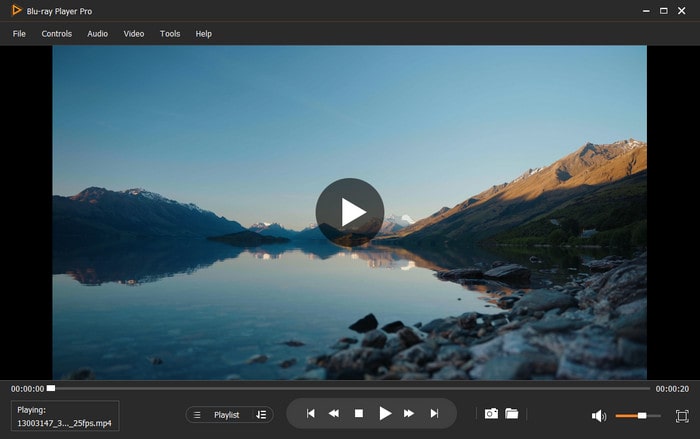
Blu-ray Master Free Blu-ray Player is the best free AVI video player for Windows and Mac. It supports various formats of 4K/1080p HD videos, including AVI, MKV, M4V, MP4, and other audio files. Besides, it supports various video and audio codecs like H.264, XviD, MJPEG, DivX, etc., for your AVI to guarantee AVI smooth playback. And it is capable of playing Blu-ray movies, DVDs, and ISO image files. It also supports custom AVI video effects, subtitles, and audio tracks. In addition, this media player uses hardware acceleration technology and does not consume a lot of resources, making it the best choice for playing AVI files.
Free Download
For Windows
Secure Download
Free Download
for macOS
Secure Download
What Users Say: Customers generally give the player high marks for handling old AVI files, especially when it comes to home videos made with early DV cameras. A lot of users also mention that the software can play high-bitrate AVI files smoothly, with accurate color reproduction and much better picture stability than similar products, even on devices with lower specifications.
Best for: High-quality playback of HD AVI files.
Pros
- It supports surround sound 5.1 (Dolby Digital, DTS).
- The interface is clear and intuitive, and the operation is user-friendly.
- It applies hardware acceleration technology.
- It allows you to adjust the hue, contrast and saturation of videos.
Cons
- The free trial version has limited functions.
VLC Media Player
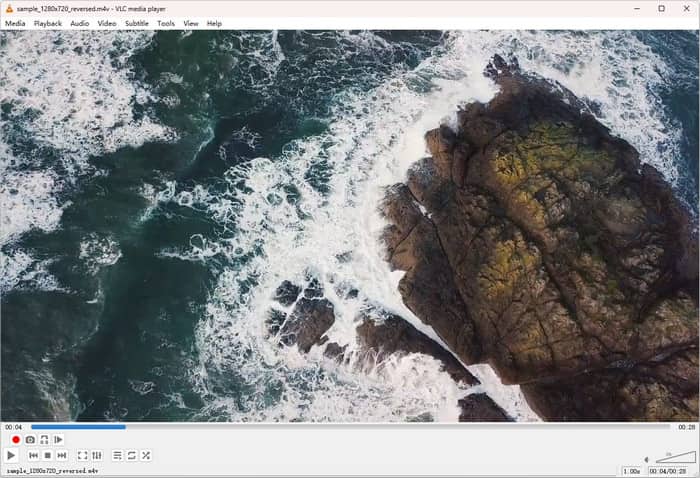
VLC Media Player is one of the most popular AVI players. It is a renowned free, open-source, cross-platform media player that supports various digital video and audio formats, including AVI files. In addition, it offers a range of playback settings that allow you to adjust the playback speed, download subtitles, take screenshots, and more according to your preferences.
What Users Say: Professional users highly praise its outstanding format compatibility, particularly excelling in handling special encoding or damaged AVI files. Additionally, some video editing workers have reported that the software can successfully play a vast majority of old AVI materials that other players cannot recognize.
Best for: Skilled users.
Pros
- It is free and compatible with all platforms.
- It supports almost every media format, including AVI.
- It has a wide format compatibility without additional codecs.
- It offers many additional features, such as editing and converting.
Cons
- The interface is outdated and not intuitive.
- The previous settings can not be remembered during use.
PotPlayer
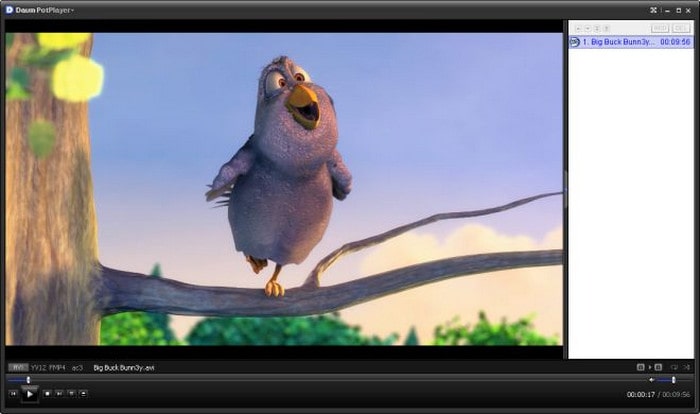
PotPlayer is a free AVI file player for Windows that supports various codecs and subtitle formats. Moreover, this AVI file player provides the necessary playback options, volume controller, and preview panel. More importantly, it supports 3D glasses, providing you with an immersive viewing experience.
What Users Say: Its professional video analysis features and wide range of customization options are especially appreciated by advanced users. And some filmmakers have noted that the hardware acceleration feature greatly improves the 4K footage playing experience, while the software's accurate parameter adjustments and frame-level control features are very helpful for video quality analysis and repair work.
Best for: Advanced users who want customization.
Pros
- It supports playing the damaged AVI files.
- It allows users to enjoy 360-degree and 3D videos.
- It has built-in video enhancement and editing tools.
- Users can customize the interface of the software.
Cons
- PotPlayer is unable to play online videos and streaming media.
- It is not user-friendly for beginners because of a lot of advanced settings.
- The interface contains additional advertisements.
GOM Player

GOM Player is a free and open-source AVI player compatible with Windows, Mac, iOS, and Android. It provides built-in codecs that help you play AVI and many other media file formats without compatibility issues. GOM Player also provides a dedicated settings panel to modify playback, subtitles, video, audio, filters/codecs, and more.
What Users Say: Its intelligent subtitle feature, which can automatically match and precisely sync external subtitles, is generally appreciated by foreign language learners and movie buffs. The software's special capacity to fix damaged video files has also been specifically mentioned by a few users.
Best for: Users who need subtitle support.
Pros
- Users can get subtitles in all formats and languages easily.
- The interface is user-friendly and straightforward.
- It provides playlist management and video enhancement settings.
- It supports 360-degree VR video playback.
Cons
- The free version has advertisements, which makes users worry.
- The advanced features are limited.
Part 3. Top 4 AVI Players for Mac
Elmedia Player
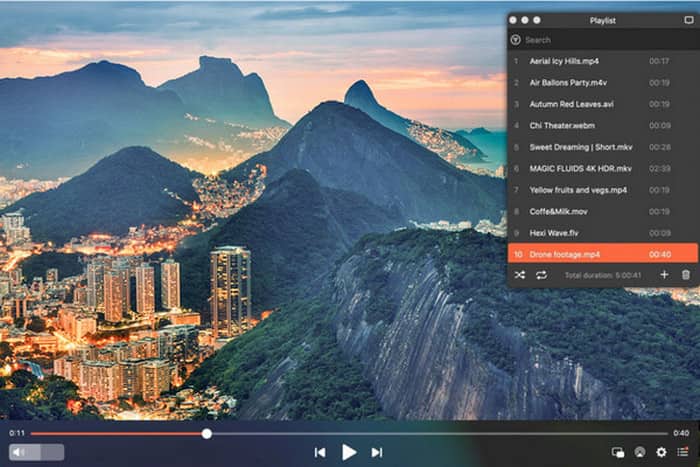
Elmedia Player is a multipurpose AVI media player designed especially for Mac computers. In addition to supporting audio playback, it is compatible with nearly all video formats, including MP4, AVI, WMV, MOV, MKV, and FLV. You can change the brightness, saturation, contrast, subtitles, loop the video, and alter the playback speed during playback. Above all, you can use this AVI player to transfer videos from your PC to an AirPlay device or smart TV.
What Users Say: According to Mac users, the program flawlessly fixes AVI compatibility problems on the Apple system, and its preset management system greatly improves efficiency by managing AVI material specs ranging from standard definition to 4K.
Best for: Mac users who need format versatility.
Pros
- It allows watching the videos from YouTube, Dailymotion and Vimeo.
- It can play AVI files that are up to 4K.
- It is capable of fixing the out-of-sync audio and subtitles in the video.
Cons
- The free trial version has limited features.
- Sometimes this player will lower the video resolution.
5K Player
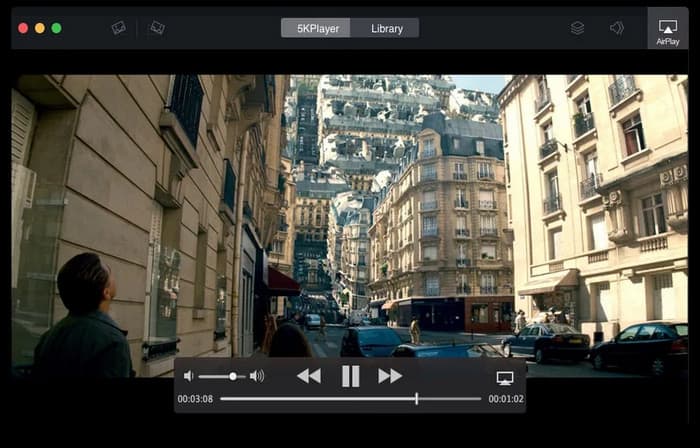
With support for 4K videos in AVI, MP4, MKV, and MOV formats, 5K Player is a robust and free ultra-high quality video player. It also has audio playback capabilities so that you can enjoy crystal-clear sound. Furthermore, AirPlay video and music streaming and immediate screen mirroring are supported by this AVI player.
What Users Say: Home users particularly favor its wireless screen mirroring feature, which allows them to conveniently cast old videos stored on their computers to play on a large-screen TV.
Best for: Users who want AirPlay and online video.
Pros
- It supports playing 360-degree panoramic video and 8K video.
- It has an online radio player where you can listen to radio stations.
- Users can download videos from more than 300 websites with it.
Cons
- Occasional system crash issues may occur.
- The backdrop still uses the CPU even when the software is not in use.
KMPlayer
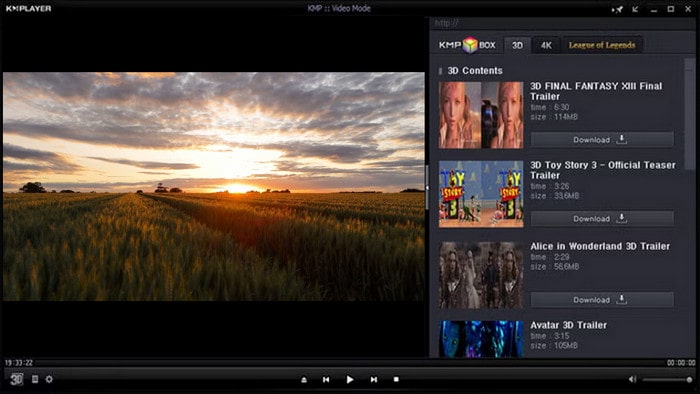
KMPlayer for Mac is another free, lightweight, and multifunctional AVI media player that can play AVI and other video/audio files. It also supports Windows, iPhone, and Android devices, making it a powerful cross-platform media player. You can even use it to play media files through Google Cloud, Dropbox, Yahoo Disc, and URLs. Additionally, like other multimedia players, it supports changing the playback speed and adding subtitles during video playback.
What Users Say: Video professionals especially value the software's audio restoration function, which does a fantastic job of recovering old films and enabling many priceless movies to regain their original sound effects.
Best for: Power users who want extensive control.
Pros
- It supports playing 4K/8K UHD videos and 3D videos.
- It can play videos from YouTube and other platforms via URL.
- It controls video and audio playback by using buttons and hotkeys.
Cons
- Several software programs will be included when the program is installed.
- Many advertisements appear when using the software.
- It consumes a large amount of resources when playing videos.
Cisdem Video Player
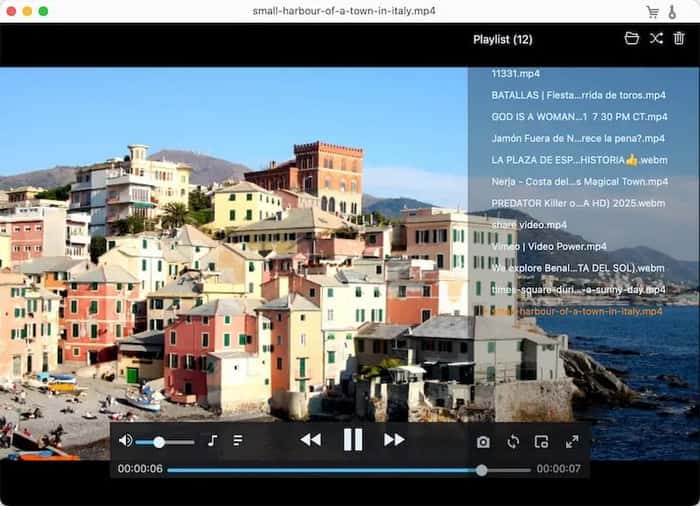
Cisdem Video Player is a free video and audio player that supports various media formats, including video formats such as MP4, MKV, MOV, FLV, and AVI, as well as audio formats like MP3, AAC, M4A, and M4R. At the same time, the application is equipped with a wealth of practical playback control features, allowing users to adjust the volume, rotate the video screen, quickly navigate to specific chapters, manage playlists, and capture screenshots of the current frame. In addition, it also supports video conversion.
What Users Say: Middle-aged and elderly users generally praise its extremely simple interface and plug-and-play features. The software eliminates the technical barrier, allowing them to easily view various video files sent by their children, making it an ideal choice for family video sharing.
Best for: Users prioritizing simplicity and reliability.
Pros
- It is capable of handling 4K, 5K and 8K videos smoothly.
- It utilizes hardware acceleration for faster decoding and playback.
- It has intuitive playback controls and playlist management.
Cons
- The free version has some limitations.
- Lags are appearing sometimes.
Part 4. Which is the Best Pick
In order to help you select the best AVI file player for your needs, here is a comparison table of all eight software options.
| Software | System OS | Ease of Use | Supported Formats | Video Quality | Other Settings |
| Blu-ray Master Free Blu-ray Player | Windows 11/10/8/7 and Mac OS X 10.9 or above. |
| Blu-ray/DVD movies and video/audio in any format. | Up to 4K. | Screenshot, editing tools (such as adjusting brightness and cropping), selecting subtitles and audio track, controlling playback, etc. |
| VLC Media Player | Windows, Mac OS, Linux, iOS, and Android. |
| Various video and audio formats, such as MP4, AVI, MKV, MP3, and WAV. | Up to 4K. | Playback settings (such as adjusting volume and playback speed), editing, and converting. |
| PotPlayer | Windows 11/10/8.1/8/7. |
| Video formats like AVI, MKV, MP4, MOV, etc. Audio formats like MP3, FLAC, AAC, etc. | 4K. | Video enhancement and editing tools, supporting 3D glasses. |
| GOM Player | Windows, Mac, iOS, and Android. |
| A wide range of video and audio formats: AVI, MP4, MKV, MOV, WMV, FLV and more. Audio formats like MP3, FLAC, AAC, etc. | Up to 8K. | Screenshots, common playback controls, subtitle supporting, etc. |
| Elmedia Player | Mac OS 10.12+. |
| Most multimedia files, including AVI, MP4, FLV, MKV, MP3, M4V, etc. | 4K. | Screenshot, regular editing tools, and playback settings. |
| 5K Player | Windows 11/10/8/7 and Mac OS X 10.9 or above. |
| MP4, H.265/264, AVI, VP8/VP9, MTS, MKV, and VR 360°. | Up to 4K and 8K. | Screen mirroring, video music AirPlay, and online video downloader. |
| KMPlayer | Windows, Mac, iOS, and Android. |
| Various media file format support: AVI, MPEG, TS, MKV, MP4, WEBM, MOV, 3GP, RM, WMV, MP3, etc. | 4K and 8K. | URL(streaming) play, subtitle settings, and cutting. |
| Cisdem Video Player | Windows 11/10/8/7 and Mac OS X 10.10 or above. |
| Popular video and audio formats, including MP4, MKV, MOV, AVI, as well as MP3, AAC, and FLAC. | 4K, 5K, and 8K. | Customize video playback, screenshot, video conversion, and playlist management. |
Conclusion
After a comprehensive review of the 8 best free AVI video players, we can see that each software has its unique advantages and application scenarios. Whether it's the powerful Blu-ray Master Free Blu-ray Player on the Windows platform, the smooth Elmedia Player on the Mac system, or the versatile VLC Media Player that works across platforms, all can meet the diverse needs of different users for AVI file playback. We suggest that you download and try out the players recommended in the article based on your own needs.
More from Blu-ray Master

Easily play Blu-rays, DVDs, and various video/audio formats with rich playback features.
100% Secure. No virus
