

Nov 28, 2025Posted by Kevin Miller to Play Audio
MX Player used to be one of the best media players among Android users. The application can play all types of media files in high video and audio quality. Sadly, developers just removed AC3 codec for MX Player due to licensing issues, as well as EAC3, DTS, MLP, TrueHD and other custom codecs. Consequently, you may encounter "AC3 is not supported" and similar problems.
To fix AC3 audio format not supported in MX Player error, you can find an alternative AC3 player to play AC3 audio files offline. Well, you can also get the latest version of MX Player AC3 codec download apk and zip files from some sites, like mxplayerappdownload.com and more. No matter which method you choose, you can get your best free AC3 player to MX Player alternative here.
- Part 1. Best Free AC3 Player Software with Outstanding Playing Effects
- Part 2. 4 Alternatives to AC3 Codec for MX Player on Windows, Mac, Android, and iOS
- Part 3. Which Is the Best Choice
- Part 4. FAQs of Best Free AC3 Player
Part 1. Best Free AC3 Player Software with Outstanding Playing Effects
Blu-ray Master Free Blu-ray Player supports most popular video and audio formats, such as AC3, AAC, AIFF, M4A, FLAC, MP3 and more. Moreover, you can play any Blu-ray and DVD discs for free on a PC without conversion. Thanks to the advanced quality maintaining technology, you can play AC3 audio files with zero quality loss.
Furthermore, you can play Blu-ray and DVD discs straightforward with 100% image quality. The intuitive interface and easy to operate options are friendly to beginners. For both newbies and experts, Free Blu-ray Player is the best free AC3 audio player for Windows 10 and earlier versions.
Main Features of the Best AC3 Player for Windows 10
• Play AC3 audio files directly without installing extra AC3 audio codec.
• Wide support of popular video and audio formats, as well as the latest Blu-ray/DVD movies.
• Support Dolby 5.1, DTS and HD audio for the playback of AC3 audio tracks.
• Adopt the most advanced kernel and newest playing technology.
• Get adjustable screen sizes and outstanding playing effect.
• The AC3 player freeware is fully compatible with Windows 10/8/7/Vista/XP.
Free Download
For Windows
Secure Download
Free Download
for macOS
Secure Download
How to Play AC3 Files on PC Smoothly without MX Player AC3 Codec
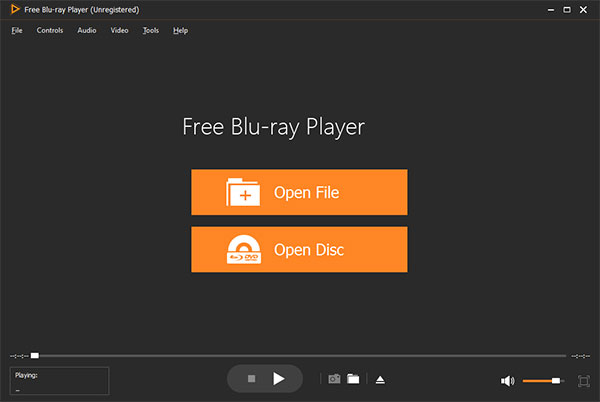
Step 1.Download the free AC3 player for PC. Launch the AC3 player for Windows software after the installation. The whole interface is clean and simple.
Step 2.Click "Open File" on the main interface of AC3 player freeware. Select your AC3 file and confirm to load it.
Step 3.After choosing the AC3 audio file, the program will start to play an AC3 file on PC automatically.
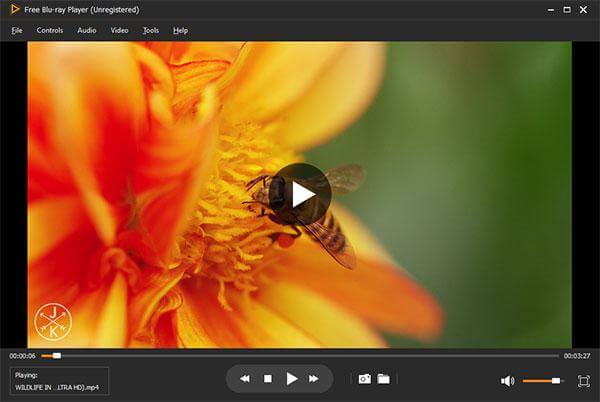
Step 4.Adjust the volume of the AC3 audio on the lower right corner. Moreover, you can get more AC3 audio editing tools from the "Audio" drop-down list on the top toolbar.
AC3 is widely used in Blu-ray and DVDs, and this AC3 player for PC is designed to decode it without extra codec packs. It has a clear interface that allows you can listen to AC3 files with one click. However, it lacks advanced audio adjustment features. If you just want to listen to it, try this free tool.
Part 2. 4 Alternatives to AC3 Codec for MX Player on Windows, Mac, Android, and iOS
Since you cannot play AC3 with MX Player anymore, you can try other AC3 video players without installing any audio codecs. Though AC3 format is not widely supported by common media players, you can still get MX Player alternatives that support AC3, EAC3, DTS and other custom audio codecs.
AIMP
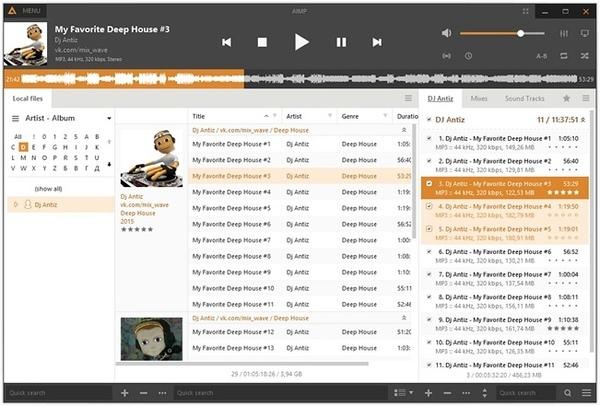
AIMP is a free AC3 player for Android and Windows that can play various audio formats in playlists. Just like other media players, you can get forward/backward icons, volume control and more. In addition, AIMP offers a DSP Manager with more customizable sound effects. The AC3 audio player allows users to balance the output audio files in clicks.
Pros
- Native AC3 support without external codec packs.
- Provides crystal-clear audio listening effects.
- Offers equalizer and tag editing for managing music libraries.
Cons
- AC3 in video files (like MKV or MP4 movies) may not be handled seamlessly.
- Some people think that its interface is complex for navigation.
KMPlayer
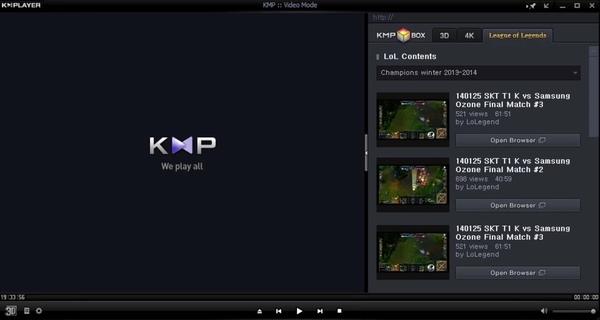
KMPlayer can play videos that have encoded audio in AC3 format. Of course, it is also supported to play standard AC3 audio files within the AC3 player on Mac, PC or Android. By using the forward and backward navigation buttons, you can change AC3 songs quickly. There are no specific audio editing features. You can just play video files with encoded AC3 audio on multiplatform.
Pros
- It is known for delivering crisp visuals and smooth audio.
- It is known for delivering crisp visuals and smooth audio.
- Offers options to adjust playback speed and audio sync.
Cons
- Free version would display ads in its interface.
- Users report occasional crashes when playing files.
VLC Media Player
VLC Media Player is a free and open-source AC3 player app for Android, iPhone and desktop. You can modify equalizer settings to tweak audio tracks. The built-in volume control allows users to boost AC3 audio sound up to 125%. As for common video files, you can boost the sound up to 200%. Furthermore, VLC offers a built-in audio editor. You can edit and manage audio libraries with ease. Though the output audio quality is not as good as other AC3 players.
Moreover, more audio formats like MP3, AIFF, FLAC, WAV, OGG, M4A, etc., are compatible with the audio player.

Pros
- VLC is a totally free and open-source tool that is compatible with multiple devices.
- Plays virtually any audio/video format, including AC3 embedded in MKV, MP4, AVI, and DVD files.
- Plays virtually any audio/video format, including AC3 embedded in MKV, MP4, AVI, and DVD files.
Cons
- Lacks the professional-level surround sound configuration.
- Some users report delays between AC3 audio and video.
AC3 Player
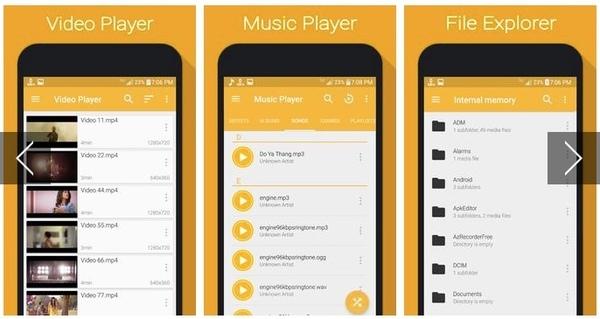
AC3 Player old version apk has been removed from Google Play Store. Luckily, you can download AC3 Player for Android from APKPure and other download sites. There are no plugins required for AC3 audio streaming. In addition, you can get playback speed control, playing gesture, sleep time settings and other useful features. Being the mobile audio player app, AC3 Player is well-designed for portable phones and tablets.
Absolutely, you can download MX Player AC3 codec zip and apk files to play AC3 audio with MX Player. If you want to try something different, you can also fix the MX Player AC3 audio not supported error with above AC3 player freeware too. Free Blu-ray Player is more than a free AC3 player for PC. You can play almost all video and audio files with excellent playback experience. All in all, you can play AC3 and other MX Player not supported audio outputs successfully here.
Pros
- Built specifically to handle AC3 audio files, ensuring smooth playback.
- Consumes few system resources to play AC3 files.
- It is free to access for everyone.
Cons
- This player focuses mainly on AC3, which is not able to handle newer codecs like HEVC.
- The UI design is outdated.
Part 3. Which Is the Best Choice
| Overall Rating | Ease of Use | Multi-channel Audio Support | Audio Customization | |
| Blu-ray Master Free Blu-ray Player | Easy |  | | |
| AIMP | Easy | | | |
| KMPlayer | Easy | | | |
| VLC Media Player | Easy | | | |
| AC3 Player | Very Easy | | |
Part 4. FAQs of Best Free AC3 Player
-
What is AC3?
AC3 is a file extension for surround sound audio files that used on DVD format. AC3 file format is used in a Dolby Digital audio on DVD, Blu-ray and other digital video format.
-
Does VLC support AC3?
Yes. With VLC Media Player, you can enjoy AC3 audio files quickly. VLC Media Player is a free and open source AC3 player for Windows, Mac, iPhone and Android. VLC Media Player supports AC3 audio files without special codecs to be installed.
-
Does MX Player support AC3?
No. MX Player doesn't support AC3 audio files. Though MX Player is one of the best video players for Android devices. For some licensing issues, MX Player has removed some of its codecs like AC3, EAC3, DTS, MLP, TrueHD, etc.
Wrapping up
After reading this article that introduces the 5 best free AC3 players, do you have an answer to play your AC3 files? For different watching needs, you can choose different players. Blu-ray Master Free Blu-ray Player is good for the playback of any video/audio formats, including AC3. VLC has compatibility with multiple devices and is free and open-source. If you want to play AC3 on mobiles, AIMP, AC3 Player, and KMPlayer are all good choices. Pick one tool and give it a try!
More from Blu-ray Master
Play Common Videos

Easily play Blu-rays, DVDs, and various video/audio formats with rich playback features.
100% Secure. No virus
