

Nov 24, 2025Posted by Kevin Miller to Play DVD
ISO is used to store and maintain the content and original quality of discs. And with modern media players, you can easily open and play the image file, whether you are using Windows, Mac, or Linux. You might have thought of getting media players like VLC or 5K Player to play your videos, but you want to confirm if Plex can play ISO image files. You are in the right place since this post will talk about it in full detail.

- Part 1. Can Plex Play ISO
- Part 2. How to Make Plex Play DVD ISO
- Part 3. How to Make Plex Play Blu-ray ISO
- Part 4. FAQs about Plex ISO
Part 1. Can Plex Play ISO
The answer to this question is no, and Plex does not support playing ISO image files. If you try to open an ISO file on the media player, it will give you an error message. Not only this, but the official statement of the tool is that it does not natively support all disc formats, including IMG, Video_TS, and others. As you may know, ISO is commonly used to archive content from optical DVD and Blu-ray discs. It maintains the original quality, so it is the best file to use whether you want to watch the movies on your computer or burn them to a new blank disc.
Unfortunately, Plex is one of the media players that limits you from playing various disc formats, and there is no available Plex plugin to play ISO. But if you still have it as a media player, you might wonder which formats it supports fully. Here, we listed all the media file formats you can open on Plex.
| Video | MKV, AVI, MOV, MP4, DivX, H.264, MPEG, WMV, etc. |
| Audio | ALAC, MP3, FLAC, AAC, WMA, M4A, WAV |
| Image | JPEG, PNG, TBN, BMP, GIF, RAW |
If you still want to play your ISO on Plex, the best way is to convert it to a common format. However, keep in mind that converting videos can possibly lose the original quality. Only if the converter you use is professional and guarantees excellent conversion results.
Part 2. How to Make Plex Play DVD ISO
To play DVD ISO files on Plex, you can use Blu-ray Master Free DVD Ripper to convert ISO files to videos that are compatible with Plex. The desktop tool is a professional DVD ripper that supports converting DVD ISO to MP4, MOV, AVI, and other common output formats. The best part of the DVD ripper is its Toolbox menu, where all excellent editing features are ready to enhance, compress, and edit videos without losing quality. You can try the free version of the best DVD ripper to support ISO playback on Plex on Windows and Mac OS.
- User-friendly DVD ripper with outstanding video quality.
- Customize and enhance ripped videos in a few clicks.
- High-speed conversion, even with multiple disc ripping.
- Suitable for ripping and converting audio and image files.
Free Download
For Windows
Secure Download
Free Download
for macOS
Secure Download
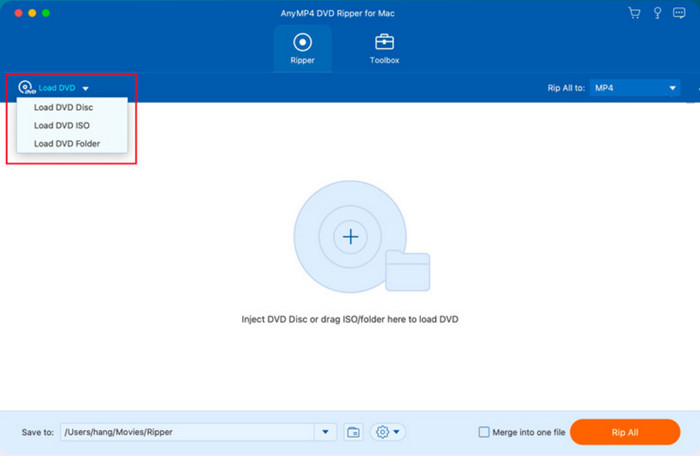
Step 1.Download DVD Ripper and install it on your computer. Load the disc on the optical drive, then click the Load Disc button from the program’s interface. Browse for the ISO files you want to add to Plex, then click the OK button.
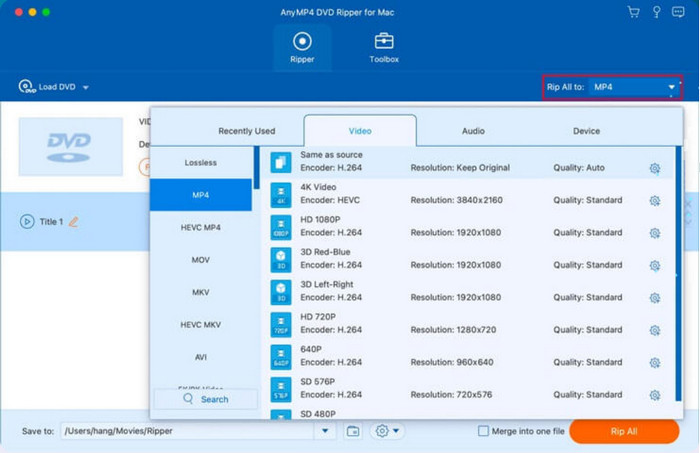
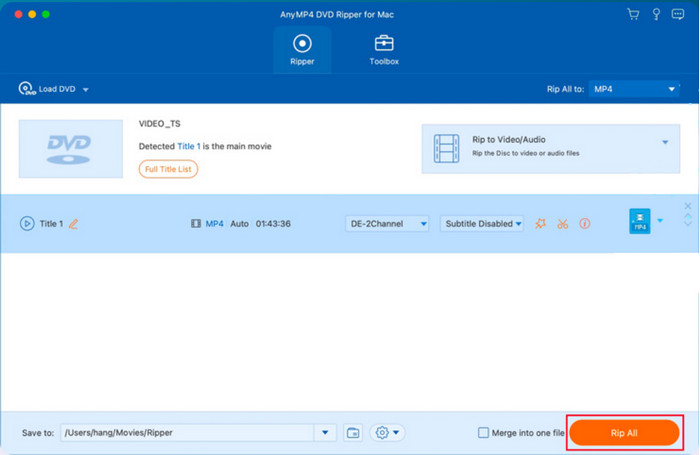
Step 2.Once the videos are uploaded, proceed to the Output Format dropdown list and choose MP4, MKV, and other formats that Plex supports. After that, click the Rip All button to start the conversion.
Step 3.For further editing, go to the Toolbox menu and use the features there to edit the metadata, compress, enhance, and create GIFs or 3D videos. Once done, open Plex for ISO playback.
And that’s how it is easy to rip and convert ISO. Free DVD Ripper makes the task easier with its user-friendly interface and powerful ripping process. But on top of that, its premium version excels with more features for DVD ripping at an affordable price.
Part 3. How to Make Plex Play Blu-ray ISO
For Blu-ray ISO playback on Plex, Free Blu-ray Ripper by Blu-ray Master is the recommended solution. Just like the DVD ripper, the Blu-ray ripping software is designed with advanced technology that rips and converts ISO image files to MP4, MOV, AVI, and other Plex-supported formats. With highly customizable settings, you can choose the encoder, resolution, bitrate, and frame rate. The built-in video editor helps you customize the audio tracks and subtitles, as well as change the aspect ratio without distorting the video quality. Blu-ray Ripper allows you to play ISO files on Plex with just a few minutes of the ripping process.
- Rip and convert Blu-ray discs with an easy learning curve.
- Professionally adjust volume, enhance visuals, and add effects.
- Support batch conversion without delaying the ripping process.
- Convert for iPhone, Android, and other portable device compatibility.
Free Download
For Windows
Secure Download
Free Download
for macOS
Secure Download
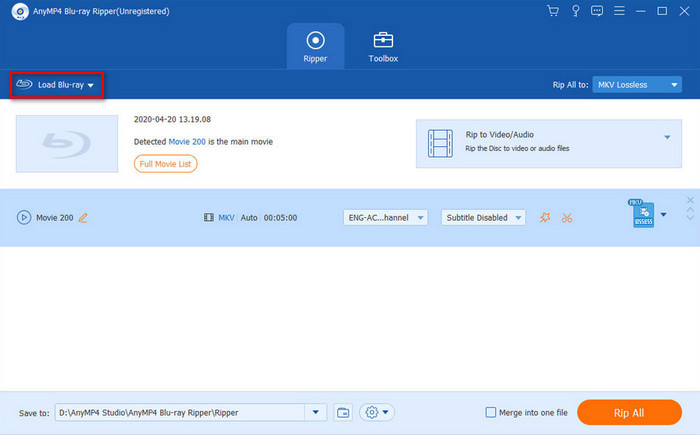
Step 1.Get the software and install it on your computer. Insert the Blu-ray disc into the optical drive and wait until the program recognizes it. Click the Load Disc button and search for the files you want to rip and convert.
Step 2.Open the Output Format dropdown list beside the uploaded files and pick the desired video or audio format. The list includes MOV, MKV, AVI, FLV, MP4, and other formats. Once done, click the Rip All button to convert the files.
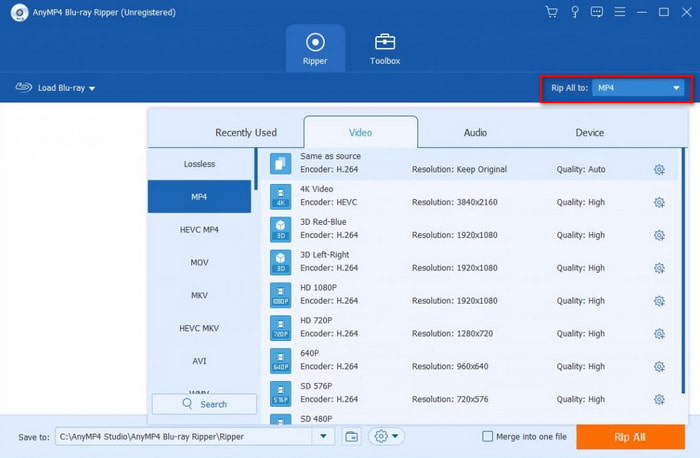
Step 3.The processing will only take some time, depending on how many files you upload and their duration length. After that, you can play the converted DVD ISO files to Plex without a hassle.
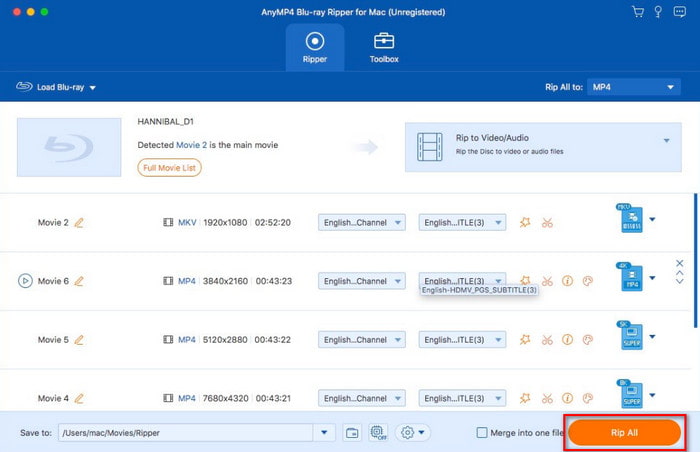
Blu-ray Master Free Blu-ray Ripper is the top software for high-quality ISO conversions. You can use it for free on Windows and Mac, but its pro version also unlocks more awesome features!
Part 4. FAQs about Plex ISO
-
Why can't Plex play ISO files?
One of the reasons is that ISO files are complex in structure, while Plex is designed for common and standard formats like MP4, MKV, MOV, etc. Another reason is copy-protected content from ISO images, which can be a legal issue for the media player.
-
What will play ISO files?
You just need to look for alternatives to Plex since there are more similar tools that support ISO playback without converting or mounting the files. We suggest trying VLC Media Player, Kodi, PowerDVD, PotPlayer, and GOMPlayer.
-
Can Plex play .TS files?
No. Since .TS files are also in disc format, Plex does not support the playback. However, some users suggest that you can use MakeMKV to change the container format to MKV so the media player can open and play it. This method also does not re-encode the content, so the original quality will stay the same.
Wrapping up
Can Plex play ISO files? You may download Plex to play ISO, but you found out that it does not play disc formats. Since you have learned the truth, there are still alternative solutions that allow you to play ISO on your favorite media player. With Blu-ray Master Free DVD Ripper and Free Blu-ray Ripper, you can easily rip and convert ISO images to media files on your computer without troublesome steps. Furthermore, these solutions are available in a free version with generous functions to create high-quality outputs. Click the Free Download button to download on Windows and Mac.
More from Blu-ray Master

Easily play Blu-rays, DVDs, and various video/audio formats with rich playback features.
100% Secure. No virus
