

Nov 24, 2025Posted by Kevin Miller to Play Video
MKV is a format widely used to store video in HD 1080p or 720p. Since it is one of the most popular video formats, Windows and other operating systems have built-in codecs for it. But for some reason, Mac and other Apple devices do not support the video format. Thus, making it frustrating for Apple users. But the good news is there are ways to play MKV on Mac, and you can find these methods here. Follow along to see which one is the best for you.

- Part 1. Can I Play MKV on Mac Natively
- Part 2. Play MKV Files on Mac Using QuickTime with Perian Plugin
- Part 3. Play MKV Videos on Mac Using Blu-ray Master Free Blu-ray Player
- Part 4. Play MKV Videos on Mac Using Elmedia Player
- Part 5. FAQs about Play MKV on Mac
Part 1. Can I Play MKV on Mac Natively
The short answer is no. Macbooks do not support or cannot play MKV, even with QuickTime’s flexible system. The default media player does not have the capacity to read the codec of the format, so you might get errors if you try to open an MKV file.
However, this does not mean MKV is completely unsupported by your computer. Several methods allow you to open MKV, such as converting the video to MOV, which is the default format for Apple. Or install a QuickTime plug-in with a little complex setup. On the other hand, there are more tools that will be discussed in the next part that can effectively play .mkv on Mac.
Part 2. Play MKV Files on Mac Using QuickTime with Perian Plugin
Best for: Free watch MKV files using old Mac computers.
As you may know, QuickTime Media Player cannot play MKV videos on Mac, but you can use a plugin like Perian to help you with this. It is a free and open-source plugin, so you can use it however you want. Only remember that it only supports QuickTime 7.6.6, and it may load the video slower. If this is fine to you, here are the steps to follow:
Step 1.Download and install Perian on your computer. Browse for the video in the local folder and right-click on it.
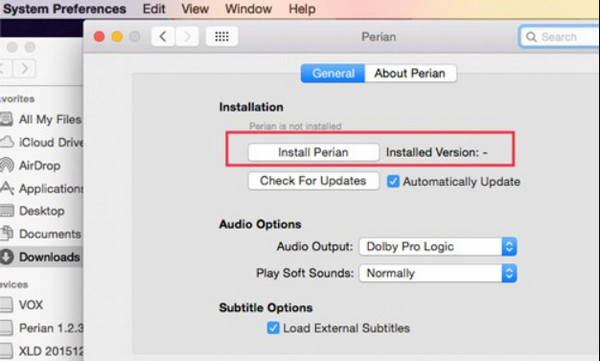
Step 2.Choose the Open With option, and select Perian – Open in QT Player. Restart the QuickTime Player.
Step 3.Once installed the plugin, import the MKV files you want to watch.
For Mac users, QuickTime Play is an easy and free choice for free watching MKV files. It has a simple and user-friendly interface that everyone can use it like professionals. However, the Perian plugin is only works with older QuickTime 7.
Part 3. Play MKV Videos on Mac Using Blu-ray Master Free Blu-ray Player
Best for: Playing MKV and various video and audio files with rich features.
Blu-ray Master Free Blu-ray Player is a professional program to play MKV files on Mac. It supports all DVD and Blu-ray formats but also is a great digital player for MKV, AVI, MP4, and other formats. The software is easy to operate with its simple interface. However, it offers advanced setting configuration for video track, audio, subtitle, and other data. Moreover, you can play MKV on Mac in 1080p HD and 4K UHD without requiring you high-end specs.
- High-quality MKV playback on Mac and Windows with a customizable screen.
- Adapt the newest playing technology to play newly released Blu-ray content.
- Adjustable video effects and Snapshot feature for screenshots.
- High-quality audio with audio encoding technologies like Dolby and DTS.
Free Download
For Windows
Secure Download
Free Download
for macOS
Secure Download
Step 1.Get Blu-ray Master Free Blu-ray Player and install it on your computer.
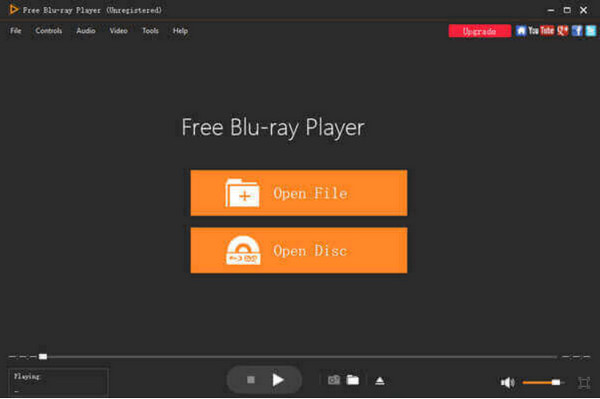
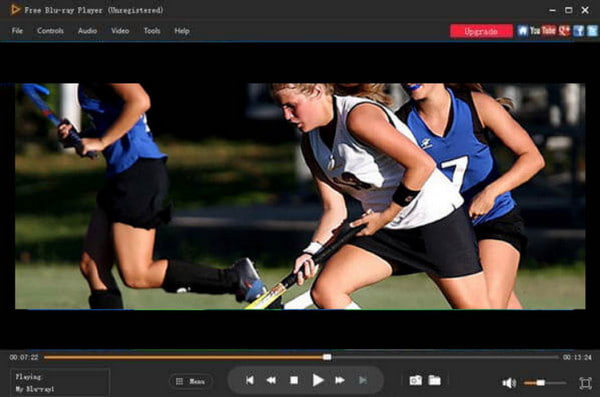
Step 2.Browse for the MKV file you want to play. Then, click the Open button, and the media player will play it immediately. Use the controls at the bottom part to fast forward, stop, or pause the playback.
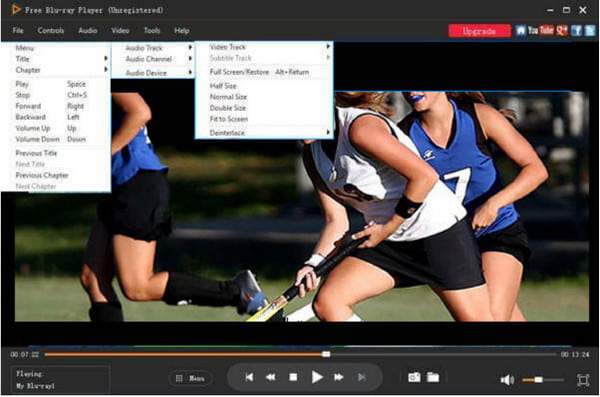
Step 3.For other configurations, go to the Audio menu to adjust the audio track or channel. Next, the Video menu allows you to change the screen size and other related settings. Lastly, the Tools menu allows you to apply effects to the video.
This MKV player can play MKV files seamlessly. You can import more than one MKV files and store them in the playlist for subsequent playback. Moreover, it provides settings for you to add external audio tracks and subtitles to improve your viewing experience. However, its free version is limited to play high-resolution videos.
Part 4. Play MKV Videos on Mac Using Elmedia Player
Best for: Playing high-resolution MKV files on Mac.
If you are not a fan of the QuickTime plugin, you can use the Elmedia Player app to play MKV files on your Mac. It is one of the alternatives to rely on for unsupported formats, while it offers the needed features that are easy to use by beginners or professionals. Other than MKV, the media player also supports video playback for MP4, AVI, SWF, FLV, and more. Elmedia Player is free to download on the Mac App Store.
Step 1.Download the media player on the online market and install it on your device. Then, launch it and access the menu bar. From the File menu, choose the Open option.
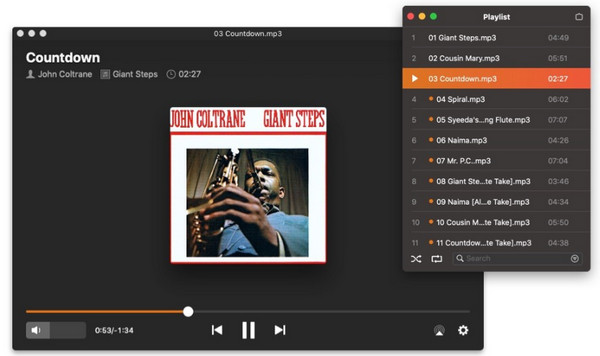
Step 2.Browse for the MKV file you want to open and play. Click the Open button to confirm the selected file. Elmedia Player will then play the MKV file on your Mac.
Elmedia Player is one of the best MKV players for macOS because it supports MKV natively, offers smooth playback even for 4K/8K, and integrates streaming features. The shortcoming is that some advanced features require the paid Pro version, and its ecosystem is Mac-only.
Part 5. FAQs about Play MKV on Mac
-
Does VLC play MKV files on Mac?
Yes. VLC Media Player is a free software to play MKV files on Mac. It is widely known for its features and simple setup while allowing almost all video formats to play with the best quality.
-
How do I play an MKV file in QuickTime natively?
The media player does not support the format. But you can use a plugin like Perian to make it happen. However, don’t expect the video playback to be smooth because the plugin can only load a single frame in a movie and by order.
-
How do I convert MKV to QuickTime MOV on Mac?
You can easily convert MKV to MOV using online converters. Try Convertio, FreeConvert, Zamzar, and more.
-
Does VLC support MKV on Mac?
Yes. VLC Media Player supports MKV, as well as other formats like MOV, MP4, WMV, HEVC, and other popular formats.
-
What is the best video player for Mac for MKV?
Aside from QuickTime Player with a plugin, it is recommended to use Blu-ray Player for high-quality MKV playback on Mac. It does not require an advanced setup and offers more features for the best experience.
-
Can I open MKV in QuickTime?
Yes. Only with plugins like Perian. However, keep in mind that this plugin has no more updates from the developers. So, the playback process might be slower and not good in video quality.
Wrapping up
How to play MKV files on Mac? Here, you learned 3 easy ways for MKV playback on Mac. With the solutions discussed in this article, Blu-ray Master Free Blu-ray Player is the most recommended tool to try. Not only can it play MKV but it is also best for DVD and Blu-ray playback with the best resolution and quality. Try the freeware version or purchase the pro version to use its unique features on Mac and Windows!
More from Blu-ray Master
Play Video Files

Easily play Blu-rays, DVDs, and various video/audio formats with rich playback features.
100% Secure. No virus
