

Aug 27, 2026Posted by Kevin Miller to Copy DVD
Quick Summary
Among the featured DVD copy software in this article, we have provided the best tools based on the common needs of DVD enthusiasts:
- The Most Reliable for 1:1 Cloning: Blu-ray Master DVD Copy
- Bypass Heavy DRM Protection: DVDFab DVD Copy
- Copy Damaged DVDs: WinX DVD Copy Pro
- Best for Background Processing: AnyDVD HD (RedFox)
In recent years, streaming services have reached their peak, causing movies and TV show content to be redistributed or outright removed. As such, physical discs are starting to gain traction again, since owning one will protect you from digital removal. Unfortunately, disc rot and physical damage are a problem, and running DVD media via digital preservation measures is a superb solution. In this article, we will review four of the best DVD copy software to solve your problems with physical media accessibility on modern devices. These programs are selected based on how they handle complex operating systems, legacy disc formats, and other technical limits. With all these in mind, this article aims to be a transparent and comprehensive review of the four best DVD copy software programs you can use in 2026.

Table of Contents
- Part 1. Behind the Screen: “How We Test”
- Product 1. Blu-ray Master DVD Copy — The Gold Standard for 1:1 Cloning
- Product 2. DVDFab DVD Copy — The Heavy-Hitter for Advanced DRM
- Product 3. WinX DVD Copy Pro — The Legacy Recovery Specialist
- Product 4. AnyDVD HD (RedFox) — The Invisible Background Worker
- Part 6. The Hidden Realities of DVD Copying
- Part 7. FAQs about DVD Copy Software
Part 1. Behind the Screen: "How We Test"
Before proceeding to our review of the tools you can use to rip DVDs to ISO or digital video, we will first discuss the testing matrix we have selected to choose these programs as our four recommended DVD copy solutions.
In total, we have selected four pillars for evaluation, which include the following factors:
- Decryption Prowess
- 1:1 Fidelity & Compression
- Processing Speed
- Resource Footprint
Decryption Prowess: Since modern commercial DVDs and Blu-rays are guaranteed to have copy protection, the first factor we selected for choosing DVD copy software is their decryption capabilities. We made sure to learn whether the programs can bypass regional codes, 99-title protection, Disney X-project DRM, and other copy-protective measures.
1:1 Fidelity & Compression: Modern DVDs and Blu-rays have superb video quality, which is often superior to digital releases on streaming platforms. As such, converting physical media to digital video may cause shrinking or quality loss. As such, the second factor we have considered for choosing DVD copy apps is the software’s ability to compress DVD video, minimize macroblocking and artifacting, and how they handle quality loss.
Processing Speed: Speed and efficiency are top concerns for DVD copying. As such, these programs are also tested based on their read/write speeds using a standard modern computer. For transparency, the device we tested these tools on is an Intel i7, 16GB RAM laptop running Windows 11.
Resource Footprint: A connected factor to processing speed, resource footprint is another consideration for choosing the DVD copy software we have featured. This option discusses how each program uses computer resources and how they perform in the background.
Product 1. Blu-ray Master DVD Copy — The Gold Standard for 1:1 Cloning
CSS, Region Code
Full Disc, Main Movie, Custom Copy
CPU-based processing
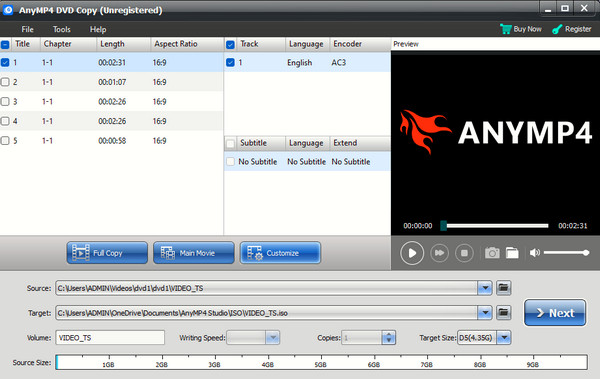
The first topic we will discuss in this article will be a full review of Blu-ray Master DVD Copy, the perfect DVD copying tool for 1:1 cloning. Among the options on this list, this program offers the most balanced features, as it works as a professional bridging tool for users looking for straightforward copying and exact DVD replication.
Designed to cater to users of different skill levels, its interface is beginner-friendly. Moreover, its copying options are highly intuitive: Full Disc, Main Movie, and Custom copying.
Among its offerings, the software’s most notable feature is its lossless archiving system. It can be used to create perfect ISO images and DVD folders while preserving 100% of the data in the DVD media it is copying.
All of these features make Blu-ray Master DVD Copy an excellent choice for users who want a pristine and identical backup of their DVD sets with all the menus and features intact.
As a cherry on top, all of these features are supported by a fast and efficient GPU acceleration system.
Free Download
For Windows
Secure Download
Free Download
for macOS
Secure Download
Pros
- Simple interface design made for beginners.
- Supports copying the full DVD, main movie, or custom chapters.
- Copied DVD content may be saved in lossless quality.
- GPU acceleration for improved speed and performance.
- Cross-platform availability for Windows and macOS.
Cons
- Fewer copy modes than other options.
- Focused on simple DVD copying rather than full disc management.
- Its free version has slightly limited features.
Verdict: If your main concern when copying DVDs is video quality, full cloning, and ease of use, Blu-ray Master DVD Copy should be your top option. Among the programs on this list, most of the features available in the software are standard. However, Blu-ray Master’s has a huge advantage in terms of beginner accessibility.
Product 2. DVDFab DVD Copy — The Heavy-Hitter for Advanced DRM

CSS, Region Codes, Analog Protection
Full Disc, Main Movie, Clone/Burn, Merge, Split, and Customise
GPU Acceleration for Intel, AMD, and NVIDIA
Moving on to the next option, we have another dedicated copying tool with DVDFab DVD Copy. If the previous option has a niche in terms of balanced features and ease of use, DVDFab’s offering is designed to decrypt protected DVDs with modern copy protection.
To preserve its key feature of having a tough protection bypass, this program receives frequent decryption updates and customizable compression settings. Together, these features make the tool a good choice for experienced users.
Unfortunately, all these features make it more expensive than the other options on this list. If you are willing to pay for its premium price tag, you will be able to take advantage of its good price-to-value ratio.
Pros
- One of the most feature-rich DVD copying tools.
- Heavy-duty DRM bypass features.
- Offers six copying modes: Full Disc, Main Movie, Clone/Burn, Merge, Split, and Customize.
Cons
- More expensive than other options.
- Complicated interface design, especially for users who only want direct copying.
- Advanced features are locked behind the paid version.
Verdict: If you plan on regularly digitizing protected DVD content, DVDFab is an easy pick. However, if you want a simple and straightforward DVD copying process, this tool might not be the best option.
Product 3. WinX DVD Copy Pro — The Legacy Recovery Specialist

CSS, Region Codes
ISO Image, DVD Folder
None
If the DVD media that you will primarily process are from older archives, there is a high chance that you will stumble upon lightly damaged or scratched DVDs. In this case, WinX DVD Copy Pro is your best choice, as it is the best software for copying scratched DVDs.
Whether the issue with your DVD is light physical damage, scratches, or warping, WinX software can copy it with no problem. This is made possible by its sector-per-sector reading engine, which can skip bad sectors without freezing.
Its modern interface design is also a big plus for modern users. However, keep in mind that it has a limitation in terms of modern copy-protection since it cannot handle advanced DRM systems.
Pros
- Designed more as a decryption layer tool to make protected DVDs accessible.
- Removes common DVD restrictions such as DVD region codes and common playback limits.
- Best used when paired with DVD cloning, ripping, and backup software.
Cons
- Not an independent DVD copy program.
- Requires more technical skills compared to all-in-one DVD copier tools.
- The reliability and support history of the program has mixed reception.
Verdict: If you are going to handle legacy DVD media and not modern releases, WinX is our most recommended option. Its features to copy damaged DVDs are the best for older media, and its subpar DRM bypass is not advisable for modern releases.
Product 4. AnyDVD HD (RedFox) — The Invisible Background Worker

CSS, Region Codes
ISO Image, DVD Folder
None
The last product we will discuss in this article is the lightest option among the featured tools. This is none other than AnyDVD HD, the only program that is light enough for DVD copying as a background process.
Unlike the other programs on this list, this tool can be integrated with the system, and it lacks a traditional interface. This makes the program work more as a plug-in to your computer and function as a set-and-forget driver-level decrypter tool that removes restrictions almost instantly.
If you plan on using the tool, beware since it has not been updated in a few years. The lack of an interface also means it has a higher skill ceiling to use properly compared to simpler all-in-one DVD copier tools.
Pros
- Designed more as a decryption layer tool to make protected DVDs accessible.
- Removes common DVD restrictions such as DVD region codes and common playback limits.
- Best used when paired with DVD cloning, ripping, and backup software.
Cons
- Not an independent DVD copy program.
- Requires more technical skills compared to all-in-one DVD copier tools.
- The reliability and support history of the program has mixed reception.
Verdict: If you are an experienced DVD enthusiast, AnyDVD HD should be your best bet. Just beware when downloading online, since the tool is no longer officially available.
Part 6. The Hidden Realities of DVD Copying
DVD-5 vs. DVD-9 Math
When copying DVD content, you have to learn whether the DVD type you are going to copy is a DVD-5 or DVD-9 format. If you plan to copy a DVD-9 with 8.5 GB of storage to DVD-5 discs with 4.7 GB of storage, the DVD content will have an aggressive compression ratio, which will negatively affect video quality.
Hardware Matters
When using external DVD drives and you plan on using lossless DVD compressor tools, we highly suggest avoiding $20 cheap drives since they will most likely fail during heavy burning sessions. Make sure to buy reputable drives from brands like ASUS or LG.
The Lifespan Reality
Burned DVDs have a long lifespan, but they are vulnerable to damage or poor storage. On the other hand, copy DVD ISO are vulnerable to file corruption or hacking. As such, the best option to keep your copied DVD data is to create multiple copies. Preferably both physically and digitally.
Part 7. FAQs about DVD Copy Software
-
Is it legal to copy a DVD I legally bought for personal backup?
It depends on what DVD you are going to copy. If you are going to bypass DRM protection, it is illegal in most areas. However, creating it for personal backup should be safe as long as you are not going to distribute it.
-
What is the difference between a DVD "copy" tool and a DVD "ripper"?
DVD copy tools perfectly replicate the content of the DVD, including the menu, chapters, and the videos. Meanwhile, DVD rippers are used to convert DVD content into digital video such as MP4 or MKV. Both options can be used to digitize DVD content.
-
Will copying a DVD remove its regional restrictions permanently?
No, it will not. However, you can do so if you use the right DVD copy tool since programs such as Blu-ray Master DVD Copy have features to remove region codes. DVD ripping can also remove these restrictions.
-
Why does my copied DVD play on my PC but fail on my older standalone home TV player?
Dedicated DVD players are more sensitive than modern media players. Your DVD player may have a region-code restriction, or the DVD may have been burned at an unsuitable speed. To avoid these issues, use a dedicated DVD-Video disc as the main disc for playing on older players.
-
Can DVD copy software handle Blu-ray discs, or do I need separate software?
It depends on what program you are going to use. Other options, such as Blu-ray Master, function as a free DVD copier in Windows 11/10. Make sure to check the specs of the DVD copier tool you will select.
Conclusion
Now that the most used DVD copy software has been discussed, we hope that you will now be able to make a concrete decision based on the programs we have featured. For a comprehensive user guide, we will recommend specific tools for specific uses. For direct cloning, use Blu-ray Master. For damaged DVDs, select WinX. For full control, AnyDVD HD is best used for experienced users.
If you are still unsure whether you have to back up your physical DVD collection, keep in mind that yesterday was the best time to do it and today is the second best time before your hardware gets damaged entirely.
