

Aug 27, 2026Posted by Kevin Miller to Copy DVD
Quick Summary
When selecting DVD copy software, first consider how you want to use it or what your priority is when copying DVDs. As such, the programs in this article are made for different use cases:
- Copying DVDs in Lossless Quality: MakeMKV
- Best Used for Creating DVD Archives: DVDFab HD Decrypter
- Copying DVDs in Compressed File Size: HandBrake
- Made for Legacy Users and Old Devices: DVD Shrink
If you are an enthusiast of physical DVD media, the 2020s are a critical time since most optical discs from the 2000s and early 2010s have been actively degrading due to natural chemical disc rot, surface scratches, and the rarity of reliable players. As such, learning how to copy DVD content digitally will be a vital preservation solution to prevent the loss of irreplaceable home videos or classic media. In this article, we will highlight some of the best free DVD copy software to make preserving DVD content seamless and easy. The programs we will highlight are all designed for DVD copying to create a 1:1 clone of the disc, not to be confused with ripping, which converts a DVD to re-encoded video. Finally, the programs featured in this article are all useful for bypassing the limits of streaming, since true ownership lies in local media.

Table of Contents
- Part 1. How We Test and Pick the Best Free DVD Copy Software
- Tool 1. MakeMKV – “The Lossless Perfectionist”
- Tool 2. DVDFab HD Decrypter – “The Archival Workhorse”
- Tool 3. HandBrake (with libdvdcss) – “The Compression Master”
- Tool 4. DVD Shrink – “The Legacy Time-Capsule”
- Part 6. The Advanced Tool for DVD Copy
- Part 7. Core Information About DVD Copy Software Selection
- Part 8. FAQs About Free DVD Copy Software
Part 1. How We Test and Pick the Best Free DVD Copy Software
Before proceeding to the reviews of the DVD cloner freeware, we will first feature the measurements we have used to test the software. As such, we used specific core metrics that align with the main purpose of DVD copying.
These testing parameters include the following:
- Decryption Defiance
- Sector Stability:
- Temporal Efficiency
- Privacy & Cleanliness
Decryption Defiance
The first factor we selected is each DVD backup freeware's ability to handle DVD decryption. Since commercial DVDs are encrypted with copy-protection, we made sure that the tools presented are all capable of bypassing common digital rights management (DRM) systems such as Content Scramble System, region codes, Sony ARccOS, and multi-title Disney X-project DRM.
Sector Stability
DVDs are now considered dated media, and copies with minor damage and light scratches are common issues. As such, the next factor we selected for choosing the tools on how to back up DVDs to a hard drive for free is their ability to open scratched sectors and read DVDs with minor errors. We will assess how each program acts when facing errors: will it crash, intelligently skip, or repair the issues?
Temporal Efficiency
Moving on to the more technical measurement, we also assessed each program's temporal efficiency. This is vital since measuring the exact copy times of a standard dual-layer or single-layer DVD is important for recovering the data.
Privacy & Cleanliness
For modern standards, since the programs we have provided in this are all tools that can copy DVDs for free, we also assessed the standard of their privacy and cleanliness. As such, we made sure to select only the programs that run entirely offline and are free from bundled adware or malicious bloatware.
Tool 1. MakeMKV - "The Lossless Perfectionist"

Best Used For: Preserving the original quality of the DVD the program will copy or rip.
The best choice for users who prefer bit-for-bit video and audio fidelity, MakeMKV is the optimal solution if you do not want to sacrifice any video quality on the DVD media you will copy or rip. It also helps that the program has built-in decryption, so lossless DVD copy in Windows 11/10 will not be a problem.
However, keep in mind that its lossless video-quality copying comes at a trade-off, since it does not compress videos and instead saves them in a raw MKV container, which is very large. This raw container file is what makes the program retain all original audio tracks, subtitle tracks, and exact chapter markers.
Finally, the software's industrial, minimalist interface design makes it lightweight on the CPU. Despite that, keep in mind that its uncompressed outputs will eat up storage space.
Pros
- Preserves original DVD quality.
- Saves videos in high-quality MKV format.
- Lightweight installation size.
Cons
- Produced DVD copies are extremely large.
- MKV files cannot be written directly to DVD.
- Designed more as a DVD ripper, and using it as a DVD copier will only save the DVDs as an ISO image.
Tips
To use the tool for DVD copying, make sure to use its DVD-to-ISO option.
Tool 2. DVDFab HD Decrypter - "The Archival Workhorse"

Best Used For: Developed for structured disc cloning to preserve all the content of the DVD, including the menu, chapters, and other settings.
Among freeware options, DVDFab HD Decrypter has a strong claim to be one of the most structured disc cloning tools made for full-scale disc management. To start, the program can bypass fundamental copy protections such as CSS, RC, and Sony ArccOS, which are commonly present on modern DVD releases.
Moreover, it excels in copying flexibility, offering Full Disc and Main Movie copying modes. Data copied from DVDs may also be saved in multiple options, with the VIDEO_TS folder or as an ISO image.
These features are supported by the program's basic GPU acceleration system to ease the strain on multi-core processors. However, beware that DVDFab's free version is more like a freemium program. If you use the tool's more advanced features like decrypting modern DVDs, you will trigger a premium upgrade prompt.
Pros
- Designed for versatility, copying or ripping DVD and Blu-ray discs.
- Copies DVD content to a hard drive or to a separate blank DVD.
- Optimized as DVD copy software.
Cons
- Significant limitations when using its free version.
- Copy-protection bypass is subpar in quality.
- It cannot produce a 1:1 clone of the DVD it will process.
Tips
If you want to choose how you want to save your DVD copy, this program works well as your main option. You can either save your data in the VIDEO_TS folder or as an ISO.
Tool 3. HandBrake (with libdvdcss) - "The Compression Master"

Best Used For: Copying and compressing the content of bulky physical discs to make them optimized for digital consumption.
The third method we will present is the most popular open-source DVD copy program option, with HandBrake and the plug-in libdvdcss required to bypass DRM protections. Among the options on this list, this tool is the most capable when it comes to handling large DVD data since it has presets that automatically adjust the video quality, which can then reduce file size.
On top of that, the presets also include device-specific digital formats such as videos optimized for Apple devices. However, the software does not natively support bypassing DRMs. It needs the libdvdcss plug-in to breach copy protections. Once added, this makes the tool capable of decrypting commercial DVDs for free.
Furthermore, the tool also offers full control over video codecs, frame rates, bitrates, and advanced deinterlacing filters. All of which are vital for controlling the quality of the video copied from the DVD.
To use these features, you have to learn the basics of media file management, since HandBrake's ease of use is far from beginner-friendly.
Pros
- Free and open-source program.
- Made for converting DVD content to MP4 or MKV format.
- Cross-platform availability in Windows, macOS, and Linux.
Cons
- Does not create an exact 1:1 copy of the DVD.
- Ripped videos undergo re-encoding, which reduces quality.
- Does not preserve DVD menu, chapters, and structure.
Tips
If you are familiar with video compression and advanced video settings, HandBrake presets are a good choice for how you want to save your copied DVD video.
Tool 4. DVD Shrink - "The Legacy Time-Capsule"

Best Used For: Compressing dual-layer discs into cheap and more compressed single-layer media.
Finally, the fourth method in this article is DVD Shrink, one of the most lightweight options for Windows users looking for a classic legacy program designed for masterfully downscaling dual-layer discs into single-layer media; as such, it is the best free DVD 9 to DVD 5 compression software.
Although it is a legacy format, the tool's built-in decryption for older DRM protections should be enough to handle old-school DVDs. However, it will not be enough to decrypt post-2010 programs with multi-title encryption mechanics.
For advanced users, technical adjustments such as manually stripping out foreign audio dubs, trailers, and heavy bonus menus can all be removed to save storage space without shrinking the actual movie quality.
If you plan on using DVD Shrink on a modern computer, you can do so even on Windows 11. However, you have to deal with its dated-looking UI.
Pros
- Designed exclusively for DVD-video backup.
- It can compress data on DVD-9 content and make it transferable on DVD-5.
- Offers advanced compression control such as DVD data removal.
Cons
- Old software and support have been discontinued.
- Incompatible with modern DVDs and Blu-ray.
- Compressing DVD content causes reduced video quality.
Tips
Made to clone DVDs to hard drives for DVDs produced in the early 2000s. Made for legacy DVD data recovery.
Part 6. The Advanced Tool for DVD Copy
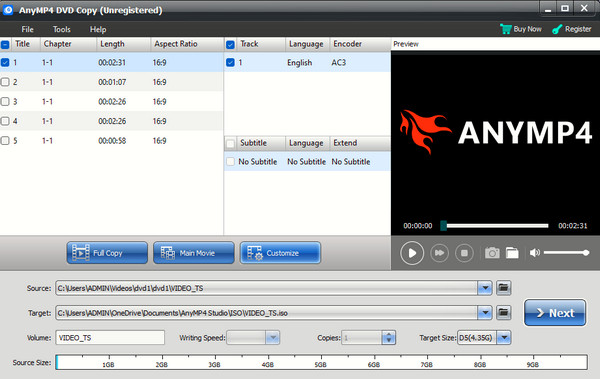
Now that we have discussed four of the most reliable freeware tools to copy DVDs, making do with limitations is the common denominator of using such programs. As such, transitioning to flawless software made for professional DVD copy execution is our recommended bonus article. With that in mind, consider using Blu-ray Master DVD Copy.
When hitting common freeware limits, a paid option such as Blu-ray Master's program is our most recommended solution. With that in mind, we highly recommend using this tool to solve heavily scratched discs, modern DVD encryptions, and direct disc-to-disc physical burning.
Beyond the cons of freeware programs, the tool also has specific strengths of its own, such as true 1:1 bit-streaming cloning to perfectly replicate DVD content into blank discs, ISO files, or DVD folders. You write DVD data based on the copy mode you will select, whether you want to use Full Disc cloning, Main Movie isolation, or whether you want to customize the data you want to copy.
On top of all these features, the tool has cutting-edge decryption that can instantly neutralize the latest DRM algorithms and multi-angle 99-title protections that freeze freeware. All of these offerings are boosted by the lightning-fast processing speeds powered by modern NVENC/Intel Quick Sync hardware optimization.
To learn how to use the most efficient and powerful DVD copy software for both Windows and Mac, download Blu-ray Master DVD Copy.
Free Download
For Windows
Secure Download
Free Download
for macOS
Secure Download
Part 7. Core Information About DVD Copy Software Selection
The Legality Threshold (The 17 U.S.C. § 1201 Reality)
Before copying DVDs, make sure that bypassing DRM technically breaks copyright law in regions like the USA. However, copyright enforcement is usually ignored, as you will only use the 1:1 copy for local backups or personal archiving.
The Structural Differences
When making DVD backups, the most common options are either copying or ripping. When using the former, the entire data of your DVD will be saved in an ISO file or VIDEO_TS folder to preserve the original structure of the DVD. This is clearly different from ripping, which saves the content of the DVD as a digital video, usually saved in MP4 or MKV format.
The Hardware Trap
Before buying a DVD, make sure you have the right hardware. Make sure your DVD supports burning drives and is not a read-only disc. Among DVD formats, DVD-RW is our most recommended.
Part 8. FAQs About Free DVD Copy Software
-
Is it legal to copy a commercial DVD for personal backup?
No, it is not as long as you will only use your copy for personal backup. Make sure to avoid distributing it, which will then count as illegal since it will be a form of piracy.
-
Why does HandBrake give me an error message when I try to copy my movie DVD?
HandBrake cannot bypass common DRM protections by default. As such, errors when trying to copy are usually connected to the protection of your DVD. You have to learn how to add the libdvdcss plug-in to use HandBrake for protected DVDs.
-
What is the difference between copying a DVD as an ISO file vs. ripping it to MP4?
Copying a DVD as an ISO file will make you copy the entire structure of the DVD, including the menu and chapters. Meanwhile, ripping will save the video content of the DVD into an MP4 video. Both options have their own uses, but ripping is better for modern use.
-
Can free DVD copy software fix or recover data from a scratched disc?
It depends on what DVD copier you will use. Among the programs on this list, the premium option Blu-ray Master DVD Copy can handle scratched discs with no problem. One common problem with freeware tools is their inability to handle damaged DVDs.
-
How do I compress a large dual-layer DVD-9 to fit onto a standard blank DVD-5 disc?
There are specific programs that can automate this process. In this article, DVD Shrink makes this possible. However, beware that this program cannot handle modern DVD encryption.
Conclusion
Now that the best free DVD copy software have been discussed, choosing the perfect tool is hard. However, you can match the tool that perfectly suits your goal. In this case, we have specific recommendations for common purposes. For lossless quality archives, MakeMKV is best. For efficient mobile viewing, use HandBrake. However, if you want zero-headache optical disc duplication, upgrading to Blu-ray Master DVD Copy is our top recommendation.
Free Download
For Windows
Secure Download
Free Download
for macOS
Secure Download
More from Blu-ray Master
