

Sep 14, 2026Posted by Kevin Miller to Rip DVD
Quick Summary:
AnyDVD is a DVD ripper tool made exclusively for Windows computers. It was heavily praised for its efficiency as a ripper tool, as it can run in the background without consuming too many resources. Unfortunately, the program has stopped receiving developer support, making switching to alternatives such as Blu-ray Master Free DVD Ripper a recommended option.
AnyDVD is DVD-ripping software for Windows, primarily used to remove copy protection from DVDs and Blu-ray discs, allowing users to copy or rip DVD movies. If you need DVD decryption software to copy your DVDs or back them up in another digital format, you may want to consider AnyDVD. So how does it perform, and is it a reliable choice? Read below for a comprehensive review of AnyDVD to learn more details!

Table of Contents
- Part 1: How We Tested AnyDVD & Quick Verdict
- Part 2: What Is AnyDVD? (And Why You Can’t Buy It Anymore)
- Part 3: AnyDVD Features Reviewed
- Part 4: AnyDVD Pros and Cons in 2026
- Part 5: AnyDVD Pricing: What Licenses Used to Cost
- Part 6: Is AnyDVD Safe and Legal to Use
- Part 7: AnyDVD Not Working? Common Fixes
- Part 8: Best AnyDVD Alternatives in 2026
- Part 9: How to Choose the Right DVD Ripper
- Part 10: FAQs About AnyDVD Review
Part 1: How We Tested AnyDVD & Quick Verdict
For an objective review of how AnyDVD works as your DVD ripper of choice for modern hardware in 2026, we have provided our methodology for testing the program. Based on our testing, we also added a quick verdict reflecting our impressions during the test.
Before moving on to the testing portion, let us first discuss the software's key features, including its best uses, pricing plans, supported platforms, and other important information.
| Classification | Result |
| Best For | Legacy DVD/Blu-ray decryption on Windows — only if you already own a license + installer. |
| Price | 1-Year License: €59.00 2-Year License: €75.00 3-Year License: €89.00 Lifetime License: €109.00 |
| Platform | Windows 98/ME/2000/XP/Vista/7/8/10/11 |
| Formats | DVD-Video, DVD-Audio, DVD±R/RW, Blu-ray (incl. 3D), BD-R/RE, BDAV, HD DVD, Audio CD |
| Watermark | None |
| Trial | Discontinued — no official trial or download since June 2024 |
How We Tested
- To achieve full performance with AnyDVD, we used an officially downloaded legacy version of the program, installed it, and updated it to the latest released version.
- We used a commercial DVD release as test hardware to determine whether AnyDVD can still process DVD content released after it was discontinued.
- Since one of AnyDVD's notable features is its ability to run in the background, we assessed how the tool performs when running in the background.
- We also tested the performance of AnyDVD as an active software.
- Finally, conducted comprehensive research to learn how the software’s trial version works by reviewing first-person online reviews.
Quick Verdict
5/5
5/5
4/5
1/5
1/5
Part 2: What Is AnyDVD? (And Why You Can't Buy It Anymore)
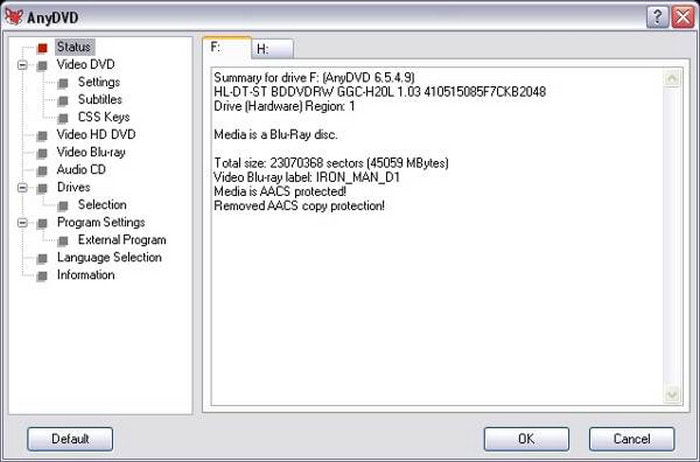
AnyDVD is a DVD ripper for Windows, primarily used to decrypt and play DVDs and Blu-ray disks. Its features include automatically decrypting DVD movies in the background, removing region codes, and providing encryption protection, thus allowing users to copy and watch disc contents freely. It was originally developed by SlySoft and later shut down because its copy-protection circumvention feature violated the copyright laws of many countries. After SlySoft's closure, some developers from the original company formed a new company, RedFox, to continue developing AnyDVD and related products.
Unfortunately, the new developer of AnyDVD in RedFox officially shut down in June 2024. As such, the program has now stopped receiving any developer support and updates. Officially downloading the program is no longer available. The copies you can download online are now sourced from third-party websites with sketchy security and subpar privacy measures.
Part 3: AnyDVD Features Reviewed
Automatic Decryption & Region-Code Removal
AnyDVD has a powerful DVD and Blu-ray Disc decryption function that can solve various copyright protection methods. It can bypass various copy protection mechanisms on DVDs, Blu-ray Discs, and even audio CDs, such as CSS encryption, Macrovision, region codes (e.g., RCE, RPC-1/2), Digital Rights Management (DRM), and other common forms of copy protection.
DVD & Blu-ray Format Coverage
AnyDVD supports multiple disc formats, including DVD-Video, DVD-Audio, DVD±R/RW, DVD±R DL, Blu-ray Discs (including 3D), BD-R/RE, BDAV, HD DVDs, Audio CDs and more.
Customization Options
AnyDVD provides a range of DVD-related customisation options that allow users to tailor the software's behaviour to their specific needs and preferences. These include disabling forced subtitles, removing unwanted movie features such as trailers and copyright warnings, adjusting the DVD drive's read speed, and more.
Background Resource Usage
AnyDVD is designed to be efficient with minimal impact on system resources. Therefore, its resource usage is usually considered lightweight and efficient. This means most users should be able to run it in the background without significantly affecting system performance.
Part 4: AnyDVD Pros and Cons in 2026
If you already own the AnyDVD license and are using the official version of the software, you can continue using the program, as its features remain available even in 2026. Some notable strengths of the program include running in the background, good compatibility with DVD formats, and more.
However, its lack of development support has caused the program to stop receiving updates, and downloading it as a new user is now officially impossible. Aside from the weaknesses due to a lack of support, pre-installed official versions of the program still suffer from being available only for Windows and from requiring additional software to use.
Pros
- Run in the background automatically.
- Compatible with all DVD format types.
- Support CSS encryption and region code removal.
- Remove unwanted movie features, including subtitles and trailers.
Cons
- Supports the Windows OS only.
- Additional software may be required at times.
- There are no official sources to obtain the software.
- Lack of regular updates provided from official sources.
Part 5: AnyDVD Pricing: What Licenses Used to Cost
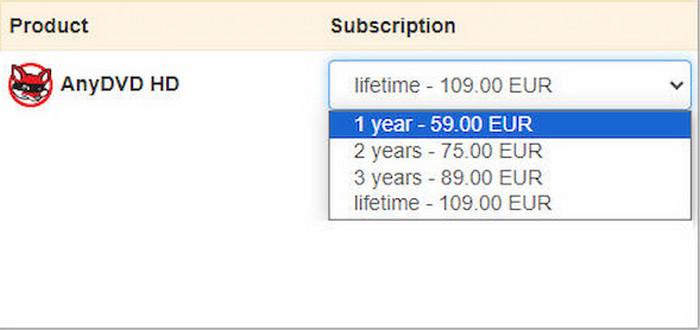
Since AnyDVD's official website, RedFox, has gone offline, its downloads and licenses are currently unavailable from official sources. Here is its previous pricing plan for reference:
| Classification | Result |
| Annual License | €59.00 |
| 2-Year License | €75.00 |
| 3-Year License | €89.00 |
| Lifetime License | €109.00 |
Reminder: Some third-party websites may still offer AnyDVD licenses, but they may be unauthorised resellers or selling expired or illegal licenses. So, it is not recommended to buy AnyDVD at this time; instead, look for alternatives.
Part 6: Is AnyDVD Safe and Legal to Use
No, it is not. AnyDVD has no official versions available for download today. As such, using third-party mirrors carries a high risk of malware, which may ruin your entire device. Even if you plan to use legacy installers, the setup program's source still carries risks. Besides that, ripping copy-protection is illegal, which is another potential problem.
Part 7: AnyDVD Not Working? Common Fixes
Some of the most common problems with AnyDVD are that it cannot rip Blu-rays, its trial version usually expires and cannot be activated, and it fails in Windows 11. With all these problems in mind, let us now discuss solutions to these common issues.
Unfortunately, AnyDVD’s Blu-ray encryption bypass no longer works because it has stopped being developed. The program has stopped receiving support from its protection database, which only ran from 2019 to 2024.
If your AnyDVD trial has expired, there is no official way to activate it online. You can only activate the software if you have access to local keys and codes. Finally, the tool is simply not optimized for Windows 11; it will not work in it.
Part 8: Best AnyDVD Alternatives in 2026
MakeMKV
For users looking for a freeware alternative that offers a direct 1:1 copy of the DVD media, MakeMKV is a good alternative. If you want the raw DVD media, this program is the way to go. Unfortunately, keep in mind that the program rips DVD content as losslessly as possible, resulting in media with extremely large file sizes.
| Classification | Result |
| Best for | Free 1:1 DVD/Blu-ray/4K UHD backup to MKV with no compression. |
| Price | Free while in beta; ~$50–65 paid license for future versions |
| Platform | Windows, macOS, Linux |
| Format | DVD, Blu-ray, 4K UHD → MKV (H.264/HEVC passthrough) |
| Watermark | None |
| Trial | Free beta, no expiry (permanent while beta lasts) |
DVDFab DVD Ripper
If you are looking for a premium option, DVDFab DVD Ripper is our recommended tool. This paid option is best for all-in-one physical media ripping and comes with basic video editing tools. It also has limitless output formats with 300+ options. Unfortunately, it is a paid tool, and its trial version has a watermark, fewer output formats, and limited ripping duration.
| Classification | Result |
| Best for | All-in-one DVD/Blu-ray ripping + conversion with editing/ |
| Price | Starts at $49.99/yr |
| Platform | Windows, macOS |
| Format | DVD/Blu-raym, MP4, MKV, MOV, Mobile device templates, and 300+ output profiles. |
| Watermark | None |
| Trial | Watermark and Limited output format |
Blu-ray Master Free DVD Ripper
Blu-ray Master Free DVD Ripper is the best choice among AnyDVD and our proposed alternatives. Available for both Windows and Mac, it allows you to easily convert all DVDs/ISO files/folders to more than 200 digital formats on your computer or make them directly applicable to all types of mobile devices. Enjoy your favourite movies anytime, anywhere! In addition, it provides editing settings to add subtitles and audio tracks, and to adjust parameters such as resolution, frame rate, and aspect ratio, which can greatly enrich your DVD-ripping experience!
| Classification | Result |
| Best for | Free DVD/ISO/folder ripping to 200+ formats on Windows & Mac with editing tools. |
| Price | Free |
| Platform | Windows, macOS |
| Format | DVD/ISO/folder → 200+ output formats; device presets; subtitle/audio track settings; resolution/frame rate/aspect ratio adjustments. |
| Watermark | None |
| Trial | None (Freeware) |
To learn how to use the program, please read our three-step guide below:
Free Download
For Windows
Secure Download
Free Download
for macOS
Secure Download
Step 1.Open Blu-ray Master Free DVD Ripper, load the DVD into your computer, then select the Load DVD > Load DVD Disc button to open the DVD in the ripper tool. Click OK to proceed.
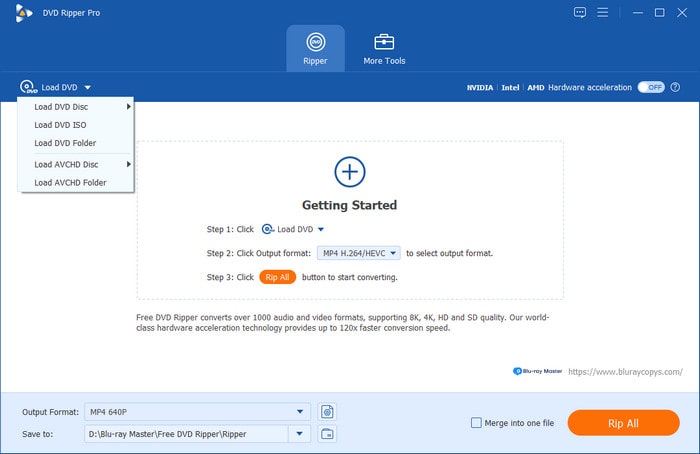
Step 2. Once the program opens the chapters and titles available in the DVD, go to the Output Format and select the file type you want to save your DVD video as. We recommend using the MP4 format for maximum compatibility.
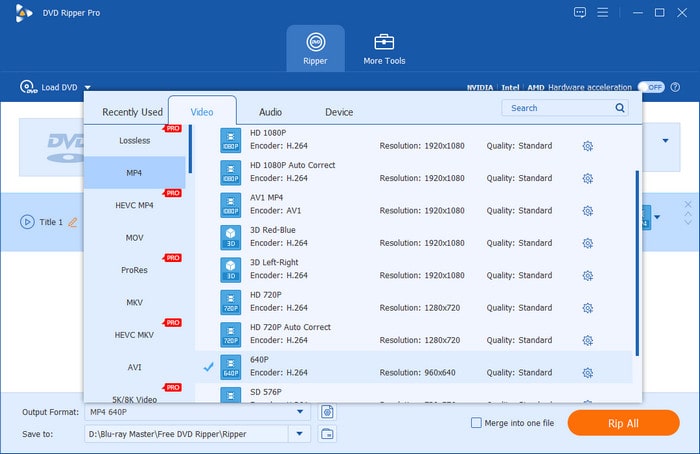
Step 3.With the output format now set, you will be redirected back to the main Ripper menu. Next, set the location folder where you will save the ripped DVD videos by clicking on the Save To option. Finally, click the Rip All button to start ripping your DVD videos to a digital video file.
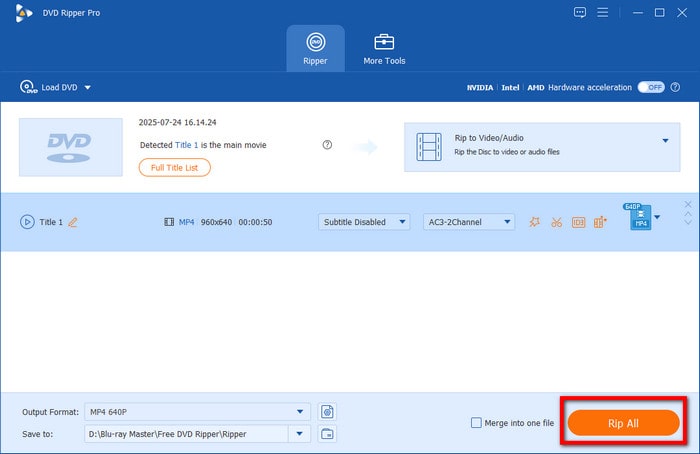
Since DVD ripping is an advanced function in its own right, choosing ripper software optimised for ease of use is the perfect option for both beginners and experienced multimedia practitioners to improve their workflow.
Part 9: How to Choose the Right DVD Ripper
When choosing which DVD ripper to use, notable factors to consider include whether you want to create a 1:1 backup of the DVD content, whether you prioritise playback quality, whether you want to make the video playable on specific mobile setups, or whether you are running a Mac or Windows computer.
Unfortunately, AnyDVD's inability to support Mac and Windows, since it has stopped receiving support, makes it not a good option in 2026. Despite that, all the alternatives we have provided all work well for DVD ripping on modern computers.
Among them, we recommend different tools for different uses: for lossless-quality ripping, use MakeMKV; for premium DVD ripper software, select DVDFab DVD Ripper; if you prefer a balanced set of features, we highly recommend Blu-ray Master Free DVD Ripper.
Part 10: FAQs About AnyDVD Review
-
What happened to AnyDVD?
AnyDVD has faced legal challenges and disputes over circumventing copyright protection, and its developer, SlySoft, was shut down in 2016. In June 2024, the webpage and service of RedFox, a company founded by the original developers, were also taken offline.
-
Does AnyDVD still work?
Some users have reported that if AnyDVD was installed locally before it was shut down, then it should still work. Otherwise, it will no longer work.
-
Is AnyDVD safe?
AnyDVD itself is safe because it does not contain malware or viruses. However, since the pages and services of its official website have been taken offline, it cannot be downloaded directly from the official source but can only be obtained from other sources, which may bring a certain risk.
-
Does AnyDVD work on Mac?
No, it does not. AnyDVD is a Windows-only exclusive. It does not have a version for Mac computers.
-
AnyDVD vs MakeMKV — which is better now?
MakeMKV wins by default since it is available and being updated today. AnyDVD cannot be downloaded officially, making it not the best choice. AnyDVD is simply unsafe in 2026.
-
What is the best free AnyDVD alternative?
Among the alternative options we have featured, we suggest using Blu-ray Master Free DVD Ripper. This program offers the best balance of features and DVD-ripping capability. It also has an optional upgraded version.
Conclusion
Above is the full review of AnyDVD. Now, you should know how it performs in DVD ripping as well as its pros and cons. Overall, it is a DVD copying and ripping software with a powerful decryption function. Unfortunately, its official website has taken down the software download, making it more difficult to obtain. So users should seek an alternative to AnyDVD, such as the Blu-ray Master Free DVD Ripper recommended in the article above. It is a good DVD ripper option, compatible with both Windows and Mac operating systems, and is regularly updated, helping users easily decrypt DVDs and convert them to digital formats.
More from Blu-ray Master
Various DVD Ripper Review
Fast and free ripping software to decrypt all DVDs to digital easily on your computer.
100% Secure. No virus
