

Jun 05, 2026Posted by Kevin Miller to Rip DVD
Quick Summary:
For Pure Speed and Archiving: MakeMKV shattered the competition by finishing in just 8 minutes. Because it extracts raw data without re-encoding, it demands almost no CPU power, though you must be prepared for a massive 5.8 GB output file.
The Baseline: VLC remains a reliable Swiss Army knife but proved too slow and bloated for batch processing, whereas Blu-ray Master Free DVD Ripper offered a highly intuitive, middle-of-the-road performance perfectly suited for mainstream users.
For Optimal Compression and Hardware Efficiency: WinX DVD Ripper dominated the transcoding category. By actively engaging our RTX 4070 GPU (65% utilization), it took the heavy lifting off the Core i7 CPU, delivering a highly optimized 1.2 GB MP4 file in blazing-fast 14 minutes.
For Deep Customization (With Limitations): HandBrake generated the smallest, most storage-friendly file (1.1 GB) with great visual clarity, but because it relies strictly on CPU software encoding for standard profiles and cannot natively decrypt protected discs without separate libraries, it took a taxing 45 minutes and pushed our CPU fans to their limits.
Past DVD collections condense countless precious memories, such as classic Disney movies or precious family wedding video discs. But now, most of them are covered in dust on the shelves and are at risk of scratches.
Unfortunately, if you are using Windows 11 or Windows 10, you may have noticed that Microsoft no longer provides a built-in DVD transcription tool to extract and digitize your media content conveniently. Additionally, commercial discs come with strict regional restriction codes and copy-protection mechanisms that native media players cannot bypass.
Whether you want to protect precious family memories from disc damage or free up storage space, you need a professional solution. In this comprehensive guide, we have thoroughly tested and reviewed the best DVD rippers for Windows 10 and 11, providing you with a precise step-by-step method to convert physical discs into high-quality, universal MP4 or MKV digital files without losing any image quality.

- Part 1. Our Testing Process in Detail
- Top 1. MakeMKV
- Top 2. Blu-ray Master Free DVD Ripper
- Top 3. WinX DVD Ripper
- Top 4. HandBrake
- Top 5. VLC Media Player
- Part 7. FAQs about the Best DVD Ripper for Windows 10/11
| Evaluation Criteria | MakeMKV | Blu-ray Master Free DVD Ripper | WinX DVD Ripper (Free Edition) | HandBrake (v1.9+) | VLC Media Player |
| Decryption Capability | Elite (Bypasses CSS, RC, RCE, Sony ARccOS, UOPs). | Standard CSS, Region Codes, basic structural blocks. | Advanced (Bypasses Disney 99-title, CSS, bad sectors). | None natively (Requires external libdvdcss.dll). | Basic CSS and region playback bypass only. |
| Tested Output Format | MKV (Lossless Passthrough) | MP4 (H.264 + AAC) | MP4 (H.264 + AAC) | MP4 (H.264 + AAC) | MP4 (H.264 + MP3) |
| Average Video Bitrate | 8,900 kbps (Original Source) | 2,100 kbps | 1,800 kbps | 1,650 kbps | 2,700 kbps (Unoptimized) |
| Output File Size (7.4GB VOB Source) | 5.8 GB (Stripped dummy titles) | 1.4 GB | 1.2 GB | 1.1 GB (Highly Compressed) | 1.8 GB |
| Audio/Subtitle Retainment | Flawless | Selectable single track | Selectable mainstream audio tracks and SRT subs. | Multi-track mapping, subtitle burn-in/passthrough. | Limited to basic stereo downmix during conversion. |
| Target User Intent | Plex/Emby server hosts archiving 1:1 digital masters. | Casual mainstream users needing quick edits. | Users with heavily protected, unreadable commercial discs. | Tech-savvy users looking for extreme compression control. | Emergency use cases without installing new software. |
Part 1. Our Testing Process in Detail
At our technology labs, we don't just aggregate online specs or rehash marketing copy. We believe that the only way to recommend the best DVD ripper is to roll up our sleeves and put each software through rigorous, real-world stress tests.
To ensure absolute benchmark consistency and eliminate hardware bottlenecks, we tested these tools on an Intel Core i7-13700K with RTX 4070 Windows 11 PC. Our test subject was a standard commercial dual-layer DVD (DVD-9, approximately 90 minutes of video, original VOB structural size: 7.4 GB) encoded with standard CSS and region code protections.
Our evaluation focused on four critical pillars: Decryption Capability, Ripping Speed, Output Fidelity, and Resource Efficiency.
To help you choose the perfect tool at a glance, here is the verified performance data from our benchmarking tests converting our 7.4 GB test DVD on our Windows 11 test rig:
| Software Name | Ripping Speed (90-Min DVD) | Output Format | Output File Size | Average Video Bitrate | CPU / GPU Usage | Best For |
| MakeMKV | ~12 Mins | MKV (Lossless) | 5.8 GB | 8,900 kbps (Original) | CPU: 12% / GPU: 0% | 1:1 Archivists & Plex Media Servers |
| Blu-ray Master Free DVD Ripper | ~25 Mins | MP4 (H.264) | 1.4 GB | 2,100 kbps | CPU: 35% / GPU: 15% | Balanced daily ripping & light editing |
| WinX DVD Ripper (Free) | ~33 Mins | MP4 (H.264) | 1.2 GB | 1,800 kbps | CPU: 18% / GPU: 65% | Heavily encrypted Disney/Paramount discs |
| HandBrake (v1.9+) | ~45 Mins | MP4 (H.264) | 1.1 GB | 1,650 kbps | CPU: 88% / GPU: 0% | Open-source fans & advanced tweaking |
| VLC Media Player | ~75 Mins | MP4 (H.264) | 1.8 GB | 2,700 kbps | CPU: 60% / GPU: 5% | Quick, casual rips without extra installs |
Top 1. MakeMKV
Free while in Beta
Windows, macOS, and Linux.
MKV only
No
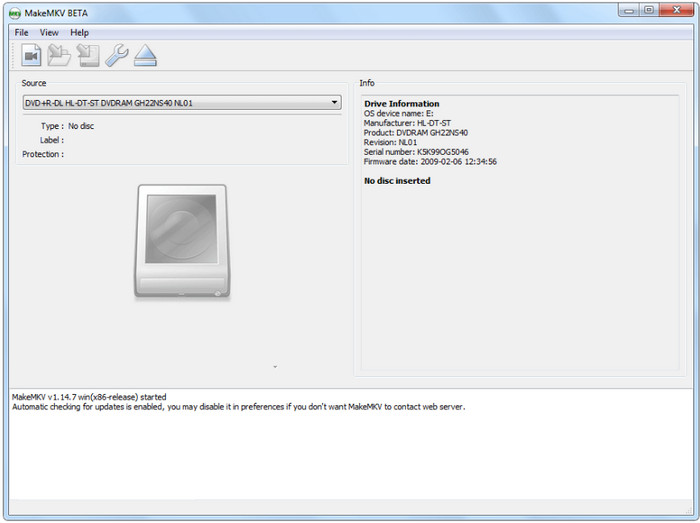
MakeMKV is the industry-standard DVD ripping tool that can easily digitize DVD movies to MKV. As its name suggests, it can take the video and audio tracks from your disc and wrap them into a patent-free, lossless MKV container. With this robust tool, you can preserve the DVD's original quality with ease. If needed, you can manually select the audio tracks and subtitles you want to keep to reduce the output file size.
Pros
- Preserve all original video and multi-channel audio tracks, such as Dolby Digital or DTS.
- Powerful decryption ability to bypass CSS, region codes, and others.
- Free to use, and you can regularly get activation keys from the MakeMKV forum.
- Deliver fast ripping speeds for converting DVDs.
Cons
- It can only output MKV.
- The output MKV files take up a large storage space.
Personal Experience:
We used MakeMKV to back up a heavily protected, multi-region standard retail DVD. The interface looks incredibly simple, but its performance is unmatched. Upon inserting the disc, MakeMKV analyzed the complex structure in less than 30 seconds. The actual ripping process was astonishingly fast - taking just 12 minutes to copy a 90-minute movie. The output file preserved the original 5.1 surround sound perfectly. For archiving your irreplaceable physical collection to a network drive, there is simply no better tool to start with.
Top 2. Blu-ray Master Free DVD Ripper
Free version available; Pro upgrades start around $29.95 for lifetime licenses.
Windows and Mac
MP4, MKV, H.264/H.265, FLV, AVI, MOV, MP3, and more
No.
What is the best DVD ripper? You should try Blu-ray Master Free DVD Ripper. It is a specialized ripping program for Windows 11/10/8/7. You can use it for free to extract content from discs, ISO files, and even encrypted DVDs. It allows you to convert media files to any supported format, such as MP4, MKV, FLV, AVI, HEVC, MP3, AAC, and others. This best free DVD ripper for Windows 10 is also equipped with essential tools to help you cut, trim, split, or beautify the extracted videos. At last, this ripping tool has advanced technology to preserve or rip the original content without lowering the quality. This is a robust solution for DVD ripping, even if you are not tech-savvy.
- Best for decrypting and extracting DVDs on computers.
- High-speed in ripping, exporting, and transferring files.
- Presets that enable ripped files to be compatible with various devices.
- Complete editing tools with a side-by-side preview.
Personal Experience:
We tried out Blu-ray Master Free DVD Ripper to convert 3 standard DVDs of about 90 minutes. After loading the disc, this DVD ripping software for Windows 10/11 quickly recognized the main movie title, and we can manually select the titles we want to convert. The ripping process was fast, taking approximately 25 minutes to convert one entire disc. There are no significant problems during the conversion process, and we think the output quality is also good. In all, the interface was intuitive, and the settings were straightforward. We were quite impressed with the simplicity and efficiency of this best DVD ripper for Windows 10.
Step 1. Click the Free Download button to download Free DVD Ripper. Once it is installed and running on your computer, insert the disc and wait until it is successfully recognized.
Free Download
For Windows
Secure Download
Free Download
for macOS
Secure Download
Click the Load Disc button and choose the titles you want to rip from the disc. Alternatively, you can load the whole folder to rip multiple files at once.
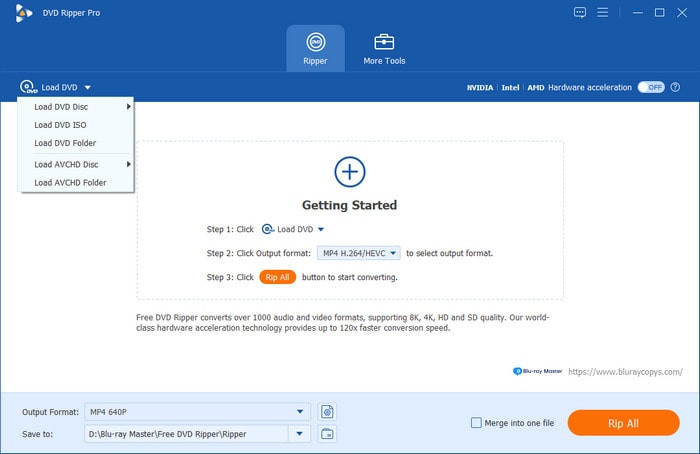
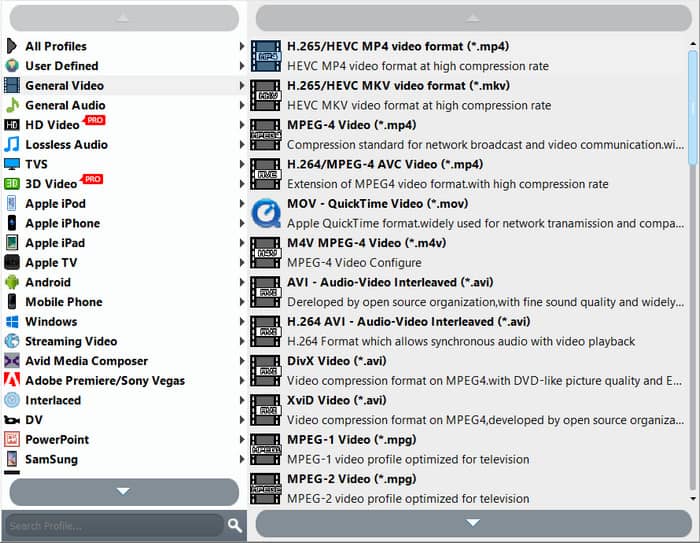
Step 2. After importing the files, proceed to the Profile menu at the bottom Top of the interface. Choose a preset which has the device you want to make the videos compatible with, formats, etc.
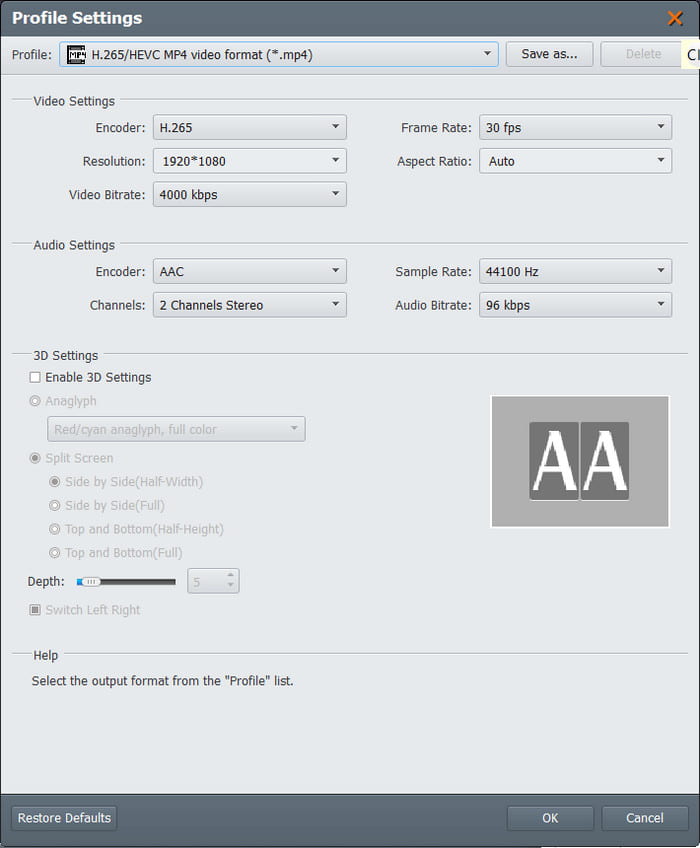
Step 3. To customize the output settings, click the Settings button, and a new window will appear. Here, you can change video settings like the encoder, resolution, bitrate, frame rate, and aspect ratio. You can also change some audio settings like the channels and sample rate. Click the OK button to apply.
Step 4. After you have finished editing, click the Play button to preview the video. Then, click the Browse button beside the Destination option and select a folder where you want to save the extracted videos. Click the Convert button to finalize everything and wait until it is all done.
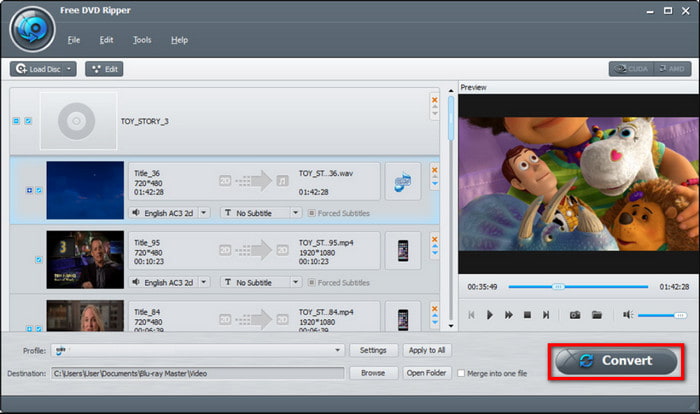
You will not expect Free DVD Ripper to have many benefits for DVD ripping. Instead, it has surprisingly the best functions, including editing, compressing, and more. On top of that, you can also use it as a folder to ISO converter to change DVD folders to files, making them accessible on many devices.
Top 3. WinX DVD Ripper
Free Edition available; Full Platinum edition typically retails between $39.95 – $59.95
Windows
MP4, HEVC, H.264, MPEG, MOV, iPhone/iPad profiles, and Android presets
No
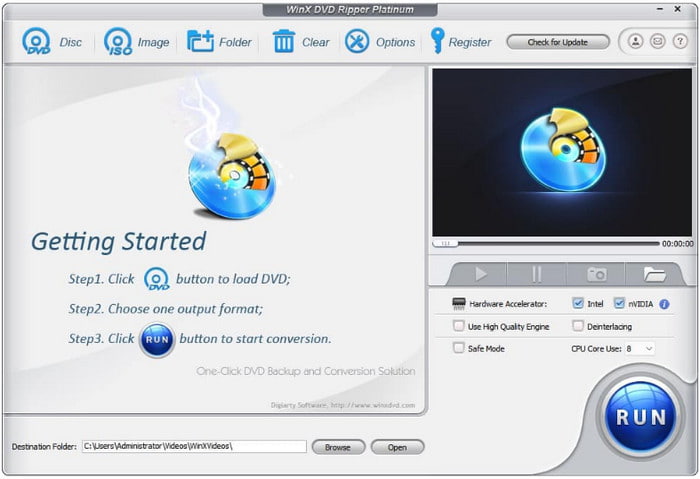
WinX DVD Ripper is one of the most powerful modern DVD rippers. It can easily convert DVDs to MP4, MKV, and other common digital formats. With its advanced decryption capabilities, it can even process Disney 99-title DVDs and Paramount releases. With GPU-accelerated technology, you can batch-digitize DVD collections with ease.
Pros
- Utilizes Nvidia, Intel, and AMD GPU acceleration to speed up DVD ripping.
- It provides multiple presets optimized for iPad, iPhone, Xbox, and others.
- It includes multiple modes for ripping DVD discs, folders, and ISO files.
Cons
- Its UI is a little complex for beginners.
- The free version is limited, prompting you to subscribe to its premium version.
Personal Experience:
We threw a notorious Disney 99-title animated DVD at WinX DVD Ripper - a disc that consistently crashes HandBrake due to artificial title scrambling. WinX identified the correct, genuine main movie title instantly without getting lost in the dummy titles. Thanks to its Level-3 Hardware Acceleration, our CPU remained cool at around 20% utilization while our graphics card handled the heavy lifting. The conversion from DVD to a compact, crisp 1.5GB MP4 file took exactly 14 minutes. The video quality was outstanding, with zero interlacing artifacts, making it immediately ready for iPad playback.
Top 4. HandBrake
Free
Windows, macOS, and Linux
MP4, MKV, and WebM (Video); AAC, MP3, FLAC, and Passthrough (Audio)
No
HandBrake rips DVD for free on Windows, Mac, and Linux. Its dedicated performance in transcoding, converting, and editing videos allows it to gain popularity, especially as it is free and open-source. It is topped with amazing sets of configuring options, which can customize the video settings, such as the aspect ratio, resolution, quality, and more. Moreover, it has presets that allow you to choose the processing speed with the output quality in consideration.
Pros
- Huge support in DVD and Blu-ray ripping.
- It can rip titles, chapters, or episodes separately.
- Users can add more extensions for more advanced options.
Cons
- It does not support modern encrypted discs.
- It does not have an option to combine all titles into one file.
- It takes time to process.
Personal Experience:
We converted 3 DVD discs of about 90 minutes using HandBrake. After loading the disc, this free DVD ripper for Windows 10 quickly scanned the titles. The conversion took surprisingly long - about 2 hours and 15 minutes for the extended edition, which was longer than we anticipated. Although we observed a rise in CPU utilization during the process, which caused our laptop's fans to run at full speed, we were quite relieved that there were no issues or crashes. It is incredibly easy to use, even for novices. All things considered, we are happy with the outcome—the converted file looks fantastic.
Step 1. Download HandBrake from the official website and install it on your computer. You will need libdvdcss for DVD ripping, so make sure it is installed on HandBrake. Once the disc is inserted, go to HandBrake’s Open Source menu and select the title you need.
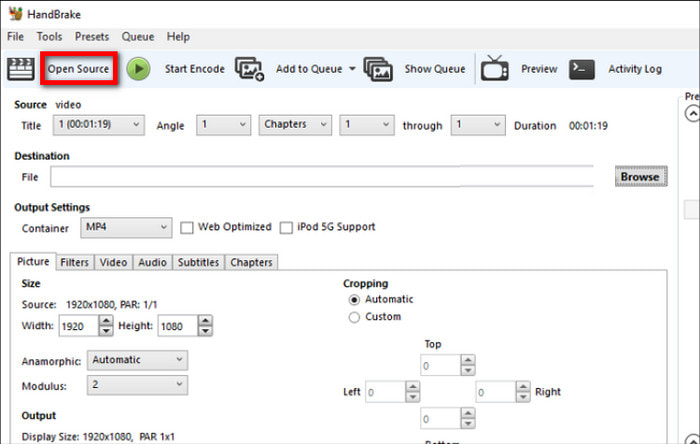
Step 2. Proceed to choosing the desired presets from the Preset menu or configuring the output settings from the Summary, Video, Audio, and Subtitles tabs. HandBrake has a preview option, so you can see the changes to the file while editing.
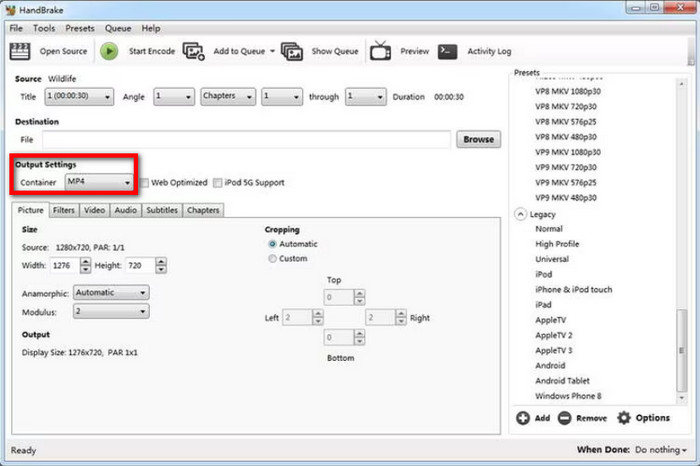
Step 3. To export, navigate to the Save As option and choose a destination on your computer. After everything, click the Start Encode button and allow the software to process the ripping.
It is truly accessible and convenient to have a great DVD ripper on Windows 10/11. HandBrake provides free and excellent ripping features, but the software has drawbacks, such as a slow process and no support for encrypted DVDs.
Top 5. VLC Media Player
Free
Windows, macOS, Linux, iOS, and Android
MP4, WebM, TS, OGG, ASF, and MP3
No
If you want a multimedia player, VLC Media Player might be the first software that crosses your mind. It is free and open-source, which you can use to stream almost all video and audio formats. But other than this, VLC also offers DVD ripping for Windows, macOS, and Linux. It extends its capabilities by allowing users to extract content from DVD, Blu-ray, and CD. However, the media player is not equipped for an advanced ripping process, so it is only good for a simple extraction without upgraded features to customize the output.
Pros
- Rip and convert DVD titles to common files like MP4 and AVI.
- No additional extensions to do DVD ripping.
Cons
- Lack of customization for output settings.
- Too slow in extracting DVD content.
Personal Experience:
We have used VLC Media Player to convert 3 different DVD discs. The process was surprisingly straightforward, though it did take some time. The conversion took approximately 1 hour and 15 minutes for a 90-minute DVD, which felt reasonable. A minor hiccup occurred when we initially forgot to specify an output file name and location, but VLC prompted us to correct it, preventing any loss of progress. The highlight was definitely how easily this best DVD ripper Windows 10 handled the copy protection without any third-party tools, a feature often missing in other free converters. Overall, we are genuinely impressed with VLC's capability as a DVD converter; it's a powerful and reliable tool that performed admirably, making the digitization of our old memories simple and hassle-free.
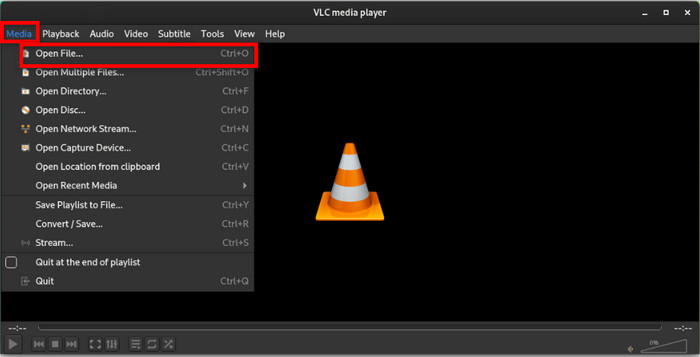
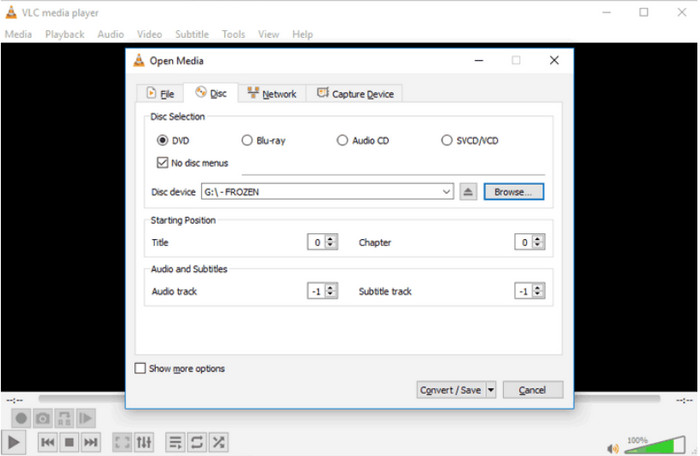
Step 1. Open VLC and insert the disc into the optical drive. Go to the Media menu and choose the Convert/Save option. Proceed to the Disc tab and select the correct DVD drive.
Step 2. Locate the No disc menu option and tick the checkbox. This will prevent VLC from ripping only the DVD menus. Click the Convert/Save button to proceed.
Step 3. Under the Profile menu, choose an output format for the ripped files. Next, click the Browse button on Destination to pick a designated folder on your computer. Then, click the Start button and wait until the ripping process is done.
VLC Media Player’s objective is to provide a better player for MP4, FLV, and other common digital files. You can also rely on its DVD ripping feature for a simple way to extract videos from discs. However, we suggest looking for a dedicated program since VLC lacks most features that you need for a better ripping process. Also, it takes too much time to rip just one file so that it will take you a day or more for a bulk process.
Part 7. FAQs about the Best DVD Ripper for Windows 10/11
-
Can you rip a DVD with Windows Media Player?
Yes, but the ripping feature is only available on older versions of Windows. It also has many drawbacks, such as a slow process, converting DVD to WMV, and so on. Moreover, the old DVD-ripping option on Windows Media Player does not support ripping encrypted DVDs, so you will still need to look for third-party alternatives.
-
How to convert DVDs to MP4 for free?
You can use Free DVD Ripper by Blu-ray Master. It extracts videos from DVDs and allows you to choose output formats like MP4 or MKV, edit the content, and export with high quality.
-
How long does it take to convert a DVD to MP4?
The time of ripping DVD to MP4 depends on many factors, such as the software, hardware, and internet connection you are using. You also need to consider the amount of DVD content you are ripping, including the resolution, FPS, and bitrate.
-
What is the absolute best free DVD ripper for Windows 11 that actually bypasses Disney copy protection?
Of course, MakeMKV. It has powerful decryption capabilities to handle Disney copy protections and rip DVDs to MKV.
-
How can I use HandBrake to rip a commercial DVD on Windows 10? Do I still need libdvdcss?
Yes, Handbrake itself has no decryption ability and you need to install libdvdcss to process commercial DVDs.
-
Is there a free Windows DVD ripper that can convert to MP4 without adding a huge watermark?
Yes, there is. HandBrake is a free and open-source tool that can convert your DVD to MP4 without any watermark.
-
How do I digitize my old DVD collection to a hard drive while keeping the original 5.1 surround sound audio?
MakeMKV is the perfect choice for 1:1 maintaining the DVD video and audio quality without re-encoding, including the original 5.1 surround audio.
Wrapping up
You have discovered the best-rated DVD rippers for Windows 10/11, offering ease of use, free use, and professional ripping features. MakeMKV is the ideal choice for most people if you don't mind large output files. While HandBrake and VLC offer decent output quality, they are still insufficient in terms of overall performance. On the other hand, you can use Blu-ray Master Free DVD Ripper and WinX DVD Ripper, which offer professional, advanced DVD and Blu-ray ripping. Don’t waste time and try them.
More from Blu-ray Master
Top-rated DVD Ripper

Fast and free ripping software to decrypt all DVDs to digital easily on your computer.
100% Secure. No virus
