

Oct 19, 2026Posted by Kevin Miller to Rip DVD
Quick Recommendation:
- • Best Basic Option: Blu-ray Master Free DVD Ripper (Fastest for basic MP3/FLAC extractions)
- • Best Audiophile Solution: MakeMKV + Foobar2000 (100% bit-perfect extraction without quality loss)
- • Best for Heavily Encrypted Discs: DVDFab DVD Ripper (Cloud decryption service handles tough DRM)
- • Best 100% Free Option: VLC Media Player (Great if you already have it installed)
Need to extract high-quality audio or losslessly rip music tracks from your concert DVDs? Standard media players often block this process due to strict copy protection like CSS and region codes.
To save you time, we tested and picked 5 top-rated DVD audio rippers on Windows and Mac for speed, audio quality (FLAC/MP3), and decryption ability. Read this article to learn essential knowledge about DVD audio extraction.

- Part 1. Can You Extract Audio from a DVD
- Part 2. Performance Test & Comparison: Which DVD Audio Ripper Wins
- Part 3. Top 5 DVD Audio Rippers (Free Incl.)
- Part 4. How to Extract DVD Audio in Detail
- Part 5. FAQs of DVD Audio Ripper
Part 1. Can You Extract Audio from a DVD
Can You Extract Audio from a DVD? Yes, you can easily extract audio tracks from any DVD, but it is important to understand how the process works so you don't accidentally sacrifice sound quality.
Understanding the Difference: Extraction vs. Transcoding
- Direct Audio Extraction (Passthrough): This method can help you extract the original audio stream directly from the DVD's VOB files without re-encoding. The process is extremely fast and fully preserves the complete content of the original audio master.
- Audio Transcoding: This process decodes the original audio and re-encodes it into a new format (e.g., converting Dolby Digital to MP3). It allows you to shrink file sizes or increase compatibility, but re-encoding to lossy formats will permanently discard audio data.
DVD Audio Formats & 5.1 Surround Sound Handling
Commercial DVDs usually encode their soundtracks using Dolby Digital (AC3) or DTS. When converting these tracks for your phone, PC, or Hi-Fi system, here is how the primary audio formats compare:
1.FLAC (Free Lossless Audio Codec)
- Type: Lossless Compression
- Channels: Supports Stereo (2.0) and 5.1 Surround Sound
- Best For: Audiophiles who want to convert DVD audio into modern lossless files.
- It compresses the original raw PCM/AC3 data by ~50% without losing a single bit of quality, while fully supporting metadata tagging (artist, album, track numbers).
2.WAV (Waveform Audio File Format)
- Type: Uncompressed Audio
- Channels: Stereo (2.0) or Multi-channel
- Best For: Raw editing.
- WAV contains uncompressed PCM audio, offering perfect sound quality. However, file sizes are massive compared to FLAC, and WAV offers poor support for embedded metadata (like album artwork).
3.MP3 (MPEG-1 Audio Layer 3)
- Type: Lossy Compression (Max 320 kbps)
- Channels: Stereo Only (2.0)
- Crucial Note on 5.1 Sound: MP3 does NOT natively support 5.1 multi-channel audio.
- When ripping a 5.1 DVD track to MP3, your software MUST downmix the 6 channels (Front L/R, Center, Surround L/R, Subwoofer) into 2-channel stereo. Poor downmixing will cause quiet dialogue or distorted bass.
4.AAC (Advanced Audio Coding) / AC3 Passthrough
- Type: Lossy (High Efficiency)
- Channels: Stereo (2.0) and 5.1 Surround Sound
- Best For: Modern streaming devices, Apple ecosystem, and home theaters.
- AAC offers better sound compression than MP3 at the same bitrate and handles 5.1 channel matrixing smoothly. Alternatively, choosing AC3 Passthrough keeps the exact 5.1 surround mix untouched for your AV receiver.
Part 2. Performance Test & Comparison: Which DVD Audio Ripper Wins
To eliminate guesswork and help you find the right tool, we ran a standardized performance test on a 2GB encrypted concert DVD (approx. 60 minutes long).
We tested multiple software programs rigorously under the same lab conditions to measure real-world speed, decryption ability, and output audio quality:
- Test System: Windows 11 PC & macOS Sonoma (Apple M3)
- Optical Drive: External LG USB 3.2 Blu-ray/DVD Drive
- Source Disc: Commercial Concert DVD (CSS Protected, Region 1, Dolby Digital 5.1 Track)
- Target Output: Uncompressed FLAC (48kHz / 24-bit) & High-Quality MP3 (320kbps)
| Tool Name | Ripping Speed (2GB DVD) | Output Formats | Decryption Capability | Best Suitable For |
| Blu-ray Master Free DVD Ripper | ~17 mins (GPU Acceleration) | MP3, FLAC, AAC, AC3, WAV | CSS, APS, Region Codes | Quick and easy lossless extractions for beginners |
| MakeMKV + Foobar2000 | ~8 mins (Direct Stream Extraction) | Lossless FLAC, WAV, ALAC, DTS, AC3 | Handles almost all commercial DVD and Blu-ray protections | Audiophiles looking for bit-perfect audio stream copy and track tagging |
| DVDFab DVD Ripper | ~15 mins (GPU Acceleration) | MP3, AAC, DTS, FLAC, OGG, +1000 | All commercial DRM & New releases | Power users handling heavily protected or damaged discs |
| VideoByte BD-DVD Ripper | ~20 mins (GPU Acceleration) | MP3, AAC, M4A, FLAC, WAV | Most DVD & Blu-ray protections | Users who need to process both Blu-rays and DVDs |
| VLC Media Player | ~47 mins | MP3, FLAC, WAV, OGG | Basic or unprotected discs only | Casual users needing quick extractions without installing extra software |
Part 3. Top 5 DVD Audio Rippers (Free Incl.)
Top 1. Blu-ray Master Free DVD Ripper
- Platform: Windows 11/10/8/7, macOS 10.12 or later.
- Ease of Use: 4.5/5
- Output Audio Formats: MP3, AAC, AC3, M4A, FLAC, WAV, etc.
- Audio Quality: Lossless
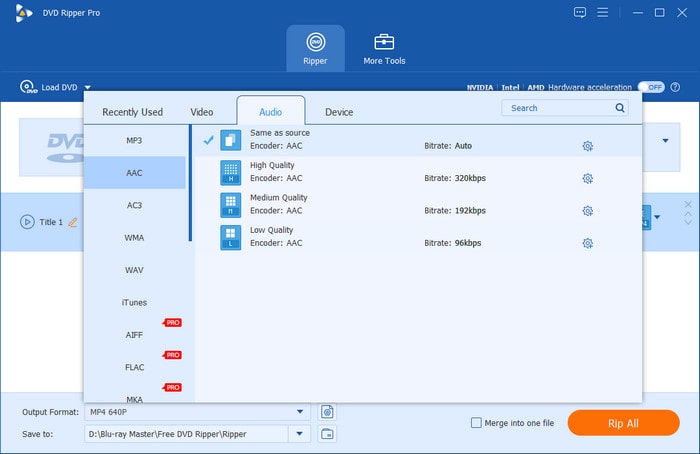
Blu-ray Master Free DVD Ripper is powerful, free DVD audio and video extraction software with a high-performance Hardware Acceleration feature for Intel, AMD, and NVIDIA systems. It can easily rip and convert DVDs' audio to various digital formats, including MP3, AC3, M4A, and more. It supports both homemade and commercially protected DVDs. It can bypass multiple copy protection schemes like CSS, region codes, and AACS. The software utilises the latest hardware acceleration technologies from Intel, NVIDIA, and AMD. Aiming to provide lightning-fast ripping speeds, with the ability to rip a full 2-hour DVD soundtrack in as little as 17 minutes.
In addition to the format offering and performance features, the software also supports setting audio files to the optimal 96 kHz sample rate and 24-bit high-resolution audio. This makes the software a premier tool for ripping Hi-Fi audio files.
Moreover, the program can also handle and bypass commonly used Digital Rights Management (DRM) protections, making it capable of copying the content of Disney 99-title and Sony ArccOS discs. Most of these advanced DRMs are commonly unsupported when using VLC or HandBrake to rip content.
Free DVD Ripper also offers a range of editing features, allowing users to trim, crop, and adjust the video and audio settings before conversion. With its understandable interface and comprehensive codec support, Free DVD Ripper is an excellent choice for anyone looking to easily and quickly convert their DVD audio collection to digital files for playback on various devices.
Free Download
For Windows
Secure Download
Free Download
for macOS
Secure Download
Features
- Wide formats support: AAC AC3, M4A, M4R, etc. are supported
- Stunning soundtrack: The audio channels are supported up to 5.1
- Smoother export speed: CUDA and AMD acceleration are available
Pros
- Comprehensive support for file formats
- Hardware acceleration is well supported, offering much faster output speed
- This DVD audio ripper only takes 17 minutes to convert a 2-hour DVD soundtrack
- No hardware requirements
Cons
- Systems older than Windows 7 and macOS 10.12 is not supported
- You cannot choose the HD, 4K, or higher output profiles in the free version.
Test Conclusion: In our hardware-accelerated tests, it processed a 90-minute DVD soundtrack into high-quality MP3 in approximately 17 minutes using GPU acceleration. Overall, it offers balanced performance for users who need fast, direct encoding to MP3 or FLAC with a beginner-friendly setup.
Top 2. MakeMKV + Foobar2000
- Platform: Windows, macOS, Linux.
- Ease of Use: 3.5/5
- Output Audio Formats: Lossless FLAC, WAV, ALAC, Uncompressed DTS, AC3, AAC.
- Audio Quality: 100% Bit-Perfect / Original Studio Quality.
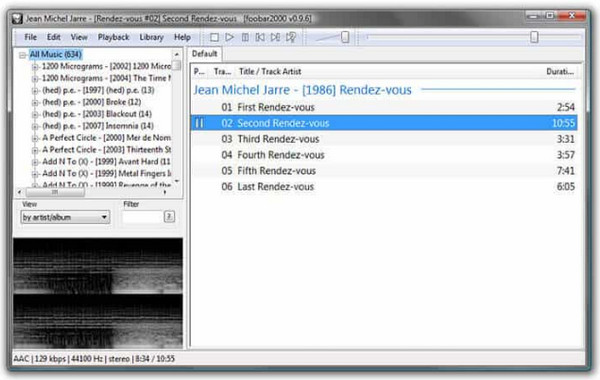
For true audio purists, the combination of MakeMKV and Foobar2000 is considered the holy grail of DVD audio extraction. MakeMKV handles the heavy lifting of bypassing complex DVD copy protections (like CSS and region codes) to perform a direct stream copy into an MKV container without re-encoding a single byte. Once extracted, Foobar2000—a legendary advanced audio player and converter—takes over to demux, convert, or split the multi-channel audio tracks into perfectly tagged lossless FLAC or WAV files. This two-step workflow ensures zero loss in audio dynamics, sample rates, or spatial detail, making it the top choice for live concerts and classical music DVDs.
Features
- MakeMKV provides direct stream extraction with zero quality degradation or re-encoding loss
- Full decryption support for almost all commercial DVD and Blu-ray region protections
- Advanced metadata tagging, disc splitting, and multi-channel downmixing via Foobar2000
- Preserves native 5.1 Dolby Digital and DTS surround sound streams for home AV receivers
Pros
- They are 100% free with unlimited lossy/lossless stream copy capabilities
- Its bit-perfect extractions preserve the exact original bitrate and 24-bit/96kHz sample rates
- Highly respected and widely recommended across audiophile communities and forums
Cons
- Requires a two-step manual workflow rather than a simple one-click conversion
- Slightly higher learning curve for complete beginners
Test Conclusion: MakeMKV + Foobar2000 is the ultimate free setup for audiophiles who want 100% bit-perfect audio extractions without any quality loss. It requires a two-step process, making it better suited for advanced users rather than absolute beginners.
Top 3. VLC
- Platform: Windows, macOS, Linux, iOS, Android.
- Ease of Use: 4/5
- Output Audio Formats: MP3, FLAC, WAV, OGG, AAC.
- Audio Quality: Moderate to High; dependent on manual configuration and source encryption.
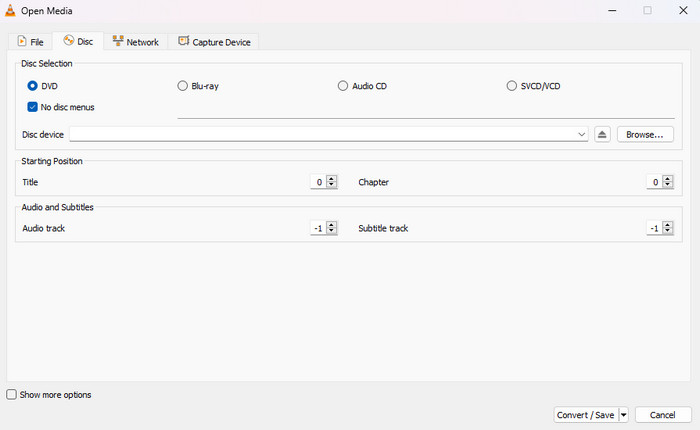
VLC Media Player is a renowned cross-platform open-source player with robust DVD audio ripping capabilities. It can rip soundtracks from DVDs, CDs, etc., and online streams, converting them to a wide range of audio formats, such as MP3, FLAC, and WAV.
The audio ripping process in VLC is straightforward, allowing users to select the desired audio tracks and customise the output settings. Additionally, this best DVD audio extractor provides advanced features like extracting specific audio channels, adjusting the bitrate, and even removing unwanted audio segments. If you are a beginner and know little about professional audio ripping, you can choose this as the simplest one to help your work.
Since VLC is a multimedia tool first and its ripping tool is only an advanced feature, learning basic troubleshooting is required to cover common issues in the program. The most basic steps are to disable decryption libraries, disable interactive menus, and adjust your output profile to MP3, since it is the most universally compatible format.
Ripping Warning
VLC Media Player cannot extract audio from encrypted commercial DVDs by default. To bypass these restrictions, you have to install the libdvdcss plug-in on your device first.
Features
- MP3, FLAC, WAV, and so on are supported
- The batch process is available
- Audio equalizers, compressor, and more are offered
Pros
- Low learning cost
- Audio and subtitle synchronisation are adjustable
- No hardware requirements
Cons
- The output speed is too slow
- Lack of more professional functions
Testing Conclusion: The DVD ripping feature of the program is a good addition for casual digital conversion. However, it is not advisable for handling commercial media since it requires installing a third-party plug-in that is not as straightforward as installing generic software.
Top 4. DVDFab DVD Ripper
- Platform: Windows 11/10/8/7, macOS 10.10 – 15.x.
- Ease of Use: 4/5
- Output Audio Formats: MP3, AAC, FLAC, WAV, DTS, OGG, and 1000+ profiles.
- Audio Quality: Hi-Fi.
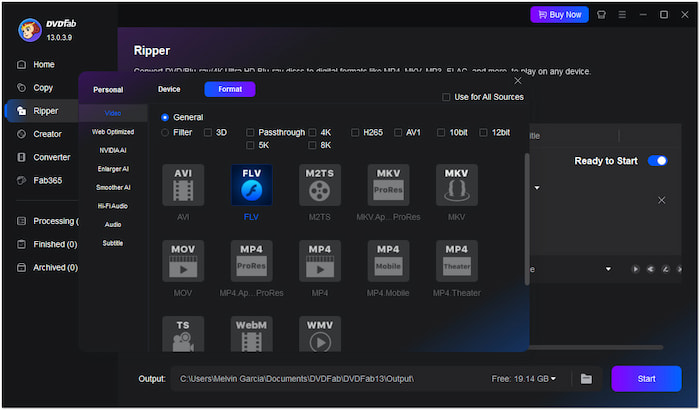
DVDFab DVD Ripper is a powerful DVD audio ripper tool that handles any DVD, old or new, encrypted or not. It bypasses standard DVD protections like CSS and APS. It even utilises a cloud decryption service for newly released discs, making it a successful ripper and DVD creator. This versatile ripper allows for 1:1 lossless conversion to MKV.
Passthrough preserves original video and 5.1 AC3 audio quality, ideal for home theater setups. DVDFab prioritizes user preference, prompting them upon launch to select their desired playback mode (Mobile, Theatre, AI, or Web), providing complete control over how they enjoy their converted DVD audio content.
Among these features, the program's batch processing capability and metadata retrieval make it the best option for digitising large DVD collections. Its preservation of key ID3 tags, including automatic album art, is a perfect addition for users who prefer an organised collection.
Features
- CSS, APS, etc. can be bypassed
- Convert audio to 5.1 soundtrack
- Nvidia, AMD, and Intel acceleration are available
- Rip DVDs to lossless Hi-Fi audio with 24-bit and 192 kHz
Pros
- 1000+ audio files like MP3, FLAC, etc.
- Open old or new discs in 5 - 10 seconds
- This DVD audio converter has a Cloud decryption service that offers a more flexible work style
Cons
- The installation process is plodding (5 mins)
- Not affordable for most of the users ($265.99)
- Complex pro settings without any guide
- High hardware requirements
Testing Conclusion: DVDFab DVD Ripper is the best option for organising large libraries of physical media into your digital collection. Its superb metadata preservation is its key advantage.
Top 5. VideoByte BD-DVD Ripper
- Platform: Windows 11/10/8/7/XP, macOS 10.12 or later.
- Ease of Use: 4.5/5
- Output Audio Formats: MP3, AAC, M4A, FLAC, WAV, WMA, etc. (300+ formats).
- Audio Quality: Lossless; 1:1 original quality retention.
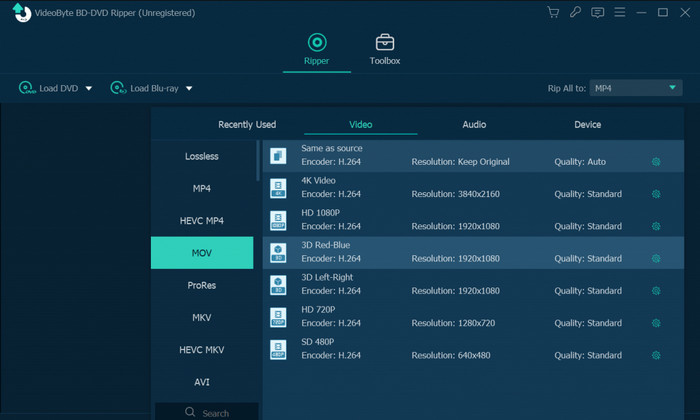
The VideoByte BD-DVD Ripper offers robust audio ripping capabilities. It supports over 300 audio and video output formats, allowing you to extract the audio from your DVDs and Blu-rays and save it in popular formats like MP3, AAC, M4A, and more. The software preserves the original audio tracks and subtitles, so you can enjoy the content with your preferred language and audio settings.
Additionally, the ripper provides lossless audio output, ensuring the extracted audio retains the same high quality as the original disc. With its understandable interface and advanced features, this DVD to audio converter makes it easy to liberate the audio from your physical media and enjoy it on your preferred devices.
Similar to the top pick in this list, VideoByte also offers hardware acceleration for Intel QSV, NVIDIA CUDA, and AMD. This makes the tool efficient and fast for batch conversion. Since it is an exclusive multimedia ripper, it offers advanced bitrate options of up to 320 kbps and a good sample rate of 48,000 Hz.
Features
- 300+ mainstream audio export formats (MP3, AAC, M4A, and more)
- 1:1 audio quality preservation: Convert without quality losses
- Nvidia, AMD, and Intel acceleration are available
- Audio channel adjustment, sample rate, audio encoder, etc. are supported
Pros
- 300+ mainstream audio output formats (MP3, AAC, M4A, and more)
- Wide acceleration support: Intel QSV, CUDA, and AMD
- Remove almost any DVD/Blu-ray protection
- Windows XP is supported
Cons
- MacOS may have some compatibility problems
- Lack of a one-time subscription plan
- The audio might be choppy or disappear when playing MKV or M2TS in VLC
- The audio file settings do not match the conversion settings
Testing Conclusion: If you want another tool that supports advanced hardware acceleration, VideoByte BD-DVD Ripper is a good alternative to Blu-ray Master. This makes it a good choice for users who prefer the stability and performance of desktop-based tools.
Part 3. What is the Best Software to Rip Audio from a DVD
To pick the best DVD audio ripper, we tried many DVD ripping programs to extract audio from a DVD movie of 2GB. To ensure accurate, unbiased, and real-world performance metrics, all 5 DVD audio rippers were tested under a unified benchmark environment in our digital media lab:
- Test Hardware: A modern desktop PC (Intel Core i7-14700K / NVIDIA RTX 4070 / 32GB RAM) and an Apple M3 MacBook Pro.
- Optical Equipment: An external LG 16x Blu-ray/DVD drive connected via USB 3.2.
- Test Source Material: A standard commercial 2GB Concert DVD encrypted with CSS and Region 1 encoding (total length: approximately 60 minutes).
- Testing Benchmark: Each software was configured to decrypt the disc and convert the primary soundtrack into the highest possible digital quality available (e.g., Lossless FLAC or 320kbps MP3).
Based on our testing, we identified that Blu-ray Master Free DVD Ripper offers the best performance when it comes to ripping efficiency. The software is optimised for users who prefer speed, especially for batch processing such as ripping audio files from DVDs. Another recommended option is HandBrake, which is a good tool for open-source users looking for a program optimised for intermediate to advanced users.
Part 4. How to Extract DVD Audio in Detail
After learning about 5 powerful tools, we will show you a step-by-step guide on how to extract audio files from DVD movies.
Free Download
For Windows
Secure Download
Free Download
for macOS
Secure Download
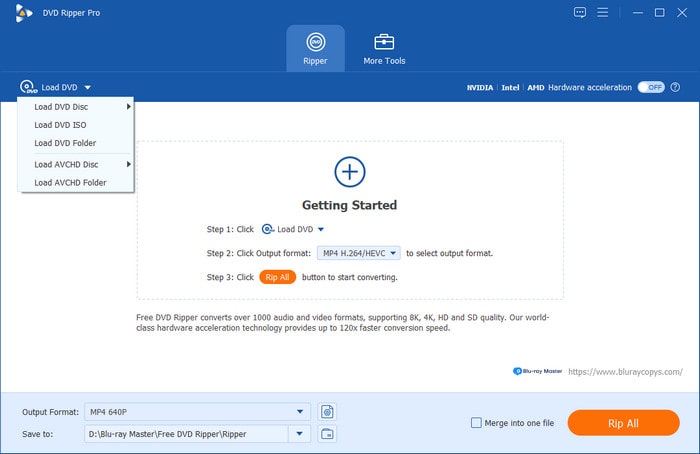
Step 1.Download and install the Blu-ray Master Free DVD Ripper on your device. Insert the DVD disc into the optical drive. Then, click the Load DVD option to import the DVD you want to rip. You can choose from Load DVD Disc, Load DVD ISO, and Load DVD Folder.
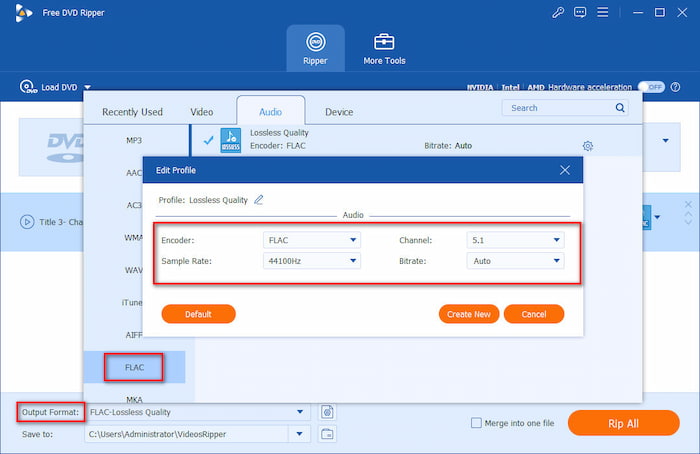
Step 2.Choose one desired profile from the Output Format drop-down list. You can choose FLAC, set the sample rate to 48 kHz, and choose the 5.1 Channels.
Note: There are multiple video, audio, and even device-specific profiles to choose from that can meet various ripping needs.
Step 3.After that, click the folder icon to set the download folder and choose Rip All to begin the DVD audio extraction process.
Note: You can click the scissors and other icons to adjust video/audio effects.
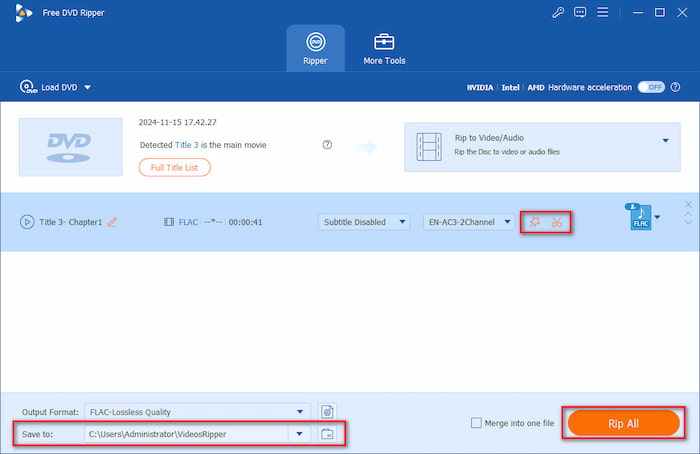
Blu-ray Master Free DVD Ripper lets you complete your work in just 3 steps, making it more efficient than most other DVD rippers. Meanwhile, it also puts the entire process on the interface, making it highly convenient and user-friendly. With its decent decryption ability to handle CSS, APS, and other DVD protections, it is a good choice for many people.
Part 5. FAQs of DVD Audio Ripper
-
What is the best software to extract audio from a DVD?
You can't go wrong with Free DVD Ripper from Blu-ray Master. Because it not only has multiple pro functions but also makes users feel it is simple to use.
-
Can you convert DVD to mp3?
Yes, you can convert DVDs to MP3, but not directly. DVDs contain video and audio data, while MP3 is an audio-only format.
-
Can VLC extract audio?
Of course! VLC can extract audio from video files, including those ripped from DVDs. It's one of the most frequently used audio rippers because it is totally free software.
-
What is the easiest free software to extract audio tracks from a DVD on a Mac?
VLC Media Player is a good choice. Though it primarily serves as a powerful media player, it has a unique Convert/Save feature to extract audio files from DVDs.
-
How can I rip a music concert DVD to lossless FLAC files with individual tracks?
You can use Blu-ray Master Free DVD Ripper to losslessly convert DVD to FLAC files. The steps are easy: Load DVD > choose FLAC as the output format, and start ripping.
-
Can VLC Media Player rip audio from a copy-protected commercial DVD, or do I need a decrypter?
No, it cannot do this. You can try other free tools to decrypt DVDs, like MakeMKV.
-
What is the difference between ripping DVD audio to WAV versus FLAC in terms of sound quality?
Both formats offer identical, bit-perfect sound quality. FLAC is the superior choice because it cuts file sizes by 50% through lossless compression and fully supports metadata tagging for media servers, and WAV creates massive files with poor tagging support.
-
What is the best way to rip audio from a copy-protected DVD on Windows 11?
The programs available in this article are all supported on Windows 11. All you have to do is select which one best suits your needs. However, we recommend using Blu-ray Master Free DVD Ripper since it is the most balanced option.
-
Can I use VLC to extract high-quality FLAC audio from a movie DVD?
Yes, VLC can convert audio to FLAC. This can be done for audio-to-audio or video-to-audio conversion. As such, the FLAC conversion profile can also be used for DVD ripping.
Wrapping up
Today, we tested 5 top DVD audio rippers, including their features, pros, cons, and more. We hope you find the one that fits you most among these apps. As for a recommendation, the Blu-ray Master Free DVD Ripper is your best choice, as it offers the best balance when it comes to features, conversion capability, and ease of use. All of which are practical options for users of all skill levels. Meanwhile, if you have more questions, you can visit the article below or get in touch with us via email.
More from Blu-ray Master
Top-rated DVD Ripper

Fast and free ripping software to decrypt all DVDs to digital easily on your computer.
100% Secure. No virus
