

Oct 19, 2026Posted by Kevin Miller to Rip DVD
Quick Summary:
To convert DVDs to digital for free in 2026, choose one way from four proven methods based on your needs: Blu-ray Master Free DVD Ripper offers the easiest 1-click process for beginners; HandBrake with libdvdcss provides the best open-source customization for DRM-protected discs; MakeMKV delivers lossless 1:1 original video quality; and Vudu allows convenient mobile barcode scanning to cloud storage.
We commonly use our devices to watch a variety of videos, from short clips to hour-long movies. Because of this, the use of DVDs and DVD players is gradually decreasing, making it almost impossible to enjoy your movie collections. But one thing you can do to avoid wasting your discs is to learn how to convert DVDs to digital for free. You are lucky because this article explains how to convert discs into digital files so you can watch or share them on your computer, phone, tablet, and more. Let’s get started!
Table of Contents
- Way 1: Best Easy-to-Use Tool for Beginners - Blu-ray Master Free DVD Ripper
- Way 2: Best Open-Source Converter for Customization - HandBrake
- Way 3: Best for Lossless Original Quality – MakeMKV
- Way 4: Best Convenience for Mobile & Cloud Scanning – Vudu (Fandango at Home)
- Part 5. Which Way is the Best One
- Part 6. FAQs about Converting DVDs to Digital for Free
Way 1: Best Overall — Blu-ray Master Free DVD Ripper
What is better than a free DVD ripping tool on Windows with high output quality? Blu-ray Master Free DVD Ripper is a professional ripping program that has the latest technology to extract content from DVDs. Whether you have DVD-5, DVD-9, or others, it automatically rips and converts the files to MP4, MOV, MKV, VOB, AVI, and more output formats. It is super easy to use, with a clean interface that makes navigation effective for both beginners and pros. Nothing tops its lightning-fast process, which converts multiple files at once in the blink of an eye. Free DVD Ripper is free software that converts DVDs to digital on Windows and Mac.
- • Equipped with the latest GPU acceleration for a quicker conversion.
- • Support DVD formats like DVD-ROM, DVD-5, DVD+R, etc.
- • Customize profile effects, metadata, quality, resolution, and more.
- • Lightweight software for Windows 11/10/8/7.
Pros
- Its interface is clear, and settings are intuitive, which allows beginners to use it with ease.
- It supports hardware acceleration to rip DVDs.
- It provides specific device-compatible profiles, like Apple, Android, Roku TV, etc.
Cons
- It may struggle with the latest or heavily protected commercial DVDs.
- You are allowed to output up to 720p profiles in the free version.
Free Download
For Windows
Secure Download
Free Download
for macOS
Secure Download
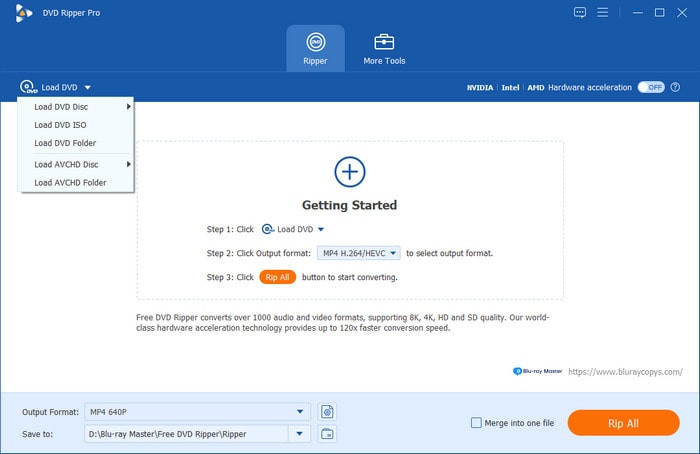
Step 1. To begin converting DVDs to digital on Windows, click the Free Download button and install the software on your computer. Insert a disc into the optical drive and wait until the program recognizes it. Then, click Load Disc and select the videos you want to convert.
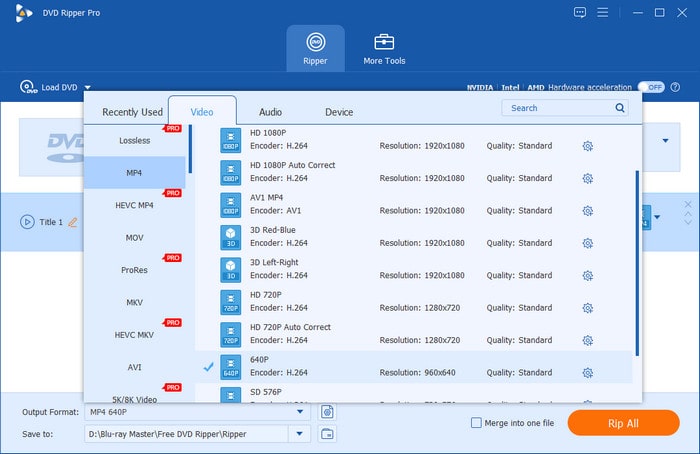
Step 2.After the files are uploaded, go to the Output Formats dropdown menu at the bottom part of the interface to choose a preset with the desired format, like H.264 and MP4 format. Then click the Gear button to change the video resolution, encoder, bitrate, FPS, etc. Click OK to save the changes.
Recommended Settings
- • Container: MP4 (Best Compatibility) or MKV (Best Quality)
- • Codec: H.264 vs. H.265 (HEVC)
- • Resolution: 720×480 (Native DVD Resolution, Do not upscale to maintain natural look.)
Tips
Simply keep the DVD at its native 480p resolution. Using 1080p or 4K output will only increase file size without improving image quality. By using the H.264 codec and setting the RF parameter to 18–20 to convert the video to an MP4 container, you can achieve the optimal balance between image quality fidelity and compact storage requirements. This approach generates high-quality digital copies that play smoothly on all modern devices while saving valuable storage space.
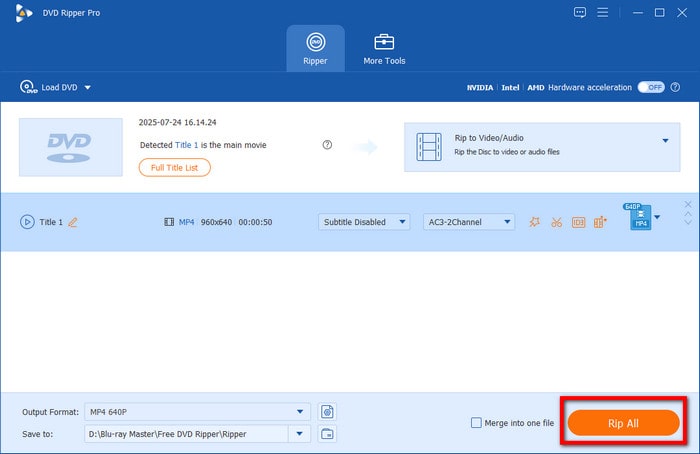
Step 3. Before converting the DVD to digital files, you must select a destination folder. Click the folder icon beside the Save to option, then choose an existing folder or create a new one. Once you’ve done this, click the Rip All button and wait until the process is finished.
When it comes to fast-speed and high-quality digital files, nothing can top Free DVD Ripper. It is also free to download and use without limitation. However, it is recommended to upgrade to a premium version to unlock more helpful tools and an excellent conversion experience.
Way 2: Best for Open-Source Users — HandBrake & VLC
If you are a Mac user, you might find it challenging to find a DVD converter. But HandBrake has always been available on both Windows and Mac platforms, allowing you to rip and convert files to MP4, MKV, MOV, and WebM. With its free, open-source service, this tool is ideal for professional DVD ripping and conversion.
When it comes to copy-protected DVDs, HandBrake does not natively support them. However, you can install the libdvdcss plug-in. This extension will allow you to read and rip commercial or encrypted DVDs.
Pros
- Advanced output settings for resolution, FPS, formats, etc.
- Excellent and quick batch processing.
Cons
- Beginners find it intimidating.
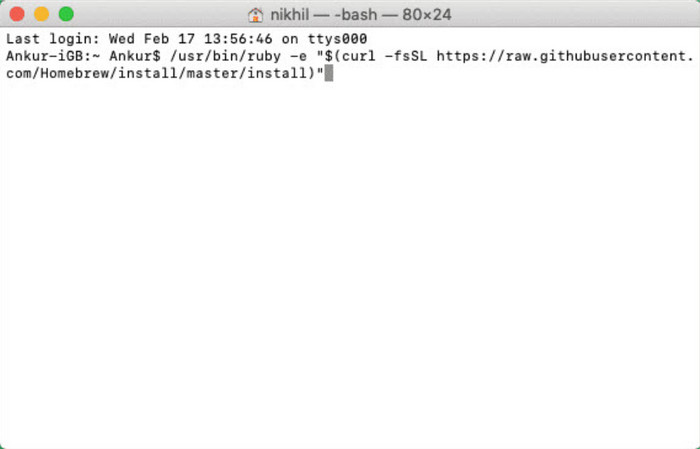
Step 1.Once HandBrake is downloaded and installed, you will need to install libdvdcss to allow conversion on a Mac.
- On Mac, open Terminal and run the official Homebrew installer: - /bin/bash -c "$(curl -fsSL https://raw.githubusercontent.com/Homebrew/install/HEAD/install.sh)"
- Run the following command to download and install the latest libdvdcss package: brew install libdvdcss
- By default, Homebrew installs libraries in /opt/homebrew/lib on Apple Silicon Macs, but HandBrake scans /usr/local/lib for decryption libraries. Run these commands to create the target folder and link the library file: sudo mkdir -p /usr/local/lib
Step 2. Insert the disc and choose the DVD drive from the sidebar. When the videos are recognized, proceed to select a preset with resolution, format, quality, etc., or customize a new one. Click the Start Encode button to convert DVDs to digital files on a Mac.
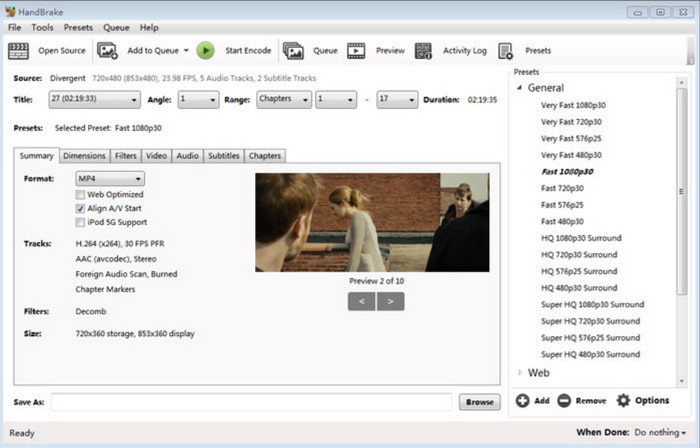
HandBrake is a helpful tool for your Mac. However, due to the operating system’s nature, you will need to use extensions to achieve high-quality conversion results.
Way 3: Best for Lossless Original Quality – MakeMKV
If your goal is to maintain the original quality of the DVD videos, MakeMKV will have to do it. Why? The tool focuses on creating MKV files from DVDs, and this format can preserve the quality of various data, such as video, audio, subtitles, and more. It is also free to use on Mac and easier to set up, too.
For better digital conversion quality, you can use MakeMKV together with HandBrake. Since HandBrake has a limitation in bypassing protection, and MakeMKV’s converted videos are huge. You can use MakeMKV to decrypt your video and then process it to HandBrake for compression.
Pros
- It can 1:1 preserve the titles, audio tracks, and subtitles.
- You are allowed to select the titles you want to maintain.
- The DVD ripping feature of MakeMKV is completely free.
Cons
- It can only output MKV files.
- The output MKV files are large.
Step 1. Prepare the software by installing it on your computer. Also, insert the disc that you want to rip and convert. Choose the videos from the menu and confirm.
Step 2. You may need to tick the checkboxes next to the data files you want to keep. Remember that maintaining all of the data content will determine the conversion speed and file size. Click the Make MKV button to start the process.
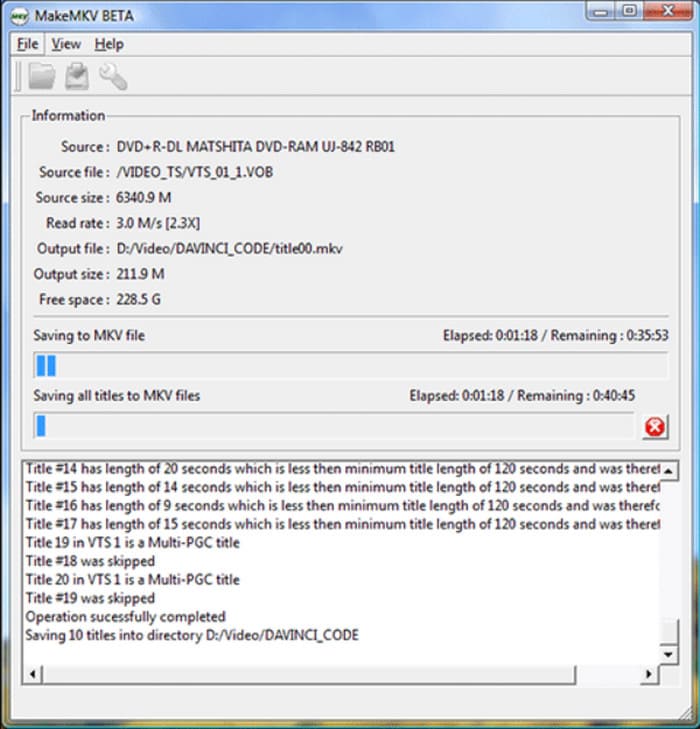
MakeMKV is recommended for a quick conversion. However, its lack of supported formats might not be ideal for you.
Way 4: Best Convenience for Mobile & Cloud Scanning – Vudu (Fandango at Home)
If you don't want to hassle with desktop software and external DVD drives, Vudu (now Fandango at Home) offers a paid service that converts your physical discs directly into cloud-based digital copies. Rather than producing a local video file (like MP4), it adds the movie directly to your online streaming library so you can watch it anywhere on your phone, smart TV, or tablet.
Pros
- You can complete this process via your phone only.
- The ripped video files will be stored directly in your cloud library and support playback on various smart devices.
- You can upgrade the old standard DVD to 1080P HDX quality for just a few dollars.
Cons
- It is a paid service that charges $2 to $5 per title, plus there is a strict limit of 100 conversions per account per calendar year.
- It is strictly limited to a US-based billing address and GPS verification.
Now, let's see the specific steps.
Step 1.On your smartphone or tablet, open a browser (Safari or Chrome), navigate to https://vudu.com/disc or https://athome.fandango.com/disc, and sign in to your account.
Note: The service now runs entirely through the mobile web browser rather than inside a desktop application.

Step 2.Allow the browser to access your phone’s camera and precise GPS location. To ensure you physically own the disc, your billing address must match your phone's current GPS location when scanning.
Step 3.Point your mobile camera at the UPC barcode on your DVD or Blu-ray case. The service will automatically match the barcode and display the conversion pricing: $2 for DVD to SD, or $5 to upgrade DVD to HDX; Blu-ray to HDX costs $2.
Step 4.Complete the checkout via your linked credit card or PayPal. The digital movie will instantly appear in your Fandango at Home library and sync across Movies Anywhere if linked.
Vudu is the perfect choice for people who don't have an optical drive. Keep in mind it costs $2–$5 per movie and adds titles directly to your cloud library rather than generating local MP4 files.
Part 5. Which Way is the Best One
Of course, you don’t want to spend too much time trying all of these recommended tools. So, the table below summarizes their features and benefits in case you want to make a quick pick.
| Tools | Supported Platforms | Output Formats | Ripping Speed (90-Min DVD Test) | DVD Decryption |
| Blu-ray Master Free DVD Ripper | Windows 11/10/8/7, macOS | MP4, MOV, AVI, WMV | ~10–12 mins (with GPU Acceleration) | Yes |
| HandBrake (+ libdvdcss) | Windows, macOS (Intel/M-Series), Linux | MP4, MKV, MOV, WebM | ~15–20 mins (H.264 RF:20 Presets) | Yes |
| MakeMKV | Windows, macOS, Linux | MKV (Lossless) | ~8–10 mins (Direct Pass-through) | Yes |
| Vudu (Fandango at Home) | iOS, Android (Mobile Web) | Cloud Streaming (SD/HDX) | ~1–2 mins per barcode scan | Yes |
Part 6. FAQs about Converting DVDs to Digital for Free
-
What is the best free DVD-to-digital converter?
Among the recommended solutions in this post, Free DVD Ripper is the best option. It guarantees output quality while providing better features for further enhancement and editing. Moreover, it is accessible on any Windows or Mac OS, so it is a good deal.
-
What is the best free software to convert DVDs to digital in 2026?
It depends on what your priority is. If you want a balance of ease of use, quality, and workflow performance, Free DVD Ripper may be the pick for you. It is also one of the easiest to use among DVD ripper tools.
-
How to convert Disney DVDs to digital without paying?
You need to use a DVD ripper that can bypass 99-title DRM. Free DVD Ripper is a good option in this case. You can also use HandBrake equipped with the libdvdcss plug-in.
-
HandBrake vs. MakeMKV: Which is better for ripping DVDs?
They are both good options. However, MakeMKV can rip encrypted DVDs natively. This is a major advantage over HandBrake.
-
Can I use VLC to rip copy-protected DVDs?
Yes, you can. VLC can bypass basic DRM protections. However, it is not the most consistent in terms of performance and reliability. DVD ripping is only an extra feature.
-
Is it legal to convert my own DVD collection to digital in the US?
It is a legal gray area. Ripping DVDs is not illegal. However, bypassing DRM protection is prohibited. To avoid any legal issues, make sure to rip only unprotected DVDs and use them only for personal use.
-
How to convert DVD to MP4 with the best quality and smallest file size?
HandBrake is a good option in this case. Among these tools, it offers the strongest compression rate. However, be careful with this setting, as too much will make your digital video of poor quality.
Wrapping up
Now you can try the solutions for free, converting DVDs to digital file formats. Before ending, make sure to choose the tool that best fits your needs for converting DVD to MP4 for free on Mac/Windows. But for an overall recommendation, Blu-ray Master Free DVD Ripper has it all, from top-speed conversion to output quality and easier navigation. Start today by clicking the Free Download button.
More from Blu-ray Master
Rip DVDs to Digital

Fast and free ripping software to decrypt all DVDs to digital easily on your computer.
100% Secure. No virus
