

Sep 18, 2026Posted by Kevin Miller to Rip DVD
Quick Selection Guide:
- Go with MP4 (H.264) if you want to watch your movies on iPhone, iPad, Smart TVs, or pretty much any player without hassle. It strikes the sweet spot between smaller file size and decent visual quality.
- Go with MKV if you’re a movie enthusiast who wants crisp quality, original surround audio, multi-language subtitles, and chapter markers preserved for home theater setups.
- Go with ISO Image if you want an exact 1:1 clone of the disc—including original DVD menus, extra footage, and zero quality loss—mainly for archiving.
Let’s be real, DVDs are outdated now. However, for a lot of people, DVDs hold so many good memories, and it’s hard to just give up those old shelves full of DVD movies. The tricky part is that discs are super fragile—one little scratch would ruin your favorite film. That’s why many people use a way to digitize the DVDs to common video formats. It keeps all those memories safe without taking up extra space or worrying about breaking them.
To digitize your DVD collections, which format is best? No single 'magic' format works best for everyone. The right choice completely depends on what you care about most. Do you want absolute top quality, small file sizes, or just something that plays everywhere without glitching? This guide will analyze the best formats to rip DVDs, compare them, and give recommendations on DVD ripping.

- Top Digital Formats for DVD Ripping (Deep Dive)l
- Quick Comparison Table of Different Formats
- How to Choose the Best Format for YOUR Needs
- Top Recommended DVD Ripping Tools (Brief Overview)
- FAQs about Best Formats for DVD Ripping
Part 1. Top Digital Formats for DVD Ripping (Deep Dive)
In general, many people would choose MP4 as the output format because MP4 has good compatibility with multiple platforms and devices. However, in some special situations, you may need to rip DVDs to other formats, but how to choose the proper one? The following are some common video formats.
MP4 (H.264 / AAC)
Best For: Universal compatibility & balance between size and quality.
MP4 is the undisputed king of compatibility. If you throw the ripped MP4 file onto a USB drive, plug it into a decade-old Smart TV, or AirDrop it to a smartphone, it will play properly without any errors.
- Pros: It works natively on virtually every modern operating system, phone, tablet, and gaming console. Great video compression means you save a lot of hard drive space.
- Cons: Because it applies stronger compression, you might lose a tiny bit of subtle detail compared to uncompressed source files (though most people barely notice on regular screens).
MKV (H.264 / H.265)
Best For: High quality, preserving multiple audio tracks, subtitles, and chapter markers.
MKV is a container format. Instead of throwing away extra audio tracks or forcing subtitles like other common formats, MKV keeps everything in a single file. You can even encode it with newer codecs like HEVC (H.265) to get smaller file sizes while maintaining high sharpness.
- Pros: Highly customizable. Keeps surround sound tracks (AC3/DTS), multiple subtitle tracks, and chapter information. Excellent for media servers like Plex or Jellyfin.
- Cons: Files are usually larger than standard MP4s. Some older Smart TVs or built-in media players might refuse to play MKV files or won't output the audio properly.
ISO Image / DVD Folder (VIDEO_TS)
Best For: 1:1 exact digital backup & archival.
An ISO image is literally a digital copy-paste of the entire physical DVD. It packs everything—the main movie, menu screens, behind-the-scenes features, audio commentary tracks, and language setups—into one big image file.
- Pros: Absolutely zero quality loss (100% identical to the disc). ISO can retain interactive menus and all special features.
- Cons: The files are huge (usually around 4.7GB for single-layer DVDs or up to 8.5GB for dual-layer discs). You'll need specialized software like VLC Media Player or Kodi to play them seamlessly.
MOV / AVI (Brief Mention)
- MOV: Best if you are exclusively inside the Apple ecosystem and plan to edit the video in Final Cut Pro or iMovie.
- AVI: An old-school format from the early Windows era. It still works on legacy hardware, but honestly, it's outdated and inefficient compared to modern MP4s.
Part 2. Quick Comparison Table of Different Formats
Now, let's see a quick comparison table to intuitively compare the 3 formats.
| Format | Quality | File Size | Compatibility | Supports Subtitles/Menus |
| MP4 | High | Medium | Excellent (Universal) | Subtitles (Hardcoded or Soft) |
| MKV | High / Original | Medium to Large | Good | Multiple Subtitles & Audio Tracks |
| ISO Image | Original (1:1) | Very Large (~4.7 – 8.5 GB) | Moderate | Full Menus & All Extras |
Part 3. How to Choose the Best Format for YOUR Needs
You may be confused about which format you should choose in different situations. Here, we list some common scenarios for you to quickly select.
Scenario A: Everyday Streaming & Mobile Devices - Go with MP4
Whether you are loading a few movies onto your iPad for an upcoming long-haul flight or sharing cherished family videos with your loved ones, converting DVDs to the MP4 format helps you save valuable storage space while guaranteeing that your videos will play smoothly and effortlessly on virtually any device.
Scenario B: Home Theater & Movie Enthusiasts - Go with MKV.
If you've spent the time and effort to build a dedicated home theater with a full surround-sound setup—or if you manage a personal Plex server for streaming your media collection—choosing the MKV format is an absolute no-brainer. It preserves every piece of original audio and soft subtitle track without sacrificing a single drop of sound or video quality, ensuring you get the exact high-fidelity experience your setup was built for.
Scenario C: Archiving & Preserving Rare Discs - Go with ISO / VIDEO_TS.
If you own rare concert DVDs, vintage films with interactive extras, or family home movies that you want to preserve in original quality forever, make a raw ISO image backup before the physical disc degrades.
Part 4. Top Recommended DVD Ripping Tools (Brief Overview)
After knowing the detailed information about the best formats to rip DVDs, you may be ready to digitize your DVD collections. Here are the two recommended DVD ripping tools for you to use.
1. HandBrake
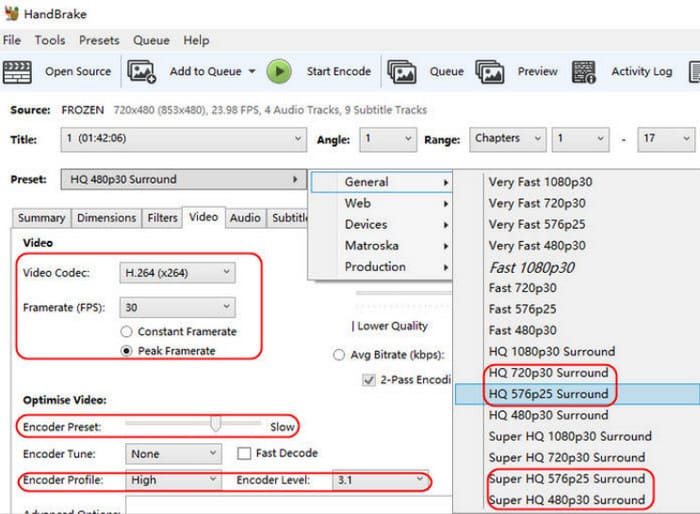
HandBrake is a free and powerful DVD ripping tool available for Windows, macOS, and Linux. It allows you to convert homemade physical DVDs, DVD folders, and ISO files into digital formats, including MP4 and MKV. In addition, it has many advanced settings, like presets, deinterlacing, denoising, and many other settings for you to improve DVD video effects. It cannot rip encrypted DVDs natively, and you can install libdvdcss on HandBrake to do this.
Pros
- It provides rich presets, including built-in presets tailored for specific devices (e.g., iPhones, Android devices, Roku).
- It has a Preview feature for you to see the video effects.
- It has the batch conversion ability for you to add multiple titles to a queue and encode them sequentially.
Cons
- Though with libdvdcss, HandBrake may fail to process advanced DVD copy protections.
- Video encoding requires noticeable CPU or GPU usage. Ripping times depend directly on the length of the video and the system performance.
2. Blu-ray Master Free Blu-ray Ripper
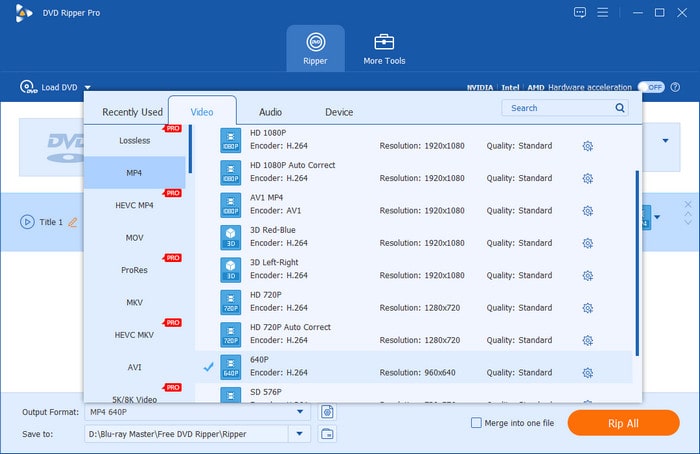
If you think the decryption ability of HandBrake is not enough, Blu-ray Master Free Blu-ray Ripper is an advanced HandBrake alternative for DVD ripping. It has robust decryption capabilities to rip both homemade and commercial DVD discs into digital. For output, it supports a wide range of formats, ranging from MP4, MKV, and FLAC, common video/audio formats, to specific device formats, such as Apple iPhone 16 Pro Max, LG, and others. With GPU acceleration, it delivers a smooth and fast DVD ripping process. Moreover, it has some extra editing tools for you to adjust video effects: filters, effects, watermarks, audio tracks, and subtitles.
Free Download
For Windows
Secure Download
Free Download
for macOS
Secure Download
Pros
- Customization settings for you to manually set the encoder, bitrate, and other parameters.
- It has an Enhance Video feature to improve the DVD video quality.
- You can add external subtitles to the DVD.
Cons
- You need to upgrade to its Pro version to unlock the high-resolution output profiles, like 4K/5K/8K.
Part 5. FAQs about Best Formats for DVD Ripping
-
What is the best digital format to future-proof a DVD collection?
MKV or ISO. These two formats can maintain the DVD's full information 1:1. If you choose MKV, H.264 and H.265 encoders are the best long-term choices.
-
Can I rip copy-protected commercial DVDs legally for personal backup?
Copyright laws vary by country. In many regions, backing up your DVD collections for personal use is a fair practice. You cannot distribute ot share the files with others.
-
How does hardware acceleration impact the overall video quality during a rip?
It would accelerate the DVD ripping process. However, in this situation, hardware-encoded files might occasionally be slightly larger or marginally lower in fine detail compared to slow, CPU-only (software) encoding at the same bit rate.
-
Why do some DVD rippers crash on modern 99-title movie discs?
Many commercial movie studios (like Disney) use advanced copy protections that create fake title tracks—often bloating the disc layout with 99 misleading titles—to trick standard ripping software. Basic converters get confused about which title is the actual movie, leading to crashes, audio sync bugs, or infinite loops. You'll need rippers equipped with smart title-detection features to bypass this.
-
How much storage space does a 1:1 lossless DVD backup typically require?
A single-layer DVD (DVD-5) takes up about 4.7 GB, while a dual-layer DVD (DVD-9) usually takes around 7.9 to 8.5 GB. If you convert those same discs into compressed MP4 or MKV files, you can easily trim the file size down to around 1.2 GB – 2.5 GB without any obvious drop in visual quality.
Conclusion
Now, you must be clear about the best formats to rip DVDs. Choosing the proper formats based on your situation is the secret. MP4 gives you the maximum playback convenience, and MKV allows for the best DVD quality retention. ISO is also a good choice for preserving the physical disc experience entirely. Do it yourself. You are welcome to share your ripping experience with us.
