

Sep 03, 2026Posted by Kevin Miller to Rip DVD
Quick Summary
Can’t rip the encrypted DVDs in HandBrake? You probably need libdvdcss. Here’s how to install and use libdvdcss on Windows, Mac, and Linux to bypass DVD encryption.
Step 1: Go to VideoLAN or GitHub and download the libdvdcss.dll file for your device and operating system.
Step 2: In your Downloads folder, copy the libdvdcss-2.dll file and locate your HandBrake installation folder.
Step 3: Paste the libdvdcss-2.dll file you have downloaded into the installation folder of HandBrake located in your Program Files.
What can be done with physical copies of DVDs that are no longer readable? Yes, ripping is the only way to save the content from discs, and you might be wondering how to do this, especially if you have encrypted DVDs. This article shows how to extract DVDs using libdvdcss in HandBrake on Windows, Mac, and Linux. But stick around for a better alternative later on.
Table of Contents
- Part 1. How We Tested libdvdcss + HandBrake Setup
- Part 2. Quick Comparison – libdvdcss vs Alternative Method
- Part 3. What Is libdvdcss and Why Do You Need It
- Part 4. How to Install libdvdcss on Windows
- Part 5. How to Install libdvdcss on Mac
- Part 6. How to Install libdvdcss on Linux
- Part 7. How to Use libdvdcss in HandBrake (Step-by-Step)
- Part 8. Troubleshooting Common libdvdcss Issues
- Part 9. Alternative – Free DVD Ripper (Easier, No Setup Required)
- Part 10. FAQs About libdvdcss and HandBrake
Part 1. How We Tested libdvdcss + HandBrake Setup
Bluraycopys Provides Verified Info
- We tested the capabilities of the libdvdcss plug-in by running HandBrake on computers running different operating systems.
- To learn the performance of the software in different setups, we ran HandBrake with a libdvdcss extension installed on Windows 11, macOS Sonoma, and Linux devices.
- To meet modern standards, the physical media we used for testing is a modern DVD release.
- Since the article features different operating systems, we also observed the performance difference of each tool when used to rip DVDs.
- After DVD ripping, the video quality of the ripped DVD copy and the original DVD media were also tested side-by-side.
Part 2. Quick Comparison - libdvdcss vs Alternative Method
To learn the difference between using the libdvdcss plug-in on HandBrake and a dedicated DVD ripper program like Blu-ray Master Free DVD Ripper Alternative, make sure to read our comparison table below. Our comparison table will highlight the differences between the two ripping methods across key factors in DVD ripping.
| libdvdcss + HandBrake | VS | Blu-ray Master Free DVD Ripper Alternative |
| Free (Open-Source) | Pricing | Free – $15.60 |
| Intermediate | Ease of Use | Easy |
| Command-Line Heavy | Setup Requirement | Download and Install |
| Intermediate to Advanced | Interface Design | Beginner-friendly |
| Windows, macOS, Linux | Supported Platforms | Windows, macOS |
Part 3. What Is libdvdcss and Why Do You Need It
This might be your first encounter with this word, so we will explain what it is. Libdvdcss is a software library that accesses encrypted DVDs, mostly with Content Scramble System (CSS). In other words, it helps bypass the encryption so that you can copy the content from a disc.
Libdvdcss is commonly used in HandBrake and VLC Media Player since both programs can rip DVDs. If you download VLC, the software library is already installed, but HandBrake will require a separate download. That said, it is important to remember that using libdvdcss can be illegal because it decrypts a protected disc.
Part 4. How to Install libdvdcss on Windows
Unfortunately, libdvdcss has been removed from HandBrake since V0.9.2, and only has libDVDNav as a pre-installed library. You will need to download libdvdcss as a separate software library to bypass DVD encryption. On top of that, it is important to address that using this method can violate copyright laws depending on your region. So, make sure to check the copyright laws before proceeding. With that said, here are the steps to follow to download and install libdvdcss on HandBrake:
Step 1. Visit a trusted website to download libdvdcss. You can also try the GitHub repository, which offers pre-compiled versions of the library. Make sure to download the right version that is compatible with your Windows system.
Step 2. To install libdvdcss on HandBrake, locate the HandBrake folder on your device, copy the downloaded libdvdcss, and paste it into the folder. Then, Restart HandBrake so the changes may take effect.
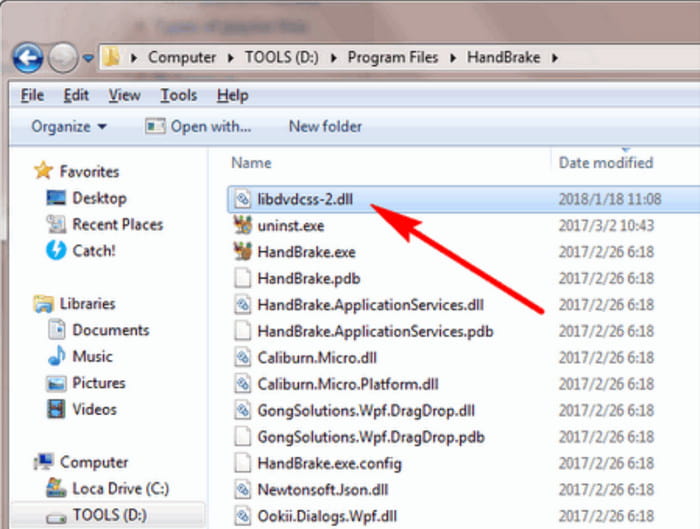
It is super easy to install libdvdcss on HandBrake on Windows. Both HandBrake and the software library are also free and open-source, so you can modify their systems to match your preferences.
Part 5. How to Install libdvdcss on Mac
Installing the software library on Mac is trickier than on Windows, considering that Apple’s security measures are restrictive. But here, we have the most effective way to install libdvdcss on Mac with Homebrew.
Step 1. Visit Homebrew’s official website and copy the first link you see. Open Terminal on your computer, paste the command, and press Enter.
Step 2. Once done, type brew install libdvdcss in the search box, and press Enter. This will automatically install the software library via Homebrew. Then, proceed to HandBrake for DVD ripping.
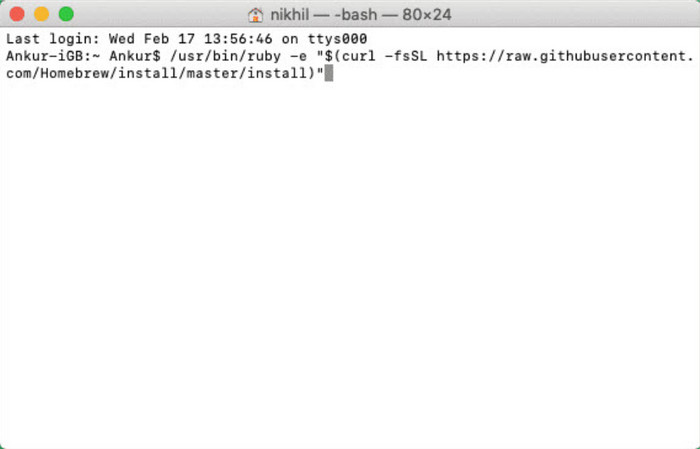
It may take a while to get used to this method. Then you can rip DVDs in HandBrake easily. But unlike the first one, using Homebrew will make DVD ripping more successful.
Part 6. How to Install libdvdcss on Linux
If you use Linux, installing libdvdcss depends on the system version. In this case, we provide general guidelines for popular Linux versions.
Debian-based like Mint, Ubuntu, etc.:
Step 1. Open the terminal and run the command sudo apt update.
Step 2. The package will immediately help you download and install libdvdcss by using the code sudo apt install libdvd-pkg. Then download HandBrake or restart it to check whether the software library is fully installed.
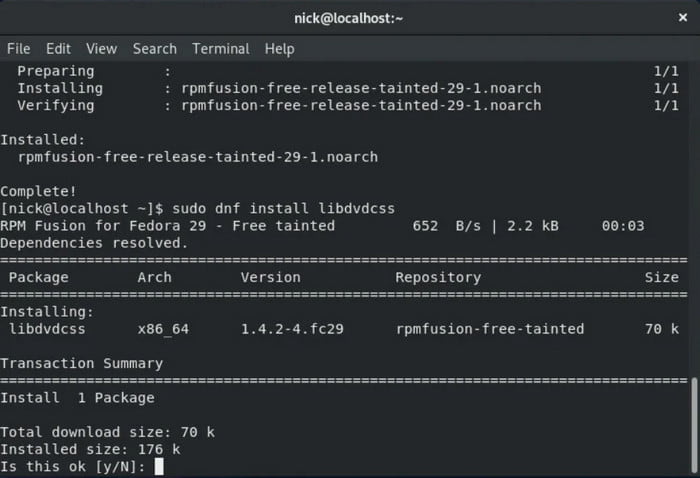
RPM-based like CentOS, Fedora, etc.:
Step 1. From a terminal, run the code sudo dnf update. Wait until the command is properly recognized.
Step 2. You can use sudo dnf install handbrake-gui libdvdcss to install libdvdcss and HandBrake simultaneously.
Installing libdvdcss on Linux does not seem to come with a simple step, especially with different system versions. However, following the instructions properly will help you set up the software library for HandBrake.
Part 7. How to Use libdvdcss in HandBrake (Step-by-Step)
Once libdvdcss is installed on your computer, it is time to use it to rip DVDs via HandBrake. Here are the steps:
Step 1. Launch HandBrake and insert the disc you want to rip. Click the Source button in the upper-left corner to upload the videos.
Step 2. Once the program scans all the uploaded titles or chapters, you can choose the desired output format, resolution, and other settings.
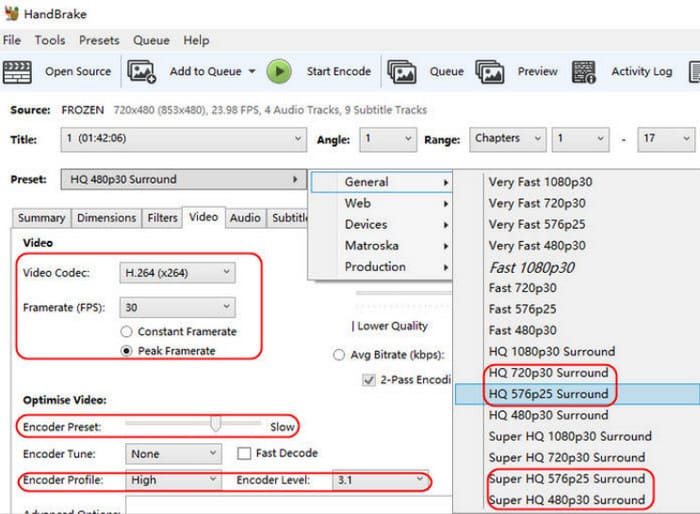
Step 3. Click the Browse button to set a destination. Finally, click the Start button to rip DVD videos. After a while, the ripped videos are ready to be streamed on your computer.
Note that adding libdvdcss to HandBrake will help you extract files from copy-protected DVDs. However, depending on your region, this can be illegal. So, we urge you to check legality first before proceeding.
Part 8. Troubleshooting Common libdvdcss Issues
Of course, it is inevitable to experience errors when using libdvdcss on HandBrake. A few things to consider during installation that you should keep in mind are the following:
- Incorrect software installation.
- An incompatible libdvdcss version.
- Outdated device or software.
- Corrupted DVDs.
These possible errors can be fixed with software updates or by diligently following the steps provided in this post so that you can install libdvdcss in the correct path. Furthermore, corrupted DVDs can be ripped with another ripping solution. Check the next part for more information.
Part 9. Alternative - Free DVD Ripper (Easier, No Setup Required)
If libdvdcss does not work on HandBrake for you, then Free DVD Ripper by Blu-ray Master is a must-try. It is a desktop software that rips DVDs, DVD Folders, DVD IFO Files, and others with just a few clicks. With support for a wide range of output formats, it makes it easy to convert DVD files to MP4, HEVC, MKV, AVI, FLV, and more. On top of that, it offers editing features so you can trim, merge, crop, or rotate the movies as much as you want. The best DVD ripper is available to download for free on the latest Windows and Mac. You can try it.
- No libdvdcss or extension is needed for DVD ripping.
- Supports ripping DVD-9, DVD-5, and other DVD types.
- Enhance, compress, add effects, and edit videos.
- Adjust output settings like aspect ratio, bitrate, FPS, etc.
Free Download
For Windows
Secure Download
Free Download
for macOS
Secure Download
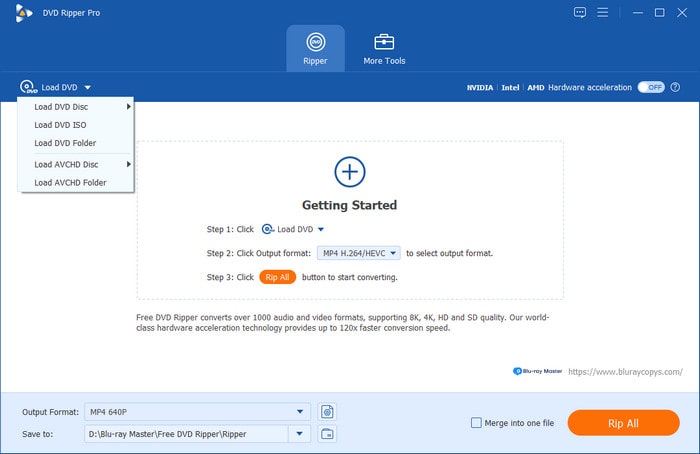
Step 1. Download and install DVD Ripper on your computer. Once completely set up, launch the software and insert the disc you want to rip. Click the Load DVD > Load DVD Disc button and upload the desired videos. Click OK to proceed.
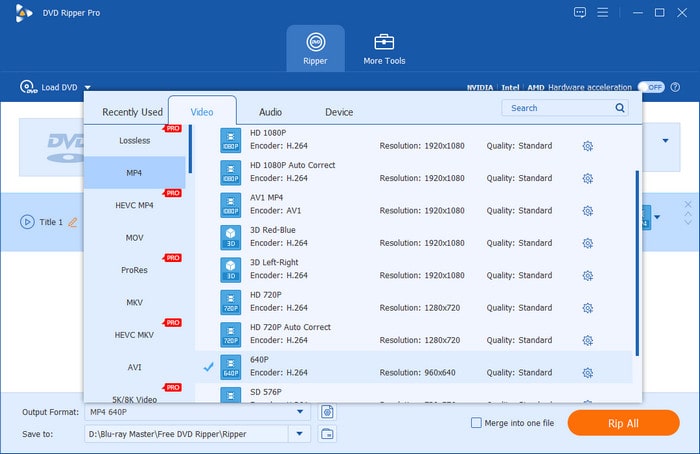
Step 2. When the titles or chapters appear on the main interface, go to the Output Format drop-down menu and select the output format. Click the gear button to adjust settings such as resolution, bitrate, FPS, sample rate, and more. Click Create New to save and apply the changes.
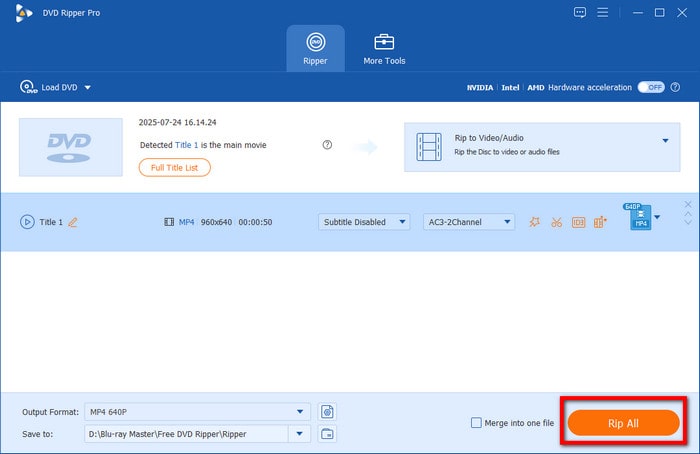
Step 3. Next, you will need to pick a location folder to save the ripped videos. Navigate to the Save To menu and browse the folder you desire. At last, click the Rip All button to rip videos from your DVD.
Unlike HandBrake, you don’t need to install libdvdcss 2DLL on DVD Ripper. In just a few clicks, high-quality videos are ripped from physical copies of DVD or Blu-ray. Try this excellent ripper for free by clicking the Free Download button.
Part 10. FAQs About libdvdcss and HandBrake
-
Does VLC need Libdvdcss?
Yes, VLC needs libdvdcss to access encrypted DVDs. This is one of the desktop tools that needs library software for ripping DVDs.
-
What is the latest version of Libdvdcss?
As of 2021, the latest version of libdvdcss was 1.4.3, which can be installed on any supported platform.
-
Why won’t my HandBrake read my DVD?
Aside from the possibility that the disc is damaged or corrupted, HandBrake may not read your DVD if it’s encrypted or protected. That’s why you will need a software library like libdvdcss to access and copy the content from DVDs.
-
Why does HandBrake say 'No valid source found'?
The most common reason why this message occurs is that your DVD has copy protection. This can be solved by installing the libdvdcss plug-in to bypass common anti-copy measures. If you are using an external driver, make sure to double-check your connection to your computer.
-
Is libdvdcss legal?
It depends on how you will use it and the law in your area. Commonly, bypassing copy protections is illegal. However, you can use this safely for personal DVD media.
-
Can I use libdvdcss with VLC instead of HandBrake?
Yes, you can. Since VLC also has basic ripping features, libdvdcss is required in it to bypass protected media. It cannot bypass protected DVDs by default without the plug-in.
-
What's the easiest way to rip a DVD if I'm not technical?
Dedicated ripper tools are the easiest option to rip DVD content. A good example is Blu-ray Master Free DVD Ripper. HandBrake is also an acceptable choice if you are an intermediate user.
Wrapping up
In this article, we showed you how to use libdvdcss in HandBrake to rip DVDs. You can extract DVD videos. At the same time, you also learned that libdvdcss does not always work for DVD ripping, so we suggest going for DVD Ripper by Blu-ray Master for a better ripping experience. Go to the official site and download it for free to try!
More from Blu-ray Master
HandBrake Solutions
Fast and free ripping software to decrypt all DVDs to digital easily on your computer.
100% Secure. No virus
