

Sep 03, 2026Posted by Kevin Miller to Rip DVD
Quick Summary:
When looking to transfer DVD media to VHS, you need to secure key equipment such as a DVD Player, VCR, RCA Cables, and a Blank VHS Tape. Afterward, you need to connect both the DVD and the VCR to your computer. Then play the DVD and start recording its content with your VCR. Alternatively, you can create a digital backup of the DVD by ripping it.
DVDs and VHS tapes come from very different technological eras. Still, many users seek to transfer DVDs to VHS for various reasons. Some do it for nostalgia, treasuring the classic feel of watching movies on VCRs. Others want to archive digital content into a physical tape that can be stored long-term. Whatever the reason, we’re here to help you transfer your DVD collections into VHS tapes. This way, you can share your collections with friends and family members who only have a VCR. Although old-fashioned, it remains a meaningful process for those still relying on analog technology.
- Part 1. Before You Start — What You’ll Need
- Part 2. Why Transfer DVD to VHS in 2026? (And Why Maybe You Shouldn’t)
- Part 3. Step-by-Step: How to Transfer DVD to VHS Tape
- Part 4. Bonus: DVD to Digital Backup — The Smarter Alternative
- Part 5. FAQs About DVD to VHS Conversion
Part 1. Before You Start — What You’ll Need
Before anything else, it's important to prepare the right equipment to transfer DVDs to VHS. Each device and tool is essential to ensure the video and audio are recorded correctly. Below is the equipment you will need for a successful DVD-to-VHS conversion:
- DVD Player: Essential for reading and playing the DVD content. It serves as the source device in the disc-to-VHS setup. The DVD player will record the video and audio signals to the VCR.
- VCR (Video Cassette Recorder): It records the video and audio signals from the DVD player into a blank VHS tape. You’ll need a working VCR that accepts RCA inputs. It should also support Standard Play or Extended Play recording modes.
- RCA Cables (Audio and Video): These traditional cables connect the DVD player to the VCR. The RCA cable consists of three plugs: yellow, white, and red. These cables carry the video and audio signal from the player to the VCR for recording.
- Blank VHS Tape: This is where you will record the DVD content. Using brand-new or high-quality unused VHS tapes is recommended to ensure high recording quality. If you’re reusing old tapes, ensure they are fully rewound.
Part 2. Why Transfer DVD to VHS in 2026? (And Why Maybe You Shouldn’t)
Before learning how to transfer DVD to VHS, let us first discuss the reasons why you should transfer physical media content from DVDs to old school tape recorders.
Among the benefits of converting to VHS, the most notable is that tapes are simply nostalgic to have, and they are even more protected than DVDs if you plan to use them as a backup. If you plan to use older hardware, such as CRT televisions and preserved Video Cassette Recorders (VCRs), writing DVD data to VHS is also highly recommended.
However, converting to VHS is not always recommended if you plan on writing modern video files with high quality. Writing videos to VHS results in significant quality and resolution loss, making it unsuitable for modern commercial DVDs.
Part 3. Step-by-Step: How to Transfer DVD to VHS Tape
Blu-ray Master Free Blu-ray Player, chosen by Blu-ray Master, is a highly flexible software you can use with a VCR to record DVDs. Beyond playing back Blu-ray discs, it can also play DVDs, VIDEO_TS folders, IFO files, and ISO files. This media player can efficiently remove any region locks and copy protections integrated with the DVD. This means you can play DVDs from any region without thinking about encryption.
Here’s how to convert a DVD to a VHS tape:
Free Download
For Windows
Secure Download
Free Download
for macOS
Secure Download
Step 1.Connect Your DVD Player to the VCR
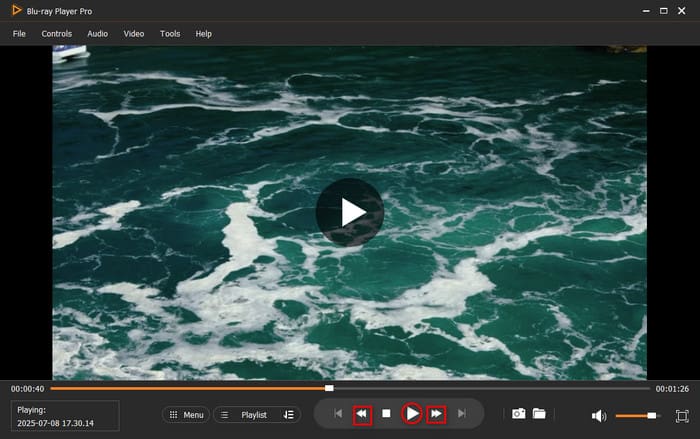
Connect your DVD player to your chosen VCR, then set up the Blu-ray Player software. Click the Open Disc button to load the source into the software. Or, click Open File to import a VIDEO_TS folder or DVD ISO file. The software will automatically start playback after the disc is recognized.

Step 2.Prepare the Recording
Insert a blank VHS tape into the VCR and set it to the correct input channel. This way, it will receive the signal from the computer. Pause the VCR so it’s ready to start recording. Switch back to the software and click Play to begin the playback. Simultaneously, press Record on the VCR and allow the DVD to play through fully while recording.
Step 3.Play and Record
Use the smart navigation menu to set the point where you want the recording to start. Once you reach the stopping point, press Stop on the VCR. Otherwise, click Stop in the software’s smart menu navigation to end the playback.

The Blu-ray Player, approved by Blu-ray Master, ensures you can convert DVD to VHS effortlessly. Best of all, it adds DVD subtitles during playback and recording. Plus, it features a Snapshot tool that lets you capture essential video highlights.
Part 4. Bonus: DVD to Digital Backup — The Smarter Alternative
Blu-ray Master Free DVD Ripper is another reliable piece of software for converting DVDs to digital formats for backup. It is compatible with macOS 10.12 or above and Windows 11/10/8/7. This free tool lets you rip DVDs to 200+ digital formats, including video, audio, and device presets. It can handle DVDs from regions (1 to 6) and even those with copy protections and encryption. After ripping the DVD, you can set a specific output directory to easily locate your ripped videos.
Since it specializes in creating digital copies of DVD content, the program is a good option if you want to create a digital copy before writing your DVD to VHS.
Here’s how to convert a DVD to VHS for backup:
Step 1.Start by downloading the Blu-ray Master Free DVD Ripper. Install the DVD-ripping software on your computer and let the installation process finish. Once completed, insert the DVD into the external disc drive and launch the software.
Free Download
For Windows
Secure Download
Free Download
for macOS
Secure Download
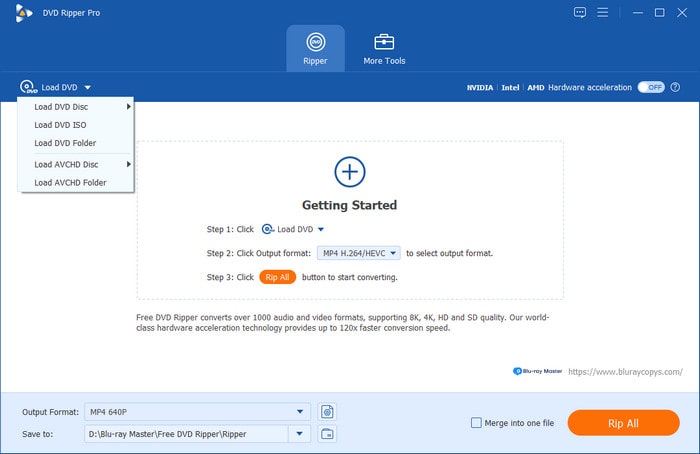
Step 2.Click Load Disc to import the source inserted from the DVD drive. If DVD files are stored locally, select other loading options using the pulldown menu. You can also choose Load DVD Folder to add a VIDEO_TS folder or Load ISO Files to insert ISO files.
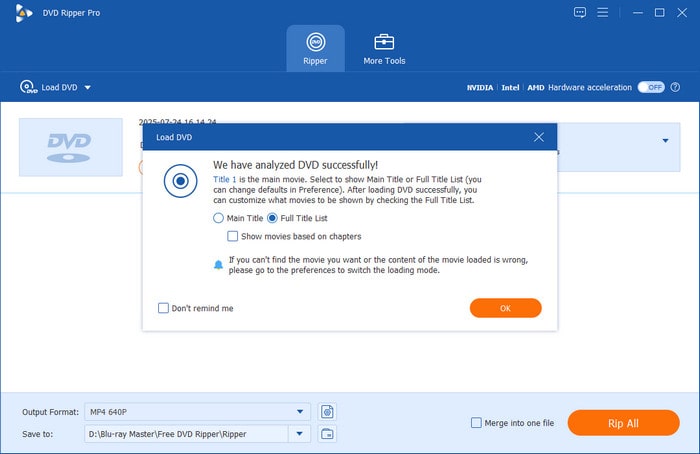
After loading your source, the software will ask you to select a loading mode. You have to choose between Main Title or Full Title List. Main Title will make the program rip all the content from your DVD. On the other hand, the Full Title List will provide you with the list of the chapters, and you can manually choose which title you want to rip.
Step 3.With the DVD loading option now selected, click on Output Format and select the file type you want to save your ripped DVD video into. In this tutorial, we selected MP4 to maximize compatibility.
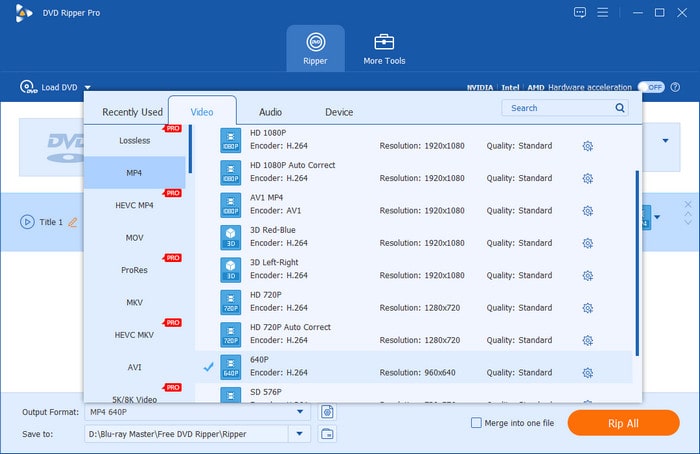
Step 4.Now that your output format has been set, you will be redirected back to the Ripper interface. There, select Rip All to start ripping your DVD content to the digital output format you have selected.
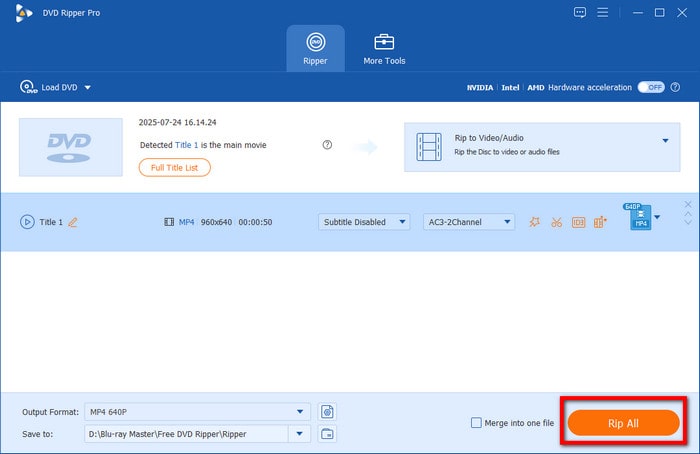
Blu-ray Master Free DVD Ripper is the best free DVD ripper to convert DVD to VHS. It supports high-quality DVD-to-digital conversion without losing essential details, making them playable across devices. Best of all, it can efficiently bypass region codes and rip-protected DVDs.
Part 5. FAQs About DVD to VHS Conversion
-
Can I transfer DVD to VHS without special equipment?
No, you cannot. DVD and VHS are fundamentally different since the DVD is digital and VHS is analog. You need special equipment to play the DVD video while the VHS is recording it.
-
Will DVD to VHS lose quality?
Yes, it will. DVDs are digital data, and their quality is high, especially modern commercial DVDs. Meanwhile, VHS only records the DVD, which will result in lower quality.
-
Why is the audio out of sync after DVD→VHS?
This issue is usually caused by VCR tracking, tape quality degradation, or an analog signal. To avoid these common issues, check the VCR connection. Double-check the quality of your VHS tape as well.
-
Can I record copy-protected DVDs to VHS?
Yes, you can. Recording DVDs using VHS does not count as copy-protection bypass. It is safe to do, but distributing these copies will still count as piracy. Use it for personal use only.
-
How long does a blank VHS tape hold?
It depends on the recording option you will use. If you plan on recording movies, the regular Standard Play should be enough. Its recording time of 2 - 3 hours will be enough for regular DVD-to-VHS writing.
Wrapping up
Transferring DVD to VHS is bridging two different eras of technology. It is valuable for those who want to experience the nostalgic charm of VHS tapes. With the proper preparation, the process becomes straightforward. The Free Blu-ray Player, approved by Blu-ray Master, is reliable software that can partner with VCRs. It lets you play your DVD collection with high-quality recordings. Meanwhile, if you need to back up videos, converting DVDs to VHS is a meaningful way. Blu-ray Master Free DVD Ripper keeps your favorite moments alive in a timeless format.
More from Blu-ray Master
Rip DVDs to Digital
Fast and free ripping software to decrypt all DVDs to digital easily on your computer.
100% Secure. No virus
