

Jun 03, 2026Posted by Kevin Miller to Rip DVD
Quick Summary:
Among the options in this article, we highly recommend Blu-ray Master Free DVD Ripper for its superb balance of speed, quality preservation, and ease of use.
Blu-ray Master Free DVD Ripper is best used for:
- Converting copy-protected DVDs.
- Basic video editing adjustments.
- Efficient DVD content ripping.
- Original DVD quality preservation.
You may find that built-in DVD drives have been removed in most newly released computers and laptops. You can indeed watch DVD movies with portable DVD players and other products. But if you want to enjoy your DVD collection whenever and wherever, you had better convert DVDs to AVI for free.
Then here comes the question: why not convert a DVD to MP4? Well, AVI is a container format developed for the Windows multimedia framework. You can play AVI videos on Windows and some standalone DVD players directly. Moreover, the AVI format can compress video files to a smaller size while maintaining higher visual quality. That’s why you need to rip a DVD to AVI for offline playback.

- Part 1. Which Method is the Best One
- Part 2. Best Way to Convert DVD to AVI for Free on Windows 10
- Part 3. Convert DVD to AVI with WinX DVD Ripper
- Part 4. Convert DVD to AVI by HandBrake
- Part 5. Convert DVD to AVI Using VLC Media Player
- Part 6. FAQs of Converting DVD to AVI for Free
Part 1. Which Method is the Best One
To help you learn the differences between the recommended converters, we provide a comparison table based on multiple parameters. As a result, you can choose them according to your needs.
| Blu-ray Master Free DVD Ripper | WinX DVD Ripper | HandBrake | VLC | |
| Supported OS | Windows | Windows/Mac | Windows/Mac | Windows/Mac |
| Paid/Free |  | | Free(open source) | Free(open source) |
| Convert Copy-Protected DVD to AVI | | |  | |
| Video Editing | | | | |
| DVD Ripping Speed | Super-fast | Fast | Fast | Decent |
| Output Video Quality | Lossless Quality | High Quality | High Quality | Decent |
| User Friendly | | | | |
| Pros | Rip 99-title DVD | Fix playback errors automatically | Rip DVDs in a batch | Have a built-in equaliser |
| Cons | Outdated interface | Play HEVC MP4 only in the paid version | Can’t rip protected DVDs | No editing features |
From the above table, it is easy to see that the open-source DVD-to-AVI converter cannot rip DVDs with copy protection. You can rip a DVD with VLC on a Mac in common scenarios. But if you want to rip copy-protected DVDs to AVI videos with fast speed and high quality, you should not miss Free DVD Ripper. It is a 100% free DVD-to-AVI converter for all Windows users. You can easily convert a DVD to an AVI file for backup or playback on any digital device.
Moreover, although MP4 is generally recommended for modern use, choosing AVI as the conversion option still has its uses, as it is the most compatible format for older car players, legacy PowerPoint versions, and dated hardware.
AVI also has a niche for storing old-school audiovisual content, which is a common concern under US DMCA rules. However, avoid distributing these files, as doing so is a blatant act of piracy.
Part 2. Best Way to Convert DVD to AVI for Free on Windows 10
If you are looking for the best free DVD-to-AVI converter software, Blu-ray Master Free DVD Ripper is a smart choice. You can batch convert DVD to AVI, MP4, MKV, WMV, and over 200 video formats with zero-loss quality. If your DVD movie has several audio tracks and subtitles, you can still access them after converting it to AVI. With advanced quality maintenance and acceleration technology, you can quickly convert DVD to AVI at the original quality for free.
Furthermore, you can edit DVD video with powerful tools before ripping a DVD on PC. You can crop the video area, adjust the display effect, add a watermark, regulate the sound level, and customise profile settings with ease. In a word, it is your best free DVD ripping software for converting protected DVDs to AVI and other formats easily and losslessly.
What Makes Free DVD Ripper the Best DVD to AVI Freeware
- Convert DVD to AVI for free with optimised preset for almost all portable devices and players.
- Rip and convert commercial DVDs to AVI while maintaining all details.
- Customise DVD videos with flexible edit settings before converting to AVI and other 200 media formats.
- Convert DVD videos to AVI files in batch with super-fast speed.
- Fast DVD ripping speed and high image quality.
- The DVD-to-AVI video converter works with Windows 10/8/7/XP/Vista.
Free Download
For Windows
Secure Download
Free Download
for macOS
Secure Download
How to Convert DVD to AVI for Free without Any Quality Loss
Step 1. Download and install a free DVD-to-AVI converter. Put your DVD into the DVD drive. Launch Free DVD Ripper after the installation.

Step 2. Click "Load Disc" to load the DVD or folder. Mark before the DVD video you want to convert. Select "AVI" from the "Profile" list. In addition, you can set the custom audio track and subtitle before the DVD-to-AVI conversion.
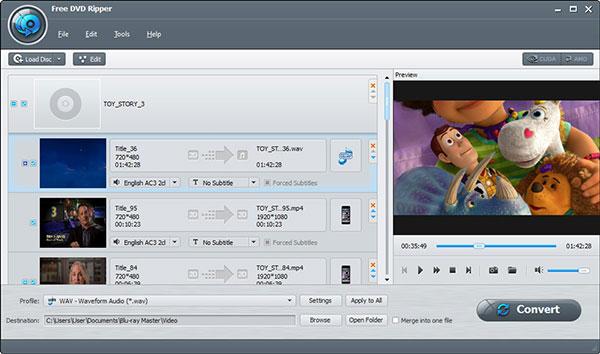
Step 3. Preview the video content from the quick-preview window in the right pane. Click "Edit" on the top toolbar to edit your selected video. You can apply video effects individually or simultaneously.
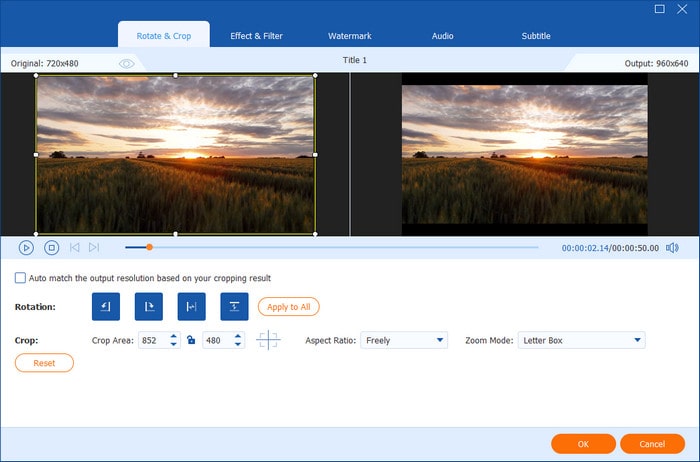
Step 4. Click "Settings" next to "Profile" to adjust profile settings. You can set video codec, bitrate, frame rate, audio channel, and more. Finally, click "Convert" to convert the DVD to AVI for free, with no watermark.
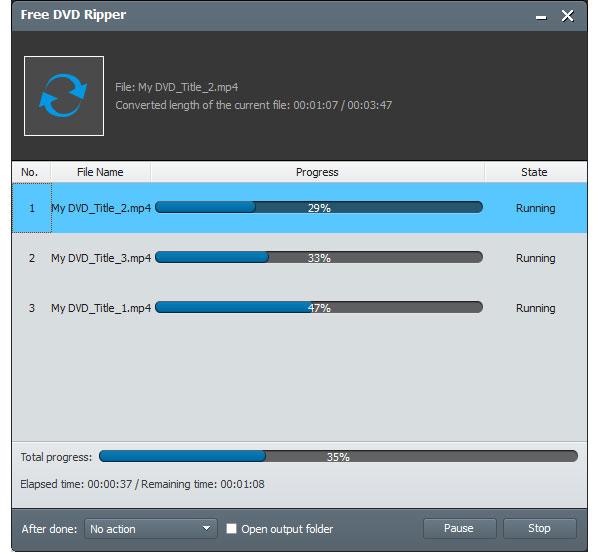
This free DVD-to-AVI ripper is quite powerful, delivering perfect DVD ripping performance. With its rich customisation features, all your specific requirements can be satisfied. Most importantly, its ripping speed is also excellent compared to most DVD ripping tools.
Editor’s Experience: Aside from the AVI format, you can also use Blu-ray Master Free DVD Ripper for modern format conversion. This gives the software an edge in versatility since other options in this article have limited output formats.
Part 3. Convert DVD to AVI with WinX DVD Ripper
WinX Free DVD Ripper is a DVD-to-video ripping freeware for Windows users. It even allows you to rip commercial, damaged/workout DVDs, DVD folders, and ISO files.
Key features:
- Rip DVD to both regular video codec and HD H.264/HEVC.
- Be able to edit your videos, such as cutting, cropping, rotating, and so on.
To learn how to copy DVDs to AVI with WinX DVD Ripper, read the steps below.
Step 1. Click the Disc button in the top-left corner to upload your DVDs after connecting your DVD drive to the computer.
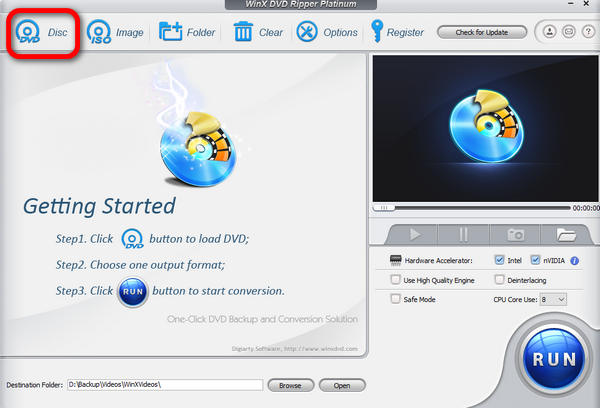
Step 2. Select AVI as the output format in the Output Profile window.
Step 3. Click the Browse button to choose the destination folder, and click the RUN button to start ripping.
With a clear interface, WinX DVD Ripper makes it easy to convert DVDs to AVI for free. You are also allowed to adjust the title, subtitles, and even edit the video to improve its effects. It can be praised as an efficient solution for digitising your DVD collection into a widely compatible AVI format.
Editor’s Experience: WinX DVD Ripper has a strong edge when it comes to handling damaged DVDs. With that in mind, it is a good choice for users who want to recover old DVD recordings.
Part 4. Convert DVD to AVI by HandBrake
HandBrake is an open-source DVD ripping program that can help you rip DVDs to digital video. It allows you to rip almost all copy-protected DVDs you bought in your local store with libdvdcss. So when you need to rip DVDs, you should give it a try.
Unfortunately, HandBrake no longer supports AVI output. The modern version of the program now only supports MP4, MKV, and WebM as its supported output formats. With that in mind, you can still use the software to convert DVD media to MKV, then use an alternative tool to convert the MKV or MP4 file to AVI.
Otherwise, you may also choose to keep your DVD media saved in MKV or MP4, as both these formats are better suited for modern use, and AVI is generally outdated in 2026.
Key features:
- Rip DVDs to videos in popular video formats like MP4 and MKV.
- You are allowed to rip certain titles, chapters, or entire DVD contents.
- It works well on Windows, macOS, and Linux.
Here are the steps for converting a DVD to a digital format using HandBrake.
Step 1. After connecting your DVD drive to the computer, you can see a DVD file on the left of HandBrake.
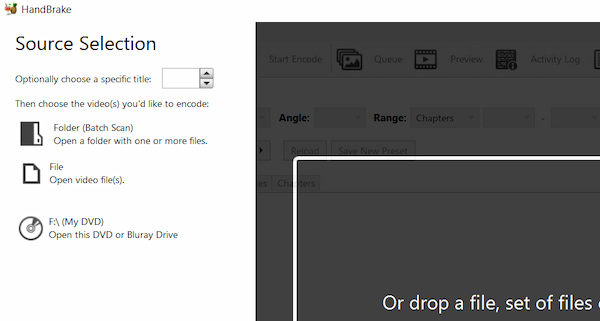
Step 2. Open this DVD file, then click the Format drop-down box to select either MKV or MP4 as the output format.
Step 3. Click Browse to select the destination folder and click Start Encode to rip your DVD.
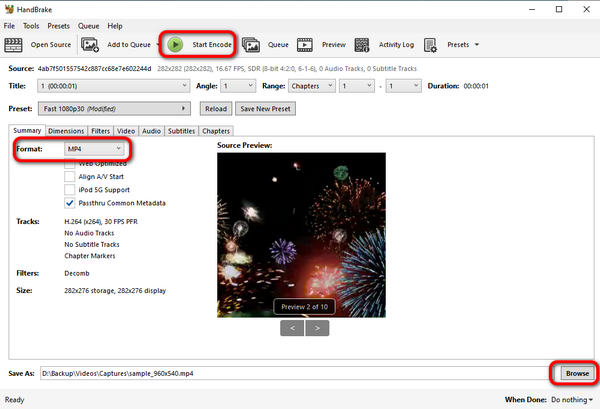
HandBrake is a well-known choice for converting your DVDs to digital format. It is free and open-source, so you can use it limitlessly. Although it is a free tool, it offers rich presets for professionals to customise their DVD conversion, such as filters, dimensions, and audio. It cannot decrypt DVDs with advanced copy protection. If you just occasionally convert your DVDs, you can try it.
Editor’s Experience: If you want to improve the modern compatibility of your DVD media, HandBrake is a good choice since all of its output formats are optimised for modern computers, especially MP4.
Part 5. Convert DVD to AVI Using VLC Media Player
VLC Media Player is one of the most popular media players, which can help you convert DVDs to digital video. If you don’t like to install any new third-party DVD ripping software on your computer, you can give VLC a try.
However, while VLC is versatile, its DVD-to-AVI workflow is complex, unstable, and prone to crashes, and it cannot effectively decrypt protected DVDs. As such, VLC is best used as an “emergency option” rather than as your primary DVD converter.
Due to VLC's instability as a DVD converter, we have provided a short troubleshooting guide below to help resolve basic errors in the program.
Incomplete Output File: If the output file you have produced is incomplete, it is most likely due to premature stopping of the conversion process. To fix this, repeat the DVD conversion and ensure the process completes smoothly.
No Disc Detected: If VLC cannot read the disc you inserted, it is most likely due to DVD hardware encryption. To fix this problem, learn how to install the libdvdcss plug-in so VLC can open encrypted files.
Freezing or Crashing: When you encounter software crashes, a good step is to close all other active programs on your device except VLC. This will make all your resources available to VLC.
Key features:
- Rip your DVD and save it as a digital video.
- Offer a straightforward way to play a DVD on your computer.
To copy your DVDs to AVI files using VLC Media Player, follow the steps below.
Step 1. Connect the DVD drive to your computer, then launch VLC Media Player.
Step 2. Click the Media menu to select Convert/Save.
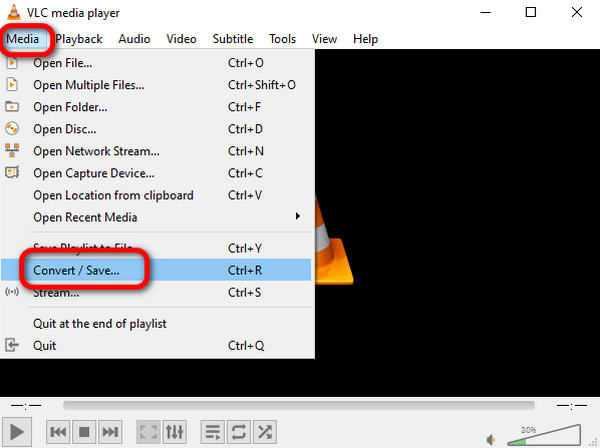
Step 3. In the Disc menu, click Browse to upload your DVD and click Convert/Save to adjust ripping settings.
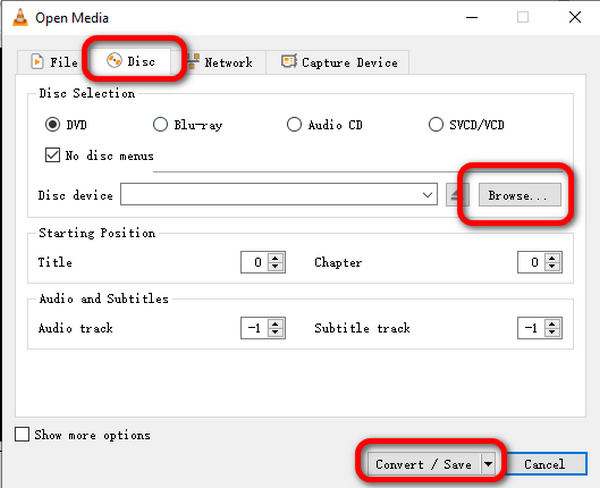
Step 4. Click the Profile drop-down list to choose AVI as your output format, and click Browse to select your destination file. Then, click Start to begin ripping.
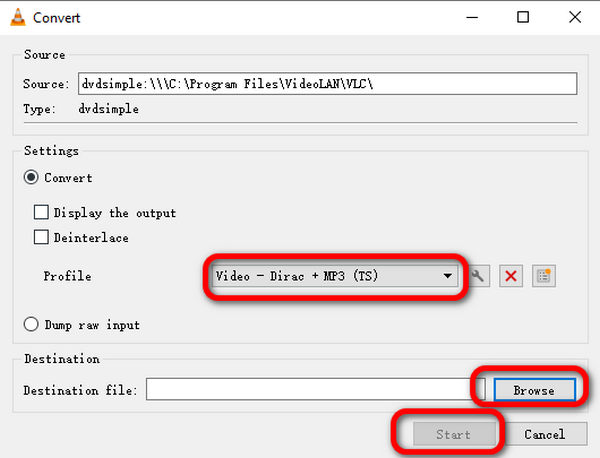
This free tool also includes a Convert feature that converts your DVDs to the AVI format. With the steps above, you should know how to use it to rip DVDs. Though the convert feature is simple, it still offers advanced options to improve your ripping experience, such as setting the starting position, adjusting the audio track, and the subtitle track. The only shortcoming is that it doesn’t have the decryption ability to rip DVDs with copy protection.
Editor’s Experience: Although it is not primarily a DVD converter, VLC's native AVI support is a big factor in its regular use. Unfortunately, its conversion capabilities are unreliable, making it inconsistent.
Part 6. FAQs of Converting DVD to AVI for Free
-
Can you rip a DVD with Windows Media Player?
No, you cannot. Although Windows Media Player can play DVDs directly, it cannot rip them. To play the copy-protected DVD on Windows Media Player, you have to use such third-party software as Free DVD Ripper to rip the DVD to Windows Media Player-supported formats.
-
What is the best DVD to AVI converter?
If you want to rip protected DVDs, WinX DVD Ripper and Free DVD Ripper are the best options. If you want an easy-to-use DVD-to-AVI converter, then Free DVD Ripper is the best option. In conclusion, Free DVD Ripper will be the best free DVD-to-AVI ripper.
-
Can I burn AVI to DVD on Windows 10?
Yes, you can. Though Windows 10 offers no built-in AVI-to-DVD conversion software, you can burn AVI to DVD with third-party software. Check this post to learn how to burn AVI to DVD.
-
Can I convert a DVD to MP4 online?
Yes, you can. You can find various free online DVD-to-MP4 converters, like Zamzar and Convert. Files, etc. But free online DVD-to-MP4 rippers are slow to complete the process. To convert DVDs to MP4 without limits, you should use desktop DVD ripper software.
-
What is the best free DVD to AVI converter for Windows 11 without watermarks?
All of the featured options in this guide are safe, watermark-free choices. However, Blu-ray Master Free DVD Ripper offers the best balance among them. If you want an open-source option, we recommend HandBrake, though it lacks AVI as a native output format.
-
Can HandBrake rip copy-protected DVDs to AVI format?
No, it cannot. HandBrake cannot rip protected DVDs natively. It cannot save ripped videos in AVI format either.
-
How long does it take to convert a 2-hour DVD to AVI?
It depends on what software you will use. When using efficient and modern converters like Blu-ray Master Free DVD Ripper, it can be as fast as 45 minutes. However, it can take as long as 2 hours if you use a suboptimal option.
-
Is AVI better than MP4 for ripping old DVDs?
No, it is not. MP4 is still better because it's optimised for modern computers. AVI is a niche format with limited usage.
-
Will converting a DVD to AVI lose video quality?
Yes, it will. Quality reduction is a common problem when converting DVD media. However, this can be controlled when using the right converter tool and format.
Wrapping up
In this article, we’ve introduced 4 tools to help you convert DVD to AVI for free. You can follow the steps above to successfully convert your DVDs. In addition to AVI, you can also rip DVDs to many other formats with these tools. Just choose the one that suits you most and start your ripping journey. When looking for a stable, beginner-friendly, and compatible solution for DVD-to-AVI conversion, we highly recommend Blu-ray Master Free DVD Ripper as your go-to choice. On top of being a reliable free DVD-to-AVI converter, it can also convert videos to 200+ digital formats.
More from Blu-ray Master
Rip DVDs to Digital

Fast and free ripping software to decrypt all DVDs to digital easily on your computer.
100% Secure. No virus
