

May 21, 2026Posted by Kevin Miller to Rip DVD
Quick Selection Guide:
Among the options in this article, we can recommend Blu-ray Master Free DVD Copy as the best way to save DVDs on computers for free. The program offers the best balance in terms of features, reliability, and ease of use.
With the advances of technology today, you don’t need to wonder if it’s possible to have a copy of DVDs on your computer. All you need is a tool that preserves the original data and quality of the desired video while keeping the process fast. With that said, there are many desktop tools on the market, so here we will introduce the best ones to help you choose the one that best suits your needs.
Table of Contents
Part 1. How to Copy a DVD to a Computer
As of today, Blu-ray Master DVD Copy is one of the best solutions for copying DVDs on Windows 10/11 and Mac OS 14 Sonoma, because it lets you clone video files from discs in just a few steps. Of course, it also earns the trust of many because it lets you copy and save DVDs to ISO, folders, and more. The desktop software also provides three copy modes, which let you make a full copy, copy only the main movie, or create a custom copy.
Beyond these excellent characteristics, Blu-ray Master DVD Copy is also designed to process batch files at 50x copying speed, making it the fastest solution among similar options. This was made possible by the GPU-acceleration system equipped in the program.
For more advanced users, Blu-ray Master DVD Copy is also designed to bypass region code copy restrictions, making it easy to copy any DVD release protected by region restrictions. However, you need to use the paid version of the software to unlock and enjoy all these advanced features.
For a sneak peek of the program's practical features, try it for free by clicking the Free Download button to start limitless DVD copying on your computer!
- • Copy and save from a DVD to a computer, including the DVD menu, subtitles, and other content.
- • Compress DVD-5, DVD-9, and other DVD types to save space.
- • Customize with a new audio track, subtitle, loop titles, and more.
- • Remove the region protection to play DVD copies without limitations.
Free Download
For Windows
Secure Download
Free Download
for macOS
Secure Download
Keep reading to learn how to copy DVDs to the computer.
Step 1. Download and install Blu-ray Master DVD Copy on your computer. Once done, launch the desktop software and insert the disc into the optical drive. Open the Source dropdown and choose the Open DVD Folder option. Select the folder that has all the movies you want to copy to your computer.
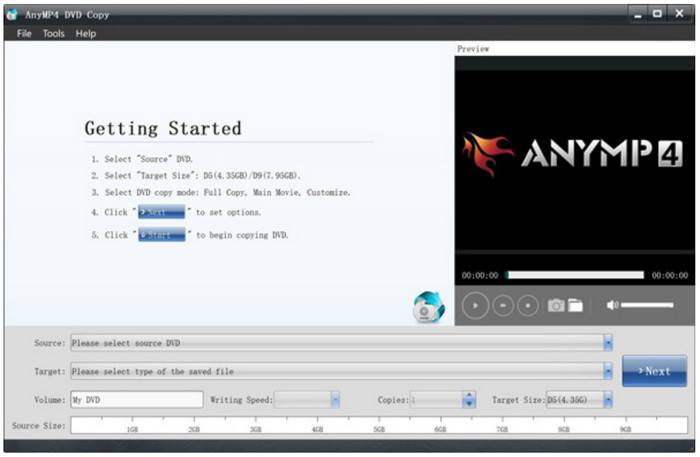
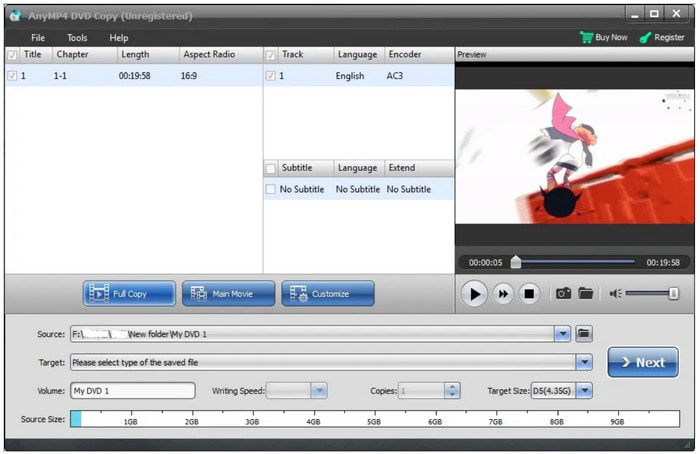
Step 2. You may select the output format, like Save as ISO, from the Target dropdown menu. Then, click Next. Proceed to edit the videos as you wish, such as by adding subtitles or audio tracks. Click the Play button to preview your work.
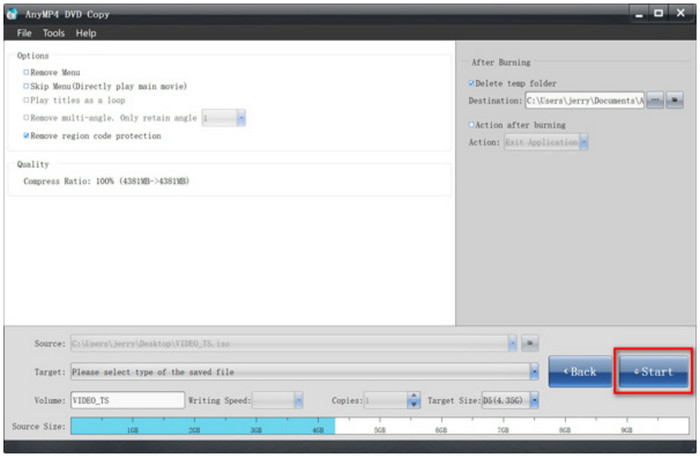
Step 3. The next thing you will do is tick the checkboxes under the Options menu, which include options to keep or remove menus, loop titles, and region code protection. Find the best designation folder, then click the Start button to copy DVDs to your computer. After a few moments, you can successfully save your DVD to the thumb drive.
Blu-ray Master DVD Copy is a great start for DVD copying on Windows and Mac. Be sure to try it today and upgrade to the pro version for more excellent features.
Why Choose Free DVD Copy
- • Built-in decryption engine.
- • Strong region-code bypass.
- • GPU-accelerated for a 50x faster processing speed.
Pros
- Modern and user-friendly interface for easier operation.
- No file size limit for DVD copying, cloning, and saving.
- High-speed copying process without quality loss.
Cons
- Some helpful features are in the pro version.
As mentioned, many tools offer DVD copying, so the table below shows other recommended DVD copiers for Windows and Mac OS.
| Other DVD Copy Tool | DVD Type Supported | Supported OS | Copying Speed | Remove Copy Protection | Output Option (ISO, folder, USB, etc.) |
| HandBrake | DVD-5, DVD-9, DVD-/+RW, etc. | Windows, Mac, Linux | Decent | No | ISO, digital formats |
| MakeMKV | DVD-5, DVD ROM, DVD-/+R, DVD-9, DVD-/+RW, etc. | Windows, Mac, Linux | Decent | Yes | MKV format |
| ImgBurn | DVD-R, DVD-5, CD, etc. | Windows | Slow | No | ISO, folder |
| VLC Media Player | DVD-5, DVD ROM, DVD-/+R, DVD-9, DVD-/+RW | Windows, Mac, Linux, Android, iOS | Slow | No | ISO, folder |
| Windows Media Player | DVD-5, DVD-9, DVD-/+R | Windows | Slow | No | ISO |
Part 2. How to Free Extract DVD to Computer by Digitalization on Windows and Mac
How to save a DVD to a computer with just a click? Blu-ray Master Free DVD Ripper offers the best service for Windows and Mac, especially with a straightforward UI that makes navigation easier. Its main purpose is to rip files from discs and turn them into digital formats, such as MP4, FLV, MKV, HEVC, MOV, and others. In addition to a wide range of supported file formats, the DVD ripper also offers the necessary output settings to adjust the desired resolution, encoder, sample rate, and more. Furthermore, you can customize and edit the profile effects with this Free DVD Ripper on Windows and Mac.
Similar to the previous software, Free DVD Ripper is also equipped with a highly efficient GPU-acceleration system that allows ripping DVD data from DRM-protected or region-code restricted DVDs up to 50x faster than standard performance.
- • Clone video and audio files from DVDs to a computer.
- • Video editing is available with a trimmer, splitter, merger, etc.
- • Supports most DVD types, including DVD-ROM, DVD-5, DVD-R, and more.
- • Best for ripping discs, folders, and IFO files.
Free Download
For Windows
Secure Download
Free Download
for macOS
Secure Download
You can see the following guide on extracting DVDs to a computer to do it by yourself.
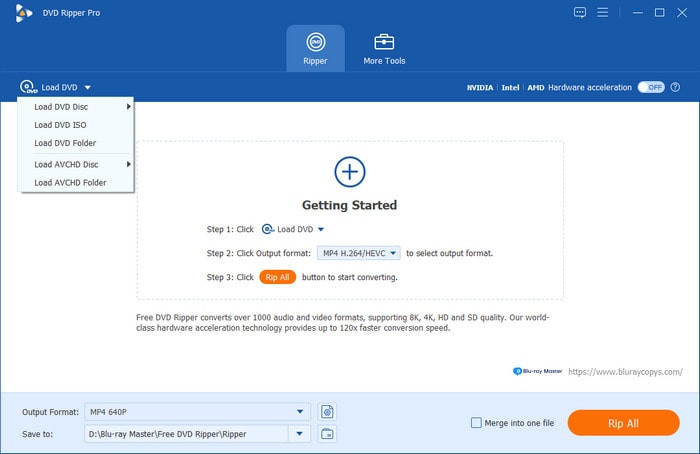
Step 1. Get the Free DVD Ripper by clicking the Free Download button and installing it on your computer. Once the desktop software is running, insert the disc and wait a few moments for it to be recognized. Click the Load Disc button to import the files you want to rip.
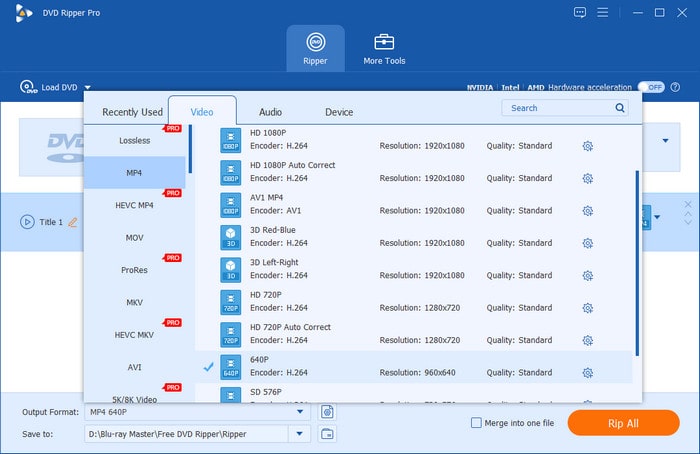
Step 2. Go to the Output Formats menu and choose a preset with output resolution, format, and others. For a more specific output adjustment, click the gear button, and then you can freely edit the encoder, FPS, and audio settings. Click OK to save the new settings.
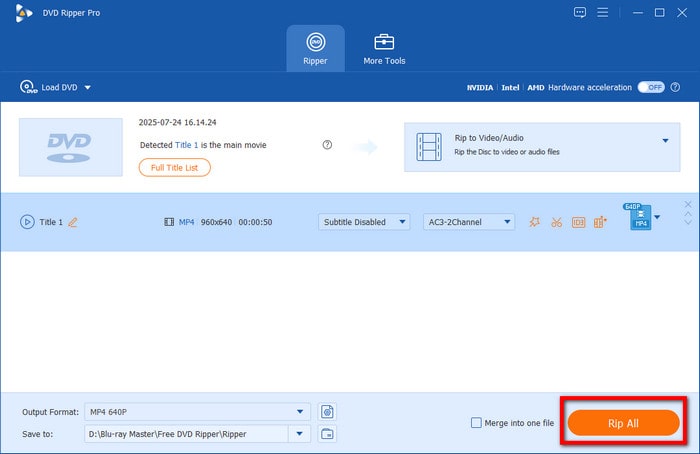
Step 3. Choose the destination where you want to save the ripped files. You may click the Browse or Open Folder button to select a file. Once done, click the Rip All button to initiate the ripping process.
With the Free DVD Ripper by Blu-ray Master, you have learned how to save a DVD on Mac and Windows with just a few steps. On top of that, it guarantees excellent results and offers more features in the premium version.
Why Choose Free DVD Copy
- • Built-in decryption system to bypass basic and advanced DRMs.
- • GPU acceleration feature for faster data reading and ripping.
- • Optimized UI design for amateur multimedia users.
Pros
- Excellent selection of output formats.
- Suitable for transferring files to other devices.
- Genuinely free and abundant in features.
Cons
- May need an upgraded OS to operate smoothly.
Do you want to know how to play a DVD on a computer for free? Here are some of the best alternatives for ripping different DVDs in 2024.
| Other Ripping Tools | Supported DVD Types | Video Editing Features | Limitations | Speed | OS Supported |
| WinX DVD Ripper | DL-/+RW, DVD-/+R, etc. | Yes | Only allows five minutes of a video | Average | Windows and Mac |
| Freemake Video Converter | DVD 9, DL-/+RW, DVD 5, etc. | No | Ads can interrupt the process | Slow | Windows |
| DVD Shrink | DVD 5 and DVD 9 | Yes | Quality problem | Slow | Windows, Mac |
| MediaCoder | DVD-ROM, DVD-5, DL DVD, DL+R, etc. | No | Only a handful of output formats are available | Average | Windows, Mac, Linux |
| DVD Decrypter | DL-/+RW, DVD-/+R, etc | No | Too limited in features | Slow | Windows, Mac |
Part 3. How to Save a DVD to a Windows Computer Directly
If you are a Windows user, there is a simple solution for copying DVD files on your computer; you will only need an optical drive and Windows Media Player to get it done. Aside from its innate advantage of being already built-in, the program is completely safe and easy to use. This makes it ideal for users who prefer simple programs.
Unfortunately, 90% of commercial DVDs sold in the US and Europe are heavily encrypted and prevent copying. This makes Windows Media Player already inadequate for opening these physical media, let alone playing them.
However, if you plan to open unprotected DVDs from personal storage, here are the easy steps to follow to open them using Windows Media Player:
Step 1. Insert the disc into the optical drive, then launch Windows Media Player. If the media player is not installed, you may get it for free from the Microsoft Store.
Step 2. From the main interface, go to the Library menu and find the DVD folder. Right-click on the folder and choose the Rip option.
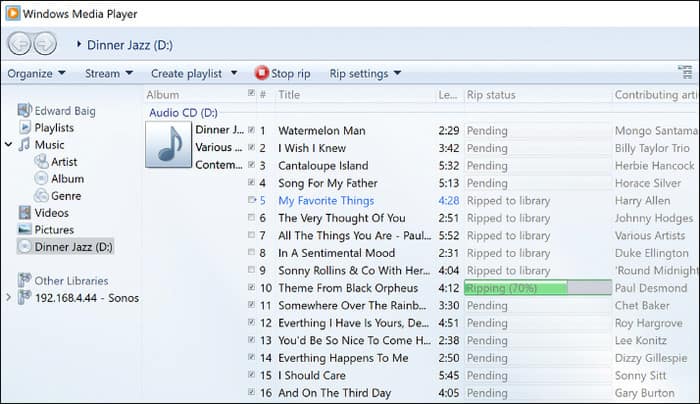
Step 3. Select the desired format and location folder; then Windows Media Player will immediately rip the videos.
Truth be told, this is the easiest way to copy DVDs. However, it is limited to WMA, MP4, and MP3 as output formats, and it is not possible to save DVDs as MP4 on Mac because WMP is not available for download on the Mac App Store.
Reality Check:
Windows Media Player is unlikely to work for commercial movies purchased from Amazon or Walmart due to DRM and other advanced encryption systems.
Part 4. FAQs about Copying a DVD to a Computer
-
Does VLC rip DVDs?
Although it is primarily a media player, VLC includes an effective DVD ripping feature. It also supports a wide range of output formats, such as WAV, MP3, MP4, FLV, and more.
-
Is there a truly free DVD ripper?
Of course, and on top of that, there are many tools to try! Check the information above for the best and free DVD rippers for Windows and Mac to clone DVDs on your computer.
-
What resolution should I rip a DVD to?
It is better to be flexible when choosing the best resolution, since it still depends on compatibility and the DVD’s file size. However, if you rarely worry about these things, you may set the resolution to 720p for better visual presentation.
-
Is ripping DVDs illegal?
Yes. It is against the law to rip DVDs and have copies of legally distributed movies. However, this may not be the case if you are ripping homemade DVDs or have no motive to share them online.
-
What is the safest free software to copy a DVD to my Windows 11 computer in 2026?
You will never go wrong using Blu-ray Master’s free DVD tools. Two good examples are Free DVD Copy and Free DVD Ripper. Simply select whether you want to copy the DVD data or rip it for digital conversion.
-
Can HandBrake rip copy-protected Disney DVDs for free?
Yes, it can. However, it cannot do so natively. You have to learn how to install libdvdcss on HandBrake first.
-
How do I save a DVD to my computer if I don’t have a disc drive?
You can solve this by purchasing an external driver. However, make sure to select one equipped with a USB peripheral. These tools are natively supported by modern computers.
-
What is the best format to save DVDs to a hard drive for Plex?
Once you have recovered your DVD media from your disc, you need to save it digitally first. We recommend using either MKV or MP4 in this case. Both formats are supported by Plex and are known for their high quality and compact file sizes.
-
Is it legal to rip my own DVDs for personal use in the UK/USA?
It is illegal in the United Kingdom to bypass encryption. In the United States, ripping DVDs for personal use is a gray area since only bypassing DRM is illegal. With that in mind, the legality of DVDs for personal use in both areas hinges only on bypassing encryption.
Wrapping up
Here, you have discovered how to save DVDs to a computer for free using some of the best free options, including Free DVD Copy and Free DVD Ripper by Blu-ray Master. Of course, there are more tools available for flexible cloning on Windows and Mac. But we suggest trying the first two solutions to enjoy your media playback from DVD to any device quickly. Click the Free Download button to start today.
More from Blu-ray Master
Rip DVDs to Digital

Fast and free ripping software to decrypt all DVDs to digital easily on your computer.
100% Secure. No virus
