

Aug 05, 2026Posted by Kevin Miller to Rip DVD
Quick Summary:
DVD region codes restrict playback based on geographic zones, and most PC/Mac drives permanently lock after 5 manual region changes. To bypass these restrictions without ruining your optical drive, you can use specialized software like Blu-ray Master Free DVD Ripper or WinX DVD Ripper to strip DRM and convert movies to MP4, or use MakeMKV to extract lossless, region-free .mkv files for free.
Have you ever occasionally bought an imported DVD disc from overseas only to find an 'Incorrect Region Code' error? You are not alone. Many people are not clear about the DVD region codes that are designed to restrict the release dates and prices globally. It is troublesome to change region codes, and it has a five-time limit. Nowadays, you can use DVD decryption tools to bypass DVD region codes with ease. Let's see the 3 powerful ways.
- What is DVD Region Code and How We Test These Ways
- Method 1. Bypass DVD Region Codes with Blu-ray Master DVD Ripper
- Method 2. Bypass DVD Region Codes with WinX DVD Ripper
- Method 3. Bypass DVD Region Codes with MakeMKV
- FAQs about Bypassing DVD Region Codes
What is DVD Region Code and How We Test These Ways
Everything You Need to Know About DVD Region Codes
If you are a DVD collector, you must have known the DVD region codes. However, for most casual people watching DVDs, they know little about it.
Back in the late 1990s, movie studios were obsessed with theatrical release windows. A movie might debut in US theaters in May, but not reach European theaters until November. To prevent cheap imported discs from ruining local theater ticket sales, Hollywood created DVD Region Codes.
It’s basically a digital lock (DRM). When you insert a disc, your DVD player or computer drive checks two things:
- The Region Code encoded on the disc.
- The Region Setting hardcoded into your drive's firmware.
If they don't match, the drive simply refuses to read the data. On computers, this is handled by RPC-2 (Regional Playback Control) firmware. Most modern optical drives give you 5 region changes max. Once you switch it for the 5th time, the drive permanently locks onto whatever region code you set last.
Different regions cover different parts of the world. Here’s a quick cheat sheet for you to check your region:
| Region Code | Geographic Coverage & Countries |
| Region 1 | US, Canada, US Territories, Bermuda |
| Region 2 | Europe, UK, Japan, Middle East, Egypt, South Africa, French overseas territories |
| Region 3 | Southeast Asia, South Korea, Taiwan, Hong Kong |
| Region 4 | Australia, New Zealand, Central & South America, Mexico, Pacific Islands |
| Region 5 | Eastern Europe, Russia, India, Africa, North Korea, Mongolia |
| Region 6 | Mainland China |
| Region 7 | Reserved for special MPAA unrated usage / future allocations |
| Region 8 | Special international venues (cruise ships, passenger airplanes, military bases) |
| Region 0 / ALL | Region-free (playable on any player worldwide) |
How to Change DVD Region Code via Windows Device Manager
If you only need to play an out-of-region disc once or twice and don't want to install extra software, Windows lets you change your drive's region directly in the system settings.
Big Warning First:
You can only do this 5 times in total. The 5th change is permanent, even if you reinstall Windows or move the DVD drive to a brand-new PC!
Step-by-step for Windows 10 & 11:
- Plug in your external DVD drive (or use your internal drive) and press Windows + X, then select Device Manager.
- Expand the DVD/CD-ROM drives section.
- Right-click your DVD drive model and select Properties.
- Click on the DVD Region tab. Select the country/region that matches your DVD disc from the list.
- Click OK to apply. (You'll see a counter showing how many changes you have left—keep an eye on that number!).
How We Tested These Methods
To make sure our recommendations actually work in the real world (and don't just sound good on paper), we put together a hands-on test rig instead of relying on vendor marketing claims.
- Test Hardware: Custom Windows 11 PC (AMD Ryzen 5 5600X, 32GB RAM)
o M1 MacBook Air running macOS Sonoma
o LG Slim Portable DVD Writer (Model SP80NB80, RPC-2 locked) - Test Discs: Doctor Who: Series 2 (UK Import, Region 2 PAL, CSS encrypted)
o Parasite (Korean Release, Region 3 NTSC, CSS + RCE protected) - What We Measured: Success rate bypassing the 5-change hardware lock, rip speed, original video/audio quality retention, CPU load, and how easy the tool was for non-tech-savvy users.
Quick Comparison of Bypass Methods
| Software | Best For | Regional Unlock Ability | Ease of Use | Price | Bonus Settings |
| Blu-ray Master Free DVD Ripper | Beginners looking for a simple, completely free basic ripper | Yes | Very easy, clean interface | Free | Title, audio track, and subtitle selection and various editing tools. |
| WinX DVD Ripper | Fast conversion & handling heavily encrypted or damaged discs | Yes | Easy, beginner-friendly | Free Trial ($39.95 for full) | Handle scratched DVDs. |
| MakeMKV | Lossless quality & creating 1:1 direct video copies | Yes | Moderate, basic interface | Free (while in Beta) | 1:1 lossless DVD full information maintaining. |
Method 1. Bypass DVD Region Codes with Blu-ray Master DVD Ripper
Best For: Bypassing region codes, encryptions, and copy protections for free.
Output Format: MP4, AVI, FLV, and 200+ others.
Blu-ray Master Free DVD Ripper is a completely free DVD ripping software built to bypass DVD region codes. It is compatible with macOS 10.12 or later and Windows 11/10/8/7. This DVD region code cracker can decrypt the region lock on DVDs from any region. It can handle DVDs from regions 1 to 6 and even those with copy protection and encryption, and convert them to MP4, MKV, MOV, and other formats. For some special requirements, you can even customize the encoder, resolution, bitrate, and other parameters. To rip DVDs to various digital formats, it can also fully maintain the DVD menu and deliver a fast ripping speed with GPU acceleration. Also, it includes a built-in editor where you can apply basic effects to the video. Best of all, it has a preview function to see the effects applied before conversion.
Here’s how to bypass the DVD region code:
Step 1.First and foremost, download the Blu-ray Master Free DVD Ripper for free. Install the DVD region code cracker on your computer and let the installation process complete. Once finished, place the disc on the computer’s external DVD drive and run the software.
Free Download
For Windows
Secure Download
Free Download
for macOS
Secure Download
Step 2.Click Load DVD > Load DVD Disc in the upper-left navigation to load the source inserted from the drive. If DVD files are saved locally, choose the Load DVD Folder for the VIDEO_TS folder or Load DVD ISO for ISO files. Next, the software will ask you to choose a loading mode: Full Title and Main Title List.
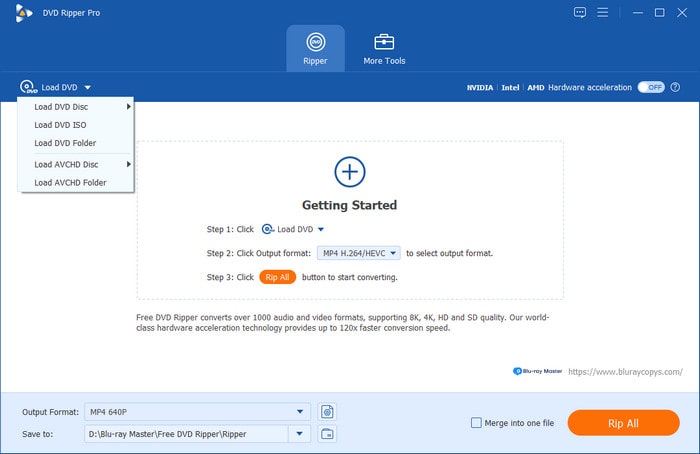
Step 3.After recognizing the disc, check the titles you want to rip from the list shown. In the Output Format section, navigate to the Video category and select MP4, Same as source as the output profile. This format offers good compression with excellent video quality at a lower file size.
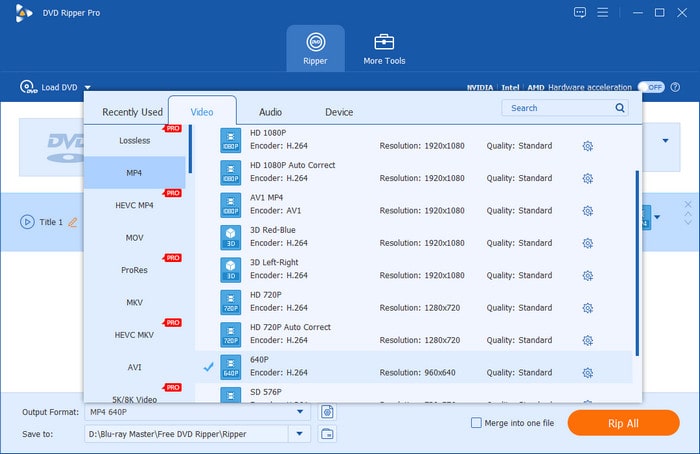
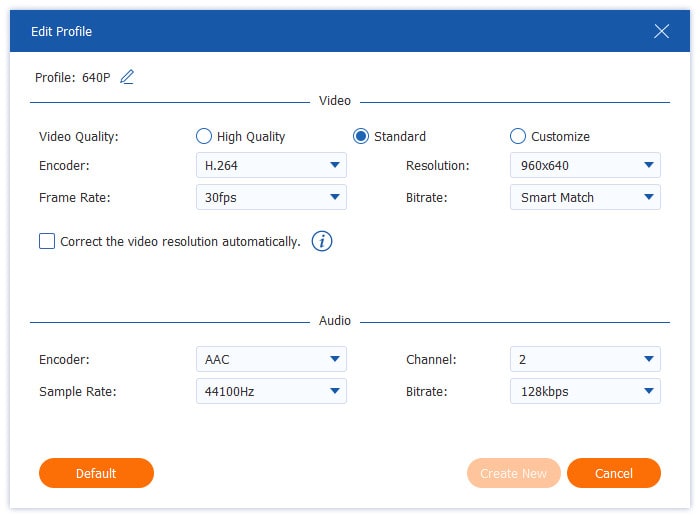
You can click the gear icon to enter the new window to adjust the output parameters. Here are the recommended settings:
Video Encoder: MPEG4
Resolution: 1280×720
Video Bitrate: 2500 kbps
Frame Rate: 30 fps
Aspect Ratio: 16:9
Audio Encoder: AAC
Channel: 2 Channel Stereo
Sample Rate: 44100 Hz
Audio Bitrate: 128 kbps
Step 4.Click the folder icon to browse and set an output directory. After all the settings, click Rip All to start the ripping process. The software will then bypass the region code, and convert DVDs to MP4.
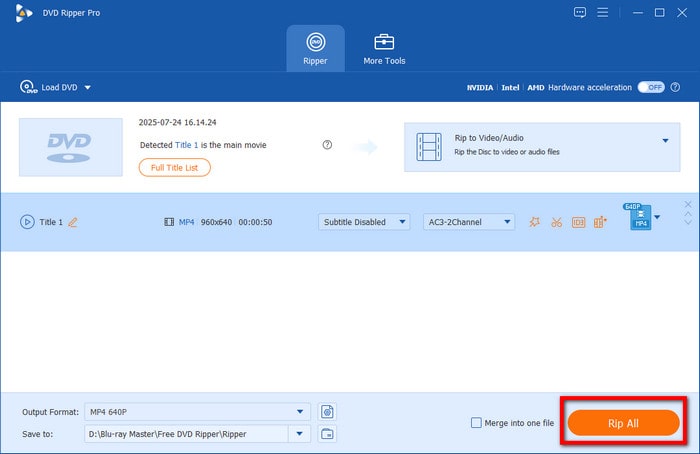
Blu-ray Master Free DVD Ripper uses the latest decryption technology to detect and remove DVD regions. Once loaded, it scans and analyzes the DVD to identify and decrypt protected titles. It lets you easily extract and convert DVD content without region restrictions. With its free version, its decryption ability is still powerful, though some high-quality profiles are not available.
Method 2. Bypass DVD Region Codes with WinX DVD Ripper
Best For: Unlocking region code and full title backup.
Output Format: MP4, AVI, WMV, and 350+ others.
WinX DVD Ripper is a premium software made to convert any DVD you have. It can handle homemade and commercial DVDs, including those with region codes and copy-protections. It features a Full Title Copy mode under DVD Backup, which creates an exact DVD copy.
Here’s how to bypass DVD region code on computer:
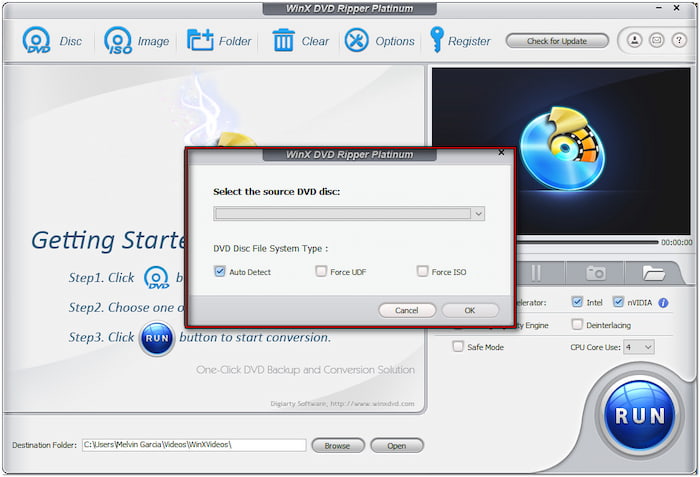
Step 1. Insert the disc on the external DVD drive and open the WinX DVD Ripper afterward. Click DVD Disc to add the source and select a disc file system type. You can leave it default if you’re unsure about the DVD file system type.
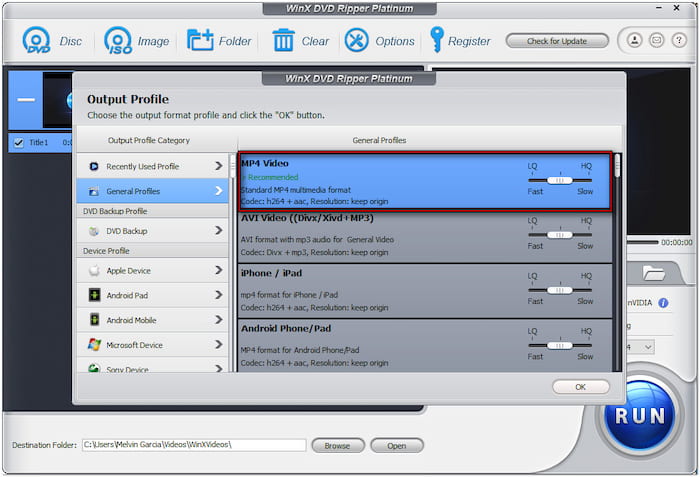
Step 2.In the Output Profile window, proceed to the General Profiles category and select MP4 Video. If you prefer other output profiles, scroll through the available options. Click Settings to adjust video and audio options, like codec, bitrate, frame rate, channel, resolution, etc.
Step 3.Click Browse next to the Destination Folder field to set a path destination. Then, click the big RUN button to initiate the conversion process. After doing so, the software will unlock the disc and save a region-free DVD copy to your local files.

WinX DVD Ripper uses advanced region-unlocking technology to strip region codes, CSS encryption, and other protections. However, you must purchase the full version to unlock the region code and remove the 5-minute conversion limitation.
Method 3. Bypass DVD Region Codes with MakeMKV
MakeMKV is a powerful and well-known DVD ripping software that can easily and efficiently bypass DVD region codes and convert them to MKV files. Instead of converting or compressing your video, it simply extracts the raw video and audio streams directly from the disc, stripping away the region lock and DRM in the process. Since it reads the raw data directly, it completely bypasses your DVD drive's 5-change counter lock. The exported MKV files would be large, usually around 4GB to 9GB per movie. But if you have extra storage space, it’s one of the cleanest free solutions available.
Now, let's see how to use it to bypass DVD region codes to convert DVD to MKV.
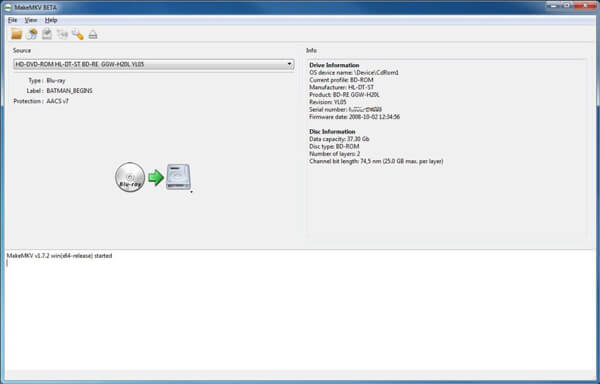
Step 1.Get MakeMKV from its official website. After that, insert a DVD disc into the optical drive and open MakeMKV. Load the inserted DVD from the Source section.
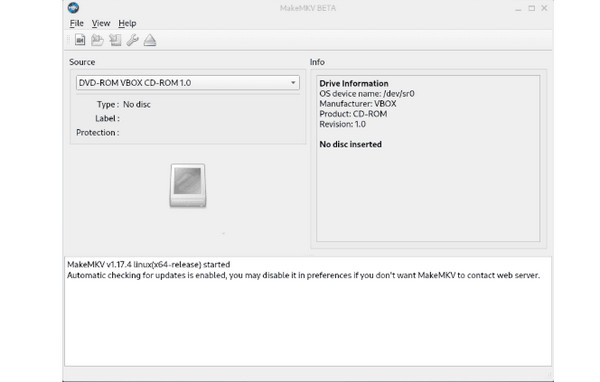
Step 2.MakeMKV will automatically scan the disc, bypass the region code, and index all the video tracks. Once scanned, expand the main title (usually the largest file) in the left panel. Check or uncheck any audio tracks or subtitle languages you want to save.
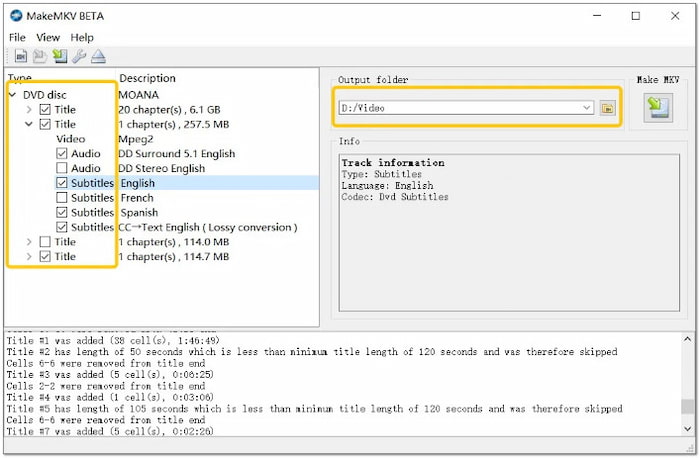
Step 3.Lastly, go to the Output folder section to set a download folder. Then, click the Make MKV big button to start the ripping.
In just a few minutes, you’ll end up with a single, region-free .mkv file on your hard drive that you can play using media players like VLC or host on your Plex server. It won't natively play on Apple TV or iTunes without converting it first, but for pure, lossless quality without touching your drive's hardware lock, MakeMKV is tough to beat.
FAQs FAQs about Bypassing DVD Region Codes
-
Is it legal in the US to bypass DVD region codes for DVDs I legally bought?
If you only use decrypted DVDs for personal backups and watching, it is ok. Don’t redistribute or share the content.
-
How do I stop my PC DVD drive from locking after changing the region code 5 times?
Don’t change the region through system settings, as every change depletes your 5-change counter. You can use DVD ripping software like MakeMKV to bypass the DVD region codes and convert DVD to digital.
-
Can VLC Media Player bypass DVD region codes on Windows 11 automatically?
Yes. VLC is built in with libdvdcss to bypass the DVD region codes and other DVD copy protection.
-
What is the secret remote control code to make a Sony/Samsung DVD player region free?
Secret unlock codes depend entirely on the specific model and hardware revision.
• Samsung (Common Hack): With no disc in the tray, press Repeat on the remote, followed by a sequence like 5, 7, 5, 3, 8 (or 9), then press 9 for multi-region.
• Sony (Hardware Limited): Most Sony standalone players (especially Blu-ray/DVD combo units) cannot be unlocked via remote codes and require specialized hardware chip mods (PAL/NTSC modifications).
Note: Always check database sites like VideoHelp for your exact player model number before trying codes.
-
How to remove DVD region code for free using HandBrake or MakeMKV?
You can install libdvdcss on HandBrake to handle DVD region codes and other DVD copy protections. MakeMKV natively has the powerful decryption ability to handle any region DVD.
-
What is the difference between RPC-1 and RPC-2 DVD drives, and how to reset the counter?
RPC-1 leaves the region lock up to your computer’s software, so the drive itself doesn’t care what disc you put in. RPC-2, on the other hand, bakes the lock straight into the drive’s hardware—giving you 5 region switches before locking you into that 5th choice forever.
Wrapping up
Today, we explored how to bypass DVD region codes with the top three tools. These tools provide reliable solutions to remove region codes and convert DVDs into a playable digital format on any device regardless of region. Among them, Blu-ray Master Free DVD Ripper shines as the option, offering a solution for decrypting region-coded discs. In addition, it provides flexible output settings and editing tools, all at no cost.
More from Blu-ray Master
Rip DVDs to Digital

Fast and free ripping software to decrypt all DVDs to digital easily on your computer.
100% Secure. No virus
