

Sep 14, 2026Posted by Kevin Miller to Rip DVD
Quick Summary:
DVDFab DVD Ripper is an exclusive ripper tool made for users looking to digitise physical media. It can save DVD media into multiple digital formats such as ISO and DVD Folder. The tool costs $59.49 annually, making it a good option for users who regularly rip DVDs.
DVDFab DVD Ripper is a powerful tool for ripping DVDs into digital formats. It gained popularity among users who want to digitise their physical media into various formats. This software is worth considering if you’re looking to extract videos from your DVDs for backup. This DVDFab DVD Ripper review covers everything you need to know. We’ll briefly review its features, strengths and weaknesses, and problems you may encounter while using it. Also, we will introduce an alternative to help you determine if it is the right choice for your DVD conversion needs.
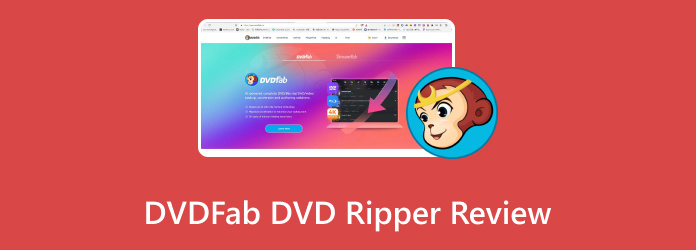
Table of Contents
- Part 1. How We Tested DVDFab DVD Ripper & Quick Verdict
- Part 2. What DVDFab DVD Ripper Does Well
- Part 3. Common DVDFab DVD Ripper Problems & How to Fix
- Part 4. DVDFab DVD Ripper Pricing & Plans (2026)
- Part 5. Best DVDFab DVD Ripper Alternative: Blu-ray Master Free DVD Ripper
- Part 6. DVDFab DVD Ripper vs. Other DVD Rippers
- Part 7. FAQs About DVDFab Ripper Reviews
Part 1. How We Tested DVDFab DVD Ripper & Quick Verdict

For an objective assessment of DVDFab DVD Ripper, we tested the program on two computers running Windows 11 and macOS Sequoia; the DVDs used for ripping were also region-coded and encrypted with CSS and ARccOS.
During performance assessment, we measured the program’s speed, video quality, protection bypass, and the stability of its video editor features. Based on the program's performance across these assessment measures, we have provided a quick review of the software.
4.5/5
Ripping DVD media into more accessible digital files saved as an ISO image or DVD folder.
Users looking to rip videos intended for specific devices. The program can only save DVD data into specific video formats.
DVDFab DVD Ripper Information and Specs
| Classification | Result |
| Best Used For | Digitising DVD content to rewritable ISO or DVD Folder copy. |
| Pricing Plans | 1-Year – $59.99 Lifetime – $67.99 |
| Supported Platforms | Windows, macOS |
| Supported Format | MP4, MKV, MP3, AAC, 1000+ profiles |
| Watermark Presence | No Watermark |
| Free Trial Period | 30-days 5-minute rip length limit |
| Region Code | Region Codes 1 – 6 |
| Copy Protection Bypass | CSS, APS, RC, Sony DADC |
Part 2. What DVDFab DVD Ripper Does Well
Output Profiles and Device Presets
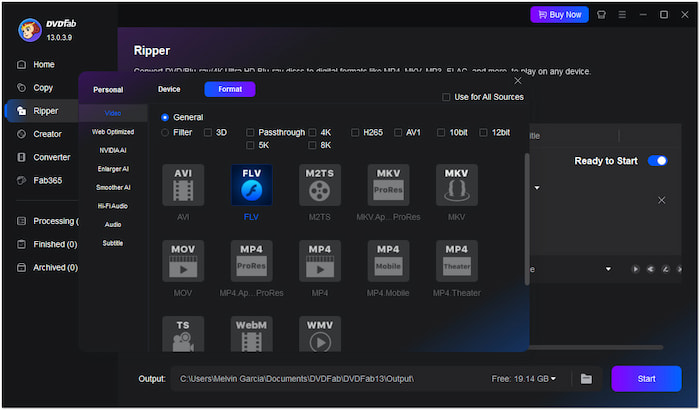
The DVDFab 13’s DVD Ripper tool supports thousands of video and audio profiles. It allows ripping DVDs, VIDEO_TS folders, and ISO files to MP4, MKV, MP3, WMA, etc. Beyond digital formats, it offers more than 260+ device presets for compatibility.
Pros
- Covers both old and the latest codecs.
- Offers device presets for popular brands.
- Wide support for nearly all mainstream digital profiles.
Cons
- The number of supported output profiles is fewer than its claim.
- Lacks support for the latest device models, like the iPhone 12 and later.
DVD Protection Handling & Cloud Decryption
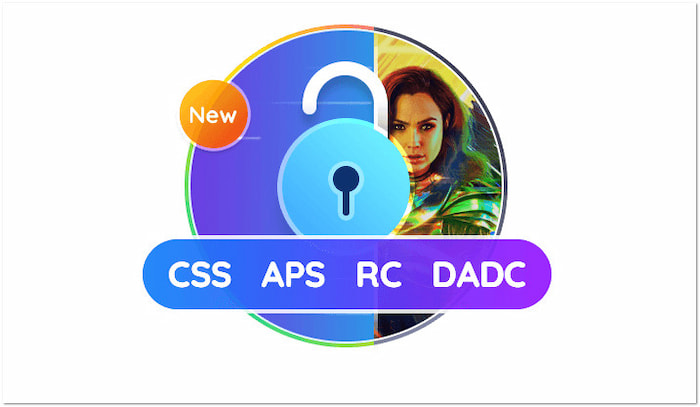
DVDFab’s Cloud Decryption Service efficiently bypasses encryption from old and newly purchased DVDs. It can detect and unlock standard copy protections, enabling DVD-to-digital conversion. It includes commercial DVDs with APS, CSS, RC, Sony DADC, and other protections.
Pros
- Handles and bypasses various DVD encryptions.
- Wide support for DVD Regions 1, 2, 3, 4, 5, and 6.
- Does not require plugins to bypass copy protections.
Cons
- It cannot load damaged, incomplete, or corrupted DVDs.
- Fails to handle newer encryptions, resulting in incomplete rips.
Ripping Speed & GPU Acceleration
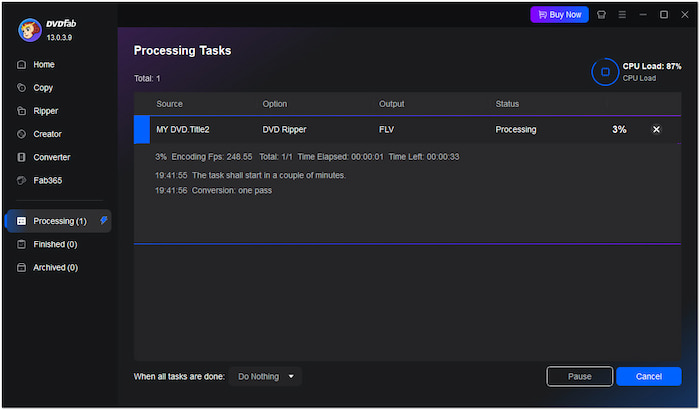
DVDFab uses the latest GPU acceleration technologies to deliver faster conversion speeds. It reduces wait times, allowing you to rip standard-length movies up to 50×. However, the DVDFab DVD Ripper free trial version can only rip 5 minutes of content.
Pros
- Convenient for ripping multiple DVDs in batches.
- Cuts down ripping time through advanced GPU acceleration.
- The multi-core CPU technology allows multitasking during ripping.
Cons
- Takes over 60 minutes to rip a full-length DVD.
- Ripping speed and performance depend on the user’s computer specs.
Built-in Video Editor
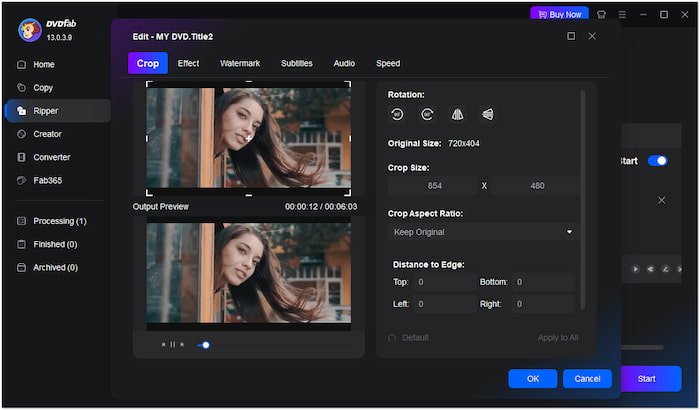
DVDFab goes beyond DVD-to-digital conversion by offering a built-in editor. You can crop the video to any dimension, trim unnecessary clips, merge multiple videos, etc. Aside from the basics, it allows you to insert external subtitles and adjust video effects. Unfortunately, its limited video editing options make it not an advisable solution for advanced editing.
Pros
- Supports insertion or customisation of subtitles.
- Includes a watermark insertion tool for branding.
- Supports adjustments to video effects to improve quality.
Cons
- Lacks advanced video editing features.
- Lags when editing larger or longer DVD titles.
Output Quality & Surround Sound
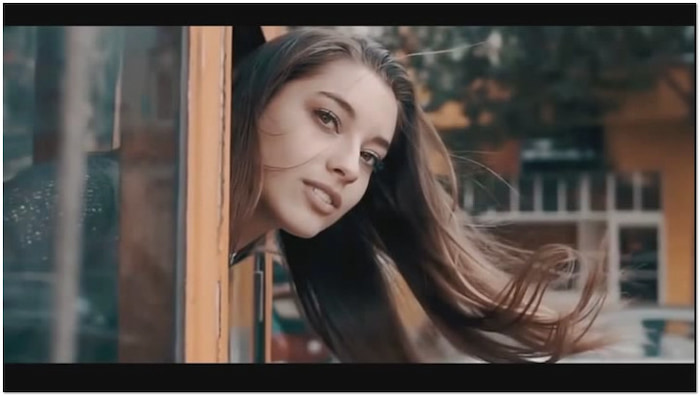
DVDFab maintains high output quality through efficient encoding even after the conversion. It can deliver a 1:1 quality of the source, preserving all the original structures. But here’s the deal: Never try to download the DVDFab DVD Ripper crack version, as it may invite malware.
Pros
- Keeps 5.1 and even 7.1 surround sound intact.
- Supports lossless formats to maintain original quality.
- Allows customisation of output profiles for high-quality exports.
Cons
- Lossless output can exceed 2GB or more per title.
- It doesn’t improve the DVD's original resolution much.
Part 3. Common DVDFab DVD Ripper Problems & How to Fix
DVDFab Won't Open / Error 102 on DVD Source
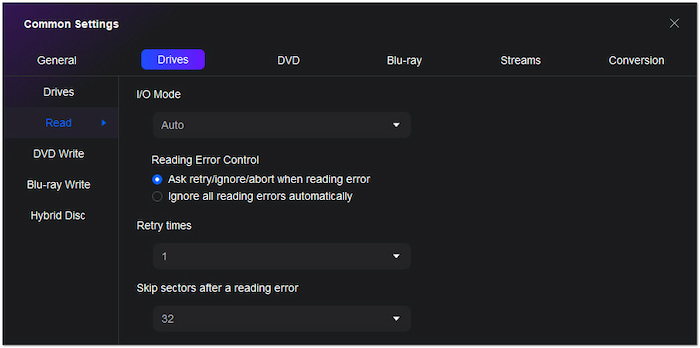
DVDFab sometimes fails to recognize or load the DVD inserted into the drive. There are instances when you will encounter DVDFab error 102 messages, and the loading process will freeze. This problem is rooted in the copy protection that DVDFab struggles to bypass. As a result, the ripping process cannot begin, leaving you stuck at the starting point.
To fix this problem, you can use one of the three potential solutions:
- Upgrade to the paid version of DVDFab DVD Ripper
- Use third-party software such as MakeMKV and HandBrake with the libdvdcss plug-in.
- Look for an alternative with built-in decryption.
"Failed to Create a Directory" Error
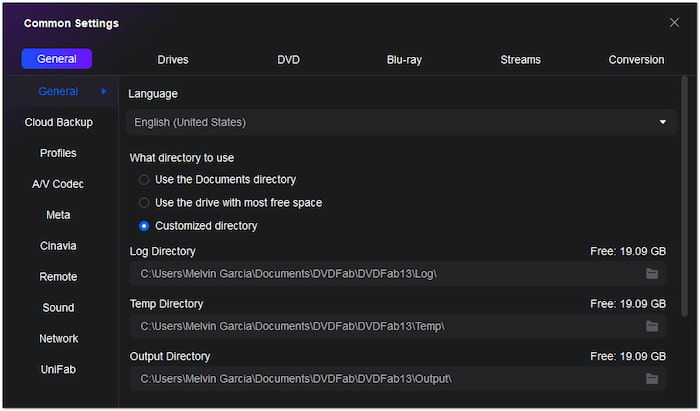
The failed-to-create-directory problem occurs during the initial setup of the ripping process. It occurs when the software tries to create a directory to save the output files. Usually, your local drive has insufficient storage, or there are special characters in folder names. It prevents the ripping process from proceeding since it cannot complete basic file management operations. Fortunately, this can be fixed by freeing up storage space, removing special characters from folder names, and granting DVDFab’s software permission.
DVDFab Process Failed Mid-Rip
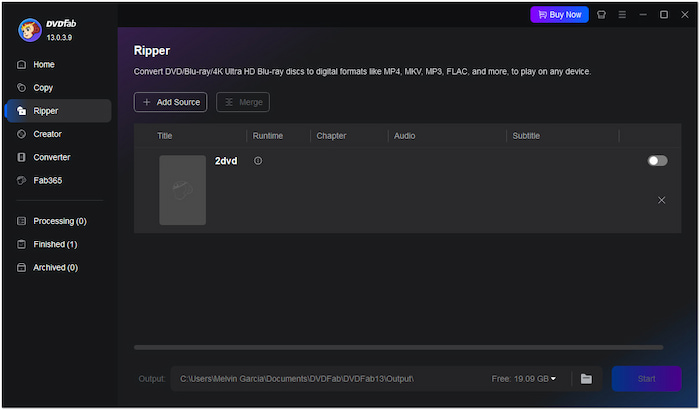
DVDFab fails to process your DVDs if you convert directly from a DVD. The external drive’s reading speed limits the ripping process, resulting in a slower or failed conversion. Sometimes, it happens due to hardware acceleration, especially after recent updates. It occurs after hours of waiting, wasting time, and processing resources without yielding results. To fix this issue, disable hardware acceleration to avoid putting too much tax on your computer. If you think your program itself is the problem, check for updates or reinstall DVDFab DVD Ripper.
Part 4. DVDFab DVD Ripper Pricing & Plans (2026)
With the strengths and limitations of DVDFab DVD Ripper now discussed, let us proceed to the program's detailed pricing plans, which may help our readers decide whether the program suits their needs.
| Classification | Result |
| 1-Year License | $59.99 |
| Lifetime License | $67.99 |
| Free Trial | 30 Days |
Before availing the lifetime license for the software, keep in mind that the tool has issues with the license being machine-bound or limited to the software version. To avoid this problem, start with the 1-year license or with the trial version first.
Part 5. Best DVDFab DVD Ripper Alternative: Blu-ray Master Free DVD Ripper
Budget users and heavily encrypted discs.
Free
Win 7–11, macOS 10.12+
MP4, MKV, AVI, MOV, 200+ formats.
None
None
Region 1-6
Built-in video editor
You may encounter issues after you download DVDFab DVD Ripper and begin using it. Some common problems include failure to open the source, directory creation errors, or failed ripping processes. Consider a more reliable alternative if these problems persist despite multiple troubleshooting attempts. Blu-ray Master Free DVD Ripper is a free DVD-ripping software that offers stability and efficiency.
Free Download
For Windows
Secure Download
Free Download
for macOS
Secure Download
It is compatible with macOS 10.12 or later and Windows 11/10/8/7. It provides over 200+ output profiles, including video, audio, and device presets. As a no-cost DVD-ripping solution, it became popular for its ability to deliver video up to 4 K resolution. In terms of performance, it can rip DVDs from Regions 1 to 6 and uses advanced decryption technology to handle heavily encrypted discs. It also includes a built-in editor for basic video enhancements, such as applying effects. It also lets you set a custom output directory for your ripped DVDs to manage your files.
To learn how to use the program, make sure to read our three-step guide on how to use it:
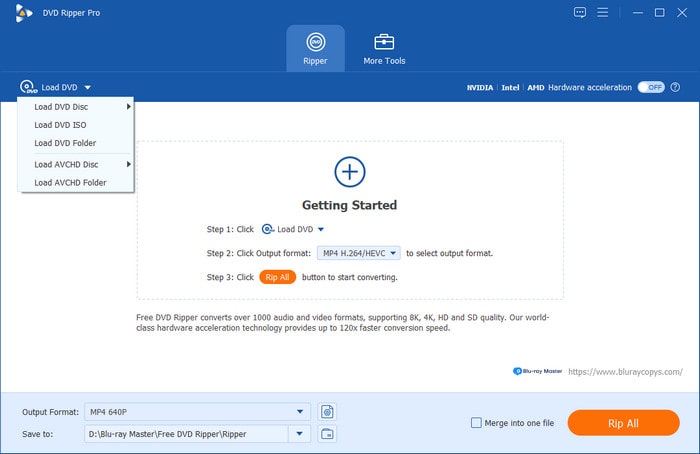
Step 1.Download and install DVD Ripper on your computer. Then, load the DVD into your computer, select the Load DVD > Load DVD Disc button, and upload the desired videos. Click OK to proceed.
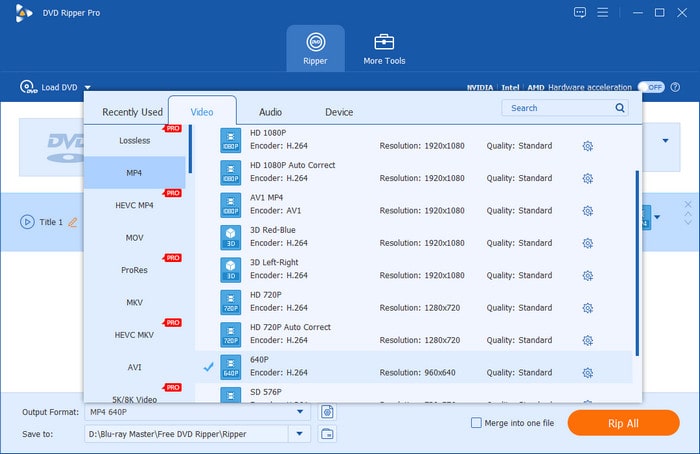
Step 2.When the DVD titles or chapters are loaded into the software, go to the Output Format and select the file type you want to save your DVD video as. Click the gear button to adjust settings such as resolution, bitrate, FPS, sample rate, and more. Click Create New to save and apply the changes.
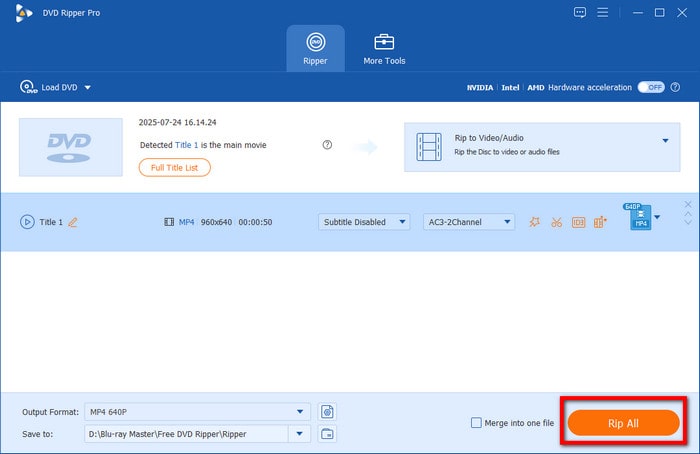
Step 3.Next, set the location folder where you will save the ripped videos. Navigate to the Save To menu and browse the folder you desire. Finally, click the Rip All button to start ripping your DVD videos to a digital video file.
If you plan to switch to Blu-ray Master Free DVD Ripper as an alternative, you may consider it if you want reliable freeware, if errors or failures are persistent with DVDFab, or if you are using an older computer, since DVDFab has higher system requirements. However, if your device can handle DVDFab and its versatility, you can continue using the tool.
Part 6. DVDFab DVD Ripper vs. Other DVD Rippers
To learn how DVDFab DVD Ripper compares with other popular DVD ripper options, make sure to read our comparison table below, featuring three other popular alternatives, including our recommended alternative, Blu-ray Master Free DVD Ripper.
| DVD Ripper Tools | Price | Supported Formats | Copy Protection Bypass | Ease of Use | Watermark Presence |
| DVDFab DVD Ripper | $59.99 – $67.99 | MP4, MKV, AVI, MP3, WAV, FLAC, H.264, H.265, AV1, and more. | Region Code, CSS, APS, Sony ARccOS, Disney-X, and more. | Easy | None |
| Blu-ray Master Free DVD Ripper | Free | MP4, AVI, FLV, WMV, MOV, MKV, M4V, TS, H.264, MP3, AAC, AC3, 200+ formats. | CSS DVDs, 99-title, Sony ARccOS, Region Code, and more. | Easy | None |
| MakeMKV | Free | MKV only | CSS DVDs, 99-title, Sony ARccOS, Region Code, and more. | Intermediate | None |
| WinX DVD Ripper | $39.95 – $59.95 | MP4, MKV, MOV, AVI, MPEG, H.264, H.265, WMV, MP3, ISO/DVD folder, and more. | CSS, region codes, UOP, RCE, 99-title/Disney, and more. | Easy | None |
Compared to other DVD rippers, DVDFab DVD Ripper has a significant price difference, even compared to another paid solution, WinX. As such, we generally do not recommend it if you are only looking for a quick one-time solution to rip DVDs. Using DVDFab is more advisable if you will rip DVD content regularly.
Part 7. FAQs About DVDFab Ripper Reviews
-
Is DVDFab DVD Ripper free?
No, it is not. DVDFab DVD Ripper is a paid program. However, it offers a 30-day free trial.
-
How long is the DVDFab free trial and what can it rip?
The free trial lasts 30 days. It is equipped with the full premium features of the program. As such, it can rip videos to 200+ video formats the program supports.
-
Why does DVDFab fail to open my DVD?
DVDFab may not support the encryption system of your DVD. It may be due to severe damage to the DVD. Finally, make sure your external drive is connected properly to your computer.
-
Can DVDFab rip copy-protected / region-locked DVDs?
Yes, it can. DVDFab can bypass common DVD protection systems. This includes basic CSS and other copy protections as well as region-code locks.
-
What's the best free DVDFab DVD Ripper alternative?
Blu-ray Master Free DVD Ripper is the best alternative to DVDFab for ease of use and reliability. Unlike DVDFab, the software is a standalone, exclusive tool designed solely for DVD ripping. This makes the program a reliable DVD ripper, since it was designed for that purpose.
-
Is a cracked DVDFab safe?
No, it is not. Cracked software will never be safe, since it is a pirated copy that may be embedded with ads or malware. To use DVDFab, make sure to download it from the official website.
Conclusion
This brings our DVDFab DVD Ripper review to a close! DVDFab offers a powerful solution for converting DVDs to digital formats. Although the software provides a comprehensive solution for ripping DVDs, it has drawbacks. Some users report persistent issues and technical limitations. If you’ve encountered these frustrations, switching to a more stable alternative might be time well spent. Blu-ray Master Free DVD Ripper is a reliable, free, and fully packed tool that supports multiple formats, high-quality conversion, and region-free DVD ripping.
More from Blu-ray Master
Various DVD Ripper Review
Fast and free ripping software to decrypt all DVDs to digital easily on your computer.
100% Secure. No virus
