

Oct 20, 2026Posted by Kevin Miller to Rip Blu-ray
Quick Summary
DVDFab DVD Ripper is one of the most popular DVD rippers. Compared to other programs, can it still be a good choice in 2026? Based on our reviews, we concluded that the software remains a good option for modern DVD ripping. However, it has a major limitation in terms of the features it has in the free version. The program’s higher price point is another major issue.
To watch Blu-ray movies with ease, you can use a Blu-ray ripper to convert Blu-ray movies to digital. One of the best ways to rip Blu-ray is to use DVDFab Blu-ray Ripper. This ripper is considered one of the most unique tools on the internet today. And to find out why, read this DVDFab Blu-ray Ripper review carefully to learn about this ripper’s features, price, advantages, and disadvantages.
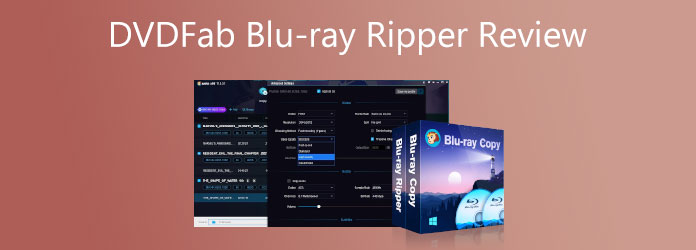
Table of Contents
- Part 1. How We Tested DVDFab DVD Ripper
- Part 2. DVDFab at a Glance — Quick Spec Summary
- Part 3. DVDFab DVD Ripper — 5-Aspect Review
- Part 4. What We Liked vs What We Didn't
- Part 5. 3 Common DVDFab Problems (and How to Fix Them)
- Part 6. Free Alternative — Blu-ray Master Free Blu-ray Ripper
- Part 7. DVDFab vs Free DVD Ripper — Which Should You Choose
- Part 8. FAQs About DVDFab DVD Ripper
Part 1. How We Tested DVDFab DVD Ripper
For an objective review of how DVDFab DVD Ripper works, we have tested the program's performance on a modern desktop. As such, we used a Windows 11 computer with 8GB of RAM and an AMD iGPU to test the software. The DVD used for testing is a modern DVD and Blu-ray drive. To test how the program performs, we measured the software's ripping time and evaluated the video quality of the ripped digital video and DVD media.
Hardware Specs Used for Testing
- Windows 11
- 8GB of RAM
- AMD Ryzen 5 iGPU
- USB Type-C External Blu-ray and DVD Drive
Part 2. DVDFab at a Glance — Quick Spec Summary
As its name suggests, DVDFab Blu-ray Ripper is a tool for ripping Blu-rays. Furthermore, this tool can provide you with gapless playback on any media player you use while allowing you to remove the Blu-ray protection before ripping. We all know how vital region code removal is for Blu-rays, as they usually have region codes that can cause playback failure if they do not match your region. Luckily, it is one of the users’ favorite features of the DVDFab Blu-ray Ripper. Thus, for the other notable features of this tool, please refer to the information below.
For a quick glimpse of the software's key features, we have provided the most important ones. These include their pricing points, supported platforms, the quality of converted videos, and other key figures vital for DVD ripping.
| Price | $49.99 |
| Platform | Windows, macOS |
| Output Format | MP4, MKV, AVI, MOV, WMV, FLV, and 1000+ formats. |
| GPU Acceleration | 50x Faster Hardware GPU Acceleration |
| Watermark | No |
| Free Trial | 30 Days |
| Latest Version | DVDFab 13 |
Part 3. DVDFab DVD Ripper — 5-Aspect Review
Format Support—Blu-ray to MKV, MP4, AVI, etc.
It offers MP4, MKV, M2TS, and more than 1000 output profiles, enabling you to convert Blu-ray movies to any format you want. Moreover, it provides Video, Audio, Hi-Fi Audio, and device-compatible formats, which allow you to directly convert Blu-ray to formats that can be played on Amazon, Google, Apple, and more. This makes the software a good Blu-ray ripper software for Mac.
DMA (DVD Multi-Angle) — Unique Feature
When handling Blu-ray content with multi-angle features, DVDFab Blu-ray Ripper can process all these angles in software. When ripping Blu-rays with multi-angle scenes, it is advisable to process the Title 1 in the software along with the main movie. This is a good miscellaneous addition for Blu-ray releases with multi-angle features.
Ripping Speed — GPU Acceleration Tested
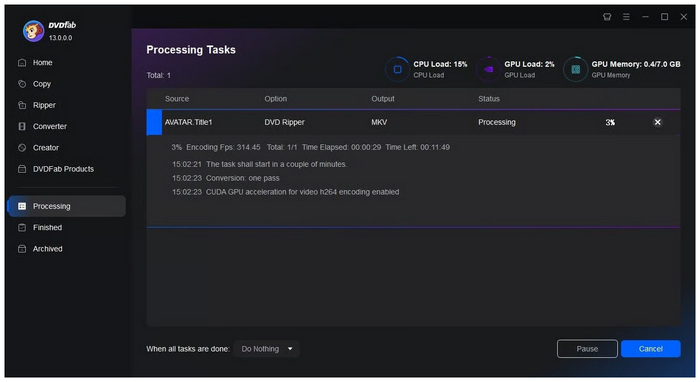
For testing, we ripped a Blu-ray once with Lightning Shrink activated and once without Lightning Shrink. There are no differences between the 2 rounds of ripping, and the file was ripped at an average of 180-240 fps (GPU load at 70%).
Then we ripped the same Blu-ray again with the same settings. On the second try, the Blu-ray was only ripped at a maximum of 80 fps.
Then, we repeated the ripping several times by exiting DVDFab, restarting, and ripping again. The lowest speed we had was 43 fps.
As we can see, there is a big difference among different rips.
Built-in Video Editor — Trim, Crop, Merge
Another feature that sets DVDFab Blu-ray Ripper apart is its built-in video editor. Equipped with essential settings such as Trim, Crop, Merge, and more, you can fix sections of the digital video you have converted directly in the program.
Output Quality — Side-by-Side Comparison
During conversion, the quality of the ripped Blu-ray video and the original Blu-ray media is very close and almost identical. As such, this is a major advantage of using the program. This makes using the tool a solid choice for creating high-quality digital videos recovered from physical media.
Part 4. What We Liked vs What We Didn't
Based on our testing, we summarized what we liked and disliked about DVDFab Blu-ray Ripper to provide an objective perspective on this tool. These are listed below and labeled as the software's pros and cons.
Pros
- It supports many different output formats.
- It has a simple yet intuitive interface.
- You can rip and convert your Blu-rays in batches.
- It can enhance your movies to 1080p and 4K resolution.
Cons
- It is not a free tool.
- It comes with a 30-day free trial but has great limitations.
- The premium is a little pricey.
- DVDFab Blu-ray Ripper for Mac is only available on macOS 12 and later releases.
- Steep learning curve if you plan to use its more advanced multimedia editing settings..
Part 5. 3 Common DVDFab Problems (and How to Fix Them)
Problem 1 — DVDFab Won't Open
If your DVDFab Blu-ray Ripper software won’t open, we recommend restarting the program and rerunning it on your computer. If the restarting option fails, run the software in Administrator Mode to ensure that your computer will run it in full compatibility.
Problem 2 — Failed Directory Scan
When facing problems regarding scanning issues, make sure to check the hardware you are trying to open in the program. Check the DVD or Blu-ray discs for scratches or double check the connection of your external DVD driver to your computer.
Problem 3 — Process Failed Mid-Rip
Mid-rip errors are usually connected to storage issues on your computer. If your program has problems writing your DVD media into a digital copy, make sure to check if your save destination has enough storage space. Otherwise, try to save the DVD media into another format such as MP4 or MKV.
Part 6. Free Alternative — Blu-ray Master Free Ripper
DVDFab is, without a doubt, a fantastic Blu-ray and DVD ripper. However, upon identifying the disadvantages of this software, you might lose interest in using it. Fortunately, we have the best alternative to back you up on this matter. We present to you the Blu-ray Master Free Blu-ray Ripper. It is a ripping tool you can acquire on both Mac and Windows. It provides rich video and audio output, and even device-compatible formats like MP4, MOV, MKV, Apple, Samsung, and other profiles. In addition, it has a built-in media metadata editor, video compressor, GIF maker, 3D maker, and an AI-powered video enhancer.
Moreover, it comes with a 30-day trial version, during which you can enjoy all its features and functions. Regarding its premium versions, we are happy to inform you that they are more affordable than DVDFab's.
Free Download
For Windows
Secure Download
Free Download
for macOS
Secure Download
Features:
- GPU hardware acceleration.
- Batch ripping and conversion process.
- Easy online sharing.
- Built-in AI editing tools.
- More than 200 input and output formats.
- 1080p and 4K supported.
Pros
- It is super easy to use.
- Breezy to install.
- The outputs are, as expected, excellent in quality.
- You can work in batches.
- It easily transforms your ripped videos into Ultra HD.
Cons
- It is not entirely free.
- Slightly limited features when using the free version.
Part 7. DVDFab Blu-ray Ripper vs Blu-ray Master Free Blu-ray Ripper — Which Should You Choose
The following table presents the differences between the Blu-ray Master Blu-ray Ripper and the DVDFab Blu-ray Ripper. This table is provided to help our readers decide which of these tools is ideal based on specific elements.
| Blu-ray Master Free Blu-ray Ripper | DVDFab Blu-ray Ripper | |
| Price | Free | $99.99/Lifetime |
| Supported Media | Blu-ray Disc, Blu-ray folder, and Bl | Blu-ray disc (2D & 3D), Blu-ray folder, Blu-ray ISO image file |
| Support OS | Windows/Mac | Windows/Mac |
| Blu-ray Menu | Yes | Yes |
| Ripping Speed | Within 3 seconds | Within 5 seconds |
| Performance | Stable | Easy to collapse |
| Ads | No | Recommended product ads |
| Output Formats | MP4, MKV, MOV, M2TS and more. | MP4, MP3, WMV, FLV, and more. |
Part 8. FAQs About DVDFab DVD Ripper
-
How can I get rid of the DVDFab Blu-ray Ripper crack error?
If you want to eliminate the issues with DVDFab Blu-ray Ripper, the best solution is to use a safe, professional alternative like Blu-ray ripper software.
-
Can I rip my Blu-ray as a 3D video using DVDFab Blu-ray Ripper?
Yes. DVDFab allows users to convert their Blu-ray movies to 3D. In addition, this tool contains 3D filters that can be applied to the output videos.
-
How long will it take to rip Blu-rays?
The duration of Ripping Blu-rays depends on the ripping tool you use. If you use an acceleration-based tool, such as Blu-ray Ripper or DVDFab Blu-ray Ripper, you can rip a 2-hour movie in 12 minutes.
-
Is DVDFab DVD Ripper free?
No, it is not. The program is a paid software. However, it can be used for free during its free trial.
-
Does DVDFab work on Windows 11?
Yes, it does. DVDFab supports modern operating systems such as Windows 11. This makes the program a good choice for processing DVD releases on modern hardware.
-
DVDFab vs MakeMKV — which is better?
Both programs are good options. You only have to choose based on quality or versatile output format. If you prioritize quality, choose MakeMKV. For a wider range of output formats, DVDFab is better.
-
Can DVDFab rip Blu-ray too?
Yes, it can. DVDFab Blu-ray Ripper is a versatile ripping tool. It can rip both DVD and Blu-ray media.
-
Is DVDFab safe to download?
Yes, it is. DVDFab Blu-ray Ripper is a safe choice. Just make sure to download the program from its official website.
Conclusion
This article offers a reliable review of DVDFab Blu-ray Ripper, including its features, pros and cons, test report, pricing, alternatives, etc. In conclusion, DVDFab Blu-ray Ripper is a good Blu-ray ripping software and performs well in the ripping process. You can try it bravely.
More Reading
Blu-ray Ripper Review
Rip Blu-rays to any video and audio formats of different parameters for free in minutes.
100% Secure. No virus
