

Sep 14, 2026Posted by Kevin Miller to Rip DVD
Quick Summary:
DumboFab DVD Ripper is a modern DVD ripper tool optimized for modern Windows and Mac computers. It was designed to handle 1:1 backups of ripped DVDs, bypass basic encryption methods such as CSS, Region Codes, ARccOSm, PuppetLock, and convert DVDs to 200+ output formats. Unfortunately, it has a 3-minute trial limit when using their free version. As such, we also provided a reliable and free DVD ripper alternative for beginners.
DumboFab DVD Ripper is currently establishing itself in the DVD ripping domain. It is built to handle any DVD for ripping, conversion, and backup purposes. It promises to deliver high-speed performance with lossless conversion quality. It aims to ease the DVD-to-digital conversion with minimal effort. This post will provide a detailed review of DumboFab DVD Ripper. It includes a quick review of the software and what it offers. We will cover the ratings across aspects like performance, processing speed, success rate, etc. Also, we will discuss and analyze its features and how they work. Most importantly, we will introduce a strong alternative to help you compare and decide if the featured software is the right tool for you.
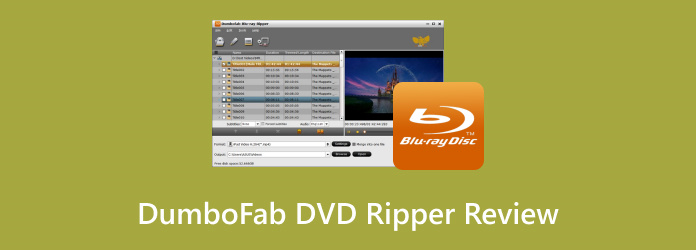
Table of Contents
Part 1. How We Tested DumboFab DVD Ripper & Quick Verdict
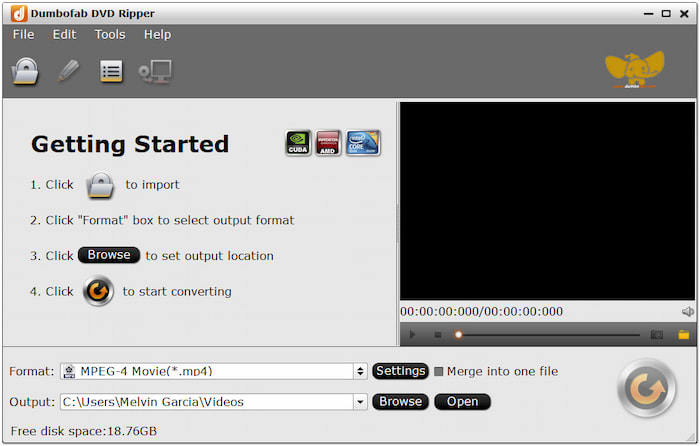
DumboFab DVD Ripper is a full-featured software made to rip, convert, copy, and edit DVDs. It supports nearly all types of DVDs, including homemade and commercial DVDs. This software can handle 99-title DVDs, movie DVDs, music DVDs, DVD regions 1-6, and workout DVDs. It lets you convert DVDs, VIDEO_TS folders, or ISO files to mainstream formats like MP4, MKV, and AVI. Beyond digital profiles, it offers over 150+ device presets compatible with popular brands.
How We Tested DumboFab DVD Ripper
- To measure performance and efficiency, we timed how long the program took to complete a full-movie rip to assess its 5-minute claim.
- After ripping, the video quality of the ripped media saved in MP4 and MKV format was compared to the original DVD quality.
- We also explored the program's subtitle and watermark options to assess whether these can be added to ripped DVD outputs.
- Unfortunately, its free version limits DVD rips to 3 minutes per DVD and is designed only to assess the quality of the ripped output.
Overall Ratings (Out of 5 Stars):
4/5
3/5
2/5
2/5
3/5
What You Need to Know About DumboFab DVD Ripper:
- Creates an exact 1:1 copy of standard-length DVDs within five minutes.
- Includes a built-in editor with basic tools for enhancement and customisation.
- Adopts a multicore processor to accelerate the conversion up to 30× faster.
- Handles any DVD format, including 99-title, regional, workout, and movie DVDs.
- Converts DVDs, VIDEO_TS folders, and ISO files to media stream formats and device presets.
Part 2. DumboFab DVD Ripper at a Glance
For a quick glimpse of the key features when using the program, make sure to read our full specifications card of DumboFab DVD Ripper, which provides key information on the tool’s best uses, pricing plans, supported platforms, supported formats, watermark presence, trial limitations, and copy protections that it can bypass.
The information provided below may be enough to help you decide whether the program’s features suit your needs.
| Classification | Result |
| Best For | Users looking for a fast DVD ripper tool for Windows and Mac that can create 1:1 DVD backups saved in digital MP4 or MKV formats. |
| Price | 1-year License: $25.95 Lifetime License: $35.95 Family License for 2-5 PCs: $65.95 |
| Platform | Windows 11/10/8/7/Vista/XP macOS 10.7–10.15 |
| Formats | Input Formats: DVD, VIDEO_TS folder, IFO, ISO Output Formats: MP4, MKV, AVI, WMV, MOV, and 200+ digital formats. |
| Watermark | No Watermark |
| Trial | DVD ripping of up to 3 minutes per file. |
| Copy protections | CSS, Region, RCE, Sony ARccOS, PuppetLock, and 50+ decryption support. |
Part 3. DumboFab DVD Ripper Pros & Cons
DVD to Mainstream Profiles & 150+ Device Presets
Overall Ratings: 3/5
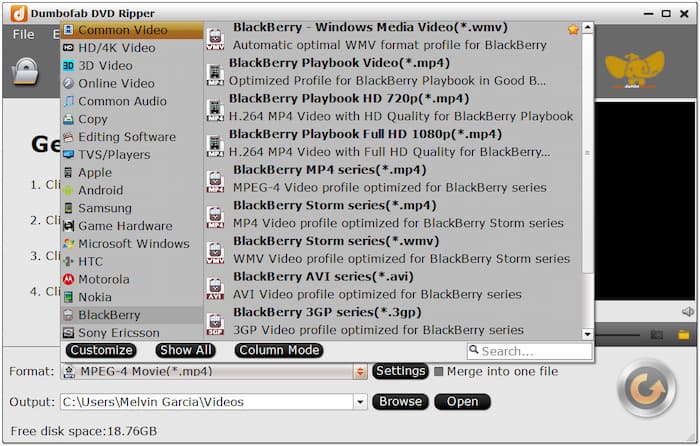
DumboFab supports input sources such as DVDs, the VIDEO_TS folder, and ISOs for conversion. You can convert these inputs into media stream formats such as MP4, AVI, WMV, ASF, and MPG. Aside from digital media formats, it also offers output in 150+ device presets. This includes popular brands like Apple, Samsung, Microsoft Windows, HTC, and Motorola.
Handles 99-Title, Regional & Copy-Protected DVDs
Overall Ratings: 2/5
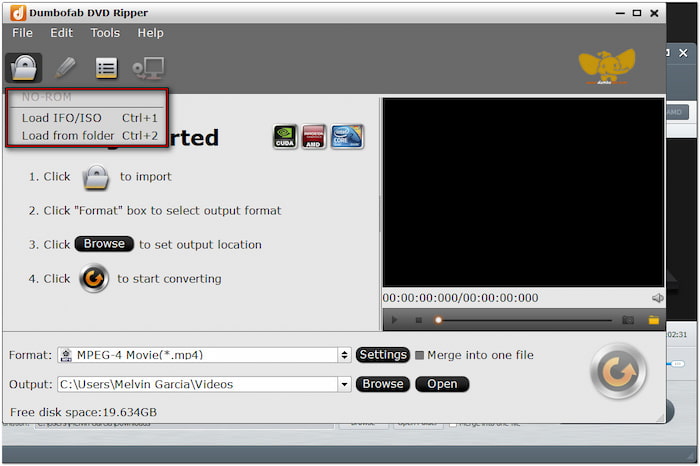
The software excels at handling any DVD, be it homemade or commercial. It can process commercial DVDs with region codes and copy protections. In addition, it can efficiently load 99-title DVDs that contain fake titles. It uses a title detection algorithm to identify the correct main title for ripping. It is valuable for those who deal with multi-angle or structured DVDs,
Ripping Speed — Real Numbers vs the "30×" Claim
Overall Ratings: 3/5
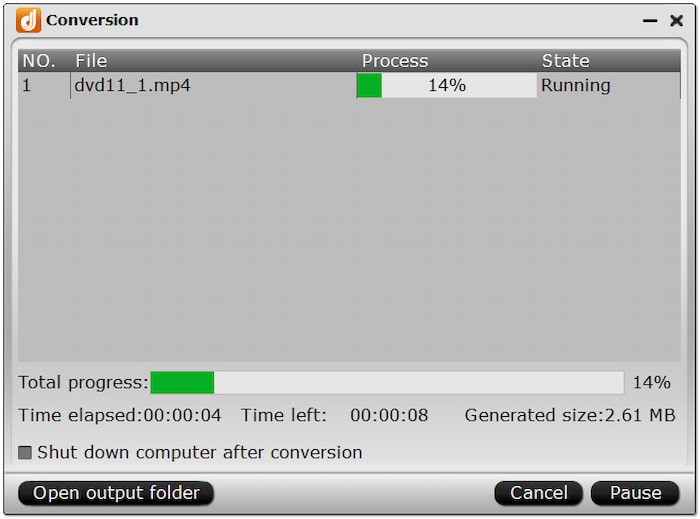
DumboFab DVD Ripper is built for performance, offering high conversion speed powered by a multicore processor. It uses AMD and Intel CPUs, NVIDIA CUDA, and NVIDIA GPUs to accelerate the ripping process. It can rip DVDs at up to 30× speed with minimal degradation in bitrate and resolution. This software reduces the time you need to process long or high-quality DVDs.
Built-in Editor for Subtitles, Crop & Watermark
Overall Ratings: 2/5
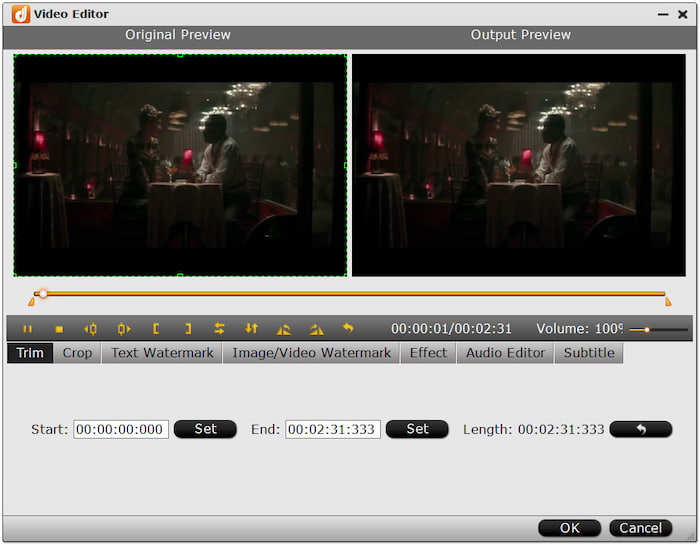
DumboFab goes beyond DVD conversion by offering a built-in editor for customising content before export. It includes essential tools for trimming, cropping, inserting DVD subtitles, adding watermarks, and adjusting video effects. Although they are not dedicated editors, these tools are adequate for quickly enhancing DVD content.
1:1 Lossless Full Title / Main Title Copy
Overall Ratings: 3/5
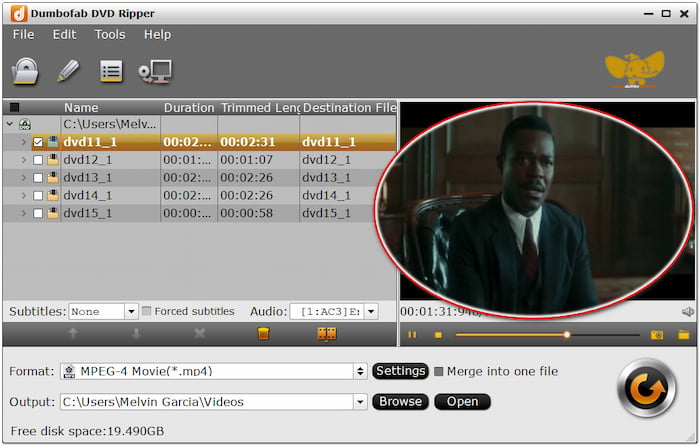
The software provides two DVD copy modes: Full Title Copy and Main Title Copy. These copy modes let you create exact copies of standard-length DVDs in five minutes. The Full Title Copy mode creates a complete 1:1 backup of the entire disc. Meanwhile, the Main Title Copy mode copies only the main movie content, excluding extras.
Part 4. How to Use DumboFab DVD Ripper
With the features, strengths, and limitations of DumboFab DVD Ripper now discussed, let us move on to the steps for using the program. As such, we have provided a quick three-step guide to using the tool.
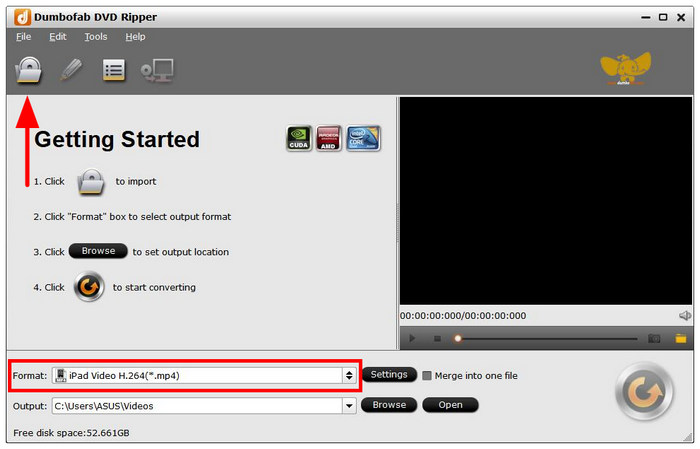
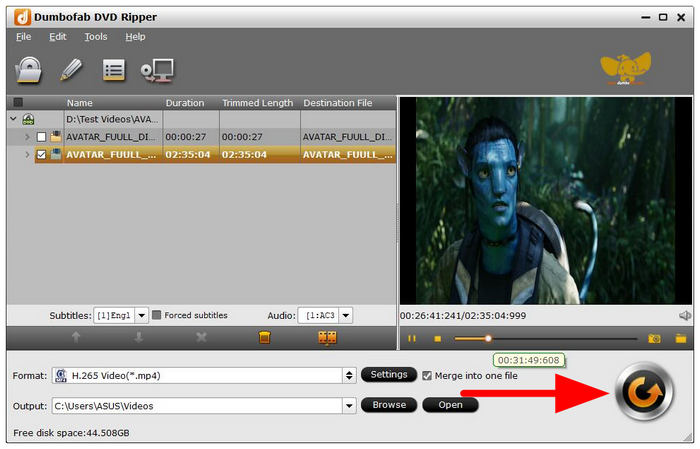
Step 1.Load the DVD you want to rip into your computer using an external or built-in driver if your computer has one. Then, open DumboFab DVD Ripper and select the Load DVD button to import the DVD content to the program. Then select Format to choose the output format of your ripped DVD.
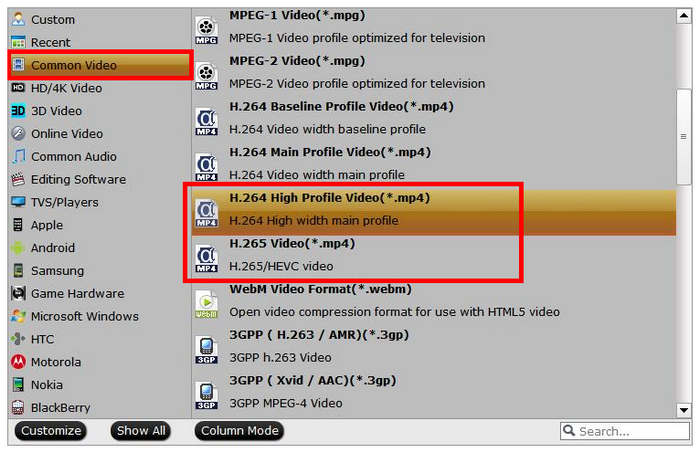
Step 2.In the Output Format menu, select Common Video to select video formats with the most compatibility. We suggest using either H.264 High Profile Video (MP4) or H.265 Video (MP4) to save your ripped DVD in the accessible MP4 format.
Step 3.With the ripping format now set, click on Output to set where the ripped video will be saved. Once done, click on the Start Rip button to begin the process.
When it comes to ease of use and accessibility, DumboFab DVD Ripper is a good solution. Unfortunately, it is severely limited by its 3-minute ripping time for its trial option. To learn the best freeware option for DVD ripping, make sure to read the next section of the article, which compares DumboFab with our recommended free DVD ripper tool.
Part 5. DumboFab DVD Ripper vs Blu-ray Master Free DVD Ripper
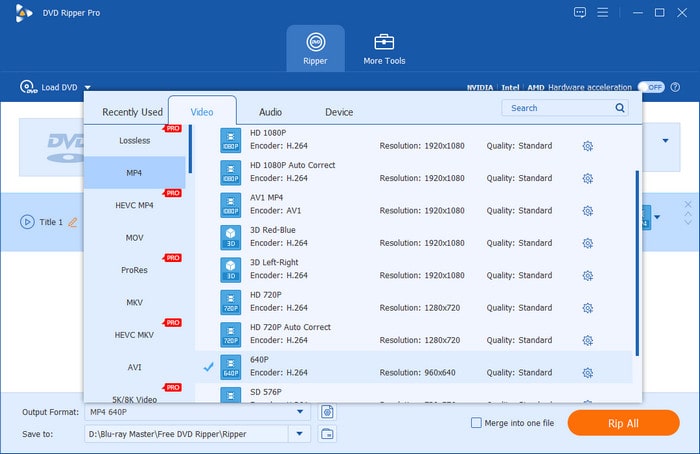
Regarding DVD ripping, DumboFab DVD Ripper is not the only option available. Blu-ray Master Free DVD Ripper is a strong alternative, offering a generous set of features at no cost. Yes, the software is 100% completely free to use. With it, you can convert DVDs to MP4, AVI, FLV, and 200+ other media profiles. It also supports converting DVDs to device-specific presets for Apple, Samsung, Google, BlackBerry, LG, and others.
Free Download
For Windows
Secure Download
Free Download
for macOS
Secure Download
Furthermore, it uses the latest, continuously updated decryption technology to rip DVDs. It can handle any DVDs, including DVDs from regions 1-6, encrypted discs, and even those with copy protection. Moreover, it includes a built-in editor with practical editing tools for adjusting video effects. But the best deal is that you can preview the content before ripping to see changes. Also, you can set an output directory for each ripped DVD to make file management easier.
Why Consider Blu-ray Master Free DVD Ripper:
- Efficient decryption of DVDs from all regions, including encrypted and copy-protected discs.
- Converts DVD, VIDEO_TS folder, IFO files, and ISO files to over 200+ digital profiles.
- Uses Hyper-threading and Super Encode Engine to maintain the DVD’s original quality.
- Freely adjust profile settings, including encoder, resolution, bitrate, frame rate, ratio, etc.
- Adopts the newest and most up-to-date acceleration technology to expedite the conversion.
Quick Comparison
| DumboFab DVD Ripper | Key Features | Blu-ray Master Free DVD Ripper |
| Apple M2 & macOS 15 and Windows 11/10/8/7 | System Compatibility | macOS 10.12 or later and Windows 11/10/8/7 |
| $25.95 starting price | Price | FREE |
| DVD, VIDEO_TS folder, ISO file, etc. | Inputs | DVD, VIDEO_TS folder, IFO file, ISO file, workout, protected, regional, 99 titles, etc. |
| MP4, MKV, AVI, WMV, MOV, etc. | Outputs | MP4, AVI, FLV, WMV, MOV, and 200+ other formats |
| Standard encryptions only | Decryption Power | Old and newer DVD encryptions and copy protections |
| Up to 30× | Processing Speed | Up to 20× |
| Add watermarks, adjust video effects, crop, insert subtitles, trim, etc. | Built-in Editor | 3D effect, adjust video effects, clip, insert subtitle, merge, etc. |
| Video/audio codec, size, sample rate, video/audio bitrate, frame rate, and channel | Professional Profile Settings Customisation | video/audio encoder, resolution, aspect ratio, video/audio bitrate, sample rate, and channel. |
| Up to 4K resolution | Quality | Up to 4K resolution |
| Easy | Usability | Basic |
Who Should Pick Which
Based on the key features of DumboFab DVD Ripper and Blu-ray Master Free DVD Ripper, we can now recommend a program based on specific criteria.
For users who prioritise speed, system compatibility, and premium feels, DumboFab DVD Ripper is our recommended solution. However, if you are looking for a reliable freeware program with stronger encryption bypass, 200+ output profiles, and more advanced video editing tools, select Blu-ray Master Free DVD Ripper.
Part 6. FAQs About DumboFab DVD Ripper
-
How much does DumboFab DVD Ripper cost?
DumboFab DVD Ripper has three different pricing options. It offers an Annual License, Lifetime License, and Family License for multiple PCs. The price ranges from $25.95 to $69.95.
-
Is the DumboFab trial really limited to 3 minutes?
Yes, it is. Using the DumboFab trial version will limit you to ripping only the first 3-minutes of the DVD. Its sole purpose is to provide the video quality of ripped DVD videos.
-
Does it work on Windows 11 and Apple Silicon Macs?
Yes, it is. DumboFab DVD Ripper can be used on Mac computers. It is also compatible with Mac Silicon chips.
-
Is DumboFab DVD Ripper safe / does the crack work?
Yes, the official version of DumboFab DVD Ripper is safe to use. However, crack versions of the program are unsafe. They are also considered pirated copies.
-
Is it legal to rip copy-protected DVDs?
No, it is not. However, you can do this for personal backups. Just make sure to avoid sharing ripped DVD copies, as sharing them is a form of piracy.
-
What is the best free alternative?
The best free DVD ripper for both Windows and Mac is Blu-ray Master Free DVD Ripper. The program has enough features to support basic ripping. It also offers a paid plan with more advanced features.
Conclusion
You’ve just read our complete review of DumboFab DVD Ripper. After a thorough look, it’s clear that the featured software offers a solution for ripping, converting, and copying DVDs. Although efficient, it comes at a cost, which may not suit users seeking a zero-cost solution. If you’re searching for a completely free alternative that delivers almost the same performance, Blu-ray Master Free DVD Ripper is what you need. It is a reliable, cost-free solution compatible with Windows and Mac systems. It lets you rip DVDs and make high-quality edits at high speed.
More from Blu-ray Master
Various DVD Ripper Review
Fast and free ripping software to decrypt all DVDs to digital easily on your computer.
100% Secure. No virus
