

Sep 14, 2026Posted by Kevin Miller to Rip DVD
Quick Summary:
Magic DVD Ripper is a legacy DVD ripper made for Windows computers. It was designed to be a reliable 1:1 backup tool that can bypass CSS and region-code restrictions. The software can also automatically compress DVD-9 content to DVD-5. It is a good option for simple DVD backups and for digitising videos.
Magic DVD Ripper is among the most established options for converting and backing up DVD collections. It is designed to rip DVDs to digital profiles compatible with selected devices. It offers a solution for anyone wanting to preserve or repurpose their DVDs. Magic DVD became popular for its aesthetic interface, high ripping speed, and reliable output quality. This Magic DVD Ripper review will explore all the information you need about the software. We’ll highlight its features, advantages, and disadvantages, along with a quick guide to using it. Before this post ends, we will introduce an alternative to help you determine which DVD ripper is the best.

Table of Contents
- Part 1. How We Tested Magic DVD Ripper & Quick Verdict
- Part 2. Magic DVD Ripper at a Glance — Full Spec Card
- Part 3. Magic DVD Ripper Pros & Cons — 6 Features Tested
- Part 4. How to Use Magic DVD Ripper — Step-by-Step
- Part 5. Magic DVD Ripper vs Blu-ray Master Free DVD Ripper
- Part 6. FAQs About Magic DVD Ripper
Part 1. How We Tested Magic DVD Ripper & Quick Verdict
To assess the performance of Magic DVD Ripper on modern computers, we tested the tool by ripping a commercial DVD with CSS and region protection. During the conversion, the total time for ripping the full movie was also measured. After the conversion, the quality of the MP4 video was also tested side by side with the DVD's original to verify whether it was a 1:1 copy.
With these testing standards in mind, we ensured that Magic DVD Ripper performed at its best under stable conditions to objectively assess how the program handles modern loads and standards.
Part 2. Magic DVD Ripper at a Glance — Full Spec Card
For an objective overview of Magic DVD Ripper Review, we have provided an overview of how the program performs in key aspects as multimedia software. As such, we have provided the tool’s best uses, pricing plans, platforms, trial period, protection bypass, and whether it is up to date.
| Classification | Result |
| Best For | Simple 1:1 DVD backup and basic conversion on Windows, on a budget. |
| Price | $34.97 – $44.45 |
| Platform | Windows XP–10 (32/64-bit) |
| Formats | AVI (Xvid/DivX), MP4, MPEG-2, WMV, MP3, VCD, SVCD, 40+ profiles |
| Watermark | None |
| Trial | 5 full-feature ripping |
Part 3. Magic DVD Ripper Pros & Cons — 6 Features Tested
Copy DVD Movie to Hard Drive
The software lets you create a 1:1 copy of a DVD directly on your hard drive. This feature ensures you can retain a complete copy of the data for archiving. You can access the content once you have the copy without needing the physical disc. However, the copied file is not optimised for playback on portable devices like smartphones.
Remove Restrictions from DVDs
The Magic DVD can bypass CSS, DVD region, RCE, Sony ARccOS, and PuppetLock restrictions. It aims to help you easily rip DVDs, regardless of region or encryption. This feature removes playback limitations when backing up DVDs for personal use. Now, a small heads-up: Bypassing copy protections from DVDs you don’t own is illegal.
Downloads Decryption Files for New Protection DVDs
The software claims to download decryption patches automatically when new protections are released. It ensures continued compatibility with modern release restrictions. You don’t need to apply updates to handle newly encrypted discs. However, you might lose access to the decryption fixes once the software’s development is discontinued.
Copy the Main Title or Split DVD-9 into Two DVD-5
The Magic DVD provides two options for handling DVD content. First, you can back up only the main title, not the extras. The other option is to split a dual-layer disc into two single-layer discs. This feature allows you to save storage capacity by excluding unnecessary content. But here’s the deal: Splitting the content can interrupt playback continuity.
Compress DVD to Fit on a 4.7 GB Disc
The software can compress a DVD-9 into a single-layer 4.7 GB disc. It works by re-encoding it at a lower bitrate while maintaining video quality. This feature allows you to burn the movie into more common single-layer DVDs. However, you cannot guarantee 100% quality retention as compression introduces quality loss.
High Ripping Speed and Good Output Quality
The Magic DVD delivers fast ripping speeds, converting a full-length DVD in less than 60 minutes. The output quality is reasonable across digital formats such as MP4 and MPEG-2. This feature can save you time, mainly when processing extensive DVD collections. However, the speed depends on your system hardware, DVD protection, and disc condition.
Part 4. How to Use Magic DVD Ripper — Step-by-Step
Magic DVD is a simple tool that provides a convenient solution for converting. It lets you rip your physical disc into a portable, playable digital format. Beyond conversion, it enables you to copy the entire disc, back up only the main title, or split a DVD-9 into two DVD-5.
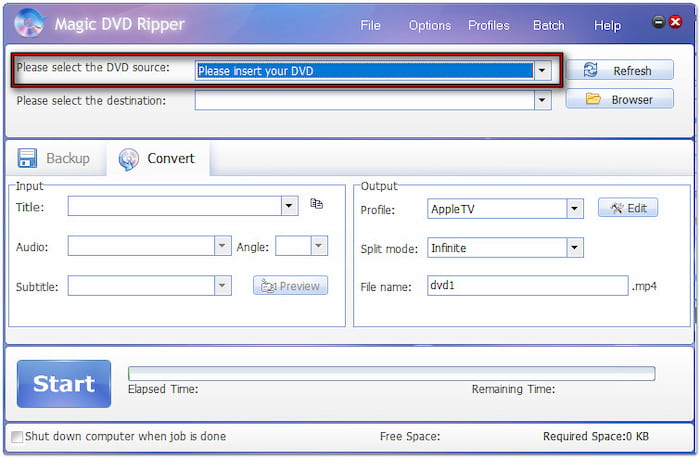
Step 1.Get your disc, insert it into your external DVD drive, and launch Magic DVD afterwards. Navigate to the Convert tab and click Please select the DVD source to load the disc. The software will scan the disc and import its contents, including all titles available.
Step 2.Move to the Input section and select the title you want to rip. Next, switch to the Output section and click the Profile pulldown menu to choose the format. If needed, click Edit to modify the profile settings for high-quality exports.
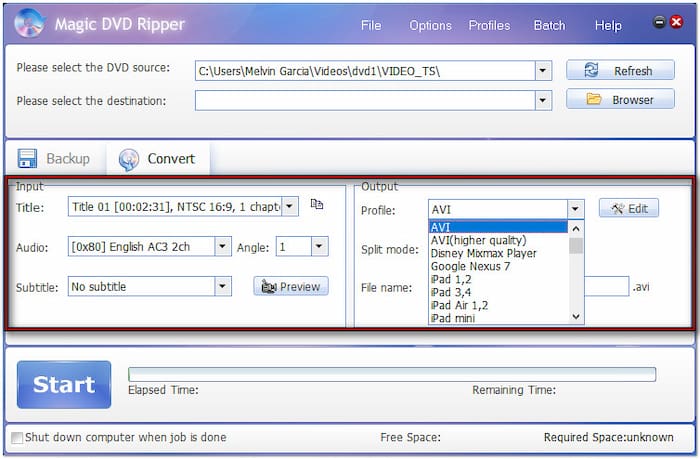
Step 3.Click Browse next to the Please select the destination field to specify the output directory. After all the settings, you can review the video by clicking the Preview button. Once everything is good, click Start to convert the DVD to the selected digital format.

Magic DVD offers a straightforward process for converting DVDs into digital format. Everything you need is located in one place, so you don’t need to switch between tabs. A friendly reminder: Do not use the Magic DVD Ripper crack version, as it may pose serious risks.
Do the characters speak with strong accents and use unfamiliar slang? Why not add a DVD subtitle? Subtitles can help clarify what’s being said, preventing missed dialogue.
Part 5. Magic DVD Ripper vs Blu-ray Master Free DVD Ripper
If you want more flexibility and enhanced compatibility, the Blu-ray Master Free DVD Ripper is a worthy alternative. It is compatible with macOS 10.12 or later and Windows 11/10/8/7. This software goes further with over 200+ profiles, including video, audio, and device presets. It can rip DVDs with output resolutions up to 4K, surpassing the standard quality of Magic DVD.
Free Download
For Windows
Secure Download
Free Download
for macOS
Secure Download
Moreover, it can handle region-restricted DVDs (Regions 1-6), the latest encryptions, and copy protections. It uses constantly updated decryption technology, ensuring compatibility with newer, more secure discs. In addition, it includes a built-in editor with essential tools not available in Magic DVD.
For an easier comparison of the two programs, please refer to our table below:
| Magic DVD Ripper | VS | Blu-ray Master Free DVD Ripper |
| Windows | Platform | Windows, macOS |
| AVI (Xvid/DivX), WMV, MP4, MPEG-2, MP3, VCD, SVCD, DVD | Supported Format | MP4, MKV, MOV, AVI, FLV, WMV, M4V, TS, H.264, MP3, AAC, and 200+ formats. |
| Original 1:1 Quality | Maximum Quality | 4K UHD |
| • DVD Title Selection • Audio/Subtitle selection • Output-quality control | Video Editor Features | • Video Crop • Colour Adjustment • Add text/image • Watermark marking • Adjust audio • Aspect ratio • Frame rate and Resolution |
| $34.97 – $44.45 | Price | Free |
| Simple DVD to digital conversion on older Windows computers. | Best Uses | Ripping DVDs on modern Windows and macOS desktops. |
Who Should Pick Which
If you are unsure which ripping tool to choose, keep in mind that both software programs are designed to create digital backups of DVDs. As such, all you have to do is check whether you want a program for modern devices or a Windows program for Windows 10 or earlier. In the end, the best of the program and how you plan to use it will dictate your pick.
Part 6. FAQs About Magic DVD Ripper
-
Is Magic DVD Ripper safe / does the crack version work?
No, it is not. No crack copies are 100% safe. They will always have risk and are illegal.
-
Does Magic DVD Ripper support Windows 11 and MKV?
Magic DVD Ripper is not available in Windows 11. It stopped being updated in 2023 and only has support until Windows 10. It is optimised for modern Windows OS.
-
How long is the Magic DVD Ripper trial?
Magic DVD Ripper has no time-based trial. Unlike other apps with 30-day trials, Magic DVD has a 5-day free trial. It is not time-based.
-
Is it legal to rip copy-protected DVDs?
No, it is not. Bypassing copy protections is illegal. However, you can copy self-produced DVDs.
-
What is the best free alternative to Magic DVD Ripper?
Blu-ray Master Free DVD Ripper is a good modern alternative. Unlike Magic DVD Ripper, this program is designed for modern Windows devices. It is also available on macOS computers.
-
Why is Magic DVD Ripper not ripping my disc / no sound?
Check your ripper settings. You may have adjusted the wrong settings during ripping. Double-check the settings in the ripper's audio section.
Conclusion
You’ve now reached the end of our Magic DVD Ripper review! Magic DVD is a dependable tool for those who need to convert or back up DVDs with ease. However, its limited format support doesn’t meet the needs of users seeking greater flexibility. If you need a more powerful, feature-rich alternative with updated, broad format support, the Blu-ray Master Free DVD Ripper is what you need. It supports over 200 profiles, 4K video quality, a built-in editor, region-free decryption, and much more.
More from Blu-ray Master
Various DVD Ripper Review
Fast and free ripping software to decrypt all DVDs to digital easily on your computer.
100% Secure. No virus
