

Sep 14, 2026Posted by Kevin Miller to Rip DVD
Quick Summary:
Aimersoft DVD Ripper is one of the most reliable modern options for ripping and converting physical DVD content to digital video. Among paid options, it offers good features for ripping to high-quality video, copy-protection bypass, and essential editing tools. Unfortunately, Wondershare has discontinued support for the Aimersoft brand, making it an obsolete DVD-ripping choice in 2026.
Aimersoft DVD Ripper is one of the tools you will encounter when searching for a solution to rip content from your DVDs. Unfortunately, the program’s developers have discontinued support for the software. As such, this review will be written based on the program’s performance during active development as a DVD ripper. We will review its features, pricing, and more. Ultimately, we do not recommend using Aimersoft DVD Ripper in 2026; however, if you already have access to a computer with a preinstalled official version of the tool, this review may help you decide whether using Aimersoft in 2026 is worth it.
Table of Contents
- Part 1. How We Tested Aimersoft DVD Ripper & Quick Verdict
- Part 2. Aimersoft DVD Ripper at a Glance — Info Card
- Part 3. Aimersoft DVD Ripper — Full Hands-on Review
- Part 4. Aimersoft DVD Ripper vs. Free Alternatives
- Part 5. What Users Say About Aimersoft DVD Ripper
- Part 6. Best Alternative to Aimersoft DVD Ripper — Blu-ray Master
- Part 7. FAQs About Aimersoft DVD Ripper
Part 1. How We Tested Aimersoft DVD Ripper & Quick Verdict
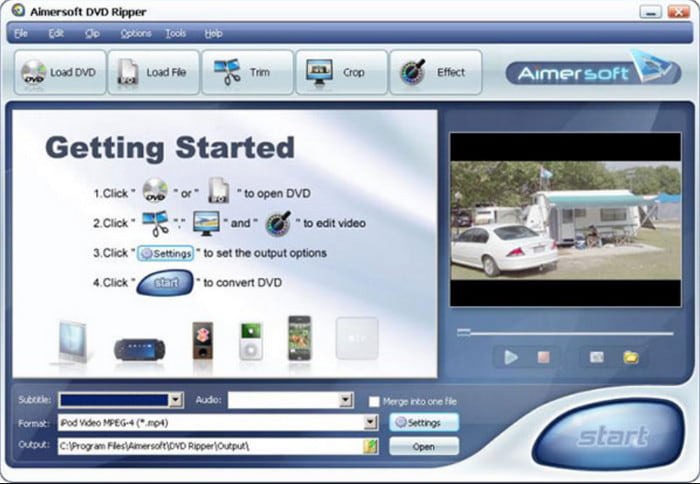
Aimersoft DVD Ripper is a desktop app that mainly transfers media files from physical discs to a computer or hard drive. Although it has stopped receiving updates, it can still perform basic tasks, such as standard DVD ripping. However, the discontinued support made it incompatible with modern operating system updates and versions.
Despite a lack of development support, digital licenses from unofficial websites and third-party resellers remain available today. However, we strongly advise against buying such copies, as they are unsafe and have poor long-term value.
If you have access to a preinstalled version of the Aimersoft DVD Ripper, you could expect a beginner-friendly interface, simple editing tools, and basic output presets. Unfortunately, the cons of the software outweigh its strengths, as it has a slow conversion speed, weak DVD decryption, and cannot read ISO images or DVD folders.
What We Tested
Aimersoft DVD Ripper was tested by making the program rip a commercial DVD protected by standard CSS and region code. To assess how the program performs across different platforms, it was tested on both Windows and Mac computers. Both devices run on Intel i7 and Apple Silicon chips, respectively. The total duration of the performance assessment was around 15 minutes.
Quick Verdict
3/5- Designed for ease of use, made possible by well-labelled buttons for a clear user interface. Unfortunately, it has a dated interface design.
4/5 – Its format support for both input and output is great. It can read modern DVDs, and the program also supports converting to popular video formats.
5/5- Ripping speed and overall efficiency are among the tool’s greatest features. This was made possible by its GPU acceleration features.
4/5 – During active development, Aimersoft DVD Ripper is trusted by users who often rip commercial DVDs.
3/5 – The pricing plan for Aimersoft DVD Ripper is around the market average among DVD ripper tools.
2/5 – If you already have the official version of Aimersoft DVD Ripper installed on your computer, you may continue to use it. However, it is not advisable if you plan to use it in 2026. Downloading the tool officially is no longer possible because the program has been discontinued. It is not safe in 2026.
Who Should Buy It / Who Should Skip It
We will only recommend using Aimersoft DVD Ripper in 2026 if the device you are using already has the program installed. Otherwise, we do not recommend using it, as the lack of developer support makes its security subpar at best, and downloading it from unofficial websites is very dangerous.
Part 2. Aimersoft DVD Ripper at a Glance — Info Card
For a quick glimpse of the key features when planning to use the program, we have provided the software’s best uses, pricing options, supported platforms, output formats for ripped DVD data, the presence of watermarks, trial version terms, and the decryption methods it can support.
During its active development, Aimersoft DVD Ripper is a popular choice due to its performance. However, since the program has stopped receiving any updates and developer support, we do not recommend using the tool for modern 2026 devices.
| Classification | Result |
| Best For | Converting DVDs to digital video for easier media consumption. This also makes the tool a good option for DVD backups. |
| Price | Lifetime License: $49.95 Annual License: $29.95 |
| Platform | Windows XP, 7, 8, 8.1, 10 macOS 10.06 – 10.09 |
| Formats | MP4, H.264, AVI, WMV, MOV, MPEG/MPG, 3GP, FLV, VOB, MKV, MP3, AAC, AC3, WAV, M4A, WMA |
| Watermark | Watermark on trial versions. |
| Trial | Converts up to 1/3 of the entire movie track. Ripped audio files will be converted to 3 minutes only. |
| Decryption Features | CSS, DVD region codes, PuppetLock and older DVD protections. |
| Support Status | Discontinued support from Wondershare developers. |
Part 3. Aimersoft DVD Ripper — Full Hands-on Review
Installation & Interface
Overall Rating: 4/5
One of the things you should look for in a ripping tool is its interface, as it will make navigation easier. Thankfully, Aimersoft offers this feature, which allows users to learn about functions and settings easily.
DVD Decryption & Ripping Speed
Overall Rating: 4/5
It utilises GPU acceleration to enhance conversion speed and offers flexible options to adjust resolution, bitrate, and audio settings. Most users are satisfied with its ripping performance.
Output Formats & Device Presets
Overall Rating: 3.5/5
Device compatibility will always be an issue for media content. Aimersoft DVD Ripper offers various presets for devices, allowing you to stream ripped videos on gaming consoles, computers, TVs, and other devices. The output settings are likely configurable to adjust overall quality, resolution, and more.
Built-in Editor & Extra Tools
Overall Rating: 4/5
Aimersoft DVD Ripper performs impressively at extracting and converting DVDs to multiple digital formats, offering quick processing and excellent output quality. However, the output video file, particularly when using high-quality settings, can be quite large, consuming a significant amount of disk space.
Pricing, Trial & Watermark — What You Actually Pay
Overall Rating: 4/5
The software offers three subscription plans with different pricing. The 1-Year Subscription is $29.95 for one PC and annual billing. The second subscription is $49.95 for one PC and a lifetime license. It is a one-time fee with free updates for a year. Lastly, the Business Lifetime Plan allows you to choose how many licenses you need for multiple devices. This is a flexible subscription, so the price varies. Free trial version with limited features. Paid version with its full features.

Safety and Stability
Overall Rating: 4.5/5
Aimersoft DVD Ripper is generally regarded as safe and stable software that efficiently handles various DVD ripping tasks. You can install it with no reports of malware or intrusive software from its official website. It runs reliably on both Windows and macOS platforms, offering a smooth user experience with minimal crashes or performance issues.
Where Aimersoft Falls Short
With the most notable pros and cons of Aimersoft DVD Ripper now reviewed, the program's most notable limitations are its lack of support for ISO images and ripped DVD folders. It also performs suboptimally during slow batch encoding and when producing large output files. However, one aspect stands out as the reason the program is not suitable for modern use: updates and support for Aimersoft brands have been discontinued, and the DVD Ripper is no exception.
The DVD Ripper looks reliable enough for a decent ripping process. However, the test we ran for Aimersoft showed slow progress, especially for multiple files. Another thing is its huge feature restrictions on the free version, like the user might not be able to rip anything from DVDs.
Part 4. Aimersoft DVD Ripper vs. Free Alternatives
With the features of Aimersoft DVD Ripper now discussed, let us move on to how the program performs compared to popular free DVD ripper alternatives in the open-source market. These tools may have their own niches, but how does paid premium software compare to them?
| DVD Ripper Tools | Ease of Use | Ripping Speed | Output Formats | Does it Decrypt DVDs | Output Quality |
| Aimersoft DVD Ripper | Easy | Fast | MP4, H.264, AVI, WMV, MOV, 100+ formats. | Yes | Good |
| HandBrake | Easy | Average | MP4, MKV, WebM | Yes (with additional plug-in) | 720p 1080p Lossless |
| MakeMKV | Intermediate | Average | MKV | Yes | Lossless (1:1 Quality) |
Part 5. What Users Say About Aimersoft DVD Ripper
At the top of our Aimersoft review, we compile the most relevant reviews from other users across reliable websites. Here are some included:
TrustPilot
Aimersoft DVD Ripper can rip and convert DVD movies to a wide range of formats. While it offers a free trial, a watermark is unavoidable, and most functions are unusable.
SoftSonic
I liked how this software includes all the necessary features for DVD ripping. Aside from its fast ripping process, Aimersoft also has a built-in video editor and converter to enhance every ripped video. With that said, the price of its pro version is too high, especially if you only need to use it once.
ReviewsTown
To be honest, I only heard about this software from a forum, and a user told me it was a great solution. However, the free trial version lacks the functionality to demonstrate its value. Also, I didn’t like its interface because it looks so old-fashioned. Or maybe that is only me.
Reddit Reviews
Aimersoft DVD Ripper is one of the most reliable modern options for DVD ripping. Too bad the support for the program has been discontinued by its parent developer, Wondershare. If you already have an official copy of Aimersoft DVD Ripper on your computer, feel free to use it. However, Reddit users advise against using the program in 2026.
Part 6. Best Alternative to Aimersoft DVD Ripper — Blu-ray Master
If you don’t fancy Aimersoft, you might try the best alternative for Windows and Mac. Blu-ray Master Free DVD Ripper is an outstanding ripping program that extracts content from original DVDs. Just like Aimersoft, this alternative has built-in editing features to improve visuals, as well as to trim, cut, and merge clips. But the best part is the supported media types, as they let you rip homemade, commercial, and damaged discs and automatically enhance the quality once ripped. You can try DVD Ripper for free, with no watermark or data loss.
- Bypass DVD region codes, system standards, and other encryptions.
- Support ripping discs for PAL and NTSC.
- Save and export multiple copies to various devices for iPhone, Android, and more.
- Create clones of uncompressed ISO and folders without hassle.
| Aimersoft DVD Ripper | VS | Blu-ray Master Free DVD Ripper |
| Windows 11, 10, 8, and macOS X 10.10 and above | Ease of Use | Windows 11/10, macOS 10.12 or above |
| MP4, WMV, FLV, and others | Output Formats | MP4, MKV, MOV, AVI, etc. |
| Good | Output Quality | Good |
| Fast | Burning Speed | Very Fast |
| Yes | Decryption Ability | Yes |
Free Download
For Windows
Secure Download
Free Download
for macOS
Secure Download
Part 7. FAQs About Aimersoft DVD Ripper
-
Is there a truly free DVD ripper?
There are a few programs that offer free ripping DVD service on desktops. Including HandBrake, MakeMKV, and VLC Media Player.
-
Are DVD rippers illegal?
If the DVD ripper can rip copy-protected content, it can be considered illegal. However, it still depends on the user who will sell the copies. If for personal use, it is not illegal to rip DVDs. Check more free DVD rippers here.
-
Is there a free version of Aimersoft DVD Ripper?
Yes. The free version offers minimal functions with restrictions on the video size, features, and quality.
-
What is the difference between Aimersoft DVD Copy vs. Aimersoft DVD Ripper?
While the DVD Ripper mainly rips and converts media files, DVD Copy allows you to clone videos, burn, and back them up to a hard drive.
-
Does it work on Windows 11 / the newest macOS?
No, Aimersoft DVD Ripper has been discontinued by Wondershare developers. As such, it is not optimised for Windows 11 and the latest macOS versions. Its safety is also compromised, as you cannot officially download the program in 2026.
-
Is Aimersoft DVD Ripper safe / still supported?
No, it is not. We do not recommend using the tool in 2026. It no longer receives updates, and other DVD ripper options, such as Blu-ray Master Free DVD Ripper, are a better solution.
Conlusion
Wrapping up the Aimersoft DVD Ripper review. You have found out the main functions of the software, including some of its highlights and drawbacks. Unfortunately, although its strengths are notable and hard to ignore, the lack of updates and developer support makes it not suitable in 2026. Using Blu-ray Master DVD Ripper as your alternative is our top recommendation. Its modern algorithm has far more advantages to preserve the original DVD quality and data. Click Free Download to get the free version from the official website.
More from Blu-ray Master
Various DVD Ripper Review

Fast and free ripping software to decrypt all DVDs to digital easily on your computer.
100% Secure. No virus
