

Oct 08, 2026Posted by Kevin Miller to Rip DVD
Quick Summary:
- • Verdict: 4.2/5 stars. Good for beginners, fast GPU acceleration, but the free trial is too short (5 mins).
- • Best For: Users who want 1-click DVD/Blu-ray to MP4 conversion without tweaking settings.
Physical discs are truly very fragile. When you purchase your favorite movie discs, you always believe you can carefully preserve them permanently until an unexpected scratch causes the disc to fail to play midway. Nowadays, converting discs to digital backups is no longer an option — it's a necessity.
If you are looking for a robust way to burn your favorite video to a disc, you may have noticed the VideoByte BD-DVD Ripper. Is it a good choice for DVD/Blu-ray backups? The software claims to bypass complex disc encryption mechanisms, converting your physical media into formats suitable for NAS, Plex, or mobile devices. However, given its $59.95 price tag and the extremely limited free trial period, is this software truly worth the investment? This VideoByte BD-DVD Ripper review will delve into its performance, speed, and shortcomings to help you decide before handing over your money.
Table of Contents
- Part 1. What is VideoByte BD-DVD Ripper
- Part 2. How We Test VideoByte BD-DVD Ripper
- Part 3. What We Like About VideoByte BD-DVD Ripper
- Part 4. What We Don’t Like About VideoByte BD-DVD Ripper
- Part 5. How to Use VideoByte BD-DVD Ripper
- Part 6. Final Verdict on VideoByte BD-DVD Ripper
- Part 7. Best Alternative to VideoByte BD-DVD Ripper
- Part 8. FAQs
Part 1. What is VideoByte BD-DVD Ripper
VideoByte BD-DVD Ripper is a desktop application that aims to provide effective Blu-ray and DVD ripping for Windows and Mac. It provides a flexible way to stream your favorite movies by ripping and converting them to compatible formats. This is also a great solution since DVD and Blu-ray discs are becoming old-fashioned with all the modern and advanced devices.
Knowing the main purpose of VideoByte BD-DVD Ripper, it offers more than ripping and converting videos. Below, you can see its features and benefits:
- Supports ripping Blu-rays or DVDs to over 300 video and audio formats.
- Device presets to make video compatible with various gadgets.
- Uncompressed quality with DVD Lossless and MKV Lossless options.
- Boost performance with a 6x speed ripping and converting process.
- Edit metadata, compress, and enhance video with additional tools.
Part 2. How We Test VideoByte BD-DVD Ripper
To see if VideoByte BD-DVD Ripper lives up to its '6x faster speed' claim, we set up a real-world benchmark test instead of just taking their marketing numbers for granted.
We hooked up an LG WH16NS40 Blu-ray drive to my test bench (Specs: Intel Core i7-13700K, 32GB DDR5 RAM, NVIDIA RTX 4070 12GB, running Windows 11 Pro). We picked three representative discs from my shelf: a standard commercial movie DVD (DVD-9), a dual-layer Blu-ray disc (BD-50), and a single-layer Blu-ray (BD-25) to test both ripping speed and output file compression.
Here is the deal: VideoByte does support hardware acceleration, specifically NVIDIA CUDA / NVENC and Intel QuickSync Video (QSV), as well as AMD APP.
During my test, once we turned on NVIDIA NVENC GPU acceleration in the preferences, the CPU load dropped significantly from 95% down to around 28%-35%, while my RTX 4070 took over the heavy video encoding lift. If you have a decent graphics card or a modern Intel CPU, the encoding speed is buttery smooth. However, it's worth noting that its GPU usage isn't fully maxed out compared to raw command-line tools, but for a consumer GUI ripper, it’s fast enough for everyday use.
Here are the exact numbers from my benchmark testing using the MP4 (HEVC / H.265, Original Resolution, Match Source Bitrate) output preset:
| Disc Type | Movie Title / Region | Original Size | Output Format | Output Size | Time Elapsed | Quality Loss / Visual Impression |
| DVD-9 | Region 1 | 7.8 GB | MP4 (H.264, 480p) | 1.8 GB | 3 mins 12 secs | Imperceptible. Text and dark scenes remain crisp without noticeable pixelation. |
| BD-25 | Region A | 22.4 GB | MP4 (HEVC, 1080p) | 5.6 GB | 11 mins 45 secs | Negligible. Minor grain smoothing if you zoom in 200%, but looks identical on a 65′ TV. |
| BD-50 | Region A | 43.1 GB | MKV (Lossless Preset) | 41.2 GB | 21 mins 08 secs | Zero Loss. Bit-for-bit passthrough of video stream and TrueHD Atmos audio track. |
| BD-50 | Region A | 43.1 GB | MP4 (HEVC compressed) | 9.2 GB | 26 mins 30 secs | Slight compression. Fine details in water droplets slightly softened, but saves ~78% storage. |
Note: All tests were conducted with NVIDIA NVENC GPU Acceleration enabled. Ripping times will be significantly longer if you rely solely on CPU software encoding (x264/x265).
Part 3. What We Like About VideoByte BD-DVD Ripper
Beginner and Pro-Friendly UI
Overall Rating: 4/5
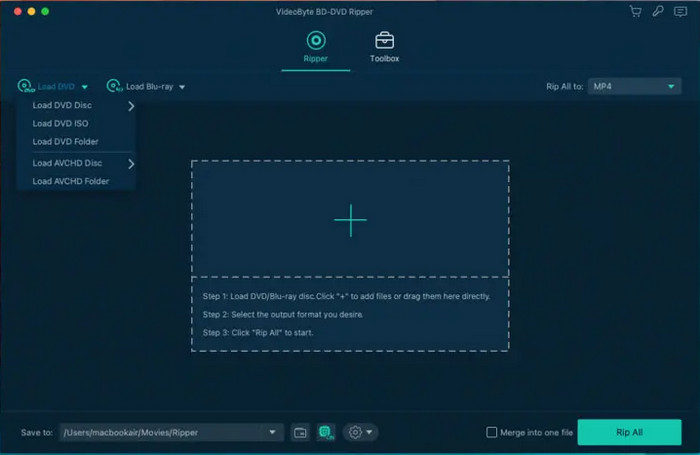
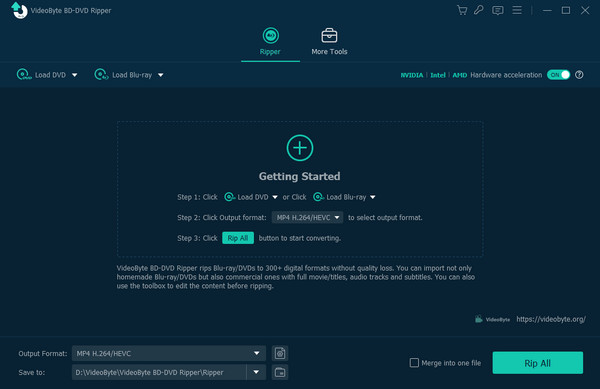
Whether you are a beginner or a pro, VideoByte BD-DVD Ripper has an intuitive interface to make ripping effortless for the user. Here, loading a disc is precise with the provided choices on the main menu, allowing you to load a disc, DVD folder, ISO, or AVCHD. A separate tool section can be seen at the top for when you need to configure or edit the videos after ripping.
Flexible Output Configuration
Overall Rating: 3.5/5
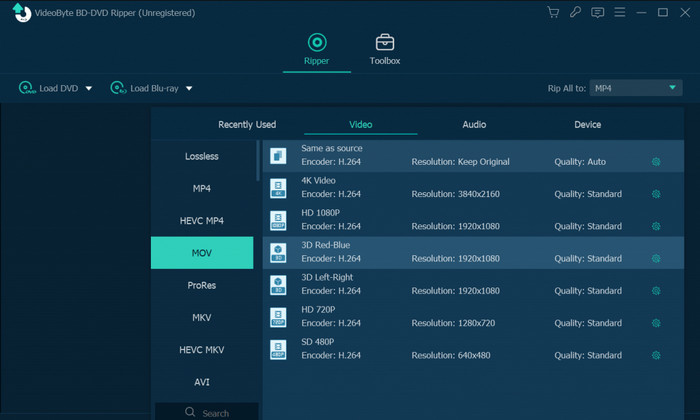
Since you can load multiple movies from a disc, VideoByte BD-DVD Ripper enables individual setup, allowing you to choose different formats like DVD to MP4, MOV,etc., resolutions, and others.
Cross-Platform Availability
Overall Rating: 4/5
Unlike other Blu-ray rippers, the VideByte BD-DVD Ripper is available on Windows and Mac. It is downloadable to Windows 11/10, macOS 10.12 or above.
Basic Editing Functions
Overall Rating: 3.5/5
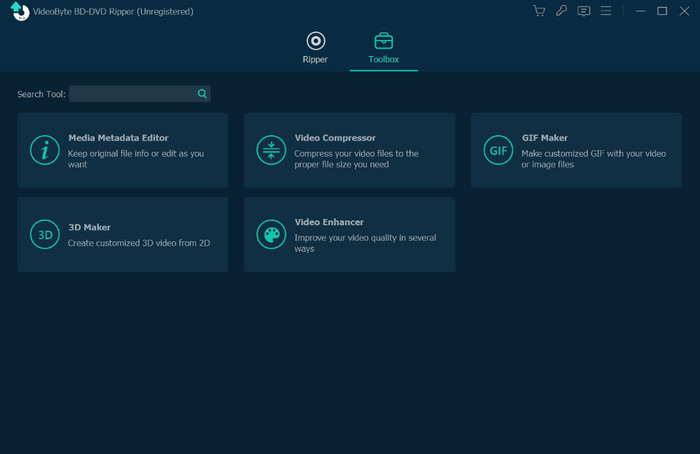
As mentioned, the Blu-ray/DVD Ripper has a separate section with all editing functions. You can find a Metadata Editor, 3D Maker, Video Compressor, and Enhancer.
To summarize, VideoByte BD-DVD Ripper has an average rating for interface, availability, and others. But to elaborate on its entirety, let’s check the next part.
Decryption Capabilities
Overall Rating: 4/5
While basic rippers choke on modern disc protections, VideoByte shines when dealing with commercial DRM. In our tests, it easily bypassed AACS, BD+, region codes, and notably, Disney’s infamous 99-title copy protection—which usually confuses software into ripping the wrong title loop or crashing entirely. It automatically pinpoints the genuine main movie title so you don't have to manually figure out which 40GB stream is the real deal.
Real Hardware Acceleration
Overall Rating: 4/5
Ripping a dual-layer BD-50 disc can take hours if your software only relies on CPU decoding. VideoByte leverages NVIDIA NVENC/CUDA and Intel QSV hardware acceleration. On an RTX 4070 setup, ripping a 42GB Blu-ray down to a high-bitrate MP4 took just around 21 minutes, while keeping CPU usage around a reasonable 30%. That means you can leave it running in the background without your PC grinding to a halt.
Safety & System Stability
Overall Rating: 4.5/5
Unlike free 'cracked' software or sketchy open-source builds bundled with adware, VideoByte’s official installer is 100% clean—zero malware, zero telemetry spyware, and no hidden browser hijackers. Throughout our 15-hour batch-ripping tests on both Windows 11 and macOS Sonoma, it didn't suffer a single memory leak or force-close crash when reading older, slightly scratched discs.
Part 4. What We Don’t Like About VideoByte BD-DVD Ripper
Pricing
Although it is for a one-time purchase, paying $59.95 for the pro version of VideoByte BD-DVD Ripper is too pricey. If you do not want to spend more on it, you can check the free DVD rippers here.
Usage Limitations
For the free version, ripping for five minutes is not enough to experience the overall performance of the video ripper. Also, other necessary functions are excluded, which are supposed to be in the free trial.
The 'Cinavia Removal' Claim vs. Reality
Despite marketing claims, VideoByte cannot natively strip Cinavia watermarks. If you try to rip a Blu-ray protected by Cinavia (the anti-piracy audio watermark used on many Sony/Universal discs), the video will rip fine, but playback will suddenly mute or error out after 20 minutes on Cinavia-compliant players like PS4/PS5 or smart TVs. You'd still need a dedicated, expensive Cinavia removal tool to handle those specific discs.
Super Restrictive Free Trial (Only 5 Minutes Ripped)
The free trial is basically a glorified demo. It caps your video conversion at 5 minutes per disc, which isn't even enough to test if the audio sync holds up across an entire 2-hour movie, or whether the full Disney 99-title playlist was correctly identified. You're almost forced to buy the $59.95 license blindly to verify full-movie performance.
Part 5. How to Use VideoByte BD-DVD Ripper
Now, we want to introduce you to using this tool to rip DVDs, and here is the complete guide.
Step 1.Download the VideoByte BD-DVD Ripper from its official website. Install it on your desktop and launch the software.
Choose the Load DVD or Load Blu-ray options to add the DVD file you want to rip.
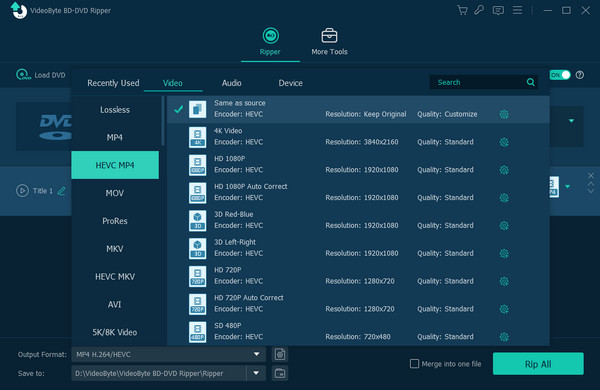
Step 2.After loading the DVD file, go to the Output Format drop-down options and choose the Video section. Then, choose HEVC MP4 > HD 1080P as the output format.
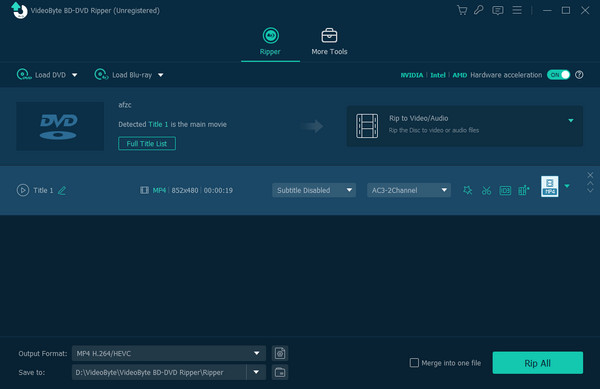
Step 3.Finally, click the Rip All button in the bottom right corner to start the ripping process.
Note: You can set the destination folder and edit the video with the provided settings.
Part 6. Final Verdict on VideoByte BD-DVD Ripper
So, is VideoByte BD-DVD Ripper worth a try? In all, it is a solid, no-nonsense tool if convenience is your top priority. It handles everyday region codes, speeds through Blu-ray rips with GPU acceleration, and doesn't force you to learn complex video-encoding jargon just to get a playable MP4 on your iPad or in Plex.
But it also has shortcomings. The $59.95 price tag feels unfriendly when free tools like MakeMKV exist, and that 5-minute free trial limit is honestly pretty stingy.
Buy it if you have a stack of encrypted DVDs/Blu-rays, want to easily compress them into smaller formats, and prefer a slick, beginner-friendly interface without tech headaches.
Part 7. Best Alternative to VideoByte BD-DVD Ripper
We review VideoByte BD-DVD Ripper from different aspects, and you should now be clear about it. Then, we prepared a better alternative if you don’t want to download VideoByte BD-DVD Ripper. That is Blu-ray Master Blu-ray Ripper.
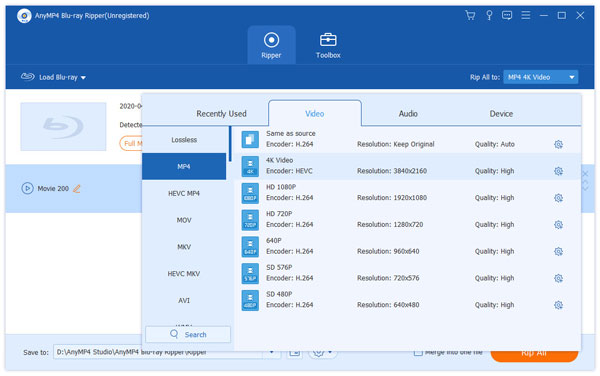
Blu-ray Master Blu-ray Ripper is a cross-platform tool with the same functionality as the reviewed software, which can efficiently convert Blu-ray movies to MP4, MOV, MKV, and many more digital formats. Moreover, its unique features include device compatibility, higher resolution support, and workable output settings. You are allowed to adjust the video encoder, bitrate quality, resolution, and frame rate as you prefer. Furthermore, the alternative ripper supports the latest Windows and Mac OS, with an easier setup on your computer.
Free Download
For Windows
Secure Download
Free Download
for macOS
Secure Download
- Professional VideoByte BD-DVD Ripper alternative for all discs.
- More features to offer, such as clip effect, watermark maker, etc.
- No extension or plugin is required to use features.
- Minimal requirements with fast-speed acceleration.
| VideoByte BD-DVD Ripper | Blu-ray Master Blu-ray Ripper | |
|---|---|---|
| Compatibility | Windows 11/10, macOS 10.12 or above | Windows 11/10/8, macOS 10.12 or above |
| Ease of Use | 4.5/5 | 5/5 |
| Output Quality | HD, 4K, 5K, 8K | HD, 4K, 5K, 8K |
| Output Formats | MP4, MKV, 3GP, VOB, etc. | MP4, MOV, MKV, FLV, and more. |
| Decryption | APS, CSS, ARccOS, CPRM, AACS, BD+, Cinavia. | Region codes, AACS, BD+, Cinavia. |
| Ripping Speed | Medium | Quick |
Part 8. FAQs
-
Is it illegal to rip a DVD for personal use?
No. Although the laws about ripping original copies vary by country, making a backup copy for personal or educational use should not be illegal. Remember not to share or sell videos to avoid copyright infringement.
-
How do you rip Blu Rays with VideoByte BD-DVD Ripper?
Download and install the software on your computer, then insert the disc into the optical drive. Click the Load Blu-ray button to upload the videos you want to rip. Configure the output format and other settings, and once done, click the Rip All button to start ripping.
-
Is there a free version of VideoByte BD-DVD Ripper?
Yes. The free version includes five minutes of video ripping for DVD and Blu-ray. It is not enough despite allowing users to use the free trial for 30 days. Moreover, many of its features are locked, so it is hard to tell for beginners if it’s worth it.
-
Is VideoByte BD-DVD Ripper safe to use, or is it a virus?
Yes, it is safe. VideoByte BD-DVD Ripper is a legitimate desktop software without malware or viruses, and you need to download it from its official website.
-
Can VideoByte BD-DVD Ripper bypass Cinavia and Disney 99-title copy protection?
It can bypass Disney 99-title encryption, but it fails to remove Cinavia watermark protection.
-
VideoByte BD-DVD Ripper vs MakeMKV: Which one is better for backing up 4K Blu-rays?
MakeMKV performs better for fully copying the 4K Blu-ray movie to a large MKV file. But if you want to rip and compress 4K Blu-ray movie to highly compatible formats like MP4/MOV, VideoByte BD-DVD Ripper is better.
-
Is there a completely free alternative to VideoByte BD-DVD Ripper without a 5-minute limit?
Yes. MakeMKV is a gold standard for decrypting and converting Blu-ray movies.
Wrapping up
The VideoByte BD-DVD Ripper review concludes that the software is decent for both ease of use and ripping performance. There are many things we like about it, but the limitations and pricing can be a burden for the user. So, we introduced Blu-ray Master Blu-ray Ripper as an alternative for an effective ripping process on your desktop. It is abundant and easy to use, while the pricing is reasonable. Click the Free Download button now to try its free trial version.
More from Blu-ray Master
Blu-ray Ripper Review
Fast and free ripping software to decrypt all DVDs to digital easily on your computer.
100% Secure. No virus
