

Oct 08, 2026Posted by Kevin Miller to Rip Blu-ray
Executive Summary: Blu-ray vs. DVD at a Glance
- • Image Resolution: Blu-ray delivers sharp 1080p High Definition (1920×1080), offering six times the visual detail of a standard DVD, which is capped at 480p (720×480).
- • Storage Capacity: A single-layer Blu-ray holds 25GB of data (up to 50GB on dual-layer), whereas a standard single-layer DVD only holds 4.7GB (8.5GB on dual-layer).
- • Laser Technology: Blu-ray players use a short-wavelength 405nm blue-violet laser to read tightly packed data, while DVD players use a 650nm red laser with a wider beam.
Have you ever considered that two identical physical discs—both standard 12cm plastic discs—are in your hands, yet a Blu-ray disc costs twice as much as a DVD? Is this merely a clever marketing tactic, or are you truly getting your money's worth?
If you've ever inserted a standard DVD into a modern 4K smart TV and wondered why the picture was blurry, or if you're struggling to decide which format deserves a place on your media collection shelf—then you've come to the right place. This guide will break down the real differences between Blu-ray discs and DVDs, from picture clarity and sound quality to storage capacity, so you can clearly understand where your hard-earned money is going.

- Part 1. What are DVD and Blu-ray
- Part 2. Differences Between DVD and Blu-ray
- Part 3. When Is DVD Still Better
- Part 4. Bonus: Free Rip Blu-rays and DVDs to Digital for Free
- Part 5. FAQs of Blu-ray VS DVD
Part 1. What are DVD and Blu-ray
Before learning the difference between Blu-ray and DVD, let’s understand their concepts.
DVD is an optical disc data storage format. It was created and developed in 1995, and on November 1, 1996, it was initially made available in Japan. Any type of digital data can be stored on the medium, which has been widely utilized to store software, computer files, and video programs that can be viewed with DVD players. Despite having the same size, DVDs have a substantially larger storage capacity than compact discs. A typical single-layer DVD can store up to 4.7 GB of data and a dual-layer DVD can store up to 8.5 GB. You can use the professional free DVD player to watch them on computers.
Blu-ray is a popular optical disc format that provides people with high storage capacity, excellent video, and audio quality. It is designed to supersede the DVD format. It was created in 2005 and made available to the public on June 20, 2006. It can store several hours of HDTV 720p and 1080p footage. Blu-ray is primarily used as a format for video content, including feature films, and for the physical delivery of video games on the Xbox One, Xbox Series X, PlayStation 3, and PlayStation 4. Its name alludes to the blue laser that reads the disc, which has a higher capacity than the longer-wavelength red laser used for DVDs, since it can store information at a higher density.
Part 2. Differences Between DVD and Blu-ray
Can you tell the difference between Blu-ray and DVD now? If you still not able to distinguish the two optical media formats, especially when you find the HD DVD and AVCHD formats, you can learn more details about the optical media formats as below.
| Optical Media Format | Blu-ray Disc | DVD |
|---|---|---|
| Laser Wavelength | 405 nm (Blue-violet laser) | 650 nm (Red-laser) |
| Storage Capacity | 25(50)/128 GB | 4.7/8.5 GB |
| Video Codec | H.264/MPEG-4 AVC/VC-1/ MPEG-2 | MPEG-1/ MPEG-2 |
| Video Resolution | 1920×1080P | 720×480 (NTSC) 720×576 (PAL) |
| Video Bitrate | 40.0 Mbit/s | 9.8 Mbit/s |
| Audio Quality | Dolby Digital/TrueHD, DTS/DTS-HD Master Audio, PCM | Dolby Digital, DTS, PCM |
| Interactivity | BDMV and Blu-ray Disc Java | Rudimentary |
| Region codes | Three Region Codes | Eight Regions |
Both Blu-ray disc and DVD files are two prominent optical media formats for movies and TV shows. Just learn more about the differences between DVD and Blu-ray, such as image resolution, audio formats, disc construction, laser technology and color space.
1. Blu-ray V.S. DVD Image Resolution
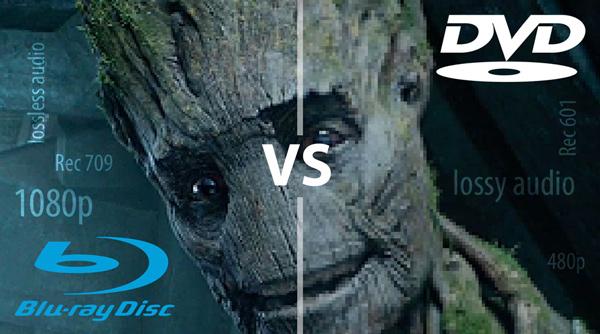
Is Blu-ray disc better quality than DVD? A Blu-ray was designed to transmit images at 1080P while most DVDs used a standard definition resolution at 480P. The Blu-ray disc has a resolution with 1920×1080 pixels on deliver 2,073,600 pixels. As for the DVD, it delivers just 345,600 pixels, which is almost exactly 1/6 the resolution of the Blu-ray disc. It is the reason that when you playback a DVD on widescreen HDTV, the image resolution may take on a grainy or blurry appearance.
2. Blu-ray V.S. DVD Storage Capacity
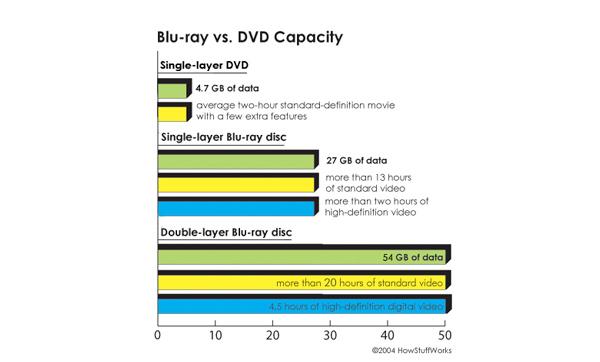
A single layer DVD only holds approximately 4.7GB file for a two-hour movie with standard definition DVD resolution. The double layer one is able to hold 8.5GB file around four hours of a movie. Some specific DVD types have larger capacities, like DVD-18. A single layer Blu-ray disc can store 25GB files, which is able to store more than 13 hours of standard video or more than two hours of high definition video. As for the double layer Blu-ray disc, you can store 50GB files. The larger storage capacity of a Blu-ray disc is a clear advantage over standard DVDs.
3. Blu-ray V.S. DVD Disc Construction
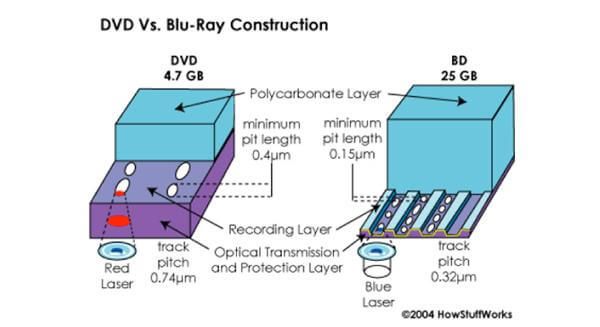
Why you cannot use the Blu-ray disc with DVD player? Since the Blu-ray uses a shorter wavelength with 405 nm, the DVD player is only able to read the DVDs with a red laser with 650 nm. It is the reason that you can find both DVD and Blu-ray disc with the similar size and the Blu-ray disc is able to hold much more files than a DVD. What is the similarity between the Blu-ray disc and DVD? Both of them have a protective layer to prevent scratches and other damage.
4. Blu-ray V.S. DVD Laser Technology
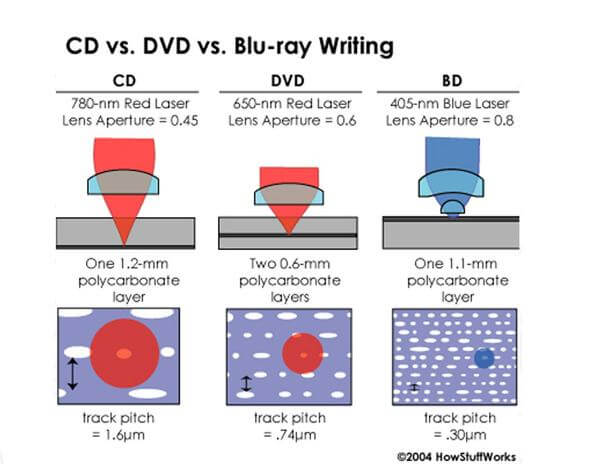
Another reason that you cannot use Blu-ray discs with DVD player is the different laser technology. The wavelengths of a blue laser are shorter than those of the red laser used in a DVD player. What is the difference between DVD and Blu-ray in the laser technology? The Blu-ray disc uses 405 nm with Blue-violet laser and the DVD uses 650 nm with Red-laser. Blu-ray lasers are at 405 nm and are approximately two and a half times smaller in diameter than a red laser.
5. Blu-ray V.S. DVD Color Space
Color Space is another difference between DVD and Blu-ray. It is the reason that you can find the Blu-ray disc with a better video quality than DVD. Blu-ray color space is defined within Rec.709, which includes a color scheme that looks like a triangle. It is quite different from the Rec. 601 on DVD, which improves the way luminance was defined as a ratio to RGB color. When you use Blu-ray discs for the HDTV, there is a color conversion happens at the same time resolution conversion happens.
6. Blu-ray V.S. DVD Audio Formats
What should be the audio codecs for Blu-ray disc and DVD? The DVD supports three different audio formats, Linear PCM, Dolby Digital and DTS Digital Surround. While the Blu-ray disc has more other audio codecs, such as Dolby Digital Plus, Dolby TrueHD, and DTS-HD. Both Dolby TrueHD and DTS-HD are lossless audio format that mimic the actual soundtrack potential of the studio masters.
Part 3. When Is DVD Still Better
While Blu-ray wins on raw specs, there are still plenty of real-world scenarios where plain old DVDs are actually the smarter pick:
- Unbeatable Price: DVDs are cheap. If you're buying kids' movies, background TV shows, or impulse buys at thrift stores, paying $2 for a DVD instead of $15 for a Blu-ray just makes economic sense.
- Massive Catalog & Out-of-Print Gems: Millions of older TV shows, niche indie films, classic cult movies, and foreign cinema never made the jump to Blu-ray. If you love obscure 80s/90s content, DVD is often your only physical option.
- Everyday Durability & Travel: Are you using an older laptop with a built-in optical drive? DVD discs play easily on traditional devices without the need for a dedicated and expensive laser drive.
- Small Screens Don't Need HD: If you're watching movies on a kitchen TV (under 32 inches) or a small portable screen, your eyes physically won't notice the jump from 480p to 1080p anyway.
Part 4. Bonus: Free Rip Blu-rays and DVDs to Digital for Free
If you’ve accumulated a mountain of DVDs and Blu-rays over the years, you’ve probably realized two things: they take up a ton of physical shelf space, and physical discs don't last forever. Optical discs can degrade over time due to scratches, heat, or 'disc rot.' Furthermore, modern laptops and thin Smart TVs no longer come with built-in disc drives.
The smartest way to protect your movie collection and enjoy it on modern devices (like your phone, tablet, or Plex media server) is to rip DVDs or Blu-rays to digital formats, such as MP4, MKV, and others.
Free Blu-ray/DVD Ripping Combination: MakeMKV + HandBrake
MakeMKV is a powerful Blu-ray and DVD backup tool. It can efficiently convert Blu-rays and DVDs to MKV files. With its decryption ability, you can use it to handle commercial Blu-rays and DVDs. It will fully scan and 1:1 copy the Blu-ray/DVD information, including menu information, titles, audio tracks, and subtitles, leading to a large MKV output always.
HandBrake is also a well-known Blu-ray/DVD ripping tool that can convert homemade Blu-rays and DVDs to MP4, MKV, MOV, and WebM. It includes various settings and multiple presets for you to choose from. As an open-source tool, it fails to handle encrypted Blu-rays and DVDs. You can install the libdvdcss library on HandBrake to process CSS-protected DVDs.
While MakeMKV outputs large MKV files, you can use HandBrake to compress and convert MKV to other formats without losing much video quality. This combination allows you to digitize Blu-rays/DVDs for free. You can also see the following two free, easy tools with an easy workflow.
Features
- MakeMKV can decrypt commercial Blu-rays and DVDs with ease.
- You are allowed to select the title, audio tracks, and subtitles you want to maintain.
- HandBrake provides various presets and settings for you to apply.
Blu-ray Master Free DVD Ripper
Blu-ray Master Free DVD Ripper, just as its name suggests, is a free tool to rip DVDs to digital formats. It provides MP4, MP3, MKV, WMV, and many other output formats, which can cater to your different requirements. It adopts the latest decryption technologies, which enable you to rip any DVD with DVD region codes and copy protection. After loading the DVD movies into the software, you can choose the titles, subtitles, and audio tracks you want to convert. It is compatible with Windows and Mac computers.
Free Download
For Windows
Secure Download
Free Download
for macOS
Secure Download
Features
• Load DVD discs and folders.
• Rip DVDs to formats that are compatible with various devices.
• Provide video editing tools to adjust video effects.
• Offer settings to customize the encoder, bitrate, and other parameters of output profiles.
Blu-ray Master Free Blu-ray Ripper
Blu-ray Master Free Blu-ray Ripper is a popular choice for ripping Blu-ray movies to digital formats. With this powerful tool, you can efficiently convert your Blu-ray collection to MP4, MKV, MOV, and other formats, which can be properly played in common media players. It can even rip 3D and 4K Blu-rays without quality loss. With the built-in video editing toolbox, you can customize video effects with ease. It is a free tool and you can download it to have a try.
Free Download
For Windows
Secure Download
Free Download
for macOS
Secure Download
Features
• Rip region A, B, and C Blu-ray movies.
• Choose the titles you want to maintain.
• Preview window to see the Blu-ray video effects.
Part 5. FAQs of Blu-ray VS DVD
-
Is Blu-ray still worth it?
Yes. Nowadays, though various streaming platforms offer unbeatable convenience for video playback, Blu-rays excel in high-quality video image and uncompressed audio effects.
-
Blu-ray VS HD DVD, which is better?
Both Blu-ray and HD DVD can store more information than current DVDs on the same size 12cm optical disc we’re all used to. In the terms of the capacity, HD DVDs can store up to 15GB on a single layer while Blu-ray can hold 25GB on one layer. In the terms of encoding, HD DVD supports VC-1, H.264 and MPEG-2, while Blu-ray supports H.264/MPEG-4 AVC, MPEG-2, VC-1, which brings better image quality than DVD. You can find Blu-ray is better than HD DVD in the capacity and resolution.
-
What is the best Blu-ray DVD player?
There are various options in the market to find the DVD and Blu-ray player. For the best DVD player, you should check it here. As for the best Blu-ray player reviews, you can find it here.
-
Is it really worth buying Blu-ray over DVD if I only have a 55-inch 4K TV?
Yes. DVD is 480p, and its image would be stretched if you play it on your 4K TV. If you play Blu-rays on your 55-inch 4K TV, it looks sharper than DVD.
-
Can my PlayStation 5 play standard DVDs and Blu-ray discs natively?
Only the PS5 Disc Edition can play standard DVDs and regular HD/4K Blu-rays without any extra app.
-
Why does my old DVD look super blurry on a modern smart TV, and how can I fix it?
It's common because of a resolution mismatch. You can turn on your Blu-ray player's or TV's 'upscaling' feature, switch your TV's picture mode from 'Vivid' to 'Movie' or 'Cinema,' and slightly lower the sharpness setting to smooth out noisy visual artifacts.
-
What is the physical reason why a DVD player cannot read a Blu-ray disc?
DVD players use a red laser that cannot read the Blu-ray's tiny pits storing data.
-
Is optical media like Blu-ray still better in audio quality compared to 4K Netflix streaming?
Yes. Though streaming media offers a fast and convenient way to transfer videos, it uses compressed audio formats (such as Dolby Digital Plus) to save bandwidth. In contrast, physical Blu-rays offer uncompressed, lossless audio formats.
Wrapping up
The article shares detailed information on Blu-ray vs DVD. Whether you need to learn more about the storage capacities, image resolution, laser technology, construction, or player compatibility, you can get a comparison between the two optical media formats. If you want to know more about DVD compared to Blu-ray, you can leave more comments in the article.
More from Blu-ray Master
Blu-ray Tips
Rip Blu-rays to any video and audio formats of different parameters for free in minutes.
100% Secure. No virus
