

Oct 08, 2026Posted by Kevin Miller to Rip Blu-ray
Quick Answer:
Blu-ray offers significantly higher bitrates (up to 100Mbps) and uncompressed lossless audio (TrueHD/DTS-HD MA) compared to WEB-DL (15-25Mbps with compressed audio). However, WEB-DL provides better platform accessibility without physical hardware.
Have you ever noticed that for the same 4K movie, a 15 GB streaming file offers excellent picture quality, while a supposedly higher-quality 60 GB Blu-ray disc performs even better? Why is there such a huge difference in file size? Can you perceive this difference with the naked eye?
This is the core of the dispute between Blu-ray and Web-DL. From a technical perspective, both promise clear, high-definition video quality, but their goals are drastically different. Blu-ray is committed to providing the highest level of audio and video quality without compromise, while Web-DL focuses on achieving instant access and smooth playback while avoiding excessive hard drive storage. Blu-ray vs. Web-DL: Which is better? This guide will provide a detailed analysis of the differences between the two in terms of actual bitrate, audio, and visual effects.

- Part 1. What is Blu-ray and WebDL
- Part 2. What are the Differences Between Blu-ray and WebDL
- Part 3. How to Rip Blu-ray into Lossless Digital Formats
- Part 4. FAQs about Blu-ray and WebDL
Part 1. What is Blu-ray and WebDL
Blu-ray vs. WebDL are two commonly used formats for delivering high-quality multimedia content. These formats both provide access to high-definition and 4K content. However, they differ in source, quality, and distribution. Below, I will explain it further:
Blu-ray
Blu-ray is a physical data storage format for storing extended high-definition video content. The Blu-ray Disc Association developed it to replace DVDs and deliver better quality. Blu-ray discs come with different capacities: 25GB for single-layer, 50GB for dual-layer, and 128 GB for newer formats, the BDXL. It supports Full HD and 4K Ultra HD resolutions to provide clear, more detailed images. In addition, it can handle lossless audio formats like Dolby TrueHD and DTS-HD Master Audio. However, it requires a Blu-ray player for playback.
WebDL
WebDL, short for Web Download, is a high-definition digital video obtained from online streaming services and distribution sites. These files can retain the original streaming quality, often in 1080p or 2160p. WebDLs can include uncompressed DTS-HD MA and TrueHD, which offer high-quality audio. Also, these files can consist of multiple subtitles and multi-language audio tracks. Best of all, they can maintain the correct frame rate without interlacing issues. However, some WebDL sources use variable bitrate encoding, affecting quality.
Part 2. What are the Differences Between Blu-ray and WebDL
Source and Distribution
Blu-rays are sourced from physical media that film studios manufacture. They are distributed through retail stores, rental services, and online marketplaces. Meanwhile, WebDL files are media content downloaded directly from online streaming and distribution sites. Since they come from official sources, they are distributed digitally without physical media.
To make things clear:
Blu-ray comes from physical discs distributed through retail, while WebDL originates from streaming services and is delivered digitally.
Video and Audio Quality
WebDL vs Blu-ray in terms of video and audio quality, Blu-ray offers more professional-grade quality than WebDL files. It can deliver up to 4K Ultra HD resolutions, peaking at 128 Mbps. WebDL, on the other hand, can deliver HD and 4K resolutions. However, the compression applied to these files can cause a slight detail loss.
| 1080p Blu-ray | 4K UHD Blu-ray | 1080p WEB-DL | 4K WEB-DL | |
| Video Bitrate | 20 – 40 Mbps | 50 – 100+ Mbps | 4 – 10 Mbps | 15 – 30 Mbps |
| Video Codec | AVC (H.264) / VC-1 | HEVC (H.265) | AVC (H.264) / HEVC | HEVC (H.265) / AV1 |
| Audio Compression | Lossless | Lossless | Lossy | Lossy |
| Audio Formats | DTS-HD MA, TrueHD, LPCM | Dolby Atmos (TrueHD), DTS:X | Dolby Digital Plus (E-AC3) | E-AC3 with Atmos |
| Audio Bitrate | 3.0 – 8.0 Mbps | 4.0 – 10.0 Mbps | 384 – 640 kbps | 448 – 768 kbps |
| Color Space & HDR | SDR (BT.709) | HDR10, HDR10+, Dolby Vision (BT.2020) | SDR (BT.709) | HDR10, Dolby Vision (Profile 5/8) |
| Color Depth | 8-bit | 10-bit | 8-bit | 10-bit |
To make things clear:
Blu-ray provides better quality due to higher bitrates, while WebDL compromises minimal quality for faster digital delivery.
Content and Features
Blu-ray includes exclusive bonus content such as behind-the-scenes footage, deleted scenes, and interactive menus. These additional features make Blu-ray appealing to those who want a deeper understanding of the production process. In contrast, WebDL files only include the main feature with basic audio and subtitle options.
To make things clear:
Blu-ray includes extensive bonus content and unique features, while WebDL focuses only on the main feature.
Storage and Playback
Blu-ray requires a Blu-ray player or an optical Blu-ray disc drive for playback. In addition, you cannot easily copy due to restrictions and region locks applied. Blu-ray content is stored in physical media and doesn’t require an internet connection. In contrast, WebDL files are stored digitally on a computer, external drive, or cloud service. You can play them across devices, such as smart TVs, smartphones, and tablets.
To make things clear:
Blu-ray relies on physical discs and specific hardware for playback, while WebDL is digitally stored and accessible across devices.
| Physical Blu-ray discs (1080p BD / 4K UHD BD) | VS | Official streaming platforms (Netflix, iTunes, Disney+, Amazon, etc.) |
| Top-tier / Lossless | Video Quality | High / Slightly compressed |
| High (25–40 Mbps for 1080p, 50–100+ Mbps for 4K) | Video Bitrate | Moderate (15–25 Mbps for 4K HEVC) |
| Lossless (Dolby TrueHD, DTS-HD MA, uncompressed Atmos) | Audio Quality | Lossy (Dolby Digital Plus / E-AC-3) |
| Minimal to none (clean dark scenes & subtle grain) | Compression Artifacts | Occasional banding or color blocking in shadow detail |
| Requires optical disc player or dedicated storage setup | Accessibility | Plays natively on smart TVs, phones, tablets |
| Large (25 GB to 80+ GB) | File Size | Small to Moderate (5 GB to 20 GB) |
In short, if you're watching on a massive 4K OLED TV paired with a dedicated 5.1 or 7.1 surround sound system, physical Blu-ray discs deliver uncompromised picture clarity and dynamic audio that WEB-DL simply can't match. However, for casual watching on laptops, tablets, or standard Smart TVs, 4K WEB-DL offers the sweet spot between image quality and manageable file sizes.
Part 3. How to Rip Blu-ray into Lossless Digital Formats
By using a reliable Blu-ray Ripper, you can convert your physical Blu-ray discs into an MKV REMUX. A remux takes the exact 1:1 video and lossless audio stream from the Blu-ray disc and places it into a clean MKV digital container. You get the portable, instant-playback convenience of a WEB-DL file, combined with the 100% uncompressed quality of a physical Blu-ray disc.
MakeMKV is always your first choice for remuxing your Blu-ray collection into MKV files. It will scan and copy the raw Blu-ray data into the MKV file, preserving the original video and audio quality. It utilizes advanced decryption technologies to bypass Blu-ray region codes and copy protections, such as AACS and BD+, to digitize your Blu-ray movies. One shortcoming is that the output MKV file is large, so remember to prepare enough storage space to store it.
Note: You can get the free beta key from the official MakeMKV forum to use it for free.

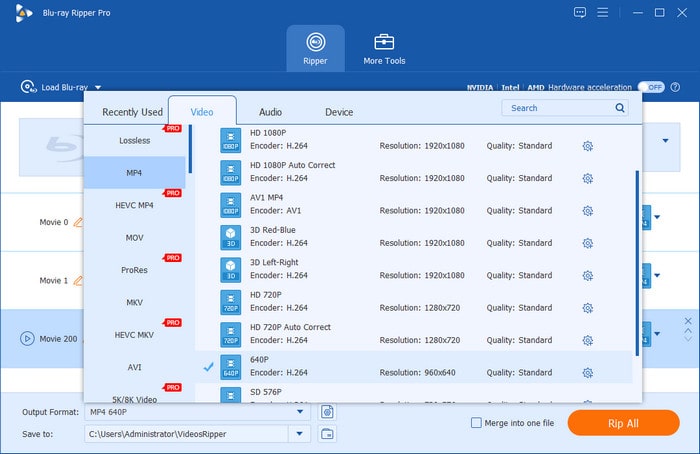
Alternatively, if you think the output MKV file from MakeMKV is large and the process is complex. You can try Blu-ray Master Free Blu-ray Ripper, which is a free and powerful Blu-ray ripping tool. With a clear interface and intuitive settings, you can easily learn how to use it to convert your Blu-rays to MKV. It features a customization window for you to adjust the encoder, resolution, bitrate, and others. It is able to handle most Blu-ray copy protections. You can download it on your Windows and Mac computers to try it.
Free Download
For Windows
Secure Download
Free Download
for macOS
Secure Download
Part 4. FAQs about Blu-ray and WebDL
-
Is WebDL better than Blu-ray?
No, Blu-ray is generally better in raw audio and video quality, but WebDL wins on convenience and file size.
-
Why does Blu-ray sound so much better than Netflix WEB-DL on a 7.1 surround system?
Blu-ray uses lossless, uncompressed audio formats like Dolby TrueHD or DTS-HD Master Audio to deliver studio-level audio quality, while Netflix uses compressed audio formats.
-
What is the average bitrate difference between a 4K UHD Blu-ray disc and an Amazon Prime WEB-DL?
• 4K UHD Blu-ray: 50 Mbps to 100+ Mbps (Video bitrate alone often averages ~60–80 Mbps).
• Amazon Prime 4K WEB-DL: 15 Mbps to 25 Mbps (HEVC/H.265).
A 4K UHD Blu-ray disc typically has 3 to 4 times the bitrate of an Amazon Prime WEB-DL. -
Can I convert my physical Blu-ray discs into a digital format that preserves the original DTS-HD MA audio?
Yes. You can use modern Blu-ray ripping tools to do this. MakeMKV is the top recommendation for 1:1 preserving the original DTS-HD MA audio.
-
What is the main difference between WEB-DL, WEBRip, and Blu-ray Rip?
WEB-DL is directly downloaded from a streaming service without re-encoding. WEBRip is recorded while streaming and then re-encoded, which results in lower quality than WEB-DL. Blu-ray Rip refers to the process of ripping Blu-rays to digital formats (with variable quality depending on encoding settings, but sourced from high-bitrate physical media).
-
Does WEB-DL support Dolby Vision and HDR10+ like Blu-ray discs do?
Yes. Streaming platforms such as Netflix support Dolby Vision and HDR10+ formats when distributing content, so WEB-DL files can preserve these dynamic HDR metadata configuration files.
Conclusion
Both formats offer high-quality multimedia content in the battle between Blu-ray vs WebDL. However, these formats differ in source, distribution, quality, content, features, storage, and playback. Blu-ray stands out with its impressive quality but requires hardware for playback. Meanwhile, WebDL provides convenience with digital storage and easy accessibility across devices, but with minimal quality loss. If you own a Blu-ray with content unavailable on streaming services, ripping it to a digital format offers ideal playback flexibility. With Blu-ray Master Free Blu-ray Ripper, you can enjoy Blu-ray-quality content on any device.
Free Download
For Windows
Secure Download
Free Download
for macOS
Secure Download
More from Blu-ray Master
Blu-ray Tips
Rip Blu-rays to any video and audio formats of different parameters for free in minutes.
100% Secure. No virus
