

Oct 08, 2026Posted by Kevin Miller to Rip Blu-ray
Quick Answer:
A BDMV file (Blu-ray Disc Movie Information) is a container folder holding raw Blu-ray video, audio, and menu metadata.
- • To play it directly: Use full-featured Blu-ray players like VLC, PowerDVD, or Blu-ray Master Free Blu-ray Player.
- • To stream it on Plex/TV: Convert the BDMV folder into a single MP4/MKV file using MakeMKV or Blu-ray Master Free Blu-ray Ripper.
Tried double-clicking a .bdmv file and got nothing but an error? You’re not alone.
A BDMV isn't a standalone video file like an MP4 or MKV—it’s a complex root directory that holds the raw video streams, audio tracks, and interactive menus of a full Blu-ray disc. Because standard media players don't know how to read these files individually, double-clicking them usually fails.
In this guide, you’ll learn exactly how BDMV folders work, how to play them directly on Windows and Mac, and how to convert them into a single file without losing quality.

Table of Contents
Part 1. Definition of BDMV File
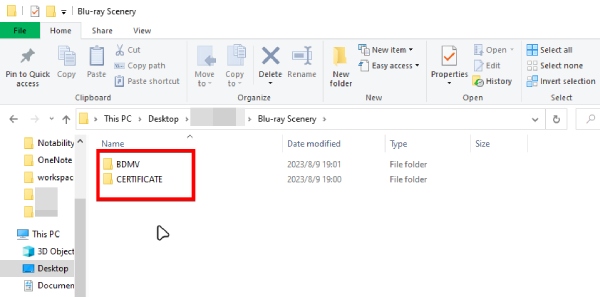
What it is:
What is a BDMV file precisely? First and foremost, this file’s name stands for Blu-ray Disc Movie Information, which stores movie content and information saved in a Blu-ray disc. However, this file extension cannot only contain the raw data of the media but also describe and keep the components associated with Blu-rays. The information may include the name, directory, and movie objects. Moreover, various BDMV files store information variously, such as an index.bdmv, sound.bdmv, and movieobject.bdmv. Wherein the index stores the directory, the sound for the audio, while the movie object is for the information of the movie.
What it contains:
• STREAM: Stores MPEG-2 transport streams.
• index.bdmv: Describes the file contents in the BDMV directory.
• MovieObject.bdmv: Describes one or more movie objects.
• sound.bdmv: (Optional) Relates to sounds associated with HDMV (Interactive Graphic Stream applications).
• AUXDATA: Includes assorted disc-specific metadata.
• BDJO: Contains Blu-ray Disc Java Object files.
• CLIPINF: Stores database files for clips.
• JAR: Contains Java Archive files.
• PLAYLIST: Contains movie playlists.
A .bdmv file (such as index.bdmv or MovieObject.bdmv) is not a video file—it is a plain index configuration file. It contains only navigation metadata, playlist instructions, and directory maps for the Blu-ray player.
The actual high-definition video and audio streams are stored separately inside the /BDMV/STREAM/ folder as .m2ts files.
How it works:
Like VIDEO_TS folders on DVDs, BDMV folders are found at the root level of a Blu-ray disk.
Playback:
To play BDMV files properly, you need professional Blu-ray players, which offer a better experience, especially with menus, for example, Blu-ray Master Free Blu-ray Player. In addition, you can also use a Blu-ray ripping tool to convert BDMV files to digital formats that have good compatibility.
Part 2. BDMV VS. BDAV
After deliberating on the BDMV, let’s now see how it differs from the BDAV extension format. Let’s begin by knowing BDAV or Blu-ray Disc Audio-Video. This kind of file is usually a product of BD cameras with HD quality. Often, it is burned BD file that doesn’t have a playback menu. And to bring you a comparison between the two, here’s a table differentiating them.
| Feature | BDMV | BDAV |
| Video Quality | Always in high quality. | Various video quality. |
| Extensions | .bdmv, .mpls, .clpi, .ssif, etc. | .bdav, .bdm, .moff, .mpg, .modd, etc. |
| Purpose | For commercial movies and complex video projects. | Home video recorded and TV shows. |
| Compatibility | Widely supported. | Limited support of media players. |
Part 3. How to Play BDMV with the Top Player
When a BDMV folder copied directly from a commercial Blu-ray disc is played back, players such as VLC or PowerDVD often display error messages, for example, 'Code 4' or 'This Blu-ray disc requires an AACS decoding library.' This is because commercial Blu-ray discs employ AACS and BD+ digital rights management technologies. Standard media players lack the integrated decryption key required to read encrypted files. The M2TS streaming files are located within this streaming folder.
Blu-ray Master Free Blu-ray Player is a BDMV player that can handle Blu-ray copy protections. As given by its name, it is a powerful media player that caters flawlessly to any type of Blu-ray you have in your file storage, including BDMV. Furthermore, it provides you with a nice and elegant ambiance of interface, as it gives you a straightforward procedure. It is an all-in-one player that comes with all the functions you need, from the playback controls, editing tools, and snapshot, to a playlist maker.
Key Features:
• Hassle-free importation and playback.
• Advanced technology and support for 4K Blu-rays.
• Customizable playlist.
• Snap your favorite part of a Blu-ray movie and save it as a high-quality image.
Free Download
For Windows
Secure Download
Free Download
for macOS
Secure Download
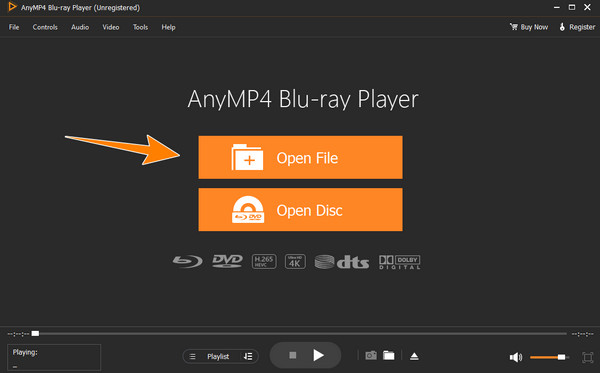
Step 1.Launch the program after installing it on your computer.
Step 2.Upload the BDMV file by clicking the Open File button. Then, wait for the movie to initialize.
Note: At the bottom of the software interface, you can see many icons that allow you to adjust volume, manage the playlist, and take snapshots.
Step 3.After initializing, the file will play electronically. Meanwhile, playback controls and menus will be available for navigation.
Note: If you need, you can select the top menu bar to adjust video, audio, and subtitle settings.
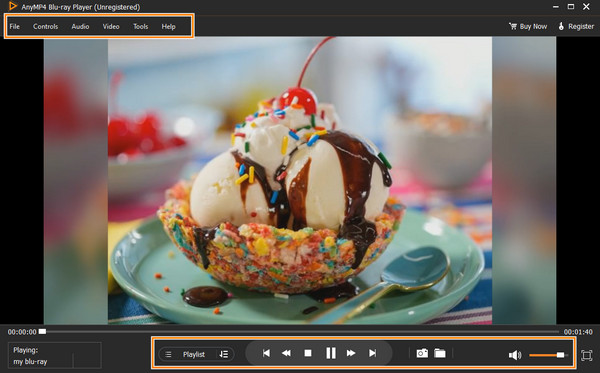
This easy way allows you to play BDMV folders properly. Without complex setups, you can enjoy your BDMV playback in high quality. Moreover, it provides many flexible settings, like screenshots, to improve your viewing experience.
Part 4. How to Convert BDMV without Losing Quality
You may be frustrated that Plex Media Server and Emby cannot play native BDMV folders. Plex Media Server and Emby cannot play native BDMV folders. Do not attempt to force Plex to read .bdmv files—it will cause missing metadata and playback loops. Instead, remux your BDMV folder into a single MKV file using MakeMKV. MakeMKV is a powerful Blu-ray decryption and conversion tool that can rip BDMV folders to MKV. Without re-encoding, your video, HDR/Dolby Vision metadata, and lossless audio remain bit-for-bit identical to the original disc while making it 100% compatible with Plex, Emby, and Apple TV.

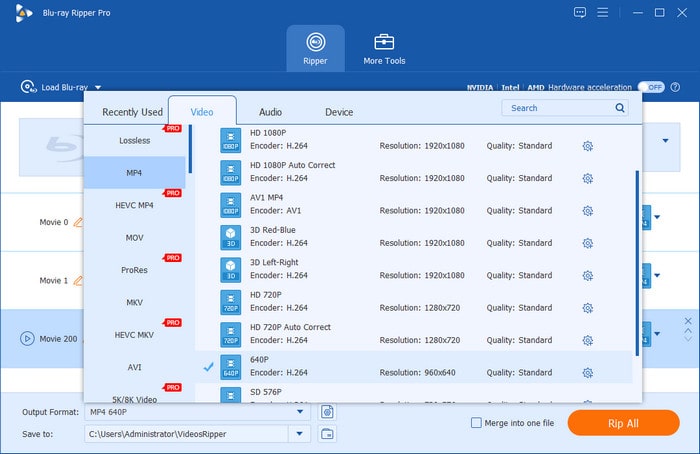
MakeMKV would output a large MKV file because it 1:1 copies the BDMV information. If you think the MKV file is too large, you can use Blu-ray Master Free Blu-ray Ripper to decrypt, convert, and compress the BDMV to a proper MP4/MKV file. This ripper can easily load and convert a BDMV file to any video or audio format. It supports almost all digital video formats, such as MP4, AVI, MOV, FLV, 3GP, WMV, and hundreds more. In addition, if you don’t want to maintain all the content, you are allowed to manually check the titles, subtitles, and even audio tracks you want to rip. It provides editing tools as well to help you improve the video effects.
Key Features:
• Convert your BDMV file to your desired output format.
• Advanced technologies such as acceleration and AI empower your task.
• Support for 4K, 2D, and 3D videos.
• Lossless conversion in a quick and easy procedure.
Free Download
For Windows
Secure Download
Free Download
for macOS
Secure Download
Part 5. FAQs About BDMV Files
-
Can Plex play BDMV?
No. Plex doesn’t have the capability to play any Blu-ray files, including BDMV. You can use Blu-ray Master Free Blu-ray Player to watch BDMV.
-
How does a BDMV folder differ from a single video file?
A BDMV folder is the complete structure of a Blu-ray film. All of the audio, video, and menu files are stored there. Only the movie itself is contained in a single video file. BDMV folders are complicated. Videos are easy to use.
-
Why can’t I just double-click a .bdmv file to play it?
In reality, the BDMV file is a folder that contains more than simply the movie. It cannot be properly read by most video players. Double-clicking it doesn’t work because of this.
-
Is BDXL the same as 4K?
No. 4K Blu-ray differs from BDXL in various aspects, wherein 4K is more of a resolution, while BDXL is for storage.
-
Why can't VLC play my BDMV folder, and how do I fix it on Mac?
It may be because the BDMV folder has Blu-ray copy protection. If you want to play it on Mac, you can install the latest Keys database (KEYDB.cfg) and dynamic library (libaacs.dylib) in VLC, so it can handle the encrypted BDMV folders.
-
How do I convert a BDMV folder to a single MKV file without losing 4K quality?
You can use MakeMKV to convert your BDMV folder to an MKV file with 1:1 video quality copying.
-
Can Plex stream BDMV files directly, or do I need to remux them first?
No. You can use MakeMKV to remux the BDMV to MKV and play it on Plex.
Wrapping up
There you have the detailed tutorial on the BDMV file. We carefully explain its meaning from its definition, function, content, and playback. Moreover, if you want to watch it with ease, Blu-ray Master Free Blu-ray Player is your best choice. Further, if you want to rip them to digital, you can use the recommended Blu-ray Master Free Blu-ray Ripper to convert BDMV to digital for easy playback. Download them to have a try!
More from Blu-ray Master
Blu-ray Tips
Rip Blu-rays to any video and audio formats of different parameters for free in minutes.
100% Secure. No virus
