

Aug 28, 2026Posted by Kevin Miller to Rip DVD
Quick Answer:
Standard CD: Holds 700 MB of data (or 80 minutes of audio).
Single-Layer DVD (DVD-5): Holds 4.7 GB of data (about 2 hours of standard video).
Dual-Layer DVD (DVD-9): Holds 8.5 GB of data.
Trying to back up precious family photos or burn a movie, but not sure if it will fit on your disc? Knowing the exact capacity of your CD or DVD is the first step to avoiding failed burns and corrupted data.
Here’s the quick takeaway: A standard blank CD holds 700 MB, while a single-layer DVD holds 4.7 GB (approx. 4.37 GB on Windows).
Need to know how many songs it holds, or how DVD-5 compares to DVD-9? Read on for a complete breakdown of every disc format and how to check your optical storage space in seconds.

- Part 1. CD Capacity of Different Types
- Part 2. DVD Capacity of Different Types
- Part 3. How to Tell the Capacity of CD DVD
- Part 4. Bonus: Digitize DVDs to Free Up Storage Space
- Part 5. FAQs About CD/DVD Capacity
Part 1. CD Capacity of Different Types
CDs are lightweight, portable, and durable for storing audio, video, and other digital files. As time passes, several types of CDs have been developed for different purposes and capacities. The most common types are:
Compact Disc-Recordable (CD-R): An optical disc containing read-only data. The data it contains is permanently burned, meaning you cannot modify or erase it.
Compact Disc Read-Only Memory (CD-ROM): It is an optical disc that can write data once and read it multiple times. Once written, they cannot be erased or reused, making them less flexible.
Compact Disc-Rewritable (CD-RW): An optical disc can be rewritable up to 1,000×. However, not all CD players can read CD-RWs compared to CD-Rs or CD-ROMs.
Compact Disc Digital Audio (CD-DA) is an optical disc for digital audio playback. It uses a specific file structure that ensures playback in standard CD players.
Video CD (VCD): An optical disc storing digital video on a standard CD. You can play it on dedicated VCD players , DVD players, and computers with compatible media players.
Here’s a quick table to learn what the storage capacity limit of a CD:
| Type | Function | Capacity | Reusability |
| CD-ROM | Read-only | 700 Megabytes |  |
| CD-R | Write-once, read multiple times | 700 Megabytes | |
| CD-RW | Rewritable up to 1,000× | 700 Megabytes |  |
| CD-DA | Stores uncompressed audio | 700 Megabytes | |
| VCD | Stores MPEG-1 video and audio | 700 Megabytes | |
Generally, a 700 MB CD can hold 80 minutes of uncompressed music (like a standard store-bought CD) or around 150 to 175 regular MP3 songs.
Part 2. DVD Capacity of Different Types
What is the capacity of a DVD? DVDs are a physical medium for storing various data and are commonly used in video content. These optical discs became the standard for high-capacity storage, surpassing standard CDs. There are several types of DVDs, including:
Digital Versatile Disc Read-Only Memory (DVD-ROM): It is a read-only disc, and you cannot modify or erase it. Since data is permanently written, it is ideal for commercial content.
DVD-Recordable (DVD-R): A write-once disc that permanently stores data. Once the data is written, you cannot erase or modify it. Many use it to archive files, create discs, and burn data.
DVD Plus Recordable (DVD+R): It is another form of write-once DVD similar to DVD-R. However, this DVD type has enhanced error management and writing precision.
DVD-Rewritable (DVD-RW): It is a rewritable disc that you can erase and reuse 1,000×. It’s recommended for temporary data storage, repeated testing, or gradual backups.
DVD Plus Rewritable (DVD+RW): It is similar to DVD-RW in that it is rewritable. However, it uses a different formatting system and supports faster access times and better random writing.
Types like DVD-R and DVD-RW are like different 'notebook formats'; whether you write with an ink pen or a pencil, it does not affect total storage capacity. The physical layer structure strictly determines DVD storage capacity: types like DVD-5 and DVD-9 represent the actual 'number of pages.' Refer to the table below for the capacity breakdown of each DVD type.
| Format / Type | Standard Name | Structure | Storage Capacity | Reusability |
| DVD-5 | Single Layer | 1 Side, 1 Layer | 4.7 GB | No (R) / Yes (RW) |
| DVD-9 | Dual Layer (DL) | 1 Side, 2 Layers | 8.5 GB | No (R) / Yes (RW) |
| DVD-10 | Double Sided | 2 Sides, 1 Layer | 9.4 GB (4.7GB/side) | No (R) / Yes (RW) |
| DVD-18 | Double-Sided DL | 2 Sides, 2 Layers | 17.08 GB | Commercial Only |
A DVD-5 fits roughly 2 hours of standard DVD-quality video (480p), or about 1,000 high-res photos.
Tip:
Why Does Your 4.7 GB DVD Only Show 4.37 GB on Windows?
Don’t worry, you didn’t get ripped off, and your disc isn’t defective! It comes down to a simple math disagreement between disc manufacturers and your computer:
Manufacturers count in base-10 (Decimal): They define 1 GB as 1,000,000,000 bytes. So, 4.7 billion bytes = 4.7 GB.
Windows counts in base-2 (Binary): Computers naturally work in powers of 2, so Windows defines 1 GB (technically a Gibibyte, or GiB) as 1,073,741,824 bytes.
When Windows divides those 4.7 billion bytes by 1,073,741,824, the math spits out 4.37 GB. All the physical storage space is actually there—Windows just measures it with a slightly bigger yardstick!
Based on our testing experience, when burning DVD-R discs with tools such as ImgBurn, avoid filling the disc to its maximum capacity of 4.37 GB. Filling the disc to 100% capacity often results in writing errors or failed data reads during the final verification stage of the burning process. We recommend reserving at least 100 MB of safety buffer space.
Note: Need more information about the capacity of DVDs ? Check here the different formats
Part 3. How to Tell the Capacity of CD DVD
CDs and DVDs may look the same but differ based on type. A computer’s optical drive can help you identify the type of disc and its capacity. You can determine its type, contents, and maximum capacity by inserting the disc and accessing its properties.
Here’s how to tell the capacity of a blank CD/DVD:
Step 1.Place the CD/DVD into the disc drive and ensure it fits perfectly in the tray. If your computer supports self-loading slotted disc drives, insert the disc halfway and let the rollers pull it in automatically. Allow the driver a few seconds to recognize and scan the disc.

Step 2.Open File Explorer and move to This PC to view the connected drives. Look for the optical drive labeled D: or E:. The drive letter assigned may vary depending on the total number of drives. Right-click the disc and select Properties to view its capacity of DVD-DL or other disc type, free space, and used space. If you insert a blank disc, it will show the maximum capacity.

Although a computer can determine disc details, there’s another way to assess CD/DVD’s capacity. You just need to look at the disc itself. Some manufacturers print identifying information around the disc’s ring, top surface, or label area.
Part 4. Bonus: Digitize DVDs to Free Up Storage Space
Hitting the 4.7 GB limit on a standard DVD-5 can be frustrating—especially if you're trying to back up a large 8.5 GB dual-layer disc or a big family video collection onto standard blank discs. Buying endless stacks of physical DVDs isn't just expensive; it also takes up real shelf space.
Instead of worrying about disc capacity limits, the smartest workaround is to digitize your collection.
Tools like Blu-ray Master Free DVD Ripper make this seamless. Instead of trying to squeeze oversized files onto a single physical disc, you can convert your DVDs, VIDEO_TS folders, or ISO files straight into digital formats like MP4 or MKV. With the customization settings, you can adjust the encoder, bitrate, resolution, and others flexibly. You can preserve your content permanently on a hard drive or cloud storage—with zero storage limits and quick playback on any computer or phone.
This tool also includes many video editing tools for you to apply filters, adjust aspect ratios, change metadata, and do others.
Step 1.First, you need to download Blu-ray Master Free DVD Ripper for free. Install the DVD-ripping software on your computer and finish the installation process. Once completed, insert the DVD into the disc drive and open the software.
Free Download
For Windows
Secure Download
Free Download
for macOS
Secure Download
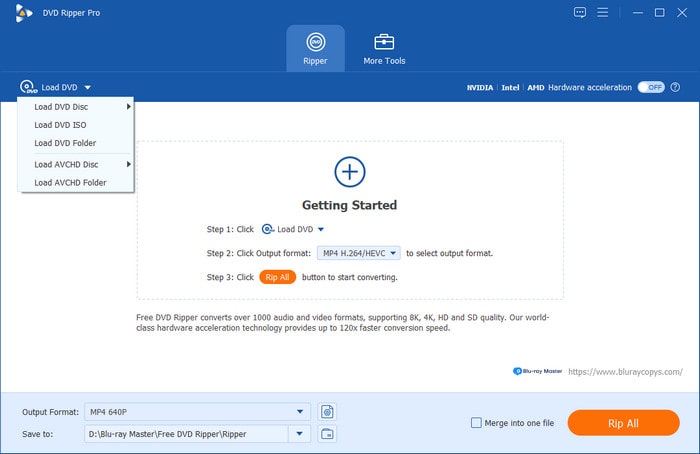
Step 2.Click Load DVD > Load DVD Disc in the upper-left navigation to import the DVD from the disc drive. Also, you can add a VIDEO_TS folder or ISO files. Afterward, choose a loading mode in the popup window.
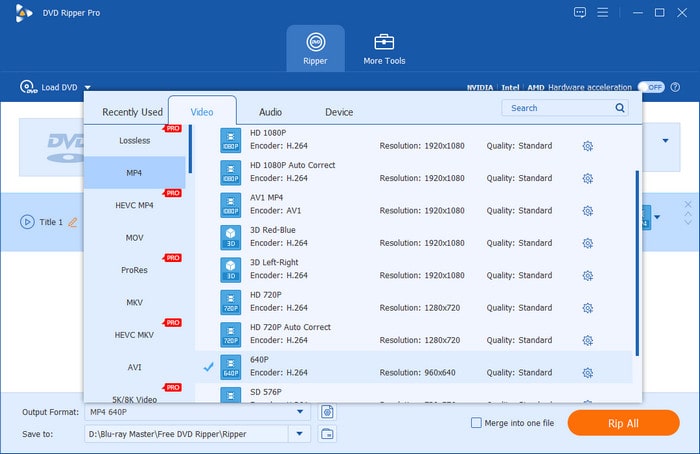
Step 3.Click the Output Format field and proceed to the Video category. Select MP4 for good playback compatibility with various devices. Besides, the MKV format is best for high-quality DVD rips.
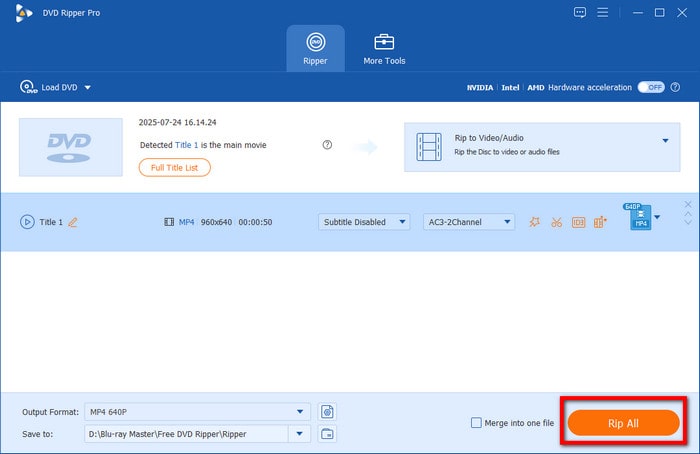
Step 4.Switch to the destination field and click the folder button to specify the output directory. Once the destination path is set, click Rip All to digitize the DVD content. The software will then extract and convert the DVD to MP4.
Blu-ray Master Free DVD Ripper provides a convenient solution to free up DVD storage capacity. By digitizing the content, you can use the maximum capacity of a DVD. In addition to DVD conversion, the software also comes with an editor for customizing video content.
Part 5. FAQs About CD/DVD Capacity
-
How many MB can a standard blank CD actually hold, and how many songs is that?
A standard CD can hold about 700 MB of data, which can store about 150 to 175 standard MP3 songs (at 128 kbps).
-
What’s the difference between DVD-5 and DVD-9 capacity?
DVD-5 holds up to 4.7 GB of data, which is a single-layer disc. DVD-9 is a dual-layer disc that holds up to 8.5 GB of data.
-
Why does my 4.7GB DVD show up as only 4.37GB on my Windows PC?
It’s a math difference between how manufacturers and computers calculate gigabytes. In reality, you didn't lose any space.
-
How much high-definition video can I fit onto a single-layer DVD?
It varies when you store different resolution video files.
• Standard DVD(480P): About 2 hours(120 minutes).
• 720P/1080P HD Video: Roughly 30 to 45 minutes. -
CD-R vs CD-RW: do they have the same storage capacity?
Yes. Their capacities are both 700 MB. The difference is that CD-R is write-once, while CD-RW can be erased and rewritten up to 1000 times.
-
How can I check the exact capacity of a blank DVD without inserting it into a drive?
You can check the text printed on the top surface of the disc or read the tiny laser-etched serial numbers near the center plastic ring. It will explicitly list "4.7GB" (Single Layer) or "8.5GB / DL" (Double Layer).
-
Is a DVD+R or DVD-R better for storing high-capacity data?
DVD+R is better. DVD+R uses a better tracking mechanism that allows for faster burning, better error management, and more reliable multi-session data recording without corrupting the disc.
Wrapping up
Understanding what is the capacity of a blank CD and DVD is essential. This lets you determine the right disc for your storage or playback needs. Each disc type is designed to hold a specific amount of data. Knowing these limits ensures you don’t run out of space, use the wrong disc format, or compromise file quality. However, as digital convenience replaces physical media, reliance on discs can limit. That’s why it’s a smart move to digitize your DVD collection. With Blu-ray Master Free DVD Ripper, you can preserve your content, free up storage space, and enjoy instant access across all your devices.
More from Blu-ray Master
Blu-ray Tips
Fast and free ripping software to decrypt all DVDs to digital easily on your computer.
100% Secure. No virus
