

Aug 28, 2026Posted by Kevin Miller to Tips
Quick Answer:
PAL is one of the analog color TV encoding standards that is used mainly in Europe, Asia, and Africa. It operates at 625 lines (576i visible) and 25 frames per second (50Hz), offering higher vertical resolution than NTSC, the other TV encoding standard, but at a lower frame rate. While the PAL analog television system has been phased out for over-the-air broadcasting, its 50 Hz frame rate and 720×576 resolution standards remain widely used today in legacy media archiving, international video formatting, and region-locked media playback across Europe and Australasia.
Inserted a DVD into the DVD drive and found an 'Invalid Format' error, distorted audio, or a completely black screen? You are not alone. This situation occurs when you want to play a PAL DVD on a standard US NTSC player. This visual roadblock is usually caused by the deep-rooted compatibility divide between PAL and NTSC video standards.
What is PAL? Is the PAL format still used today? The quick answer is that for modern digital TV broadcasting and streaming, no. For physical media playback, digitizing legacy tapes, and retro gaming? Absolutely yes. In this guide, we will explain the PAL format in detail, including its specs, quick comparison with NTSC, and practical solutions for modern playback.

- Section 1. What is PAL
- Section 2. Key Features of PAL
- Section 3. PAL Vs. NTSC
- Section 4. Bonus: Convert NTSC DVD to PAL
- Section 5. FAQs about PAL Format
Section 1. What is PAL
Let’s begin our discussion by understanding what PAL format is. PAL, short for Phase Alternating Line, is a color encoding system for analog TVs. It’s one of the three primary analog color TV standards, the others being SECAM and NTSC format. It was developed in the early 1960s by Walter Bruch at Telefunken in West Germany, with its official patent filed in 1962. PAL was created to address the color tone shifting issues experienced by NTSC under poor transmission conditions.
PAL aimed to deliver a more stable and accurate color representation for television standards. It transmits 625 lines of SD resolution at 50 fields per second or 50 Hz. Most European countries adopted PAL, some African countries, and much of the Asia Pacific region. It also refers to digital formats, such as DVDs, that share similar characteristics. For instance, a PAL DVD format contains 576i encoded as YCbCr, distinct from the analog PAL color system. Understanding this can help you deal with various media applications.
Section 2. Key Features of PAL
Resolution
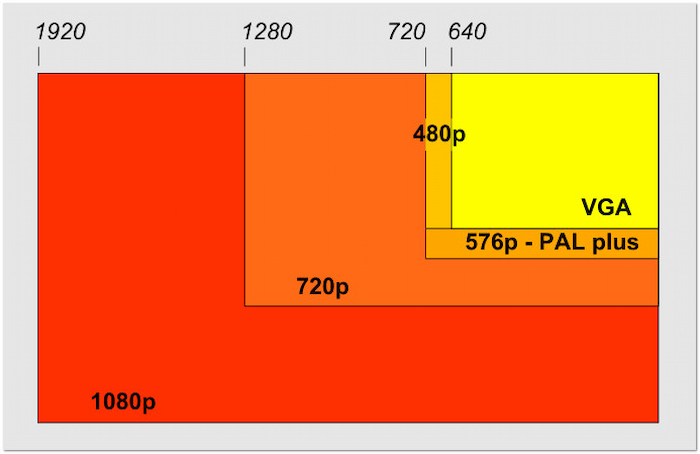
The PAL format resolution features 625 lines per frame (576 visible) to display a picture. The remaining 49 lines are allocated for synchronization and other broadcast signals. This higher visible line count gave PAL a distinct advantage in image quality and detailed visuals. It is why digital formats like DVDs in PAL regions are referred to as 576i.
Frame Rate
PAL operates at 25 frames per second, which is synchronized with a 50 Hz power frequency in PAL-using countries. This synchronization ensured smoother playback with minimal flickering, crucial during the analog TV era. Although 25 fps is lower, the consistent timing with the power grid contributed to PAL’s stability and reliability.
Color Encoding
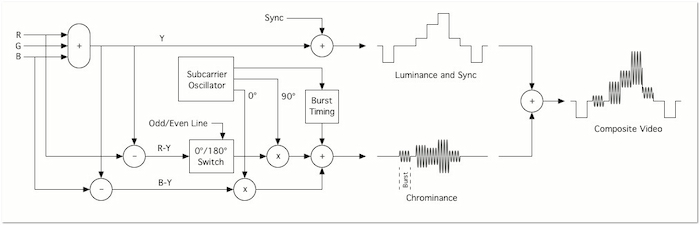
The color encoding system of PAL is one of its most defining features, and it uses an A phase-altering line. This system enhances color accuracy by correcting color errors over successive lines. This method reverses the color signal’s phase on every other line. It eliminates minor phase errors caused by transmission issues or signal interference.
Interlaced Scanning
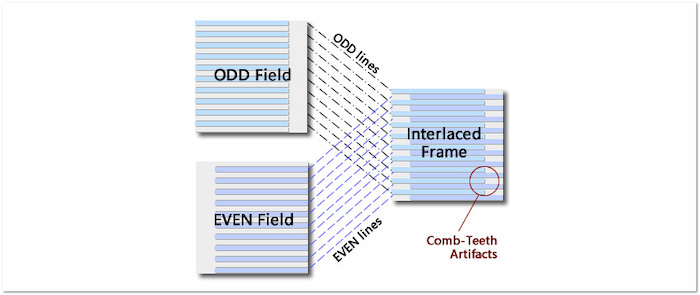
PAL uses interlaced scanning, where each frame is split into two fields. One contains all the odd lines, and the other contains all the even lines. These two fields are displayed rapidly, creating the illusion of full motion at 50 fields per second. This 576i format helped smooth motion and reduce screen flicker without requiring increased bandwidth.
Geographical Usage
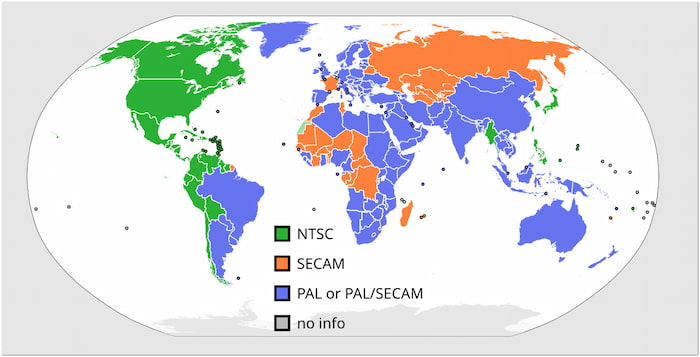
PAL was adopted as the broadcast standard across Europe, Africa, and Asia Pacific. Its compatibility with the 50 Hz electricity grid ensures smooth playback and stable performance. This broad adoption influenced television set manufacturing and home video formats like DVD PAL format. Its widespread use led to the development of region-specific media content.
Section 3. PAL Vs. NTSC
PAL and NTSC are two video standards in analog TV broadcasting. Each format is developed to suit the regional needs of different parts of the world. This section will highlight the differences between NTSC and PAL. We will provide a comparison to understand their distinctions better. Check the quick table below:
| PAL | Versus | NTSC |
| 625 lines per frame, with 576 of these lines being visible | Resolution | 525 lines per frame, with 480 of these lines being visible |
| 25 frames per second (50 fields per second) | Frame Rate | 29.97 frames per second (59.94 fields per second) |
| Phase alternation every line for color error correction | Color Encoding | Fixed phase; more prone to color inaccuracies |
| 576i | Scanning | 480i |
| 50 Hz | Power Supply | 60 Hz |
| More stable and accurate color reproduction | Color Stability | Can suffer from hue shifts due to phase errors |
| Europe, Africa, most parts of Asia, South America, and Oceania | Geographical Usage | North America, parts of South America, and some regions in Asia |
| 25fps to 60Hz displays cause frame judder/stuttering; interlacing lines (576i) are visible on modern 4K TVs without proper deinterlacing. | Modern Playback Challenge | Lower vertical resolution (480i) looks fuzzier on large 4K screens; NTSC-to-PAL conversion can lead to dropped frames. |
Modern Use Cases: Why PAL Still Matters
PAL isn't dead—it just shifted to physical media and archiving. Here is how it affects modern users:
- Retro Gaming (PAL 50Hz vs. NTSC 60Hz): European 80s/90s console games ran 17% slower than US versions because game speeds were tied to 50Hz TV refresh rates. Unoptimized PAL games also suffered from squished screens with black borders.
- Digitizing PAL VHS: Converting old European home tapes (576i) to MP4 requires a multi-system VCR. You must also apply software deinterlacing (like QTGMC in HandBrake) to prevent ugly horizontal lines on modern TVs.
- Importing Foreign DVDs: The European edition of the DVD uses the Region 2 format and the PAL standard. Therefore, it cannot be played on standard US playback devices, as the US is Region 1 and uses the NTSC format. Although HD Blu-ray movies universally employ a frame rate of 24 frames per second, the additional content in overseas editions typically adheres to the 576i PAL standard, which can cause a black screen issue when played on US players.
Section 4. Bonus: Convert NTSC DVD to PAL
The Video Converter Ultimate, recommended by the Blu-ray Master, is a highly efficient media conversion software. It is compatible with Windows 11/10/8/7 and macOS 10.12 or above. This software allows you to load NTSC DVDs or videos for conversion to PAL format. It offers customization for profile settings to match the PAL standard accurately. Additionally, it can bypass copy protections and region restrictions to make the PAL conversion possible. Plus, it includes built-in editing tools that enhance your NTSC DVDs before conversion.
Step 1.Start by downloading the Video Converter Ultimate, preferred by Blu-ray Master, for free. Install the multimedia conversion software and complete the installation process. Once the installation is finished, open the Video Converter Ultimate on your system.
Free Download
For Windows
Secure Download
Free Download
for macOS
Secure Download
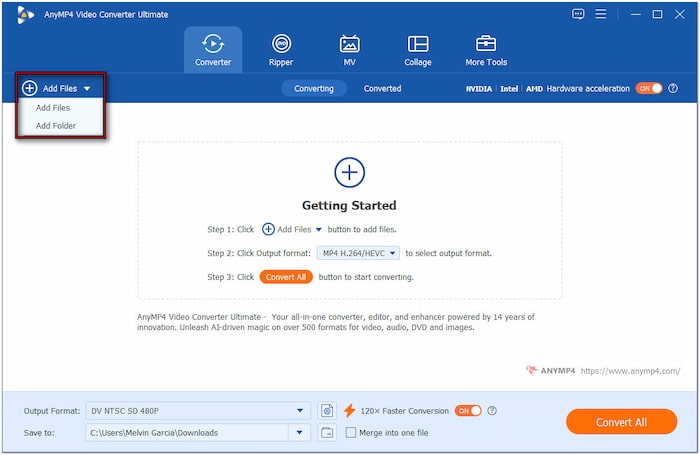
Step 2.Launching the software will take you to the Converter tab by default. Click the +Add Files in the upper-left section to import the NTSC files. If multiple videos are compiled in a single folder, click the pulldown menu and select Add Folder.
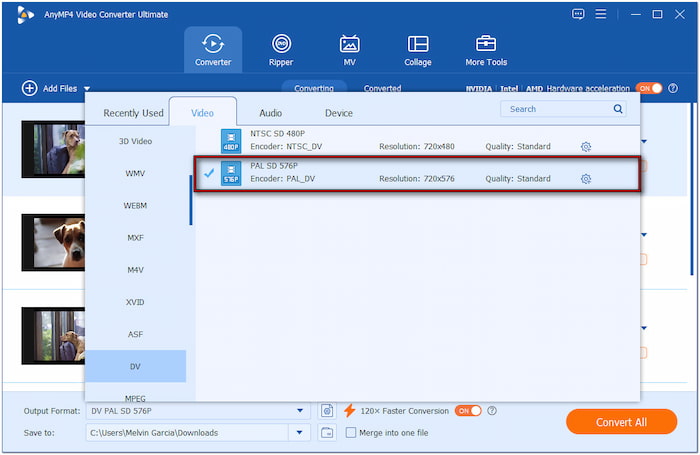
Step 3.Navigate to the Output Format section and choose the Video category. Scroll through the formats, click DV, then select PAL SD 576P as your quality preset. Click Custom Profile to configure the output preset for high-quality conversions. Set the encoder to PAL_DV, change the frame rate to 25fps, and select 720×576 resolution.
Note: You can also import PAL files and convert them to the NTSC format.
Step 4.Move to the Save To section and select Browse & Select Folder from the pulldown menu. Specify the output directory, then turn on Hardware Acceleration for 120× faster lossless conversion. Once everything is good, click Convert All to begin the NTSC to PAL conversion.
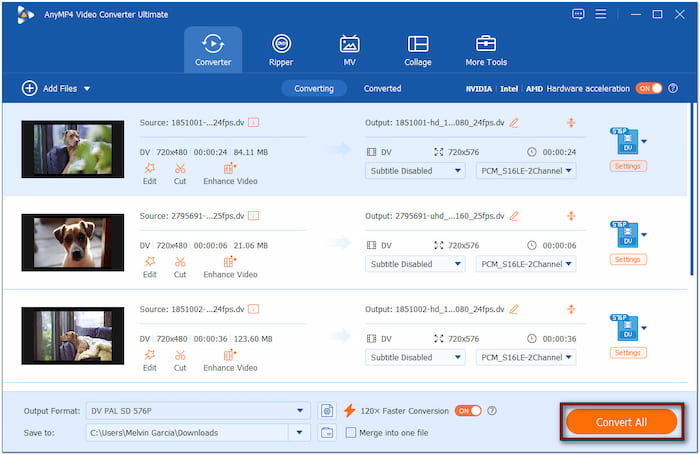
The Video Converter Ultimate, chosen by Blu-ray Master, offers a reliable solution for converting NTSC DVDs to PAL. It ensures high compatibility and customizable output settings that meet regional playback requirements. Since PALs have a slightly lower resolution, you can use the Enhance Video feature to upscale the resolution.
Section 5. FAQs about PAL Format
-
Can I play a European PAL DVD on a US PlayStation 5 or Blu-ray player?
No. US PS5 and Blu-ray players are designed to play NTSC DVDs. Besides, a standard US PS5 and Blu-ray player are locked to play Region 1 DVDs, while the European DVD belongs to Region 2.
-
Why does my PAL video look jittery or laggy when I convert it to 30fps NTSC?
It lags because you're forcing 25 frames per second into a 29.97/30 frames per second timeline. Software has to duplicate 5 extra frames every second to bridge the gap, causing a stuttering effect called judder.
-
What is the difference between 576i (PAL) and 480i (NTSC), and which one is better?
576i (PAL) has higher vertical resolution, with 576 visible lines, and runs at 25fps (50Hz). 480i (NTSC) has fewer lines (480) but a smoother frame rate of 29.97 fps (60Hz). PAL is better for image detailS and colour accuracy, but NTSC offers slightly smoother motion.
-
Why do retro games run slower on European PAL consoles compared to US NTSC?
Retro gaming consoles from the 1980s to the 1990s directly linked game frame rates to television refresh rates: PAL-standard televisions had a refresh rate of 50 Hz, while NTSC-standard televisions had a refresh rate of 60 Hz. Since developers at the time rarely optimised game code specifically for the European market, European versions of games typically ran at approximately 17% slower speeds, and black borders often appeared at the top and bottom of the screen.
Conclusion
After reading this article, you must have a clear understanding of the PAL standard. Modern digital formats have largely replaced traditional analog broadcasting. However, the legacy of the PAL standard persists in specific resolution and refresh rate specifications—such as 720×576 at 50 Hz—which remain applicable today to DVDs with regional codes, video file storage, and international frame rate standards. When accurately converting, preserving, or playing back such tapes, these core parameters must be strictly adhered to in order to ensure that historical content retains its authenticity throughout the evolution of media technologies across different generations.
More from Blu-ray Master
Blu-ray Tips
