

Aug 28, 2026Posted by Kevin Miller to Tips
Quick Summary:
NTSC and PAL are the two traditional video display standards originally designed for different regional power grids. NTSC is primarily used in North America and Japan, whereas PAL is widely adopted in Europe, Asia, and Australia. Today, all digital 4K displays support both standards; however, distinguishing between them remains crucial for preventing image flickering on indoor cameras, playing imported regional DVDs, and running retro games at their native frame rates.
You've probably encountered this situation before: you're thrilled to have found a rare DVD, so you pick it up, insert it into your player, and press the play button – only to find... It's really frustrating. The clear image you expected has instead turned into a chaotic sea of black-and-white noise, distorted audio, or scrolling lines.
This is one of the most common technical issues; its root cause frequently stems from two traditional broadcast and television standards: NTSC and PAL. Even in today's high-definition era, these classic colour coding systems and frame rate formats still determine how DVD, classic gaming console, and modern camera frame rates are compatible with many display devices worldwide. Whether you want to bypass regional playback restrictions on optical discs, resolve image flickering issues in footage captured with 4K cameras, or understand why imported classic games run 17% slower, understanding the NTSC and PAL standards can save you time, reduce costs, and prevent confusion. This article gives a comprehensive overview of how these file formats work and why they remain relevant today.

Table of Contents
Part 1. What are NTSC and PAL
If you are interested in TV technology or games, you have probably heard the terms PAL and NTSC. But the question is, what are they, and how do they differ? In that case, if you are eager to learn about these two terms, we got you. Come here to know a detailed explanation of NTSC vs. PAL.
What is NTSC?
NTSC is a format and color encoding system that DVD players use. It is, until recently, TV broadcasting in North America. Since black and white color television began to be replaced, the United States has been utilizing various methods for encoding colors to be broadcast to users’ homes. But these methods, including the black and white television sets, conflict. Also, it cannot interpret the signal’s color which is being sent to them. So, in 1953, NTSC, or the National Television System Committee, enforced and developed a single method. It could be across the nation and suitable with various TV sets. Also, the new NTSC stayed backward-compatible with BnW TVs. The color data is simple to filter out on older grayscale displays. Aside from that, the committee uses 525 scan lines and is split between two interlaced fields of 262.5 lines. Plus, the refresh rate of NTSC is 60Hz. Choosing a refresh rate that can’t sync up with the power grid can result in interference. With that, NTSC has a great frame rate of 30FPS.
Part 2. NTSC vs. PAL
NTSC and PAL are both television standards that were created to provide a better television experience back in the day. However, they are very different when it comes to streaming services, and you might as well learn their aspects so as not to mix them up eventually. Here is a side-by-side comparison of NTSC and PAL.
In this section, we will compare the two color encoding systems. This way, you will be given an idea about the two. Also, we will explain various factors. It includes color encoding, image quality, FPS, number of resolutions, and more. So, immediately check the details below and learn about NTSC vs. PAL differences.
NTSC vs. PAL: Color Encoding
When talking about NTSC, its receivers have manual tint color correction. Its higher saturation of NTSC makes off-hue colors more visible and noticeable. It is essential to create some adjustments. Meanwhile, PAL can manage color automatically. It utilizes color signal phase alteration to erase hue errors. In addition to that, PAL can easily eliminate chrominance phase errors.
NTSC vs. PAL: Camera
The NTSC contains 525 lines of resolution. More lines are an indication of greater image quality. Therefore, the image/picture quality is less compared to PAL. On the other hand, PAL lines can go out at 50 per second. It can also offer 25 alternating lines. It even produces 25 frames per second. This way, it can result in a faster photo display. Also, 625 is the total lines of resolution in PAL. It means that it is higher than NTSC. So, in terms of camera or image quality, PAL dominates NTSC.
NTSC 60 vs. PAL 50: Frequency & Frame Per Second (FPS)
Another difference between these standards is their frames per second rate.NTSC has 29.97, while PAL contains 25. NTSC used to be 30 FPS for every complete alteration of a 60HZ household outlet. But when color broadcasting emerged, the black and white TVs could not interpret brightness and color signals appropriately. It only displays nonsensical photos on the screens. The households in PAL regions utilize another type of outlet with a frequency-50Hz. It also explains the different FPS rates for PAL.
NTSC vs. PAL: Countries & Regions
For other information, the two standards are limited to certain parts of the world. NTSC is mostly found in certain countries in South America, North America, Myanmar, Taiwan, the Philippines, Japan, and South Korea. But PAL is more common. It covers most Western Europe, India, China, Africa, and Australia.
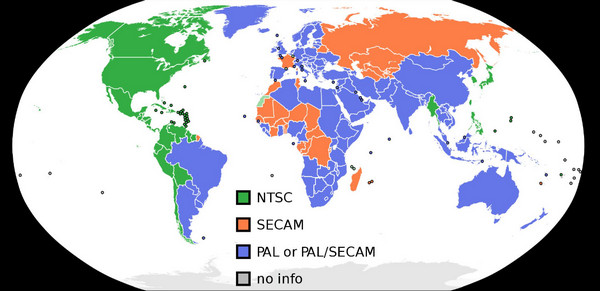
Part 3. PAL vs. NTSC: Which One Should You Choose
There is no simple 'better' when comparing NTSC and PAL today. In the analogue era, PAL delivered slightly higher resolution and better colour stability, while NTSC offered more seamless motion thanks to its higher frame rate. Nowadays, digital formats and 4K TVs handle both standards seamlessly, so your choice depends entirely on your specific scenario:
- For Film Collectors & DVD Imports: If you collect imported regional discs, stick to the disc's native format. However, keep in mind that many North American NTSC players cannot decode PAL content. To bypass these hardware restrictions, using a versatile software player like Blu-ray Master Free Blu-ray Player is the easiest solution to watch both 50Hz and 60Hz discs without conversion loss.
- For Global Video Creators (YouTube / Social Media): For online content distribution, it is generally recommended to use the NTSC frame rate (24p / 30p / 60p). Although the PAL standard covers the majority of the global population, most modern computer monitors, smartphones, and televisions operate at the standard 60 Hz refresh rate. Using the NTSC standard for video distribution ensures smoother playback across the globe. (Professional tip: When shooting indoor scenes in countries using the 50 Hz PAL standard, adjust the shutter speed to 1/50s or 1/100s to avoid flickering indoor light.)
- For Retro Gaming Enthusiasts: NTSC is the go-to standard for the classic gaming scene. Most 8-bit and 16-bit retro games were originally developed for the NTSC 60Hz display standard. European PAL format releases are often not optimized, resulting in black bars at the top and bottom of the screen, as well as a game performance approximately 17% slower than expected.
| Feature / Dimension | NTSC | PAL |
| Primary Regions | North America, Japan, South Korea, Taiwan, Philippines | Europe, China, Australia, South America, parts of Asia & Africa |
| Power Grid Frequency | 60 Hz (59.94 Hz) | 50 Hz |
| Frame Rates (FPS) | 29.97 fps / 60 fps | 25 fps / 50 fps |
| Analog Resolution | 720 x 480 (480i / 525 lines) | 720 x 576 (576i / 625 lines) |
| Color Correction | Manual (Tint Control) | Automatic Phase Alternation |
| Modern Shooting Impact | Prevents light flicker in 60Hz regions | Prevents light flicker in 50Hz regions |
Part 4. Should You Record in NTSC or PAL on Your Camera or Phone
Choosing between NTSC and PAL on a camera or phone depends on your location and lighting, not just where your audience is.
Why Indoor Lights Cause Video Flicker
It comes down to your local power grid:
- NTSC Regions (North America, Japan): The grid runs at 60Hz (lights pulse 120 times/sec). Recording at NTSC frame rates (30fps/60fps) matches this frequency perfectly.
- PAL Regions (Europe, UK, China, Australia): The grid runs at 50Hz (lights pulse 100 times/sec).
The 60fps Mismatch in Europe
If you record at 60fps under 50Hz indoor lights, 60 doesn't divide evenly into 100. Your camera catches a different phase of the light bulb's pulse in every frame, causing annoying dark rolling bands or rapid flickering.
Quick Rule of Thumb:
- For any outdoor setting, you need to choose the NTSC standard (24p/30p/60p) that enables smooth dynamic effects under natural light.
- For regions that use the PAL standard, switch to PAL (25 fps/50 fps) to eliminate flicker.
- Professional tip: When shooting indoors in Europe, should you use a frame rate of 30 fps or 60 fps? Maintain the NTSC standard, but manually set the shutter speed to 1/50s or 1/100s to synchronise with the local shutter grid.
Part 5. Best Way to Play NTSC and PAL DVDs
VLC is a robust media player that is praised by many people. It also serves as a versatile DVD player for playing NTSC or PAL DVDs. With its unique deinterlacing technologies, VLC provides real-time deinterlacing filters (like Yadif or Blend) under Video > Deinterlace to prevent screen tearing on modern displays. Moreover, it has a built-in libdvdcss library to handle DVD copy protection without extra plugins.
Features
• VLC bypasses software RPC-2 region restrictions on most optical drives to play regions 1-6 DVDs.
• It provides an interactive menu, root/title selection, sub-menus, and chapter selection.
• It can also play VIDEO_TS folders and ISO files.
• This free player supports instant switching between multiple audio streams and subtitle tracks.
If you don't want to waste your DVD drive's limited region changes or deal with VLC menu glitches, use a dedicated region-free player software. Blu-ray Master Free Blu-ray Player is a region-free player that allows you to watch NTSC and PAL DVDs with ease. It utilizes advanced decryption technologies to process and play copy-protected DVDs. When playing DVDs with this tool, you can manually select audio tracks and subtitles. Moreover, it has many flexible settings to give you a good viewing experience, like a snapshot feature to capture the wonderful moments of the movies.
Free Download
For Windows
Secure Download
Free Download
for macOS
Secure Download
Features
• This powerful tool supports DVDs, Blu-rays, and various video formats for playback.
• It can bypass regions to play all DVDs.
• The playlist feature allows you to manage playback of multiple files.
• It allows you to select and add external audio tracks yourself.
Part 6. FAQs
-
Is NTSC or PAL better quality?
PAL has a better quality. It is because it has 625 lines of resolution while NTSC only has 525 lines.
-
Is Japan NTSC or PAL?
In Japan, they are using NTSC. They are with other countries or regions, like South Korea, the Philippines, Taiwan, Myanmar, etc.
-
Does PAL and NTSC matter anymore?
Yes. It does matter because you must consider the location when using a certain format. Also, we all know that PAL DVD players can read NTSC. However, some NTSC platforms cannot read PAL. These two still matter.
-
Is NTSC still being used?
Since we are always upgrading, especially in technologies, formats like NTSC are becoming outdated. Yes, it is still used but not as popular as other formats.
-
Should I set my Sony camera to NTSC or PAL if I live in Europe but post on YouTube?
Set your Sony camera to NTSC if you want to upload the shoot to YouTube. Note that Europe runs on a 50Hz power grid. If you shoot in NTSC under indoor LED or fluorescent lights, your footage will flicker.
-
Why are the lights flickering in my video when recording in 60fps in the UK?
The UK grid delivers electricity at 50Hz. This means household lights pulse (turn on and off) 100 times per second—faster than your eyes can see, but your camera definitely picks it up. You can fix this situation by switching your camera to PAL mode. If you must shoot at 60fps, manually change your shutter speed to 1/50s or 1/100s so the sensor exposure matches the local 50Hz light cycles.
-
Can a US NTSC DVD player play a region-free PAL DVD?
No. A standard US NTSC DVD player expects a 480i / 60Hz video signal, while a PAL DVD contains a 576i / 50Hz video signal.
-
Is PAL really better image quality than NTSC, or does it not matter on modern 4K TVs?
In the past analog era, PAL was objectively better. But now, it no longer matters on modern 4K TVs.
-
What does 'Never The Same Color' mean when talking about NTSC video?
'Never The Same Color' is a playful industry reference to the NTSC analog television standard. Because its color signals were highly susceptible to interference and distortion—such as faces appearing green or the sky turning purple—viewers often had to manually turn the tuning knob frequently to correct the colors. In contrast, the later PAL standard featured automatic color correction, which led to it being jokingly dubbed 'Perfect At Last.'
Wrapping up
This article provides full information about NTSC vs PAL. Whether to use the NTSC or PAL format depends on your specific device configuration. Media collectors can easily avoid signal-mismatch issues with region-free software, such as the Blu-ray Master Free Blu-ray Player. Video creators targeting global platforms should use the NTSC frame rate (24p/30p/60p) and adjust the shutter speed according to the local power grid frequency to prevent image flickering. Retro gamers, on the other hand, should stick to the native format of their gaming consoles to ensure accurate game playback speed. Although modern 4K digital displays have largely eliminated this format-related debate, understanding these refresh rates remains crucial for ensuring smooth playback of imported media and in international video systems.
More from Blu-ray Master
DVD Tips

Fast and free ripping software to decrypt all DVDs to digital easily on your computer.
100% Secure. No virus
