

Oct 16, 2026Posted by Kevin Miller to Play Blu-ray
Quick Summary
All official 4K Ultra HD Blu-ray discs are natively 100% region-free worldwide. You need to use a region-free Blu-ray player when watching 1080P HD Blu-rays and standard DVDs. A region-free Blu-ray player allows you to bypass geographical restrictions (Regions A, B, and C). The best solutions in 2026 include professional software such as Blu-ray Master Free Blu-ray Player for PC/Mac and modified hardware such as the Sony UBP-X800M2 for home theaters.
Nowadays, the revival of physical media is strong. For many collectors, the region codes of Blu-ray movies are still a major frustration. While all 4K Ultra HD discs are inherently region-free worldwide, standard 1080p Blu-rays (Regions A, B, C) and DVDs are strictly locked by geographic zones. If you want to enjoy exclusive UK imports from Second Sight or Arrow Video on a US player, you will inevitably hit a digital wall. To unlock your entire global collection, you need a reliable solution. In this comprehensive review, we break down the best region-free Blu-ray player software and hardware to bypass restrictions seamlessly and future-proof your home theater.

- Part 1. Why You Actually Need a Region-Free Blu-ray Player
- Part 2. Top 5 Region-Free Blu-ray Players (Hardware)
- Part 3. Top 5 Region-Free Blu-ray Players (Software)
- Part 4. How do I Change My Region on My Region-Free Blu-ray Player
- Part 5. FAQs About Region-Free Blu-ray Player
Part 1. Why You Actually Need a Region-Free Blu-ray Player
Blu-ray Playback Restrictions
If you’ve ever tried playing a region-locked import—like a UK-exclusive release from Second Sight, Arrow Video, or Eureka—on a standard US Blu-ray player, you’ve probably seen the dreaded screen: 'This disc is not compatible with your player.'
Here is the quick breakdown of what is actually happening and how to fix it:
- The Problem: Standard 1080p Blu-rays are locked into three strict geographic zones: Region A (Americas & East Asia), Region B (Europe, UK, Australia), and Region C (Asia/Russia). A standard US player will refuse to boot a Region B disc from the UK.
- The Solution: A modified region-free player (or a dedicated software tool) completely bypasses these regional handshakes, giving you a smooth, region-free playback experience for your entire global collection.
How We Tested The Region-free Players (Our Real-World Testing Process)
We don't just aggregate tech specs from manufacturer datasheets—we actually test these setups with challenging physical media. To evaluate every hardware player and software option in this guide, we built a dedicated testing rig using an LG C2 OLED TV and a Denon AVR-S760H receiver.
Our testing suite included:
1. Region B Imports: Second Sight's Dawn of the Dead (UK) and Indicator's Columbia Noir sets (UK) to verify Region B to Region A switching speed.
2. Complex Menu Navigation: Criterion Collection discs with heavy Java-based menus to test disc loading times and remote response.
3. Audio Passthrough & HDR: Testing Dolby Atmos, DTS:X, and Dolby Vision dynamic range mapping across 4K UHD discs.
We paid close attention to how easy it was to switch regions using the remote control, how quiet the drive mechanisms ran during playback, and whether software options handled dynamic AACS decryption without dropping frames.
Part 2. Top 5 Region-Free Blu-ray Players (Hardware)
Buying a hardware player is the most reliable way to enjoy imported movies on your living room setup. However, keep in mind that mainstream manufacturers like Sony or Panasonic do not sell region-free players directly from the factory. To play multi-region 1080p Blu-rays, you must purchase a hardware-modified version (fitted with a custom mod-chip) from specialized retailers like 220-Electronics.
Here are the 5 picked region-free Blu-ray player hardware for you to enjoy high-quality movies.
| Product | Region Support (A, B, C) | Mod Requirement | Max Resolution | Key Strengths | Best For |
| Sony UBP-X800M2 | Fully Unlocked (A/B/C + DVD 1-6) | Requires 3rd-party Mod-Chip | 4K UHD | Tank-like build quality, quiet drive mechanism, superb Hi-Res audio support (SACD/DVD-A). | Mid-to-high-end home theater enthusiasts who want a solid 4K deck. |
| LG BP175 | Fully Unlocked (A/B/C + DVD 1-6) | Pre-modified Hardware | 1080p HD | Extremely affordable, compact footprint, fast disc loading speeds. | Budget-conscious users who only need to play 1080p Blu-rays and upscaled DVDs. |
| Panasonic DP-UB820 | Fully Unlocked (A/B/C + DVD 1-6) | Requires 3rd-party Mod-Chip | 4K UHD | Industry-leading HDR Optimizer, auto-detects Dolby Vision & HDR10+. The gold standard for OLED TVs. | Cinephiles and physical media purists who prioritize picture quality above all else. |
| Magnetar UDP800 | Fully Unlocked (A/B/C + DVD 1-6) | Requires Custom Firmware/Mod | 4K UHD | Audiophile-grade dual Burr-Brown DACs, balanced XLR outputs, ultra-rigid chassis. | High-end home theater owners and audiophiles looking for a true Oppo replacement. |
| Sony BDP-S1700 | Fully Unlocked (A/B/C + DVD 1-6) | Pre-modified Hardware | 1080p HD | Budget-friendly, reliable everyday workhorse, child lock feature on the disc tray. | Secondary rooms, bedroom setups, or non-4K TV displays. |
Our Buying Advice for Hardware Players
• If you have an OLED TV and care deeply about HDR: Go straight for the Panasonic DP-UB820.
• If you are on a tight budget: Don’t overthink it—grab the LG BP175 or Sony S1700.
1. Sony UBP-X800M2 4K Ultra HD Blu-ray Player
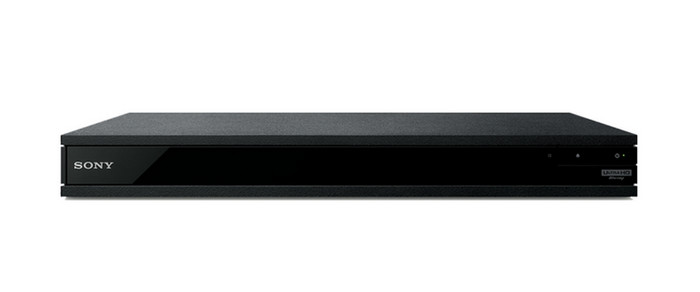
Both beginners and professionals who are home theater enthusiasts.
Sony
MP3, DVD, Blu-ray Disc
4K High Dynamic Range; HDR to SDR Conversion
3840×2160
Remote Control
8.4 Pounds
$480 – $590
A heavy-duty, premium 4K player. Its main quirk is that you have to manually toggle Dolby Vision on or off in the settings; it doesn’t auto-detect it as the Panasonic does.
Pros
- It can play high-quality 4K UHD disc content.
- It supports an extensive range of audio formats, such as Dolby Atmos and DTS:X.
- It has a reliable build quality and brand reputation.
- Integrated streaming services for additional content.
Cons
- It is a bit expensive for its price.
- It has limited multi-region support for DVD playback.
The Sony UBP-X800M2 is a top-tier Blu-ray player. It is designed for home theater enthusiasts who want a superior audiovisual performance. With 4K UHD playback capabilities, it delivers crystal-clear visuals. At the same time, it supports advanced audio formats. Thus, you will be able to have an appealing cinematic experience. Yet, it comes at a slightly higher price. Nonetheless, it is dependable and offers interesting additional streaming features. That is why many consider it a valuable investment. Most especially those who seek a premium home entertainment setup. When purchased from a standard retailer like Amazon, it doesn't support multi-region Blu-ray playback. You need to purchase a hardware-modified version specifically upgraded by specialized third-party retailers like 220-Electronics to enjoy any Blu-ray movie.
2. LG BP175 Blu-ray DVD Player
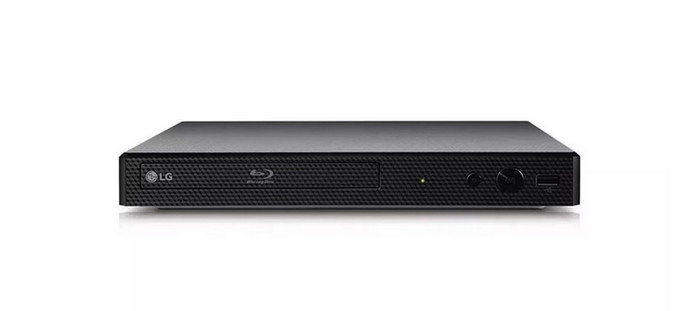
Beginners that are budget-conscious.
CD, DVD, Blu-ray Disc
Wireless
1920×1080
Controller Type: Remote Control
2 Pounds
$130 – $190
A simple, budget-friendly player that excels at upscaling older DVDs to near-HD quality. Like the Sony, it requires a wired connection for its limited smart apps (Netflix/YouTube) and is best for users who just want a small, easy-to-use disc player.
Pros
- It offers 1080p quality playback and DVD upscaling.
- It has a sleek design for easy integration into any setup.
- Quick and reliable disc loading.
- It supports streaming applications, too.
Cons
- Limited advanced features compared to high-end models, like it has no built-in Wi-Fi and smart features.
- It may lack some of the latest audio decoding technologies.
The LG BP175 is an excellent choice for users on a budget. It is a device that offers essential region-free Blu-ray playback features that you might look for. If you simply need a player for your HD discs or movies, it’s the right one for you. It also implies that you can enjoy your Blu-ray discs to the best of their ability. But as mentioned, it may not have all the advanced features of premium models. Still, it provides a cost-effective solution for basic home entertainment needs.
Tips
Official LG factory units are hard-locked to their original purchase zone. Make sure the product title explicitly states 'Hardware Modified,' 'Region Free A/B/C,' or 'Multi-Region' (typically sold by specialized third-party vendors like 220-Electronics) before hitting buy.
3. Panasonic DP-UB820
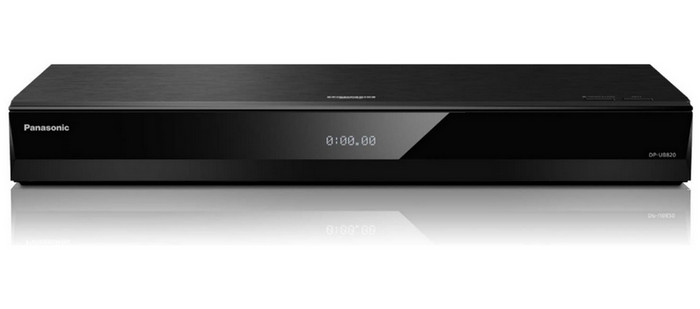
Professional users.
Blu-ray Disc
Voice Assist, Streaming 4K Video on Demand
3840×2160
Controller Type: Remote Control
5.3 Pounds
$600 – $750
Currently considered the ‘gold standard’ for 4K enthusiasts due to its HDR Optimizer feature, which significantly improves picture quality on mid-range HDR TVs.
Pros
- It can play 4K HDR DVDs from Region A, B, and C with dynamic color and contrast.
- It also supports HDR10+ and Dolby Vision for enhanced visuals.
- It is infused with advanced audio processing
- Offers a built-in voice control and smart features.
Cons
- It can be expensive for users with a lower budget since it costs $499.00.
- The user interface is less intuitive.
The next player that you should consider is the Panasonic DP-UB820. It is also a powerful Blu-ray player that caters to users who prioritize exceptional 4K HDR playback. Just like the Sony, to bypass the geographic lockdown on the Panasonic UB820, you must buy a modified "multi-region" version from a dedicated third-party vendor, so that you are able to enjoy the multi-region Blu-ray movies on it. Now, if you demand high-quality imaging when viewing, this device is recommended. It supports HDR10+ and Dolby Vision, enhancing your watching experience. Given its advanced and premium features, you have to note that it comes at a cost.
Tips
Don't panic if your imported UK disc shows a 'Wrong Region' error message on the screen! On hardware-modified UB820 units, the disc drive won't auto-switch zones on the fly. You must put the player in Standby Mode (OFF) first, then press 1, 2, or 3 on the remote to boot the player into the correct zone (A, B, or C). If that doesn't work, hit the Option button on your remote to trigger the Top Menu override.
4. Magnetar UDP800 Ultra HD Universal Disc Player
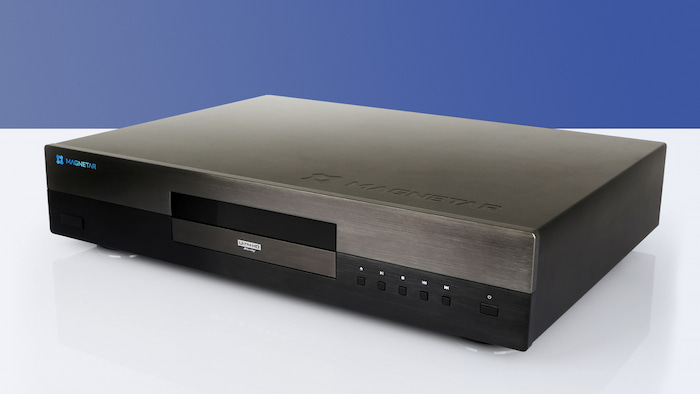
High-end audiophiles, serious cinephiles, and physical media purists.
4K UHD Blu-ray, Blu-ray 3D
Dual Burr-Brown DACs, XLR Balanced Outputs, Heavy Rigid Chassis|
3840×2160 (4K UHD)
Remote Control
$1,599 – $1,799
Magnetar UDP800 is definitely a universal region-free Blu-ray player that offers high-fidelity audio and video performance.
Pros
- It has dual Burr-Brown PCM 1795 DACs and dedicated XLR balanced stereo outputs, delivering spectacular analog audio performance for SACD and CD playback.
- Complete native support for both Dolby Vision and HDR10+ to provide studio-quality audio.
- It can read massive media files up to 16TB via USB or local NAS network drives.
Cons
- Its price is high, which is not friendly for casual users.
- It does not feature integrated Wi-Fi or streaming services (like Netflix or YouTube).
Stepping into the premium market space left vacant by discontinued reference brands like Oppo and Pioneer, the Magnetar UDP800 is a heavyweight universal player built without compromise. While native 4K Ultra HD discs are region-free by industry standard, this modified universal deck seamlessly unlocks legacy 1080p Blu-rays and standard DVDs from any zone worldwide. Combining pristine 4K video processing (including native Dolby Vision and HDR10+) with high-end audiophile circuitry, it eliminates compatibility issues entirely, giving you the freedom to enjoy any global release exactly as the director intended.
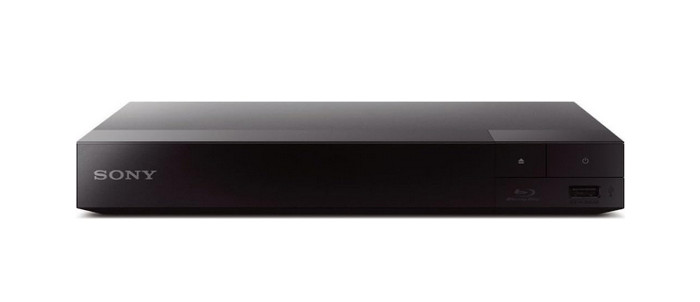
5. Sony S1700 Blu-ray Disc DVD Player
Intermediate and professional users.
CD, DVD, Blu-ray Disc
Blu ray support, Compact
1920×1080
HDMI
$140 – $180
It is known for stable 1080p playback and TRILUMINOS color technology. It is a solid, no-frills choice but lacks built-in Wi-Fi, requiring a wired Ethernet cable for updates or basic streaming.
Pros
- Enables playing Blu-ray discs from any region.
- It is a budget-friendly device.
- It has a compact design, making it easier to fit into various home entertainment setups.
- It also supports USB playback to enjoy various multimedia content.
Cons
- It has fewer supported audio formats.
- There are no built-in smart features and streaming capabilities.
Last but not least, we have the Sony S1700 on our list of region-free Blu-ray players. It is an affordable and straightforward Blu-ray player with region-free capabilities. Apart from that, it supports multi-language for the installation and operation of the unit. Another interesting feature of it is you can lock the disc tray if you want to. That way, children will not be able to open and play with it. This Sony unit can play various types of audio, video, and even image formats. You can check out all the supported formats listed in its instructions. Thus, it is reliable in playing pretty much anything.
Part 3. Top 5 Region-Free Blu-ray Players (Software)
| Product | Platform | Region Support | 4K UHD Support | Subtitle Support | Price | Best For |
| Blu-ray Master Free Blu-ray Player | Windows, macOS | Region A, B, C (Auto-bypasses via app) | Up to 1080p (4K unlocked in Paid version) | Excellent (External SRT & disc subtitle tracks) | Free / Premium | Windows users looking for a lightweight, straightforward desk player. |
| DVDFab PlayerFab | Windows, macOS | Region A, B, C (Full menu auto-bypass) | Yes (HDR10, Dolby Vision, Atmos/DTS:X) | Excellent (Custom fonts, placement & sync) | $99.99 (Lifetime) | Cinephiles seeking a full interactive disc menu and home-theater experience on PC. |
| VLC Media Player | Windows, macOS, Linux | Region A, B, C (Requires manual AACS keys setup) | Yes (Hardware dependent) | Excellent (Built-in OpenSubtitles search & customizable styles) | 100% Free | Tech-savvy users who want a completely free, open-source setup. |
| IINA Player | macOS | Region A, B, C (Bypasses via open-source libaacs) | Yes (Native macOS hardware acceleration) | Outstanding (Auto OpenSubtitles download, PGS & SRT support) | 100% Free | Mac users wanting a modern, open-source, and battery-efficient media player. |
| Infuse (by Firecore) | macOS, iOS, tvOS (Apple TV) | Fully Unlocked (Via raw ISO / BDMV file streaming) | Yes (Pristine Dolby Vision & HDR10+) | Industry-Leading (One-click downloads, iCloud sync across devices) | Free / Pro ($0.99/mo or $9.99/yr) | Apple ecosystem purists streaming digitized Blu-ray backups from a NAS or hard drive. |
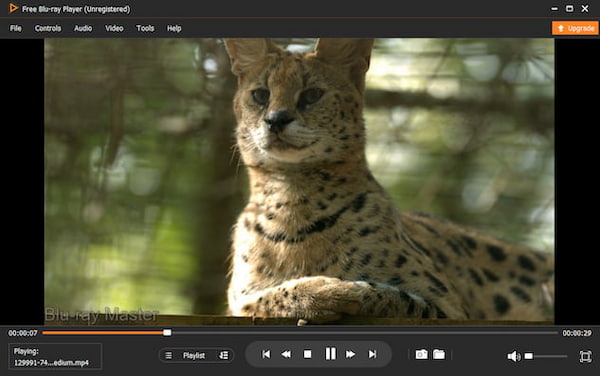
1. Blu-ray Master Free Blu-ray Player
Windows and macOS
All types of users, from beginners to professionals.
4.5/5
1080P
Yes
No
Blu-ray Master Free Blu-ray Player is an excellent region-free Blu-ray player we want to recommend. It can effortlessly bypass region codes and play Blu-ray discs from regions A, B, and C without resetting your PC drive counter. Moreover, you can also view Blu-ray folders and ISO files with high quality. This region-free 4K Blu-ray player lets you play high-quality Blu-ray. Apart from that, it also offers great sound quality. Hence, you can enjoy a home cinematic experience with this adaptable Blu-ray player. During testing, we found that it loads discs faster than other software. That is why it is our top choice.
Free Download
For Windows
Secure Download
Free Download
for macOS
Secure Download
Pros
- Allows playing movies from any region without restrictions.
- Offers a high-definition playback to enhance stunning visuals.
- It also accommodates various formats apart from Blu-ray discs, like DVDs and CDs.
- It has a beginner-friendly and intuitive user interface.
- Video playback controls are available for viewing customization.
Cons
- The trial version is limited.
- The 4K/5K/8K video playback quality is only available for the premium version.
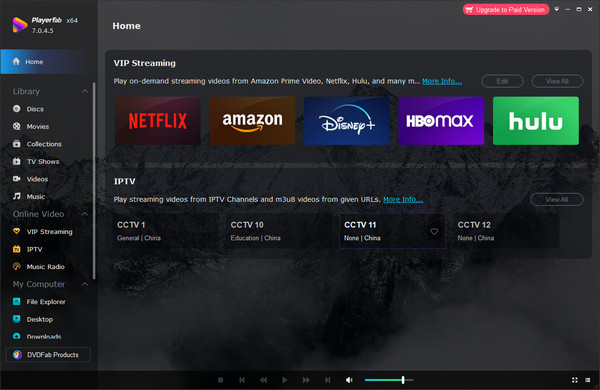
2. DVDFab PlayerFab
Windows and macOS
Intermediate to Professional Users
4.5/5
4K
Yes
Yes
DVDFab PlayerFab is an all-region Blu-ray player that enables you to watch Blu-ray movies without the limit of Blu-ray region codes. It can load Blu-ray discs and ISO files. With advanced settings, you can easily control Blu-ray playback, like creating playlists, taking screenshots, and selecting audio tracks and subtitles. Moreover, it provides a hardware-like full menu navigation experience for 4K UHD. Besides, this best region-free Blu-ray player can play 3D Blu-ray movies to enable you to enjoy an immersive watching experience. You can also use it to watch DVDs and various video formats, like MP4, MOV, MKV, etc.
Pros
- It also serves as a streaming tool besides Blu-ray playback.
- It offers high-quality Blu-ray and video playback.
- It can customize audio tracks and subtitles.
- It provides hotkeys to simplify the watching process.
Cons
- It would occasionally crash.
- Some people would think the interface is complex.
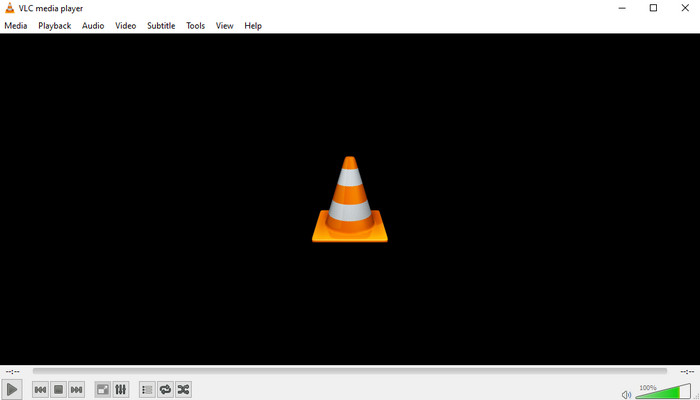
3. VLC Media Player
Windows, macOS, Linux, Android, iOS, and more.
Intermediate and professional users.
3.5/5
4K
Yes
Yes
VLC Media Player is a well-known media player that also supports Blu-ray playback. It can play region A, B, and C Blu-ray movies. This multi-region Blu-ray player is an excellent choice for users who prefer a familiar interface. Not only that, it will serve as a free and open-source solution. By default, VLC does not support commercial Blu-ray decryption due to dynamic licensing restrictions. To bypass region codes and copy protections on retail discs, you must manually download two external configuration files: the KEYDB.cfg database file and the libaacs.dll dynamic link library.
It may not provide the same level of Blu-ray customization features as dedicated software. Nonetheless, upon trying and checking it, overall, it’s still a good choice for general media playback needs.
Pros
- Enables Blu-ray disc playback.
- It is a widely used and trusted multimedia player.
- It also supports a vast array of audio and video file formats.
- Open-source and free to use.
Cons
- Limited support for Blu-ray menu navigation.
- Requires additional steps for Blu-ray playback compared to dedicated Blu-ray software.
Tip
Standard VLC cannot play commercial Blu-rays out of the box due to AACS encryption. To fix this on Windows, you must manually install two open-source files from vlc-bluray.whoknowsmy.name:
1. KEYDB.cfg (Keys database): Place inside %APPDATA%\aacs\
2. libaacs.dll (Dynamic library): Place inside your VLC installation folder (C:\Program Files\VideoLAN\VLC\)
Once placed, restart VLC, go to Media > Open Disc, select Blu-ray, and click Play.
4. IINA Player (With Libaacs Integration)
macOS
Mac power-users looking for a modern, open-source, and highly customizable media player
4.5/5
Up to 4K UHD with HDR support
Yes
Yes
Designed specifically for modern macOS (built with Swift), IINA is often dubbed 'the modern VLC for Mac.' Out of the box, IINA is a sleek, highly versatile media player that supports macOS native gestures, Dark Mode, and Picture-in-Picture. While it doesn't decrypt commercial Blu-ray discs natively due to licensing restrictions, Mac power-users can easily integrate open-source decryption libraries (like libaacs and KEYDB.cfg). Once configured, IINA reads encrypted BDMV folders and Blu-ray ISOs seamlessly, making it a powerful, lightweight alternative to bloated commercial players.
Pros
- 100% free and open-source with zero ads or upsells.
- Sleek macOS-native user interface with Touch Bar, Dark Mode, and PiP support.
- Smooth hardware acceleration for 4K video and high-bitrate playback.
Cons
- Requires manual initial setup (libaacs dynamic libraries) to play commercial encrypted discs.
- No native support for full interactive Blu-ray disc menus (skips straight to title/main movie).
5. Infuse (by Firecore)
macOS, iOS, iPadOS, tvOS (Apple TV), VisionOS
Apple ecosystem purists, home theater streaming from NAS/local networks, and Apple TV setups
4.5/5
Full 4K HDR10, Dolby Vision (Profile 5 & 8), and Spatial Audio
Yes
Yes
If you have digitised your physical Blu-ray collection into ISO images or BDMV folder structures on a NAS (Network Attached Storage) or external drive, Infuse is the uncontested gold standard across Apple devices. It bypasses region lockouts completely because you are playing raw digital backup files directly over your local network. Infuse automatically fetches metadata, artwork, and subtitles while offering flawless playback for Dolby Vision, HDR10+, and high-res audio (including Dolby Atmos passthrough). It is particularly unmatched if you want to stream imported films directly to an Apple TV 4K in your living room.
Pros
- It provides unrivaled Apple ecosystem sync, which can seamlessly sync watch status across Mac, iPhone, iPad, and Apple TV.
- It can handle pristine 4K Dolby Vision and high-bitrate Remux files without dropping frames.
- Its UI is beautiful and automatically fetches posters, fan art, and cast info.
Cons
- It does not read physical optical drives directly that is designed for digital rips, ISOs, and folder structures.
- Advanced audio codecs (Dolby Atmos, DTS-HD MA) require the paid Pro subscription.
Part 4. How do I Change My Region on My Region-Free Blu-ray Player
Changing the region on a region-free Blu-ray player is generally not necessary. As the players listed above are designed to play discs from any region without restrictions. However, if you are facing issues or uncertainties, here are some general steps you can consider:
Step 1. First, ensure to turn on your region-free Blu-ray player and connect it to your TV. Then, use your remote control to access the settings menu. Depending on your device, click Setup or Settings.
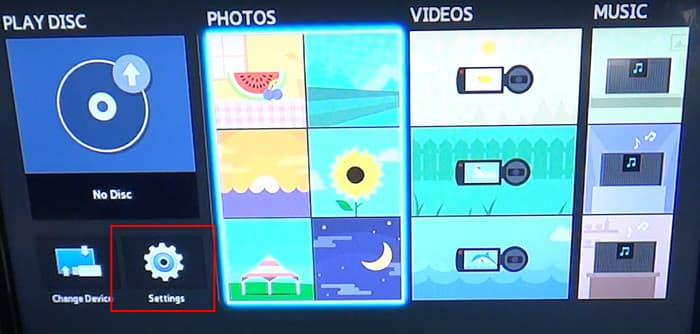
Step 2. Next, find the section labeled Region or Region Code in the Settings menu. Then, choose the region corresponding to the disc's purchase location or your preference.
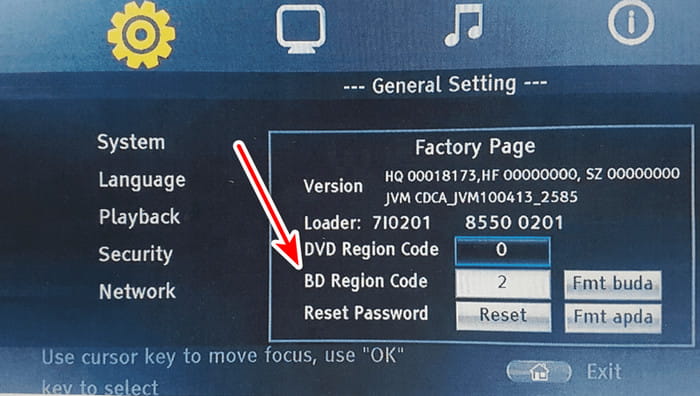
Step 3. Now, save the changes made by pressing the OK or Enter button. Then, exit the Settings menu. Finally, you might have to restart your Blu-ray player for changes to take effect.
Remember, if you have a genuine region-free Blu-ray player, it should automatically play discs from any region. Hence, it will not require you to make manual region changes. If you continue to experience issues, contacting customer support for your specific player model is advisable. Always follow the manufacturer's guidelines to avoid potential risks or voiding warranties.
Part 5. FAQs About Region-Free Blu-ray Player
-
If I update the firmware on my hardware-modified player, will I lose region-free functionality?
No, in almost all cases. Modern mod kits from reputable vendors (like 220-Electronics) use physical hardware modifications—often a dedicated secondary chip—to override the factory regional lock. Because the hack lives on a separate hardware level rather than rewritten factory code, official Sony or Panasonic firmware updates won't overwrite or wipe it out.
-
Can I unlock region codes on my standard Panasonic/Sony player using just remote control codes?
It is almost impossible. Blu-ray encryption is strict. Sony and Panasonic standalone players require physical hardware chip mods or specialized third-party firmware to play multi-region Blu-rays.
-
Are 4K Ultra HD Blu-ray discs region-free, or do I still need a multi-region player?
Yes. 4K Blu-ray discs are region-free. However, you may still need a multi-region player because many 4K combo packs include standard 1080p Blu-rays for special features or bonus discs.
-
Is 220-Electronics a legitimate and safe website to buy hardware-modified region-free Blu-ray players?
Yes, it is. 220-Electronics is a reliable vendor in the physical media community.
-
What’s the difference between Region A, Region B, and Region C Blu-rays?
Standard 1080p Blu-rays are divided into three geographic zones:
• Region A: North America, South America, Japan, Korea, Taiwan, and Southeast Asia.
• Region B: Europe, UK, Australia, New Zealand, Africa, and the Middle East.
• Region C: China, Russia, India, and Central/South Asia.
If your player and disc regions don't match, the disc simply won't boot. -
Is it legal to buy and use a region-free modified Blu-ray player in the US or UK?
Yes. Region codes are a commercial distribution agreement enforced by movie studios, not a government law. Owning, importing, or using a hardware-modified player for personal home viewing breaks no laws in both the US and UK.
Wrapping up
In the end, that’s our comprehensive list of the top 10 all-region Blu-ray players. Among the tools mentioned above, there’s one that stands out the most. None other than the Blu-ray Master’s Blu-ray Player. If you’re into convenience, use the straightforward method of this region-free Blu-ray Player. With it, you can play and watch Blu-ray discs up to 4K quality without any hassle.
More from Blu-ray Master
Top Blu-ray Player

Easily play Blu-rays, DVDs, and various video/audio formats with rich playback features.
100% Secure. No virus
