

Jul 15, 2026Posted by Brittany Garcia to Play Blu-ray
Quick Recommendation
For the ultimate 3D home theater experience, the Panasonic DP-UB820 is the best 3D Blu-ray hardware player overall, while VLC Media Player stands as the top free 3D software solution for PC and Mac.
Let’s face it: 3D TVs are dead and buried. But if you think 3D movies at home died with them, think again.
Thanks to the massive rise of 4K 3D home projectors and next-gen spatial headsets like the Apple Vision Pro and Meta Quest 3, physical 3D Blu-ray content is having a massive cinematic renaissance. If you want true, uncompressed three-dimensional depth without the compression artifacts or spinning wheels of streaming services, a dedicated playback setup is still non-negotiable.
Whether you are looking to hook a premium deck to your home theater or spin up ISO files on your laptop, we’ve got you covered. Here is our definitive, battle-tested list of the best 3D Blu-ray player hardware and software you can actually buy and use today.
- Part 1. How We Test: Our 3D Blu-ray Evaluation Methodology
- Part 2. Top 5 3D Blu-ray Player Hardware
- Part 3. Top 5 3D Blu-ray Player Software
- Part 4. 3D Blu-ray Player Software VS 3D Blu-ray Player Hardware
- Part 5. FAQs of 3D Blu-ray Player
Part 1. How We Test: Our 3D Blu-ray Evaluation Methodology
To cut through the marketing fluff and provide you with honest, battle-tested recommendations, our A/V testing process is rooted in real-world performance. We don’t just copy spec sheets; we put every piece of hardware and software through a rigorous benchmarking pipeline in our media lab.
Here is the exact framework we use to evaluate 3D Blu-ray solutions:
1. The Core Testing Environment
Every product on our list is tested using a standardized ecosystem to ensure a level playing field:
- Display Setup: A modern 4K Home Theater Projector (supporting active-shutter 3D) and a Meta Quest 3 VR headset connected via a high-speed HDMI 2.1 matrix.
- Optical Reference Drive: A firmware-patched, UHD-friendly LG internal Blu-ray drive for PC/Mac software testing.
- Test Media: A curated mix of retail 3D Blu-ray discs (including heavily encrypted and multi-region titles) alongside raw 1:1 MVC .ISO backup files.
2. Our 4-Tier Evaluation Criteria
- Disc Decryption & Regional Compatibility: We measure exactly how many seconds it takes a player to bypass commercial AACS copy protections and region locks. For software, we verify whether it works natively out of the box or forces you to hunt down complex third-party library files.
- 3D Depth & Visual Integrity: We closely analyze frame-packing efficiency and native MVC (Multiview Video Coding) decoding. Our team actively checks for 'ghosting' (crosstalk), motion judder during high-action panning shots, and the scaling sharpness when rendering 1080p 3D content on 4K screens.
- Audio Pass-through Performance: Immersive 3D visuals require matching multi-dimensional sound. We test whether the player successfully streams uncompressed Dolby Atmos, Dolby TrueHD, and DTS:X bitstreams straight to a premium A/V receiver without audio-to-video sync delays.
- UI Responsiveness & System Overhead: For hardware decks, we clock boot times and disc tray loading speeds. For software tools, we monitor CPU/GPU utilization percentages to ensure smooth playback that won't turn your laptop into an overheating fan box.
Our Commitment to Objectivity: While we develop our own proprietary software solutions, our reviews remain strictly independent. If a tool fails to decode a disc, stutters during fast-forwarding, or features an outdated interface, we call it out directly—no exceptions, no sugarcoating.
Part 2. Top 5 3D Blu-ray Player Hardware
1. Panasonic UB820 3D Blu-ray Player
Around $400
3840×2160
HDMI
[‘HDMI (HDCP 2.2)’]
Remote Control
5.3 Pounds
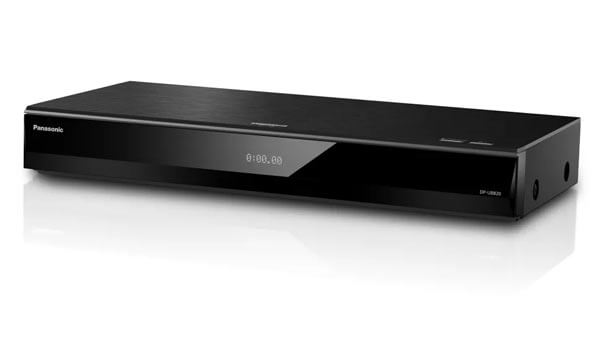
Panasonic UB820 is considered as the one of the best 4K 3D Blu-ray players with top-notch performances. It enables you to play Ultra HD Blu-ray discs, 3D and standard Blu-ray discs, DVDs, CDs and rewriteable discs effortlessly. It not only supports the full 4K resolution video for use with Ultra HD TVs, but also the lower resolution videos when used with non-4K TVs. Its dual-band Wi-Fi 5 (802.11ac) offers fast, reliable wireless streaming. Moreover, it also has some built-in apps for Amazon Video, and YouTube.
Reasons to Buy
- Handles almost any format you throw at it including CDs, DVDs, Blu-rays, 3D Blu-rays, and 4K Ultra HD Blu-ray discs
- Provides compatibility with almost every major audio format including Dolby Atmos and DTS:X.
- Allows to stream from Amazon Prime Video, and YouTube.
- Supports for Dolby Vision, HDR10, HDR10+, and HLG.
- The software interface is responsive and speedy.
Reasons to Avoid
- The Panasonic UB820 doesn’t support DVD-Audio or SACD.
- If you don’t need Dolby Vision, the Panasonic DP-UB420 is a cost-effective option.
2. Sony BDP-S6700 3D Blu-ray Player
Around $80 – $100
1080p (with 4K Upscaling)
HDMI, Coaxial Output, USB
Wi-Fi, Bluetooth (LDAC), Ethernet
Remote Control
1.9 Pounds
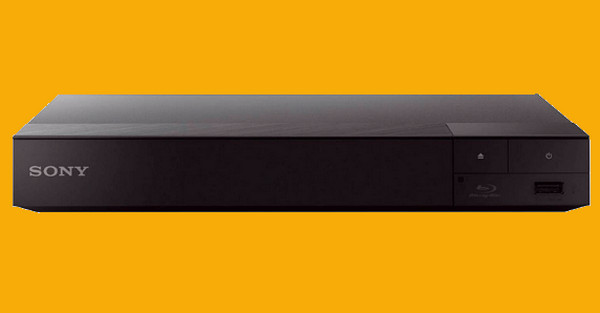
If you want a reliable, brand-new 3D Blu-ray player with limited budget, the Sony BDP-S6700 is the undisputed budget champion. While it doesn't spin native 4K Ultra HD discs, it excels at playing standard 3D Blu-rays, 2D Blu-rays, and DVDs. Equipped with a powerful video processor, it can upscale your 1080p 3D movies to near-4K quality on compatible displays. Furthermore, its built-in dual-band Wi-Fi ensures smooth streaming, and it even features Bluetooth connectivity with LDAC support, allowing you to watch late-night 3D movies using wireless headphones without disturbing anyone.
Reasons to Buy
- It is highly affordable and still actively sold and supported on the market.
- Its utililized advanced 2D-to-3D upconversion breathes new life into regular DVDs and Blu-rays.
- Built-in Bluetooth allows for private wireless audio streaming to headphones.
- Super Wi-Fi provides a strong, stable wireless connection for built-in streaming apps.
Reasons to Avoid
- It is a 1080p player and cannot play native 4K Ultra HD physical discs.
- The lightweight, plastic chassis feels a bit flimsy compared to premium models.
3. Magnetar UDP800 Ultra HD 3D Blu-ray Player
Around $1,599
3840×2160 (Native 4K)
Dual HDMI, Balanced XLR, RCA, Coaxial, Optical
Ethernet (For local network playback & firmware)
Backlit Remote Control
17.6 Pounds
Audiophile Stereo & Multichannel Surround
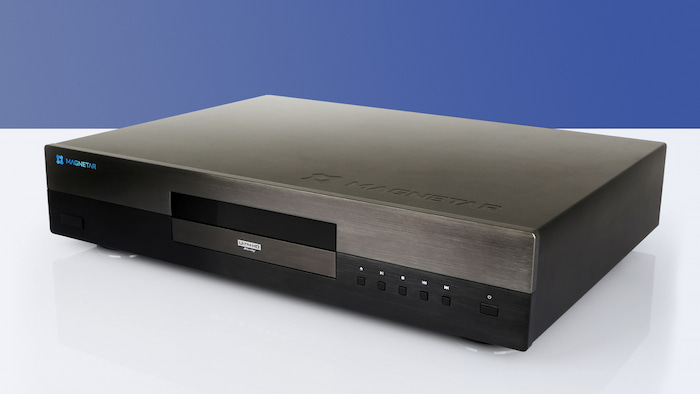
For hardcore physical media purists, the retirement of OPPO left a massive void—until Magnetar arrived. The Magnetar UDP800 is the true spiritual successor to elite high-end decks, offering reference-grade playback for 4K Ultra HD, 3D Blu-ray, SACD, and DVD-Audio. It features a heavy-duty, dual-layer aluminium alloy chassis that completely eliminates disc-spinning vibrations. On the audio side, it packs professional-grade Burr-Brown DACs and independent XLR balanced stereo outputs, delivering a jaw-dropping audiophile soundstage that matches its flawless, ghost-free 3D video processing.
Reasons to Buy
- It is praised as the ultimate reference player with uncompromising 3D and native 4K Dolby Vision/HDR10+ performance.
- Audiophile-grade internal components, featuring dual Burr-Brown DACs and XLR balanced outputs.
- Tank-like build quality with an isolated, low-noise power supply to ensure pure signal integrity.
- It has universal disc compatibility, flawlessly handling niche audio formats like SACD and DVD-Audio.
Reasons to Avoid
- This extremely expensive luxury item is designed strictly for high-end home theatres.
- It lacks built-in smart streaming apps.
4. LG UBK90 3D Blu-ray Player
$150
3840×2160
HDMI
HDMI
3.6 Pounds
Surround
The LG UBK90 is a successor to LG's previous player, the UP970. It is Dolby Vision-compatible out of the box and should be an excellent 4K Blu-ray player for most users. However, it's missing a few features that some A/V enthusiasts would enjoy. This 3D Blu-ray player from LG is equipped with 4K upconversion for Blu-ray and DVD discs. It has built-in WiFi capability for connecting wirelessly to a home network and is 3D-capable. The player supports popular disc-based formats such as CD, DVD, Blu-ray, 3D Blu-ray, and Ultra HD Blu-ray.

Reasons to Buy
- Elegant design and solid build quality.
- Excellent picture quality when playing 4K UHD and Blu-ray discs
- Dual HDMI outputs.
- A wide range of streaming options.
- Fast startup and loading of 3D Blu-ray Discs.
Reasons to Avoid
- No “subtitle” button on the remote.
- The settings menu is extremely limited.
- No advanced playback information while watching a disc.
5. Sony UBP-X800M2 3D Blu-ray Player
about $380
3840×2160
HDMI, Coaxial
Wi-Fi, Ethernet
Remote Control
8.4 Pounds
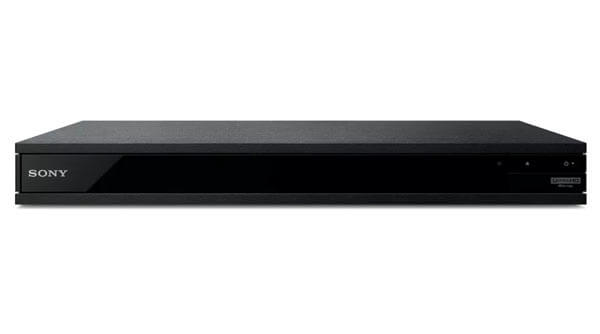
Sony UBP-X800M2 is one the most fully-featured 4K 3D Blu-ray players on the market, featured by 4K HDR10 and Dolby Vision playback capabilities, Dolby Atmos and DTS:X bit-streaming, hi-res audio support, Bluetooth, Wi-Fi, and DSEE HX functionality. It can play Ultra HD Blu-ray discs, 3D and standard Blu-ray discs, SACDs, DVD-Audio, DVDs, CDs and rewriteable discs. Moreover, it also supports dual-band Wi-Fi for smooth wireless streaming and includes various streaming apps, such as Amazon Prime Video, etc.
Reasons to Buy
- 4K HDR10 and Dolby Vision playback.
- 3D Blu-ray support.
- 4K upscaling.
- Dolby Atmos and DTS:X bit-streaming.
- Hi-res audio support.
Reasons to Avoid
- Over-bright Dolby Vision playback.
- No HDR10+ support.
- Very slight over-scanning issue on the left side of the screen.
- No optical audio connection.
- No HDR10+ support.
Part 3. Top 5 3D Blu-ray Player Software
1. Blu-ray Master Free Blu-ray Player
Free
Yes
4K
Select and add subtitles
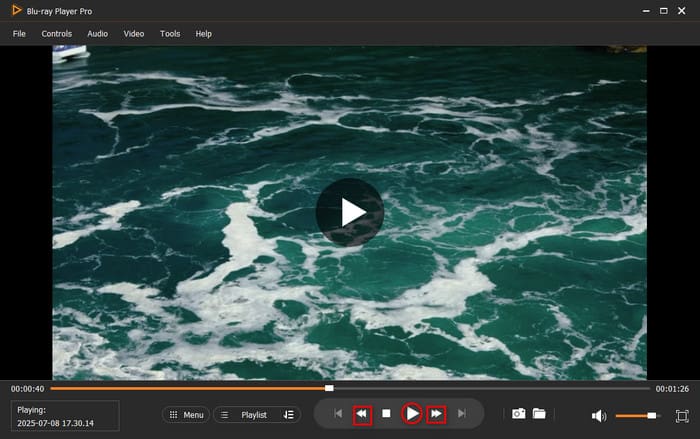
Blu-ray Master Free Blu-ray Player is an excellent 3D Blu-ray player that offers a clear and intuitive interface. It can be called the most professional Blu-ray player that allows watchers to enjoy seamless and immersive playback of 3D Blu-ray movies or videos in high quality. Moreover, you can use its controller to adjust volume and speed, select audio tracks, add subtitles, etc. In addition, it can play DVDs and digital formats, including MP4, MKV, MOV, FLV, M2TS, and many others. During our hands-on testing on a standard Windows 11 laptop, we loaded a heavily encrypted Region B 3D Blu-ray disc, and the software bypassed the region restriction in under four seconds.
Key Features:
- It allows you to play 3D Blu-ray movies from regions A, B, and C.
- It has a clear interface for controlling video playback.
- It offers many features to enhance your viewing experience, such as the screenshot feature.
Free Download
For Windows
Secure Download
Free Download
for macOS
Secure Download
Reasons to Buy
- It is a lightweight tool that loads 3D Blu-rays faster than other competitors.
- It utilises advanced decryption technologies to handle Blu-ray copy protections like AACS, BD+, and region codes.
- It provides a seamless right-click control panel for real-time 3D sync and audio delays.
Reasons to Avoid
- Its advanced features, like 4K upscaling and Dolby audio pass-through, require the paid license.
2. DVDFab Player 6
$59.99
Yes
4K Lossless
PC and TV modes to meet different needs
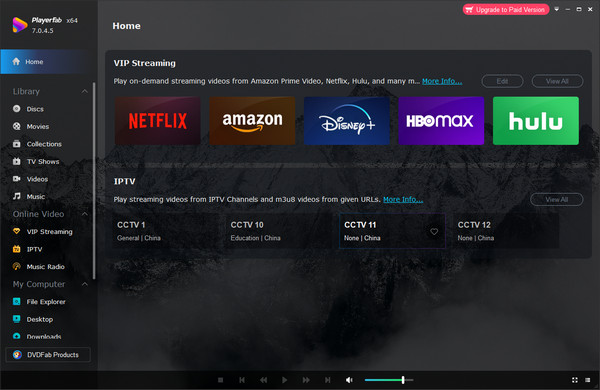
DVDFab PlayerFab has been recognised as an outstanding 3D Blu-ray disc player. It uses 3D technology to provide you with an immersive Blu-ray viewing experience. It can play 3D Blu-ray discs, ISO files, and SBS (top-and-bottom) 3D videos. Moreover, it can natively recognise the depth layer without pre-conversion and offers multiple 3D output modes, like Anaglyph Red/Cyan, 3D-Ready HDTV (Checkerboard), Micro-polariser LCD 3D (Row-interleaved), etc.
With a user-friendly interface, you can easily learn how to use it. Besides, the regular updates of this all-inclusive media player make it more appreciated by the users. During testing, it delivers exceptional lossless transmission of Dolby Atmos and DTS:X, providing a cinema-grade visual experience without compression that cannot be replicated by free open-source tools.
Reasons to Buy
- Four 3D output modes available for user’s preferences, including Anaglyph Red/Cyan, 3D-Ready HDTV (Checkerboard), Micro-polarizer LCD 3D (Row-interleaved), and HDMI 1.4 enabled 3D TV.
- All-round 3D playback support on genuine 3D Blu-ray discs, ISO files, and SBS (side-by-side) or top and bottom 3D videos.
- Advanced settings for visual and audio output.
- Screen compatibility with both PC and TV modes.
Reasons to Avoid
- High price beyond its features.
- Vacancy of some basic functions, such as the media library.
3. 5KPlayer
Free
Yes
4K, 8K
AirPlay & DLNA support
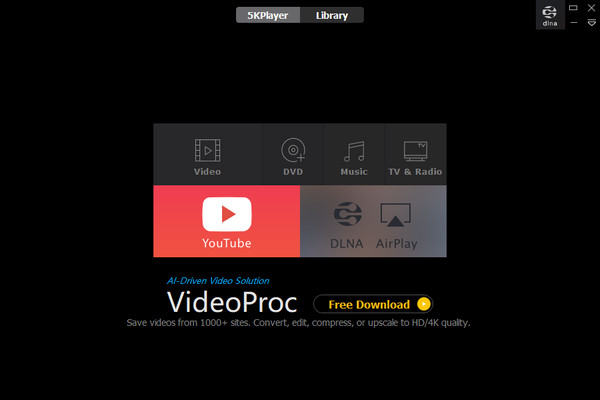
5KPlayer is a good 3D Blu-ray player that performs well on both Mac and Windows computers. It can play 3D Blu-ray discs, ISO files, and 3D video formats, like M2TS and MTS. With advanced technologies, you can enjoy the smooth and seamless 3D Blu-ray playback. Its feature-rich built-in codec pack makes it more like a universal media player. In addition, it can also let you download online videos and enjoy AirPlay streaming. In our evaluation environment, we used its built-in DLNA server to stream a pre-rendered 3D Side-by-Side (SBS) MKV file from my desktop to a standalone VR headset. The hardware acceleration engine did a commendable job preventing frame drops during fast-forwarding.
Reasons to Buy
- Supporting 3D Blu-ray movie formats, including M2TS and MTS.
- Versatile built-in code pack.
- Streaming videos to mobile devices by AirPlay.
- Offering convenient movie lists from popular websites.
Reasons to Avoid
- Lack of ample advanced features.
- Vacancy of some basic functions, such as the media library.
4. PowerDVD Player
$79.99
Yes
4K, 8K
Cast 3D Blu-rays to TV or streaming devices.
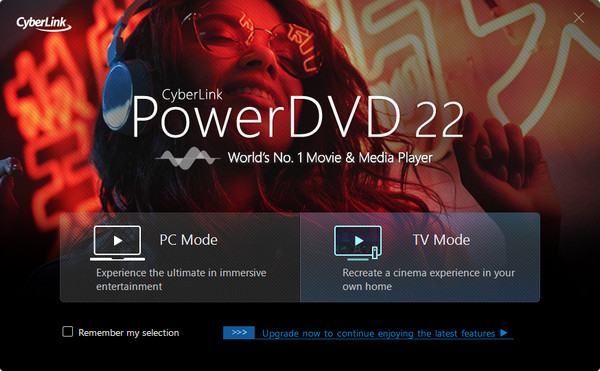
While historically crowned the absolute titan of PC home etheatre software, CyberLink PowerDVD carries a massive, industry-wide warning in 2026: native 3D Blu-ray playback functionality was completely stripped from all versions released after April 2020 (PowerDVD 20 and newer). To verify its current viability, we had to boot up a legacy test rig running PowerDVD 19. When using the correct, older software version, the experience remains magnificent, delivering ghost-free 3D playback and incredible TrueTheater colour upscaling over an HDMI 1.4 connection. If you can track down an old, valid license key, it is fantastic; otherwise, do not buy the modern versions expecting 3D support.
Reasons to Buy
- Extensive range of file formats supported, such as MKV, MP4, MOV, AVI, and even 4K videos.
- Live support enables you to share what you are watching real-time.
- Application of latest visual technologies, including 3D Blu-ray discs, 360-degree videos, 8K UHD videos, etc.
- Playing 3D Blu-ray movies without optical disc by PowerDVD SNS plug-in.
Reasons to Avoid
- Ineffective to play protected 3D Blu-ray discs.
- Stutter of 3D movies playing on Mac when operating fast forward or rewind.
5. VLC Media Player
Free
Yes
4K, 8K
Video, Blu-ray, and DVD conversion feature
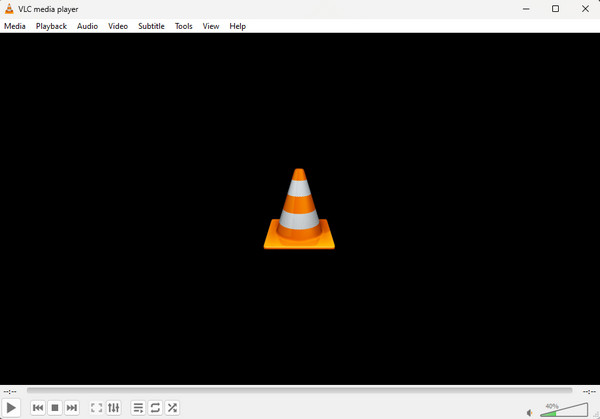
VLC Media Player can serve as a 3D Blu-ray player, handling side-by-side and top-and-bottom 3D Blu-ray movies with ease. It has 3D settings that let you control 3D Blu-ray playback, including Anaglyph 3D. With the basic playback settings, you can manage the playback of video files, such as skipping, stopping, and resuming, etc. Moreover, it includes an Equaliser, Compressor, Stereo Widener, and more to help you adjust video and audio effects.
However, upon inserting a commercial-grade 3D Blu-ray disc, VLC exhibits significant flaws. In practical tests, immediately after loading a retail version 3D disc into the drive, a critical 'AACS decoding error' message appears. As VLC is pure open-source software, it lacks the commercial license required to decrypt copyright-protected Blu-ray discs. To ensure proper operation, we spent 20 minutes locating the necessary external components—including DLL libraries, the latest KEYDB tool, and the .cfg configuration file—and manually installing them in VLC's system directory. While this makes it a powerful free tool for tech-savvy users who don't mind manual configuration, beginners will find the entire process highly cumbersome.
Reasons to Buy
- It is a free and open-source media player.
- It can play 3D Blu-rays, DVDs, and other digital files.
- It provides basic and advanced settings to adjust playback.
Reasons to Avoid
- Its interface is a little outdated.
- It may occasionally stutter or lag.
Part 4. 3D Blu-ray Player Software VS 3D Blu-ray Player Hardware
| 3D Blu-ray Player Hardware | 3D Blu-ray Player Software | |
| Pricing | More expensive. It typically costs hundreds of dollars. | Free download is available. |
| Portability | As a physical device, hardware is not suitable for those who need to travel frequently. | It can be installed on your computer, allowing you to play 3D Blu-ray anywhere. |
| Audio and video quality | Supports Ultra HD Blu-ray with excellent visual effects. | Play DVD, 1080p Blu-ray, and HD videos without quality dropping. |
| Advanced features | 4K upscaling and 2D-to-3D conversion. | Change the screen size and adjust the video, audio, and subtitle track. |
Part 5. FAQs of 3D Blu-ray Player
-
Are all Blu-ray players 3D capable?
Most Ultra HD Blu-ray Disc players can play 3D Blu-ray discs. If you’re upgrading to an Ultra HD Blu-ray player and need 3D playback capability, make sure this feature is available.
-
Do I need a 3D TV for a 3D Blu-ray player?
To watch your film in 3D, you will need a 3D HDTV, a Blu-ray 3D player, and 3D glasses compatible with your 3D TV. Your TV and player will need to be connected with HDMI cables.
-
Why won’t my 3D Blu-ray player play DVDs?
If your disc is dirty or scratched, it might not play in the 3D Blu-ray player. You need to make sure your DVD is clean and intact before playing it. Or you can try to convert the DVD into digital formats with VR video converters and play it on a 3D Blu-ray player.
-
What are the best 3D Blu-ray players still available to buy brand new in 2026?
There are still many choices: Panasonic DP-UB820 for home theatres, Sony UBP-X800M2 that supports a wide range of formats, and Sony BDP-S6700 with a friendly price.
-
Can I play a 3D Blu-ray disc on a standard 4K Ultra HD Blu-ray player, or do I need a specific one?
Yes. The 4K Ultra HD Blu-ray specification itself does not support 4K 3D (all 4K discs are strictly 2D). However, almost all reputable 4K hardware players are designed with backward compatibility to read standard 1080p 3D Blu-ray discs.
-
Since 3D TVs are discontinued, how can I watch my 3D Blu-ray movies at home now?
The 4K 3D home theater projectors allow you to play 3D Blu-ray movies with cinematic 3D effects.
-
Is there any free Windows 11 media player software that can natively play 3D Blu-ray ISO files?
Yes. PotPlayer is highly recommended for 3D Blu-ray playback, which provides the Side-by-Side, Top-and-Bottom, or Anaglyph (Red/Cyan) outputs depending on your monitor or projector setup.
-
Panasonic DP-UB820 vs Sony UBP-X800M2: Which one handles 3D Blu-ray discs better?
Both of them are exceptional. If you purely want a seamless, set-it-and-forget-it movie machine with elite video processing for both 3D and 4K HDR, get the Panasonic UB820. If you are a physical media purist who also collects high-fidelity audio discs (SACDs), the Sony X800M2 offers better value.
Conclusion
According to the above introduction, you must know which 3D Blu-ray player is suitable for you. We offered 10 best options to play your 3D Blu-ray disc in total, no matter whether you prefer hardware or software. Choose one from our list and enjoy a seamless 3D Blu-ray movie at home.
More from Blu-ray Master
Top Blu-ray Player
Easily play Blu-rays, DVDs, and various video/audio formats with rich playback features.
100% Secure. No virus
