

Jun 30, 2026Posted by Kevin Miller to Play Blu-ray
Best for Categories:
Best Free 4K Blu-ray Player: VLC
Best for Windows: Blu-ray Master Free Blu-ray Player
Best for Mac: 5KPlayer
Best for Dolby Vision: Panasonic DP-UB820
Best Budget: LG UBK80
You can easily notice the quality increase over streaming. Many popular video sharing sites even allow you to directly access various 4K movies online. But you may also face the 4K video streaming problems like buffering, dropout and bandwidth caps. So it becomes a quite necessary need to get a good 4K Blu-ray player.
Comparing the standard DVD, Blu-ray provides a whopping improvement to image and sound quality. You may purchase many new 4K Blu-ray discs or can get some of your favorite movies downloaded as 4K videos on computer. The question is, which 4K Blu-ray playing software you should use to play them? What is the best 4K Blu-ray player for Mac and PC?

- Part 1. Top 5 4K Blu-ray Player (Software)
- Part 2. 5 Best 4K Blu-ray Player (Hardware)
- Part 3. 4K Blu-ray Player Software vs Hardware
- Part 4. FAQs about 4K Blu-ray Player for Mac and PC
Part 1. Top 5 4K Blu-ray Player (Software)
To watch 4K Blu-ray movies comfortably at home, you will need a convenient 4K Blu-ray player software. Among all the choices, which one should you pick for your Windows or Mac computers? Different people may give different answers. The following detailed review presents you with a clear picture of what’s good and bad about 5 popular player software.
Tips
Due to the discontinuation of Intel SGX technology, playing encrypted 4K Ultra HD Blu-ray discs directly on a computer is now practically impossible. You must use a 'UHD-friendly drive' to read the data of 4K Blu-ray discs.
Before diving into the reviews, it's important to know how we tested these apps. 4K Blu-ray playback can be demanding, so we put each player through its paces on a standardized, real-world desktop setup to see how they actually perform.
Our Test Rig:
OS: Windows 11 Home (64-bit)
Optical Drive: LG WH16NS40 UHD-Friendly Drive (Flashed Firmware)
CPU: Intel Core i5-13400
GPU: NVIDIA GeForce RTX 3060
RAM: 16GB DDR4
Here is a quick breakdown of how these 5 popular players stack up against each other based on our hands-on testing:
| Player Name | Price | 4K Disc Decryption (Out of the Box) | Estimated CPU Usage (4K Playback) | Standout Feature | Biggest Catch |
| Blu-ray Master Free Blu-ray Player | Free |  | 15% – 20% | Super lightweight on older hardware. | Has no GPU acceleration in the free version. |
| 5KPlayer | Free | | 20% – 25% | Built-in AirPlay & DLNA wireless streaming. | Interface can feel a bit cluttered with bundles. |
| VLC Media Player | Free |  | 10% – 15% | 100% open-source and plays any digital file. | Highly complicated setup for encrypted 4K discs. |
| AnyMP4 Blu-ray Player | Paid ($15.6/mon or $40.21/lifetime) | | 15% – 20% | Lossless Dolby Atmos & DTS-HD cinema audio pass-through. | The interface looks a bit old-school. |
| CyberLink PowerDVD Ultra | Paid ($59.99 sale price) | | 12% – 18% | Real-time AI video upscaling (TrueTheater HDR) & 8K support. | Will not play 4K physical discs on newer Intel CPUs due to missing SGX support. |
1. Best 4K Blu-ray Playing Software for PC – Blu-ray Master Free Blu-ray Player
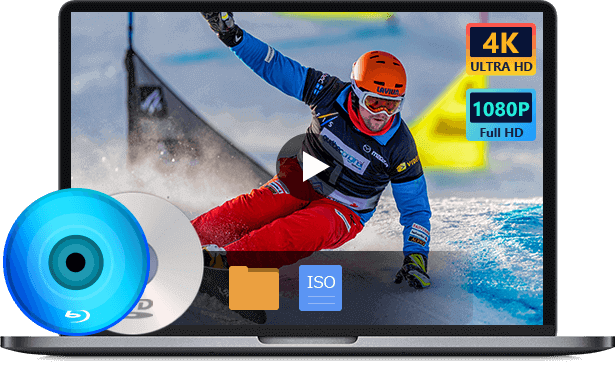
- Free Blu-ray Player is the free video and audio playing software which can help you play any Blu-ray disc with great visual and sound experience.
- Play the latest and most popular Blu-ray movies on Windows 10/8/7 PC.
- Play any Blu-ray disc, Blu-ray folder and ISO files on PC with great image and sound quality.
- Support DVD disc, DVD folder and any popular video and audio formats.
- Enjoy Blu-ray movies with the 5.1 surround sound, Dolby Digital, DTS effect.
Free Download
For Windows
Secure Download
Free Download
for macOS
Secure Download
If you just want to sit back and watch your 4K Blu-ray movies on your PC without spending a dime or dealing with annoying setups, Blu-ray Master Free Blu-ray Player is your best bet. It’s tailor-made for Windows users and runs smoothly on the latest OS or an older laptop. With advanced decryption technologies, it can easily bypass most Blu-ray copy protections, like AACS 2.0 and BD+. You can enjoy the latest commercial 4K releases, and they’ll just play without any error pop-ups. Its interface is clear and intuitive, which allows you to fully locate and control various settings, like skipping, showing the playlist, managing audio tracks, and subtitles.
Plus, it’s super lightweight. It uses only about 15% to 20% of your CPU during 4K playback, so your movies will run buttery-smooth even on an average mid-range laptop. The interface is clean too, making it a breeze to swap subtitles, switch audio tracks, or tweak the colors.

Pros
- Advanced built-in audio and video encoding technologies.
- Keep the original quality during playback.
- Completely free.
- No extra codecs are needed.
Cons
- It has no Mac version.
2. Popular 4K Blu-ray Player for Mac and PC – 5K Player
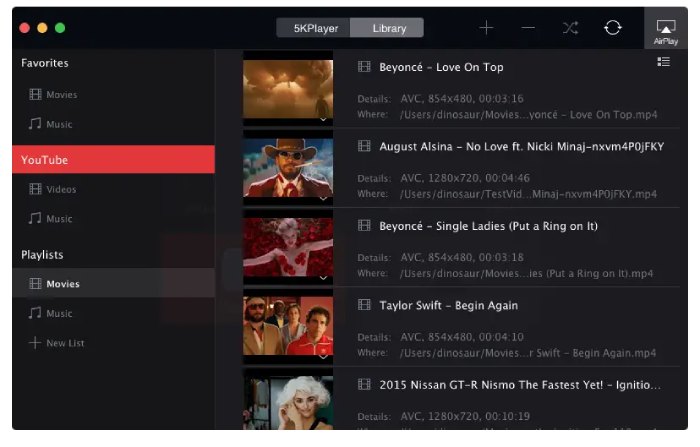
5KPlayer is way more than just a video player—it’s essentially an all-in-one media hub for your house. It works perfectly on both Mac and Windows, and in addition to handling 4K Blu-rays and DVDs, it can even play 5K videos with incredible clarity.
But the coolest feature here is the wireless streaming. Nobody likes being stuck staring at a tiny computer screen for a movie night. With built-in AirPlay and DLNA, 5KPlayer lets you beam whatever is playing on your computer straight to your big living room TV or projector without messing with cables. To keep things from lagging, it handles heavy video decoding in the background using hardware acceleration (supporting Nvidia, Intel, and AMD cards). You get zero buffering and zero dropped frames. It’s hard to find another player that blends top-tier decoding with wireless freedom this well.
Pros
- Built-in AirPlay tech for remote playback.
- Work as a connecting center for DLNA-compliant devices.
- H/W accelerated decoding.
Cons
- The installation contains an extra program.
3. Open Source 4K Blu-ray Player for Mac and PC – VLC Media Player
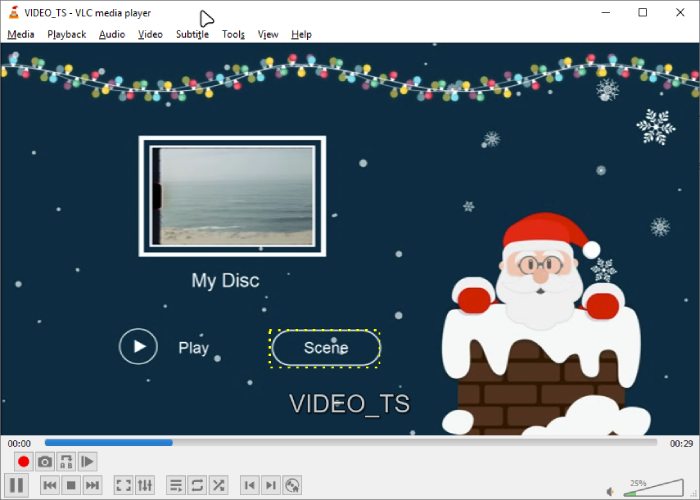
Anyone who has used a computer probably knows VLC. It’s the ultimate king of open-source software, and it's the perfect choice if you're a tech-savvy user who likes to customize things.
However, going completely free and ad-free comes with a catch. Out of the box, VLC won't play commercial, encrypted 4K Blu-ray discs. You’ll have to spend a bit of time looking up tutorials online, downloading extra plugins, and configuring the files yourself. But once you get it sorted, VLC transforms into a free 4K powerhouse that easily matches the capabilities of expensive paid software. Its biggest strength is that it eats anything you throw at it—whether it’s a physical disc, a digital file, or a live streaming link. As long as your PC has decent specs and you keep the app updated, it provides a clean, fully unrestricted viewing experience.
Pros
- Open-source and free.
- Accessible across platforms.
- Supports Blu-ray and DVDs of all regions.
Cons
- It requires extra settings for a 4K Blu-ray playback.
- It cannot play encrypted discs.
4. Professional 4K Blu-ray Player – AnyMP4 Blu-ray Player
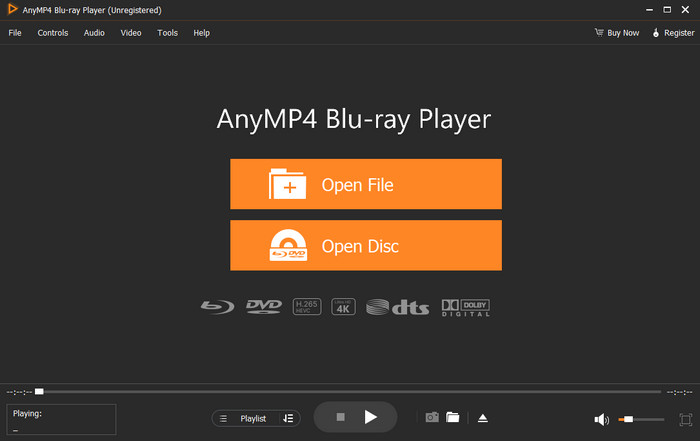
AnyMP4 Blu-ray Player is a player built specifically for movie fans who are obsessed with great sound. If you have a solid speaker setup or a premium pair of headphones, watching 4K Blu-rays, ISO files, or digital downloads on this app is an absolute treat.
It’s one of the few players out there that passes high-end cinema audio like Dolby Atmos and DTS-HD Master Audio directly to your sound system without losing any quality. From deep, rumbling explosions to crisp dialogue over your head, everything sounds exactly like it would in a real theater. On top of that, it fixes the annoying issue of region locks. If you love buying imported discs from overseas, you know they are usually locked to Regions A, B, or C. AnyMP4 completely tears down these barriers so you can play any disc from anywhere. Combined with its ability to smoothly play heavy formats like H.265/HEVC, it’s the easiest way to build a private home theater on your PC or Mac.
Pros
- 4K/8K video playback.
- Plays all types of Blu-ray and DVDs.
- Supports the latest Dolby, DTS, and more sound techs.
- Seamless playback between titles and chapters.
Cons
- The interface is old-fashioned.
- No shortcuts for speed change.
5. Paid 4K Blu-ray Player Software for PC – CyberLink PowerDVD Ultra
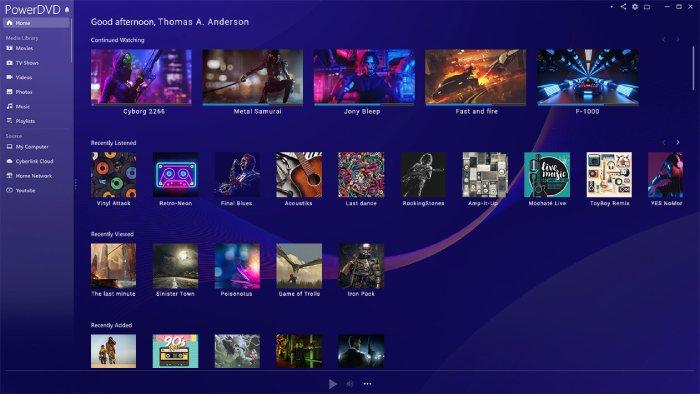
When it comes to premium-paid players, PowerDVD is the undisputed gold standard, though it only runs on Windows. It's definitely not cheap, but it brings massive features to the table—handling 4K, 3D, and it’s even ready for future 8K videos.
Its biggest selling point is a feature called TrueTheater HDR Enhancement. Basically, it uses AI to upscale and improve video and audio quality in real time while the movie plays. Even if your original disc looks a bit dark or dull, it bumps up the colors and contrast to make it look even better than the original transfer. On the audio side, it handles audiophile formats like FLAC and DSD perfectly.
It also doubles as a massive digital file manager. If you have terabytes of ISO copies, old AVCHD clips, or 360-degree VR videos scattered across your hard drives, it neatly organizes everything into a beautiful, easy-to-browse dashboard. Just keep in mind that only the top-tier Ultra version actually supports 4K Blu-ray playback. It's currently on sale for $59.99 (40% off), so if you have the budget and want the absolute best experience, it's definitely worth looking into.
Regrettably, since Intel has completely removed the SGX (Software Guard Extensions) security technology from its new CPUs, CyberLink has long announced that it can no longer play 4K physical discs on newer computer systems.
Pros
- Support up to 8K video playback.
- Enhanced Blu-ray & DVD playback.
- Enable you to stream from any device.
Cons
- Extremely expensive.
Part 2. 5 Best 4K Blu-ray Player (Hardware)
The above Blu-ray player software is robust for 4K Blu-ray playback. Without further ado, let’s see the five recommended 4K Blu-ray player hardware.
| Model | Best For | Key Feature | HDR Formats |
| Sony UBP-X700 | Beginners | Compact & Affordable | HDR10, Dolby Vision |
| Panasonic UB820 | Home Theater Pros | HDR Optimizer | All (Inc. HDR10+) |
| Sony X800M2 | Audio Enthusiasts | Premium Build | HDR10, Dolby Vision |
| LG UBK80 | Budget Users | Simple Reliability | HDR10 |
| PS5 / Xbox X | Gamers | All-in-One Media | HDR10 |
1. Sony UBP-X700: Best Entry-Level 4K Player
The Sony UBP-X700 is the perfect gateway into the world of Ultra HD. It offers a complete package, including built-in Wi-Fi and advanced 4K upscaling for your standard Blu-rays. It provides seamless access to streaming services like Netflix and YouTube in 4K. With dual HDMI outputs, you can separate audio and video signals for better performance.

2. Sony UBP-X800M2: Best Premium Build Quality
Replacing older entry-level models, the UBP-X800M2 is a sturdy, 'high-resolution' certified player designed for both cinema and music lovers. It features a rigid 'frame-and-beam' chassis to eliminate vibrations and supports almost any disc format, including SACD and DVD-Audio. It offers a more premium, quiet playback experience compared to budget alternatives.
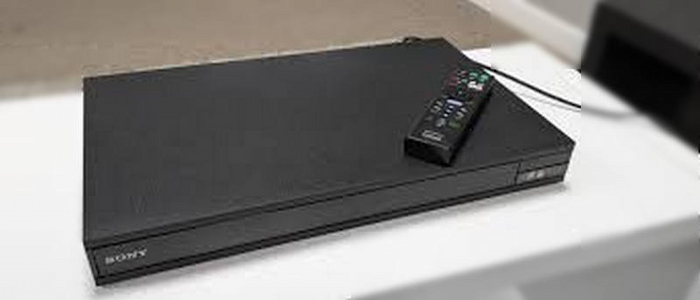
Pro Tip: To enjoy high-resolution audio (SACD or DVD-Audio), ensure you use the 'Audio Only' HDMI port to connect directly to your receiver. This minimizes electrical noise and jitter, providing a much cleaner soundstage for your home theater.
3. Panasonic DP-UB820: The Videophile’s Choice
If you are strict about picture perfection, the Panasonic DP-UB820 is your go-to player. It is world-renowned for its HCX Processor and HDR Optimizer technology, which tone-maps HDR content specifically for your TV's brightness capabilities. Unlike its competitors, it supports every major HDR format, including HDR10+ and Dolby Vision, and features 7.1 channel analog audio outputs for high-fidelity sound.
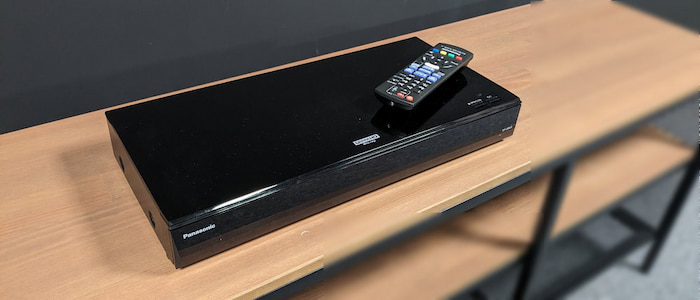
Pro Tip: Make full use of the HDR Optimizer button on the remote. This proprietary feature allows you to adjust the tone mapping based on whether you are using a high-luminance OLED or a lower-brightness projector, ensuring you never lose detail in the brightest parts of the image.
4. LG UBK80: Best Budget No-Frills Option
For users who want a stable, straightforward 4K experience without the high price tag, the LG UBK80 is a reliable workhorse. While it lacks some of the 'fancy' features like Dolby Vision support, it excels at playing 4K UHD Blu-rays, DVDs, and CDs with excellent stability. It is the ideal choice for those who have a standard HDR10 television and want a dedicated, easy-to-use remote experience.
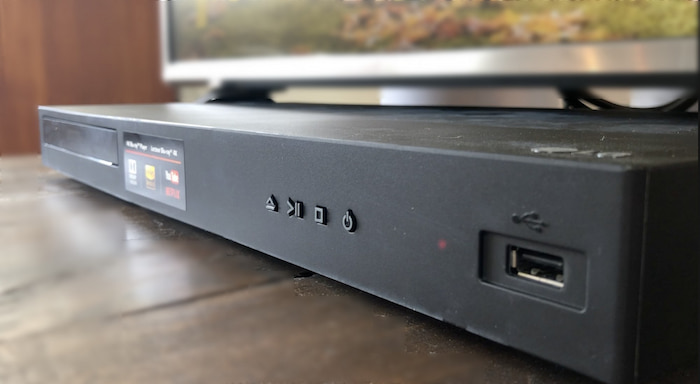
Pro Tip: Since this model lacks Dolby Vision, it is the perfect companion for budget-friendly 4K HDR10 monitors or projectors. If you experience any disk-spinning noise, placing a vibration-dampening mat underneath the player can significantly quiet the unit during nighttime viewing.
5. Xbox Series X: Best Multi-Purpose 4K Players
Instead of obsolete legacy models, many modern users opt for a gaming console. Xbox Series X features built-in 4K Blu-ray drives. While it lacks the advanced HDR tone-mapping of a dedicated Panasonic player, it offers incredible value by combining a world-class gaming machine with a capable 4K HDR media hub.

Pro Tip: Consoles are notorious for 'handshake' issues with 4K TVs. Always use the ultra-high-speed HDMI cable included in the box and ensure your TV’s HDMI port is set to 'Enhanced' or 'Deep Color' mode to prevent the screen from flickering or falling back to 1080p.
Part 3. 4K Blu-ray Player Software vs Hardware
We've compared 4K Blu-ray player software and hardware from the following 5 perspectives. From the thorough comparison, you can have a clear view of their differences and their separate benefits.
Portability
Obviously, the 4K Blu-ray player software is the winner in aspect of portability. It is a virtual thing that requires no actual space. Even if we change the perspective and compare the software and hardware from the storage space consumption. The software is still "lighter". For the hardware, it is hard to move, and you also need a monitor to be paired with it to enjoy the 4K UHD Blu-ray truly. But, if you are watching Blu-ray on the laptop, all you need is a Blu-ray player plus a compatible drive.
Compatibility
Whether it is the software or hardware, the 4K Blu-ray player seems to have the same compatibility in reading Blu-rays, DVDs, and CDs. However, if you want to watch regular videos, that's when the gap shows. Take the Panasonic DP-UB820 as an example; even though it is the most expensive player on the list, its playable formats are limited to WAV, WMA, AAC, AIFF, MP3, and FLAC. On the contrary, the Free Blu-ray Player from Blu-ray Master supports 20 more formats than the Samsung player does. That being said, we have a winner here, and it goes to the software team.
Regional Restrictions
It's hard to tell which one is the winner, the software or hardware. Because some excellent 4K Blu-ray players, such as the ones mentioned above, can really bypass the region code and read all discs of all regions. But what if you have a drive that only reads region-A Blu-ray? Things can be tricky, then. Besides, if you search for a 4K optical drive on Amazon, you will see prices range from $125 to $170, while the cheapest 4K Blu-ray player hardware on our list is only $119.99. With everything considered, it seems we have a tie.
Price
When it comes to price, obviously, the software is much cheaper than the 4K UHD Blu-ray player hardware. The price can go up to $400 if you are a fan of extreme picture and sound quality. On the other hand, 4K player software, even though some of them require payment, has a lower price. The average price for the software is around $20.
Audiovisual Quality
The last thing we want to compare is the audiovisual quality. Those high-end 4K UHD Blu-ray players perform well with audiovisual quality and can even upscale your low-resolution video. However, if you have a lousy TV or monitor, these fancy features won't work. This is also the same for the software, as the audiovisual quality largely depends on your device's resolution support and the video/disc you are watching. Personally speaking, the hardware might do better for their HDMI output and wired connection. All these ensure less quality loss during the transmission.
Part 4. FAQs about 4K Blu-ray Player for Mac and PC
-
What is 4K?
4K is a display resolution which displays 3,840 pixels horizontally and 2,160 vertically. You can take it as four times as many pixels than a 1080p screen. So, it is expensive to create a 4K Blu-ray movie.
-
What is HDR?
HDR, stands for High Dynamic Range. HDR is a technology that improves the colors on your TV. TV which supports HDR technology can offer brighter images and a wider range of color details. It can offer a more realistic, natural image. For now, HDR has three main formats, HDR10, HDR10+, and Dolby Vision.
-
Why are 4K Blu-ray players so expensive?
You should know that, high resolution is backed up by the latest techniques and higher cost. Most hardware 4K Blu-ray players that support the multi region codes are expensive, comparing with other players.
-
What is the best 4K Blu-ray player for Windows and Mac?
• For Windows: CyberLink PowerDVD Ultra is the gold standard for home theaters, supporting 8K and TrueTheater HDR.
• For Mac: Macgo Blu-ray Player Pro or VideoByte are the top choices, as they are specifically optimized for high-bitrate playback on macOS. -
Can a PC play 4K Blu-ray discs?
Technically yes, but it is very difficult. Official support required Intel SGX technology, which was discontinued in 2021. Most users now play 4K discs by ‘ripping’ them to a digital file (MKV) first using specialized hardware and software.
-
Do I need a special drive to play 4K Blu-ray on a computer?
Yes. Most standard Blu-ray drives lack the UHD-friendly firmware to read 4K discs. You must have a UHD-compatible drive (often referred to as a ‘UHD-friendly’ drive if you plan to bypass encryption).
-
Can I play a physical 4K Ultra HD Blu-ray disc on my Windows 11 laptop?
Yes. You can use a ‘UHD-friendly’ drive and a professional 4K Blu-ray player software to watch your Blu-rays on laptop.
-
Why did CyberLink PowerDVD stop playing 4K Blu-rays on newer Intel CPUs?
PowerDVD was able to play 4K Blu-rays relying on the built-in Intel hardware security feature called Intel SGX. However, Intel completely removed SGX from its processors starting with the 11th Generation due to security vulnerabilities, so it cannot play 4K Blu-rays now.
-
What is a ‘UHD-friendly’ optical drive, and why do I need one for Mac?
A UHD-friendly drive is a specific utility that can read the massive data on a 4K disc
-
How do I configure VLC to bypass AACS encryption for Blu-ray playback?
You need to manually add two open-source decryption files: KEYDB.cfg and libaacs.dll for Windows / libaacs.dylib for Mac, on your computer.
-
Is there any 100% free 4K Blu-ray player software that actually works without lagging?
Yes, VLC and MPC-HC are good choices.
Wrapping up
From this post, you can get 5 great 4K Blu-ray players for Mac and Windows PC. Whether you are looking for a free 4K Blu-ray player, or the professional Blu-ray movies playing software, you can easily find your preferred one.
More from Blu-ray Master
Top Blu-ray Player

Easily play Blu-rays, DVDs, and various video/audio formats with rich playback features.
100% Secure. No virus
