

Jul 15, 2026Posted by Kevin Miller to Play Blu-ray
Quick Verdict: Which One to Choose
Best For Budget Users: Blu-ray Master Free Blu-ray Player — 100% free, zero-configuration, and plays multi-region discs out of the box.
Best For Cinema Purists: PlayerFab Ultra HD Player — Unlocks full interactive Java disc menus and pristine 4K HDR10 video.
Best For Modern Macs (M1-M4): Macgo Mac Blu-ray Player Pro — Native Apple Silicon optimization with lossless DTS-HD audio pass-through.
While Apple completely phased out optical drives from the Mac lineup years ago, enjoying your physical Blu-ray collection on macOS is far from impossible. To transform your MacBook Pro, iMac, or Mac Mini into a high-definition home theater, you need two things: a reliable external USB Blu-ray drive and a robust, region-free Mac Blu-ray player software that can bypass modern encryption (AACS and BD+). In this updated guide, we thoroughly tested and reviewed the top 6 Blu-ray players for Mac—spanning completely free open-source tools to premium 4K UHD cinematic software. Whether you are running the latest Apple Silicon (M1/M2/M3/M4) on macOS Sequoia or an older Intel-based Mac, here are the best options to guarantee smooth, stutter-free playback.

- Part 1: How We Test and Review Mac Blu-ray Players
- Part 2. Best Free Mac Blu-ray Players (No Budget Required)
- Part 3. Best 4K Ultra HD & Cinematic Players (Premium Experience)
- Part 4. Best Versatile & Portable Media Players (All-in-One Solutions)
- Part 5. FAQs
Part 1. How We Test and Review Mac Blu-ray Players
To deliver honest and practical recommendations, we put every software option through a standardized, real-world benchmarking process. We do not rely on marketing specs; instead, we test the software on actual hardware to see how it performs under stress.
Our Testing Environment
Our testing lab utilizes two distinct Mac setups to ensure cross-generation compatibility:
- Modern Setup: A 14-inch MacBook Pro powered by an Apple Silicon M3 Pro chip running the latest macOS Sequoia.
- Legacy Setup: An Intel-based Mac Mini running macOS Monterey.
Both machines are connected to a Pioneer BDR-XD07B external USB 3.0 Blu-ray drive via direct USB-C/USB 3.0 connections.
Our Evaluation Process
Every player is subjected to the same four-step testing routine:
- DRM & Region Testing: We load heavily encrypted, commercial retail discs from Regions A, B, and C to verify if the software bypasses protections smoothly without changing the hardware drive's internal firmware.
- Performance & Resource Monitoring: Using the macOS Activity Monitor, we track CPU usage, RAM consumption, and battery drain during high-bitrate 1080p and 4K playback to watch for dropped frames or lag.
- Audio & Video Fidelity Inspection: We test the output on an external 4K monitor to check for true HDR10 color rendering and verify whether the software supports bitstream pass-through for lossless audio codecs like DTS-HD Master Audio and Dolby TrueHD.
- Interface & Usability Check: We navigate full Java-based disc menus (BD-J), load external SRT subtitles, and evaluate how intuitive the controls feel for an everyday Mac user.
| Product Name | Best Scenario | Price | Apple Silicon Compatibility | Max Supported Quality | Full Disc Menu Support |
| VLC Media Player | Best Open-Source DIY Setup | 100% Free | Native (Universal Binary) | Up to 4K UHD | Title Selection Only |
| Blu-ray Master Free Player | Best Overall Free Option | 100% Free | Supported (via Rosetta 2) | 1080p HD (Free) / 4K (Paid) | Simplified Menu |
| PlayerFab Ultra HD Player | Best for True Home Theater | From $59.99 | Supported | 4K UHD with HDR10 | Full Interactive (BD-J) |
| Macgo Mac Blu-ray Player Pro | Best Optimization for M-Chips | From $79.95 | Native (Highly Optimized) | Up to 4K UHD | Full Interactive (BD-J) |
| Elmedia Player | Best for Wireless Streaming | From $19.99 | Native (Universal Binary) | 1080p / 4K Upscaling | Simplified Menu |
| VideoByte Blu-ray Player | Best for Tough Commercial DRM | From $29.95 | Supported | Up to 4K UHD | Simplified Menu |
Part 2. Best Free Mac Blu-ray Players (No Budget Required)
Top 1. VLC Media Player: The Ultimate Open-Source Powerhouse (With DIY Setup)
Price: Free
Our Editorial Verdict: Best for tech-savvy power users who value open-source software and don't mind manual configuration.

VLC is a powerful, well-known media player that supports a wide range of video formats. It can also play Blu-ray movies. Because it is completely open source, and it doesn't have proprietary decryption keys, you need to manually download and install AACS databases into the Mac's Library folder. Once that DIY step is complete, you can get a bulletproof, ad-free environment that handles advanced subtitle tracks, custom audio sync, and rare file formats better than almost anything else on the market.
Pros
- It is completely free to use with no hidden costs.
- It is optimized to run smoothly even on older Macs.
- It can play almost all media stream formats and sources.
Cons
- It requires proper configuration to playback Blu-rays.
- It requires downloading key databases and the AACS dynamic library.
Top 2. Blu-ray Master Free Blu-ray Player: The Ultimate Region-Free Budget Choice
Price: Free
Our Editorial Verdict: Best for everyday Mac users who want a 100% free, zero-configuration solution for multi-region discs and ISO files.
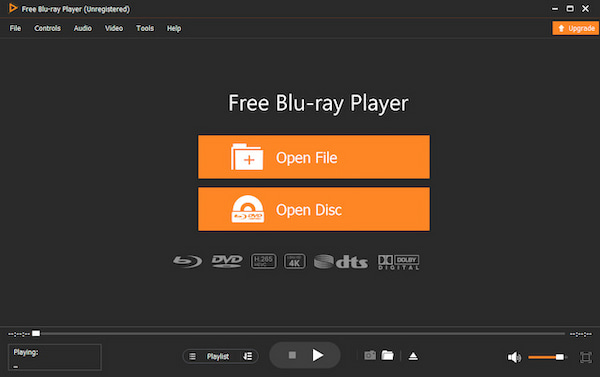
Blu-ray Master Free Blu-ray Player is one of the top-rated Blu-ray players for Mac. It is fully compatible and accessible on Mac OS X 10.9 and later versions. It can play Blu-ray discs, ISO files, and BDMV folders without region code restrictions. It means you can insert a Blu-ray disc from any region (A, B, and C).
Free Download
For Windows
Secure Download
Free Download
for macOS
Secure Download
In addition to Blu-ray, it accepts other sources and local files for playback. It includes DVDs, DVD ISO files, VIDEO_TS folders, MP4, MOV, MKV, AV1, MP3, ALAC, FLAC, and more. It allows you to create a playlist to organize and manage your playback. Additionally, it offers options to add audio tracks, adjust the volume, add external subtitles, and even take screenshots.
Pros
- It offers smart playback controls for easy navigation of content.
- It has multiple advance features for you to add external subtitles, create playlists, and do others.
Cons
- It requires an upgrade to play 4K, 5K, and 8K videos.
Part 3. Best 4K Ultra HD & Cinematic Players (Premium Experience)
Top 3. PlayerFab Ultra HD Player: The Ultimate Choice for Full 4K Blu-ray Menus
Price: $59.99 starting price
Our Editorial Verdict: Best for cinematic purists who want the authentic disc-menu experience alongside pristine 4K HDR10 rendering.

DVDFab PlayerFab is a premium 4K Blu-ray player for Mac. If your priority is replicating the exact experience of sitting in front of a dedicated home Blu-ray deck, it's your choice. It allows you to play standard Blu-rays, 4K Blu-rays, ISO files, and BDMV folders with menus. With its offered Simple Mode, you can skip all the extra and bonus content. Bonusly, this software fully renders intricate, Java-based interactive disc menus, allowing seamless access to bonus features, director commentaries, and scene selections. The built-in AI upscaling engine is particularly impressive, breathing vivid detail into older 1080p standard discs on high-resolution Retina displays.
Pros
- It has full support for Blu-ray menus.
- It supports playback from streaming services.
- It includes AI upscaling to enhance non-4K video.
Cons
- It is commercial software requiring a license to operate.
- Its Mac version lacks some features available on Windows.
Top 4. Macgo Mac Blu-ray Player Pro: The Most Reliable Apple Silicon Native Player
Price: $79.95 starting price
Our Editorial Verdict: Best for modern MacBook Pro and Mac Mini owners seeking flawless hardware acceleration and lossless audio pass-through.

Macgo Blu-ray Player is the first Blu-ray player software for Mac OS Big Sur. It is specifically designed for Mac computers that support modern M-series chips (M1 through M4). It can handle Blu-ray discs with original Blu-ray menus, BDMV folders, and ISO image files. In terms of commercial Blu-rays, it can decrypt common protection to make the Blu-ray playable. This software delivers high audiovisual quality, supporting up to 1080p resolution. The true draw is its immaculate handling of lossless surround sound, passing DTS-HD Master Audio and Dolby TrueHD directly to your external sound system without any muddy downmixing.
Pros
- It provides high-quality playback with smooth performance.
- It supports standard, homemade, and commercial Blu-rays.
- It is compatible with various lossless surround sound formats.
Cons
- It has limited support for media stream formats.
- It imposes a watermark during playback in the free version.
Part 4. Best Versatile & Portable Media Players (All-in-One Solutions)
Top 5. Elmedia Player: The Sleekest Mac-Centric Media Hub with AirPlay Support
Price: $19.99 starting price
Our Editorial Verdict: Best for design-conscious users who want to stream local media and unencrypted Blu-ray files wirelessly to smart TVs.

Elmedia Player is a dedicated Blu-ray disk player for Mac that offers advanced playback options. It can play various media formats, including Blu-ray discs, H.266/VVC, VCD, MTS, and VOB, among others. Additionally, it allows you to stream local files to various devices, including Apple TV, smart TVs, and AirPlay-enabled devices. What's more, you can manually add an external subtitle in SRT, ASS, or SMIL format. It has a clear and intuitive interface that is user-friendly to users.
Pros
- It supports streaming media wirelessly.
- It features a modern and straightforward interface.
- It can play Blu-rays and other other sources.
Cons
- It requires a Pro version for full feature accessibility.
Top 6. VideoByte Blu-ray Player: The Most Dependable Multi-Region Discs Navigator
Price: Free, with an option to upgrade for a starting price of $29.95
Our Editorial Verdict: Best for international movie collectors who regularly import and play heavily encrypted commercial retail discs.

VideoByte Blu-ray Player is a multi-region Blu-ray player, meaning it can bypass all region codes. Designed with an incredibly aggressive decryption engine, it specializes in decoding tough copy protections and region locks on the fly. It can play Blu-ray discs, ISO files, and BDMV folders efficiently with up to 4K quality. With a simplified navigation interface, you can quickly get into the film. At the same time, it will build an automated smart playlist of your recently played discs for easy retrieval later.
Pros
- It supports video playback with lossless quality.
- It can play both commercial and non-commercial Blu-ray discs.
- It allows you to freely switch audio tracks and subtitles.
Cons
- It does not support interactive Blu-ray menus.
- It has slow loading times when reading Blu-ray discs.
Part 5. FAQs
-
What is the best free Blu-ray player software for a Mac M2?
VLC can be called the best Mac Blu-ray player for its wide compatibility and free use.
-
Do I need an external drive to play Blu-ray discs on my MacBook Pro?
Yes. Apple’s official USB SuperDrive only reads DVDs and CDs. To play a physical Blu-ray disc, you must purchase a third-party external USB Blu-ray drive (such as models from Pioneer, ASUS, or LG) and connect it to your Mac before playing Blu-ray.
-
Why won't VLC play my Blu-ray disc on Mac, and how do I fix the missing AACS keys error?
VLC cannot handle AACS and other Blu-ray copy protections. You can get the AACS dynamic library (libaacs.dylib) and the keys database (KEYDB.cfg) from a trusted community source (e.g., vlc-bluray.whoknowsmy.name).
-
Can Apple Silicon Macs (M1/M3) play 4K UHD Blu-ray discs natively?
It is highly restricted to play 4K Blu-rays on a Mac. Most standard software cannot play them. To enjoy 4K UHD content on a Mac, you generally need a compatible external drive and software like PlayerFab Ultra HD Player.
-
Is Macgo Blu-ray Player still worth buying in 2026, or is there a better alternative?
Macgo Blu-ray Player is a premium Blu-ray player for Mac that offers stable playback performance. However, if you do not care about interactive disc menus and prefer wireless streaming features, Elmedia Player (Pro) or Infuse are highly competitive, sleeker alternatives in 2026.
-
How can I bypass region codes on a Mac when playing a region B Blu-ray?
Many Mac Blu-ray players have the ability to bypass Blu-ray region codes, such as Blu-ray Master Free Blu-ray Player, DVDFab PlayerFab, and others. You can choose one from them to play any region Blu-ray.
-
Are there any Mac Blu-ray players that support full interactive disc menus?
Yes, but full menu navigation is usually a premium feature. PlayerFab Ultra HD Player and Macgo Mac Blu-ray Player Pro are the two best options that fully support original Java-based (BD-J) interactive menus
Conclusion
Playing Blu-ray discs on a Mac may not be as straightforward as on Windows. However, with the right equipment, including an external Blu-ray drive and a Blu-ray player for Mac, it's possible. Whether you're watching standard or commercial Blu-rays, there are 6 best Mac Blu-ray players available. Among them, Blu-ray Master Free Blu-ray Player stands out as the most accessible and user-friendly choice. It's lightweight, completely free, and delivers high-quality playback for Blu-ray discs on macOS.
More from Blu-ray Master
Top Blu-ray Player

Easily play Blu-rays, DVDs, and various video/audio formats with rich playback features.
100% Secure. No virus
