

Jul 22, 2026Posted by Kevin Miller to Play Blu-ray
Quick Summary / Key Takeaways:
The 4K Hardware Myth: Major brands do not mass-produce native region-free Blu-ray players. Multi-region Blu-ray player hardware is modified by specialised third-party vendors (e.g., 220-Electronics).
Best Hardware Pick: The Panasonic DP-UB820 leads for mid-to-high-end setups, and the Sony UBP-X700 offers the best budget 4K value.
Best Software Pick: Blu-ray Master Free Blu-ray Player bypasses Region A/B/C locks directly via software decryption algorithms without altering your drive’s firmware.
Why Go Multi-Region? Easily play imported boutique releases across Regions A, B, and C without playback errors or restriction pop-ups.
Ever ordered a rare European import from Arrow Video or Second Sight, only to get slapped with a 'Region Code Mismatch' error? It’s super annoying. Region locking keeps movie lovers from enjoying Region B exclusives in North America (or vice versa). But don't worry—you don't have to miss out on those boutique releases. To watch any Blu-ray from anywhere, use a multi-region Blu-ray player to bypass region locks. Let’s break down the best options out there so you can watch your movies hassle-free.

- Part 1. How We Test and Pick the Best Multi-region Blu-ray Player
- Part 2. Top 4 Multi-region Blu-ray Players (Hardware)
- Part 3. Top 4 Multi-region Blu-ray Players (Software)
- Part 4. How to Change the Blu-ray Region
- Part 5. FAQs about Multi-region Blu-ray Players
Part 1. How We Test and Pick the Best Multi-region Blu-ray Player
Do Multi-region Blu-ray Players Exist
Is there a multi-region Blu-ray player? Yes, this type of Blu-ray player does exist. But what is a multi-region Blu-ray player, and what made it special compared to a regular Blu-ray player?
As you may know, the film industry does not distribute movies all around the world at the same time. This is to allow the distributors to control the release date, pricing, and content. Some movies are restricted to other countries to avoid dishonoring cultures and traditions, while another reason is to prevent illegal reselling. All of these are what makes the region code important.
But if you are not aware of which region code your country belongs to, here is the full region code list:
1. Region A- This region code includes most parts of Southeast Asia, Japan, Korea, North, South, and Central America.
2. Region B- Include Europe, Australia, the Middle East, Africa, and New Zealand countries.
3. Region C- It has China, Russia, India, and the rest of the remaining countries.
And there you have it. The region codes are why you need a multi-region Blu-ray player to enable the playback. Surprisingly, some movies are coded as Region ABC. This means a movie can be played on a regular Blu-ray player without restrictions. Popular films with this rare region code are Pulp Fiction, The Hobbit Trilogy, The Avengers, Iron Man, and more.
There are differences between multiple regions and the free region in Blu-ray. Multiple regions in Blu-ray mean more than one Blu-ray region, and it might be two regions or three regions. Free region means that it is region-free, and regions A, B, and C are all included.
Before introducing our recommended top-tier tools, let's clarify a common misconception: no major manufacturer (such as Sony, Panasonic, or LG) produces players that natively support globally compatible 4K UHD or Blu-ray playback. Due to stringent licensing agreements and film distribution restrictions, standard players must operate strictly within the designated Blu-ray region codes.
When you see a 'Multi-Region' or 'Region-Free' hardware player on the market, it is almost always a brand-new, premium unit that has been custom hardware-modded by a specialised third-party vendor (such as 220-Electronics). Understanding this distinction is key to choosing between purchasing a modified hardware unit or using region-bypassing desktop software.
How We Tested & Evaluated
To ensure our recommendations are reliable, we evaluated both hardware units and software media players across four core testing criteria:
- Region-Bypassing Reliability (30%): We tested each solution using 15 commercially released discs locked to Region A, B, and C (including boutique titles from Criterion, Arrow Video, and Second Sight) to verify zero playback errors or handshake issues.
- Audio & Video Quality (30%): Hardware players were connected to a 65-inch LG C3 OLED TV and a 7.1.4 Dolby Atmos AV receiver to test native 4K HDR tone mapping, Dolby Vision pass-through, and uncompressed audio bitstreaming. Software was tested on both Windows 11 and macOS Sequoia driving 4K HDR displays.
- User Experience & Ease of Use (20%): We evaluated how simple it is to switch regions—whether via a remote key combination on modded hardware or automatically via software drive algorithms.
- Format Versatility & Speed (20%): We benchmarked disc loading times, menu navigation responsiveness, and support for legacy foreign PAL/NTSC DVDs.
Buyer’s Guide: How to Choose the Right Region-Free Solution
Choosing the proper tool from the hardware players and software options comes down to your setup, budget, and viewing habits:
- Choose a Modded Hardware Player (like Panasonic UB820 or Sony X700) if:
o You want a true couch-and-TV home theater experience with direct Dolby Vision/Atmos pass-through.
o You own a physical collection of 4K UHD and 1080p Blu-ray discs from multiple countries and don't want to rely on a computer. - Choose Desktop Software (like Blu-ray Master or VLC) if:
o You primarily watch movies at your desk or use a PC/Mac connected to a monitor.
o You already have an internal or external UHD/Blu-ray drive connected to your computer and want a low-cost or free region-unlocking solution. - Choose a Blu-ray Ripper if:
o You prefer building a digital media library (e.g., Plex or Jellyfin) to stream your imported movies wirelessly to any device in your home without worrying about region locks ever again.
Part 2. Top 4 Multi-region Blu-ray Players (Hardware)
| Model | Category | Price Range | Video Standards | Audio & High-End Features | Dual HDMI | Best For |
| Sony Multi Zone (S3700/S1700 Modded) | Budget 1080p All-Rounder | ~$140 – $180 | 1080p Full HD (No 4K Discs) | Dolby TrueHD / DTS-HD MA, No SACD |  | Casual Viewers: Anyone needing a compact, hassle-free player exclusively for Region A, B, and C 1080p Blu-rays. |
| Panasonic DP-UB820 | Mid-to-High-End Choice | ~$499 – $799 | 4K UHD, Dolby Vision, HDR10+, HCX Tone Mapping | Dolby Atmos / DTS:X (Bitstream), No SACD |  | Best Overall: Home theater enthusiasts wanting top-tier HDR tone mapping and the “Top Menu” trick. |
| Sony UBP-X700 | Best Value 4K Player | ~$249 – $349 | 4K UHD, Dolby Vision (Manual), 4K Upscaling | Dolby Atmos / DTS:X, SACD Support | | Best Value: Budget-conscious buyers wanting 4K UHD, Dolby Vision, SACD, and multi-region 1080p playback. |
| Reavon UBR-X100 | Premium Heavy-Duty Flagship | ~$800 – $1,000+ | 4K UHD, Dolby Vision, HDR10 | Dolby Atmos / DTS:X, No SACD | | Physical Media Purists: Collectors seeking Oppo-like tank build quality, silent operation, and dual HDMI isolation. |
Sony Multi Zone - Best Budget All-Rounder
Budget 1080p Everyday Pick
~$140–$180 (Modded dependent)
No
No
Yes (DTS-HD Master Audio & Dolby TrueHD bitstream)
No
No (Single HDMI output)
1080p Full HD
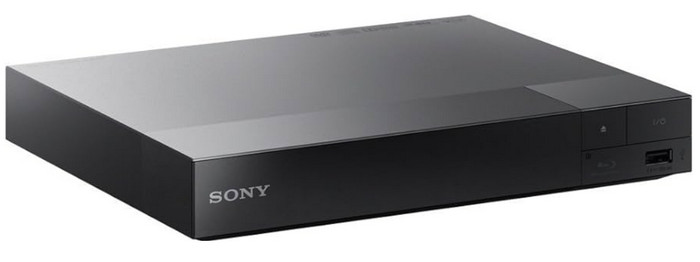
Sony is a premium brand that provides excellent personal and home entertainment devices. For Sony Multi Zone, it emphasizes versatility for region-free playback. Other than a Full HD video, the multi-region Blu-ray player also supports streaming and playing PlayStation Now with a DUALSHOCK 4 controller. Moreover, it allows you to stream other platforms with a valid subscription or broadband connection. The Multi Zone Blu-ray Player unit is much cheaper and has decent video playback compared to other Sony players.
Pros
- Full HD resolution for movies, TV shows, and games.
- Support HDMI connectivity.
- Over 300 streaming services to connect with the device.
- Support NTSC, PAL, DVD, and BD formats. (Do Blu-ray players play DVDs?)
Cons
- Regions 7 and 8 are not supported.
Panasonic DP-UB820 – Best Overall Mid-to-High-End Pick
Mid-to-High-End Enthusiast Choice
~$499–$799 (Modded dependent)
Yes
Yes
Yes (Bitstream out)
No
Yes (Dedicated Audio + Video/Audio)
4K HCX Processor
If you want to enjoy a home theater experience, the Panasonic UB820 is the gold standard. Its HCX processor delivers unmatched HDR tone mapping, meaning your 4K discs will look vibrant and punchy on almost any TV, especially OLEDs. When modified for region-free playback, it handles global 1080p Blu-rays and standard DVDs without sweating. On top of that, film nerds love it for its hidden 'Top Menu trick,' which lets you bypass region locks on many standard discs even without a hardware chip mod.
Pros
- It is equipped with a top-tier HCX processor to give incredible HDR tone mapping.
- Provides native Dolby Vision, HDR10+, and Atmos support.
- Its famous 'Top Menu' remote trick offers extra region-bypassing flexibility.
- It has a 4K upscaling feature for older Region B or C Blu-rays.
Cons
- Its build quality feels a bit plastic-heavy for its price tag.
- The remote layout feels a little outdated.
Sony UBP-X700 – Best Value for Money 4K Player
Budget-Friendly 4K UHD Pick
~$249–$349 (Modded dependent)
Yes (Manual toggle required)
No (Standard HDR10 only)
Yes (Bitstream out)
Yes
Yes (Dedicated Audio + Video/Audio)
4K Upscaling
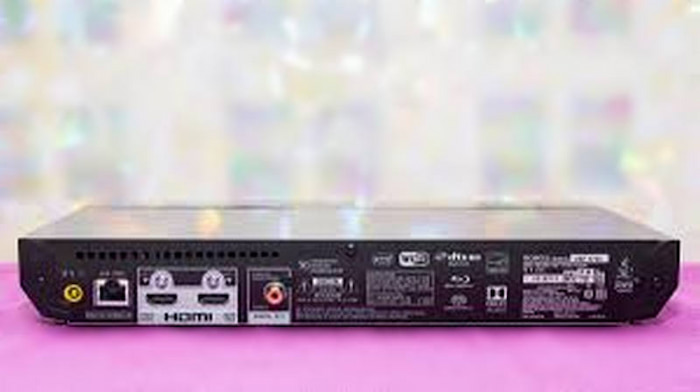
Want to enjoy the crisp 4K visuals and Dolby Vision without wiping out your bank account? The modded Sony UBP-X700 is your best bet. It’s compact, lightweight, and packs a heavy punch for its size. Once fitted with a third-party region-free mod chip, switching between Region A, B, and C is as easy as pressing a button on your remote before loading a disc. It’s the ultimate entry point if you want to play imported European boutique discs on your 4K setup.
Pros
- As a 4K player, it offers excellent value for money.
- Easily switch between zones using the remote control.
- Supports Dolby Vision and high-resolution audio playback.
- Compact design, easy to install in narrow media cabinets.
Cons
- Dolby Vision has to be manually toggled on/off in the settings.
- Occasional freezing issues reported on heavy 100GB (BD-100) triple-layer 4K discs.
Reavon UBR-X100 – Best Premium Heavy-Duty Flagship
High-End / Audiophile & Physical Media Collector Pick
~$800–$1,000+ (Modded dependent)
Yes
No
Yes (Bitstream out)
No (UBR-X200 required for SACD)
Yes (Dedicated Audio + Video/Audio)
SDR to 4K Upscaling
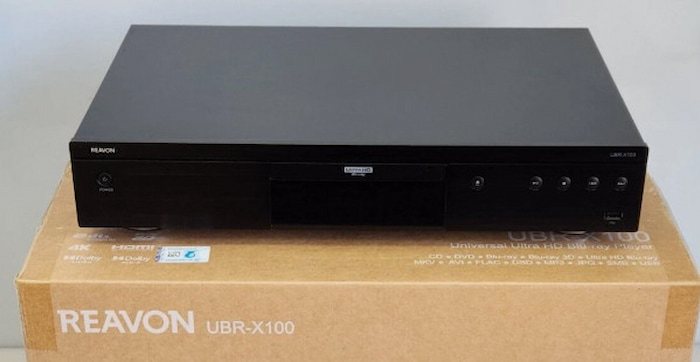
For physical media purists who miss the tanks Oppo used to build, the Reavon UBR-X100 fills that void. Featuring an ultra-rigid chassis and a heavy steel base, this machine is built like a vault to eliminate mechanical vibrations during disc rotation. As a high-end universal player, when modified for multi-region playback, it offers silent operation, lightning-fast disc loading, and pure, uncompressed video delivery. It's strictly for enthusiasts who want a luxury centerpiece in their rack.
Pros
- It has exceptional, tank-like build quality that reduces drive noise to zero.
- Dual HDMI outputs for isolating audio and video signals.
- Ultra-fast loading times and smooth playback.
- Extensive media file format compatibility via USB.
Cons
- Pretty expensive, especially once you add the hardware mod cost.
- Lacks built-in Wi-Fi and streaming apps (designed purely for physical media).
Part 3. Top 4 Multi-region Blu-ray Players (Software)
| Multi-Region Blu-ray Players | Resolution | Price | Media Type | Limitations | Operating Systems |
| Blu-ray Master Free Blu-ray Player | Full HD 1080p and 4K UHD | $40.21 | Blu-ray, DVD, MP4, MOV, MKV, AVI, HEVC, H.264, etc. | Relies heavily on a stable internet connection | Windows, Mac |
| VLC Media Player | Full HD 1080p | Free | DVD and digital video formats | Glitchy playback | Windows, Mac, Linux, Android |
| Macgo Blu-ray Player | Full HD 1080p | $64.99 | Blu-ray | The playback can’t be managed with the mouse cursor | Windows, Mac |
| Aurora Blu-ray Player | Full HD 1080p and 4K UHD | $39.95 | Blu-ray and DVD | It has a watermark | Windows, Mac |
Read the description below of the chosen multi-region Blu-ray players for Windows and Mac. We tested the following tools according to their ease of navigation, resolution, and overall performance.
Blu-ray Master Free Blu-ray Player
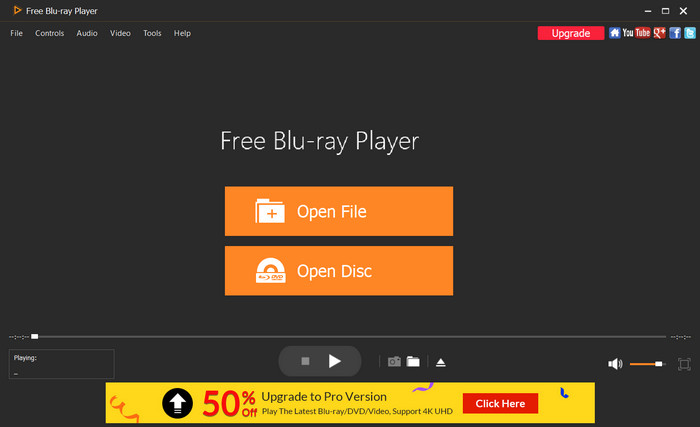
Blu-ray Master Free Blu-ray Player is one of the best multi-region 4k Blu-ray players, which allows you to enjoy high-definition playback for Blu-ray discs. It features an integrated internal AACS/BD+ decryption engine that directly intercepts the optical drive’s handshake protocol. It dynamically reads and simulates the authorized region keys in real-time, allowing you to bypass Region A, B, and C locks without modifying your PC optical drive’s strict 5-time hardware firmware limit. Aside from BD formats, you can also play digital movies such as MOV, AVI, MP4, H.264, and more. One highlight we pick for this tool is the ability to configure the output video along its visual, quality, screen size, and effect. Blu-ray Player is free to download as a 4K multi-region Blu-ray player on your desktop.
Free Download
For Windows
Secure Download
Free Download
for macOS
Secure Download
Pros
- User-friendly interface, full of excellent settings.
- Create a playlist for continuous watching.
- Minimum system requirements.
- Abundant free version for high-quality playback.
Cons
- The user needs a stable internet connection.
- The 4K/8K video quality is available for only the premium versions.
VLC Media Player
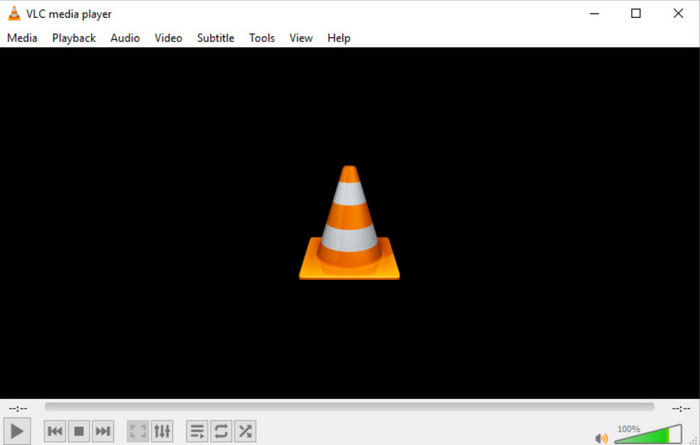
VLC makes every user love to watch their favorite movies on their computers. It is free, open-source, and easy to set up. And despite its outstanding performance, VLC remains a free tool for popular platforms, making it accessible to anyone using Windows, Mac, or Linux. While vanilla VLC cannot decrypt region-locked Blu-rays natively, it bypasses restrictions when installed the open-source libaacs.dll library and a community-maintained KEYDB.cfg database. These dynamic libraries feed processing keys directly to VLC to decrypt AACS Media Key Blocks (MKB) on the fly, completely ignoring region restrictions. If not for its media playing feature, you might also like the built-in functions like the recorder, converter, and editor.
Pros
- No hidden charges.
- Many extensions to add more features.
Cons
- The playback might not be as smooth as expected.
- Difficult to configure the video and subtitle settings.
Macgo Mac Blu-ray Player
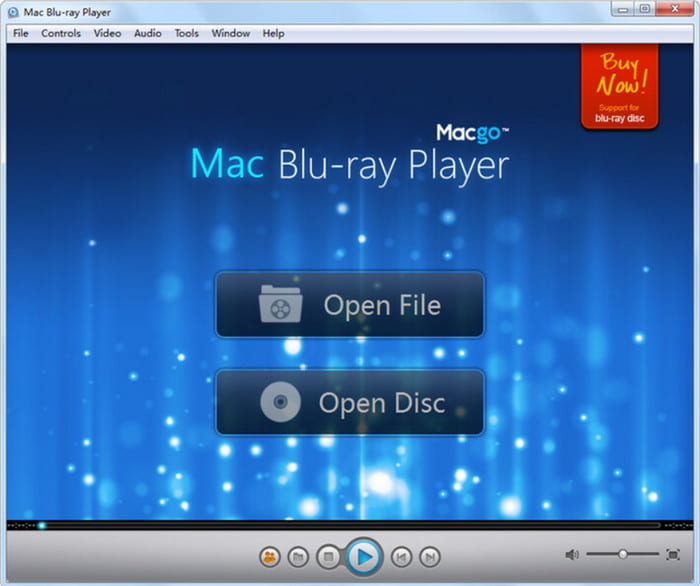
Macgo Blu-ray Player, the multi-region Blu-ray player provides a smoother experience when watching Blu-ray discs, folders, and ISO files. One of the best highlights of this alternative is the support of BD-Live and BONUSVIEW content with keyboard shortcuts to manage them while watching. It utilizes an advanced software decryption algorithm designed specifically for macOS and Windows, which bypasses the disc’s region-check code before sending video data to your GPU. By decoding the AACS key directly in memory, it allows smooth playback of international discs without requiring firmware flashing on external USB drives.
Pros
- Shareable purchased version up to six members.
- Suitable for common video files.
Cons
- It does not support Blu-ray 3D and Ultra HD.
Aurora Blu-ray Player
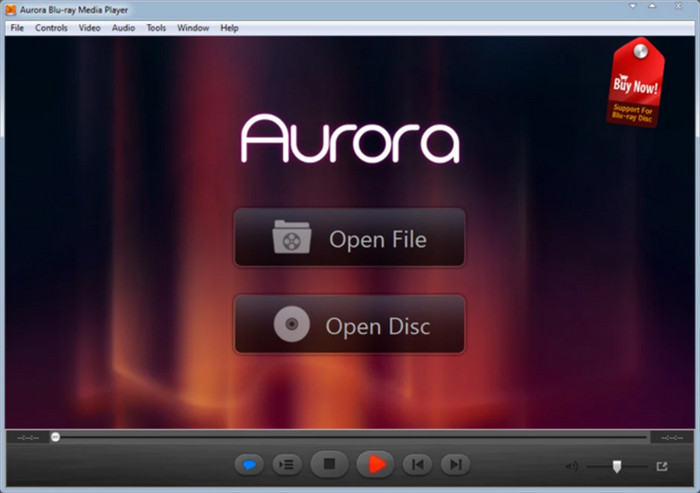
Aurora is designed for immersive playback on your desktop, offering an affordable premium version at $39.95. It handles region-locked discs by ignoring the regional flag requests sent by the disc's menu structure during loading. Its built-in key-matching engine decrypts the main video streams in real-time, allowing users to force-select Region A, B, or C manually in the settings menu if automatic region detection fails. It combines a sleek interface and professional functionalities to create a versatile movie night. Of course, the best part of Aurora Blu-ray Player is the customization options for resolution, brightness, and audio equalization.
Pros
- Regular updates with new features.
- Stream videos from other platforms.
Cons
- Highly dependent on the computer’s system.
Part 4. How to Change the Blu-ray Region
Sure, multi-region Blu-ray players exist, and you can choose one to watch movies freely. But an alternative way of watching footage with a different region code is to use Blu-ray Ripper. It is a desktop tool that helps you extract data from a disc and convert it to common formats like MP4, MOV, FLV, and others. It can upscale the resolution from 1080p to 4k UHD in a single click. Moreover, with its top-speed acceleration, you can save time, ripping Blu-ray quickly without losing quality. Here’s how to use it:
Free Download
For Windows
Secure Download
Free Download
for macOS
Secure Download
Step 1. Download and install the Blu-ray Ripper on your device. Open the app and insert the disc into the optical drive. Click the Load Disc button and select the video you want to rip.
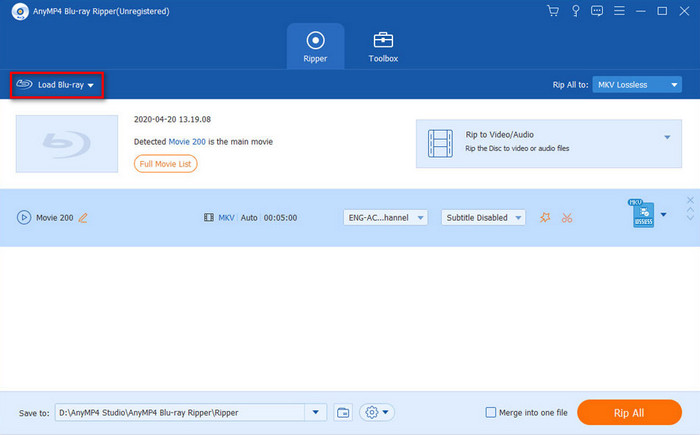
Step 2. Proceed to set the profile by choosing the output format, resolution, bitrate, and more Click the OK button to apply the new settings
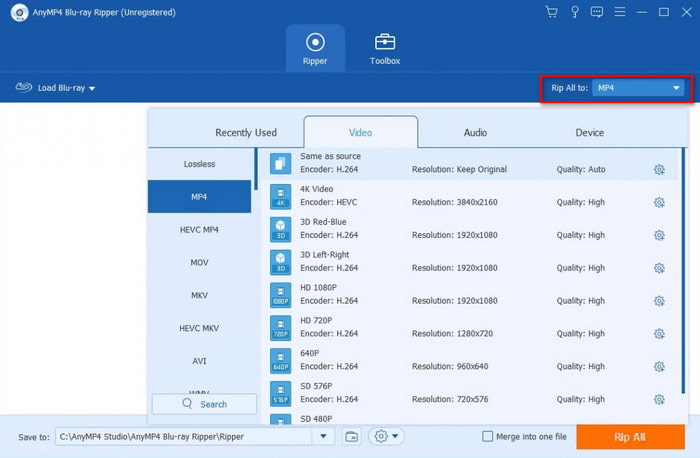
Step 3. Click the Convert button to rip the Blu-ray videos. By default, the videos will be saved in the Blu-ray Ripper folder, but you can change that by clicking the Browse button at the bottom part of the interface.
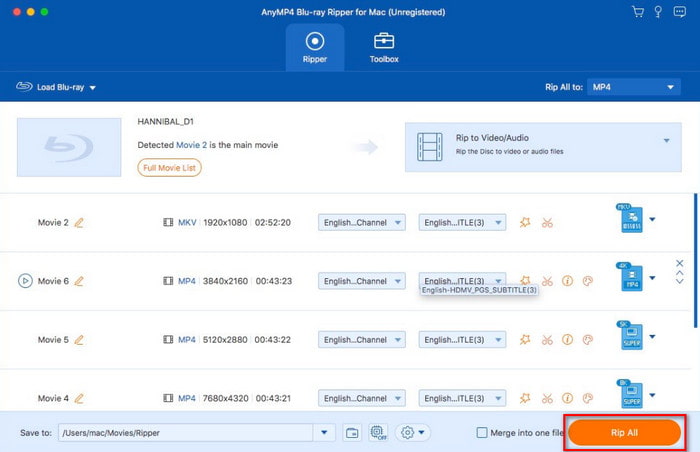
Blu-ray Ripper is the extra help you need if you can’t get a multi-region Blu-ray player. It is easy to use but results in a high-quality ripping process. You can download it for free on Windows and Mac.
Part 5. FAQs about Multi-region Blu-ray Players
-
How do I change my Blu-ray Player to Multi-Region?
The process involves changing the firmware and its remote control commands and settings. But keep in mind that this attempt can lead to a violation of the terms of service for the software.
-
Are Blu-rays still region-locked?
Yes. The region coding will remain as it is for Blu-ray and DVD to control the distribution of films worldwide.
-
Is a region-free Blu-ray Player illegal?
It depends on the local laws and regulations. While owning one, you might consider copyright and licensing agreements, warranty, importing, and selling.
-
Can I make my standard Sony or Panasonic 4K Blu-ray player region-free with a firmware update or remote code?
No, you cannot unlock them for free via software or remote codes.
-
What is the best hardware-modded region-free 4K Blu-ray player under $300?
The Sony BDP-S6700 (Modified Version) or the Sony UBP-X700 (if on sale) are two decent choices.
-
Is 220-Electronics legit for buying region-free Blu-ray players in the US?
Yes, 220-Electronics is 100% legitimate and widely considered the industry standard in the US.
-
Are 4K Ultra HD Blu-ray discs region locked like standard Blu-rays?
No. The official released 4K Blu-ray discs are completely region-free.
-
How can I watch Region B European Blu-rays on my Windows 11 PC or Mac without changing drive region limits?
You can use a region-free Blu-ray player to watch it, such as Blu-ray Master Free Blu-ray Player, DVDFab PlayerFab, etc.
Conclusion
To conclude, using multi-region Blu-ray players is an ideal way to watch Blu-ray movies from other regions. Without altering the discs’ region codes, you can enjoy watching films with the given hardware and software solutions. But for instant playback without too much trouble, Blu-ray Master Free Blu-ray Player is the best pick in this post. Besides, Blu-ray Master Blu-ray Ripper is also a great tool for converting Blu-ray files to common video formats for effortless streaming.
More from Blu-ray Master
Top Blu-ray Player

Easily play Blu-rays, DVDs, and various video/audio formats with rich playback features.
100% Secure. No virus
