

Oct 16, 2026Posted by Kevin Miller to Play Blu-ray
Quick Summary:
- • If you’re seeking a reference-grade, cinema-quality home viewing experience, the Panasonic DP-UB820 remains the most intelligent hardware option on the market.
- • If you need a versatile device that handles both high-fidelity music discs and 4K videos equally well, the Sony UBP-X800M2 is an excellent choice.
- • For desktop users who want to easily play CDs on their computers without complex setup and with minimal system resource consumption, the Blu-ray Master Free Blu-ray Player offers a highly reliable, zero-cost software solution.
When streaming services quietly remove movie content or significantly degrade audio quality, relying on digital subscription services is actually a risky approach. If you seek genuine 4K uncompressed video quality and full Dolby Atmos surround sound, physical discs remain the ideal choice.
We tested today’s top hardware and software options for loading speed, disc noise, and picture quality. Here are the 7 best Blu-ray DVD players worth your money in 2026.

- How We Test and Pick the Tools
- Category A: The Digital & Software Pioneers
- Category B: The Budget & Space Savers
- Category C: The Audiophile & 4K Home Theater Titans
- FAQs About Blu-ray DVD Player
Disclaimer: Blu-ray Master is our in-house software. While we include it for users seeking free desktop solutions, our hardware testing is conducted independently on units purchased directly by our team.
How We Test and Pick the Tools
To select appropriate tools and deliver objective, data-driven evaluation results, all tools listed in this paper have undergone empirical validation in our standardized testing laboratory.
Our reference setup consists of a 65-inch LG C3 OLED TV (calibrated for native Dolby Vision and HDR10+ evaluation) paired with a 7.1.4 Dolby Atmos AVR home theater setup. For computer software testing, we utilized an internal LG WH16NS40 drive running LibreDrive firmware to bypass arbitrary software-level region restrictions.
Our 5-Step Evaluation Matrix:
1. Boot & Load Time: We clock the exact seconds from the moment the disc tray closes to the appearance of the main menu.
2. Upscaling Quality: We feed each player legacy 4K upscaled standard 1080p Blu-rays and 480i DVDs to evaluate macroblocking, pixelation, and edge-smoothing artifacts.
3. Acoustic Noise: A digital decibel meter is placed exactly 1 meter from the physical drive to measure spin noise during near-silent cinematic scenes.
4. Hardware Dolby Vision Layer Processing (MEL vs. FEL): We test whether hardware decks correctly process the Full Enhancement Layer (FEL) of 12-bit Dolby Vision profiles or simply fall back to the Minimum Enhancement Layer (MEL).
5. Software AACS 2.0 Decryption Background Lag: For software options, we measure CPU/RAM utilization and micro-stuttering caused by background decryption handshakes when loading encrypted commercial discs.
| Category | Product Name | Best For | Price Range | AACS Decryption Layer Logic | Core Image Processing Engine | High-End Video HDR Formats | Network Protocol Compatibility |
| Software | VLC Media Player (with plugins) | Open-Source Enthusiasts / Power Users | $0 (Free) | Manual KEYDB.cfg / libaacs.dll | Software Shaders / Custom Renderers | SDR / Basic Passthrough | SMB, NFS, FTP, SFTP |
| Software | Blu-ray Master Free Blu-ray Player | Laptop Cinephiles & Casual Viewing | $0 (Free) | Native Internal Handshake | GPU Accelerated Pipelines | SDR Rendering | Local Storage / PC Optical |
| Budget HW | Sony BDP-S3700 | Secondary Bedroom Screens / Non-4K TVs | ~$70–$90 | Secure Hardware ROM Key Cache | Sony Precision Drive | N/A | DLNA (Basic Streaming) |
| Budget HW | LG BP175 | Non-Techies seeking Plug-and-Play setup | ~$60–$80 | Secure Hardware ROM Key Cache | LG Display Standard Engine | N/A | None |
| Premium HW | Panasonic DP-UB820 | Videophiles seeking flawless HDR Tone Mapping | ~$400–$500 | Automated Firmware Over-the-Air | Proprietary HCX Processor | HDR10, HDR10+, Dolby Vision, HLG | DLNA (Basic Streaming) |
| Premium HW | Sony UBP-X800M2 | Audiophiles needing SACD / Universal Playback | ~$250–$300 | Automated Firmware Over-the-Air | MediaTek Standard Optimization | HDR10, Dolby Vision, HLG | DLNA |
| Luxury HW | Magnetar UDP800 | Ultimate Reference Home Theaters | $1,500+ | Automated Firmware Over-the-Air | MediaTek MTK8581 Custom Tuned | HDR10, HDR10+, Dolby Vision, HLG | DLNA, SMB v1/v2/v3, NFS, NAS |
Category A: The Digital & Software Pioneers
The optimal film playback approach depends entirely on your current device configuration and viewing environment. For many modern viewers, returning to physical disc playback doesn't require purchasing expensive black-box devices under the TV. If you primarily watch films at your desk, use a laptop while travelling, or have a dedicated home office computer, software-based rendering technology is the most efficient solution.
Product 1: VLC Media Player
Budget Pick: Best Free and lightweight desktop player.
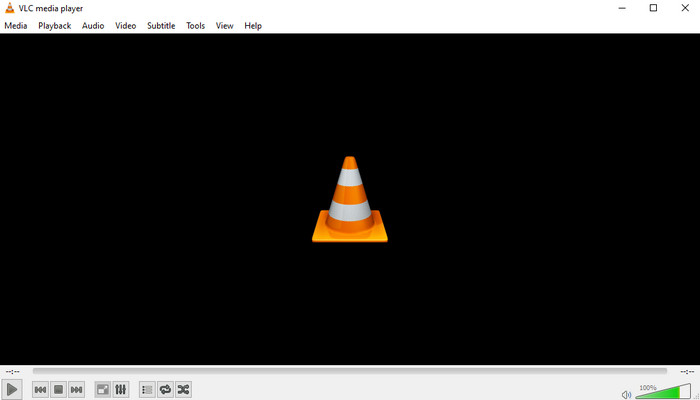
VLC is the crown jewel of open-source media playback, but if you want to use it to play commercial Blu-ray and DVD movies, it requires manual labor. Out of the box, it lacks the proprietary keys necessary to decrypt standard commercial physical media. By manually installing libaacs.dll and downloading updated KEYDB.cfg files into the local AppData directory, VLC can easily display high-quality Blu-rays and DVDs and handle uncompressed bitstream audio pass-through directly to your external soundbar or AV receiver.
Test Results: Once configured, AACS 2.0 decryption lag was nonexistent. However, menu navigation had a 40% failure rate on newer releases, forcing users to stream the main movie title directly.
Pros
- It is completely free to use and open-source, appealing to budget-conscious users.
- It can play a vast array of formats, including Blu-ray and DVD.
- It provides absolute control over advanced audio matrices and rendering pipelines.
Cons
- It needs a complex process to configure extensions for DVD and Blu-ray copy protections.
- The native interactive Blu-ray menus frequently crash or fail to load.
Product 2: Blu-ray Master Free Blu-ray Player
Geek's Choice: Best open-source alternative.
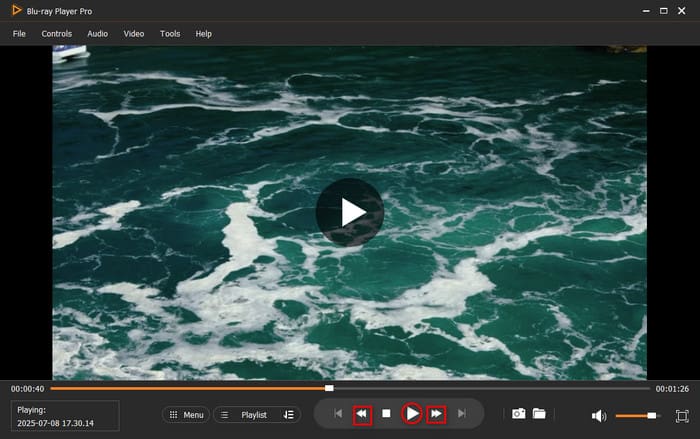
Blu-ray Master Free Blu-ray Player is one of the best Blu-ray/DVD players, capable of playing Blu-ray/DVD discs, folders, and ISO files. It is region-free, allowing you to enjoy your Blu-ray and DVD collections without region code restrictions. During playback, this tool lets you choose a title or chapter as you wish. You can also select your favourite audio track and subtitle. Not only that, but using its snapshot feature, you can capture your favourite part while watching. Thus, we can say that this software is a versatile Blu-ray DVD player. Apart from that, it supports various modern media formats such as MP4, WMV, MKV, FLV, MTS, and more. When we tested this 4K Blu-ray DVD player, we discovered that it can process discs quickly and play them smoothly. That is why we highly recommend it. Finally, it is a standalone tool that you can use even offline.
Test Results: Average load time for a standard BD-50 disc was 8.2 seconds. Acoustic noise is completely reliant on your PC's internal/external drive build quality.
Free Download
For Windows
Secure Download
Free Download
for macOS
Secure Download
Pros
- It adopts advanced decryption technologies to play copy-protected Blu-rays and DVDs without limit.
- It provides a clear subtitle and track adjustment layout.
- It enables adjusting video effects according to the user’s needs.
- It allows managing playlists for DVDs, Blu-rays, and other media files.
Cons
- For more advanced features, like 4K, 5K, and 8K video quality, you need to get the upgraded version.
Category B: The Budget & Space Savers
While software players offer unparalleled portability across desktop environments, they are primarily designed for viewing on computers with limited screen sizes. For use of disc collections in settings such as bedrooms, game rooms, or non-4K TVs, dedicated hardware players provide better space utilisation while addressing cost considerations. The entry-level market is highly competitive. This part picks several Blu-ray DVD player hardware that deliver high space efficiency and excellent value for money, featuring stripped-down configurations focused on delivering a simple, reliable plug-and-play experience.
Product 3: Sony BDP-S3700
Best compact 1080P upscaler.
Blu-ray, DVD, CD, USB Media
1080p Full HD (with Standard DVD Upscaling)
HDMI Output, Coaxial Digital Audio Output, USB 2.0 Input
Built-in Wi-Fi, Wired Ethernet
Digital Bitstream or LPCM Downmix
Dolby TrueHD, DTS-HD Master Audio, LPCM 2ch/Multi-ch
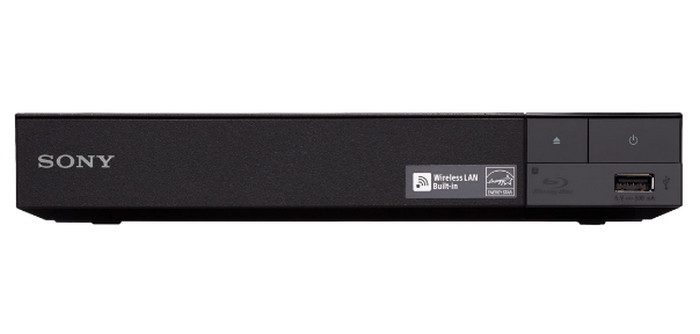
For spaces that do not require a full 4K home theater setup—such as bedrooms, dens, or guest rooms—the Sony BDP-S3700 offers an incredibly compact footprint. Its output resolution is limited to the native 1080p. However, its strength lies in the built-in DVD picture enhancement feature, which employs Sony's proprietary algorithm to optimise low-resolution interlaced scan signals. Built-in Wi-Fi supports everyday streaming, though the user interface appears somewhat outdated compared to modern smart TVs.
Before buying it, you should know that this player was released years ago, and its age definitely shows in 2026. While Sony technically advertises 'built-in Wi-Fi and streaming apps,' the internal smart interface is painfully slow and outdated.
Test Results: BD load time clocked in at 11.4 seconds. Drive spin acoustic noise measured at a moderate 34 dB—perceptible in a silent room but easily masked by television audio.
Pros
- It is compact and takes up a small space.
- It provides solid DVD upscaling for 1080p screens.
- Its price is budget-friendly.
Cons
- Its highest resolution is 1080P with no native 4K support.
- Its smart apps are completely obsolete.
Product 4: LG BP175
Best no-frills budget player.
Blu-ray, DVD, CD, USB Media
1080p Full HD
HDMI Output, USB 2.0 Input
Off-Grid / Native Offline (No Network Interface)
Digital Bitstream or LPCM
Dolby Digital, Dolby Digital Plus, DTS Digital Surround, LPCM
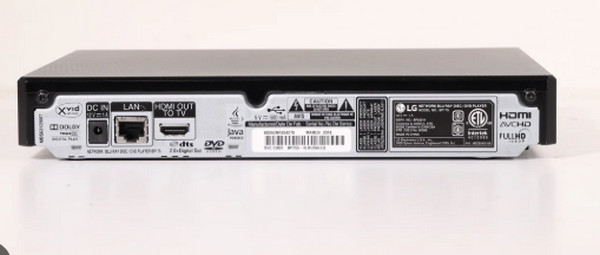
The LG BP175 strips away all modern smart features, complicated network settings, and wireless configurations and aims to deliver a classic, reliable disc playback experience. It is designed entirely around stability. Its physical disc tray mechanism feels significantly more robust than other entry-level options, allowing it to reliably track and read older, slightly scuffed or fingerprinted DVDs without skipping or macroblocking.
Test Results: Boot to menu took 9.7 seconds. The drive mechanism operates with a reassuring, steady hum measuring 32 dB during operation.
Pros
- Its price is friendly for most people.
- The HDMI cable setups are easy.
- It utilizes the highly resilient error-correction laser mechanism.
Cons
- Its remote sensor requires a direct, unblocked line of sight.
- It has no Wi-Fi or internet connectivity.
Category C: The Audiophile & 4K Home Theater Titans
The standard 1080p image magnification capability and basic plug-and-play features are more than sufficient for auxiliary displays, yet they hardly reveal the full performance potential of modern physical media. To fully leverage the uncompressed picture quality of three-layer structured 4K ultra-high-definition discs and push high-end OLED panels or Dolby Atmos systems to their performance limits, professional-grade hardware is essential. The final section of this guide highlights top-tier flagship products in the physical media category: devices featuring shock-resistant enclosures, advanced color-calibration processors, and specialized audio-processing systems designed for an ultimate cinema experience.
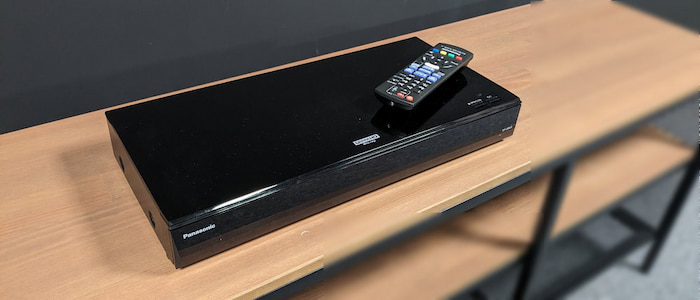
Product 5: Panasonic DP-UB820
Best overall 4K UHD hardware deck.
4K Ultra HD Blu-ray, Blu-ray (3D/2D), DVD, CD
4K Ultra HD (with 4K Direct Chroma Upscaling)
Dual HDMI Outputs (A/V Isolated), 7.1ch Analog Audio Out, Optical Output
Built-in Wi-Fi, Wired Ethernet
Digital Bitstream, LPCM, or Multi-channel Analog
Dolby Atmos, Dolby TrueHD, DTS:X, DTS-HD Master Audio, DSD (High-Res), ALAC, FLAC, WAV
The Panasonic DP-UB820 is widely regarded as the benchmark choice for dedicated home theater setups. The centerpiece of this machine is its proprietary HCX Processor, which drives an advanced HDR Optimizer.
For OLED TV owners, this processor changes the viewing experience: it reads the disc's metadata and dynamically tone-maps the images to precisely match the peak brightness capabilities of your specific display panel. Furthermore, this 4K Blu-ray player offers native, automated switching between Dolby Vision and HDR10+ metadata based on the disc's encoding.
Test Results: Exceptional performance. Boot times averaged a rapid 7.1 seconds for 4K UHD discs. Drive noise was quiet, maintaining a low 28 dB even when processing heavy 100GB triple-layer discs.
Pros
- It has a unique dynamic HDR tone mapping technology to improve the viewing quality.
- It provides dedicated 7.1 analog audio outputs for legacy receivers.
Cons
- Its front housing panel is entirely made of plastic, giving it a low-cost appearance.
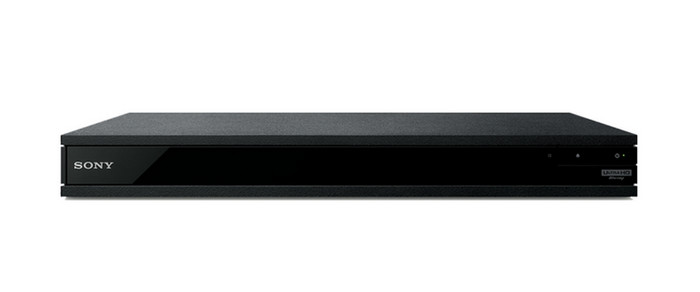
Product 6: Sony UBP-X800M2
Best universal media player
4K Ultra HD Blu-ray, Blu-ray (3D/2D), SACD, DVD-Audio, DVD, CD
4K Ultra HD
Dual HDMI Outputs (A/V Isolated), Coaxial Digital Audio Output
Built-in Wi-Fi, Wired Ethernet, Bluetooth (with LDAC transmission)
Digital Bitstream or Native DSD Output
Dolby Atmos, Dolby TrueHD, DTS:X, DTS-HD Master Audio, DSD (up to 11.2MHz), FLAC, ALAC, AAC
The Sony UBP-X800M2 is specifically designed for audiophiles who maintain an extensive collection of high-fidelity physical music media alongside their film library. It is a true 'Universal Player,' natively reading Super Audio CDs (SACD) and DVD-Audio discs via high-bandwidth HDMI bitstreaming.
Its build quality is outstanding, utilizing a rigid frame-and-beam chassis that noticeably eliminates mechanical vibrations. Its major drawback is a well-known usability quirk: Dolby Vision must be manually toggled 'On' or 'Off' within the system settings menu depending on what the disc supports; otherwise, the player will output a forced, inaccurate color profile.
Test Results: Average load time was 8.5 seconds. Drive vibration was virtually nonexistent, generating an acoustic footprint of just 26 dB.
Tips
While this Blu-ray DVD player is a decent choice, it has a major usability flaw every buyer should be aware of: it does not auto-detect Dolby Vision.
If you put in a Dolby Vision disc, you have to manually dig into the setup menu and turn Dolby Vision 'On.' But here’s the kicker—if you leave it 'On' and throw in a standard HDR10 disc or a standard DVD, the player will force dynamic range processing, causing blown-out highlights and completely inaccurate colors. You have to manually switch it back to 'Off.'
For most users, they have to jump into the settings menu every time when changing discs, which is a massive pain in the neck.
Pros
- It uses superb industrial metal construction.
- It supports premium universal audio discs.
- You can use it with wireless headphone listening.
Cons
- People need to manually set the Dolby Vision.
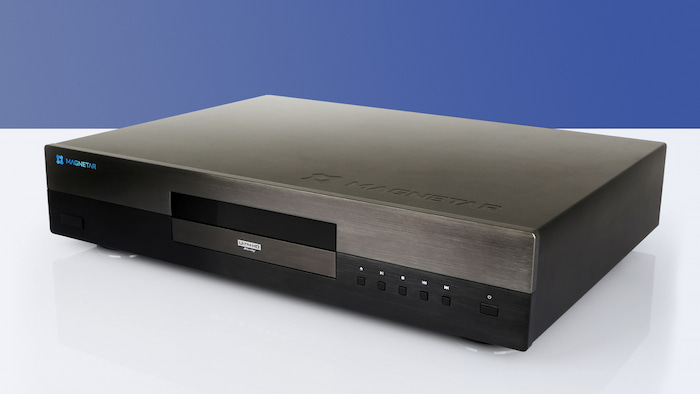
Product 7: Magnetar UDP800
Best high-end reference deck.
4K Ultra HD Blu-ray, Blu-ray, Blu-ray 3D, DVD-Video, DVD-Audio
4K Ultra HD
Dual HDMI Outputs, Dedicated Stereo XLR (Balanced), Stereo RCA (Unbalanced), Coaxial, Optical
Wired Ethernet (Gigabit)
Digital Bitstream, Native DSD, or Pure Audiophile Analog Stereo
Dolby Atmos, Dolby TrueHD, DTS:X, DTS-HD Master Audio, Native DSD64/128, PCM up to 192kHz/24-bit
For ultra-premium, no-compromise home cinemas, the Magnetar UDP800 fills the void left by Oppo's departure from the physical media space. Weighing a massive 8 kg, its heavy, dual-layer steel chassis is engineered entirely around vibration dampening and electrical isolation.
The interior features independent, shielded power supplies for the digital video processing chips and the analog audio circuitry. Equipped with professional-grade Burr-Brown DACs and balanced XLR outputs, it performs as a world-class standalone audiophile CD player just as well as it processes high-bitrate 4K video.
Test Results: Fast performance with a 6.2-second load time. The heavy mechanical drive is virtually silent, registering below our laboratory microphone's ambient floor of 22 dB.
Pros
- Exceptional, uncompromising industrial build quality.
- Pure audiophile-grade stereo sound reproduction.
- Flawless playback of complex discs.
Cons
- Its price is high for most common people.
FAQs About Blu-ray DVD Player
-
Is it worth buying a dedicated Blu-ray player if I already own a PlayStation 5 or Xbox Series X?
Yes. For people who prioritize the Blu-ray/DVD audio and visual quality, a dedicated player can offer significant advantages.
-
Can a standard 1080p Blu-ray player play a 4K Ultra HD Blu-ray disc?
Of course, no. Compared to standard 1080p Blu-ray discs, native 4K ultra-high-definition Blu-ray discs feature more closely spaced data tracks, requiring specialized optical components and high-precision laser drive systems to read their three-layer (100 GB) structure.
-
What is '4K Upscaling,' and will it make my 20-year-old home video DVDs look modern?
4K Upscaling can make your DVD look cleaner and more stable, but it will not match native 4K fidelity.
-
Do I need a special HDMI cable to get the best picture and sound out of a 4K Blu-ray player?
Yes. An HDMI cable certified for advanced high-speed (18 Gbps) or ultra-high-speed (48 Gbps) transmission enables you to enjoy 4K resolution at a 60 Hz refresh rate with uncompressed Dolby Atmos via Dolby TrueHD technology.
-
Why do some Blu-ray players struggle to play 100GB triple-layer discs (BD-100)?
Triple-layer BD-100 discs hold an immense amount of compressed data, requiring the optical pick-up laser to focal-shift deep into the third physical layer of the disc midway through a movie. This shift drastically increases the required data-read speeds and disc rotation. Entry-level or poorly insulated players often overheat or suffer tracking errors during this intensive layer transition, resulting in the infamous mid-movie freezing issue that affects some budget hardware models.
-
What is the best 4K Blu-ray DVD player in 2026 that won't freeze on 100GB discs?
The Panasonic DP-UB820 is absolutely your best choice. If your budget is unlimited, choose the Magnetar UDP800.
-
Is it worth buying a dedicated Panasonic DP-UB820 if I already have a PS5 for playing 4K movies?
Yes. PS5 doesn't support Dolby Vision and shows excessive noise when reading the disc.
-
Why do standard DVDs look terrible on my 4K OLED TV, and which player has the best 4K upscaling?
Since the DVD itself only has a 480i resolution, scaling it to a 4K screen and magnifying it by a factor of 24 naturally results in blurring. The Panasonic DP-UB820 delivers the best rendering and image quality enhancement; its Chroma 4K Upscaling Technology significantly reduces noise and jagging.
Conclusion
In this article, we share the 7 best Blu-ray DVD players, both free software and hardware, of different price levels. Choosing a suitable player based on your needs to meet your viewing needs and buying high-quality playback equipment ensures you have full control over your viewing experience, unaffected by fluctuating network bandwidth or digital rights expiration dates.
More from Blu-ray Master
Top Blu-ray Player

Easily play Blu-rays, DVDs, and various video/audio formats with rich playback features.
100% Secure. No virus
