

Oct 23, 2026Posted by Kevin Miller to Play Blu-ray
Quick Guide:
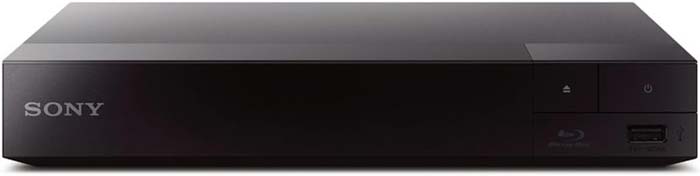
Best Overall TV Hardware Blu-ray Player: Sony BDP-S1700.
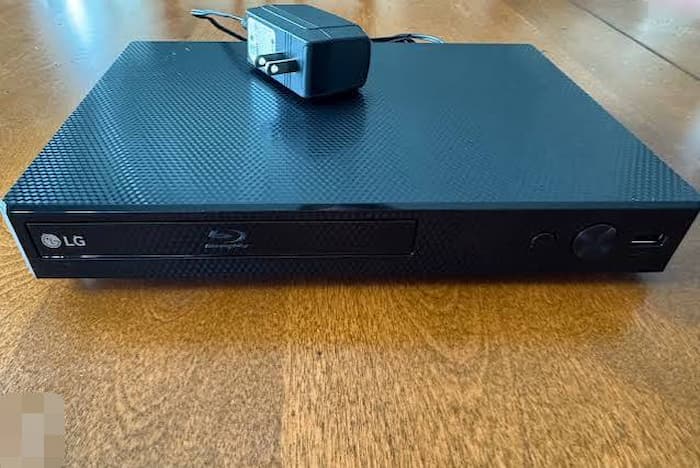
Best Budget Smart Hardware Player: LG BP350.
Best Open-Source Blu-ray Player Software: VLC Media Player.
Best Easy PC/Mac Blu-ray Player Software: Blu-ray Master Free Blu-ray Player.
As streaming services continue to raise subscription fees and progressively remove a large number of films from their platforms, streaming has lost its competitive edge, while physical media is undergoing a widespread revival. Film enthusiasts are gradually realizing that owning physical discs remains the only way to ensure a genuine 1080p or 4K viewing experience—one that avoids compression artifacts and sidesteps network buffering issues.
Good news? You no longer need to spend $300 or $400 on a high-end Blu-ray player to enjoy your disc collection fully. Whether you're simply looking for a sleek, minimalist player for your living room TV, or want to play discs on your laptop at zero cost, this guide will introduce you to the 4 cheap Blu-ray player options available on the market in 2026.

- 1. What to Look for in a Cheap Blu-ray Player
- 2. Top Budget Hardware Blu-ray Players for TV Setups
- 3. The Zero-Cost Desktop Solution: Software Blu-ray Players
- 4. Hardware vs. Software: Which Route Should You Take
- 5. FAQs about Blu-ray Players
1. What to Look for in a Cheap Blu-ray Player
When shopping for an affordable player, it helps to know what features actually matter so you don’t overpay for tech you won't use.
- Resolution & Upscaling: Most dedicated players under $100 are native 1080p Full HD devices. However, good budget models will upscale your standard DVDs to look surprisingly sharp on a modern 4K TV screen. Keep in mind that true 4K Ultra HD Blu-ray discs require specialized 4K hardware, which usually starts above $150.
- Connectivity: Look for a reliable HDMI output. If you want online features or BD-Live content, check whether the player includes built-in Wi-Fi or requires an Ethernet cable to connect to your router.
- Loading Speed & Noise: Cheaper players sometimes skimp on drive insulation. A solid budget player should read a disc within 15 to 20 seconds without sounding like a jet engine on your TV stand.
- Audio Pass-through: If you have a soundbar or home theater receiver, make sure the player supports audio pass-through (Bitstream) for Dolby TrueHD and DTS-HD Master Audio.
2. Top Budget Hardware Blu-ray Players for TV Setups
First, we recommend hardware players, which deliver uncompressed high-bitrate video and lossless audio without relying on an internet connection or streaming compression. From among the wide array of options, we have carefully selected two traditional set-top boxes that can be directly connected to your living room TV; these two models remain the most reliable and readily available budget-friendly choices on the market.
2.1 Best Overall Budget Pick — Sony BDP-S1700
$65 – $80
No (Native SDR only; 1080p SDR-to-HD upscaling)
No
Single HDMI 1.4 output (No dual HDMI audio-video separation)
Bitstream passthrough for Dolby TrueHD, DTS-HD Master Audio, and LPCM multi-channel audio
Wired Ethernet port (RJ-45), 1x Front USB 2.0 port, Coaxial Digital Audio out
Pros
- It performs a lightning-fast boot time and disc loading speed (under 15 seconds).
- It supports high-resolution audio pass-through to soundbars and receivers.
- It has a compact build with low drive spin noise.
Cons
- It doesn’t support the Wi-Fi connection.
- It cannot play 4K UHD Blu-ray discs.
2.2 Best Budget Smart Alternative — LG BP350
$75 – $85
No (Native SDR only)
No
Single HDMI output (No dual HDMI audio-video separation)
Supports Dolby Digital, Dolby Digital Plus, DTS, and LPCM (Downmixes high-bitrate TrueHD/DTS-HD)
Built-in Wi-Fi (802.11b/g/n), 1x Front USB 2.0 port
If you prefer to keep cables to a minimum, the LG BP350 is a great alternative. It offers built-in Wi-Fi, allowing you to connect to your home network without running an Ethernet cable behind your entertainment center. It plays standard Blu-rays in crisp 1080p and handles standard audio formats seamlessly.
Pros
- It has built-in Wi-Fi for quick setup.
- Its compact footprint fits easily into tight media consoles or bedroom setups.
- The unique USB playback feature allows you to stream local movie, music, and photo files directly from external drives.
Cons
- Compared to the Sony BDP-S1700, its loading speed is slower.
- It lacks advanced audio passthrough for uncompressed DTS-HD Master Audio and Dolby TrueHD.
2.3 Quick Comparison of 2 Blu-ray Player Hardware
| Model | Max Resolution | Network | Audio Pass-through | Est. Price | Best For |
| Sony BDP-S1700 | 1080p (DVD Upscale) | Ethernet | Dolby TrueHD / DTS-HD | $65 – $80 | Pure disc playback & reliability |
| LG BP350 | 1080p (DVD Upscale) | Built-in Wi-Fi | Dolby Digital / DTS | $75 – $85 | Wireless setup & small spaces |
3. The Zero-Cost Desktop Solution: Software Blu-ray Players
Not everyone wants another black box cluttering up their TV stand. In addition, for some people, it is troublesome to manually swap physical discs. If you are one of them, Blu-ray player software is also a cost-effective way to enjoy your movies.
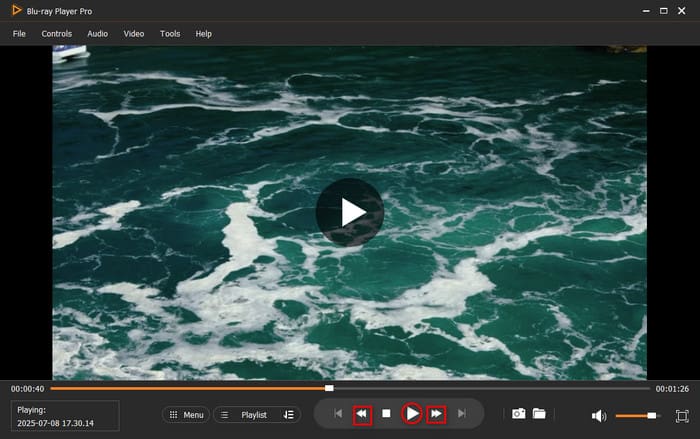
3.1 Blu-ray Master Free Blu-ray Player
Blu-ray Master Free Blu-ray Player is a good Blu-ray player software that gives you a smooth Blu-ray watching experience. It has powerful decryption ability to handle most copy-protected Blu-ray movies. With an intuitive interface, you can easily load your Blu-ray movies and enjoy them. It provides many flexible settings for you to control the Blu-ray playback, including screenshot, skip, fast forward, and others. Moreover, it has advanced features for you to add external subtitles to enjoy a more immersive experience.
Free Download
For Windows
Secure Download
Free Download
for macOS
Secure Download
Pros
- It will show the Blu-ray native menu that allows you to select titles, audio tracks, etc.
- It supports a wide range of formats, including Blu-ray discs, folders, and ISO files.
- Its setup is easy, and it requires low system resource consumption.
Cons
- The free version focuses on 1080p Blu-ray playback; native 4K UHD discs require paid software upgrades.
- For some advanced Blu-ray copy protections, it fails to handle.
3.2 VLC Media Player
VLC Media Player is a well-known media player, as well as a good Blu-ray player. It is a totally free tool that enables you to watch various digital file formats and Blu-ray discs. To handle commercial Blu-rays, you need to manually configure the KEYDB.cfg and libaacs.dll. Moreover, it has many advanced settings for you to improve video effects.

Pros
- It is totally free with no limits and ads.
- It provides wide system compatibility, a highly customizable interface, and extensive playback controls.
- It has many advanced tools, like Equalizer, Compressor, Stereo Widener, etc.
Cons
- It needs a complex process to install AACS keys to handle commercial Blu-rays.
- Blu-ray disc menus often fail to load or glitch, forcing users to select video title streams manually.
3.3 Quick Comparison of 2 Blu-ray Player Software
| Feature | Blu-ray Master Free Blu-ray Player | VLC Media Player |
| Commercial Disc Playback | Out-of-the-box native support | Requires manual AACS key setup |
| Disc Menu Navigation | Full interactive menu support | Basic stream selection / Glitchy menus |
| System Support | Windows 11/10/8/7, macOS | Windows, macOS, Linux |
| User Setup Difficulty | Beginner-friendly (Plug & Play) | Advanced (Requires manual folder edits) |
| Cost | Free (Optional Pro upgrade) | 100% Free & Open-source |
4. Hardware vs. Software: Which Route Should You Take
Strictly speaking, there is no inherent right or wrong between hardware and software players; rather, different individuals may have different experiences. The choice between a dedicated TV hardware player and a desktop-based software solution ultimately depends on your personal viewing preferences and your device specifications.
| Feature | TV Hardware | PC Software |
| Total Cost | $65 – $85 (standalone purchase) | $0 (works with existing PC drive) |
| Primary Location | Living room, couch TV, bedroom | Desk, laptop, dorm room |
| Ease of Use | Grab the remote and press play | Click to launch on your computer |
| Region Code Flexibility | Locked to Region A, B, or C | More flexible with software updates |
| Best Target Audience | Traditional TV watchers, families | Students, office setups, travel |
5. FAQs about Blu-ray Players
-
What is the absolute cheapest Blu-ray player I can buy right now that actually lasts?
Sony BDP-S1700 is the good choice that the price is around $65-$80 and performas good loading speed without breaking down quickly.
-
Can I play 4K Ultra HD Blu-ray discs on a cheap $50 Sony Blu-ray player?
No. You need to use a professional 4K Blu-ray player to watch 4K Blu-rays, like the Sony UBP-X700, starting around $200–$250.
-
Is it better to buy a cheap dedicated Blu-ray player or just get a cheap external USB drive for my laptop?
That depends on your viewing habits and needs.
-
How can I play region B Blu-ray discs in the US without spending hundreds on a region-free player?
You can use a region-free Blu-ray player with an external USB drive to play it.
-
Are there any completely free Blu-ray player software options for Windows 11 that don't have watermarks?
Yes, like VLC and Blu-ray Master Free Blu-ray Player.
-
Is a used PlayStation 3 still a good cheap Blu-ray player for a bedroom TV in 2026?
Yes, if you can find one under $50. It plays standard 1080p Blu-rays reliably, though it consumes more power, takes up more space, and can be slightly noisier than a small modern player.
Conclusion
After reading this article, you must be clear about the 4 cheap Blu-ray players. Choosing a physical medium does not mean you need to spend a fortune. You can enjoy exceptional 1080p video quality and a high-definition surround sound experience without going overboard on your budget. Although this article covers only a limited number of tools, it addresses a variety of different use cases. Select the tool that best suits your needs to explore your Blu-ray collection.
More from Blu-ray Master
Top Blu-ray Player
Easily play Blu-rays, DVDs, and various video/audio formats with rich playback features.
100% Secure. No virus
