

Jul 15, 2026Posted by Kevin Miller to Play Video
Quick Summary
Can Android devices read Blu-ray discs directly? No, Android phones and tablets cannot natively read physical Blu-ray discs due to hardware and OS file system limitations.
What is the solution? To enjoy your Blu-ray movies on Android, you must either connect an external portable Blu-ray drive via a powered USB-C OTG hub using a specialized mounter app, or digitize the disc into an MP4/MKV file on your PC first.
If you have a massive shelf of physical Blu-ray discs, you’ve probably wondered: Is there a reliable Blu-ray player for Android to watch these movies on the go? While you can't just slide a 50GB disc into your smartphone, you don't have to leave your movie collection behind. Bridging the gap between physical Blu-ray discs and your Android screen is entirely possible. In this updated guide, we will show you exactly how to bypass Android OS limitations using specialized hardware mounters and top-rated Android Blu-ray players for eays playback.
- Part 1. Best Apps & Hardware Solutions to Play Blu-ray on Android Directly
- Part 2. How to Play Blu-ray Movies on Your Android Phone
- Part 3. FAQs of Blu-ray Players for Android
Part 1. Best Apps & Hardware Solutions to Play Blu-ray on Android Directly
Can I Play Blu-ray on Android
If you want to watch physical Blu-ray discs directly on your Android tablet or phone without a computer, you can build a portable mobile cinema using external hardware. This is highly popular among tech enthusiasts and movie purists who prefer raw, uncompressed quality over digital conversion.
- The Hardware Setup: You will need an external portable Blu-ray drive (such as a Hitachi-LG Multi-Drive that explicitly supports Android connectivity) and a high-quality USB-C OTG (On-The-Go) cable/adapter to link the drive to your mobile device.
- The Bridge App: Download MLUSB Mounter (with the UDF/ISO Mount extension) or Disc Link Platinum from the Google Play Store.
Tips
Crucial for Mobile Setups: External Blu-ray lasers consume a significant amount of power when spinning and reading discs. Most Android phones or tablets cannot output enough voltage via their OTG ports, which frequently causes the drive to disconnect or fail to initialize. To avoid this, always use a powered USB-C hub or an OTG Y-cable to feed extra power from a portable power bank directly to the external drive.
What is the best media player app for Android? If you have no idea which Blu-ray app for Android to choose, you can take a look at the following suggestions.
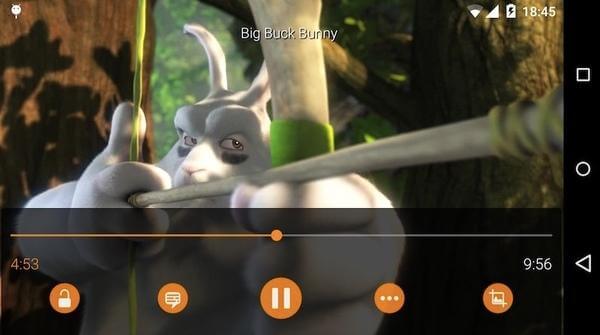
Top 1. VLC Media Player
VLC for Android is the multimedia player that plays Blu-ray discs, ISO files, devices and other network streaming protocols. Most popular video codecs are downloaded already. The Blu-ray player for Android app also supports subtitles, teletext and closed captions. You can stay away from ads, in-app purchases and spying.
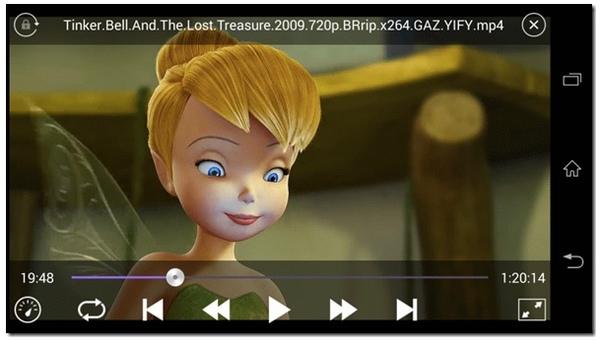
Top 2. KMPlayer
You can get high-quality Blu-ray playback on Android by using KMPlayer. The supported video playback ranges from HD to 4K, UHD and full HD. Moreover, you can adjust the Blu-ray playback speed from 0.1 to 4 based on your need. KMPlayer also supports a wide range of video, audio and subtitle formats.
How to Play Blu-rays on Android in Detail
You might wonder: Can I just open VLC or KMPlayer and read the disc directly?
Unfortunately, no. Android's native storage framework cannot recognize the UDF/ISO 9660 file systems used by encrypted Blu-ray discs.
To bridge this gap, a clever 2-step workflow is used by the Android playback community:
- The Bridge (MLUSB Mounter): When you plug in the drive, MLUSB bypasses Android's storage limitations, mounts the Blu-ray disc's file system, and decrypts the basic data stream. It then hosts a Local HTTP Loopback Stream (a virtual local server, e.g., http://127.0.0.1:25252/stream.mkv) right on your phone.
- The Render (VLC for Android): You copy the local network stream link from MLUSB, head to VLC -> Stream, and paste the URL. VLC’s advanced FFmpeg decoders will instantly render the raw video, allowing you to switch between multi-language audio tracks and unpack PGS subtitles seamlessly.
Note: While this direct method is perfect for home use, commercial encrypted discs featuring advanced BD+ or AACS protections may occasionally hit decryption blocks on mobile OS. For 100% hassle-free portability on the go, check out the digital archiving alternative in the next part.
Part 2. How to Play Blu-ray Movies on Your Android Phone
If you think the above process is complex and want to play your Blu-ray movies, even copy-protected Blu-rays, in an easy way, you can rip your Blu-rays to digital formats. Blu-ray Master Free Blu-ray Ripper is a good choice to convert commercial Blu-ray discs to Android-compatible formats. It provides multiple Android profiles, and you can choose from them and even customize the parameters, like encoder, resolution, and others. The customizable video and audio settings make the Blu-ray video better. With the GPU acceleration, you can enjoy the seamless Blu-ray ripping process and lossless converted videos. After conversion, you can see the videos on Android with ease.
- Free rip Blu-ray to Android readable formats, like MP4, MKV, 3GP, WebM, etc. as well as the HD video formats.
- Rip Blu-ray disc/folder/ISO file to Android profiles directly, such as Black Berry, Nokia and other mobile phones.
- Fast Blu-ray to Android ripping speed and high output quality.
- Adjust video encoder, resolution, frame rate, bitrate, aspect ratio and other output settings.
Free Download
For Windows
Secure Download
Free Download
for macOS
Secure Download
Step 1. Free download and install the Blu-ray Master Free Blu-ray Ripper on your computer. Put your Blu-ray disc into the BD drive. Click Load Blu-ray > Load Blu-ray Disc to load your Blu-ray movie.
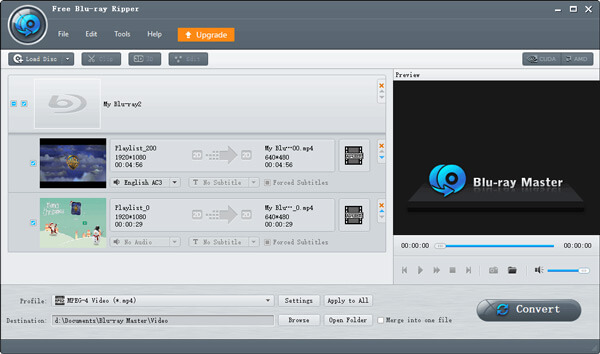
Step 2. Next, go to the Output Format section to choose a desired output profile. It provides massive video and audio profiles for you to choose.
This tool allows you to easily and quickly get the lossless Blu-ray videos. Once the process is done, you can use the Android media players to play them properly.
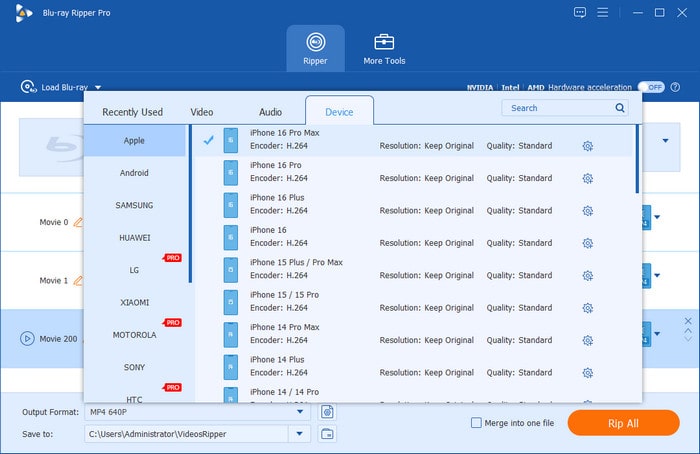
Step 3. You can click Settings to adjust video and audio settings before ripping Blu-ray. Then click Rip All to extract Blu-ray content and save as the selected format. The Blu-ray to Android converter app will finish the process quickly.
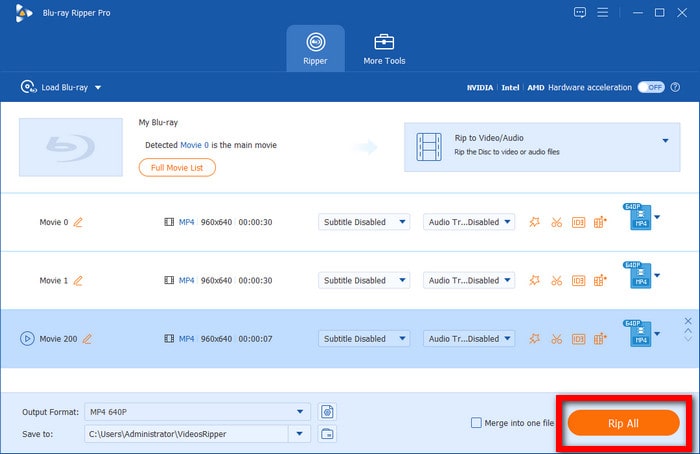
This tool allows you to easily and quickly get the lossless Blu-ray videos. Once the process is done, you can use the Android media players to play them properly.
Part 3. FAQs of Blu-ray Players for Android
-
Are Blu-ray players obsolete?
No. Though Samsung has ceased the new Blu-ray player for the US market since 2017, engineers continue to work on advancing the technology for the disc size, capacity, and layer. Moreover, some Blu-ray discs still need the Blu-ray players for playback.
-
How to connect Blu-ray player to Android tablet?
It is impossible to connect the Blu-ray player hardware to your Android tablet, because the Android tablet cannot load the Blu-ray drive. For playing the Blu-ray discs on Android tablet, you have to convert the Blu-ray disc into the Android tablet compatible formats.
-
What is the best 4K Blu-ray Player?
VLC, MX Player and KMPlayer can play 4K Blu-ray files, but they may get your device stuck. The best 4K Blu-ray player is Blu-ray Player Upgrade. It cannot play the 4K movies from the various regions, but also play the common 4K ripped Blu-ray video formats.
-
Can I connect an external Blu-ray drive directly to my Android tablet via an OTG cable to watch movies?
Yes, you can. But it requires extra power and a bridge app like MLUSB Mounter.
-
What is the best free Android app that supports playing Blu-ray ISO files with full subtitle control?
VLC for Android and Nova Video Player are the top free, ad-free choices.
-
Does VLC for Android support Blu-ray disc menus and chapter selection?
Yes. VLC for Android has limited support for full Blu-ray disc menus, but it fully supports chapter selection.
-
Why is my ripped Blu-ray MKV video stuttering or lagging on my Android device, and how can I fix it?
If your high-quality Blu-ray rip is lagging on Android, the issue usually comes down to bitrate or decoding settings. Try these quick fixes:
• Turn on Hardware Acceleration: Go into your player’s settings (VLC or Nova) and ensure “Hardware Acceleration” or “Hardware Decoding” is set to Full. This shifts the heavy lifting from the CPU to the phone’s graphics chip.
• Lower the Bitrate / Transcode to H.265: If the file is a raw 40GB+ rip, your device’s storage read speed or chipset might struggle. Compress the file on your PC using a lower bitrate or encode it to H.265/HEVC, which handles high-fidelity video much more smoothly on mobile hardware.
Conclusion
Watching your favourite Blu-ray movies on an Android device is no longer a multi-step headache. In this guide, we highlighted two of the best Android Blu-ray player configurations that bridge the gap between physical media and mobile screens. By setting up the right hardware mounters and media players, you can unlock a high-fidelity viewing experience right on your smartphone or tablet.
However, if you want to skip the hassle of carrying external drives or configuring OTG cables, digitising your collection is a good alternative. Using a reliable tool to rip your Blu-rays into digital files (like H.265 MKV or MP4) allows you to build a permanent, highly portable movie library. Choose the method that best fits your lifestyle, download your preferred player app, and enjoy seamless, cinema-quality playback wherever you go!
More from Blu-ray Master
Top Blu-ray Player
Easily play Blu-rays, DVDs, and various video/audio formats with rich playback features.
100% Secure. No virus
