

Jun 01, 2026Posted by Kevin Miller to Rip Blu-ray
Quick Summary:
To rip Blu-ray movies to digital without losing quality, MakeMKV is the most efficient way, which can handle most copy protection and retain original quality. If you want to convert Blu-rays in an easy way, Blu-ray Master Free Blu-ray Ripper is also a good choice that shows excellent ripping speed and ripping quality.
If you have purchased some Blu-ray movies from Amazon or eBay, you can only enjoy the movies on TVs or computers with a Blu-ray Player. To play Blu-ray on computers, iPhone, Android tablets and other devices, you have to rip Blu-ray movies to digital formats instead. How to rip Blu-ray movies to other digital formats? Just find out the best solutions to rip Blu-ray movies to the desired digital formats from the article now.

- Way 1. MakeMKV Rip Blu-ray Movies with Pure Quality
- Way 2. Use Blu-ray Master Free Blu-ray Ripper to Rip Blu-rays in One Click
- Way 3. Rip Blu-ray Movies to Digital with Leawo Blu-ray Ripper
- Part 4. FAQs of Ripping Blu-ray Movies
Our Testing Environment
To provide you with the most accurate and reliable data, our team tested these ripping methods using a standard retail Blu-ray disc of 'Inception' (approx. 35GB) on a Windows 11 PC and a macOS Sequoia device. We utilized a LibreDrive-flashed LG WH16NS40 optical drive connected via a powered USB 3.0 hub to benchmark exact ripping speeds, decryption stability, and output file sizes.
| Compatibility | Price | Speed | Decryption | Output Formats | Output Quality | Ripping Speed(A Blu-ray movie of 1h30mins) | |
| Blu-ray Master Free Blu-ray Ripper | Windows 11/10, macOS 10.12 or above. | Free | 37 minutes |  | 500+ formats, like MP4, MP3, OGG, MKV, AVI, etc. | 4K | 28 minutes |
| MakeMKV | Windows 11/10, macOS 10.7+. | Free | 37 minutes | | MKV | 4K | 49 minutes |
| Leawo Blu-ray Ripper | Windows 11/10, macOS 10.13 and later. | Free | 35 minutes | | 180+ formats, like MP4, MOV, MKV, etc. | 4K | 35 minutes. |
Before downloading any ripping software, you must understand a critical hardware reality: you cannot read or rip a Blu-ray disc using a standard DVD or CD drive.
To digitize your movie collection on a modern PC or Mac, you must connect a dedicated External Blu-ray Drive via USB. When shopping for hardware, keep these two categories in mind:
For Standard 1080p Blu-rays: Any reputable external USB 3.0 Blu-ray writer (such as retail models from LG, ASUS, or Pioneer) will work seamlessly out of the box with software like MakeMKV.
For 4K Ultra HD Blu-rays (Critical Setup): If you intend to rip 4K UHD discs, standard external drives will actively block the encryption keys at the firmware level. You will need what the community calls a '4K-friendly' drive or a drive that supports LibreDrive firmware. This specialized setup allows third-party software to bypass hardware-level restrictions and read the raw uncompressed data safely.
Way 1. MakeMKV Rip Blu-ray Movies with Pure Quality
MakeMKV is the undisputed industry standard for raw, uncompressed Blu-ray ripping. It can efficiently rip Blu-ray movies to MKV format, which is a container format that can fully preserve the content of Blu-ray movies. Without re-encoding, the exact video and audio data are complete. At the same time, the MKV file size is large. For tech-savvy users, it is the best and first choice if they want to maintain all original audio tracks, including Dolby Atmos and DTS-HD Master Audio, multiple subtitle tracks, and chapter menus.
In addition, it can rip 3D and 4K Blu-rays. This tool can convert Blu-ray discs protected with the latest versions of AACS and BD+ to MKV, so that you can watch Blu-rays with ease. Before starting the Blu-ray ripping, you can check the titles you want to maintain to rip to digital.
Tips
MakeMKV is free to use during its beta period. Users can get the monthly updated registration key directly from the MakeMKV Forum.
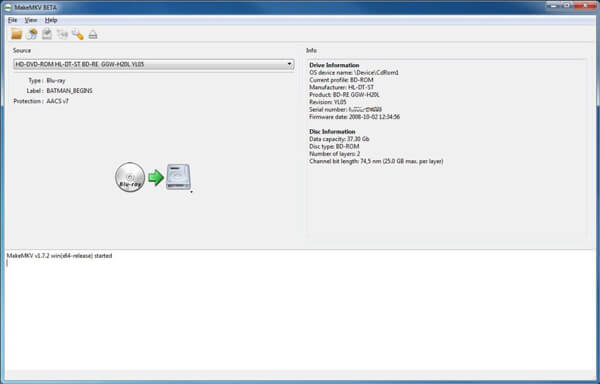
Step 1. Download and install MakeMKV from the official website. Launch the program and insert a Blu-ray disc into the optical drive.
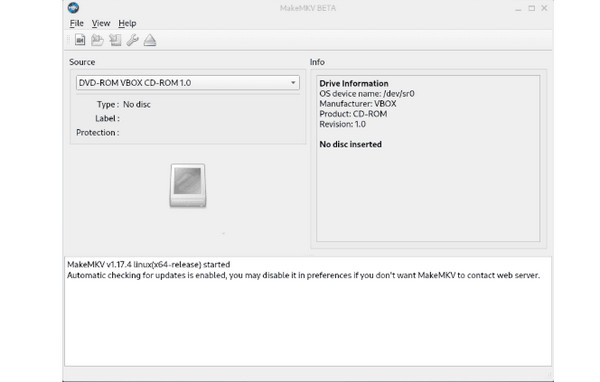
Step 2. Once MakeMKV detects the Blu-ray disc, you can click the Blu-ray icon to load the titles in the disc. When the Blu-ray disc is fully loaded, you can find a 'Title' drop-down menu in the upper left corner.
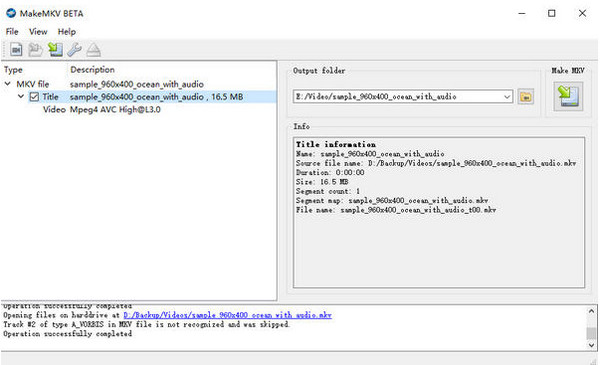
Step 3. Click on the Title to preview and check the subtitles, audio tracks, titles and other content you want to rip. After that, you can set the destination folder on the right side.
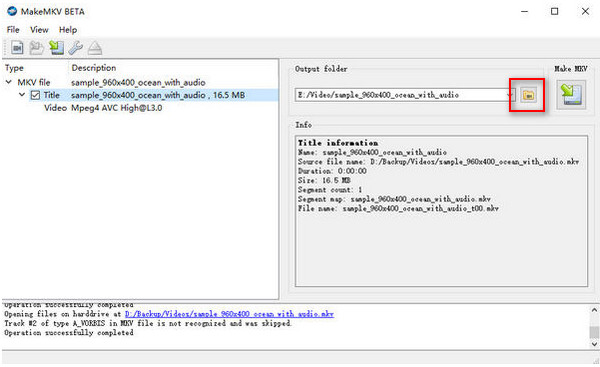
Step 4. Press the "Make MKV" button to start ripping Blu-ray movies to MKV format. It takes at least one hour to rip a Blu-ray movie with 90 minutes. All the chosen titles will be merged into one video file.
Way 2. Use Blu-ray Master Free Blu-ray Ripper to Rip Blu-rays in One Click
Blu-ray Master Free Blu-ray Ripper is an excellent Blu-ray movie ripper that can convert Blu-ray movies to MP4, MOV, MKV, and others. Without configuring complex video codecs, it can rip Blu-rays to digital, and you can customize the video/audio parameters. Its interface is clear and intuitive, which is friendly for Blu-ray ripping beginners.
Further, it provides the output profiles that are directly compatible with various devices, such as Apple, Android, Samsung, etc. With advanced decryption technologies, it can rip any Blu-ray to digital with ease. In addition, it offers video editing tools for you to adjust video effects, like Clip, Crop, Watermark, Effect, etc. It is a free tool and you can download it to try it.
Free Download
For Windows
Secure Download
Free Download
for macOS
Secure Download
Step 1. Download and install the Free Blu-ray Ripper. Launch the program and click the Load Blu-ray button to load the Blu-ray disc into the program. After that you can preview the movies within the Blu-ray ripper.
Note: Before ripping, you can clean your Blu-ray disc to make the loading smoother.
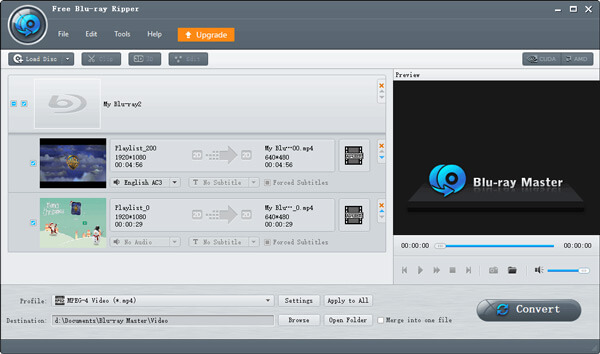
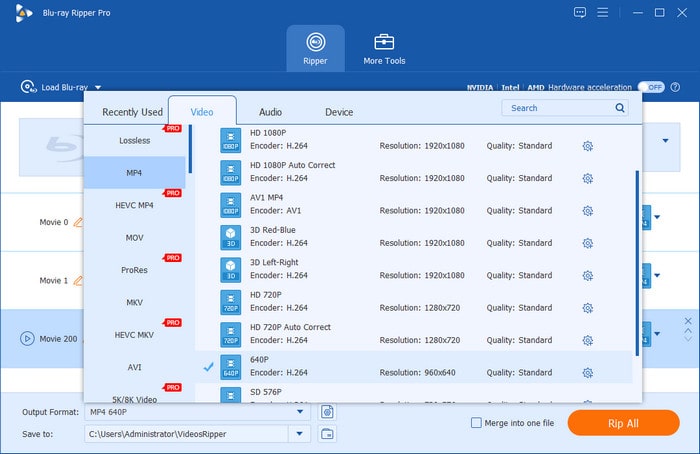
Step 2. Click the Output Format drop-down options to choose one desired format. Here are MP4, MOV, AVI, MKV, etc., which each has unique features. You can choose MP4 format, which is a popular format with good compatibility.
Note: You can click the gear icon to customize the parameters of output videos.
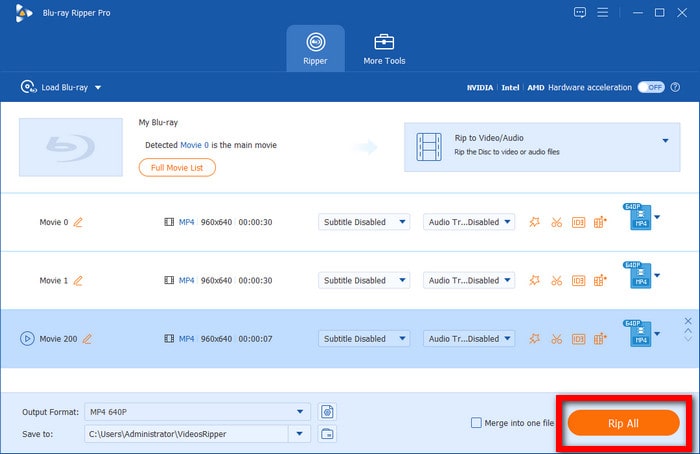
Step 3. Lastly, you can click the folder icon at the bottom to set the download folder of ripped videos and click Rip All to begin to rip Blu-ray.
Way 3. Rip Blu-ray Movies to Digital with Leawo Blu-ray Ripper
Leawo Blu-ray Ripper is one of the most powerful Blu-ray rippers in the market. It is capable of ripping Blu-rays to 180+ formats, like MP4, MKV, MOV, MP3, FLAC, etc.
It stands out for its robust multi-core acceleration. Along with the proprietary decryption technology, it could decode AACS and BD+ Blu-rays with ease. In addition, it provides multiple editing tools, and you can trim movie length to save drive space, crop out annoying black bars, and overlay custom watermarks to protect the copyright.
Here are the steps for ripping Blu-ray on Mac.
Step 1. Download and install Leawo Blu-ray Ripper on your Mac computer that runs macOS 10.13 or later systems. Then, open the software.
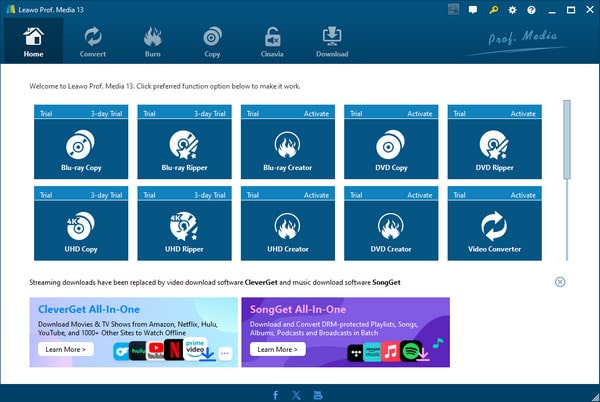
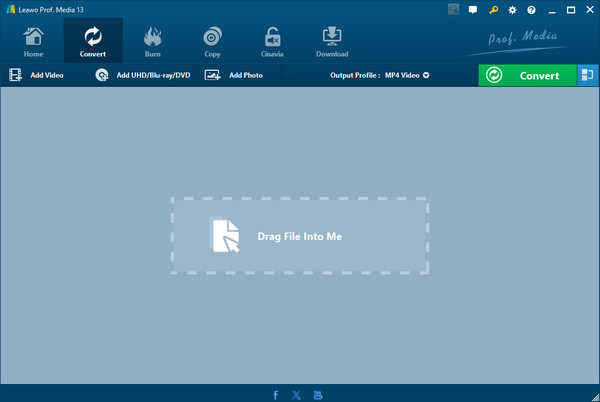
Step 2. Choose the Convert option from the top menu bar. Click Add UHD / Blu-ray / DVD > Add from folder to load one Blu-ray folder you want to rip. Click the OK button at the bottom to proceed.
Note: There are Full Movie, Main Movie, and Custom Mode three modes for you to choose from.
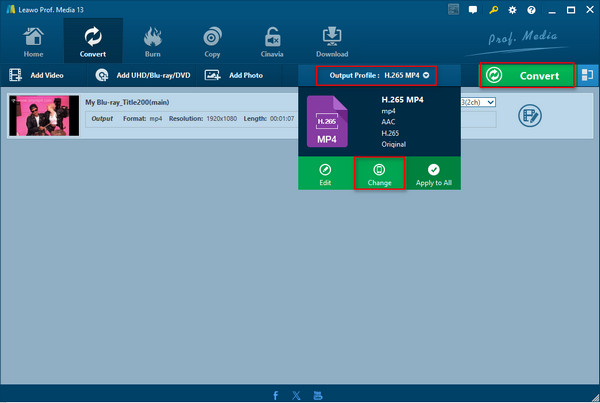
Step 3. Select Output Profile > Change to choose the output format, and you can choose H.265 MP4. Then, click the Convert button at the top right corner.
Note: There are various output formats provided, like video, audio, HD video, etc.
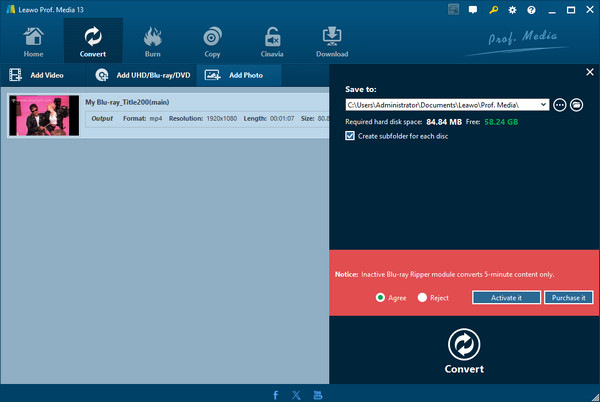
Step 4. Finally, you can click on the folder icon to set the destination folder, and click Convert again to start the ripping process.
Part 4. FAQs of Ripping Blu-ray Movies
-
Can I use a regular external Apple USB SuperDrive to rip a Blu-ray disc on my Mac?
No. Apple USB SuperDrive is strictly for DVD/CD.
-
Why is MakeMKV taking so long to open my Blu-ray drive, and how do I fix the 'No disc inserted' error?
MakeMKV takes a long time to open or shows 'No disc inserted' because the drive or system cannot read the disc. You can try cleaning the disc, restarting the drive, enabling LibreDrive, and other ways to fix the problem.
-
Where can I find the latest free registration key for MakeMKV Beta this month?
You can go to the MakeMKV forum to get the updated registration key.
-
Will I lose video quality when ripping Blu-ray movies?
It is inevitable to lose video quality after ripping Blu-rays. But a good professional Blu-ray ripper, like MakeMKV, can help minimize the loss to maintain the original video quality.
Wrapping up
Now, you must have the answer of how to rip Blu-ray movies. With these 3 easy ways, you can have Blu-ray digital copies to watch Blu-ray movies freely and back them up in a more convenient way. Blu-ray Master Free Blu-ray Ripper is actually a good Blu-ray ripping program that is free and provides rich settings. You can download it and have a try!
More from Blu-ray Master
Rip Blu-ray to Digital
Rip Blu-rays to any video and audio formats of different parameters for free in minutes.
100% Secure. No virus
