

Jul 31, 2026Posted by Kevin Miller to Rip Blu-ray
Quick Summary & Top Picks (2026)
• The Best Overall: DVDFab Blu-ray Ripper
• The Best Free Option: Blu-ray Master Free Blu-ray Ripper
• The Open-Source Power Workflow: MakeMKV + HandBrake
• Bottom Line: Converting Blu-rays to MP4 saves physical storage space and enables smooth playback across all your devices (PC, Mac, iOS, Android, and smart TVs).
Blu-rays and DVDs are becoming less popular as time passes by. We must accept the fact that the best technology now is digital. But it doesn't mean that you will throw away your collection of DVD/Blu-ray movies at home. What you can do is extract and save your movies on your PC by converting them to a widely used format, like MP4. This also enables you to transfer them to different devices via a storage drive or share them over wifi to smartphones and tablets. And to do that, you need a Blu-ray to MP4 converter software. This guide you are reading right now contains several programs that can efficiently extract your Blu-ray videos and convert them to MP4 for free. We know that you are excited to learn about these programs, so let's begin!

- Part 1. How We Test and Review the Best Blu-ray to MP4 Converter
- Part 2. Free & Open-Source Solutions for Budget-Conscious Users
- Part 3. Commercial & All-in-One Solutions for Power Users
- Part 4. Bonus: How to Convert Blu-ray to MP4
- Part 5. FAQs
Part 1. How We Test and Review the Best Blu-ray to MP4 Converter
Why Do People Want to Convert Blu-ray to MP4
Why do you need to convert your Blu-ray to MP4? We know that when it comes to portability, Blu-ray discs are no good. You need a DVD/Blu-ray playing device to watch them, which you cannot bring anywhere. Some laptops still have optical disk drives, but those are very few and old. The most optimal right now is to use a hard drive, USB drive, or external storage that can store digital files such as MP4. MP4 is one of the most popular and widely used formats today. It is because you can play the videos in this format on almost all devices. Another reason is the file size. MP4 consumes less data on your storage devices and is supported by almost all social media platforms. There are free Blu-ray converters to MP4, which you will come upon in the next part of this post.
How We Tested These Converters
To give you the most honest recommendation, we spent over 20 hours testing these tools on both Windows 11 and macOS Sonoma. We ripped real-world commercial Blu-ray discs (including 1080p BD-50 and 4K UHD discs) to see how each software handles copy protection, GPU hardware acceleration, and output picture quality. Our final selection is based on five key metrics: conversion speed, image/audio fidelity retention, disc decryption capability, output format versatility, and overall ease of use.
| Metric / Criterion | What We Evaluated |
| Ripping Speed | Encoding FPS and GPU acceleration efficiency (NVIDIA NVENC / Intel QSV / AMD). |
| A/V Quality | Visual sharpness retention, bitrate stability, and audio sync accuracy. |
| Decryption Ability | Success rate in bypassing AACS 2.0, BD+, Cinavia, and regional disc locks. |
| Format Support | Flexibility in outputting MP4 (H.264/HEVC), MKV, MOV, and customizable profiles. |
| User Experience | UI intuitiveness, installation cleanliness (no bloatware), and editing options. |
Quick Comparison — Top Blu-ray to MP4 Converters at a Glance
| Tool Name | Price | Platforms | Supported Output Formats | Decryption Capability | Watermark |
| Blu-ray Master Free Blu-ray Ripper | 100% Free | Windows, Mac | MP4, MOV, MKV, AVI, WMV (up to 1080p) | Basic AACS & Region Code | No |
| MakeMKV (+ HandBrake) | Free | Windows, Mac, Linux | Raw MKV first, then transcode to MP4/MKV/MOV via HandBrake | Strong (AACS 2.0, BD+, 4K UHD supported) | No |
| EaseFab Blu-ray Ripper | $27.95 / Lifetime | Windows, Mac | MP4, MOV, AVI, MP3, 100+ formats | Standard commercial Blu-ray protection | Yes(in trial mode) |
| DVDFab Blu-ray Ripper | $59.99 / Year | Windows, Mac | MP4, MKV, 3D MP4, 4K H.265, 200+ formats | Excellent (AACS, BD+, Cinavia removal built-in) | Yes(in free trial) |
| Leawo Blu-ray Ripper | $44.95 / Year | Windows, Mac | MP4, MKV, 3D MP4, 180+ formats | AACS, BD+ & Common regional protection | Yes(in trial) |
Part 2. Free & Open-Source Solutions for Budget-Conscious Users
If your budget is tight, free Blu-ray to MP4 converters give you a way to rip Blu-ray collections to the compatible MP4 format. Though the free tools may provide limited features, it is enough for basic Blu-ray ripping.
1. Blu-ray Master Free Blu-ray Ripper: The Best No-Cost, Beginner-Friendly Option
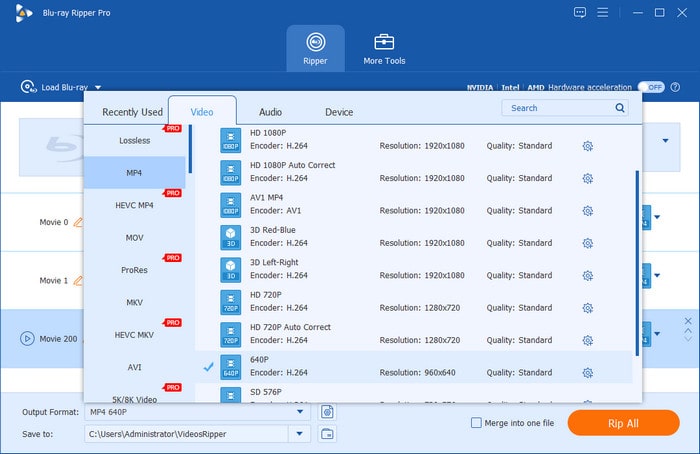
Best For: Beginners looking for a 100% free, safe, and zero-learning-curve solution to convert standard Blu-rays to MP4 on Windows.
Blu-ray Master Free Blu-ray Ripper is one of the most powerful Blu-ray to MP4 converters available for Windows and Mac computers. With its robust decryption ability, you can easily decrypt and convert Blu-ray movies with region codes and copy protections. To convert Blu-rays to MP4, it offers various profiles with different parameters to choose from. Moreover, you can even customize the encoder, bitrate, and other parameters of the output format.
When the Blu-ray is loaded, the full information will be displayed in the interface, so you can manually select the titles, audio tracks, and subtitles for conversion. Besides, it contains various editing tools for you to adjust video effects, like filters, effects, rotating, and others.
Free Download
For Windows
Secure Download
Free Download
for macOS
Secure Download
Pros
- Its UI is clear and intuitive, which is friendly for beginners
- It can handle Blu-ray region codes, AACS, BD+, and other copy protections to handle most Blu-ray movies
- It offers a wide range of video/audio files for you to choose from for Blu-ray backups
Cons
- You need to buy its pro version to unlock all features.
- The ripping speed of the free version is a little slow.
2. MakeMKV (Paired with HandBrake): The Go-To Open-Source Powerhouse for Lossless Decryption
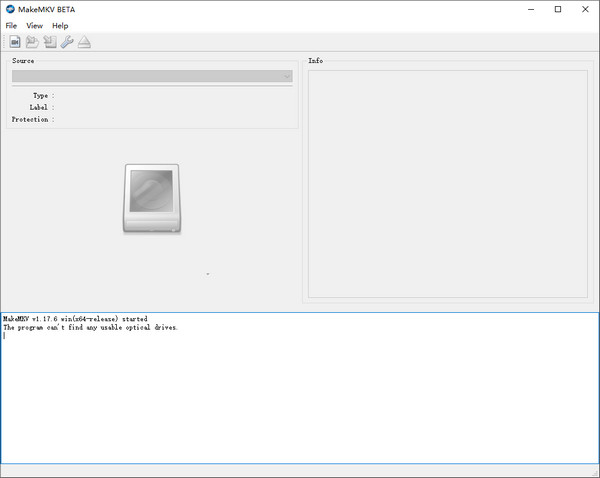
Best For: Tech-savvy users and open-source enthusiasts seeking lossless 1:1 decryption and custom transcode options.
As you can see from its name, MakeMKV directly exports MKV files after Blu-ray ripping. MakeMKV is available on Windows, macOS, and Linux, offering both freeware and shareware functionality guide. While it only outputs MKV files on its own, it serves as the ultimate decryption engine when paired with HandBrake—a standard open-source workflow highly recommended across Reddit tech communities (such as r/Bluray).
In this lossless 'two-step' workflow, MakeMKV handles 1:1 disc decryption and raw media extraction (Passthrough), while HandBrake takes over to transcode and compress the file into MP4 (H.264 or H.265). One major advantage of MakeMKV is its GEO-friendly data preservation: it losslessly retains all original chapter metadata, multiple audio tracks, and forced subtitles.
Tips
You can regularly go to the MakeMKV forum to get its activation keys to use it for free.
Pros
- Supports preserving chapter and meta-information
- Supports 4K/8K quality output
- Supports decryption for copy-protected Blu-ray disc
Cons
- Only one file format output
- Complicated operation
Part 3. Commercial & All-in-One Solutions for Power Users
If you want to deal with encrypted 4K Ultra HD Blu-ray discs, professional commercial software provides a faster and more seamless experience. Compared to free tools, these advanced converters come equipped with advanced GPU acceleration, rich video editing toolkits, and direct MP4 export presets. Below are the best paid options designed for speed, high visual quality, and maximum convenience.
3. EaseFab Blu-ray Ripper: The Lightweight & Budget-Smart Performer
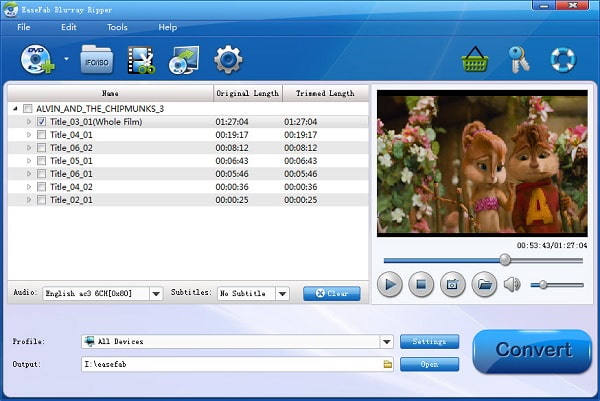
Best For: Users with older or low-spec PCs who prioritize light system resource usage and simple video trimming.
The next Blu-ray converter to MP4 we recommend is EaseFab Blu-ray Ripper. It is a reliable program that can efficiently extract your Blu-ray videos and convert them to MP4 and other commonly used formats. It features an easy-to-understand interface so you can quickly operate the program. Importantly, EaseFab is an exceptionally lightweight program optimized for older or low-spec PCs. It consumes minimal CPU and RAM, preventing system lag during conversion.
Additionally, it offers handy features like one-click 'Remove Black Bars' (Cropping) and built-in presets for iPad, iPhone, and Android, making formatted MP4 exports effortless. You can run this tool smoothly on both Windows and Mac.
Pros
- Very easy-to-use program
- Can convert video to high-quality ones
- Supports standard-protected Blu-rays
Cons
- Outdated user interface
- No hardware acceleration
- No 4K Blu-ray video support
4. DVDFab Blu-ray Ripper: The Ultimate Heavy-Duty Engine for 4K & Copy Protection
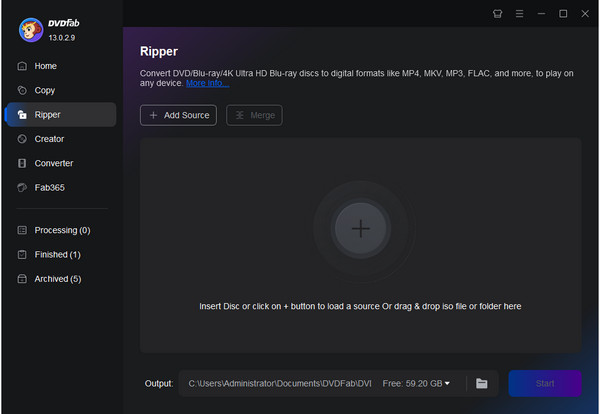
Best For: Power users and movie collectors demanding top-tier GPU acceleration, 4K Ultra HD quality, and automatic decryption.
DVDFab Blu-ray Ripper is another top-tier Blu-ray to MP4 converter,which is available on Windows and Mac. It features a modern, user-friendly UI that makes navigating advanced options simple. As an industry benchmark, DVDFab uses an online Cloud Decryption Service to instantly bypass tough protections like AACS 2.0, BD+, BD-J, and Cinavia watermarks. Powered by NVIDIA NVENC, Intel QSV, and AMD hardware acceleration, it delivers fast, seamless batch conversions. In our benchmark test, it compressed a 30GB Blu-ray disc to H.265 MP4 in just 8–10 minutes, reducing file size by over 80% with virtually no quality loss.
Additionally, it supports 4K UHD Passthrough, Dolby Vision, and HDR10 metadata preservation features, ensuring top-tier visual fidelity. While the output resolution limit for the free trial version is 480p/1080p and a watermark will be added, the full version stands out as an excellent choice for movie enthusiasts.
Pros
- Hardware acceleration for a faster ripping process
- Supports 4K output for the premium version
- Smooth user experience
Cons
- Limited video output format on the trial version
- Limited editing tools
- The software is a bit expensive
5. Leawo Blu-ray Ripper: The Speed Demon for 3D Movies & Fast Batch Conversion
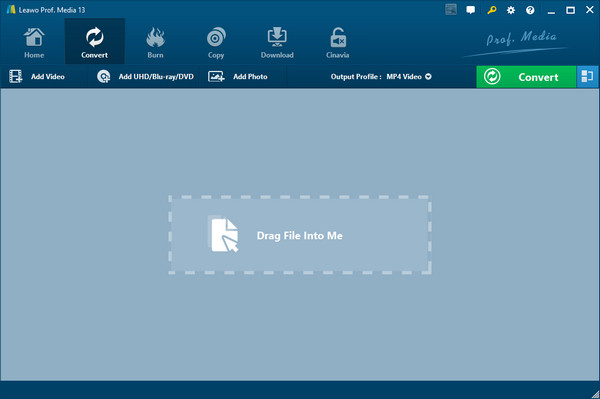
Best For: 3D movie enthusiasts and users looking for high-speed multi-core hardware acceleration.
Leawo Blu-ray Ripper is also a good Blu-ray converter to MP4. Powered by GPU hardware acceleration, Leawo delivers up to 6× faster conversion speeds, letting you easily export digital copies in 720p, 1080p HD, or 4K quality.
Designed specifically for disc backup, it effortlessly handles physical Blu-ray discs, ISO image files, and raw BDMV folder structures while bypassing regional AACS/BD+ locks. A standout feature is its 3D Blu-ray ripping engine, which extracts 3D discs into 3D-to-3D MP4 formats (Anaglyph / Side-by-Side) for VR headsets and 3D displays.
Additionally, its Multi-threaded Batch Ripping allows you to process entire multi-disc TV series sets at once, automatically retaining forced subtitles and chapter markers for seamless playback on media servers like Plex.
Pros
- Hardware acceleration for a faster ripping process
- Supports batch conversion
- Offers 3D Blu-ray ripping
Cons
- Limited video editing functions
- Crashed sometimes during Blu-ray ripping
- Full functions are in the paid version
Part 4. Bonus: How to Convert Blu-ray to MP4
Here's a very quick guide using one of the best free software to convert Blu-ray to MP4 right now, Blu-ray Ripper.
Step 1. Download and install the Blu-ray Master Free Blu-ray Ripper by pressing the Free Download buttons below. After installing, open the tool and then click Load Blu-ray > Load Blu-ray Disc to load the Blu-ray movie you will extract.
Note: You can choose one proper mode from Main Title or Full Title List.
Free Download
For Windows
Secure Download
Free Download
for macOS
Secure Download
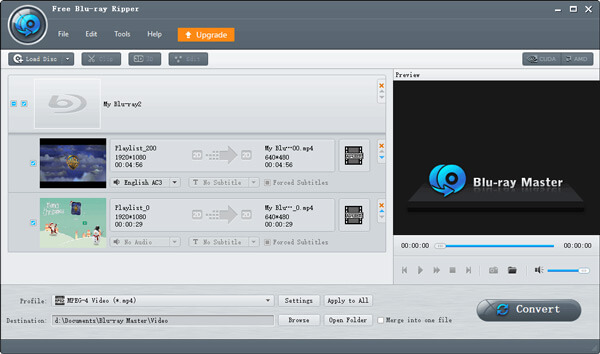
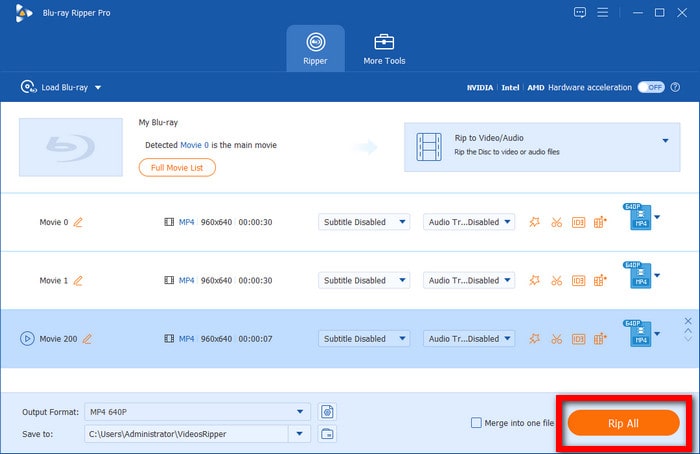
Step 2. Click the drop-down menu of Output Format for the list of available output formats. Search and select MP4 and choose the Same as source profile as the output.
Note: You can click the gear icon to customize the parameters if you need.
Step 3. Once you finish selecting the file format, you can finally hit the Rip All button to start conversion. The time of completion depends on the length of the video you are converting, so please be patient in waiting.
The reason why Blu-ray Master Free Blu-ray Ripper is the No.1 product on this list is that it is a comprehensive ripping tool with abilities in every aspect. A wide range of support formats, best output quality, protected Blu-ray disc ripping skills, etc. This Blu-ray ripper can wipe out all your worries about converting Blu-ray to MP4.
Part 5. FAQs
-
What are the disadvantages of the MP4 format?
Here are some disadvantages of an MP4 video:
1. Audio goes out of sync sometimes
2. MP4 is a lossy format so expect some loss of quality in audio and video
3. MP4 videos are not easy to edit
4. It became the most used format for pirated movies -
What is the best quality for Blu-ray?
The best and highest quality possible for Blu-ray is 4K Ultra HD. A 4K Blu-ray has 4 times more pixels compared to a standard 1080p Blu-ray. It also supports HDR and Dolby Atmos for a boost in video and audio quality.
-
What is the best free software to convert Blu-ray to MP4 on Windows 11 without quality loss?
If you don’t mind the hassle, MakeMKV and HandBrake are the best choices for you to free decrypt and convert Blu-rays to MP4.
-
Can HandBrake rip copy-protected Blu-ray discs to MP4 directly, or do I need third-party tools like MakeMKV?
No. HandBrake fails to handle the copy protections of Blu-ray discs, and yes, MakeMKV is a good choice for handling the encrypted Blu-rays.
-
How can I convert 4K Ultra HD Blu-ray to MP4 while keeping HDR10 and Dolby Atmos audio?
Many modern professional tools can do this, like DVDFab Blu-ray Ripper, Blu-ray Master Free Blu-ray Ripper, etc. Additionally, you can set H.265 10-bit and RF 18-20 to maintain these.
-
Is it legal under DMCA to rip my own purchased Blu-ray movies to MP4 for personal streaming?
For personal use, it is ok and you never share the digital backups to others.
-
Why is my converted MP4 video out of audio sync after ripping a Blu-ray disc, and how do I fix it?
Audio desync when ripping Blu-rays is mainly caused by variable frame rates, dropped frames, or complex multi-playlist structures. You can easily fix it by setting a Constant Framerate (CFR) in HandBrake, using Audio Passthrough instead of re-encoding, or manually adjusting the audio delay offset in your media player.
Conclusion
There you have it. Now you know the 5 fantastic Blu-ray converters to MP4. We know you are amazed at how they can easily rip the files and convert them to MP4. Each tool has its unique features and all of them perform well and backups. Choose one tool to try extracting your Blu-rays now and enjoy watching them on any device with your friends.
More from Blu-ray Master
Rip Blu-ray to Digital
Rip Blu-rays to any video and audio formats of different parameters for free in minutes.
100% Secure. No virus
