

Jun 05, 2026Posted by Kevin Miller to Rip Blu-ray
Quick Summary:
- • For a 100% free, open-source approach: The couple of MakeMKV & HandBrake.
- • For the absolute fastest all-in-one conversion: Blu-ray Master Free Blu-ray Ripper.
- • For tough, modern encryption or damaged discs: DVDFab Blu-ray Ripper.
You’ve been anticipating this all week. That rare, imported European collector's edition of your favorite film finally arrived in your mailbox via Amazon or eBay. You unwrap it, pop the disc into your Blu-ray player, settle into your couch with a drink, and hit play. You may have encountered similar situations: instead of the studio logo, your screen flashes an infuriating message: 'Region Error' or 'Incorrect Region Disc.' Just like that, your evening is ruined. It’s a classic roadblock for physical media collectors. Before you head back online to drop hundreds of dollars on a sketchy, hardware-modified region-free player, take a breath. There is a much simpler, cheaper, and safer way. Using a reliable desktop Blu-ray region code remover, you can remove these restrictions entirely. You’ll be left with a flawless digital copy of your movie that plays on any device you own, completely preserving the original masterclass picture and audio quality.

Table of Contents
Our Testing Environment
To provide you with the most accurate and reliable data, our team tested these region removal tools on a standard Windows 11 desktop equipped with an external ASUS BW-16D1X-U Blu-ray drive. Test discs include a notoriously stubborn Region B locked disc (StudioCanal’s European release of The Third Man) and a heavily encrypted Lionsgate title to test complex copy protections. We measured raw decryption speed, ease of use, formatting versatility, and the effectiveness of each tool in preserving multi-channel surround sound and subtitle configurations.
Part 1. Understanding Blu-ray Region Codes & How Bypass Works
Region A, B, and C: What are They
The global entertainment industry divides the world into three main Blu-ray regions. They use these geographical blocks to control release dates, pricing, and licensing agreements across different continents.
| Region | Area |
| A | North America, Central America, South America, Japan, Taiwan, Hong Kong, and Southeast Asia. |
| B | Europe, Africa, the Middle East, Australia, and New Zealand. |
| C | India, mainland China, Russia, and the rest of Central and South Asia. |
If your playback hardware doesn't match the code stamped onto the physical disc, the system locks you out.
Hardware Lock vs. Software Rip: Which Route Should You Choose
Historically, film enthusiasts have typically circumvented this issue by purchasing hardware-modified 'multi-region' players or attempting to flash the optical drive firmware. However, modifying the optical drive firmware is extremely risky; it can easily cause irreversible hardware damage, rendering the device completely unusable.
Furthermore, both the external and internal Blu-ray drives in modern desktop computers adhere to the RPC-2 hardware standard. This standard imposes a strict five-time limit on region switching: When you change the drive's region setting for the fifth time to play an imported video, the hardware permanently locks that region.
For this reason, using software specifically designed to remove Blu-ray region codes is the superior, more modern approach. Advanced desktop applications intercept and decrypt area code signals in real time, operating solely at the software level; this allows you to copy discs released overseas without exceeding the hardware-imposed five-replacement limit.
Furthermore, 4K ultra-high-definition enthusiasts face an additional challenge: the 'UHD format compatibility' issue with optical drives. Although standard 4K UHD discs are technically region-free, many modern optical drives with the latest official firmware refuse to read them when using third-party applications. To back up 4K discs, you must ensure the drive supports the 'UHD format,' which typically requires using specialized software tools to safely downgrade its firmware to an older version with fewer restrictions.
Part 2. Quick Comparison of the Top Region Code Removal Software
How We Test: To find the absolute best app to remove region code from Blu-ray, we put the leading software options through rigorous real-world evaluations. We utilized a standard Windows 11 desktop equipped with an external ASUS BW-16D1X-U Blu-ray drive.
Our test subjects included a notoriously stubborn Region B locked disc (StudioCanal’s European release of The Third Man) and a heavily encrypted Lionsgate title to test complex copy protections. We measured raw decryption speed, ease of use, formatting versatility, and the effectiveness of each tool in preserving multi-channel surround sound and subtitle configurations.
| Software Name | Price Range | Free Version Limitations | 4K UHD Support | Rip Speed Rating (Out of 5) | Best For |
| MakeMKV + HandBrake | Free | None during beta windows | Yes (Requires UHD drive) | 5 stars | Pure open-source enthusiasts & archiving |
| Blu-ray Master Free Blu-ray Ripper | Free | Limited formats, basic speeds | Yes (Pro version) | 4.5 stars | Balance speed and user-friendliness |
| DVDFab Blu-ray Ripper | $84.99 | 3-disc limit, basic profiles | Yes (With UHD module) | 4.5 stars | Overcome complex studio encryption |
| Leawo Blu-ray Ripper | $99.95 | Rips first 5 minutes only | Yes | 4 stars | Straightforward navigation for beginners |
Part 3. Best Blu-ray Region Code Removers: Detailed Breakdown
1. MakeMKV & HandBrake
Windows, macOS, Linux
Blu-rays of regions A, B, and C
1:1 MKV (MakeMKV), dozens of video/audio presets via HandBrake
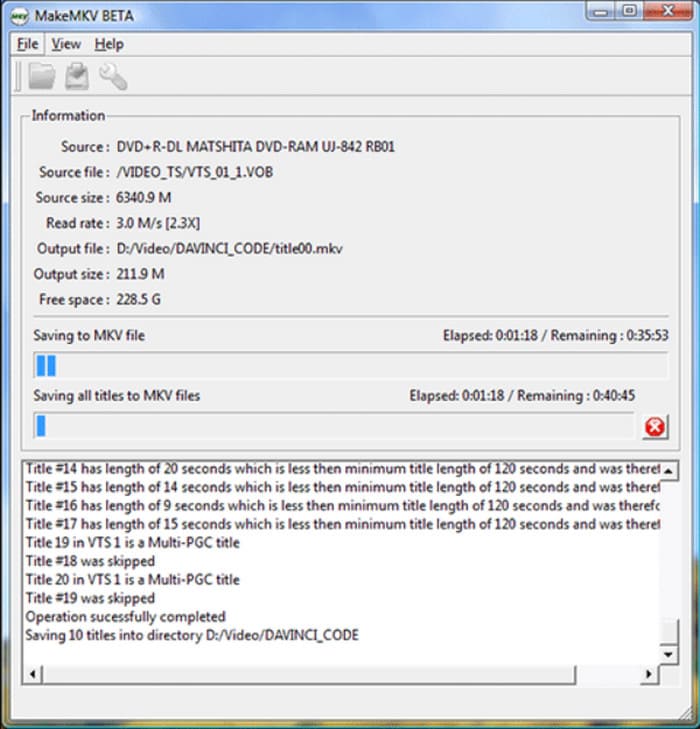
For users who want an open-source approach, MakeMKV is the ultimate choice. It serves as a specialized Blu-ray region-code remover that bypasses regional security handshakes and copies the raw video data directly into a digital container. The software interface looks plain, and it will not compress your files or edit your video. It simply extracts a massive, uncompressed, 1:1 copy of your movie.
Because MakeMKV outputs massive files that can easily top 40 gigabytes per disc, you need HandBrake to finish the job. HandBrake takes that huge file and compresses it into a highly efficient, space-saving format, such as an MP4 or a lightweight MKV.
Our Hands-On Testing Experience
We fed MakeMKV a heavily protected European import disc. The software read through the initial AACS protection layers in roughly four minutes and successfully saved the main movie track as an identical digital file in 32 minutes. However, the output file occupied a massive 38GB of hard drive space. Passing that file through HandBrake to compress it down to an efficient H.264 MP4 took an additional 22 minutes of processing time.
Pros
- MakeMKV and HandBrake are both open-source tools with zero subscription or hidden fees.
- MakeMKV can extract the exact raw video and audio data without re-encoding loss.
- Regular updates of both MakeMKV and HandBrake ensure them adapts well to new open-source decoding needs.
Cons
- Uncompressed output files of MakeMKV can easily exceed 40GB per disc before compression.
- Managing two separate programs can feel tedious and time-consuming for beginners.
- The bare-bones UI lacks modern design and built-in basic video editing tools.
2. Blu-ray Master Free Blu-ray Ripper – Best Overall for Speed
Windows, macOS
Region A, B, C Blu-ray discs, folders, ISO files
MP4, MKV, MOV, AVI, WMV, FLV, and 500+ profiles
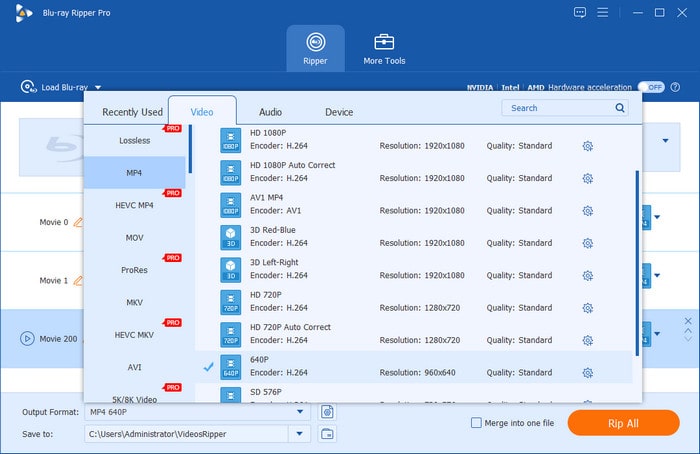
Blu-ray Master Free Blu-ray Ripper is one of the top-rated Blu-ray decrypters. This desktop tool balances a clean, accessible interface with powerful backend decryption tech. It handles region unlocking and video compression simultaneously in a single step, so you don't have to manage multiple apps.
The tool stands out for its smart GPU acceleration hardware pipeline. It bypasses region limitations and compresses the video stream on the fly, allowing it to complete tasks in a fraction of the time required by standard open-source tools. It is an ideal option if you want to quickly clear out regional locks and back up multiple international discs without getting bogged down in complex technical settings.
Free Download
For Windows
Secure Download
Free Download
for macOS
Secure Download
Our Hands-On Testing Experience
To test Blu-ray, we use the Region B locking scheme on a standard external drive. It immediately identified the audio track, bypassing regional restrictions without any manual configuration. We selected the 1080p MP4 format and enabled GPU acceleration. The entire conversion process took only 24 minutes, maintaining excellent visual fidelity while compressing the file size to a manageable 5.8 GB.
Pros
- The GPU hardware acceleration helps finish conversions in a fraction of the time.
- Unlocks regional restrictions and compresses video simultaneously in one step.
- Features a clean, accessible layout with hundreds of pre-configured device profiles.
Cons
- Advanced 4K resolution processing requires an upgrade to the paid version.
- The free tier offers fewer deep customization options for multi-channel surround sound.
3. DVDFab Blu-ray Ripper – Best for Premium Advanced Features
Windows, macOS
All standard Blu-ray discs, 3D Blu-rays, 4K UHD files
MKV/MP4/PASSTHROUGH in 1080p, 4K, and 8K resolutions
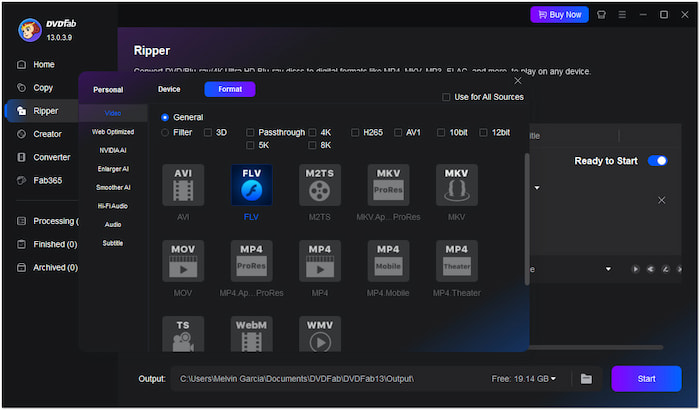
When you run into stubborn discs with complex security features, DVDFab Blu-ray Ripper is the heavy hitter you need. Major Hollywood studios frequently bundle basic regional restrictions with complex copy protections, such as BD+ algorithms or live, cloud-based encryption keys. Standard free programs often crash when trying to read these discs. DVDFab avoids this issue by using a cloud-connected decryption network that automatically pulls fresh decryption keys for new releases.
This tool is especially useful for managing non-standard disc architectures. For example, it easily handles the 'playlist faking' tricks studios like Lionsgate often use to scramble the order of chapters on a disc. DVDFab automatically filters through hundreds of bogus titles to find the correct movie sequence, saving you hours of trial-and-error.
Our Hands-On Testing Experience
We tested DVDFab using a modern, highly encrypted Lionsgate action film. Upon inserting the disc, the software immediately connected to its online database to remove regional restrictions and identified the authentic main audio track within 45 seconds. The conversion process proceeded smoothly, successfully eliminating the persistent Cinavia audio watermark—a feature that often causes audio silence in less robust software.
Pros
- Its cloud-connected database can automatically fetch keys for new and stubborn encryption schemes.
- It can easily bypass advanced protections like Cinavia watermarks and playlist faking.
- It can fully preserve advanced color profiles, including HDR10 and Dolby Vision.
Cons
- The prices of its subscription plans are higher than those of the tools.
- The massive feature set creates a steeper learning curve for casual users.
4. Leawo Blu-ray Ripper – Straightforward Choice for Beginners
Windows, macOS
Blu-ray discs, DVDs, ISO structures
Common formats including MP4, MKV, AVI, and MOV
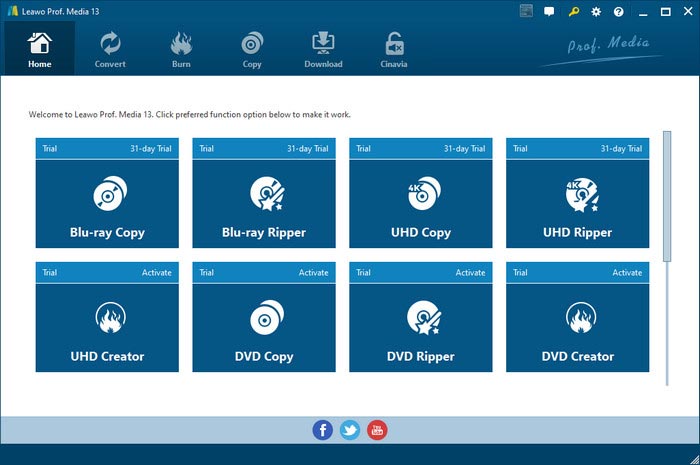
Leawo Blu-ray Ripper is built for folks who do not want to deal with multiplexing options, bitrates, or confusing tech jargon. It simplifies the entire Blu-ray disc region code remover process into a straightforward, visual workflow. It is designed specifically for casual users who just want to convert their foreign discs without a headache.
The best feature here is the highly visual profile selector. Instead of forcing you to decipher video codecs, Leawo lets you pick your target device directly, whether you are exporting to a PlayStation 5, an iPad, or a Roku box. It strips out the regional lock in the background while keeping the core multi-language subtitle tracks and audio streams intact.
Our Hands-On Testing Experience
We tested the Leawo software using a classic European art film disc. Its user interface is exceptionally minimalist and highly intuitive to operate. The software automatically removes regional B restrictions, reliably compresses video without crashing, and converts the entire film to an iPad-compatible format in approximately 38 minutes.
Pros
- Allows users to select specific playback devices rather than be confused by video codecs.
- Extremely simple interface that minimizes technical jargon for casual enthusiasts.
- Safely keeps multi-language subtitle tracks and core surround sound intact.
Cons
- Lacks the highly optimized hardware acceleration found in premium competitors.
- Updates can be slow when dealing with cutting-edge copy protection in recent releases.
Part 4. How to Decrypt and Convert a Region-Locked Blu-ray
Here is a step-by-step guide to unlocking and converting your imported discs. While we are using Blu-ray Master Free Blu-ray Ripper for this guide, the fundamental logic carries over to almost any modern desktop ripping software.
Free Download
For Windows
Secure Download
Free Download
for macOS
Secure Download
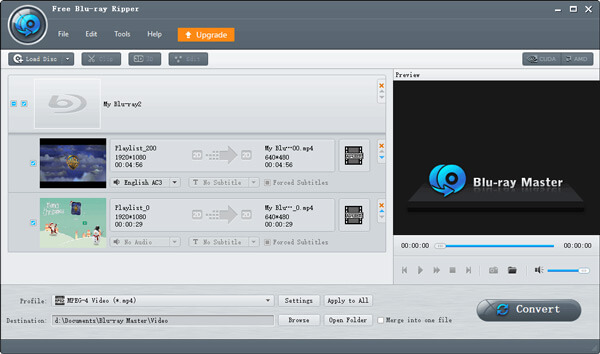
Step 1. Load the Physical Disc
Pop your region-locked disc into your external or internal computer optical drive. Launch your software, and click the Load Blu-ray button in the upper-left corner. The tool will automatically scan the disc, bypass regional restrictions, and display the main movie titles.
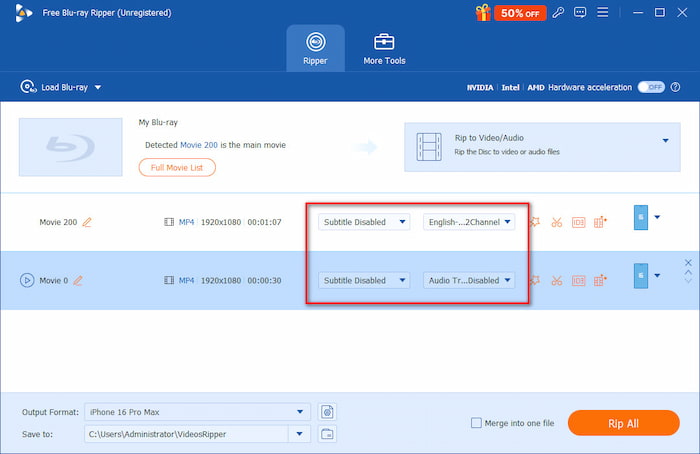
Step 2. Configure Audio Tracks and Subtitles
Don't skip this step! Look at the audio and subtitle dropdown selectors next to the movie title.
- • For Audio: Make sure you select the high-definition multi-channel track (such as DTS-HD Master Audio or Dolby TrueHD) if you plan to watch on a home theater system. Avoid basic AAC 2.0 presets unless you are intentionally optimizing for an iPhone or a laptop speaker.
- • For Subtitles: Check the boxes for your preferred languages. If the movie features foreign-language scenes, select the Forced Subtitles option to avoid missing key dialogue.
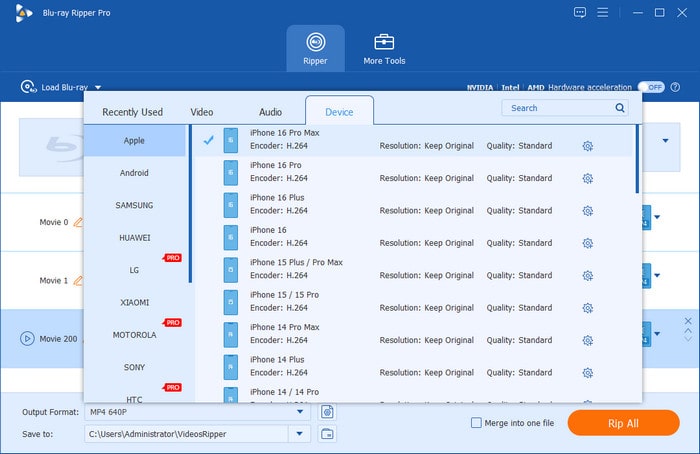
Step 3. Choose Your Output Format
Navigate to the Output Formats selection menu, and there are Video, Audio, and Device sections for you to select the presets.
- • For maximum compatibility across nearly any device, select MP4 (H.264) or HEVC/H.265.
- • If you plan to import this movie into a home media server setup like Plex, Emby, or Jellyfin, selecting an uncompressed MKV format will preserve every bit of the original disc’s high-fidelity glory.
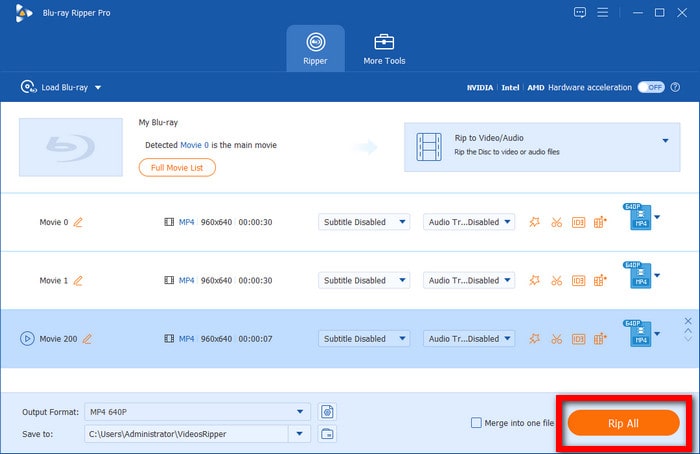
Step 4. Run the Conversion
Choose a destination folder for the ripped videos. Click the orange Rip All button in the bottom right corner to start the process. Once it’s done, you will receive a success message.
Part 5. FAQs of Blu-ray Region Code Removing
-
Is it legal to bypass Blu-ray region codes for personal use?
No, it is not legal. However, as long as you purchase a physical disc and use the digital file strictly for personal, private household purposes, it falls within the generally accepted ethical and feasible scope of security.
-
Can VLC Player play region-locked Blu-ray discs directly?
Out of the box, VLC cannot natively play region-locked physical Blu-ray discs because it lacks the proprietary decryption keys required to read them.
-
Does ripping a Blu-ray change the physical region code on the disc?
No. The regional restrictions on a physical Blu-ray disc are permanently burned into its hardware structure at the factory and cannot be altered. A region code remover leaves the physical disc completely untouched.
-
Why does my external Blu-ray drive limit region changes to 5 times?
This limitation is dictated by the international RPC-2 hardware standard embedded directly into your optical drive's firmware. Manufacturers are legally required to prevent users from constantly switching regions to prevent gray-market media imports.
Conclusion
Blu-ray region code remover software offers a secure, modern solution for playing Blu-ray films from various regions. By converting foreign discs into digital formats such as MP4 or MKV, you can not only eliminate geographical restrictions entirely but also preserve high-quality 1080p video resolution and premium audio tracks like Dolby Atmos.
If you prefer a completely free, open-source project and do not mind a slightly technical, two-step process, the MakeMKV and HandBrake combination is excellent. For casual movie lovers looking for a fast, straightforward, single-click solution, Blu-ray Master Free Blu-ray Ripper delivers the most efficient workflow to liberate your international media library. Choose the tool that best fits your technical comfort level, and turn your locked physical discs into a seamless, future-proof digital collection.
More from Blu-ray Master
Blu-ray Ripper
Rip Blu-rays to any video and audio formats of different parameters for free in minutes.
100% Secure. No virus
