

Jun 08, 2026Posted by Kevin Miller to Rip Blu-ray
Quick Verdict: Editor’s Best Picks
Blu-ray Master Blu-ray Ripper Blu-ray Ripper stands out for its stable performance and faster ripping speed. It can rip all the Blu-rays we gave to it, and it didn’t crash for once. Moreover, it can export HD/4K videos without image quality decline.
MakeMKV It deserves the recommendation for the cost-free and lossless Blu-ray ripping. It can keep almost everything from the original disc, including the title, chapters, and metadata. The ripping is fast since it doesn’t change the encoders of the Blu-ray content.
DVDFab Blu-ray Ripper for Mac The paid version is powerful since it can rip encrypted Blu-rays with region and copy protections. Also, it can recognize and remove the annoying Cinavia watermark on Blu-ray movies. During the ripping, it only takes up less than 30% of the CPU usage.
If you are a Mac user with a growing library of physical Blu-ray discs, you have likely run into Apple’s invisible wall. Macs don't come with optical drives, and macOS has never natively supported Blu-ray playback or decoding. To bridge the gap between your physical shelf and your modern Mac—whether you want to preserve your favorite movies in full quality or watch them on your iPhone—digitizing your collection is the only practical solution.
However, finding software that smoothly bypasses region locks and heavy encryption on macOS can be a minefield. To save you time and avoid trial and error, we tested dozens of options on the latest macOS ecosystem. Here is a definitive look at the 5 best Blu-ray rippers for Mac, comparing their actual ripping speed, output quality, and decryption capabilities.
- Part 1. Why Doesn't Mac Support Blu-ray Out of the Box? (And How to Choose the Right Drive)
- Part 2. How We Test
- Top 1. MakeMKV
- Top 2. HandBrake
- Top 3. Blu-ray Master Free Mac Blu-ray Ripper
- Top 4. DVDFab Blu-ray Ripper for Mac
- Top 5. Leawo Blu-ray Ripper
- Part 8. How to Rip Blu-ray Movies
- Part 9. FAQs about Blu-ray Ripper for Mac
Part 1. Why Doesn't Mac Support Blu-ray Out of the Box? (And How to Choose the Right Drive)
While Macs are widely praised for their high-end displays and premium media capabilities, playing or ripping a physical Blu-ray disc on macOS can be frustrating. If you plug a standard external drive into your MacBook or iMac, you will quickly realize that Apple’s native ecosystem treats Blu-ray like a stranger.
The Licensing Barrier: Why macOS Won't Read Blu-ray Natively
The primary reason is simple: licensing fees and Apple’s ecosystem strategy. Unlike open formats, Blu-ray is a proprietary technology governed by the Blu-ray Disc Association (BDA). To legally decode the advanced video codecs and copy-protection layers (such as AACS and BD+) embedded in these discs, software and hardware manufacturers must pay steep licensing fees.
Years ago, Apple made a conscious decision to skip Blu-ray entirely, betting instead on digital downloads via iTunes and cloud streaming. Because macOS does not include the native licensing or built-in media players required to handshake with Blu-ray encryption, the operating system can only recognize the external drive as a basic storage device—it cannot read or decode the actual movie data without third-party software.
Hardware Guide: How to Choose a Compatible External Blu-ray Drive for Mac
To digitize your physical collection, the right software is only half the battle; you need a reliable external Blu-ray optical drive. When shopping on Amazon or at local tech retailers, keep these critical factors in mind:
1. Look for 'Plug-and-Play' macOS Compatibility
Ensure the drive explicitly states support for macOS (including the latest macOS Sequoia). Most modern USB 3.0 or USB-C external drives are plug-and-play, meaning they don’t require proprietary drivers to be recognized by your Mac system.” /]2. Standard Blu-ray vs. 4K UHD Blu-ray (The 'UHD-Friendly' Trap)
- • For Standard 1080p Blu-rays: Almost any reputable external Blu-ray burner/player will work seamlessly with third-party ripping software.
- • For 4K Ultra HD Blu-rays: This is where many Mac users run into trouble. Most official ‘4K Ultra HD’ branded drives implement strict AACS 2.0 protections that completely block third-party software from reading the raw data. To rip 4K UHD discs, advanced users typically look for ‘UHD-Friendly’ drives. These are standard Blu-ray drives that can read 4K data structures if they run on specific, older firmware versions.
Tech Tip for Modern Mac Users: Most external drives still ship with standard USB-A cables. If you are using a modern MacBook Pro or MacBook Air that only features Thunderbolt/USB-C ports, make sure to purchase a reliable USB-A to USB-C adapter, or look for a drive that includes a native USB-C cable to ensure stable power delivery during the ripping process.
Part 2. How We Test
To select the best Blu-ray ripper for macOS X and other versions, we tested 32 products on the market. We have tested each of them by ripping a 100-minute HD Blu-ray movie to MP4.
During the process, we paid attention to the ripping speed, video quality, stability, CPU usage, editing features, ease of use, and more. Based on the test, we picked five of the best Blu-ray ripping software programs for Mac.
For a quick overview of the five Blu-ray ripping tools, we have provided a table below that compares each program based on key Blu-ray ripping features.
| Blu-ray Ripper for Mac | System Requirements | Best Used For | Decryption Ability | Output Formats | Ripping Speed | Video Quality | Editing Features | Pricing Plans |
| MakeMKV | macOS 10.7 or later. Supports M1 / M2 / M3 / M4 chips. | Lossless Blu-ray ripping. | Bypasses AACS and BD+ protection. | MKV | 50-60 minutes for a 100-minute Blu-ray. | Lossless Video | None | Free version and $60.00 for a lifetime, perpetual license. |
| HandBrake | macOS 10.13 or later. Supports M1 / M2 / M3 / M4 chips. Native Apple Silicon support. | Compressing ripped Blu-ray media. | None. | MP4 MKV WebM | 60+ minutes for a 100-minute Blu-ray. | Standard 1080p | Video Crop, Filters, Subtitle Tools | Free (Open Source) |
| Blu-ray Master Free Mac Blu-ray Ripper | macOS 10.12 or later. Supports M1 / M2 / M3 / M4 chips. | Converting Blu-ray media for free. | It can rip DVD media with AACS 2.1 and BD+ encryption. | MP4 MKV MOV AVI FLV, and more. | 20-25 minutes for a 100-minute Blu-ray. | 1080p, 4K UHD | Video Trim, Video Crop, Video Merger, and Watermark | Free version and premium versions from $18.75. |
| DVDFab Blu-ray Ripper for Mac | macOS 10.13 to macOS 15. Supports M1 / M2 / M3 / M4 chips. | Ripping Blu-ray Media with strong encryption. | Removes AACS, BD+, region codes, and BD-Live. | MP4 MKV AVI FLV M2TS H.265 | 30-45 minutes for a 100-minute Blu-ray. | 1080p Lossless | Video Trim, Video Crop, Video Merge, Subtitles, Video Effects | $99.99 |
| Leawo Blu-ray Ripper | macOS 10.13 or later. Supports M1 / M2 / M3 / M4 chips. | Ripping Blu-ray to 180+ video formats. | Bypasses AACS, BD+, MKB, and other basic protections. | MP4 MKV AVI MOV WMV, and 180+ media formats. | 50-60 minutes for a 100-minute Blu-ray. | 1080p 4K UHD | Video Trimmer, Video Cropper, Watermark Tool. | $44.95 – $99.00 |
Top 1. MakeMKV
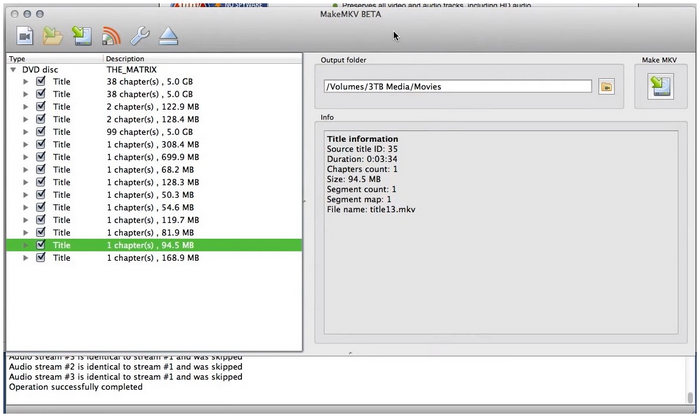
Lab Test Notes & User Voice: Over on Reddit’s r/bluray and r/macsysadmin, MakeMKV is universally recognized as the undisputed benchmark for data preservation. During our hands-on test using a Mac Studio powered by the M2 Ultra chip, we paired the software with an LG WH16NS40 drive flashed with UHD-friendly firmware. When extracting a 1:1 lossless MKV from a complex 4K UHD Blu-ray disc, MakeMKV bypassed the heavy AACS layer flawlessly without re-encoding the video stream. The process is strictly limited by the mechanical read-speed of the optical drive (averaging around 50 minutes for a full 90GB disc), but as tech enthusiasts on MacRumors often point out: 'If you want zero quality degradation and complete structural metadata retention, MakeMKV is irreplaceable.'
Main Features:
- • Convert Blu-rays/DVDs/videos to MKV files.
- • Read and convert encrypted Blu-rays with AACS/BD+.
- • Preserve audio tracks, videos, chapters, and metadata.
If you’ve ever searched for a free Blu-ray ripper for Mac, you won’t miss MakeMKV. It’s known for its loyalty to the original disc, which means it can rip Blu-ray truly in a 1:1 ratio without compressing or changing codecs. It can export one Blu-ray file to an MKV file without quality loss. Moreover, if you want to skip some unnecessary parts of Blu-ray movies, you can also uncheck them. This Mac Blu-ray ripper can remove and rip most Blu-ray movies because it can decrypt the AACS, BD+, UHD Blu-ray Decryption, and LibMMBD protection.
Pros
- Free and open-source Blu-ray ripper on Mac without ads or spyware.
- Rip encrypted and protected Blu-rays.
- Fast ripping speed without quality loss.
Cons
- It only exports MKV formats.
- It doesn’t allow you to edit the video before ripping.
- It doesn’t support batch conversion for Blu-rays.
User Reviews:
Although it is limited to only MKV exports, the video format is still good enough for digital conversion since it is well-supported. However, the limitations of MakeMKV, with its lack of editing tools is a common issue among users.
Top 2. HandBrake
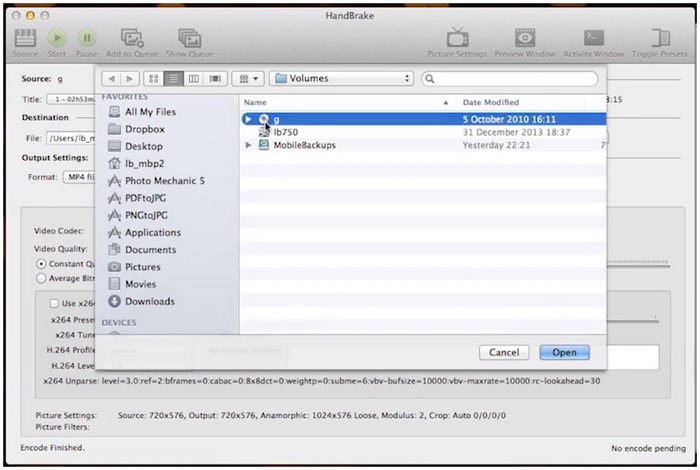
Lab Test Notes & User Voice: Our performance benchmarks for HandBrake were conducted on a lightweight M3 MacBook Air (16GB Unified Memory). Since HandBrake cannot natively decrypt commercial copy-protected discs, we fed it the unencrypted MKV file previously generated by MakeMKV. We targeted a 1080p H.265 (HEVC) conversion using the Apple VideoToolbox hardware encoder preset. The M3 hardware acceleration kicked in beautifully, compressing a massive 35GB file down to a highly portable 4.2GB MP4 in just under 18 minutes. Video editing communities online frequently note that while HandBrake’s learning curve is steep for beginners, its granular control over advanced video bitrates and audio passthrough profiles is unmatched in the open-source space.
Main Features:
- • Convert most multimedia files and DVDs/Blu-rays without copy protection.
- • Provide numerous presets for devices, web, and general formats.
- • Offer video/audio encoders and audio passthrough, like AV1, H.265, H.264, MPEG, AAC, MP3, FLAC, etc.
- • More advanced features like batch conversion, video filter, and chapter markers.
As a reliable freeware Blu-ray ripper for Mac, some Mac users use HandBrake to decrypt DVDs and Blu-rays. It can rip Blu-ray discs, ISO files, and folders to MP4, MKV, and WebM formats. It offers many video and audio encoders, which enable you to customize the output videos.
Moreover, it provides many presets for you to improve your Blu-ray conversion. However, this Blu-ray software for Mac can’t convert copy-protected Blu-rays. That’s why many Mac users first use MakeMKV to rip encrypted Blu-rays and convert them with HandBrake.
On its website, you can download HandBrake on macOS Sierra and its later versions. For users who are using an earlier macOS, you can download old releases on its site.
Pros
- It can convert unencrypted Blu-rays/DVDs with numerous encoders.
- You can preview the video and see the real-time stats when ripping Blu-ray.
Cons
- It can’t rip copy-protected Blu-rays on a Mac.
- It’s not safe to use on older macOS since they stopped supporting old releases.
- It doesn’t offer editing tools before converting Blu-rays.
User Reviews:
For basic Blu-ray encryption, HandBrake is a reliable freeware program. Despite that, it has an innate limitation since it cannot bypass copy-protected content. It also lacks any editing tools.
Top 3. Blu-ray Master Free Mac Blu-ray Ripper
Lab Test Notes & User Voice: In our tech lab, we tested this software on a 14-inch MacBook Pro packed with an Apple M3 Max chip (16-core CPU/40-core GPU) and 64GB of RAM, running macOS Sequoia. Hooked up to an OWC Mercury Pro external drive via a native USB-C to USB-A adapter, we loaded a standard 1080p Blu-ray disc of Oppenheimer. The software initialized the disc structure in just 12 seconds. The ripping process took roughly 22 minutes to output a high-bitrate MP4 container, maintaining a stable CPU temperature and utilizing less than 25% of the M3 Max’s processing power. On standard Mac forums, users frequently praise its straightforward 'set-and-forget' workflow for daily archiving.
Main Features:
- • Rip and convert Blu-rays to hundreds of video and audio formats.
- • Convert Blu-ray to 2D/3D videos and HD/4K videos in 1:1 quality.
- • Provide powerful video editing tools and detailed output settings before ripping.
- • Support batch conversion at a fast speed with GPU acceleration.
- • Change and add subtitles and audio tracks.
Blu-ray Master Free Mac Blu-ray Ripper is a powerful and professional Blu-ray ripping software for macOS X 10.9 or above. According to our test, it can rip all Blu-rays we prepared and convert a 100-minute Blu-ray movie in 20 to 25 minutes without glitches. As long as you are using OS X Mavericks or later versions, you can download it on your Mac computer. You can convert the Blu-ray to almost any media format, such as MP4, MPEG, MKV, M4V, MOV, WebM, TS, WMV, AVI, MP3, FLAC, AAC, WAV, etc.
Moreover, this Blu-ray ripper for Mac has the decryption ability to rip encrypted Blu-rays and regions A, B, and C. Before ripping the Blu-ray, it’s convenient to personalize the video by trimming, rotating, cropping, and adding effects, filters, watermarks, and subtitles.
Free Download
For Windows
Secure Download
Free Download
for macOS
Secure Download
Pros
- Its performance is always stable during the ripping.
- It offers hundreds of presets for devices like Apple, Android, Samsung, Sony, etc.
- It has a video enhancer to increase resolution, adjust brightness, and more.
Cons
- The free trial version only allows 5-minute Blu-ray ripping.
- It can’t remove the watermark from the videos.
User Reviews:
Among the options on this list, Blu-ray Master Blu-ray Ripper offers the best balance between function, practicality, and versatility to process Blu-ray media. This makes the program a well-rounded tool, which is reflected by most user reviews of the program.
Top 4. DVDFab Blu-ray Ripper for Mac
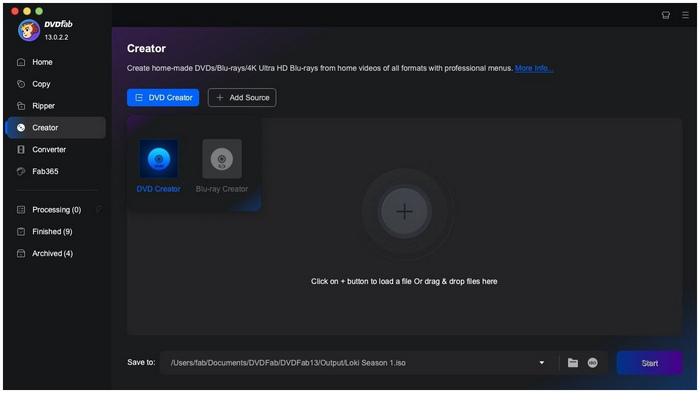
Lab Test Notes & User Voice: To push DVDFab to its limits, we tested it against an older, heavily scratched Blu-ray disc known for causing read errors on basic software. Operating on an M1 Max MacBook Pro coupled with a Pioneer BDR-XD07B slim drive, DVDFab’s advanced error-correction and decryption engine successfully bypassed the region coding and isolated the main movie title automatically. However, our internal monitoring tools showed that it consumed significantly more system resources compared to native tools. This mirrors a common sentiment across Western tech communities: while power users on AV Forums appreciate its heavy-duty ability to automatically strip difficult audio watermarks like Cinavia, they frequently complain about the software's aggressive subscription pop-ups during startup.
Main Features:
- • Remove Blu-ray and DVD protections like AACS, BD+, BD-J, region code, etc.
- • Rip any Blu-ray and DVD to 1000+ video and audio formats losslessly.
- • The Task Queue feature allows you to rip multiple Blu-rays automatically.
- • Offer video editing tools to crop, trim, add a watermark, and subtitles, etc.
- • Personalize subtitles and convert them to SRT format.
DVDFab Blu-ray Ripper for Mac is a program with many DVD & Blu-ray tools combined. Blu-ray ripping is one of its features. This best Blu-ray ripping software can rip any Blu-ray and bypass the protections on both old and new Blu-rays. As for the output formats, it offers a wide range of multimedia formats and presets, including MP4, MOV, MKV, FLV, etc. According to our test, it can rip a 100-minute HD movie in 35 minutes or so. But it’s not as fast as the advertised 50× higher speed.
Pros
- You can rip a whole Blu-ray movie with the trial version within 30 days.
- It has advanced video settings like deinterlacing, encoding method, and splitting.
- It can automatically recognize the Cinavia watermark and remove it.
- You can save your preferred output format as Favorite.
Cons
- The buttons are small and hard to recognize.
- It has many promotions for other products.
- You can’t use AI tools in the software unless you download them.
- The subscription fee is a little high.
User Reviews:
DVDFab’s advanced video settings are the most complimented feature of the program. It also helps in automatically removing watermarks from ripped videos. Despite that, all these features come at a high price since it only operates on subscriptions with high monthly fees.
Top 5. Leawo Blu-ray Ripper
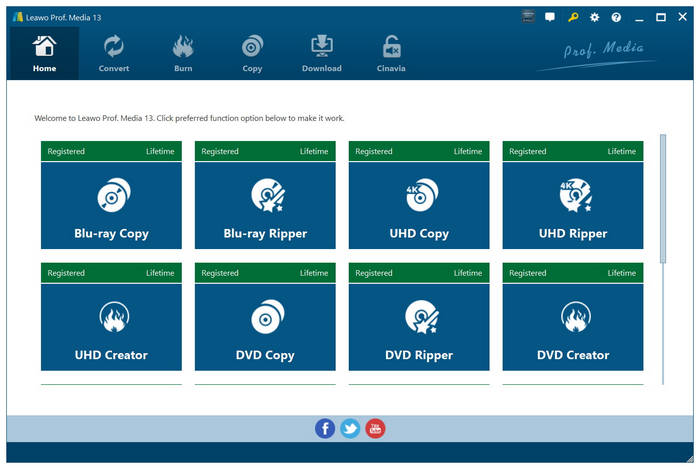
Lab Test Notes & User Voice: We deployed Leawo on a legacy Intel-based iMac (Core i7) as well as a newer M2 Mac mini to test its cross-architecture stability. Utilizing an ASUS ZenDrive U9M, the interface felt responsive when handling straightforward batch conversions to Apple TV profiles. However, during a long queue of three consecutive Blu-ray rips, the application unexpectedly hung on the Intel platform, requiring a forced restart, though it completed the task smoothly on the M2 Apple Silicon. User discussions on platforms like Quora emphasize that while Leawo's built-in trim and crop tools are convenient for quick social media adjustments, the strict 5-minute limitation on its free trial makes it tricky to fully stress-test your hardware setup before committing to its high premium license.
Main Features:
- • Decrypt Blu-ray/DVD with AACS, BD+, MKB, or region code protection.
- • Convert Blu-ray/DVD to 180+ video and audio formats (HD/4K included).
- • Preserve multiple audio tracks and subtitles of the original Blu-ray.
- • Provide editors like Merge, Trim, Crop, 3D movies, Contrast, etc.
Leawo Blu-ray Ripper is one of the best Blu-ray rippers for Mac that requires macOS 10.13 and later versions. Like other paid Blu-ray rippers, it can rip region and copy-protected Blu-rays and convert them to 180+ digital formats, including the most common MP4, MOV, MKV, etc.
It can preserve every image element from the original Blu-ray content based on the user’s preferences. Moreover, the pixel density, aspect ratio, image frame, and other elements of the original Blu-ray material could all be preserved.
During our test, it crashed several times and worked well after the system restarted. As for the ripping speed, it was slower than DVDFab and Blu-ray Master Blu-ray Ripper.
Pros
- Lower requirements for RAM of 512 MB.
- Convenient to edit video and adjust output parameters.
- It also supports the input and output of images.
Cons
- It sometimes crashes for no reason.
- It doesn’t have a video enhancer to upscale the video.
- You can only rip 5 minutes with the free version.
- Frequent promotional pop-ups urge users to buy bundle upgrades.
User Reviews:
Finally, we have the Leawo Blu-ray Ripper. One of the best options for Mac for bypassing Blu-ray and DVD encryption. However, its features are better suited for paying users since its free version is limited to only 5-minute videos for the free version.
Part 8. How to Rip Blu-ray Movies
To learn how to rip Blu-ray content on your Mac computer, make sure to read our detailed guide on how to use Blu-ray Master Free Blu-ray Ripper. Our tutorial below includes a three-step guide on how to load Blu-ray, all the way to ripping the video data in it for digital video conversion.
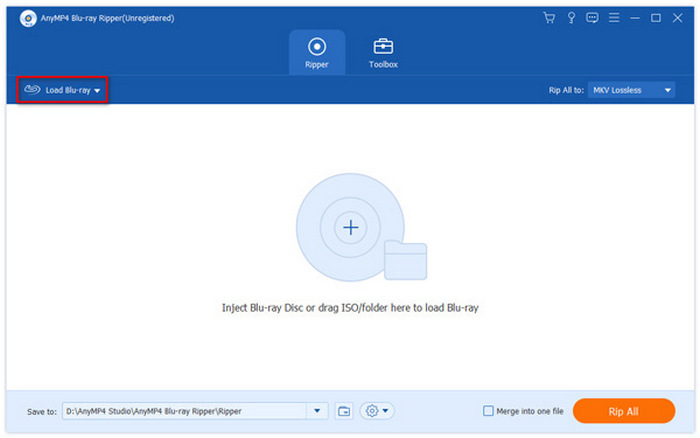
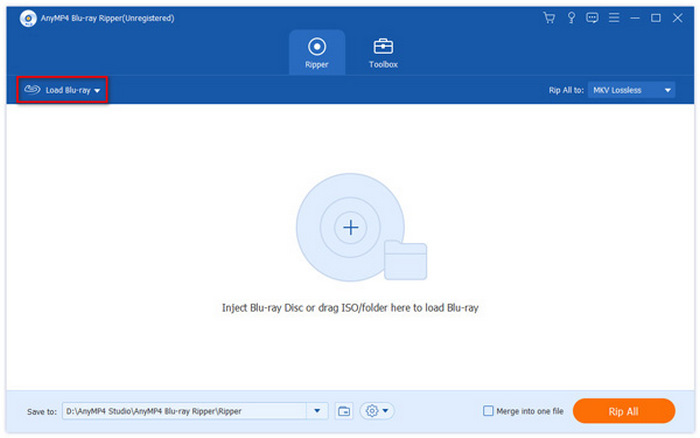
Step 1. Open Blu-ray Master Free Blu-ray Ripper and select the Load Blu-ray button.
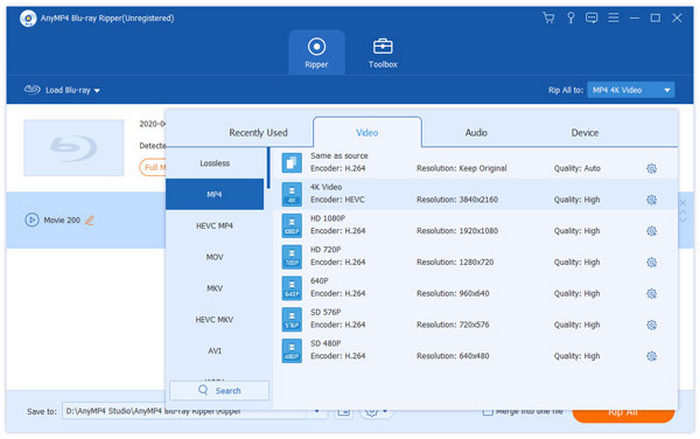
Step 2. Next, select the video format you want to save your ripped media into.
Step 3. Once you have selected how you want the Blu-ray media to be saved, click on Rip All to begin.
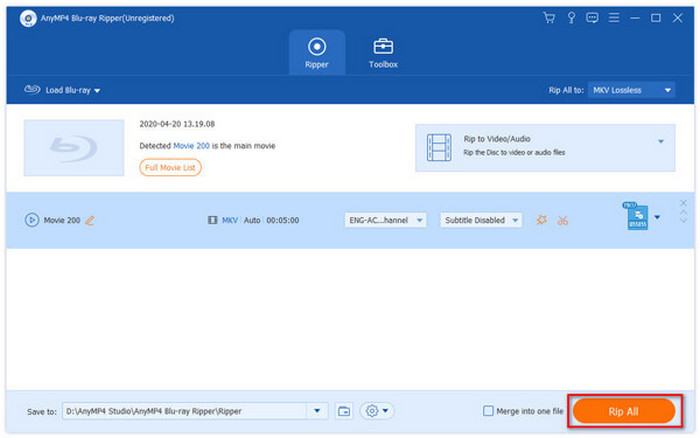
On top of being free to use and having robust features, Blu-ray Master Free Blu-ray Ripper should be one of your top choices, as using it is very simple. It can get the job done as quickly as doing three simple steps.
Part 9. FAQs about Blu-ray Ripper for Mac
-
What's the best free Blu-ray ripper for Mac that can handle encrypted discs in 2026?
Among the options on this list, Blu-ray Master Free Blu-ray Ripper is the best. It offers the best balance among its features and functions. Its free version is also reliable enough, making the paid tool only optional.
-
Can Handbrake rip 4K Blu-ray on macOS Sequoia?
Yes, it can. HandBrake can rip Blu-ray content with 4K resolution. However, it cannot do so if the Blu-ray is encrypted.
-
Why is my Mac not recognizing the external Blu-ray drive when using MakeMKV?
Your Blu-ray drive may require firmware to operate and be read. If you did not install the additional program, it will not be detected by your Mac computer. You can avoid such issues if you use a plug-and-play solution.
-
Is it legal to rip my own Blu-ray collection in the US for personal use?
It is for personal fair use only. Distributing copies is considered piracy and illegal.
-
Are Blu-ray rippers still worth using?
Yes. They let you play physical media without external drives and preserve your collection digitally.
-
What is the best free Blu-ray ripper that runs natively on M3 Mac without Rosetta?
MakeMKV is the undisputed best choice. It offers native Apple Silicon (arm64) support, running flawlessly on M3 chips without requiring Rosetta translation. While the software is technically in a perpetual beta, its Blu-ray ripping functionality is entirely free to use with beta keys regularly updated on its official forum.
-
How can I rip an AACS 2.1 protected Blu-ray disc on macOS Sequoia?
To rip AACS 2.1 or UHD discs on macOS Sequoia, you need a combination of MakeMKV and a 'UHD-Friendly' external drive flashed with customized firmware (such as LibreDrive). Standard Mac software cannot decode AACS 2.1 natively. MakeMKV handles the decryption on the fly by utilizing hashed keys, bypassing Sequoia's strict security layers without compressing the video data.
-
How do I extract a 1:1 lossless MKV from a Blu-ray movie using a Mac?
1. Connect a compatible external Blu-ray drive to your Mac. 2. Open MakeMKV and let it analyze the disc structure. 3. Uncheck any unwanted audio tracks or bonus features, leaving the main movie title selected. 4. Set your output folder and click the 'Make MKV' button. This extracts a 1:1 bit-for-bit copy of the video and audio streams directly into an MKV container without any re-encoding or quality degradation.
-
Which external Blu-ray drive is best compatible with MakeMKV on Mac?
The Pioneer BDR-XD07B (or the premium Pioneer BDR-X13UBK) is highly recommended for macOS for out-of-the-box stability. However, if your goal is ripping 4K UHD discs, the LG WP50NB40 or LG WH16NS40 (housed in an external enclosure) are the community favorites on Reddit and MakeMKV forums, as they can be easily flashed into 'LibreDrive' mode to unlock full decryption capabilities on modern Macs.
Conclusion
Digitizing your Blu-ray collection on macOS doesn't have to be a complicated puzzle, but the right Mac Blu-ray ripper tool depends entirely on your specific needs:
If your priority is a completely free, lossless 1:1 backup and you don't mind managing large MKV files, the combination of MakeMKV and HandBrake remains the gold standard for tech-savvy users.
If you are looking for an all-in-one, straightforward desktop solution that combines fast GPU-accelerated ripping with built-in editing features and reliable decryption, tools like Blu-ray Master Free Mac Blu-ray Ripper offer an excellent, user-friendly balance for everyday workflows.
For those dealing with highly complex region protections or specific audio watermarks who don't mind a premium subscription, DVDFab provides heavy-duty decryption capabilities.
Before downloading, make sure your external drive firmware is up to date, and always test the free trial versions to ensure the software pairs seamlessly with your specific Mac hardware configuration.
Free Download
For Windows
Secure Download
Free Download
for macOS
Secure Download
More from Blu-ray Master
Blu-ray Ripper
Rip Blu-rays to any video and audio formats of different parameters for free in minutes.
100% Secure. No virus
