

May 15, 2026Posted by Kevin Miller to Rip DVD
Quick Selection Guide
Choose the Best Mac DVD Ripper Easily
For an easier time selecting which software is best for you, we will recommend the fastest, easiest, and best value options. For speed, MakeMKV is a good choice. For ease of use, Blu-ray Master Free DVD Ripper is the best. Finally, the best value option is HandBrake.
With digital streaming becoming more popular today, it might be time to copy or extract your videos from a DVD. You will need a dedicated ripping program, but choosing the right Mac DVD ripper can be challenging. You’ll have to consider the performance, offered features, and pricing to make ripping more worthwhile. With that said, we chose the 10 best ripping tools as of 2024 and will provide honest reviews so you can pick the best one for your DVDs.
Table of Contents
Part 1. Tips to Select a DVD Ripper for Mac
For an objective performance assessment of our selected DVD ripper tools, we set a fair testing environment for all the software using a MacBook Pro M3 laptop as the hardware, where the ripping test was done. The DVD we used for each software contains 4.7 GB of data, and we set a ripping time standard of 5 minutes and 30 seconds.
With these testing standards now set, it is quite overwhelming to learn that there are too many DVD-ripping software programs available on the market, especially since they differ in terms of ripping performance, output quality, and offered features. In this case, consider some of the following factors when looking for the desired DVD ripper on Mac:
Compatibility: The first factor to consider is whether a tool is available for an OS. Unfortunately, a professional DVD ripper with an impressive feature set is not compatible with Mac. Always check first if the software has a Mac version.
Encryption Capability: Moving forward, we also tested each program based on its security bypass features. We used the strong Disney 99-title protection as the baseline for strong copy protection and the standard CSS for basic ripping limitation.
Speed: Ripping a DVD takes a lot of time, but this can be lessened if the tool is equipped with advanced GPU acceleration for fast processing.
Quality: Of course, the quality of the result will be the most important factor when choosing a DVD ripper for Mac. Not all high-speed solutions can retain the original quality; rather, they can damage the video file.
Ease of use: If you are not into technical settings, you may need a user-friendly DVD ripper to navigate it easily. Unlike older versions, most modern ripping tools have this character.
Handle Encrypted DVD: The encryption on your DVD will hinder you from ripping the content for copyright protection. So, it is important to look for a DVD ripper that bypasses it.
Special Features: It would be better if the Mac DVD ripper included additional features beyond ripping. You may need a movie maker option to enhance or edit the video, so that an all-around tool would be a good choice.
In addition to using the key factors to choose the best ripping software, you can also effectively test a product by measuring ripping speed and time, checking which DVD types are supported, and verifying whether videos can be exported with compatibility for other devices. This will help you break down the alternatives for ripping and make the right choice.
Legal Disclaimer: For our US and EU readers trying to use this guide for selecting DVD rippers, make sure to only use this software for personal backup of your own DVD and avoid distributing ripped DVD content to avoid piracy issues.
Part 2. Top 10 DVD Rippers for Mac
| DVD Rippers | Output Resolution | Supported DVD Types | Encrypted DVD | Processing Speed |
| Blu-ray Master Free DVD Ripper | 1080P | DVD-5, DVD-9, ISO, DVD folder, etc. | Supported | Fast |
| HandBrake | 720p | Standards, DVD-ROM, DVD-Audio, etc. | Supported | Slow |
| VLC | 720p | DVD-5, DVD-9, etc. | Not Supported | Slow |
| MakeMKV | 720p | DVD+R, DVD-9, etc. | Supported | Average |
| MacX DVDRipper Pro | 1080p | DVD-5, DVD-Audio, etc. | Supported | Fast |
| Mac DVD Ripper Pro | 1080p | DVD-R, DVD-9, DVD-5, etc. | Not Supported | Fast |
| Movavi Video Converter | 1080p | Standards, DVD-ROM, etc. | Not Supported | Fast |
| VideoProc Converter AI | 720p | DVD-RAM, DVD-ROM, etc. | Supported | Fast |
| DVDFab DVD Ripper | 720p | DVD-R, DVD+R, DVD-9, DVD-5, etc. | Supported | Average |
| FFmpeg | 720p | Standards, DVD-RAM, DVD-ROM, etc. | Not Supported | Average |
Blu-ray Master Free DVD Ripper
Free
macOS 10.12 or above
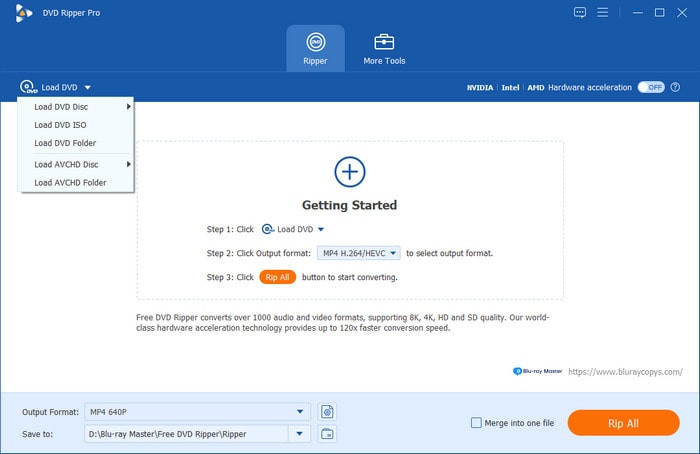
You can start with a professional, easy solution: Free DVD Ripper. The desktop software provides a user-friendly interface for ripping DVD-9, DVD-5, DVD-R, and other discs instantly. It is designed with an advanced algorithm that allows you to choose an output format for exporting videos, including FLV, MP4, MKV, etc. It lacks video editing capabilities, but it does offer built-in cropping, merging, splitting, filters, and effects. Moreover, it is perfect for all types of DVDs, effortlessly bypassing region codes and encryption. All in all, Free DVD Ripper is the best solution for DVD extraction.
Free Download
For Windows
Secure Download
Free Download
for macOS
Secure Download
Pros
- Robust DVD-ripping technology without losing the original quality.
- Presets to make videos compatible with Samsung, HTC, Apple, etc.
- Best for ripping standard DVDs, ISO files, and others.
- 100% free without applying watermarks to videos.
Cons
- Dependent on hardware and a strong internet connection.
Editor’s Choice Reason: When it comes to ease of use alone, the modern interface design and well-labeled features of the software made it the most beginner-friendly program on this list. As such, we also used it as the software featured in our tutorial on how to rip DVDs on Mac.
HandBrake
Free
macOS 10.13 or later
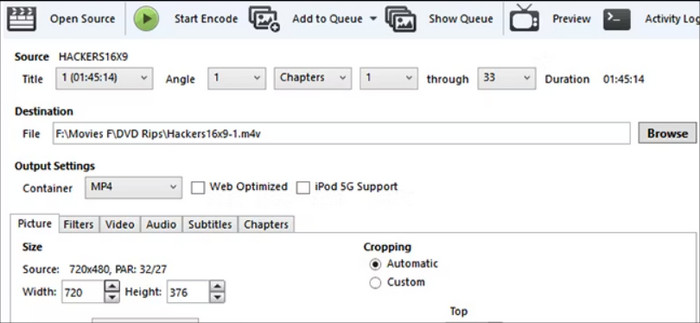
This Mac DVD Ripper is a versatile tool for converting, modifying, and ripping videos. It creates high-quality digital files without damaging the physical copies. It also has settings to fine-tune video and audio, with parameters for the output quality. Although HandBrake is free, it is upgraded regularly by a dedicated community and volunteers.
Although HandBrake claims full Mac compatibility, on our M3 Max MacBook Pro, enabling ‘Video Toolbox’ hardware acceleration tripled the speed but introduced slight noise artifacts in dark scenes. For users seeking archival-grade quality, we recommend sticking with software encoding (x265) instead of hardware acceleration.
Pros
- Best open-source DVD ripper.
- A wide variety of output formats, such as MOV, MKV, AVI, etc.
- Preconfigured presets with different quality levels.
- Manually adjust the codec, bitrate, FPS, etc.
Cons
- Too slow in ripping and exporting.
Editor’s Choice Reason: HandBrake was our recommended best-value software due to its being an open-source solution as well as its Apple Silicon native acceleration.
VLC
Free
macOS 10.7.5 or later
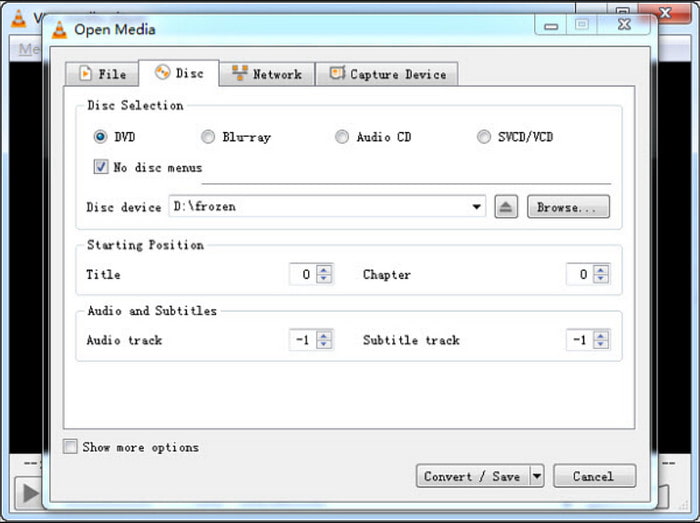
VLC mainly focuses on providing a streaming platform on your computer, but it is also a free DVD ripper alternative for Mac if you don’t want to spend money. It provides straightforward functionality for ripping DVDs to MP4 or AVI, but otherwise lacks customization options. However, if you want an easy solution, VLC is a good choice.
Do not rely on VLC for transcoding. In our tests, converting DVDs to MP4 often resulted in missing secondary subtitle tracks. If you need to preserve multilingual subtitles, avoid using VLC as a converter—it is far better suited as a player.
Pros
- No additional extensions for DVD ripping.
- This Mac DVD ripper supports most standard DVD types.
- The processing speed is good with upgraded hardware.
Cons
- No advanced settings for codec encoding, deinterlacing, etc.
Our Verdict: Although it is not a DVD ripper per se, VLC’s transcoding feature offers basic AI deinterlacing, making it a viable solution for enhancing videos with AI. However, it is not designed to function as such regularly, so only use it if there are no other options available.
MakeMKV
$60
macOS 10.7 and later
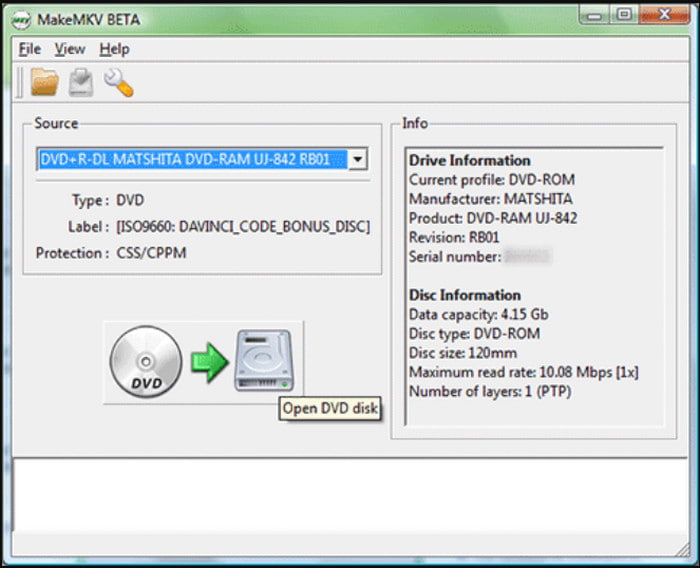
MakeMKV is one of the best DVD ripping software programs for Mac that lets you convert DVD content to MKV. Since MKV is the output format, the tool helps preserve most of the data from DVDs, including metadata, chapters, and more. MakeMKV offers a free trial version, but you can unlock more of its powerful features by upgrading to the pro version.
Note that on 2026 external all-in-one optical drives, an insufficient power supply may trigger a ‘SCSI error’ in MakeMKV. Using the included dual-head USB power cable eliminated read interruptions in our tests.
Pros
- Suitable for all DVD and Blu-ray types.
- Support ripping encrypted discs.
- Reliable processing speed,
Cons
- MKV is the only supported output format.
Editor’s Choice Reason: Although MakeMKV preserves most of the data on the DVD you process, it is highly optimized, making it also the fastest to use among the DVD rippers in this guide.
MacX DVD Ripper Pro
$39.95
Mac OS X 10.6 and later
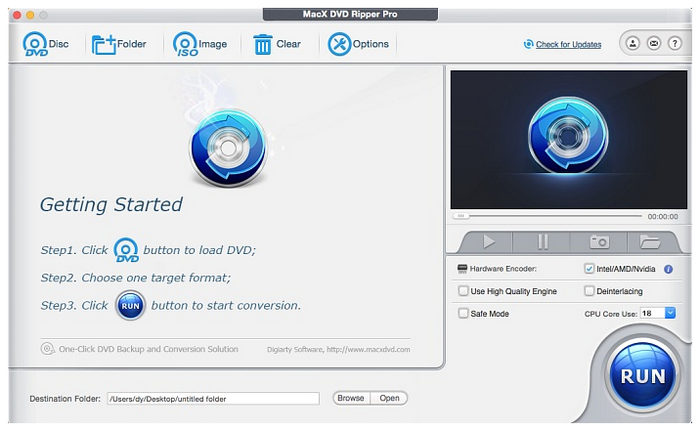
MacX DVD Ripper Pro is a dedicated DVD ripping tool for macOS made to rip and bypass commercial, protected, damaged, and region-locked DVDs, converting them into digital formats like MP4, MOV, and MKV. This makes it a versatile ripper tool and a good upgrade from only using free DVD extractor software.
When testing on macOS Sequoia (15.x), we found that if ‘Safe Mode’ was not enabled, the software occasionally froze at 34% when converting older Disney DVDs with 99-title protection. If this occurs, click ‘Check for Updates’ to ensure the decoding library is up to date.
Pros
- Excellent DVD protection bypass.
- It can handle damaged or old discs.
- Fast DVD ripping speed, even for larger DVD content.
Cons
- Dated-looking interface design.
- It has an expensive price tag since it only offers a one-time payment option.
Technical Tip: To avoid errors when trying to encode heavily protected content, make sure to use Safe Mode when using the tool for processing 99-title protected content.
Mac DVDRipper Pro
$59.95
macOS 11 and later
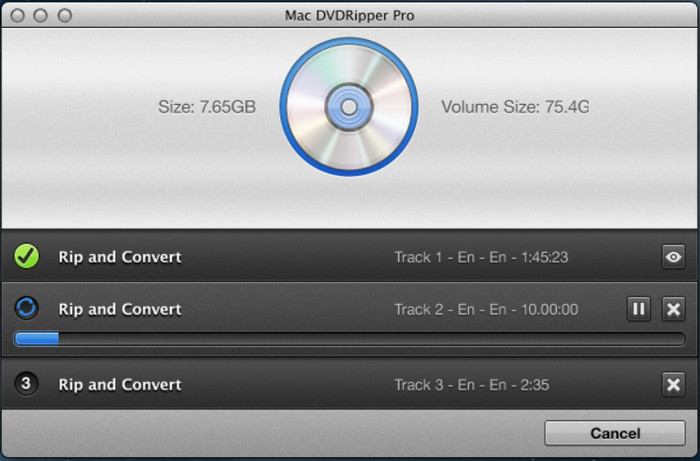
Mac DVDRipper Pro’s objective is to make your DVDs compatible with your devices, including Android, iPad, iPhone, and more. It is also flexible enough to rip, copy, or make backups on your computer with just a few clicks. Additionally, this macOS DVD ripper lets you cut unwanted parts from your video so you can skip the ads and trailers.
Pros
- Burn videos to a new blank disc.
- Use AI to upscale videos to HD resolution.
- Create DVD archives with MDRP.
Cons
- Only allows five rips.
- Lack of other basic editing features.
Technical Tip: In Apple’s 2026 ecosystem, H.265 (HEVC) has become the dominant standard. On top of its native support for modern 4K resolution, H.265 files are about 40–50% smaller, which is ideal for Mac’s expensive SSD storage. We recommend saving ripped DVD data via the H.265 codec.
Movavi Video Converter
$69.95
macOS 11.0 or higher
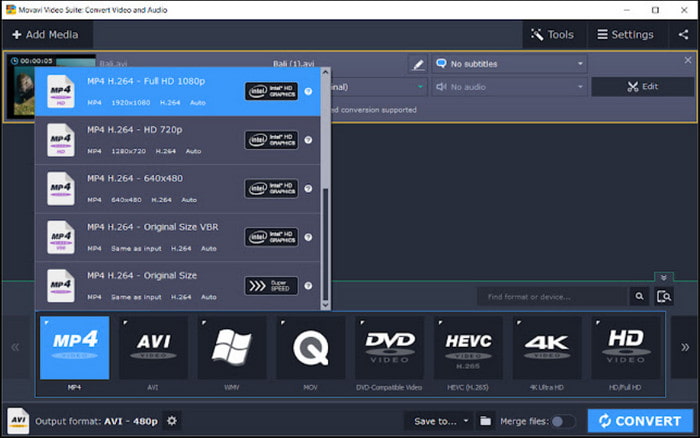
Movavi Video Converter is an all-in-one DVD ripping software for Mac. It is well-known for its versatility. The provided editing functions also work wonders, allowing you to further enhance videos in visual and output settings.
Pros
- Upscale extracted videos in HD resolution.
- Works well for converting, compressing, etc.
- User-friendly, so it is easy to use.
Cons
- Potential watermarks are visible in the output.
- The pro version is too expensive.
Our Verdict: Among the options on this list, Movavi Video Converter offers basic AI upscaling. Although generally more powerful than AI deinterlacing, it is still not optimized for handling DVD content.
VideoProc Converter AI
$59.95
macOS 10.10 and later
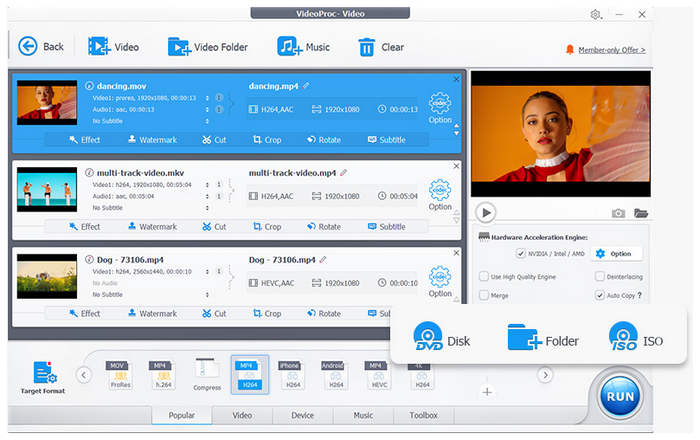
VideoProc Converter AI is an all-in-one video processing tool that combines conversion, compression, editing, and AI enhancement—with DVD ripping as a secondary feature. Although DVD ripping is only its secondary feature, this makes all of its AI tools applicable to ripped DVD content. With that in mind, you can use the tool to enhance converted DVD videos using AI video enhancements.
It also has superb format support and is equipped with presets for easier output format selection. For faster processing, it also has hardware acceleration.
Pros
- Equipped with AI video enhancement tools.
- Easy to use and highly intuitive interface.
Cons
- Its DVD ripping feature is only a secondary feature to its AI tools.
- It has severe ripping limitations for copy-protected DVDs.
Our Verdict: If you plan to use AI video enhancement features on your ripped DVD media, we can recommend using VideoProc Converter AI. This made it a good choice for enhancing personal videos saved on DVDs.
DVDFab DVD Ripper
$67.99
macOS 10.10 – 15.x
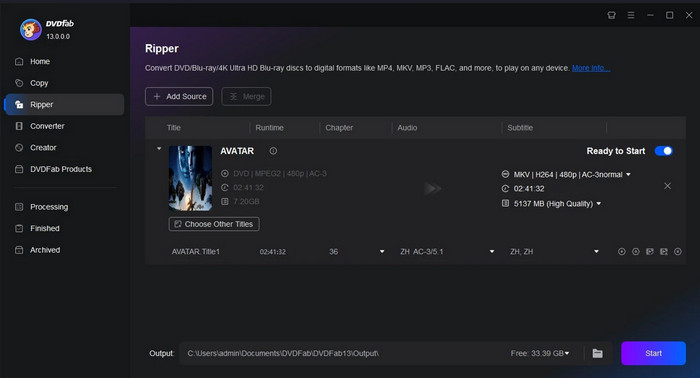
When you need to rip DVDs on a Mac and edit the extracted files without extra software, DVDFab DVD Ripper is a great choice. It promises a reliable processing time of up to 5 minutes while preserving the original quality. The DVD ripper’s built-in editing functions are also a good addition, allowing you to crop, trim, and add subtitles.
Pros
- Automatically enhance videos through AI.
- Recognize and rip new encrypted DVDs.
Cons
- The trial version only supports output formats like MKV and MP4.
- Limit resolution to 480p.
Our Verdict: DVDFab can bypass system-level region code checks and read raw disc data directly, preventing unnecessary consumption of your limited region changes. As such, it is a good choice for watching region-protected content without locking your DVD driver.
FFmpeg
Free
macOS 11 and later
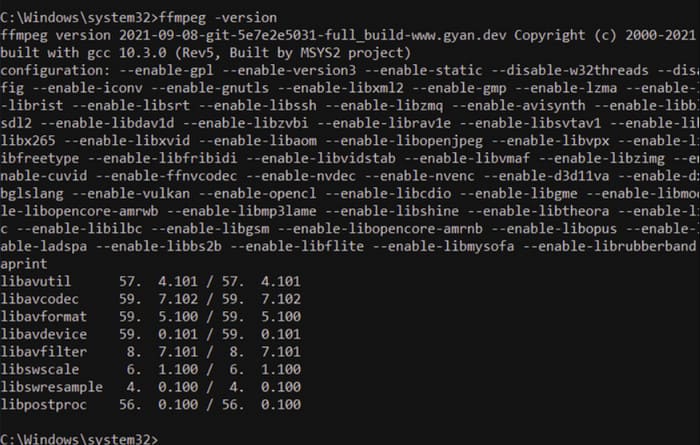
FFmpeg is a versatile program widely used for video converting, editing, etc. It is also a great DVD ripper for Mac, as it can extract content from discs using text commands rather than the graphical interface most ripping tools use. Moreover, you can use its editing features to adjust the bitrate, resolution, and format for free.
Pros
- It is open-source, allowing users to modify the software.
- Provide noise reduction, deinterlacing, and filters.
- Modify the extracted file with new metadata.
Cons
- Too complex for beginners.
- Require upgraded hardware.
Our Verdict: Among the options on this list, we found that FFmpeg has potentially limitless video adjustment capabilities. However, its steep requirement for learning the proper commands is a major accessibility limitation.
Part 3. How to Rip DVDs on Mac
Now, after learning the 10 best DVD rippers for Mac, you would still be confused about how to rip DVDs on Mac computers. We will take Blu-ray Master Free DVD Ripper as an example to show you the detailed ripping steps.
Step 1. Download and install Blu-ray Master Free DVD Ripper from the download buttons below. Double-click the software to open it on your Mac.
Free Download
For Windows
Secure Download
Free Download
for macOS
Secure Download
Step 2. Insert a DVD into your optical drive. Click Load DVD > Load DVD Disc to scan your DVD. Then, select whether you want to open the DVD’s Main Title or Full Title List.
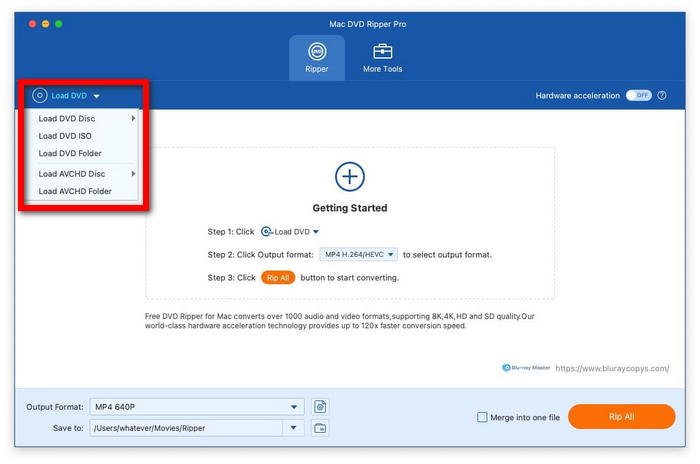
Then, select whether you want to open the DVD’s Main Title or Full Title List.
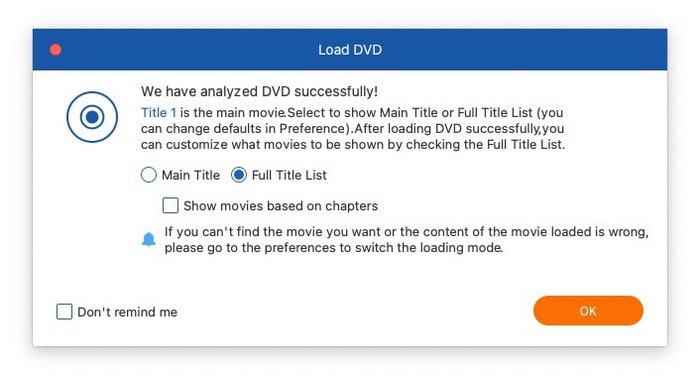
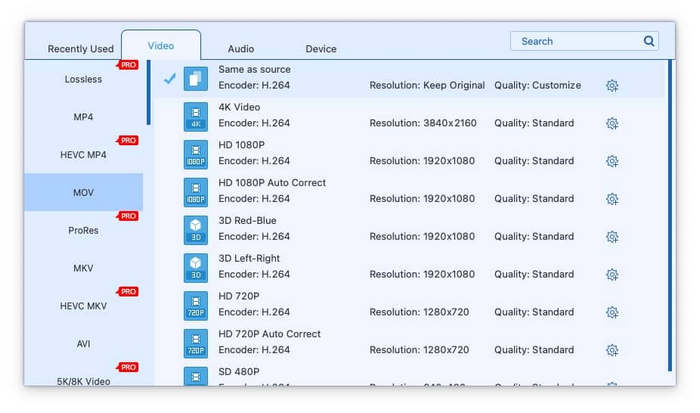
Step 3. Select the Output Format option to choose your desired option. Among these options, MOV and MP4 are good options. You can even customize your output parameters by clicking Settings, such as encoder, bitrate, resolution, and more.
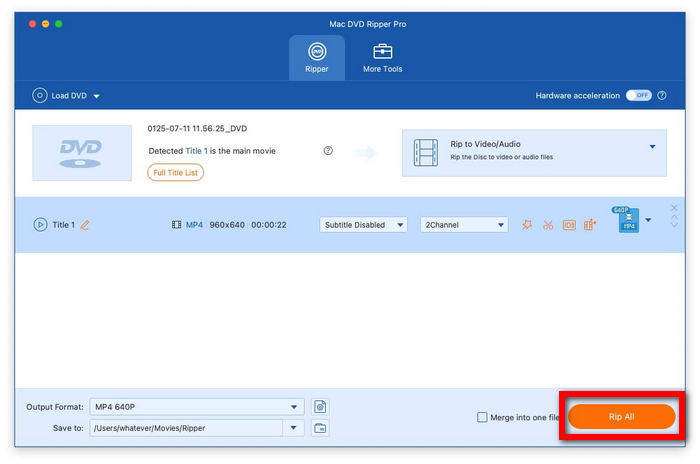
Step 4. With the Output Format now set, go back to the main interface of the software. Then, click on Rip All to begin the DVD ripping process and have your media converted into a digital format.
Part 4. FAQs about DVD Ripper for Mac
-
Does Mac have a DVD Ripper?
Unlike Windows, Mac does not have a built-in DVD ripping program. Fortunately, several third-party alternatives are available for downloading to copy, extract, or back up content from the disc. You can start with the top 10 reviewed tools in this post.
-
Is the Mac DVD Ripper Pro safe?
Yes, it is safe to rip discs with this software. It offers great features, including backup, flexible ripping, adding subtitles, and more. Moreover, the DVD ripper is equipped with high security to protect files before and after ripping.
-
How do I rip a DVD to my Mac for free?
Included in the top 10 DVD rippers for Mac, Free Blu-ray Player, HandBrake, and MakeMKV are the best options for free ripping. They offer various features to help you extract or copy titles from a disc, as well as editing functions for further modifications.
-
What is the best free DVD ripper for Mac that can handle copy-protected discs?
HandBrake is the best in this case since it can handle protected discs natively. Other freeware requires a plug-in setup to access copy-protected content. For an easier option, Blu-ray Master Free DVD Ripper is another excellent choice.
-
Does HandBrake work on macOS Sequoia to rip commercial DVDs?
No, it cannot. HandBrake cannot rip commercial DVDs on macOS Sequoia hardware natively. You have to learn how to install the libdvdcss plug-in first to open protected DVDs.
-
How can I rip a DVD to my Mac without losing original video quality?
MakeMKV is a good option in this case. Ripped DVD content saved in MKV has lossless quality. However, beware, since these raw MKVs are very large.
-
Which DVD ripper is optimized for Apple M3 chips for faster encoding?
HandBrake supports native hardware acceleration from Apple. Alternatively, FFmpeg supports the more advanced Apple Silicon acceleration. However, HandBrake is better in this case since it is way more beginner-friendly and easier to use.
-
Is MacX DVD Ripper Pro better than WinX DVD Ripper?
They are essentially the same program. MacX DVD Ripper is for macOS. Meanwhile, WinX DVD Ripper is for Windows. As such, neither of them is better.
-
Is it legal to rip my own Disney DVDs on a Mac in the US?
No, it is not. Disney DVDs are prohibited and highly encrypted to combat ripping. It is still prohibited even for personal use.
Wrapping up
There are the top-rated 10 best Mac DVD rippers for you to choose from. Ripping solutions vary in their features and functions, and some might not be what you are looking for. However, the Blu-ray Master Free DVD Ripper should be enough for professional ripping, with advanced features to maintain original quality. Both the free and paid versions of the software are best used as DVD rippers for Mac. It can also be used as a solution for ripping copy-protected DVDs on Apple desktops.
More from Blu-ray Master
- 5 Best Free DVD to MP3 Converters in 2026 (Tested & Ranked)
- 4 Best DVD Decoders for Windows & Mac (2026 Free & Paid)
- 5 Best DVD Rippers for Windows 11/10 in 2026 (Free & Tested)
- Top 3 Linux DVD Rippers to Convert DVDs for Free in 2025
- 10 Best Multi-Region DVD Players (2026): Play Any Disc Anywhere
- Best Multi-region Blu-ray Players 2026: Hardware & Software
Top-rated DVD Ripper
Fast and free ripping software to decrypt all DVDs to digital easily on your computer.
100% Secure. No virus
