

Jun 05, 2026Posted by Kevin Miller to Rip DVD
Quick Selection Tips:
Blu-ray Master Free DVD Ripper: Best for common users who want to quickly extract the standard DVD audio files with one click.
VLC Media Player: Best for users who already have it installed and want a quick way to access DVD audio files.
MakeMKV & Audacity: Best for people who pursue the perfect DVD audio extraction to enjoy the audio anywhere.
HandBrake: Best for open-source enthusiasts who need highly customizable audio codec encoding parameters and downmixing configurations
WinX DVD Ripper: Best for Windows users who need a dedicated desktop utility with decent DVD ripping speed.
Have you ever tried to extract the audio files from DVD movies, such as a rare, out-of-print concert DVD? Extracting DVD audio isn't as straightforward as copying a file. Between complex multi-channel audio tracks (like Dolby Digital AC-3 or DTS) and modern copy protections, most generic audio converters will simply throw an error.So, you need a professional DVD audio ripper to get audio files. In this guide, we will show you the 5 best free DVD to MP3 converters. Whether you're ripping a live music album or archiving your favorite movie commentaries into podcast-style MP3s, they can help you.

- Part 1. Why Rip DVD to MP3? Understanding DVD Audio Formats (AC3 vs. DTS)
- Part 2. Top 5 DVD to MP3 Converters
- Part 3. How to Convert DVD Audio to MP3
- Part 4. FAQs about Best Free DVD to MP3 Converter
To deliver accurate, unbiased recommendations for the best free DVD-to-MP3 converters, we put every tool through a rigorous, standardized testing process. We don't just review features; we measure real-world performance using a consistent physical media source and standardized computing environments. We conducted the testing using a desktop PC running Windows 11 Home (Intel Core i7-12700K CPU, 32GB DDR4 RAM, 1TB NVMe PCIe 4.0 SSD) and an M2 MacBook Air running macOS Sonoma (8-core CPU, 8-core GPU, 16GB Unified Memory, 512GB SSD).
To test processing speeds, audio quality downmixing, and decryption handling, we used the exact same physical disc for all software profiles:
- Source Media: A dual-layer (DVD-9) 120-minute live concert DVD.
- Audio Streams Present: 1 x Dolby Digital (AC3) 5.1 surround sound track, and 1 x DTS 5.1 high-bitrate surround sound track.
- Encryption Status: Macrovision and CSS (Content Scramble System) regional copy protection enabled.
| Platform | Ripping Time(A DVD of 5 GB) | Audio Quality | Other Settings | |
| Blu-ray Master Free DVD Ripper | Windows 11/10/8/7 & macOS 10.12 or above | 27 mins | Lossless | Choose specific audio tracks to rip to MP3. |
| VLC Media Player | Windows 11/10/8, Mac OS X 10.7.5 or later | 43 mins | Low | Chapter/title selection to extract MP3 audio from certain titles. |
| MakeMKV | Windows 11/10, macOS 10.7 or later, and Linux | 39 mins | Lossless | 1:1 maintain the original audio quality. |
| HandBrake | Windows 11/10, macOS 10.15 and later | 33 mins | Moderate | Highly customizable audio encoding to optimize MP3 quality. |
| WinX DVD Ripper | Windows 11/10 | 30 mins | Lossless | Strong copy protection removal to extract MP3 audio from DVDs. |
Part 1. Why Rip DVD to MP3? Understanding DVD Audio Formats (AC3 vs. DTS)
Before diving into the tools, it helps to understand what is actually happening under the hood when you extract audio from a DVD. Unlike standard digital audio files, physical DVDs store sound in complex, multi-channel formats designed for home-theater surround-sound systems.
When you rip a DVD to MP3, you are essentially shrinking a massive cinema-grade audio file into a highly compatible, portable format. The two most common audio formats you will encounter on a DVD are AC3 and DTS:
Dolby Digital (AC3)
- What it is: The industry standard format found on almost every commercial DVD.
- Characteristics: AC3 uses lossy compression but is highly optimized for multi-channel playback (up to 5.1 surround sound).
- The Ripping Challenge: Because AC3 focuses on steering sound across multiple speakers, a good converter must downmix these 6 channels into a clean, 2-channel stereo MP3 without making the dialogue sound muffled or the background music too loud.
DTS (Digital Theater Systems)
- What it is: An optional surround sound format found primarily on premium music and concert DVDs.
- Characteristics: DTS runs at a much higher bitrate than AC3, meaning it carries more acoustic data and offers superior, crisper audio fidelity.
- The Ripping Challenge: DTS streams are notoriously heavy and complex. Cheap or outdated converters often fail to decode DTS entirely, resulting in complete silence or corrupted static in your final MP3 file.
By using a dedicated DVD to MP3 converter, you can bypass these multi-channel complexities, strip away the heavy video data, and compress the audio into a universal format that plays flawlessly on your smartphone, tablet, or car audio system.
Part 2. Top 5 DVD to MP3 Converters
In this section, we will test and review the best DVD to MP3 converters you can operate to get your desired result. You will see the tool’s description, features, pros, and cons. So, to begin the discovery regarding the best free converters, start reading the information below.
1. Blu-ray Master Free DVD Ripper
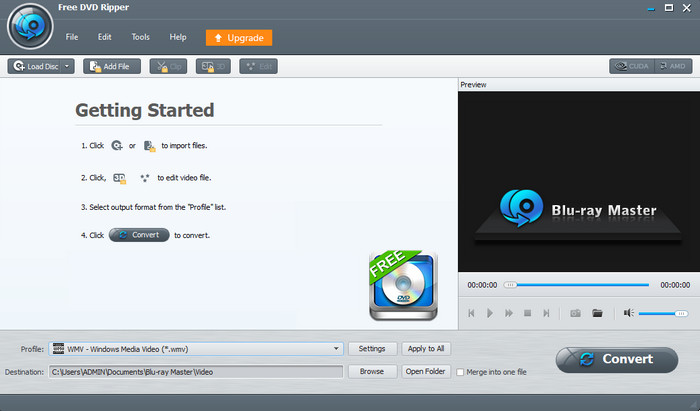
If you are searching for an excellent program to convert DVD music to MP3, you can rely on Blu-ray Master Free DVD Ripper. With the assistance of this best DVD to MP3 converter, you can effectively convert your DVD to MP3 without experiencing any struggles. Well, it is because Blu-ray Master Free DVD Ripper has an easy-to-understand user interface. Plus, the conversion process is simple. You can achieve your desired outcome in just a few seconds. Aside from that, the program also supports various audio files. It includes MP3, M4A, M4R, ALAC, and more. With that, no matter what audio files you choose, the tool will help you with the process. Plus, accessing the program is simple, unlike other converters. All you need is to download and install the Free DVD Ripper. After that, you can begin viewing the interface and proceed to the conversion procedure. Therefore, if you want to easily get your final result without any hassle, it is best to operate the software.
Free Download
For Windows
Secure Download
Free Download
for macOS
Secure Download
Features:
- Convert DVD to MP3 effectively.
- It can convert various video files to different formats.
- It supports various languages.
Pros
- Converting the DVD to MP3 is as easy as ABC.
- The interface is simple to navigate.
- It is 100% free to get MP3 from DVD.
Cons
- For more exciting features, purchasing the upgraded version is the best.
2. VLC Media Player
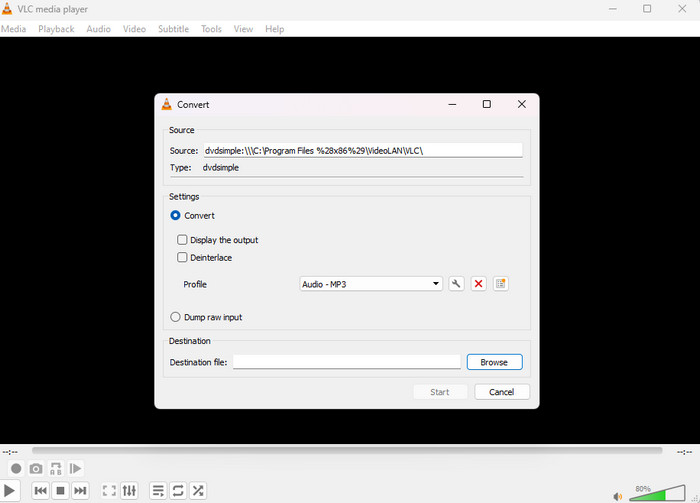
Another offline program that may help you convert DVDs to MP3 on Mac and Windows is VLC Media Player. The program is also capable of converting various multimedia files, including DVDs. With that being said, we are here to tell you that converting files is among the best features of VLC. It can even support other formats, like FLAC and Vorbis. When converting the DVD, all you need is to proceed to the Convert/Save function. Then, attach the file and select the MP3 file from the Profile option. It also has a fast conversion procedure, making it more convenient for those users who want to convert DVDs quickly. So, if you want to digitize your DVDs for better compatibility and accessibility, you can rely on VLC. However, upon navigating the program, there are various disadvantages we have discovered. VLC Media Player is not that easy to navigate. After viewing the interface, you must learn where to search for its converting function. Well, the tool’s interface is complicated, making it confusing to operate, especially for novices. Plus, since the interface is looking outdated, it is better to use another converter.
Features:
- It can convert various files, like DVDs, to other audio files.
- It can play videos and audio remarkably.
Pros
- This DVD audio ripper can convert the DVD to MP3 without any problems.
- The software can also offer excellent video and audio playback.
Cons
- The user interface is not appealing enough.
- It is unsuitable for beginners since the interface is complicated.
3. MakeMKV and Audacity
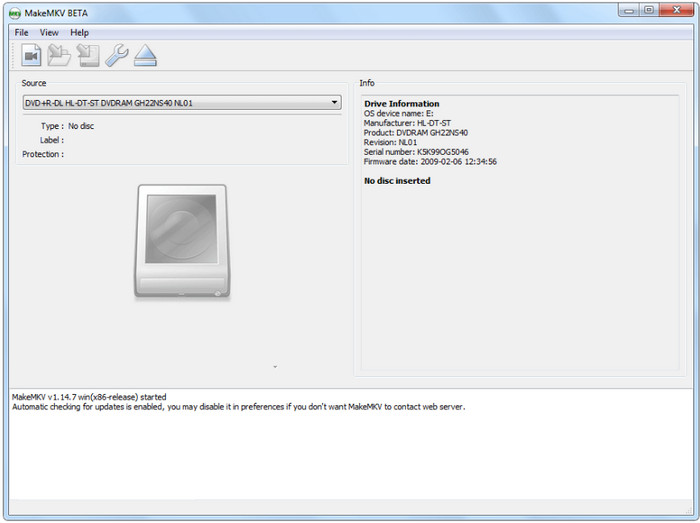
You must have heard of MakeMKV, one of the most powerful DVD-ripping tools. It can bypass complex DVD encryption to extract multi-channel audio streams (such as Dolby Digital AC-3 or DTS) into a raw MKV container without re-encoding. However, it can only output MKV. Then, you can use the open-source scalpel of audio editing, Audacity, to convert MKV to MP3. This robust tool can bypass the video entirely, demux the pristine audio track, and give you total control to export it as a high-bitrate 320 kbps MP3 or a bit-perfect FLAC.
Pros
- MakeMKV can 1:1 extract the complete audio streams in high quality.
- MakeMKV has powerful decryption capabilities for handling DVD copy protections.
- Audacity’s visual waveform editor allows you to precisely zoom in, cut out crowd noise, or stage banter.
Cons
- This is a multi-step workflow that maybe unfrienly to some casual users.
- It requires a large local storage space to save MKV files.
4. HandBrake
Features:
- It can convert both audio and video.
- It can restore low-quality video.
Pros
- It can convert DVD audio to MP3 in an effective manner.
- Simple to access.
Cons
- The user interfaces are complicated, which is unsuitable for non-professionals.
- You need to install libdvdcss on HandBrake to decrypt DVDs.
- The process of ripping a DVD to pure MP3 may be complex because it only provides MP4, MKV, MOV, and WebM formats.
5. WinX DVD Ripper
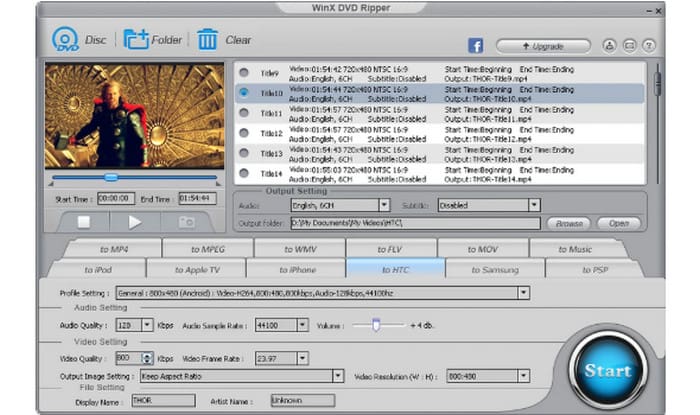
Features:
- It can support DVD and ISO files.
- It can convert DVDs to MP3 and other formats.
Pros
- The tool’s user interface is simple to understand.
- You can assign a destination folder.
Cons
- Accessing the program takes so much time.
- It can only upload DVDs.
Part 3. How to Convert DVD Audio to MP3
As we have mentioned above, there are various effective tools to use for changing DVDs to MP3. It includes the Free DVD Ripper software. With that, if you are looking for an excellent tutorial about converting DVD to MP3, we have provided simple steps below. So, to begin the process, proceed to the details below.
Step 1. Download the Free DVD Ripper on your computer. Then, launch it after the installation procedure.
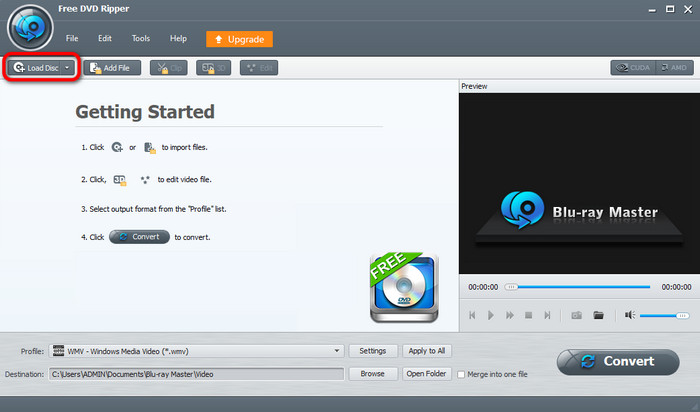
Step 2. After that, go to the top left interface and click the Load Disc option. From the file folder, select the DVD file you want to convert.
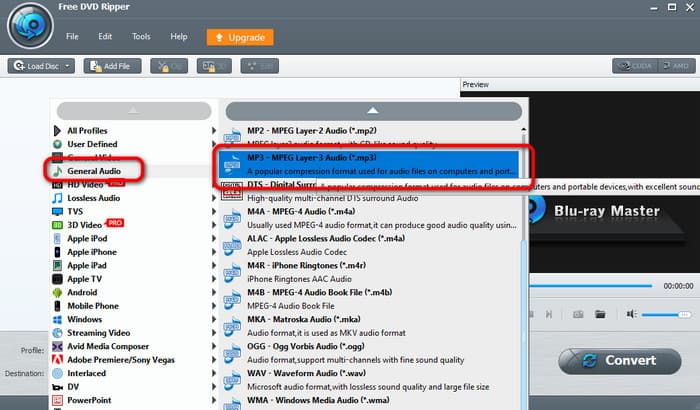
Step 3. Then, go to the Profile > Genera Audio option. Choose the MP3 format from the format options.
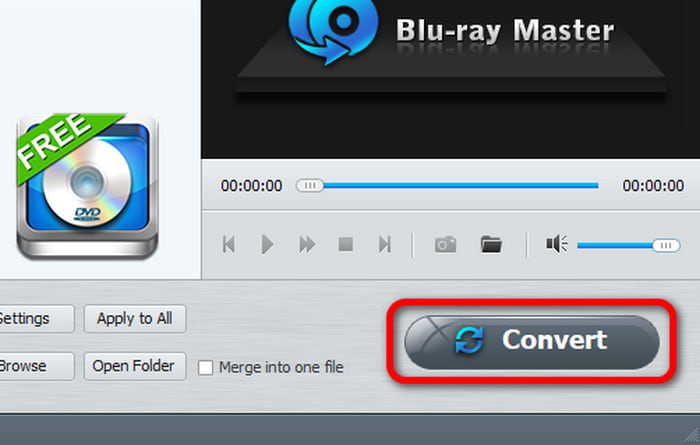
Step 4. To start the conversion process, hit Convert from the bottom right corner of the interface.
Part 4. FAQs about Best Free DVD to MP3 Converter
-
Can I rip just the audio from a DVD?
Absolutely, yes. If you want to rip audio from a DVD, use the Free DVD Ripper. With the help of this program, you can get the audio from the DVD effectively. All you need is to access the software and begin the ripping process.
-
Can VLC rip CDs to MP3?
Absolutely, yes. You can rip CDs to MP3 using various offline programs, like VLC Media Player. By navigating to the Convert and Save function, you can obtain your main objective, which is ripping.
-
What happens when you rip a DVD?
There are various things you get when ripping a DVD. It lets you get the audio from a DVD or transcode it to another video and audio file. Well, ripping DVDs is the best way, especially to solve compatibility issues.
-
What is the best completely free software to rip audio from a DVD to MP3 on Windows 11 without watermark?
VLC Media Player is a good choice to extract pure MP3 files from homemade DVD movies.
-
Is it legal in the US to copy audio from a DVD I legally bought to an MP3 file?
Technically, it is a legal gray area. For personal backup, it is ok.
-
Can VLC media player extract audio from a DVD? If so, what are the steps?
Yes, it can. The steps are: Open VLC and choose the Convert/Save option from the Media drop-down list > Choose the DVD section and import the DVD > In the Profile drop-down, select Audio - MP3 > Start the ripping process.
-
Why is HandBrake not letting me convert my DVD directly to MP3, and how do I fix it?
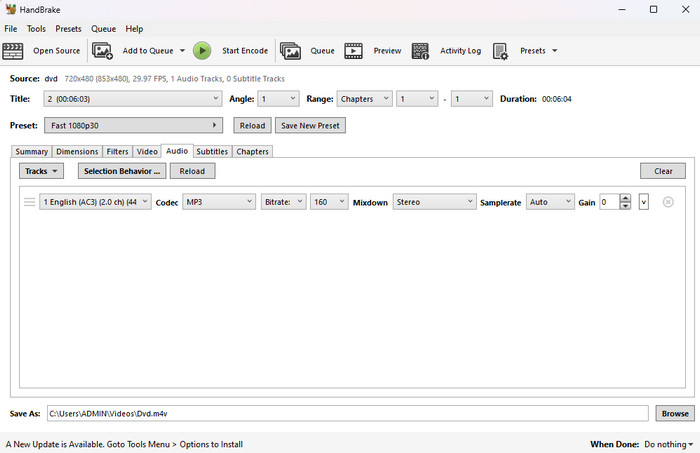
HandBrake is strictly a video transcoder that has no audio output formats. You can use HandBrake to rip the DVD with a fast video preset, set the audio track to 'Passthru' or 'AAC,' then use a free audio tool like Audacity or VLC to strip the video and save it as an MP3.
-
What's the safest open-source DVD audio extractor for Mac that is safe from malware?
VLC Media Player or MakeMKV combined with Audacity.
Wrapping up
If you want to rip DVDs to MP3, this article is your go-to guide. In this post, you will discover various DVD to MP3 converters. Each one has unique features. If you think audio quality is most important, the combination of MakeMKV and Audacity is best for you. If you just want a simple option, Blu-ray Master Free Blu-ray Ripper is a good choice; it is easy to use and offers decent DVD decryption and ripping speed. Download and try them yourself, and feel free to share your experience with us!
More from Blu-ray Master
