

Oct 20, 2026Posted by Kevin Miller to Rip Blu-ray
Quick Summary
Based on our review, we found that EaseFab Blu-ray Ripper is a good choice if you prefer all-around software that can digitize Blu-ray and DVD media, bypass advanced encryption, support GPU acceleration, and produce digital videos with 1:1 lossless quality. Unfortunately, it suffers from key limitations, including a 3-minute ripping limit during the free trial and an inability to handle modern 4K UHD Blu-rays.
Your kids' favorite movies are on Blu-ray, but the family tablet only plays MP4. Although you have 200 discs and about two hours a week to convert them, EaseFab Blu-ray Ripper claims to rip physical media at 30× real-time speed — enough to rip a movie in under 5 minutes. We tested whether that number survives contact with a real disc. Here, we will review EaseFab Blu-ray Ripper, a well-known tool on the market, and walk you through its alternatives, aiming to help you choose a better ripper.

Table of Contents
- Part 1. How We Tested EaseFab Blu-ray Ripper & Quick Verdict
- Part 2. EaseFab Blu-ray Ripper Key Features
- Part 3. EaseFab Blu-ray Ripper Pros and Cons
- Part 4. Pricing — Is EaseFab Worth the Price
- Part 5. Blu-ray Master Free Blu-ray Ripper — Best Affordable Alternative
- Part 6. FAQs About EaseFab Blu-ray Ripper
Part 1. How We Tested EaseFab Blu-ray Ripper & Quick Verdict
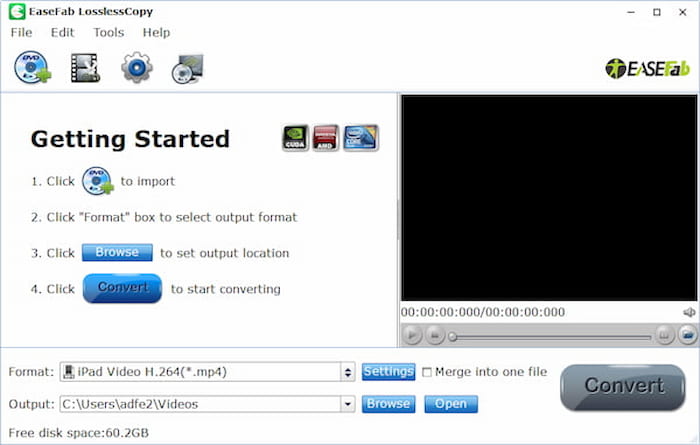
To test how EaseFab Blu-ray Ripper performs as a ripper, we ripped a 2-hour DVD movie. After the ripping process, the quality of the original DVD and the ripped digital video was compared side by side. In this testing method, we used the premium version of EaseFab Blu-ray Ripper because these tests wouldn’t be possible with the free trial version, which has a 5-minute limit.
Speed & Quality Verification
The program's claim to be 30× faster than standard video converter ripper tools is valid based on our testing. During the ripping of the 2-hour DVD media, the conversion took 10 minutes. However, the video quality during conversion is only high. Total lossless conversion is difficult to achieve in the program, since DVD ripping inherently reduces media quality.
Quick Verdict
EaseFab Blu-ray Ripper can rip Blu-ray/DVD discs to digital video and audio files in 500+ formats, including MP4, MKV, M4V, MOV, AVI, and WMA. Equipped with an NVIDIA GPU, it can convert any 2D/3D/UHD Blu-ray & DVD without quality loss at 30× real-time speed, making it one of the fastest Blu-ray ripping tools.
Whether EaseFab Blu-ray Ripper is a good tool depends on your needs and preferences. You can consider factors such as ease of use, supported formats, output quality, conversion speed, system compatibility, customer support, the availability of a trial version, user reviews, etc., to determine whether it is a good choice.
EaseFab Blu-ray Ripper can be your good choice if you pay more attention to the following factors:
- Convert Blu-ray to various digital formats, including MP4, MKV, MOV, etc.
- Prioritize the quality of results.
- You have Blu-ray with copy protections, including AACS, BD+, BD-J, and Cinavia.
- You want to use it on a computer or Mac.
- Rip 4K Blu-ray movies to various digital formats.
Though it has powerful features, it is not always your best choice if you consider the following factors.
- Its conversion speed is not the best.
- The price of its paid version may be too high.
Part 2. EaseFab Blu-ray Ripper Key Features
Copy Protection Removal
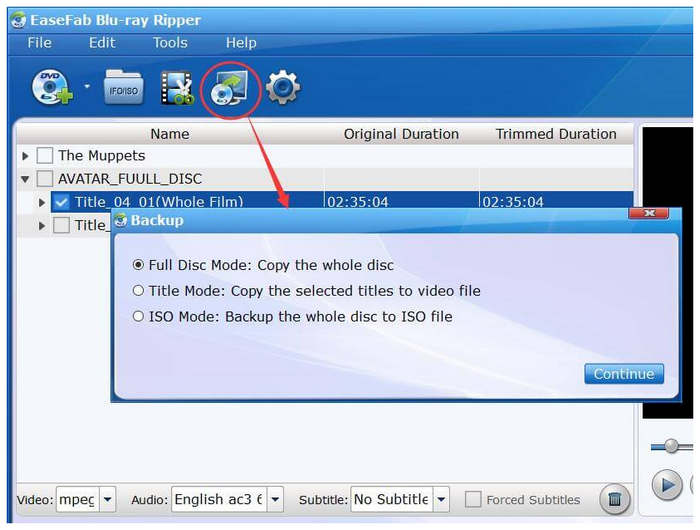
EaseFab Blu-ray Ripper can remove most Blu-ray copy protections, including AACS, BD+, BD-J, RC, Country Code, MKB, and even the advanced Cinavia encryption, etc., and is praised by many users. This makes the software a capable solution for general physical media conversion, whether DVD or Blu-ray.
Output Formats & Quality
It provides many output formats, including H.264, MP4, MOV, MKV, M2TS, and others, to meet users’ diverse viewing needs. This is a solid choice to ensure your converted digital video is well-supported, as the tool can convert to 500+ formats and produce videos at 4K resolution.
System Compatibility
With broad system compatibility across Windows 11/10/8/7 and macOS 10.13+, EaseFab Blu-ray Ripper is used by many Windows and Mac users. They all praised this software’s ease of use. This adds another point to the program’s accessibility, making the tool a solid choice for more users.
Part 3. EaseFab Blu-ray Ripper Pros and Cons
Pros
- Versatile platform support, making it a good choice for both Windows and Mac users.
- Wide support for input and output formats, making the tool a solid choice for processing 500+ file types.
- Good conversion speed performance with 30x faster GPU acceleration.
- Good copy protection bypass, enabling the program to rip modern DVD media.
- Converted and ripped videos have good video quality.
Cons
- Expensive price tag compared to the features available in the tool.
- Its interface design needs improvement in terms of accessibility.
- Very limited free trial mode with a 5-minute limit and watermark.
- Inconsistent pricing plans.
- Reports of damage to the Blu-ray video and audio quality.
Part 4. Pricing — Is EaseFab Worth the Price
Is EaseFab free? The answer is no. It offers 3 price plans to suit different requirements. You can subscribe to the software as you need. Unfortunately, all of the program’s pricing plans are on the expensive side, which is an area for improvement.
To start, the pricing figures of $27.95 for 1 year and $42.95 lifetime are both on the pricier side, making the program a suboptimal choice for casual DVD ripping. However, if you think the program's dedicated features may be worth it. This makes the tool a good choice for high-quality DVD ripping.
Part 5. Blu-ray Master Free Blu-ray Ripper — Best Affordable Alternative
If EaseFab Blu-ray Ripper doesn't meet your needs or you can’t afford its high price, consider Blu-ray Master's Blu-ray Ripper for its cost-effective features and powerful functions.
Blu-ray Master Free Blu-ray Ripper can rip Blu-ray Disc and Blu-ray folders to the most commonly used and popular digital formats. It supports various portable devices, including PSP, Sony, Creative Zen, iRiver, Sansa, Sony Walkman, Zune, Samsung Galaxy Tab, and Galaxy Note. Its multicore CPU lets you quickly rip multiple 4K and UHD Blu-ray movies to MKV, MP4, FLV, and other formats. You can even define the output video settings, including resolution, bitrate, frame rate, and video encoder. With the advanced acceleration technologies, you can efficiently convert your Blu-ray collection to digital files.
Free Download
For Windows
Secure Download
Free Download
for macOS
Secure Download
Pros
- Rip Blu-ray movies quickly in seconds with advanced acceleration technology.
- 1:1 copy of the original Blu-ray disc.
- Support batch conversion.
- Extract subtitles from Blu-ray discs.
Cons
- The free trial allows you to rip for only 5 minutes.
Side-by-Side Comparison Table
To give you a clear picture, we reviewed the two tools that matter most to users in the following areas and created a comparison table below.
| Feature | Blu-ray Master Free Blu-ray Ripper | EaseFab Blu-ray Ripper |
| Supported Output Formats | Various video and audio formats (MP4, MKV, AVI, etc.) | 500+ video and audio formats (MP4, MKV, AVI, etc.) |
| GPU Acceleration | AMD and NVIDIA GPU acceleration options | NVIDIA GPU acceleration |
| Conversion Speed | High-speed conversion with GPU acceleration | 30× real-time speed |
| Supported OS | Windows 11/10/8/8.1/7… Mac OS X 10.9 or above (macOS Sonoma included) | Windows: Windows 11/10/8/7… macOS 10.13 and later (64-bit OS) |
| Editing Features | Can enhance videos | Basic editing options |
| Price | Free | $42.95 lifetime (relatively high) |
| Subtitles and Audio Selection | Provides options for choosing subtitles and audio | Allows selection of subtitles and audio tracks |
Part 6. FAQs About EaseFab Blu-ray Ripper
-
Is it possible to rip Blu-ray discs?
Yes, you can rip Blu-ray Discs; there are various rippers available for this purpose, such as Blu-ray Master. Ripping Blu-ray discs is a good way to back up your personal archives and to watch digital copies on different devices.
-
Can EaseFab Blu-ray Ripper remove copy protection from a Blu-ray disc?
Yes, EaseFab Blu-ray Ripper can handle and bypass most Blu-ray copy protection, allowing users to rip Blu-ray discs to digital formats. EaseFab Blu-ray Ripper can remove AACS (Advanced Access Content System) and BD+ encryption.
-
Can you convert Blu-ray to MKV without quality loss?
Yes, some professional Blu-ray rippers can help you convert Blu-ray to MKV in lossless format, such as Blu-ray Master Free Blu-ray Ripper. With only 3 steps, you can successfully change your Blu-ray to MKV lossless. Just insert your Blu-ray disc into the program, then select MKV as the output format.
-
Is EaseFab Blu-ray Ripper worth the price?
It depends on how you will use the tool. For batch conversion of Blu-ray collections, it will be worth it. However, it may be too expensive if your goal is a one-off conversion.
-
Does EaseFab leave a watermark?
Yes, it does. However, it only leaves watermarks when using its free trial version. The software is watermark-free in the paid versions.
-
Can EaseFab handle Cinavia-protected discs?
Yes, it can. EaseFab Blu-ray Ripper can bypass modern Cinavia-protected discs. This makes the software a good choice for handling modern DVD releases.
Wrapping up
This is the end of the EaseFab Blu-ray Ripper review; learn more about it. In conclusion, it is one of the best Blu-ray ripping programs, offering powerful Blu-ray conversion capabilities. However, the program and its alternative have specific uses that you must consider. For budget-first users, Blu-ray Master Free Blu-ray Ripper is a better choice at a $32.19 lifetime license with a 5-minute trial limit. For users who need to handle 500+ formats and are willing to pay $40.00, EaseFab could be a good choice. Just make sure to verify the current price before checkout, as we have found inconsistent pricing.
More from Blu-ray Master
Blu-ray Ripper Review
Rip Blu-rays to any video and audio formats of different parameters for free in minutes.
100% Secure. No virus
