

Aug 28, 2025Posted by Kevin Miller to Create Blu-ray
Nowadays, plenty of companies are selling devices like TVs, monitors, smartphones, and Blu-ray players that can play 4K videos. That is because 4K video quality is the best video resolution for a satisfying watch experience. You can also record a video in 4K using your phone or camera and watch 4K videos and movies on Blu-ray discs. But if you want to create a Blu-ray copy as a backup or want to watch it on a bigger screen, you need a reliable 4K Blu-ray burner software. You are on the right website as this article contains several programs that can burn 4K videos to a Blu-ray disc safely and effectively. Read the whole post to know the pros and cons of the programs. We also included simple steps to follow in making a 4K Blu-ray movie. Let's begin!
- Part 1: What Is a 4K Blu-ray Burner
- Part 2: Best 3 4K Blu-ray Burner Software
- Part 3: How to Burn a 4K Blu-ray Disc at Home
- Part 4: FAQs about 4K Blu-ray Burner
Part 1. What Is a 4K Blu-ray Burner
A 4K Blu-ray burner is a device that allows you to write or burn high-definition video content onto Blu-ray discs, specifically those formatted for 4K Ultra HD resolution. These burners enable the creation of physical copies of 4K movies or videos, offering an alternative to streaming or digital downloads.
While both 4K Blu-ray burners and standard Blu-ray burners serve the purpose of writing video content to Blu-ray discs, there are key differences that affect output quality, compatibility, file size, etc.
| Feature | Standard Blu-ray Burner | 4K Blu-ray Burner |
| Video Resolution | Up to 1080p (Full HD) | Up to 2160p (Ultra HD) |
| Encoding Format | H.264/AVC | H.265/HEVC |
| Disc Type | BD-25/BD-50 | BD-66/BD-100 |
| Audio Support | Dolby Digital/DTS | Dolby Atmos/DTS:X |
| Playback Compatibility | Standard Blu-ray players. | Requires 4K UHD Blu-ray player. |
| File Size Handling | Moderate | Large (often >30GB) |
Part 2. Best 3 4K Blu-ray Burner Software
Note: You can only use these products for personal use.
Blu-ray Creator
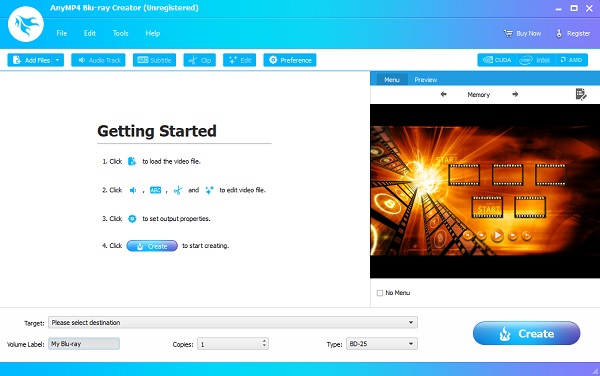
The first 4K Blu-ray burner software you will encounter is Blu-ray Creator. This exceptional program is used for burning videos and other media files to an empty Blu-ray disc. You can convert it to Blu-ray Folder or ISO file and store it on your PC for future use. The resolution of the videos you can burn can go up to 4K HD without quality loss and lag. Not only that, you can use the video editing feature to edit your videos for further enhancement. You can crop, adjust the effects, and add watermarks. You can acquire this tool on Windows only.
Pros
- Lightning-fast disc burning
- Allows importing videos in 100 formats (MP4, VOB, MKB, MPEG, etc.)
- Plenty of different menu templates
Cons
- You need to avail the full version to use all features.
Free Download
For Windows
Secure Download
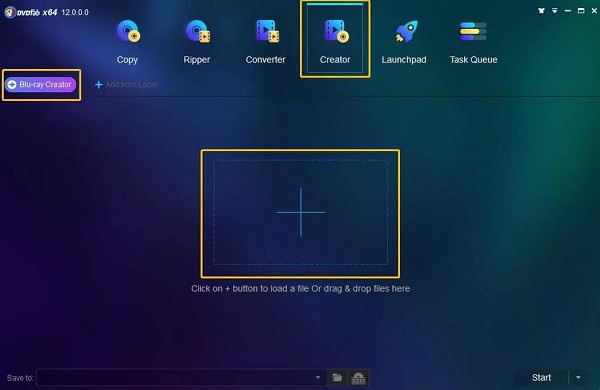
The following 4K Blu-ray burning software in this list is DVDFab Blu-ray Creator. This program is an all-in-one solution containing features other than burning 4K Blu-ray disc. You can copy, rip, and convert DVD/Blu-ray discs and other utilities. You can safely burn videos in SD up to 4K HD for disc burning. It also supports several video formats for your convenience. And when burning videos, the videos will not reduce quality during the process. However, the trial version only lasts for 30-days. You can download this software on Windows and Mac.
Pros
- Can burn videos of any type in Blu-ray and AVCHD
- Supports external subtitles onto Blu-ray
- Merge videos into one disc
Cons
- Expensive pricing plans
- It has a boring user-interface
- Slow Blu-ray disc burning
DVDFab Blu-ray Creator
The following 4K Blu-ray burning software in this list is DVDFab Blu-ray Creator. This program is an all-in-one solution containing features other than Blu-ray disc burning. You can copy, rip, and convert DVD/Blu-ray discs and other utilities. You can safely burn videos in SD up to 4K HD for disc burning. It also supports several video formats for your convenience. And when burning videos, the videos will not reduce quality during the process. However, the trial version only lasts for 30-days. You can download this software on Windows and Mac.
Pros
- Can burn videos of any type in Blu-ray and AVCHD
- Supports external subtitles onto Blu-ray
- Merge videos into one disc
Cons
- Expensive pricing plans
- It has a boring user-interface
- Slow Blu-ray disc burning
Leawo Blu-ray Creator
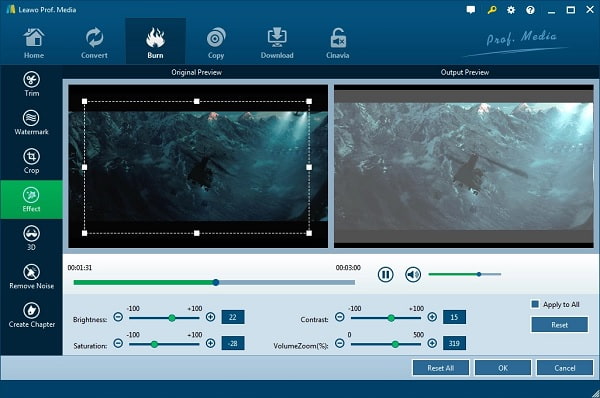
The last in the 4K Blu-ray burner program list is Leawo Blu-ray Creator. It is one of the most straightforward desktop programs you will use for Blu-ray burning. You can burn videos up to 4K HD resolution without reducing their quality. It supports the commonly used formats for videos for users' convenience. Moreover, you can edit your videos using its basic editing function for cropping, trimming, and adding watermarks. You can also modify your blu-ray menu using the free template and even create a personalized menu. This program is not totally free as its free version is only limited to use.
Pros
- Windows and Mac version is available
- It has a straightforward interface
- You can add 3D effects to 2D videos
- Import and burn 4K MP4, AVI, MKV, and MOV to Blu-rays
Cons
- No data disc and CD support
- Bad customer support
- You cannot customize Blu-ray discs
Part 3. How to Burn a 4K Blu-ray Disc at Home
To know the proper method on how to burn a 4K movie to Blu-ray, you can use the guide below on how to burn 4K Blu-ray using this highly-commendable program, Blu-ray Creator.
Free Download
For Windows
Secure Download
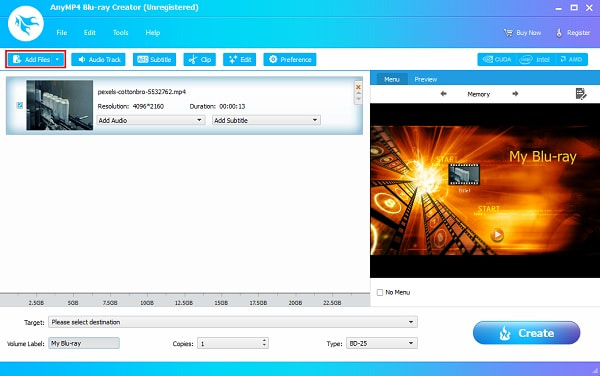
Step 1.Download the desktop software by tapping the Free Download button provided above. Install the program, then immediately open it. Load an empty Blu-ray disc, then click Add Files to add videos or movies to the application.
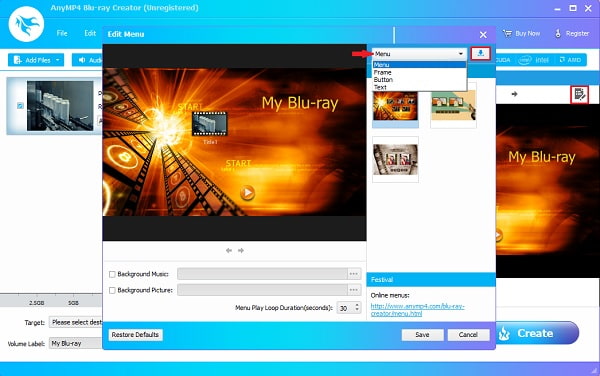
Step 2.Click the Edit Menu button on the right section of the interface to launch the edit menu window. On that window, tap the drop-down list to select the available templates for menu, frame, button, and text fonts. You can press the Download icon to download more templates on the official page.
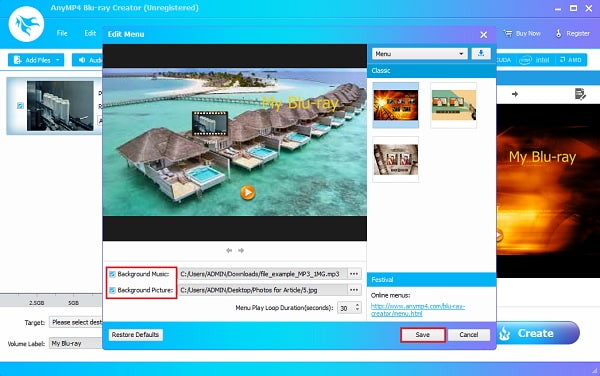
Step 3.You can import background audio by tapping the Background Music to make a personalized menu template. And to add your own image, click Background Picture. Hit Save to close the edit menu window.
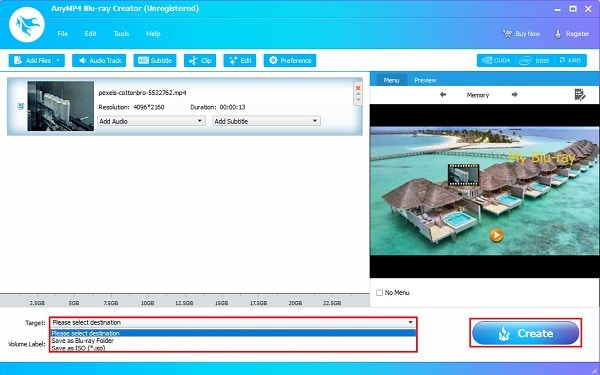
Step 4.To save the video, you can burn the file directly to a Blu-ray disc. And if you want to store it on your computer, you can burn the video as Blu-ray Folder or ISO file. Press Create to start video burning. Close the program after the process and eject the newly created Blu-ray movie.
Part 4. FAQs about 4K Blu-ray Burner
-
What are the differences between a 4K Blu-ray and a standard Blu-ray?
The difference between the two resolutions is that 4K Blu-ray has better color, contrast, sharpness, clarity, and texture. The audio is much louder and clearer compared to the standard Blu-ray.
-
How much data can a 4K Blu-ray disc store?
4K Blu-ray discs can store up to 100GB of storage on dual and triple-layer discs. Since 4K movies can go up to 100GB of data, you can only keep one video per disc.
-
Why do my 4K Blu-ray movies blurry and pixelated?
If your 4K movies do not look sharp and clear, these things might be the common problem.
• Your TV's resolution is not 4K.
• The TV's setting is not set in maximum resolution.
• The cable you are using does not support 4K. -
Do I need a specific Blu-ray drive to burn 4K discs at home?
Yes, you need a specific 4K UHD Blu-ray drive, either the best external Blu-ray burners or internal drives, and specialized software to burn 4K Blu-ray discs, as conventional burners only support standard Blu-ray formats.
Conclusion
You have finished reading the article, good job. Are you impressed with the 4K blu-ray burner software on this post? If so, which among the programs is your choice? Having seen their pros and cons, Blu-ray Creator is a step above the rest. You are guaranteed to burn 4K videos to Blu-ray seamlessly. And with the extra features for video editing and menu template making, making a unique Blu-ray is easy. Also, it is 100% safe and secured, so don't be worried and create homemade movies for anyone.
More from Blu-ray Master
