

Sep 08, 2025Posted by Kevin Miller to Create Blu-ray
Are you a binge watcher? Especially in movies and other videos? Do you have a large collection of MPEG video files on your computer? Maybe you are wondering if it is time to delete some movies because you are running out of storage. But what if I tell you that you don't have to remove them as you can move them to a storage device? You can use a Blu-ray disc to save your movies and still have a copy. To do that, you must use an MPEG to Blu-ray converter program to safely transfer them to the discs. This post covers all the information about the programs you can use for free. So without further ado, let us go to the first section.
- Part 1. Can You Burn MPEG to Blu-ray
- Part 2. 3 MPEG to Blu-ray Converters
- Part 3. Which is the Best One
- Part 4. FAQs about MPEG to Blu-ray Converter
Part 1. Can You Burn MPEG to Blu-ray
Can you Burn MPEG videos to Blu-ray? Absolutely yes. But before we go to the best MPEG to Blu-ray converter software list, let's talk about MPEG first. MPEG is a video format that is widely used for digital streaming and offline watching. They are the perfect choice for that platform since they are quicker to stream and download than other formats. It might be great to have a huge collection of movies on your computer but be reminded that there is a limitation as this depends on the capacity of your hard drives. And that is where Blu-ray discs come in. You can convert your MPEG movies and videos to all kinds of Blu-ray types using the MPEG to Blu-ray converters included in this post. Furthermore, you can easily watch these movies using your DVD/Blu-ray players at home. Let's move on to the next section to see the list of programs and a simple guide on how you create a Blu-ray disc.
Part 2. 3 MPEG to Blu-ray Converters
To burn MPEG video to a Blu-ray disc successfully, you need specialized MPEG to Blu-ray conversion software. Such tools can not only deal with format compatibility issues, but also help you add menus, adjust picture quality, and optimize output settings. Let's take a look at three popular MPEG to Blu-ray converters below.
Note: You can only use these products for personal use.
Blu-ray Master Blu-ray Creator
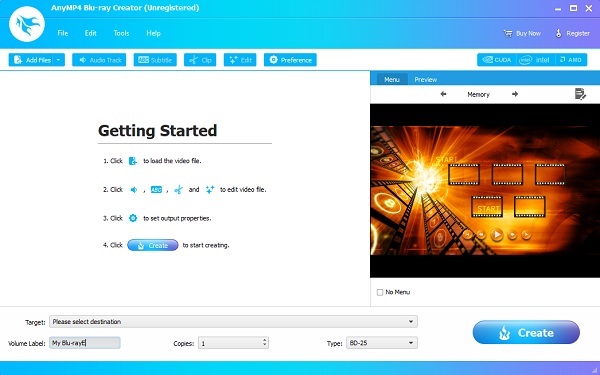
First among the list of MPEG to Blu-ray Converters is Blu-ray Creator. This outstanding program that you can acquire for free is one of the leading programs on making homemade Blu-ray discs. It has easy-to-understand controls that many might find convenient to use. It supports 100+ video formats that you can burn to Blu-ray discs. What's more, you can edit your videos and save them on a disc using the video editing function. You can add subtitles and watermarks, cut and crop videos, and adjust volume and effects. It is 100% safe to use with privacy information protection. This is only available on Windows as of the moment.
Windows 11/10/8.1/8/7, Windows Vista, and Windows XP
Windows users who want a straightforward, high-quality Blu-ray authoring tool with built-in video editing features.
Pros
- Can easily handle long and heavy process.
- Can burn high-quality videos with no quality loss.
- GPU hardware acceleration for faster file burning process.
- Can create Blu-ray discs in 4K video resolution.
Cons
- All features can only be unlocked by purchasing the product.
Free Download
For Windows
Secure Download
Here's how to convert and save your videos in MPEG to Blu-ray discs using the most recommended program for video file burning.
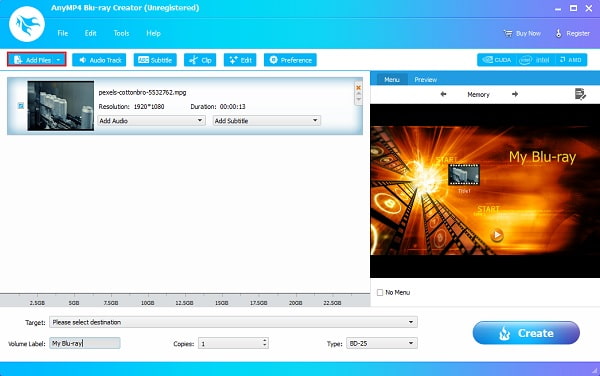
Step 1.Download Blu-ray Creator on your computer, then install it by following the instructions thoroughly. After that, insert a blank Blu-ray disc into your PC and run the application. Click Add Files to import the MPEG movies you need to burn to the Blu-ray disc.
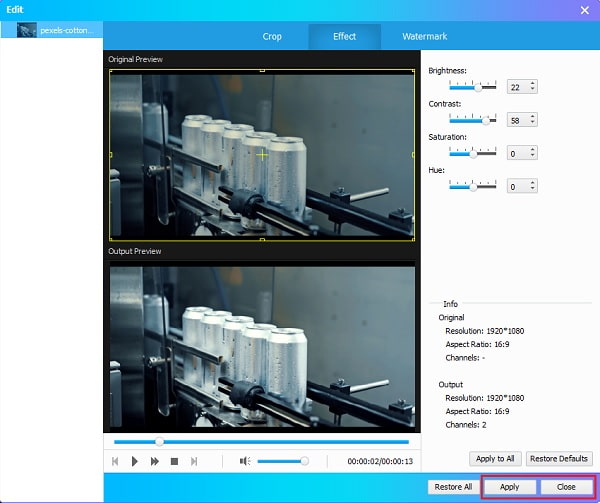
Step 2.After importing, Click Edit to improve the video before burning. A window will appear that allows you to customize the video. You can crop the video, change the aspect ratio, and adjust the brightness, contrast, hue, and saturation. You can also add watermarks of your desired choice. Tap Apply to save the adjustments, then Close to exit the window.
Step 3.On the right side of the interface, you can change the style of your menu template. There are plenty of templates you can choose to make unique Blu-ray discs like Memory, Reminiscence, Music, etc. Select one according to your preference.
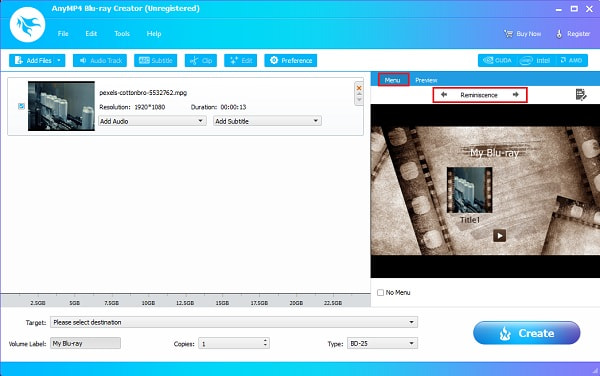
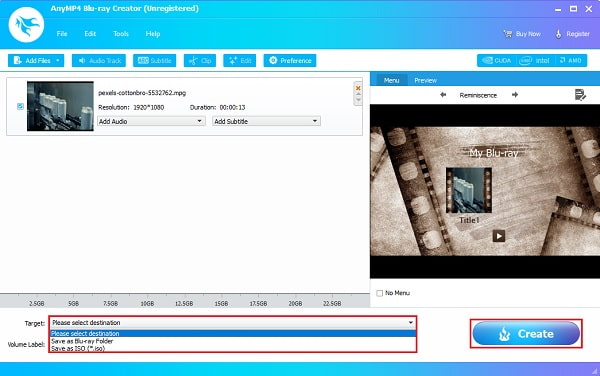
Step 4.For the final step, tap the drop-down menu next to Target to save the video on a Blu-ray disc or in the following option: Blu-ray Folder or ISO file. Afterward, tap Create to start file burning. Please wait for the process to be done before closing the program. Try your newly made Blu-ray movie and watch it in the comfort of your home.
DVDFab Blu-ray Creator
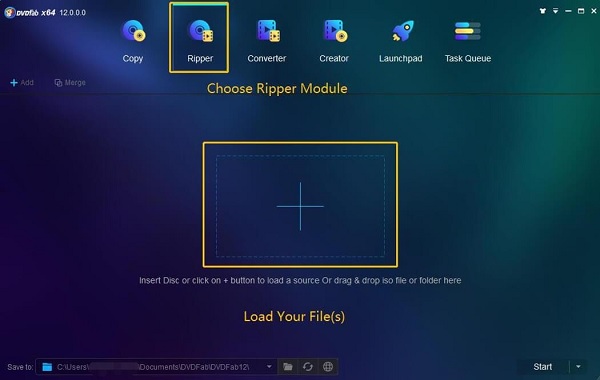
The following MPEG to Blu-ray Converter software on this list is DVDFab Blu-ray Creator, one of the top Blu-ray burner software. This comprehensive software allows you to burn videos to DVD/Blu-ray discs quickly and easily. The user interface is so simple that almost anyone can use it effortlessly. There are extra functions included as well, like DVD Ripper, DVD Copy, DVD Converter, and other nifty features. It supports several video formats, including the most commonly used ones such as MP4, AVI, MTS, MPEG, etc. You can customize your menu template to add a more personal touch to your Blu-ray disc. This program is free and available on Windows and Mac.
Windows 11/10/8.1/8/7 and macOS 10.10 – 15.x
Users seeking a versatile, cross-platform Blu-ray authoring tool with AI-powered upscaling and multi-format support.
Pros
- AI-powered upscaling resolution.
- Hardware-accelerated processing.
- Merge several videos into one Blu-ray disc.
- Burn MPEG, MP4, MKV, WMV, and MOV to Blu-ray disc, folder, and ISO.
Cons
- No option to add subtitles on DVDs/Blu-ray.
- Somewhat expensive pricing.
NCH Express Burn
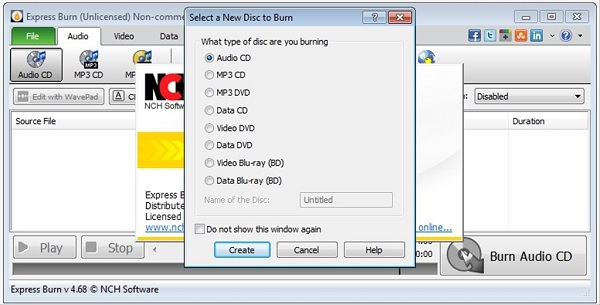
NCH Express Burn is the last MPEG to Blu-ray Converter on the list. It is a competent, free-to-download program that enables users to burn, write and copy video, audio, and data discs. It has a very straightforward interface, so even first-time users can use the program correctly. You can also create and customize your Blu-ray disc by using the 20 menu template or create a unique template, add pictures, and more. In addition, this program allows you to back up data to discs easily. But for users to access all the features it has, you must first purchase the premium version.
Windows7/8/10/11 and macOS 10.5 or above
Ideal for those focused on basic MPEG-to-Blu-ray conversion and menu customization, especially if simplicity and data backup features are a priority.
Pros
- Mac and Windows versions are available.
- Very stable application.
- Fast and easy to use.
Cons
- Can't create audio DVDs.
- More expensive than other products.
- Lack of security options.
Part 3. Which is the Best One
In order to ensure the objectivity and practicality of the review, we conducted three days of intensive testing on the three software programs, covering the following dimensions:
- Duration : 3 days total; 6 hours per software.
- Device: Windows 11 (64-bit) and macOS 10.10
- Test Contents: MPEG import, Blu-ray menu creation, disc burning, stability, usability, etc.
- Wait Time Tracking: Measured average time from import to final disc output.
Here is a comparison table of the three best MPEG to Blu-ray burners:
| Blu-ray Master Blu-ray Creator | DVDFab Blu-ray Creator | NCH Express Burn | |
| Compatibility | Windows | Windows/Mac | Windows/Mac |
| Ease of Use | Easy | Moderate | Simple |
| Input Formats | Wide format support: MPEG, MP4, MOV, 3GP, etc. | MPEG, MP4, MKV, AVI, and more. | MPEG, MP4, AVI, etc. |
| Blu-ray Menu | Clean static templates, fast customization | Custom templates, animated menus | 20 templates, image customization |
| Additional Features | Subtitle support, basic editing, fast encoding, etc. | Video editing and subtitle support. | Data backup and audio CD/DVD burning. |
Part 4. FAQs about MPEG to Blu-ray Converter
-
What are the different types of MPEG?
The makers of MPEG had finalized four famous encoding standards and these are MPEG-1, MPEG-2, MPEG-4, and MPEG 7.
-
What makes MPEG a great format?
MPEG is a great format because of its high compatibility, as it can be played on various players like QuickTime, iTunes, VLC, and Windows Media Player. It is also great to use as the format for backing up videos on CDs, DVDs, and Blu-ray.
-
Can you play MPEG videos on mobile?
Yes, you can play videos in MPEG format, but not all types of MPEG. You can only playback videos in MPEG-4. So if you have MPEG-1 or MPEG-2 videos, you must first convert them into other formats.
-
What is the best type of blank disc to use (BD-R, BD-RE)?
For permanent storage or distribution, BD-R (Blu-ray Disc Recordable) is the best choice. It’s write-once, cost-effective, and widely compatible with Blu-ray player software. If you need to test, revise, or reuse discs frequently, BD-RE (Blu-ray Disc Rewritable) is more flexible, allowing multiple overwrites. Use BD-R for final projects, and BD-RE for drafts or temporary backups.
Conclusion
There you have it. Converting and saving your MPEG videos to Blu-ray discs is fun and easy, especially if you use the right MPEG to Blu-ray converter. We have explored three Blu-ray burners, among which Blu-ray Master picked Blu-ray Creator supports a wide range of video formats and provides rich menu templates and customization options to help you easily create Blu-ray disc content. Don’t hesitate, try it now!
More from Blu-ray Master
