

Jun 18, 2025Posted by Kevin Miller to Media Player
Most smartphones come with built-in music players, but these default apps lack flexibility. Though they may offer basic playback, they fall short of better file format support and richer sound quality. It is where the best MP3 player apps step in. These apps deliver superior audio performance, support a broader range of formats, and are packed with advanced features. Many also offer better battery efficiency and library management tools. If you're someone who enjoys music, selecting the right MP3 player app can significantly enhance your music experience. This post will explore the top MP3 player apps to help you find the perfect one for your audio needs.

- Part 1. How to Choose an MP3 Player App
- Part 2. Top 5 MP3 Player Apps
- Part 3. Best-Pick
- Part 4. Bonus: Best Free MP3 Player for Windows and Mac
Part 1. How to Choose an MP3 Player App
Audio Format Support
Audio format support is a crucial factor to consider when selecting an MP3 player app. Most apps can handle less common formats, such as MP3, WAV, and AAC. However, many audiophiles often seek broader support, such as FLAC, ALAC, OGG, AIFF, and DSD, among others.
Audio Quality and Equalization
Audio quality can vary between apps, mainly when it comes to equalization features. A good app should possess a built-in equalizer with several presets with custom EQ sliders. Bass boost, virtualizer effects, and surround sound simulation are also significant advantages.
Organization and Library Management
Library management is crucial for individuals with extensive music collections. Look for features like automatic tagging, album art support, folder browsing, and custom playlist creation. These features let you spend more time listening rather than wasting time searching.
User Interface and Ease of Use
A clean and intuitive UI can make or break the user experience. The best MP3 player app should have easy navigation, gesture controls, and minimal clutter. Look for apps that offer themes or customization options, allowing you to tailor the app's appearance to your preferences.
Advanced Features
For power users, advanced features can elevate the experience. Look for gapless playback, crossfade, and a sleep timer for automatic shutdown. Additionally, apps that integrate with Last.fm can scrobble played tracks for tracking listening habits. Meanwhile, Chromecast support allows playback on smart devices, and Android Auto compatibility is essential for in-car use.
Offline Playback and Storage Options
A noteworthy app should support offline playback, meaning it can play music locally. It is crucial for those who prefer managing a library or have limited data. Additionally, consider supporting external storage, such as SD cards, for devices with limited internal memory.
Battery Efficiency
Battery life is a concern, especially during long listening sessions. Some app MP3 players are optimized for low resource usage, ensuring they won't drain the battery quickly. Lightweight apps with efficient background processing and minimal animations are ideal.
Price and Availability
The best local music player for Android and iOS devices comes in various pricing models. Free versions may include ads or limit certain features. Freemium apps offer a basic free version with optional in-app purchases or a premium upgrade. Meanwhile, paid apps usually offer an ad-free experience with full functionality.
Part 2. Top 5 MP3 Player Apps
AIMP

AIMP is an MP3 player app for Android devices running version 6.0 and above. It can playback formats like AAC, APE, DFF, DSF, FLAC, MP3, OGG, S3M, and more. It is highly recognized for its many features and high-quality music playback performance.
FEATURES:
• utomatic music search and indexing.
• lay files from Windows shared folders.
• ndroid Auto and custom Car PC support.
• ownmix multi-channel audio files to stereo.
Pros
- It has an automatic detection of tag encoding.
- It supports multiple playlists and smart playlists.
- It allows you to control playback using gestures.
Cons
- It has limited support for newer audio formats.
- It does not work properly on devices based on M.I.U.I firmware.
Music Player & MP3 Player

Music Player & MP3 Player is a feature-rich HD MP3 music player app for Android users. It supports various music and audio formats, including FLAC, AAC, APE, MP3, MIDI, and WAV. This music player app features a bass boost, reverb effects, a built-in equalizer, and more.
FEATURES:
• lay songs in order, shuffle or loop them.
• iew music by artists, albums, folders, or playlists.
• ock screen controls and plays in the notification bar.
• obust equalizer with bass boost and reverb effects.
Pros
- It operates as an offline music player.
- It offers various stylish layouts and themes.
- It allows you to easily search songs by keywords.
Cons
- It cannot download music from online sources.
- Its latest music is locked behind in-app purchases.
Foobar2000

Foobar2000 is both an Apple MP3 player and a modular music player app. It supports formats such as AAC, AIFF, FLAC, MP3, MP4, Opus, Vorbis, WAV, WavPack, and Musepack. In addition to Apple devices, it is also accessible on Android running 7.0 and up.
FEATURES:
• Plugin architecture for extending functionality.
• Gapless playback and advanced DSP support.
• Full ReplayGain support for volume normalization.
• Download music from servers like UPnP, FTP, and WebDAV.
Pros
- It delivers excellent sound quality.
- It is extremely lightweight and fast.
- It is modular and highly customizable.
Cons
- Its interface is not visually appealing.
- It lacks advanced audio enhancement settings.
jetAudio Hi-Res Music Player

jetAudio Hi-Res Music Player is an MP3 player app for iPhone and Android. It supports media stream formats such as WAV, MP3, OGG, FLAC, M4A, and a few more. It provides high-quality sound with effects and enhancements.
FEATURES:
• Play music via Wi-Fi from shared folders.
• AGC to avoid volume fluctuations between tracks.
• Shake your mobile device to play the next or previous track.
• Provides three list modes or ten grid modes for layout style.
Pros
- It allows speed control from 50% to 200%.
- It supports crossfading and gapless playback.
- It has a flick-down gesture to show Now Playing.
Cons
- It does not play other formats on some devices.
- It requires an official Last.fm app to access Last.fm.
MediaMonkey

MediaMonkey is among the best MP3 player apps for Android devices. It is a powerful music player app that allows you to manage and keep large music collections. It also operates as an Audiobook player, and it bookmarks large audiobook and video files.
FEATURES:
• Sync files wirelessly with MediaMonkey for Windows.
• Access and download media from UPnP/DLNA servers.
• Keep file information, ratings, lyrics, and play history in sync.
• Play music at a steady volume to avoid fidgeting with the volume.
Pros
- It allows adding, removing, or reordering tracks.
- It is the best music player for Android without ads.
- It enables the sharing of play history with third-party scribblers.
Cons
- It operates in a time-limited trial.
- It requires MediaMonkey Pro for full access.
Part 3. Best-Pick
Best for Audiophiles:
AIMP is the best MP3 player application for audiophiles, specializing in high-resolution, lossless audio formats. It may take time to learn its interface, but the payoff in sound precision is worth it.
Best for Offline Listening:
MediaMonkey is the best offline music app, as it relies on local music and features smart playlist creation. It allows access to thousands of tracks spread across folders, drives, or SD cards.
Best Free Options:
Foobar2000 is the best free MP3 music player available with no ads and hidden charges. Unlike many freemium apps, it doesn't restrict advanced tools or force in-app purchases.
Best for Minimalists:
The Music Player & MP3 Player is ideal for minimalists seeking an efficient playback experience. It focuses purely on music playback, offering basic but solid features all packed in a clean UI
Best for Android Auto Users:
jetAudio Hi-Res Music Player is optimized for Android Auto, supporting various formats and sound effects. It offers large, car-friendly controls and seamless integration for in-car use.
Part 4. Bonus: Best Free MP3 Player for Windows and Mac
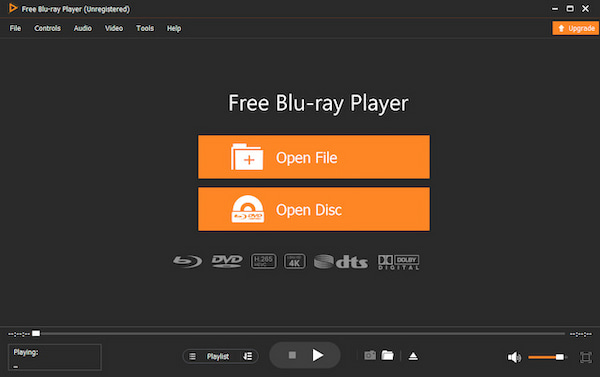
If you're looking for the best free MP3 Player that operates seamlessly on your desktop, Blu-ray Master Free Blu-ray Player is a standout option. It is compatible with Mac OS X 10.9 or later and Windows 11, 10, 8, or 7. Although the name suggests it is for Blu-ray playback, it supports several audio formats and codecs. It supports popular media stream formats, including MP3, AAC, FLAC, WAV, M4A, and over 500 others.
Free Download
For Windows
Secure Download
Free Download
for macOS
Secure Download
Not to mention, it is optimized for fast startup and stable playback, even with high-bitrate audio. It includes handy features like playlist creation and management, audio track selection and switching, and sound adjustments. The interface is intuitive and beginner-friendly, with clearly labeled buttons and a clean layout. Best of all? It is 100% free to download and use, with no hidden fees, no trial limits, and no watermarking of playback.
KEY FEATURES:
• Play any audio files, both lesser-known and newer formats.
• High-quality playback with rich, dynamic sound reproduction.
• Create and manage custom playlists directly within the software.
• Essential playback options are built-in, including play, pause, and stop.
Wrapping up
Finding the best MP3 player app ultimately comes down to your personal listening needs. Today's MP3 apps offer something for everyone, enabling you to transform your music experience. However, if you're seeking a free, reliable, and high-quality MP3 player for your desktop, the Blu-ray Master Free Blu-ray Player is the ideal solution. It supports over 500+ media stream formats, delivers smooth performance, and offers effortless playback.
More from Blu-ray Master
Best Video Player
