

Jun 11, 2025Posted by Selena Thomas to Media Player
As digital entertainment consumption continuously develops, finding a single media player that handles everything can be a challenge. PlayerFab positions itself as a universal media player that can play anything, from local files to discs and online videos. But how well does it actually perform? This PlayerFab review aims to deliver an in-depth and unbiased analysis of the media player. We will explore its performance, features, user experience, and how it compares to other media players. The question is: can PlayerFab keep up with the modern viewer’s expectations? Let’s find out here!

- Part 1. What is PlayerFab? (Key Features Overview)
- Part 2. Performance and Playback Quality
- Part 3. User Experience and Interface
- Part 4. Streaming Service Integration (A Closer Look)
- Part 5. Pros and Cons (The Bottom Line)
- Part 6. Final Verdict and Recommendations
- Part 7. User Reviews and Community Feedback
- Part 8. PlayerFab Alternative (Alternatives and Comparisons)
- Part 9. FAQs about PlayerFab
Part 1. What is PlayerFab? (Key Features Overview)

The PlayerFab is a total package media player developed and owned by DVDFab. It is built to handle any media formats and sources, all within a single application. It supports playback of local video files, DVDs, Blu-rays, and content from certain streaming services. In addition, it can play 4K UHD video with HDR effects and all forms of 3D content.
What You Need to Know About PlayerFab:
- Provides two playback modes with UI design: PC Mode and TV Mode.
- Playback of local files in formats like MP4, MKV, AVI, MP3, WAV, FLAC, etc.
- Supports DVDs, Blu-rays, and 4K UHD Blu-rays with navigation menu support.
- Handles 3D Blu-rays, ISO files, SBS (side-by-side), and Top & Bottom 3D videos.
- Access and play videos from streaming services like Netflix, Amazon, Disney+, etc.
Part 2. Performance and Playback Quality
In terms of performance, DVDFab’s PlayerFab delivers smooth playback with minimal CPU and GPU load. Even during high-resolution playback, it can play the content with stability. We test it on mid-range systems and show consistent 4K playback without stuttering. UHD videos appear vibrant with color accuracy and impressive dynamic range, mainly when HDR is enabled.
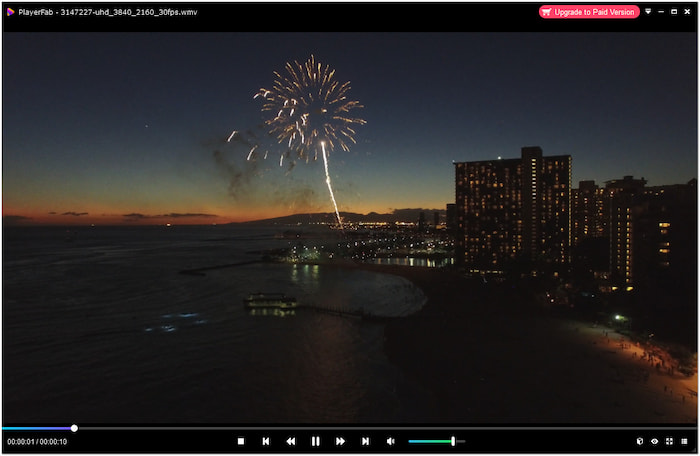
The media player’s audio output support is commendable. It can output lossless high-resolution audio like Dolby Atmos, Dolby TrueHD, DTS-HD Master, DTS:X, etc. In addition, it can upscale lower-resolution content using advanced algorithms. For different displays, such as OLED and LED, you can adjust video settings to optimize playback.
Important Note: The result is cleaner edges and more detailed images. However, the effectiveness of the settings varies depending on the source quality. Still, it is a good DVD player for Windows users.
Part 3. User Experience and Interface
The media player’s interface is modern and intuitive. It provides two playback modes, PC Mode and TV Mode, allowing flexibility based on your setup. The UI is locally arranged, with accessible tabs for discs, local files, and streaming services. It also includes basic customization of skins, themes, and settings.
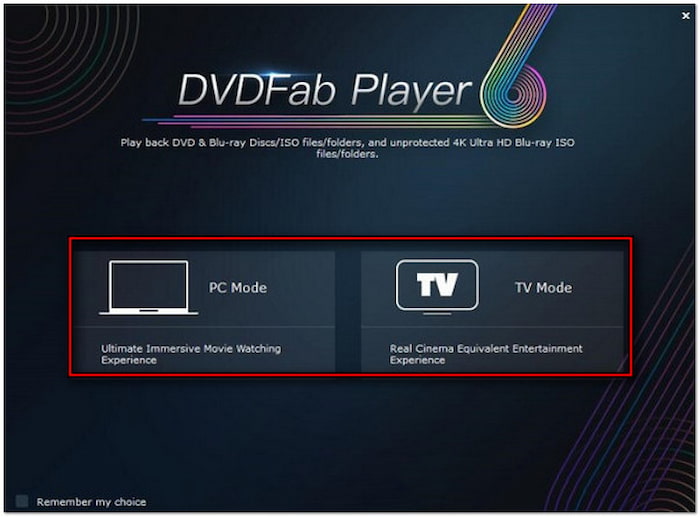
Furthermore, you can configure settings related to video playback, audio output, and subtitle appearance. Its efficient media library supports the convenient import of physical media as ISO files. It lets you effectively manage your media collections by using file metadata. Creating a playlist and searching for titles through keywords are also noteworthy.
Part 4. Streaming Service Integration (A Closer Look)
The PlayerFab Ultra HD Player goes beyond playing local files and discs. It also supports video playback from popular streaming services worldwide. This includes Netflix, Amazon, HBO Macx, Hulu, U-Next, Paramount+, Paravi, Roku channel, RTL+, Disney+, etc. This integration allows you to access various online content directly within the application.

However, there are some quirks. Playback of DRM-protected content can sometimes be subject to limitations inherent in the underlying browser technology. Regarding regional restrictions, it cannot bypass geo-locks on streaming content without VPN assistance. In terms of online playback, it delivers Full HD 1080p resolution and EAC3 5.1 audio quality.
Part 5. Pros and Cons (The Bottom Line)
The PlayerFab Ultra HD Player goes beyond playing local files and discs. It also supports video playback from popular streaming services worldwide. This includes Netflix, Amazon, HBO Macx, Hulu, U-Next, Paramount+, Paravi, Roku channel, RTL+, Disney+, etc. This integration allows you to access various online content directly within the application.
Pros
- It upscales low-resolution videos for better viewing experience.
- It is compatible with 4K Ultra HD, HDR1O, HDR10+, and 3D Blu-rays.
- It uses GPU acceleration to reduce CPU usage during video playback.
- It allows access to major streaming services like Netflix, Disney+, Hulu, etc.
- It supports the playback of local files, discs, and content from streaming services.
Cons
- Its region unlocking is limited to physical media, not streaming.
- It is a premium software that requires a subscription for full access.
- Its streaming performance can be inconsistent compared to native apps.
Final Assessment:
PlayerFab Ultra HD Player is a feature-rich media player for anyone. It is all-in-one software for playing local files, discs, and content from streaming services. You can also use it as a free music player on your computer. However, its limitations may lessen its appeal to casual users. These include the media player’s reliance on paid subscriptions for premium features, heavy system demands, and issues with DRM and streaming reliability. Still, if you’re willing to invest, it delivers a comprehensive solution.
Part 6. Final Verdict and Recommendations
Overall, the software delivers an impressive media experience that blends local playback with online streaming. Its high-quality playback, lower-resolution upscaling features, and format support make it a top choice. Although the media player has a few limitations, its strengths easily outweigh its weaknesses.
If you’re asking if it’s worth it, my answer is yes. It is worth investing in if you prefer a media player that goes beyond the basics. However, if you heavily rely on streaming and expect a smooth experience, keep those expectations in check. It would be best to test the software first before committing to a subscription.
Part 7. User Reviews and Community Feedback
This PlayerFab review covers mixed feedback from users, both positive and negative. Many users appreciate the media player software for its powerful media playback functionalities. Despites its performance, there are still users reporting issues affecting their experience. Here are some of the reviews and feedback from trusted tech review sites:
This is more like bad Beta software than a finished product! Bugs and glitches run rampant through this program, and many discs don’t load properly.
VideoHelp
I love having all my movies and Netflix in one place without switching apps.
It’s great, but I wish more features were included in the free version.
Trustpilot
It plays everything and satisfies everyone who has invested in home theater using a PC as a source. It has no problem with 4K Blu-ray on any CPU. It is the best Blu-ray player software I have had so far.
Slashdot
It’s $99 for a player that really doesn’t offer anything compelling over free players to justify that price. But here, that price is $160.00. That’s just insane.
VideoHelp
Part 8. PlayerFab Alternative (Alternatives and Comparisons)

If you’re exploring free alternatives to PlayerFab, Blu-ray Master Free Blu-ray Player is a compelling choice. It is available on Mac OS X 10.9 or above and Windows 11/10/8/7. It supports playback of nearly all local files, region-lock discs, and even 2D/3D movies. It is compatible with all HD-quality videos, offering outstanding visual effects and clear sound quality. In addition, it features playlist creation, external subtitle insertion, screen capturing, continuous playback, etc. You can access all of its features and functionalities completely free of charge.
Free Download
For Windows
Secure Download
Free Download
for macOS
Secure Download
| PlayerFab | What to Offer | Blu-ray Master Free Blu-ray Player |
| Windows | System Requirement | Windows and Mac |
| $59.99 starting price | Price | FREE |
 | Local Files Playback | |
| DVDs, Blu-rays, and 3D Blu-rays | Physical Media Playback | DVDs, Blu-rays, and 2D/3D movies |
| Streaming Integration |  |
| Dolby Atmos, Dolby TrueHD, DTS-HD Master, DTS:X, etc. | Audio Support | DTS and Dolby 5.1 audio support |
| 4K UHD, HDR10, HDR10+ | Video Support | 8K/5K/4K UHD video |
Part 9. FAQs about PlayerFab
-
Is PlayerFab safe?
Yes, it is safe to use. DVDFab, a well-known multimedia software company, owns and develops it. You can download the installer directly from the official website.
-
How to fix Mordhau PlayerFab?
Verify game files through Steam, update your graphics drivers, and reinstall DirectX and Visual C++ Redistributables. If the error persists, uninstall conflicting media players or codecs.
-
Is PlayerFab free?
No, it is not free software. However, it offers a free trial with limited access to some features. You need a subscription or a one-time purchase to access all features without restrictions.
Wrapping up
That’s where your PlayerFab review ends! PlayerFab stands out as a universal media player capable of handling everything. But is it truly the all-in-one solution it claims to be? If you’re looking for a completely free alternative that still delivers high-quality playback, we recommend Blu-ray Master Free Blu-ray Player. It’s lightweight, easy to use, and compatible with Windows and Mac.
More from Blu-ray Master
Media Player Review
