

Jun 12, 2025Posted by Kevin Miller to Play DVD
Looking for a simple DVD player for your Windows PC? WinX DVD Player is a contender, but how well does it handle your discs in 2025? We’ll delve into its features, performance, and compatibility, along with modern alternatives and codec considerations. This WinX DVD Player review focuses on WinX, a standalone DVD player software. We will evaluate WinX’s aspects to determine if it’s still a practical playback software up to this day.

- Part 1. WinX DVD Player - Features and Functionality
- Part 2. Performance and User Experience
- Part 3. Free WinX DVD Player Alternative
- Part 4. Who Is WinX DVD Player Best For?
- Part 5. FAQs about WinX DVD Player
Part 1. WinX DVD Player - Features and Functionality
WinX DVD Player is a dedicated VLC Media Player 7, 8.1, and 10. It can play DVDs, VCDs/SVCDs, protected DVDs, commercial/homemade DVDs, and even region-locked DVDs. In addition to physical discs, it also accepts media stream files for playback.
Core Playback Capabilities
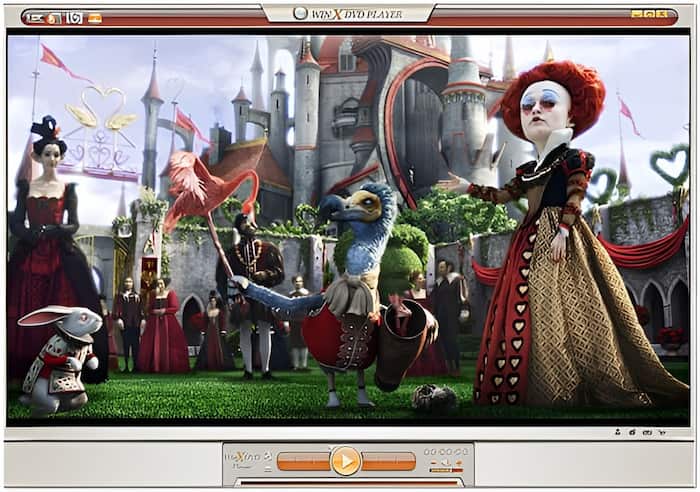
WinX supports the playback of any DVDs, including DVDs from regions 1-6, copy-protected, commercial, homemade, etc. It delivers visuals in excellent quality, up to HD, with sharp details and accurate colors. In terms of audio, you can choose an audio track from AC-3 to 5.1 channel for optimal audio effect.
Unique Insight: This DVD Player can handle slightly damaged or scratched DVDs, which is a common user concern. It uses a modern title check mechanism and a disc analysis kernel to handle such discs.
User Interface and Controls

WinX’s navigation is intuitive, with responsive controls for play, pause, stop, forward, backward, skip chapter, etc. The layout includes essential playback buttons, a volume controller, subtitle toggles, audio track toggles, screenshots, etc. It also provides settings for adjusting screen size, changing effects, selecting audio/subtitle tracks, etc.
Unique Insight: WinX’s design feels outdated compared to modern media players. It lacks advanced settings for video and audio playback customization. Still, it is reasonable media player software for basic DVD playback.
Codec Support & Compatibility
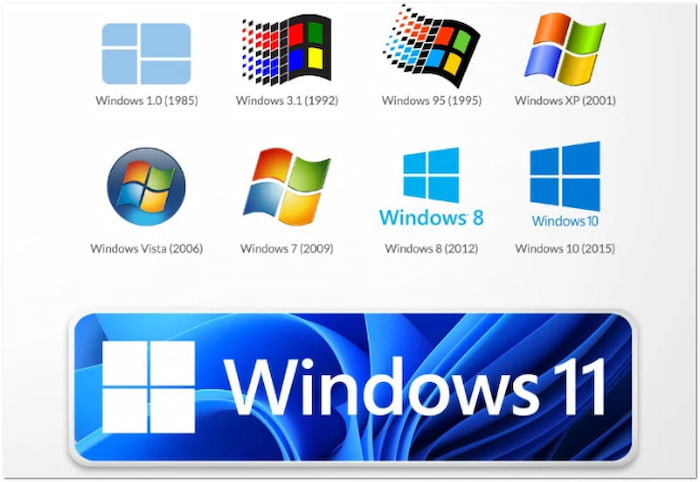
WinX comes with built-in video and audio codecs, supporting numerous formats. Some of which are AVI, WMV, MP4, VOB, MPEG, MP3, RMA, WMA, and more. This software is fully compatible with Windows 10, 8.1, 7, Vista, and XP.
Unique Insight: WinX boasts integrated codec support, meaning it does not rely heavily on external codec packs. It minimizes playback errors caused by missing and conflicting codecs, which is essential for playback, where encryption and format complexity can trip up lighter players.
Part 2. Performance and User Experience
Playback Performance and Stability
Smoothness of Playback
This multi-region DVD player software delivers smooth playback with minimal stuttering or buffering. Standard DVDs, with heavy menus and multiple tracks, play well without much buffering. It reads and loads discs quickly, so you don’t need to wait long for content to begin. However, you will notice a slight lag when switching to chapters when using old systems.
Resource Usage
WinX is lightweight and optimized for lower-end Windows systems with limited resources. It runs efficiently without overburdening the CPU processor, even when playing region-locked DVDs. During playback, system resource usage stays modest, which allows multitasking without performance degradation. It is a great playback software that won’t bog down your system.
Stability & Reliability
Under most conditions, WinX Player performs stably and reliably. It does not crash often and handles long-duration movies. Its built-in error-handling features also improve the player’s reliability when reading old and damaged discs. However, compatibility issues sometimes arise on rare occasions with corrupted discs or unique DVD menu structures.
User Feedback & Reviews
• Softonic: Wrong installer. Don’t be fooled. This downloads with the name WinX DVD but installs 5KPlayer. This might be a glitch, hack, collusion, or deception; I do not know for sure. 5KPlayer played my DVD, but the toolbars did not disappear in full-screen mode.
Takeaway: This reviewer from Softonic did not actually download the wrong installer. WinX has been renamed 5KPlayer, with improved performance and additional features.
• Reddit: It’s a normal DVD player. I have tried it with a Blu-ray disc, but it doesn’t support it. I wish there was all-in-one software that goes beyond DVD playback.
Take Away: According to the reviewer’s feedback on Reddit, WinX does not support Blu-ray playback. It can only handle media stream formats and DVDs, nothing more, nothing less. You can consider alternatives for other local files or source playback support.
• Trustpilot: Excellent DVD player software. It efficiently played back my old collection of DVDs. You can download it and try it yourself.
Take Away: Indeed, WinX can playback old DVDs, even those with slight damage. However, its interface is outdated, which, while functional, may not appeal to those used to modern UIs.
Part 3. Free WinX DVD Player Alternative

As mentioned previously, WinX DVD Player is limited to DVDs and common media stream formats. If you’re seeking an all-in-one alternative that offers more than WinX, Blu-ray Master Free Blu-ray Player is what you need. This total package multimedia playback software is fully compatible with Mac OS X 10.9 or above and Windows 11/10/8/7. It can smoothly play DVDs, VIDEO_TS folders, and ISO, be they region-locked, copy-protected, or encrypted.
Free Download
For Windows
Secure Download
Free Download
for macOS
Secure Download
It supports DVDs, Blu-rays, HD/UHD, and thousands of digital formats. It also handles newer codecs, including AAC, FLAC, H.264, H.265, AV1, etc. In terms of quality playback, it delivers outstanding video/audio quality for DVDs. It boasts a straightforward and modern interface with a cleaner layout and intuitive controls. It offers additional features like playlist creation, subtitle support, screen capture, continuous playback, etc.
Part 4. Who Is WinX DVD Player Best For?
WinX is a dedicated DVD playback software built for those who want to enjoy DVDs. It is a great tool for playing DVDs without dealing with complicated configurations. Below are some user profiles for whom WinX is suitable:
• It is a great choice for users who prefer offline playback.
• It is ideal for users seeking simple and lightweight DVD playback software.
• It excels at playing DVDs from any region and those with common protection.
• It is best for users who experience issues with damaged, scratched, and old DVDs.
• It is a recommended software for users who prefer low-maintenance media solutions.
Part 5. FAQs about WinX DVD Player
-
Is WinX DVD trustworthy?
Yes, WinX is a trustworthy software. It is developed by Digiarty Software Inc., an established company in multimedia software since 2006.
-
Is WinX DVD really free?
Yes, the DVD Player is free, providing full playback functionality at no cost. However, other software of Winx, like DVD Ripper offers both free and paid versions.
-
Is WinX DVD Ripper safe?
Is WinX DVD Ripper safe? Yes, WinX is safe to use when downloaded from the official site. It does not contain any adware, malware, plug-ins, spyware, or user tracking.
Wrapping up
This concludes our WinX DVD Player review! WinX delivers a simple, lightweight solution to playback DVDs on Windows PC. It handles any DVDs efficiently, even those with region locks. However, the media player falls short in playing local files and sources. If you’re seeking a more flexible playback software, Blu-ray Master Free Blu-ray Player is a highly recommended option. It supports nearly all media stream formats and sources, including DVD and Blu-ray, with high-quality playback.
More from Blu-ray Master
DVD Player Review

Easily play Blu-rays, DVDs, and various video/audio formats with rich playback features.
100% Secure. No virus
