

Sep 11, 2025Posted by Kevin Miller to Create Blu-ray
Many of the computers, Mac and laptops included, don’t have disc drives and burners anymore. This is due to the innovation that caters to digital files. However, many of these computers do not have a huge amount of storage to keep Blu-ray movies. That being said, burning Blu-rays is still inevitable. Now, if you also see the importance of external Blu-ray burners, this is the perfect time to see the various external burners you can connect to your computer device.
Have a secured storage process for an optical drive to clear or save up much space on your computer space after meeting the best tool you can have.

- Part 1. Comparison Table of External Blu-ray Burners
- Part 2. Exposition of Top 5 External Blu-ray Burners
- Part 3. Bonus: Best Internal Blu-ray Burner to Keep
- Part 4. FAQs about External Blu-ray Burners
Part 1. Comparison Table of External Blu-ray Burners
To start with, let's have this comparison table as the initial demonstration of the listed Blue-ray burners below.
| External Burner | Dainty External Blu-ray Drive | Vinpower Digital External Blu-ray Drive | Generic Alphami External Blu-ray Drive | ASUS BW-16D1X-U 16x External Blu-ray Drive | OWC Mercury Pro 16X External Blu-ray Drive |
| Price | $108.99 | $89.95 | $59.99 | $178 | $154.99 |
| Blu-ray Disc Support | BD-R, BD-ROM, and BD-RE | BD-RE, BD-R | BD-RE, BD-ROM, BD-R | BD-R, BD-ROM, BD-RE | BD-ROM, BD-RE, BD-R |
| Power Source | Powered by USB | Powered by AC | Powered by USB | Powered by AC | Powered by AC |
| Support DVD | Yes | Yes | Yes | Yes | Yes |
Part 2. Exposition of Top 5 External Blu-ray Burners
Top 1. Dainty External Blu-ray Drive
The first on the best external Blu-ray burner on the list is this Dainty External Blu-ray Drive. It is a burner that uses two types of cables, the TPC and USB. It is thin and light, so you can easily store and carry it anywhere. Furthermore, it comes with a powerful function to read rapidly, as it has the ability to read and function 6 times faster.
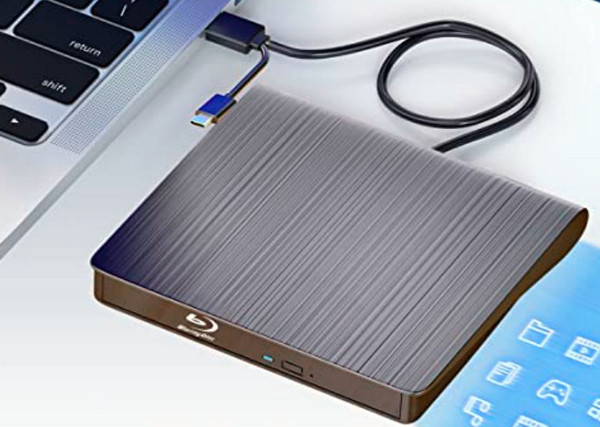
- Operating System: Windows XP/7/8/10/11, macOS
- Hardware Interface: USB 3.0 / Type-C
- Hardware Platform: Laptop / Desktop / MacBook
- Special Features: Dual interface (USB 3.0 & Type-C), supports BDXL and M-DISC, ultra-slim design, plug-and-play, and 4K Blu-ray playback.
- Brand: Dainty
- Best for: Ideal for users who need to switch between laptops, desktops, and Mac devices. Its lightweight design makes it perfect for mobile work or home use.
- Users Review: Users generally find this device compact and versatile, with dual USB 3.0 and Type-C interfaces that work smoothly across both Windows and macOS systems. It’s praised for its plug-and-play convenience, reliable performance, and support for 4K playback and BDXL burning. However, some users noted slightly slower write speeds when using older USB ports, but overall, it delivers stable and dependable results.
Top 2. Vinpower Digital External Blu-ray Drive
Vinpower Digital External Blu-ray Drive is also a portable burner that can copy or burn bigger movies with up to 128GB. It has a weight of 4 pounds with a dimension of 10×6.75×4.5 inches. Furthermore, this Amazon external Blu-ray burner has this technology for the limit equalizer that works to improve its capability in playing Blu-rays.
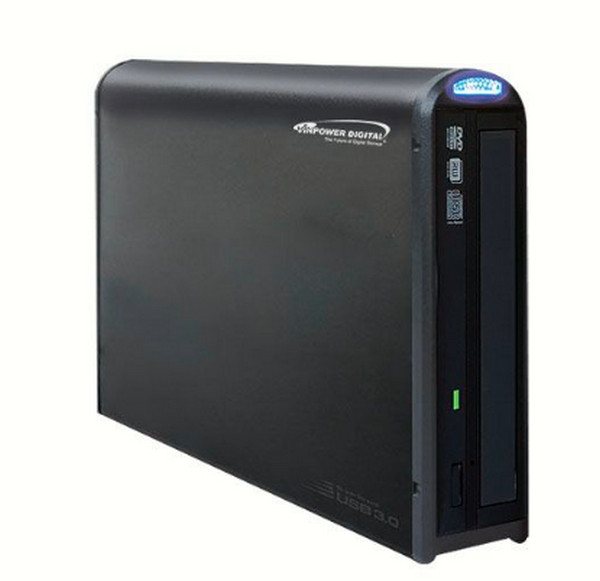
- Operating System: Windows XP/Vista/7/8/10/11
- Hardware Interface: USB 3.0 / USB 2.0
- Hardware Platform: Laptop / Desktop
- Special Features: Embedded Copy Protection (ECP), supports BDXL up to 128GB, archival-grade burning, and professional-grade stability.
- Brand: Vinpower Digital
- Best for: Best suited for professionals who need to burn BDXL discs (up to 128GB) or require advanced data security, such as video editors or archivists.
- Users Review: This drive receives high marks for its professional-grade performance, especially when handling high-capacity BDXL discs. Users appreciate its built-in copy protection and consistent writing quality, making it ideal for those with strict data security needs. While the design is somewhat bulky, it’s well-suited for office or studio environments where reliability matters most.
Top 3. Generic Alphami External Blu-ray Drive
If you want a larger capacity in storage for a Blu-ray burner, this Generic Alphami is the external burner you will need. It has wider compatibility, for it works on Windows, Linux, and Mac computer devices. Furthermore, it is also a user-friendly device that adds up to its being easy to carry due to its thinness and lightweight. Moreover, you can treat it as a 4K Blu-ray burner that brings the clarity and high quality of 4K Blu-ray discs.
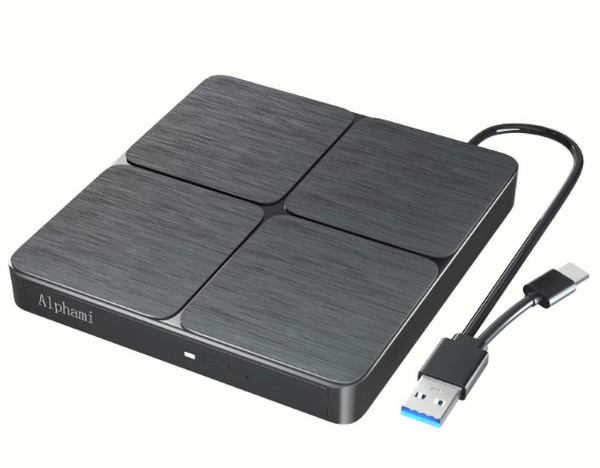
- Operating System: Windows XP/7/8/10/11, macOS, Linux
- Hardware Interface: USB 3.0 / Type-C
- Hardware Platform: Laptop / Desktop / MacBook
- Special Features: Supports 3D Blu-ray playback, M-DISC compatibility, dual interface (USB 3.0 & Type-C), lightweight, and portable.
- Brand: Generic (Alphami)
- Best for: Great for beginners or students. It supports various disc formats and offers good value for light to moderate burning tasks.
- Users Review: Praised for its affordability and well-rounded features, this drive is popular among beginners and casual users. It supports 3D Blu-ray playback, M-DISC, and multiple disc formats, making it a solid choice for everyday burning tasks. Users like its lightweight build and dual interface design, though some reported occasional compatibility issues with Linux and older macOS versions.
Top 4. ASUS BW-16D1X-U 16x External Blu-ray Drive
Next on the list is this ASUS BW-16D1X-U that doesn’t only read Blu-rays, but it can also read and write DVDs and CDs. Moreover, this burner also supports BDXL and M-Disc formats, and this ASUS Blu-ray burner provides a good factor for users to choose from: its 16× optical disc writing speed. Another reason for you to choose it is that it allows you to back up your data or files from your Android device going to a Blu-ray.
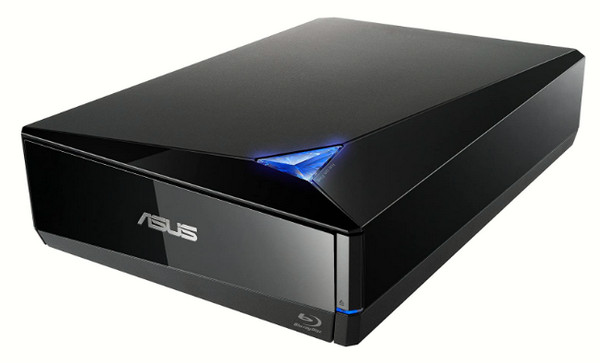
- Operating System: Windows XP/Vista/7/8/10, macOS X 10.6+
- Hardware Interface: USB 3.0
- Hardware Platform: Laptop / Desktop
- Special Features: 16X high-speed burning, BDXL and M-DISC support, bundled backup software, and vertical stand design.
- Brand: ASUS
- Best for: Perfect for users who need fast data burning, such as businesses or content creators. ASUS ensures stable performance and trusted quality.
- Users Review: Known for its fast 16X burning speed and trusted brand reputation, this ASUS model is favored by content creators and business users. It supports BDXL and M-DISC, and includes backup software that many find useful. While the vertical stand design adds a sleek touch, a few users mentioned it can be awkward to position on smaller desks.
Top 5. OWC Mercury Pro 16X External Blu-ray Drive
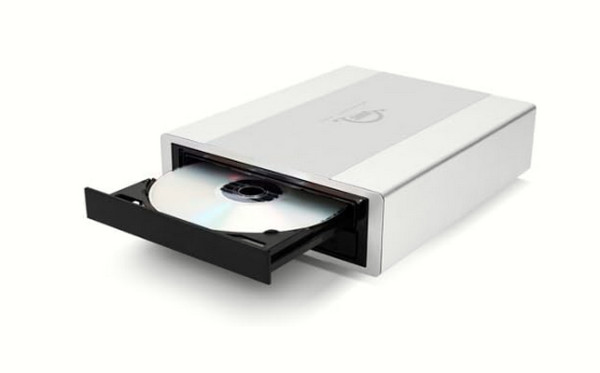
Here comes one of the most popular external burners because of its rapid speed, the OWC Mercury Pro 16× External Blu-ray Drive. This, too, has an optical reading and writing speed of 16 to 48 times faster, like what its name suggests, making it work twice or more than the other external burners out there. Moreover, it is a Blu-ray burner for Mac and is an aluminum sleek and durable device.
- Operating System: Windows XP+, macOS 10.6+
- Hardware Interface: USB 3.0
- Hardware Platform: Laptop / Desktop / Mac
- Special Features: Aluminum enclosure for durability, supports BDXL and M-DISC, archival-grade performance, ideal for long-term data storage.
- Brand: OWC (Other World Computing)
- Best for: Designed for users who need to preserve important data over time, like photographers or researchers. Its durable aluminum casing suits demanding environments.
- Users Review: Professional users value this drive for its durability and long-term data preservation capabilities. The aluminum casing is both stylish and rugged, making it suitable for demanding environments like photography studios or research labs. Although it comes at a higher price and is slightly heavier than other models, its archival-grade performance makes it one of the best external Blu-ray burners for serious data storage needs.
Part 3. Bonus: Best Internal Blu-ray Burner to Keep
If purchasing an external device to burn your Blu-ray is hard due to the price, then having an internal burner should be your backup plan. That being said, have the Blu-ray Creator on your computer device to experience a fast and high qualitative burning process. Furthermore, this best Blu-ray creator lets you burn different types of videos, like MP4, MOV, MKV, MOV, FLV, MXF, etc., into a Blu-ray disc, ISO, and folder. In addition, it provides you with great options that will enable you to crop, trim, add watermark, and add subtitles to your video.
What is more amazing is the burning technologies infused with it, such as IMAPI SDK, Cdr tool, and VSO. On top of that, if you need to combine and merge multiple videos with their titles and chapters, this Blu-ray Creator will let you do it without any hassle!
Main Features:
• A Blu-ray disc maker from different video files and types of ISO.
• It is a 4K Blu-ray burner.
• It provides legions of menus and options to customize the videos.
• Acceleration technology that helps to burn Blu-ray 30× faster.
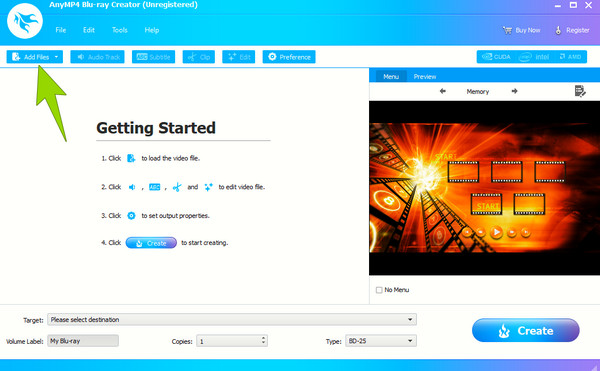
Step 1.Insert the Blu-ray disc into your drive and launch the software once you finish the download and installation process. Then, hit Add Media Files on the main interface to upload the video or content you want to burn. Please note that you can add as many as you like.
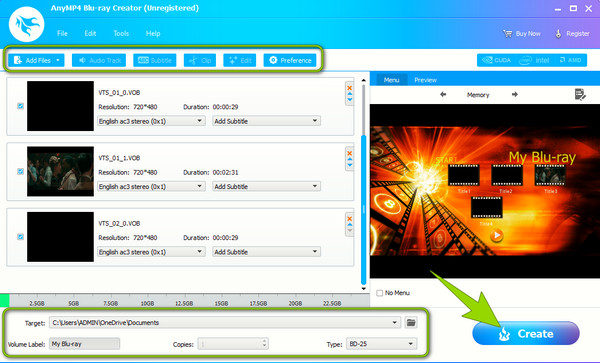
Step 2.Once the contents are uploaded, you can navigate to the tools provided if you want to customize them before burning.
Step 3.Then, hit the Create button to begin the process.
Part 4. FAQs about External Blu-ray Burners
-
Are Blu-ray burners compatible with DVDs and CDs?
Yes. Most Blu-ray burners are compatible with DVDs and CDs. These burners can write and read the other discs aside from burning them.
-
What is the slowest writing speed of external Blu-ray burners?
The slowest writing speed of a Blu-ray burner is x2, which is the common speed.
-
Can I watch a Blu-ray movie with an external Blu-ray drive or burner?
Yes. External drives allow you to play movies on a disc.
Conclusion
We’ve explored the top external Blu-ray burners, compared their features, and even introduced a reliable internal solution for disc creation. Whether you're backing up data or crafting personalized Blu-ray discs, having the right tool matters. If you're looking for a powerful, user-friendly way to burn Blu-ray content, try Blu-ray Master Blu-ray Creator. It’s the perfect companion for turning your videos into high-quality Blu-ray discs. Download it and start creating with confidence now!
More from Blu-ray Master
