

Aug 27, 2025Posted by Kevin Miller to Create DVD
We use photos and videos to record countless precious moments, such as weddings, family gatherings, and travel memories. However, these memories are often scattered across different devices, buried deeply in folders, and may even be lost forever due to data loss. DVD slideshow makers can transform these scattered photos and videos into vivid visual memories, allowing you to relive those wonderful moments with music, transitions, and video effects.
With a good DVD slideshow maker, you can not only easily create professional-quality slideshows, but also burn the finished product to DVD for permanent storage or convert it to a digital format for sharing anytime. Therefore, let’s explore some best DVD slideshow makers to help you save precious memories.

- Part 1. What Is a DVD Slideshow Maker
- Top 1. Blu-ray Master DVD Creator
- Top 2. Movavi Slideshow Maker
- Top 3. Wondershare Filmora
- Bonus: How to Create a DVD Slideshow
Part 1. What Is a DVD Slideshow Maker
A DVD slideshow maker is software that allows users to make a slideshow presentation from photos and videos and then burn it onto a DVD. These programs typically offer features like adding transitions, music, text, and even DVD menus to enhance the viewing experience. They are designed to make it easy to share digital memories on a TV with a DVD player.
• Family memories: Create growth photo albums of your baby, wedding anniversaries, etc.
• Travel records: Organize memorable moments from your travels.
• Event reviews: Class reunions, graduation ceremonies, and other precious moments.
• Business applications: Product displays, corporate promotions, and other specialized uses.
An excellent DVD slideshow maker should have the following core features:
• Simple and intuitive user interface: Even beginners can get started quickly.
• Comprehensive format support: Compatible with various photo, video, and audio formats.
• Rich creative tools: Provides creative elements such as transition effects, filters, and animations.
• Flexible export options: Supports DVD burning, video file saving, or direct sharing to social media platforms.
Top 1. Blu-ray Master DVD Creator
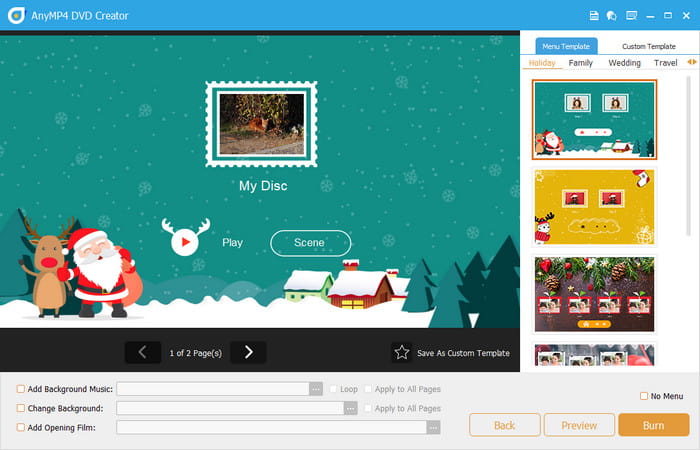
Blu-ray Master picked DVD Creator is one of the most popular DVD slideshow makers, which is compatible with both Windows and Mac. It supports various input slideshow formats such as MP4, MKV, and MOV, as well as a wide range of output formats, including DVD, folders, and ISO image files. In addition, it has a built-in editor allowing users to crop slideshows, add filters, and insert background music, which can make your slideshow more vivid.
Free Download
For Windows
Secure Download
Free Download
for macOS
Secure Download
Main Features:
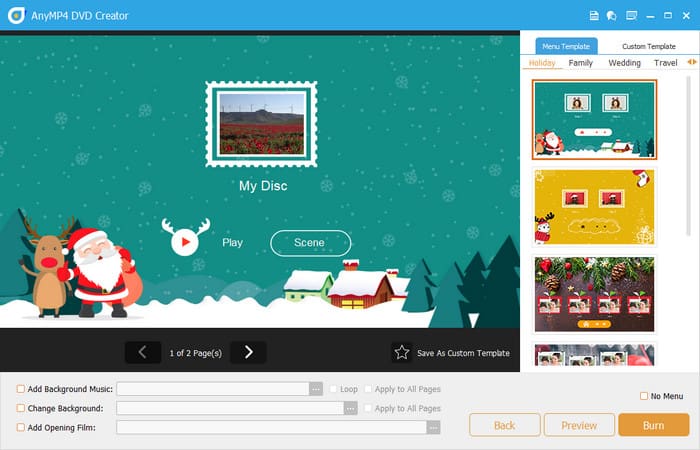
• It offers several menu templates for slideshows, such as holiday, family, wedding, and travel.
• Users can customize the menus’ thumbnails, texts, buttons, frames, etc.
• It supports both PAL and NTSC video standards, ensuring compatibility with various TV systems.
• It provides video tools to add subtitles and audio tracks, clip, and edit chapters for your slideshow.
Pros
- The user interface is intuitive and easy to learn.
- Excellent output quality with complete detail retention.
- No annoying ads or bundled software.
- All kinds of editing tools to enhance DVD slideshows.
Cons
- Some advanced features require a paid version.
Top 2. Movavi Slideshow Maker
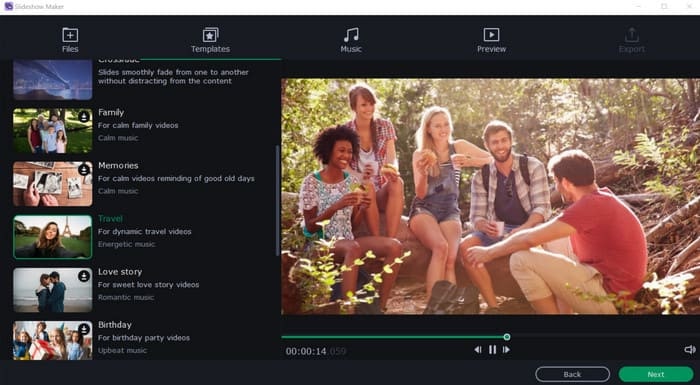
Movavi Slideshow Maker is a software designed to easily create DVD slideshows from photos and videos. It offers both automatic and manual modes, allowing users to burn slideshow to DVD on Mac or Windows quickly or customize them with creative touches. Moreover, it has built-in templates, a variety of transitions, and effects. And it offers a lot of options to add music and voiceovers, and a variety of tools to enhance image and video quality.
Main Features:
• Features like color correction, LUTs, and background removal are available to improve visual quality.
• Users are capable of adding their own music, adjusting volume, and applying audio effects.
• It offers many templates and themes, as well as a manual mode for more customization.
• Users can save DVD slideshows at high speed and upload them to platforms like YouTube and TikTok.
Pros
- Supports high-resolution output like 4K and 8K.
- Direct export to popular social media platforms.
- Powerful AI-assisted features can save time.
Cons
- Advanced features require a subscription to access.
- Occasional lag when handling large projects.
- Some effects take a long time to render.
Top 3. Wondershare Filmora
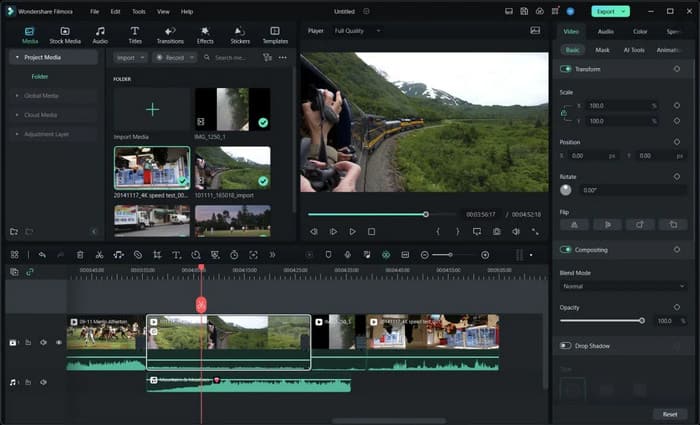
Wondershare Filmora is a software designed to create DVD slideshows from photos and videos. It allows users to combine media files, add music, transitions, and effects, and then burn the slideshow to a DVD for playback on a TV or other DVD players. What’s more, the software offers both a wizard-style interface for beginners and an advanced mode for more customization options.
Main Features:
• It incorporates AI tools to remove noise, enhance video quality, and so on.
• It offers tools for audio ducking, silence detection, speech-to-text, and text-to-speech.
• The cloud-storage feature allows for multi-platform synchronization.
• It has a built-in media library, which offers multiple effects, background music, and video clips.
Pros
- Apply hardware acceleration technology.
- Excellent cross-platform support capabilities.
- An extensive media library to access.
Cons
- The free version doesn’t contain full features.
- It requires high computer configurations.
- Potential performance issues with large files.
Bonus: How to Create a DVD Slideshow
After mastering the main characteristics of these best DVD slideshow makers, it’s time to learn how to create a DVD slideshow. Then, we will take DVD Creator as an example to guide you step by step on how to burn a slideshow to DVD on Mac or Windows.
Step 1. Download and install DVD Creator on your computer. Then, launch it.
Free Download
For Windows
Secure Download
Free Download
for macOS
Secure Download
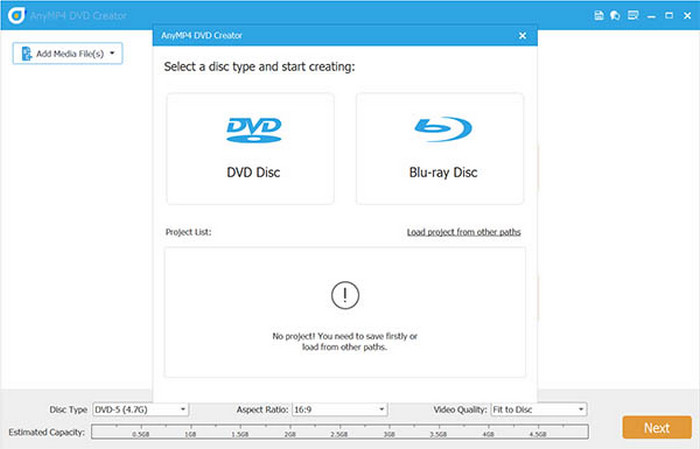
Step 2. Choose the DVD Disc option at the pop-up window, and then click the Add Media File(s) button to add your slideshow that has been converted to video format, or directly drag and drop them.
Note: DVD Creator doesn’t support directly burning slideshows to DVDs, so if you have PPT slideshow, you need to use PowerPoint to export the presentations to video formats, such as MP4.
Step 3. Click the Power Tools button, and the editing tools panel will appear. In the panel, you can clip, crop, and rotate video, add effects, watermarks, and adjust brightness, contrast, etc. for your slideshow. Also, it allows you to edit audio, add audio, and add subtitles.
Note: It also provides many chapter tools, including merging chapters, splitting chapters, and adjusting thumbnails. You can use them based on your needs.
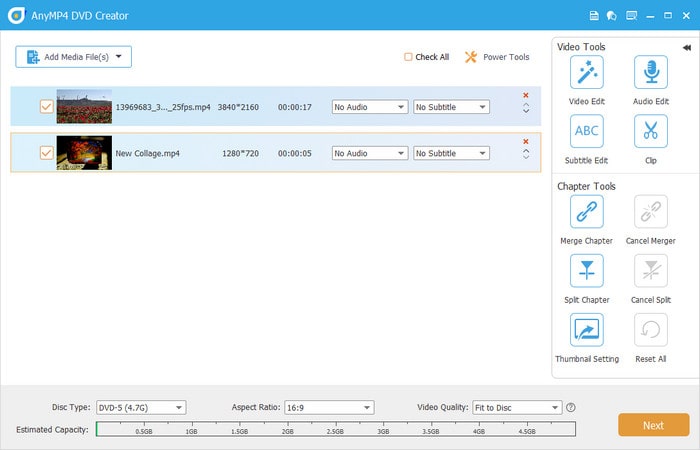
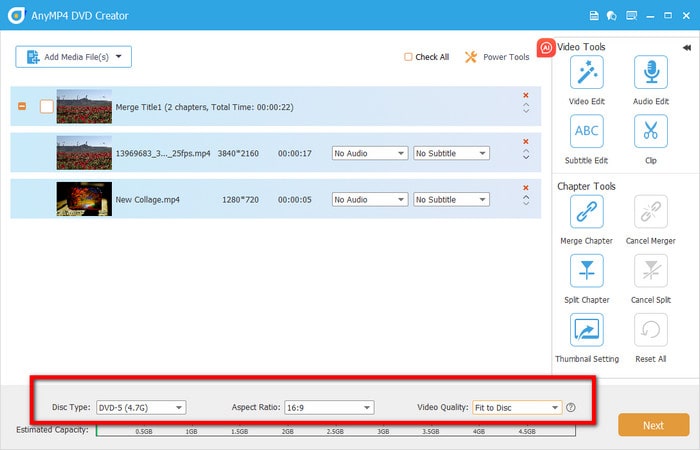
Step 4. After that, you can select the DVD disc type, aspect ratio, and video quality at the bottom. Then, click the Next button to continue.
Step 5. In the right panel, you can choose the menu according to your video content. You can also add background music, change the background, or add an opening film. Then, click the Burn button to start the burning process.
Through the above steps, you will create a DVD slideshow successfully.
Conclusion
Conclude the content of the article and call to action to use and download our product.Throughout the above analysis of the three best DVD slideshow makers, you will have a deep understanding of their core features, advantages, and disadvantages. These tools are capable of helping you create an attractive DVD slideshow. And we recommend DVD Creator because of its intuitive interface and extensive supported input and output formats. Download and try it now!
